
Pre-Flight Check Failures
Problem
Pre-flight checks display failures.
Solution
The pre-flight checks flag configuration issues before they affect Data Center Assurance functionality. Each failed check includes a description of the failure and recommendations to resolve it. Click the failed test to see the full result analysis.
Figure 1: Preflight Test Failures
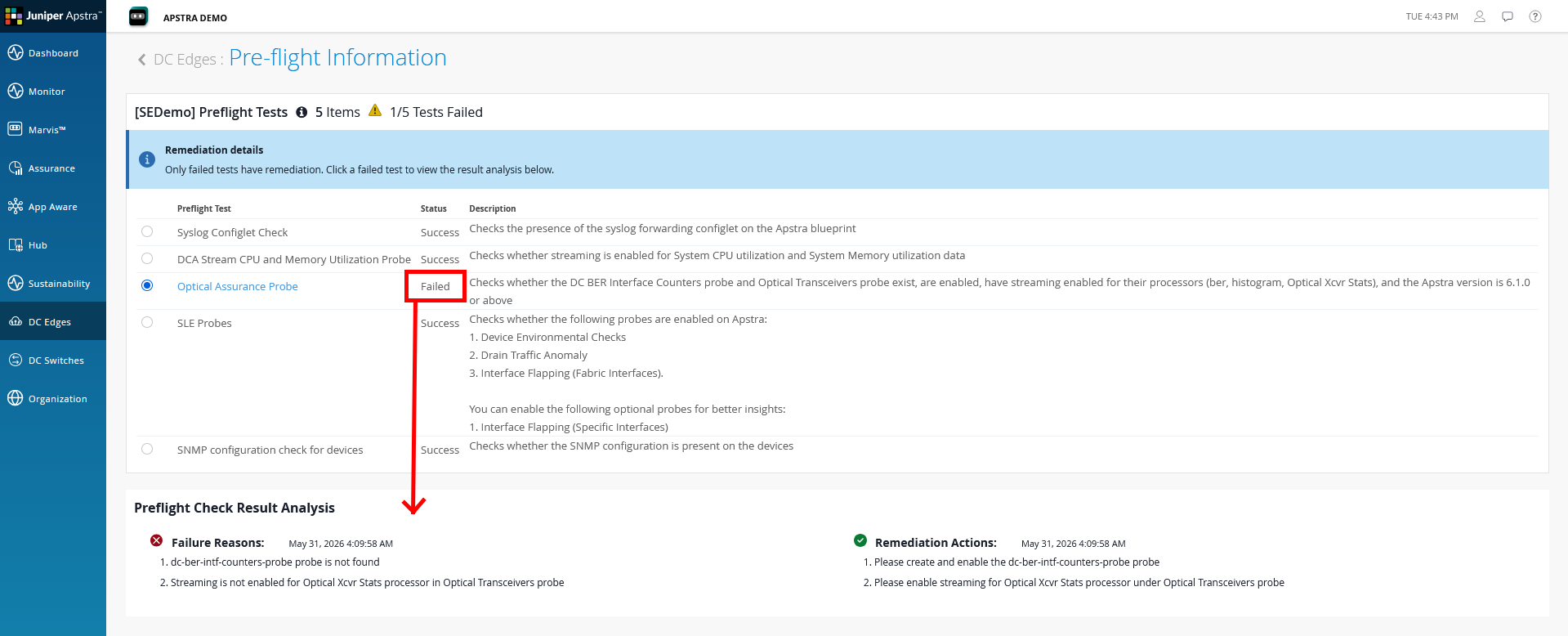
Review the following table to identify the likely cause and their resolution:
| Symptom | Likely Cause | Resolution |
|---|---|---|
| SLE Probes: Failed — Device Environmental Checks, Drain Traffic Anomaly, or Interface Flapping (Fabric Interfaces) probe is missing | One or more required probes have not been instantiated in the blueprint. | In Apstra, navigate to Analytics > Probes for the affected blueprint. Click Create Probe > Instantiate Predefined Probe and instantiate each missing probe. See Enable Predefined Probes in the Prerequisites section. |
| Stream CPU and Memory Utilization Probe: Failed | The custom CPU and memory probe has not been imported into the blueprint. | Import the probe JSON into each affected blueprint via Analytics > Probes > Create Probe > Import Probes. See Import the Data Center Assurance Custom Probe in the Prerequisites section. |
| SNMP configuration check: Failed | The SNMP configlet has not been deployed to devices, or the community string in the property set does not match the device configuration. | Confirm the SNMP for Flow Data Interface Enrichment configlet has been imported and committed to the blueprint. Verify the SNMP community string in the property set matches the read-only community configured on your devices. |
| Edge Version Compatibility: Failed | The installed Apstra Edge version is below the minimum version required for current Data Center Assurance features. | Upgrade the Apstra Edge from Data Center Assurance: navigate to DC Edges, select the Edge, click More > Upgrade Edge. You must be a Super User to perform upgrades. Ensure the Edge is connected to the cloud before attempting a remote upgrade. |
| Time Stamp Check between Apstra Flow Server and Data Center Assurance: Failed | The system clocks on the Apstra Flow server and Data Center Assurance are out of sync, which causes flow data correlation failures. | Enable NTP on the Apstra Flow server and confirm it is synchronized. Verify the Apstra VM is also NTP-synchronized. Clock drift of more than a few minutes will cause data correlation failures even if other checks pass. |