
Example: Single MX Series (ECMP Based Consistent Hashing) and Scaled-Out SRX Series Firewalls (Standalone) for NAT and Stateful Firewall
In this configuration, you’ll learn to set up a single MX Series with scaled-out SRX Series Firewalls in standalone for NAT and stateful firewall services.
Overview
Table 1 shows the deployment components used in the example.
| CSDS Components | Details |
|---|---|
| Forwarding Layer | MX304 with Junos OS Release 23.4R1 or later |
| Services Layer | vSRX 3.0 with Junos OS Release 23.4R1 or later |
| Redundancy |
Single MX Series with ECMP based Consistent Hashing for load balancer. SRX Series Firewalls (Standalone) |
| Features | NAPT44 and stateful firewall (IPv4 Support) |
| Additional Component | Gateway router for TRUST and UNTRUST networks. The example uses MX Series. You can use any device. |
See Table 2 and Table 3 for traffic flow.
| Feature | Traffic Flow Component | IP Address and Port Number |
|---|---|---|
| NAPT44 on SRX Series Firewall (SRX1) | Original source data client | 140.0.0.0/8 and port 22279 |
| Original destination Internet server | 100.1.1.0/24 and port 70 | |
| After NAT source | 192.168.64.0/24 and port 2480 | |
| After NAT destination | 100.1.1.0/24 and port 70 | |
| NAPT44 on SRX Series Firewall (SRX2) | Original source data client | 140.0.0.0/8 and port 22279 |
| Original destination Internet server | 100.1.1.0/24 and port 70 | |
| After NAT source | 192.169.64.0/24 and port 2480 | |
| After NAT destination | 100.1.1.0/24 and port 70 | |
| NAPT44 on SRX Series Firewall (SRX3) | Original source data client | 140.0.0.0/8 and port 22279 |
| Original destination Internet server | 100.1.1.0/24 and port 70 | |
| After NAT source | 192.170.64.0/24 and port 2480 | |
| After NAT destination | 100.1.1.0/24 and port 70 |
| Feature | Traffic Flow Component | IP Address |
|---|---|---|
|
Stateful firewall services on SRX Series Firewalls (SRX1, SRX2 and SRX3) |
Source data client | 141.0.0.0/8 |
| Destination Internet server | 100.1.1.0/24 | |
| SRX Series with stateful firewall - Source | 141.0.0.0/8 | |
| SRX Series with stateful firewall - Destination | 100.1.1.0/24 |
See Table 4 and Table 5 for traffic flow.
| Flow Type | Traffic Flow Component | IP Address |
|---|---|---|
| Forward Flow | Source Load Balancer (Route Filter on MX Series) | 0.0.0.0/0 |
| Reverse Flow | Destination Load Balancer (Routing-Based) | Based on unique NAT pool IP address range |
| Flow Type | Traffic Flow Component | IP Address |
|---|---|---|
| Forward Flow | Source Load Balancer (Route Filter on MX Series) | 0.0.0.0/0 |
| Reverse Flow | Destination Load Balancer (Route Filter on MX Series) | 141.0.0.0/8 |
Topology Illustration
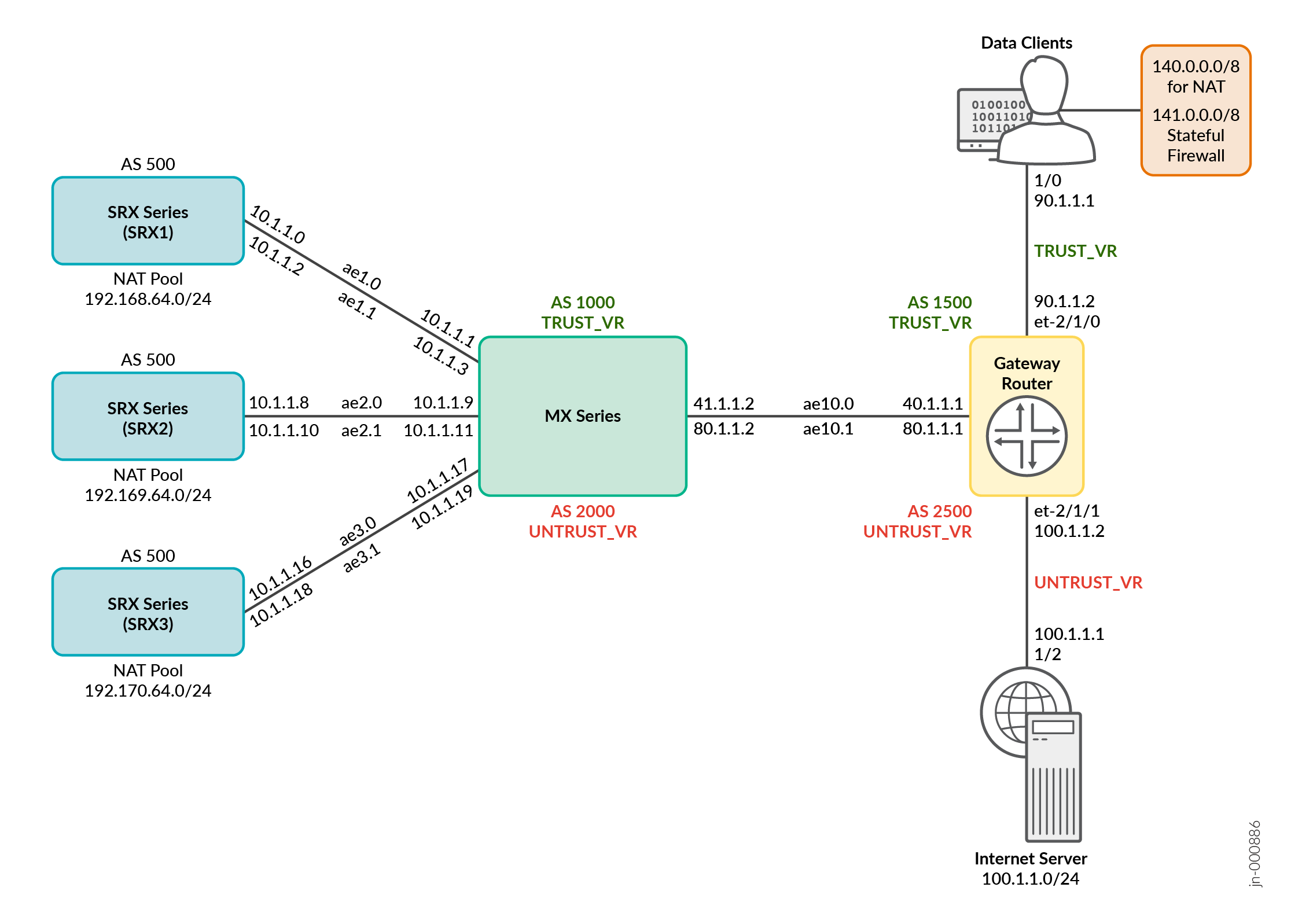
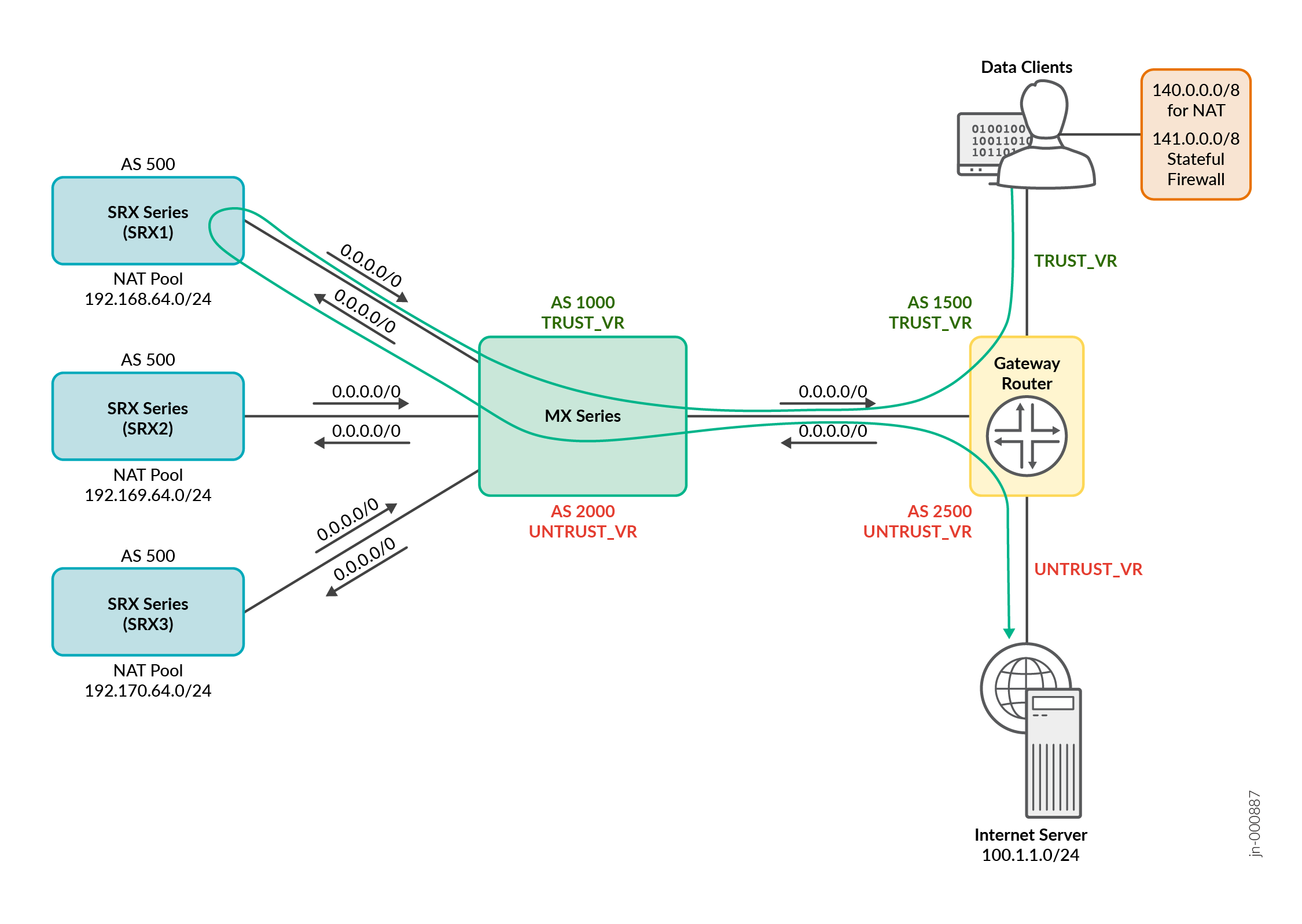
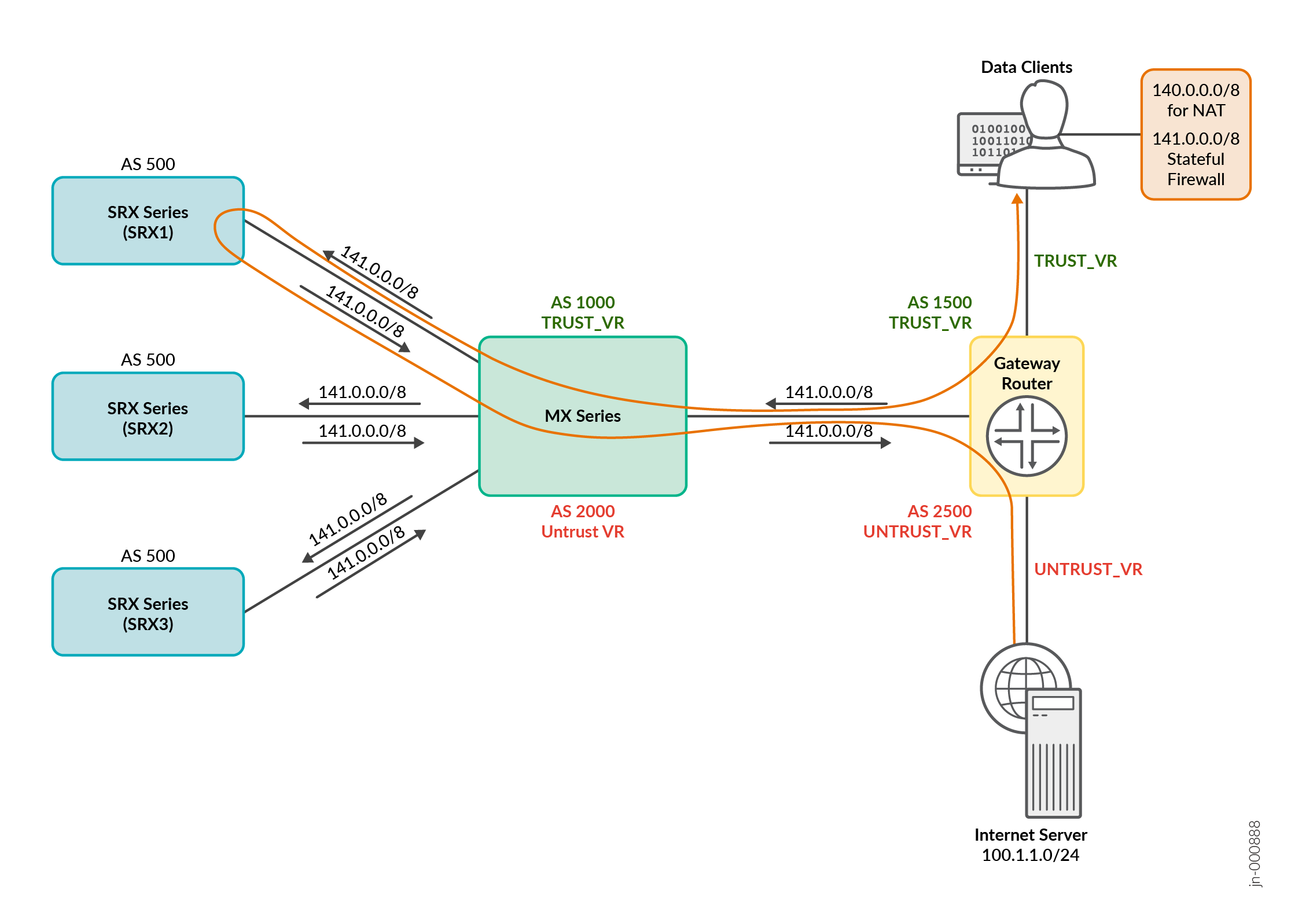
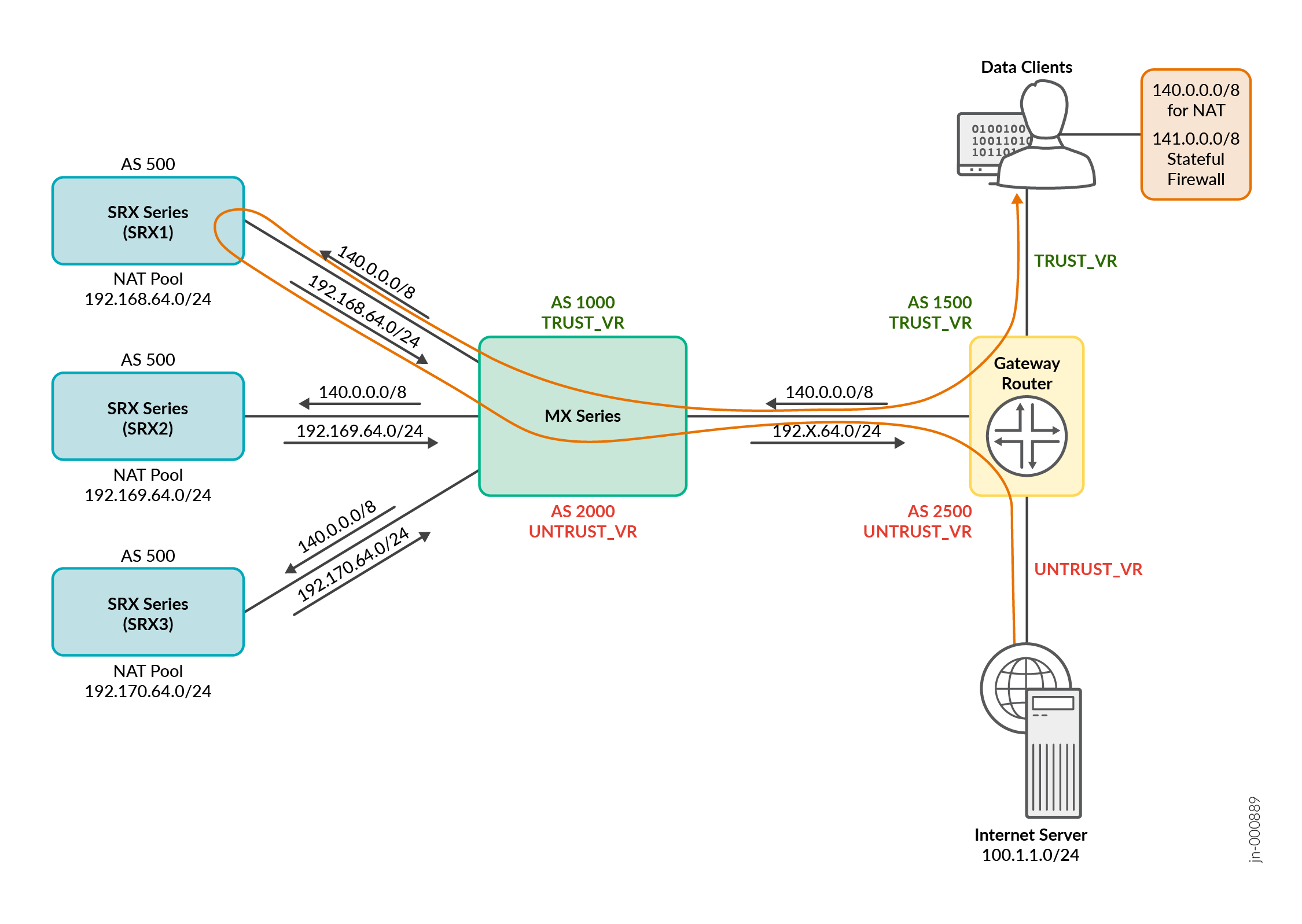
Configuration
To quickly configure this example, copy the following commands, paste them into a text file, remove any line breaks, change any details necessary to match your network configuration, copy and paste the commands into the CLI at the [edit] hierarchy level, and then enter commit from configuration mode.
These configurations are captured from a lab environment and are provided for reference only. Actual configurations might vary based on the specific requirements of your environment.
The following items show a list of configuration components for this example:
- Configure MX Series
- Configure the Gateway router
- Configure SRX1
- Configure SRX2
- Configure SRX3
[edit]
set interfaces et-0/0/0 gigether-options 802.3ad ae1
set interfaces et-0/0/1 gigether-options 802.3ad ae2
set interfaces et-0/0/2 gigether-options 802.3ad ae3
set interfaces et-0/0/7 gigether-options 802.3ad ae1
set interfaces et-0/0/8 gigether-options 802.3ad ae2
set interfaces et-0/0/9 gigether-options 802.3ad ae3
set interfaces et-0/0/10 gigether-options 802.3ad ae10
set interfaces et-0/0/11 gigether-options 802.3ad ae10
set interfaces et-0/1/0 gigether-options 802.3ad ae10
set interfaces et-0/1/1 gigether-options 802.3ad ae10
set interfaces et-0/1/2 gigether-options 802.3ad ae10
set interfaces ae1 vlan-tagging
set interfaces ae1 aggregated-ether-options minimum-links 1
set interfaces ae1 aggregated-ether-options lacp active
set interfaces ae1 aggregated-ether-options lacp periodic fast
set interfaces ae1 unit 0 vlan-id 1
set interfaces ae1 unit 0 family inet address 10.1.1.1/31
set interfaces ae1 unit 0 family inet6 address 10:1:1::1/127
set interfaces ae1 unit 1 vlan-id 2
set interfaces ae1 unit 1 family inet address 10.1.1.3/31
set interfaces ae1 unit 1 family inet6 address 10:1:1::3/127
set interfaces ae2 vlan-tagging
set interfaces ae2 aggregated-ether-options minimum-links 1
set interfaces ae2 aggregated-ether-options lacp active
set interfaces ae2 aggregated-ether-options lacp periodic fast
set interfaces ae2 unit 0 vlan-id 9
set interfaces ae2 unit 0 family inet address 10.1.1.9/31
set interfaces ae2 unit 0 family inet6 address 10:2:2::1/127
set interfaces ae2 unit 1 vlan-id 10
set interfaces ae2 unit 1 family inet address 10.1.1.11/31
set interfaces ae2 unit 1 family inet6 address 10:2:2::3/127
set interfaces ae3 vlan-tagging
set interfaces ae3 aggregated-ether-options minimum-links 1
set interfaces ae3 aggregated-ether-options lacp active
set interfaces ae3 aggregated-ether-options lacp periodic fast
set interfaces ae3 unit 0 vlan-id 9
set interfaces ae3 unit 0 family inet address 10.1.1.17/31
set interfaces ae3 unit 0 family inet6 address 10:3:3::1/127
set interfaces ae3 unit 1 vlan-id 10
set interfaces ae3 unit 1 family inet address 10.1.1.19/31
set interfaces ae3 unit 1 family inet6 address 10:3:3::3/127
set interfaces ae10 flexible-vlan-tagging
set interfaces ae10 encapsulation flexible-ethernet-services
set interfaces ae10 aggregated-ether-options minimum-links 1
set interfaces ae10 aggregated-ether-options lacp active
set interfaces ae10 aggregated-ether-options lacp periodic fast
set interfaces ae10 unit 40 vlan-id 40
set interfaces ae10 unit 40 family inet address 40.1.1.2/30
set interfaces ae10 unit 40 family inet6 address 40:1:1::2/124
set interfaces ae10 unit 80 vlan-id 80
set interfaces ae10 unit 80 family inet address 80.1.1.2/30
set interfaces ae10 unit 80 family inet6 address 80:1:1::2/124
set routing-instances TRUST_VR instance-type virtual-router
set routing-instances TRUST_VR routing-options autonomous-system 1000
set routing-instances TRUST_VR routing-options autonomous-system independent-domain no-attrset
set routing-instances TRUST_VR protocols bgp group MX-to-TRUST_GW_Router type external
set routing-instances TRUST_VR protocols bgp group MX-to-TRUST_GW_Router export def_route_for_client-2-server
set routing-instances TRUST_VR protocols bgp group MX-to-TRUST_GW_Router peer-as 1500
set routing-instances TRUST_VR protocols bgp group MX-to-TRUST_GW_Router local-as 1000
set routing-instances TRUST_VR protocols bgp group MX-to-TRUST_GW_Router bfd-liveness-detection minimum-interval 300
set routing-instances TRUST_VR protocols bgp group MX-to-TRUST_GW_Router bfd-liveness-detection minimum-receive-interval 300
set routing-instances TRUST_VR protocols bgp group MX-to-TRUST_GW_Router bfd-liveness-detection multiplier 3
set routing-instances TRUST_VR protocols bgp group MX-to-TRUST_GW_Router neighbor 40.1.1.1
set routing-instances TRUST_VR protocols bgp group MX-to-vsrx1 type external
set routing-instances TRUST_VR protocols bgp group MX-to-vsrx1 import pfe_consistent_hash
set routing-instances TRUST_VR protocols bgp group MX-to-vsrx1 export trust-to-untrust-export
set routing-instances TRUST_VR protocols bgp group MX-to-vsrx1 peer-as 500
set routing-instances TRUST_VR protocols bgp group MX-to-vsrx1 local-as 1000
set routing-instances TRUST_VR protocols bgp group MX-to-vsrx1 multipath
set routing-instances TRUST_VR protocols bgp group MX-to-vsrx1 bfd-liveness-detection minimum-interval 300
set routing-instances TRUST_VR protocols bgp group MX-to-vsrx1 bfd-liveness-detection minimum-receive-interval 300
set routing-instances TRUST_VR protocols bgp group MX-to-vsrx1 bfd-liveness-detection multiplier 3
set routing-instances TRUST_VR protocols bgp group MX-to-vsrx1 neighbor 10.1.1.0
set routing-instances TRUST_VR protocols bgp group MX-to-vsrx2 type external
set routing-instances TRUST_VR protocols bgp group MX-to-vsrx2 import pfe_consistent_hash
set routing-instances TRUST_VR protocols bgp group MX-to-vsrx2 export trust-to-untrust-export
set routing-instances TRUST_VR protocols bgp group MX-to-vsrx2 peer-as 500
set routing-instances TRUST_VR protocols bgp group MX-to-vsrx2 local-as 1000
set routing-instances TRUST_VR protocols bgp group MX-to-vsrx2 multipath
set routing-instances TRUST_VR protocols bgp group MX-to-vsrx2 bfd-liveness-detection minimum-interval 300
set routing-instances TRUST_VR protocols bgp group MX-to-vsrx2 bfd-liveness-detection minimum-receive-interval 300
set routing-instances TRUST_VR protocols bgp group MX-to-vsrx2 bfd-liveness-detection multiplier 3
set routing-instances TRUST_VR protocols bgp group MX-to-vsrx2 neighbor 10.1.1.8
set routing-instances TRUST_VR protocols bgp group MX-to-vsrx3 type external
set routing-instances TRUST_VR protocols bgp group MX-to-vsrx3 import pfe_consistent_hash
set routing-instances TRUST_VR protocols bgp group MX-to-vsrx3 export trust-to-untrust-export
set routing-instances TRUST_VR protocols bgp group MX-to-vsrx3 peer-as 500
set routing-instances TRUST_VR protocols bgp group MX-to-vsrx3 local-as 1000
set routing-instances TRUST_VR protocols bgp group MX-to-vsrx3 multipath
set routing-instances TRUST_VR protocols bgp group MX-to-vsrx3 bfd-liveness-detection minimum-interval 300
set routing-instances TRUST_VR protocols bgp group MX-to-vsrx3 bfd-liveness-detection minimum-receive-interval 300
set routing-instances TRUST_VR protocols bgp group MX-to-vsrx3 bfd-liveness-detection multiplier 3
set routing-instances TRUST_VR protocols bgp group MX-to-vsrx3 neighbor 10.1.1.16
set routing-instances TRUST_VR interface ae1.0
set routing-instances TRUST_VR interface ae2.0
set routing-instances TRUST_VR interface ae3.0
set routing-instances TRUST_VR interface ae10.40
set policy-options policy-statement def_route_for_client-2-server term 1 from protocol bgp
set policy-options policy-statement def_route_for_client-2-server term 1 from route-filter 0.0.0.0/0 exact
set policy-options policy-statement def_route_for_client-2-server term 1 then next-hop self
set policy-options policy-statement def_route_for_client-2-server term 1 then accept
set policy-options policy-statement def_route_for_client-2-server term 2 then reject
set policy-options policy-statement pfe_consistent_hash from route-filter 0.0.0.0/0 exact
set policy-options policy-statement pfe_consistent_hash then load-balance consistent-hash
set policy-options policy-statement pfe_consistent_hash then accept
set policy-options policy-statement trust-to-untrust-export term 1 from protocol bgp
set policy-options policy-statement trust-to-untrust-export term 1 from protocol static
set policy-options policy-statement trust-to-untrust-export term 1 then next-hop self
set policy-options policy-statement trust-to-untrust-export term 1 then accept
set policy-options policy-statement trust-to-untrust-export term 2 then reject
set routing-instances UNTRUST_VR instance-type virtual-router
set routing-instances UNTRUST_VR routing-options autonomous-system 2000
set routing-instances UNTRUST_VR routing-options autonomous-system independent-domain no-attrset
set routing-instances UNTRUST_VR protocols bgp group MX-to-UNTRUST_GW_Router type external
set routing-instances UNTRUST_VR protocols bgp group MX-to-UNTRUST_GW_Router export client_sfw_and_nat_pool_prefix_export
set routing-instances UNTRUST_VR protocols bgp group MX-to-UNTRUST_GW_Router peer-as 2500
set routing-instances UNTRUST_VR protocols bgp group MX-to-UNTRUST_GW_Router local-as 2000
set routing-instances UNTRUST_VR protocols bgp group MX-to-UNTRUST_GW_Router bfd-liveness-detection minimum-interval 300
set routing-instances UNTRUST_VR protocols bgp group MX-to-UNTRUST_GW_Router bfd-liveness-detection minimum-receive-interval 300
set routing-instances UNTRUST_VR protocols bgp group MX-to-UNTRUST_GW_Router bfd-liveness-detection multiplier 3
set routing-instances UNTRUST_VR protocols bgp group MX-to-UNTRUST_GW_Router neighbor 80.1.1.1
set routing-instances UNTRUST_VR protocols bgp group MX-to-vsrx1 type external
set routing-instances UNTRUST_VR protocols bgp group MX-to-vsrx1 import pfe_sfw_return_consistent_hash
set routing-instances UNTRUST_VR protocols bgp group MX-to-vsrx1 export untrust-to-trust-export
set routing-instances UNTRUST_VR protocols bgp group MX-to-vsrx1 peer-as 500
set routing-instances UNTRUST_VR protocols bgp group MX-to-vsrx1 local-as 2000
set routing-instances UNTRUST_VR protocols bgp group MX-to-vsrx1 multipath
set routing-instances UNTRUST_VR protocols bgp group MX-to-vsrx1 bfd-liveness-detection minimum-interval 300
set routing-instances UNTRUST_VR protocols bgp group MX-to-vsrx1 bfd-liveness-detection minimum-receive-interval 300
set routing-instances UNTRUST_VR protocols bgp group MX-to-vsrx1 bfd-liveness-detection multiplier 3
set routing-instances UNTRUST_VR protocols bgp group MX-to-vsrx1 neighbor 10.1.1.2
set routing-instances UNTRUST_VR protocols bgp group MX-to-vsrx2 type external
set routing-instances UNTRUST_VR protocols bgp group MX-to-vsrx2 import pfe_sfw_return_consistent_hash
set routing-instances UNTRUST_VR protocols bgp group MX-to-vsrx2 export untrust-to-trust-export
set routing-instances UNTRUST_VR protocols bgp group MX-to-vsrx2 peer-as 500
set routing-instances UNTRUST_VR protocols bgp group MX-to-vsrx2 local-as 2000
set routing-instances UNTRUST_VR protocols bgp group MX-to-vsrx2 multipath
set routing-instances UNTRUST_VR protocols bgp group MX-to-vsrx2 bfd-liveness-detection minimum-interval 300
set routing-instances UNTRUST_VR protocols bgp group MX-to-vsrx2 bfd-liveness-detection minimum-receive-interval 300
set routing-instances UNTRUST_VR protocols bgp group MX-to-vsrx2 bfd-liveness-detection multiplier 3
set routing-instances UNTRUST_VR protocols bgp group MX-to-vsrx2 neighbor 10.1.1.10
set routing-instances UNTRUST_VR protocols bgp group MX-to-vsrx3 type external
set routing-instances UNTRUST_VR protocols bgp group MX-to-vsrx3 import pfe_sfw_return_consistent_hash
set routing-instances UNTRUST_VR protocols bgp group MX-to-vsrx3 export untrust-to-trust-export
set routing-instances UNTRUST_VR protocols bgp group MX-to-vsrx3 peer-as 500
set routing-instances UNTRUST_VR protocols bgp group MX-to-vsrx3 local-as 2000
set routing-instances UNTRUST_VR protocols bgp group MX-to-vsrx3 multipath
set routing-instances UNTRUST_VR protocols bgp group MX-to-vsrx3 bfd-liveness-detection minimum-interval 300
set routing-instances UNTRUST_VR protocols bgp group MX-to-vsrx3 bfd-liveness-detection minimum-receive-interval 300
set routing-instances UNTRUST_VR protocols bgp group MX-to-vsrx3 bfd-liveness-detection multiplier 3
set routing-instances UNTRUST_VR protocols bgp group MX-to-vsrx3 neighbor 10.1.1.18
set routing-instances UNTRUST_VR interface ae1.1
set routing-instances UNTRUST_VR interface ae2.1
set routing-instances UNTRUST_VR interface ae3.1
set routing-instances UNTRUST_VR interface ae10.80
set policy-options policy-statement client_sfw_and_nat_pool_prefix_export term 1 from protocol bgp
set policy-options policy-statement client_sfw_and_nat_pool_prefix_export term 1 from route-filter 140.0.0.0/8 exact
set policy-options policy-statement client_sfw_and_nat_pool_prefix_export term 1 from route-filter 141.0.0.0/8 exact
set policy-options policy-statement client_sfw_and_nat_pool_prefix_export term 1 from route-filter 192.168.64.0/24 exact
set policy-options policy-statement client_sfw_and_nat_pool_prefix_export term 1 from route-filter 192.169.64.0/24 exact
set policy-options policy-statement client_sfw_and_nat_pool_prefix_export term 1 from route-filter 192.170.64.0/24 exact
set policy-options policy-statement client_sfw_and_nat_pool_prefix_export term 1 then next-hop self
set policy-options policy-statement client_sfw_and_nat_pool_prefix_export term 1 then accept
set policy-options policy-statement client_sfw_and_nat_pool_prefix_export term 2 then reject
set policy-options policy-statement pfe_sfw_return_consistent_hash from route-filter 140.0.0.0/8 exact
set policy-options policy-statement pfe_sfw_return_consistent_hash from route-filter 141.0.0.0/8 exact
set policy-options policy-statement pfe_sfw_return_consistent_hash then load-balance consistent-hash
set policy-options policy-statement pfe_sfw_return_consistent_hash then accept
set policy-options policy-statement untrust-to-trust-export term 1 from protocol bgp
set policy-options policy-statement untrust-to-trust-export term 1 from protocol static
set policy-options policy-statement untrust-to-trust-export term 1 then next-hop self
set policy-options policy-statement untrust-to-trust-export term 1 then accept
set policy-options policy-statement untrust-to-trust-export term 2 then reject
set policy-options policy-statement pfe_lb_hash term source_hash from route-filter 0.0.0.0/0 exact
set policy-options policy-statement pfe_lb_hash term source_hash then load-balance source-ip-only
set policy-options policy-statement pfe_lb_hash term source_hash then accept
set policy-options policy-statement pfe_lb_hash term dest_hash from route-filter 140.0.0.0/8 exact
set policy-options policy-statement pfe_lb_hash term dest_hash from route-filter 141.0.0.0/8 exact
set policy-options policy-statement pfe_lb_hash term dest_hash then load-balance destination-ip-only
set policy-options policy-statement pfe_lb_hash term dest_hash then accept
set policy-options policy-statement pfe_lb_hash term ALL-ELSE then load-balance per-packet
set policy-options policy-statement pfe_lb_hash term ALL-ELSE then accept
set routing-options forwarding-table export pfe_lb_hash
[edit]
set interfaces ae10 flexible-vlan-tagging
set interfaces ae10 encapsulation flexible-ethernet-services
set interfaces ae10 aggregated-ether-options minimum-links 1
set interfaces ae10 aggregated-ether-options lacp active
set interfaces ae10 aggregated-ether-options lacp periodic fast
set interfaces ae10 unit 40 vlan-id 40
set interfaces ae10 unit 40 family inet address 40.1.1.1/30
set interfaces ae10 unit 80 vlan-id 80
set interfaces ae10 unit 80 family inet address 80.1.1.1/30
set interfaces ae11 flexible-vlan-tagging
set interfaces ae11 encapsulation flexible-ethernet-services
set interfaces ae11 aggregated-ether-options minimum-links 1
set interfaces ae11 aggregated-ether-options lacp active
set interfaces ae11 aggregated-ether-options lacp periodic fast
set interfaces ae11 unit 41 vlan-id 41
set interfaces ae11 unit 41 family inet address 41.1.1.1/30
set interfaces ae11 unit 81 vlan-id 81
set interfaces ae11 unit 81 family inet address 81.1.1.1/30
set interfaces et-2/1/0 unit 0 family inet address 90.1.1.2/30
set routing-instances TRUST_VR instance-type virtual-router
set routing-instances TRUST_VR routing-options autonomous-system 1500
set routing-instances TRUST_VR routing-options static route 140.0.0.0/8 next-hop 90.1.1.1
set routing-instances TRUST_VR routing-options static route 141.0.0.0/8 next-hop 90.1.1.1
set routing-instances TRUST_VR protocols bgp group trust_GW-to-MX1_trust type external
set routing-instances TRUST_VR protocols bgp group trust_GW-to-MX1_trust export client_to_server_export
set routing-instances TRUST_VR protocols bgp group trust_GW-to-MX1_trust peer-as 1000
set routing-instances TRUST_VR protocols bgp group trust_GW-to-MX1_trust local-as 1500
set routing-instances TRUST_VR protocols bgp group trust_GW-to-MX1_trust bfd-liveness-detection minimum-interval 300
set routing-instances TRUST_VR protocols bgp group trust_GW-to-MX1_trust bfd-liveness-detection minimum-receive-interval 300
set routing-instances TRUST_VR protocols bgp group trust_GW-to-MX1_trust bfd-liveness-detection multiplier 3
set routing-instances TRUST_VR protocols bgp group trust_GW-to-MX1_trust neighbor 40.1.1.2
set routing-instances TRUST_VR protocols bgp multipath
set routing-instances TRUST_VR interface et-2/1/0.0
set routing-instances TRUST_VR interface ae10.40
set policy-options policy-statement client_to_server_export term 1 from protocol static
set policy-options policy-statement client_to_server_export term 1 from route-filter 141.0.0.0/8 orlonger
set policy-options policy-statement client_to_server_export term 1 from route-filter 140.0.0.0/8 orlonger
set policy-options policy-statement client_to_server_export term 1 then accept
set policy-options policy-statement client_to_server_export term 2 then reject
set routing-instances UNTRUST_VR instance-type virtual-router
set routing-instances UNTRUST_VR routing-options autonomous-system 2500
set routing-instances UNTRUST_VR routing-options static route 0.0.0.0/0 discard
set routing-instances UNTRUST_VR protocols bgp group Untrust_GW-to-MX1_Untrust type external
set routing-instances UNTRUST_VR protocols bgp group Untrust_GW-to-MX1_Untrust export server_to_client_export
set routing-instances UNTRUST_VR protocols bgp group Untrust_GW-to-MX1_Untrust peer-as 2000
set routing-instances UNTRUST_VR protocols bgp group Untrust_GW-to-MX1_Untrust local-as 2500
set routing-instances UNTRUST_VR protocols bgp group Untrust_GW-to-MX1_Untrust bfd-liveness-detection minimum-interval 300
set routing-instances UNTRUST_VR protocols bgp group Untrust_GW-to-MX1_Untrust bfd-liveness-detection minimum-receive-interval 300
set routing-instances UNTRUST_VR protocols bgp group Untrust_GW-to-MX1_Untrust bfd-liveness-detection multiplier 3
set routing-instances UNTRUST_VR protocols bgp group Untrust_GW-to-MX1_Untrust neighbor 80.1.1.2
set routing-instances UNTRUST_VR protocols bgp multipath
set routing-instances UNTRUST_VR interface et-2/1/1.0
set routing-instances UNTRUST_VR interface ae10.80
set policy-options policy-statement server_to_client_export term t1 from protocol static
set policy-options policy-statement server_to_client_export term t1 from route-filter 0.0.0.0/0 exact
set policy-options policy-statement server_to_client_export term t1 then accept
set policy-options policy-statement server_to_client_export term t2 then reject
set policy-options policy-statement ECMP_POLICY-LB then load-balance per-packet
set routing-options forwarding-table export ECMP_POLICY-LB
[edit]
set security zones security-zone vr-1_trust_zone host-inbound-traffic system-services all
set security zones security-zone vr-1_trust_zone host-inbound-traffic protocols all
set security zones security-zone vr-1_trust_zone interfaces ae1.0
set security zones security-zone vr-1_untrust_zone host-inbound-traffic system-services all
set security zones security-zone vr-1_untrust_zone host-inbound-traffic protocols all
set security zones security-zone vr-1_untrust_zone interfaces ae1.1
set security policies from-zone vr-1_trust_zone to-zone vr-1_untrust_zone policy SNAT_NAPT44_POLICY match source-address sfw_source_prefix_140.0.0.0/8
set security policies from-zone vr-1_trust_zone to-zone vr-1_untrust_zone policy SNAT_NAPT44_POLICY match destination-address any
set security policies from-zone vr-1_trust_zone to-zone vr-1_untrust_zone policy SNAT_NAPT44_POLICY match application any
set security policies from-zone vr-1_trust_zone to-zone vr-1_untrust_zone policy SNAT_NAPT44_POLICY then permit
set security policies from-zone vr-1_trust_zone to-zone vr-1_untrust_zone policy SFW_POLICY match source-address sfw_source_prefix_141.0.0.0/8
set security policies from-zone vr-1_trust_zone to-zone vr-1_untrust_zone policy SFW_POLICY match destination-address any
set security policies from-zone vr-1_trust_zone to-zone vr-1_untrust_zone policy SFW_POLICY match application any
set security policies from-zone vr-1_trust_zone to-zone vr-1_untrust_zone policy SFW_POLICY then permit
set security address-book global address sfw_source_prefix_140.0.0.0/8 140.0.0.0/8
set security address-book global address sfw_source_prefix_141.0.0.0/8 141.0.0.0/8
set security nat source pool vsrx1_nat_pool address 192.168.64.0/24
set security nat source pool vsrx1_nat_pool address-pooling paired
set security nat source rule-set vsrx1_nat_rule-set from zone vr-1_trust_zone
set security nat source rule-set vsrx1_nat_rule-set to zone vr-1_untrust_zone
set security nat source rule-set vsrx1_nat_rule-set rule vsrx1_nat_rule1 match source-address 140.0.0.0/8
set security nat source rule-set vsrx1_nat_rule-set rule vsrx1_nat_rule1 match destination-address 0.0.0.0/0
set security nat source rule-set vsrx1_nat_rule-set rule vsrx1_nat_rule1 match application any
set security nat source rule-set vsrx1_nat_rule-set rule vsrx1_nat_rule1 then source-nat pool vsrx1_nat_pool
set interfaces et-1/0/0 gigether-options 802.3ad ae1
set interfaces et-1/0/1 gigether-options 802.3ad ae1
set interfaces ae1 vlan-tagging
set interfaces ae1 aggregated-ether-options minimum-links 1
set interfaces ae1 aggregated-ether-options lacp active
set interfaces ae1 aggregated-ether-options lacp periodic fast
set interfaces ae1 unit 0 vlan-id 1
set interfaces ae1 unit 0 family inet address 10.1.1.0/31
set interfaces ae1 unit 0 family inet6 address 10:1:1::0/127
set interfaces ae1 unit 1 vlan-id 2
set interfaces ae1 unit 1 family inet address 10.1.1.2/31
set interfaces ae1 unit 1 family inet6 address 10:1:1::2/127
set routing-instances VR-1 instance-type virtual-router
set routing-instances VR-1 routing-options static route 192.168.64.0/24 discard
set routing-instances VR-1 protocols bgp group Vsrx-to-MX_TRUST type external
set routing-instances VR-1 protocols bgp group Vsrx-to-MX_TRUST export trust_export_policy
set routing-instances VR-1 protocols bgp group Vsrx-to-MX_TRUST local-as 500
set routing-instances VR-1 protocols bgp group Vsrx-to-MX_TRUST bfd-liveness-detection minimum-interval 300
set routing-instances VR-1 protocols bgp group Vsrx-to-MX_TRUST bfd-liveness-detection minimum-receive-interval 300
set routing-instances VR-1 protocols bgp group Vsrx-to-MX_TRUST bfd-liveness-detection multiplier 3
set routing-instances VR-1 protocols bgp group Vsrx-to-MX_TRUST neighbor 10.1.1.1 peer-as 1000
set routing-instances VR-1 protocols bgp group Vsrx-to-MX_UNTRUST type external
set routing-instances VR-1 protocols bgp group Vsrx-to-MX_UNTRUST export untrust_export_policy
set routing-instances VR-1 protocols bgp group Vsrx-to-MX_UNTRUST local-as 500
set routing-instances VR-1 protocols bgp group Vsrx-to-MX_UNTRUST bfd-liveness-detection minimum-interval 300
set routing-instances VR-1 protocols bgp group Vsrx-to-MX_UNTRUST bfd-liveness-detection minimum-receive-interval 300
set routing-instances VR-1 protocols bgp group Vsrx-to-MX_UNTRUST bfd-liveness-detection multiplier 3
set routing-instances VR-1 protocols bgp group Vsrx-to-MX_UNTRUST neighbor 10.1.1.3 peer-as 2000
set routing-instances VR-1 interface ae1.0
set routing-instances VR-1 interface ae1.1
set policy-options policy-statement trust_export_policy term 1 from protocol bgp
set policy-options policy-statement trust_export_policy term 1 from route-filter 0.0.0.0/0 exact
set policy-options policy-statement trust_export_policy term 1 then next-hop self
set policy-options policy-statement trust_export_policy term 1 then accept
set policy-options policy-statement trust_export_policy term 2 then reject
set policy-options policy-statement untrust_export_policy term 1 from protocol bgp
set policy-options policy-statement untrust_export_policy term 1 from route-filter 141.0.0.0/8 orlonger
set policy-options policy-statement untrust_export_policy term 1 then accept
set policy-options policy-statement untrust_export_policy term 2 from protocol static
set policy-options policy-statement untrust_export_policy term 2 from route-filter 192.168.64.0/24 orlonger
set policy-options policy-statement untrust_export_policy term 2 then accept
set policy-options policy-statement untrust_export_policy term 3 then reject
set policy-options policy-statement ecmp_policy_lab then load-balance per-packet
set routing-options forwarding-table export ecmp_policy_lab
[edit]
set security zones security-zone vr-1_trust_zone host-inbound-traffic system-services all
set security zones security-zone vr-1_trust_zone host-inbound-traffic protocols all
set security zones security-zone vr-1_trust_zone interfaces ae1.0
set security zones security-zone vr-1_untrust_zone host-inbound-traffic system-services all
set security zones security-zone vr-1_untrust_zone host-inbound-traffic protocols all
set security zones security-zone vr-1_untrust_zone interfaces ae1.1
set security policies from-zone vr-1_trust_zone to-zone vr-1_untrust_zone policy SNAT_NAPT44_POLICY match source-address sfw_source_prefix_140.0.0.0/8
set security policies from-zone vr-1_trust_zone to-zone vr-1_untrust_zone policy SNAT_NAPT44_POLICY match destination-address any
set security policies from-zone vr-1_trust_zone to-zone vr-1_untrust_zone policy SNAT_NAPT44_POLICY match application any
set security policies from-zone vr-1_trust_zone to-zone vr-1_untrust_zone policy SNAT_NAPT44_POLICY then permit
set security policies from-zone vr-1_trust_zone to-zone vr-1_untrust_zone policy SFW_POLICY match source-address sfw_source_prefix_141.0.0.0/8
set security policies from-zone vr-1_trust_zone to-zone vr-1_untrust_zone policy SFW_POLICY match destination-address any
set security policies from-zone vr-1_trust_zone to-zone vr-1_untrust_zone policy SFW_POLICY match application any
set security policies from-zone vr-1_trust_zone to-zone vr-1_untrust_zone policy SFW_POLICY then permit
set security address-book global address sfw_source_prefix_140.0.0.0/8 140.0.0.0/8
set security address-book global address sfw_source_prefix_141.0.0.0/8 141.0.0.0/8
set security nat source pool vsrx1_nat_pool address 192.169.64.0/24
set security nat source pool vsrx1_nat_pool address-pooling paired
set security nat source rule-set vsrx1_nat_rule-set from zone vr-1_trust_zone
set security nat source rule-set vsrx1_nat_rule-set to zone vr-1_untrust_zone
set security nat source rule-set vsrx1_nat_rule-set rule vsrx1_nat_rule1 match source-address 140.0.0.0/8
set security nat source rule-set vsrx1_nat_rule-set rule vsrx1_nat_rule1 match destination-address 0.0.0.0/0
set security nat source rule-set vsrx1_nat_rule-set rule vsrx1_nat_rule1 match application any
set security nat source rule-set vsrx1_nat_rule-set rule vsrx1_nat_rule1 then source-nat pool vsrx1_nat_pool
set interfaces et-1/0/0 gigether-options 802.3ad ae1
set interfaces et-1/0/1 gigether-options 802.3ad ae1
set interfaces ae1 vlan-tagging
set interfaces ae1 aggregated-ether-options minimum-links 1
set interfaces ae1 aggregated-ether-options lacp active
set interfaces ae1 aggregated-ether-options lacp periodic fast
set interfaces ae1 unit 0 vlan-id 9
set interfaces ae1 unit 0 family inet address 10.1.1.8/31
set interfaces ae1 unit 0 family inet6 address 10:2:2::0/127
set interfaces ae1 unit 1 vlan-id 10
set interfaces ae1 unit 1 family inet address 10.1.1.10/31
set interfaces ae1 unit 1 family inet6 address 10:2:2::2/127
set routing-instances VR-1 instance-type virtual-router
set routing-instances VR-1 routing-options static route 192.169.64.0/24 discard
set routing-instances VR-1 protocols bgp group Vsrx-to-MX_TRUST type external
set routing-instances VR-1 protocols bgp group Vsrx-to-MX_TRUST export trust_export_policy
set routing-instances VR-1 protocols bgp group Vsrx-to-MX_TRUST local-as 500
set routing-instances VR-1 protocols bgp group Vsrx-to-MX_TRUST bfd-liveness-detection minimum-interval 300
set routing-instances VR-1 protocols bgp group Vsrx-to-MX_TRUST bfd-liveness-detection minimum-receive-interval 300
set routing-instances VR-1 protocols bgp group Vsrx-to-MX_TRUST bfd-liveness-detection multiplier 3
set routing-instances VR-1 protocols bgp group Vsrx-to-MX_TRUST neighbor 10.1.1.9 peer-as 1000
set routing-instances VR-1 protocols bgp group Vsrx-to-MX_UNTRUST type external
set routing-instances VR-1 protocols bgp group Vsrx-to-MX_UNTRUST export untrust_export_policy
set routing-instances VR-1 protocols bgp group Vsrx-to-MX_UNTRUST local-as 500
set routing-instances VR-1 protocols bgp group Vsrx-to-MX_UNTRUST bfd-liveness-detection minimum-interval 300
set routing-instances VR-1 protocols bgp group Vsrx-to-MX_UNTRUST bfd-liveness-detection minimum-receive-interval 300
set routing-instances VR-1 protocols bgp group Vsrx-to-MX_UNTRUST bfd-liveness-detection multiplier 3
set routing-instances VR-1 protocols bgp group Vsrx-to-MX_UNTRUST neighbor 10.1.1.11 peer-as 2000
set routing-instances VR-1 interface ae1.0
set routing-instances VR-1 interface ae1.1
set policy-options policy-statement trust_export_policy term 1 from protocol bgp
set policy-options policy-statement trust_export_policy term 1 from route-filter 0.0.0.0/0 exact
set policy-options policy-statement trust_export_policy term 1 then next-hop self
set policy-options policy-statement trust_export_policy term 1 then accept
set policy-options policy-statement trust_export_policy term 2 then reject
set policy-options policy-statement untrust_export_policy term 1 from protocol bgp
set policy-options policy-statement untrust_export_policy term 1 from route-filter 141.0.0.0/8 orlonger
set policy-options policy-statement untrust_export_policy term 1 then accept
set policy-options policy-statement untrust_export_policy term 2 from protocol static
set policy-options policy-statement untrust_export_policy term 2 from route-filter 192.169.64.0/24 orlonger
set policy-options policy-statement untrust_export_policy term 2 then accept
set policy-options policy-statement untrust_export_policy term 3 then reject
set policy-options policy-statement ecmp_policy_lab then load-balance per-packet
set routing-options forwarding-table export ecmp_policy_lab
[edit]
set security zones security-zone vr-1_trust_zone host-inbound-traffic system-services all
set security zones security-zone vr-1_trust_zone host-inbound-traffic protocols all
set security zones security-zone vr-1_trust_zone interfaces ae1.0
set security zones security-zone vr-1_untrust_zone host-inbound-traffic system-services all
set security zones security-zone vr-1_untrust_zone host-inbound-traffic protocols all
set security zones security-zone vr-1_untrust_zone interfaces ae1.1
set security policies from-zone vr-1_trust_zone to-zone vr-1_untrust_zone policy SNAT_NAPT44_POLICY match source-address sfw_source_prefix_140.0.0.0/8
set security policies from-zone vr-1_trust_zone to-zone vr-1_untrust_zone policy SNAT_NAPT44_POLICY match destination-address any
set security policies from-zone vr-1_trust_zone to-zone vr-1_untrust_zone policy SNAT_NAPT44_POLICY match application any
set security policies from-zone vr-1_trust_zone to-zone vr-1_untrust_zone policy SNAT_NAPT44_POLICY then permit
set security policies from-zone vr-1_trust_zone to-zone vr-1_untrust_zone policy SFW_POLICY match source-address sfw_source_prefix_141.0.0.0/8
set security policies from-zone vr-1_trust_zone to-zone vr-1_untrust_zone policy SFW_POLICY match destination-address any
set security policies from-zone vr-1_trust_zone to-zone vr-1_untrust_zone policy SFW_POLICY match application any
set security policies from-zone vr-1_trust_zone to-zone vr-1_untrust_zone policy SFW_POLICY then permit
set security address-book global address sfw_source_prefix_140.0.0.0/8 140.0.0.0/8
set security address-book global address sfw_source_prefix_141.0.0.0/8 141.0.0.0/8
set security nat source pool vsrx1_nat_pool address 192.170.64.0/24
set security nat source pool vsrx1_nat_pool address-pooling paired
set security nat source rule-set vsrx1_nat_rule-set from zone vr-1_trust_zone
set security nat source rule-set vsrx1_nat_rule-set to zone vr-1_untrust_zone
set security nat source rule-set vsrx1_nat_rule-set rule vsrx1_nat_rule1 match source-address 140.0.0.0/8
set security nat source rule-set vsrx1_nat_rule-set rule vsrx1_nat_rule1 match destination-address 0.0.0.0/0
set security nat source rule-set vsrx1_nat_rule-set rule vsrx1_nat_rule1 match application any
set security nat source rule-set vsrx1_nat_rule-set rule vsrx1_nat_rule1 then source-nat pool vsrx1_nat_pool
set interfaces et-1/0/0 gigether-options 802.3ad ae1
set interfaces et-1/0/1 gigether-options 802.3ad ae1
set interfaces ae1 vlan-tagging
set interfaces ae1 aggregated-ether-options minimum-links 1
set interfaces ae1 aggregated-ether-options lacp active
set interfaces ae1 aggregated-ether-options lacp periodic fast
set interfaces ae1 unit 0 vlan-id 9
set interfaces ae1 unit 0 family inet address 10.1.1.16/31
set interfaces ae1 unit 0 family inet6 address 10:3:3::0/127
set interfaces ae1 unit 1 vlan-id 10
set interfaces ae1 unit 1 family inet address 10.1.1.18/31
set interfaces ae1 unit 1 family inet6 address 10:3:3::2/127
set routing-instances VR-1 instance-type virtual-router
set routing-instances VR-1 routing-options static route 192.170.64.0/24 discard
set routing-instances VR-1 protocols bgp group Vsrx-to-MX_TRUST type external
set routing-instances VR-1 protocols bgp group Vsrx-to-MX_TRUST export trust_export_policy
set routing-instances VR-1 protocols bgp group Vsrx-to-MX_TRUST local-as 500
set routing-instances VR-1 protocols bgp group Vsrx-to-MX_TRUST bfd-liveness-detection minimum-interval 300
set routing-instances VR-1 protocols bgp group Vsrx-to-MX_TRUST bfd-liveness-detection minimum-receive-interval 300
set routing-instances VR-1 protocols bgp group Vsrx-to-MX_TRUST bfd-liveness-detection multiplier 3
set routing-instances VR-1 protocols bgp group Vsrx-to-MX_TRUST neighbor 10.1.1.17 peer-as 1000
set routing-instances VR-1 protocols bgp group Vsrx-to-MX_UNTRUST type external
set routing-instances VR-1 protocols bgp group Vsrx-to-MX_UNTRUST export untrust_export_policy
set routing-instances VR-1 protocols bgp group Vsrx-to-MX_UNTRUST local-as 500
set routing-instances VR-1 protocols bgp group Vsrx-to-MX_UNTRUST bfd-liveness-detection minimum-interval 300
set routing-instances VR-1 protocols bgp group Vsrx-to-MX_UNTRUST bfd-liveness-detection minimum-receive-interval 300
set routing-instances VR-1 protocols bgp group Vsrx-to-MX_UNTRUST bfd-liveness-detection multiplier 3
set routing-instances VR-1 protocols bgp group Vsrx-to-MX_UNTRUST neighbor 10.1.1.19 peer-as 2000
set routing-instances VR-1 interface ae1.0
set routing-instances VR-1 interface ae1.1
set policy-options policy-statement trust_export_policy term 1 from protocol bgp
set policy-options policy-statement trust_export_policy term 1 from route-filter 0.0.0.0/0 exact
set policy-options policy-statement trust_export_policy term 1 then next-hop self
set policy-options policy-statement trust_export_policy term 1 then accept
set policy-options policy-statement trust_export_policy term 2 then reject
set policy-options policy-statement untrust_export_policy term 1 from protocol bgp
set policy-options policy-statement untrust_export_policy term 1 from route-filter 141.0.0.0/8 orlonger
set policy-options policy-statement untrust_export_policy term 1 then accept
set policy-options policy-statement untrust_export_policy term 2 from protocol static
set policy-options policy-statement untrust_export_policy term 2 from route-filter 192.170.64.0/24 orlonger
set policy-options policy-statement untrust_export_policy term 2 then accept
set policy-options policy-statement untrust_export_policy term 3 then reject
set policy-options policy-statement ecmp_policy_lab then load-balance per-packet
set routing-options forwarding-table export ecmp_policy_lab
Verification
The following items highlight a list of show commands used to verify the feature in this example.
- Verify MX Series configuration
- Verify SRX1 configuration
- Verify SRX2 configuration
- Verify SRX3 configuration
user@MX304> show route table TRUST_VR.inet 0.0.0.0/0 exact active-path
              TRUST_VR.inet.0: 11 destinations, 13 routes (11 active, 0 holddown, 0 hidden)
              + = Active Route, - = Last Active, * = Both
              0.0.0.0/0          *[BGP/170] 04:17:13, localpref 100
                                   AS path: 500 2000 2500 I, validation-state: unverified
                                 >  to 10.1.1.0 via ae1.0
                                    to 10.1.1.8 via ae2.0
to 10.1.1.16 via ae3.0user@MX304> show route table TRUST_VR.inet 0.0.0.0/0 exact active-path extensive
TRUST_VR.inet.0: 11 destinations, 13 routes (11 active, 0 holddown, 0 hidden)
0.0.0.0/0 (3 entries, 1 announced)
TSI:
KRT in-kernel 0.0.0.0/0 -> {list:10.1.1.0, 10.1.1.8, 10.1.1.16 Flags source ip load-balance}
Page 0 idx 1, (group MX-to-TRUST_GW_Router type External) Type 1 val 0x12b05d48 (adv_entry)
Advertised metrics:
Flags: Nexthop Change
Nexthop: Self
AS path: [1000] 500 2000 2500 I
Communities:
Advertise: 00000001
Path 0.0.0.0
from 10.1.1.0
Vector len 4. Val: 1
*BGP Preference: 170/-101
Next hop type: Router, Next hop index: 0
Address: 0xf91865c
Next-hop reference count: 2, Next-hop session id: 0
Kernel Table Id: 0
Source: 10.1.1.0
Next hop: 10.1.1.0 via ae1.0, selected
Session Id: 0
Next hop: 10.1.1.8 via ae2.0
Session Id: 0
Next hop: 10.1.1.16 via ae3.0
Session Id: 0
State: <Active Ext LoadBalConsistentHash>
Local AS: 1000 Peer AS: 500
Age: 4:17:17
Validation State: unverified
Task: BGP_500_1000.10.1.1.0
Announcement bits (3): 0-KRT 1-BGP_Multi_Path 2-BGP_RT_Background
AS path: 500 2000 2500 I
Accepted Multipath
Localpref: 100
Router ID: 10.1.1.0
Thread: junos-main user@MX304> show route table UNTRUST_VR.inet 141/8 active-path
UNTRUST_VR.inet.0: 13 destinations, 15 routes (13 active, 0 holddown, 0 hidden)
+ = Active Route, - = Last Active, * = Both
141.0.0.0/8 *[BGP/170] 04:18:15, localpref 100, from 10.1.1.2
AS path: 500 1000 1500 I, validation-state: unverified
to 10.1.1.2 via ae1.1
to 10.1.1.10 via ae2.1
> to 10.1.1.18 via ae3.1user@MX304> show route table UNTRUST_VR.inet 141/8 active-path extensive
UNTRUST_VR.inet.0: 13 destinations, 15 routes (13 active, 0 holddown, 0 hidden)
141.0.0.0/8 (3 entries, 1 announced)
TSI:
KRT in-kernel 141.0.0.0/8 -> {list:10.1.1.2, 10.1.1.10, 10.1.1.18 Flags destination ip load-balance}
Page 0 idx 1, (group MX-to-UNTRUST_GW_Router type External) Type 1 val 0x12b073d0 (adv_entry)
Advertised metrics:
Flags: Nexthop Change
Nexthop: Self
AS path: [2000] 500 1000 1500 I
Communities:
Advertise: 00000001
Path 141.0.0.0
from 10.1.1.2
Vector len 4. Val: 1
*BGP Preference: 170/-101
Next hop type: Router, Next hop index: 0
Address: 0xf918b24
Next-hop reference count: 2, Next-hop session id: 0
Kernel Table Id: 0
Source: 10.1.1.2
Next hop: 10.1.1.2 via ae1.1
Session Id: 0
Next hop: 10.1.1.10 via ae2.1
Session Id: 0
Next hop: 10.1.1.18 via ae3.1, selected
Session Id: 0
State: <Active Ext LoadBalConsistentHash>
Local AS: 2000 Peer AS: 500
Age: 4:18:17
Validation State: unverified
Task: BGP_500_2000.10.1.1.2
Announcement bits (3): 0-KRT 1-BGP_Multi_Path 2-BGP_RT_Background
AS path: 500 1000 1500 I
Accepted Multipath
Localpref: 100
Router ID: 10.1.1.0
Thread: junos-mainuser@MX304> show route table UNTRUST_VR.inet 192/8
UNTRUST_VR.inet.0: 13 destinations, 15 routes (13 active, 0 holddown, 0 hidden)
+ = Active Route, - = Last Active, * = Both
192.168.64.0/24 *[BGP/170] 03:31:16, localpref 100
AS path: 500 I, validation-state: unverified
> to 10.1.1.2 via ae1.1
192.169.64.0/24 *[BGP/170] 03:31:21, localpref 100
AS path: 500 I, validation-state: unverified
> to 10.1.1.10 via ae2.1
192.170.64.0/24 *[BGP/170] 03:31:27, localpref 100
AS path: 500 I, validation-state: unverified
> to 10.1.1.18 via ae3.1user@MX304> show bgp summary
Warning: License key missing; requires 'bgp' license
Threading mode: BGP I/O
Default eBGP mode: advertise - accept, receive - accept
Groups: 8 Peers: 8 Down peers: 0
Peer AS InPkt OutPkt OutQ Flaps Last Up/Dwn State|#Active/Received/Accepted/Damped...
10.1.1.0 500 606 593 0 1 4:31:25 Establ
TRUST_VR.inet.0: 1/1/1/0
10.1.1.2 500 606 593 0 1 4:31:25 Establ
UNTRUST_VR.inet.0: 2/2/2/0
10.1.1.8 500 588 576 0 1 4:23:27 Establ
TRUST_VR.inet.0: 1/1/1/0
10.1.1.10 500 589 576 0 1 4:23:27 Establ
UNTRUST_VR.inet.0: 2/2/2/0
10.1.1.16 500 578 566 0 1 4:18:56 Establ
TRUST_VR.inet.0: 1/1/1/0
10.1.1.18 500 579 566 0 1 4:18:56 Establ
UNTRUST_VR.inet.0: 2/2/2/0
40.1.1.1 1500 12472 12247 0 1 3d 23:18:01 Establ
TRUST_VR.inet.0: 2/2/2/0
80.1.1.1 2500 12471 12257 0 1 3d 23:18:01 Establ
UNTRUST_VR.inet.0: 1/1/1/0user@MX304> show bfd session
Warning: License key missing; requires 'bfd-liveness-detection' license
Detect Transmit
Address State Interface Time Interval Multiplier
10.1.1.0 Up ae1.0 0.900 0.300 3
10.1.1.2 Up ae1.1 0.900 0.300 3
10.1.1.8 Up ae2.0 0.900 0.300 3
10.1.1.10 Up ae2.1 0.900 0.300 3
10.1.1.16 Up ae3.0 0.900 0.300 3
10.1.1.18 Up ae3.1 0.900 0.300 3
40.1.1.1 Up ae10.40 0.900 0.300 3
80.1.1.1 Up ae10.80 0.900 0.300 3
8 sessions, 8 clients
Cumulative transmit rate 26.7 pps, cumulative receive rate 26.7 ppsuser@SRX1> show bgp summary Threading mode: BGP I/O Default eBGP mode: advertise - accept, receive - accept Groups: 2 Peers: 2 Down peers: 0 Peer AS InPkt OutPkt OutQ Flaps Last Up/Dwn State|#Active/Received/Accepted/Damped... 10.1.1.1 1000 596 606 0 0 4:32:18 Establ VR-1.inet.0: 2/2/2/0 10.1.1.3 2000 596 606 0 0 4:32:18 Establ VR-1.inet.0: 1/1/1/0
user@SRX1> show bfd session
                                                  Detect   Transmit
Address                  State     Interface      Time     Interval  Multiplier
10.1.1.1                 Up        ae1.0          0.900     0.300        3
10.1.1.3                 Up        ae1.1          0.900     0.300        3
2 sessions, 2 clients
Cumulative transmit rate 6.7 pps, cumulative receive rate 6.7 ppsuser@SRX1> show route 0.0.0.0/0 exact
VR-1.inet.0: 8 destinations, 8 routes (8 active, 0 holddown, 0 hidden)
+ = Active Route, - = Last Active, * = Both
0.0.0.0/0 *[BGP/170] 04:33:13, localpref 100
AS path: 2000 2500 I, validation-state: unverified
> to 10.1.1.3 via ae1.1user@SRX1> show route 140/8 exact
VR-1.inet.0: 8 destinations, 8 routes (8 active, 0 holddown, 0 hidden)
+ = Active Route, - = Last Active, * = Both
140.0.0.0/8 *[BGP/170] 04:33:20, localpref 100
AS path: 1000 1500 I, validation-state: unverified
> to 10.1.1.1 via ae1.0user@SRX1> show route 141/8 exact
VR-1.inet.0: 8 destinations, 8 routes (8 active, 0 holddown, 0 hidden)
+ = Active Route, - = Last Active, * = Both
141.0.0.0/8 *[BGP/170] 04:33:23, localpref 100
AS path: 1000 1500 I, validation-state: unverified
> to 10.1.1.1 via ae1.0user@SRX2> show bgp summary Threading mode: BGP I/O Default eBGP mode: advertise - accept, receive - accept Groups: 2 Peers: 2 Down peers: 0 Peer AS InPkt OutPkt OutQ Flaps Last Up/Dwn State|#Active/Received/Accepted/Damped... 10.1.1.9 1000 601 611 0 0 4:34:20 Establ VR-1.inet.0: 2/2/2/0 10.1.1.11 2000 600 611 0 0 4:34:20 Establ VR-1.inet.0: 1/1/1/0
user@SRX2> show bfd session
                                                  Detect   Transmit
Address                  State     Interface      Time     Interval  Multiplier
10.1.1.9                 Up        ae1.0          0.900     0.300        3
10.1.1.11                Up        ae1.1          0.900     0.300        3
2 sessions, 2 clients
Cumulative transmit rate 6.7 pps, cumulative receive rate 6.7 ppsuser@SRX2> show route 0.0.0.0/0 exact
VR-1.inet.0: 8 destinations, 8 routes (8 active, 0 holddown, 0 hidden)
+ = Active Route, - = Last Active, * = Both
0.0.0.0/0 *[BGP/170] 04:34:30, localpref 100
AS path: 2000 2500 I, validation-state: unverified
> to 10.1.1.11 via ae1.1user@SRX2> show route 140/8 exact
VR-1.inet.0: 8 destinations, 8 routes (8 active, 0 holddown, 0 hidden)
+ = Active Route, - = Last Active, * = Both
140.0.0.0/8 *[BGP/170] 04:36:20, localpref 100
AS path: 1000 1500 I, validation-state: unverified
> to 10.1.1.9 via ae1.0user@SRX2> show route 141/8 exact
VR-1.inet.0: 8 destinations, 8 routes (8 active, 0 holddown, 0 hidden)
+ = Active Route, - = Last Active, * = Both
141.0.0.0/8 *[BGP/170] 04:36:24, localpref 100
AS path: 1000 1500 I, validation-state: unverified
> to 10.1.1.9 via ae1.0user@SRX3> show bgp summary Threading mode: BGP I/O Default eBGP mode: advertise - accept, receive - accept Groups: 2 Peers: 2 Down peers: 0 Peer AS InPkt OutPkt OutQ Flaps Last Up/Dwn State|#Active/Received/Accepted/Damped... 10.1.1.17 1000 622 632 0 0 4:44:11 Establ VR-1.inet.0: 2/2/2/0 10.1.1.19 2000 622 634 0 0 4:44:11 Establ VR-1.inet.0: 1/1/1/0
user@SRX3> show bfd session
                                                  Detect   Transmit
Address                  State     Interface      Time     Interval  Multiplier
10.1.1.17                Up        ae1.0          0.900     0.300        3
10.1.1.19                Up        ae1.1          0.900     0.300        3
2 sessions, 2 clients
Cumulative transmit rate 6.7 pps, cumulative receive rate 6.7 ppsuser@SRX3> show route 0.0.0.0/0 exact
VR-1.inet.0: 8 destinations, 8 routes (8 active, 0 holddown, 0 hidden)
+ = Active Route, - = Last Active, * = Both
0.0.0.0/0 *[BGP/170] 04:44:23, localpref 100
AS path: 2000 2500 I, validation-state: unverified
> to 10.1.1.19 via ae1.1user@SRX3> show route 140/8 exact
VR-1.inet.0: 8 destinations, 8 routes (8 active, 0 holddown, 0 hidden)
+ = Active Route, - = Last Active, * = Both
140.0.0.0/8 *[BGP/170] 04:44:51, localpref 100
AS path: 1000 1500 I, validation-state: unverified
> to 10.1.1.17 via ae1.0user@SRX3> show route 141/8 exact
VR-1.inet.0: 8 destinations, 8 routes (8 active, 0 holddown, 0 hidden)
+ = Active Route, - = Last Active, * = Both
141.0.0.0/8 *[BGP/170] 04:44:55, localpref 100
AS path: 1000 1500 I, validation-state: unverified
> to 10.1.1.17 via ae1.0