
How Express Path Works in CSDS Architecture
Read this topic to learn how you can use Express Path to offload services in CSDS Architecture.
Services offloading is a network optimization technique where routers assess whether a session requires extensive inspection. If extensive inspection isn't necessary, the router processes the session directly through fast-path processing. Express Path enhances services offloading by enabling fast-path packet processing directly on the router.
In a typical Juniper Networks® SRX Series Firewall, Express Path processes fast-path packets in the network processor instead of Services Processing Unit (SPU) of the firewall. In a multichassis solution such as CSDS architecture, the router acts as the network processor that sends and receives packets from the client and the server. The router forwards the packets to the firewall as the client and the server cannot directly interact with the firewall for security services. Express Path offloads certain traffic from the firewall (SPU) to the router (network processor). The firewall determines whether to offload the session to the router after inspecting the first packet in a flow.
In Juniper Networks® MX Series router, the Packet Forwarding Engine ASIC is the network processor responsible for initial packet reception. The Packet Forwarding Engines ASIC determines the route and the processing method for each packet. The Packet Forwarding Engine ASIC in the router balances between fast-path processing and forwarding of packets to the firewall for deeper inspection.
CSDS Components for Express Path
Express Path uses the following components in the CSDS architecture for session offloading:
-
Forwarding layer—Uses the inline service logical interface known as the si- interface on the router's Packet Forwarding Engine ASIC. The si- interface supports session offloading as an inline service on the designated Packet Forwarding Engine called the anchor Packet Forwarding Engine. Express Path can use different anchor Packet Forwarding Engines, hence separate si- interfaces, for the forward and reverse flows based on the
service-setconfiguration on the router. You can use the same Line-card Modular Interface Card (LMIC) or separate LMICs for forward and reverse flows. -
Services layer—Uses the vSRX Virtual Firewall.
-
Client—Initiates traffic in the forward flow to the server.
-
Server—Send traffic to the client in the reverse flow.
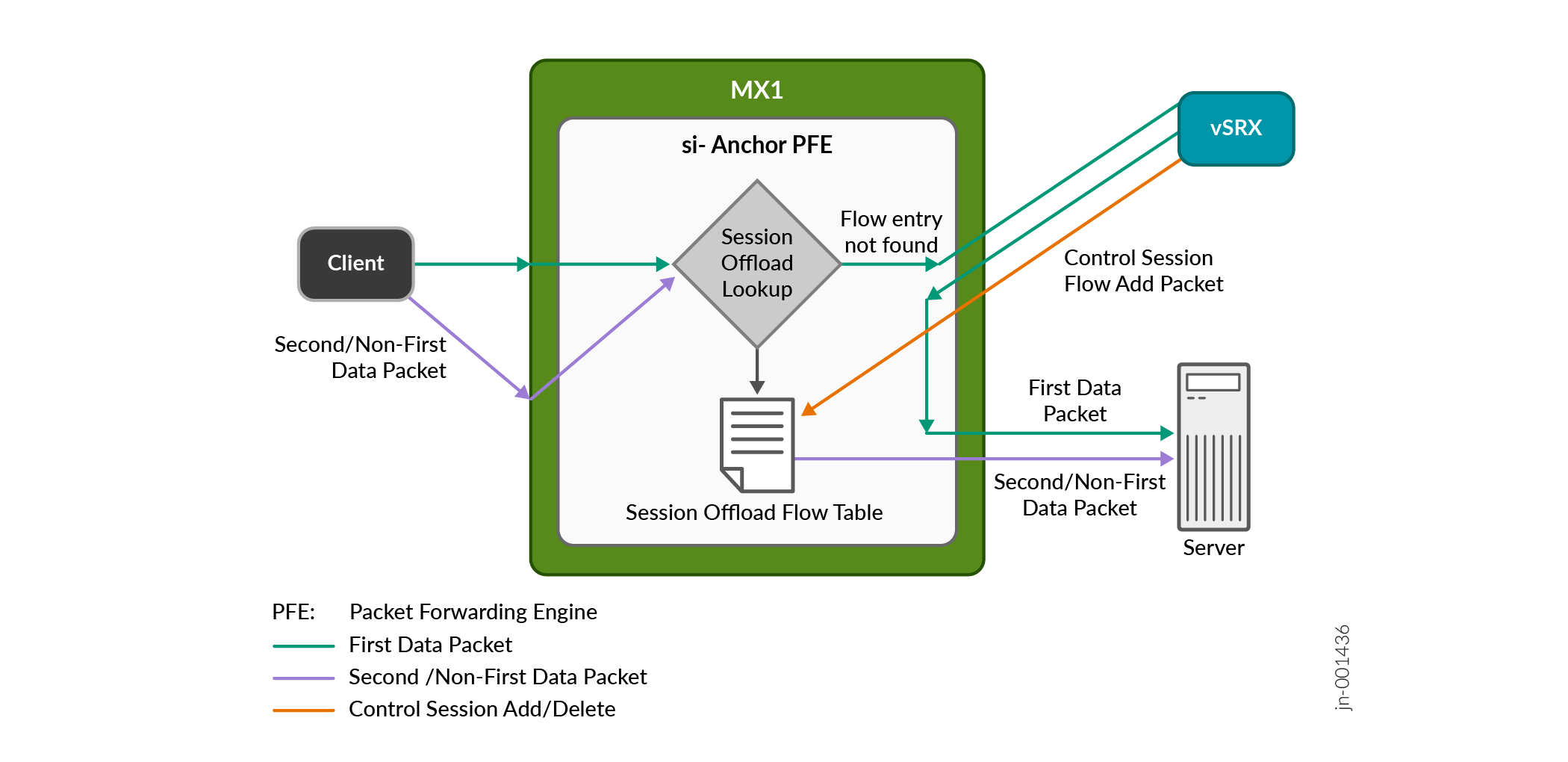
Figure 1 illustrates the interaction between these components during the data packet flow for session offloading within the CSDS Architecture.
Read the following steps to understand the flow:
The Packet Forwarding Engine receives the first packet, and the router checks for an existing fast-path service offloaded session in its flow table.
If there's no existing session, the router forwards the first packet to the firewall by load-balancing the traffic using CSDS Traffic Orchestrator (CSDS-TO).
The firewall creates a security session and sends traffic to the server through the regular path.
The firewall also evaluates whether the traffic qualifies for fast-path processing and if the router supports Express Path for fast-path processing. If both conditions are met, the firewall sends a control message to install the fast-path session in the router's Packet Forwarding Engine. If the firewall can't apply fast-path processing to the traffic, it doesn't send a control session message to the router. This mechanism also ensures that if the network drops the first packet for any reason, the router uses subsequent packets to install the control session.
For subsequent packets, the router performs a session lookup and finds a matched session in the Packet Forwarding Engine flow table. The firewall's flow module manages the flow table on the router. The firewall inserts and deletes flow entries in the flow table based on the results of the security policy match. The firewall sends a delete message when the session times out due to inactivity.. The firewall continues to govern the services offload flows in the CSDS topology.
When a session match occurs, the Packet Forwarding Engine uses the session flow result to forward the packet directly to the server. The router performs necessary TCP checks to forward the packet. These checks include Time To Live (TTL), NAT translation, route lookup, and source and destination MAC address updates.
Table 1 summarizes the packet flow across the CSDS components for session offloaded and non-offloaded scenarios between the client and the server.
| Scenario | Action | Packet Flow |
|---|---|---|
|
Session not offloaded |
Client to server communication where the client initiates the packet |
Packet sent to the router > Session lookup > Load balancing > Packet processing by the firewall > Return to the router > Forward to the server |
|
Server to client communication where the server responds to client |
Packet sent to the router > Session lookup > Load balancing > Packet processing by the firewall > Return to the router > Forward to the client |
|
|
Session offloaded |
Client to server communication where the client initiates the packet |
Packet sent to the router > Session lookup > Direct forwarding if session found / Load balancing if not > Packet processing by the firewall > Return to the router > Forward to the server |
|
Server to client communication where the server responds to client |
Packet sent to the router > Session lookup > Direct forwarding if session found / Load balancing if not > Packet processing by the firewall > Return to the router > Forward to the client |
Express Path works only if the router has two connections toward the firewall, one for
forward flow and the other for reverse flow. Use the configuration statement
[edit chassis fpc slot service-offload] to enable
Express Path on the router. After configuring the option, you must reboot the FPC using
the command request chassis fpc slot slot restart.
See Enable and Configure Express Path in CSDS Solution
to configure the feature.
Supported Features and Limitations
Supported Features
Express Path in CSDS architecture supports:
-
Next-hop-style service-set configuration, which directs both the forward-flow and reverse-flow packets to the respective anchor Packet Forwarding Engine through routing, initiating the session offloading process.
-
IPv4 and IPv6 partial reassembly as an Express Path inline service for both the forward and reverse flows. However, this feature is not enabled by default and requires explicit configuration in the service offloading rule.
-
CSDS-TO with RE-based health checks.
-
Up to 200 vSRX instances per MX Series router aligning with the maximum CSDS-TO instance count.
-
Carrier-grade NAT (CGNAT) and Stateful Firewall (SFW) services.
Limitations
Express Path has the following limitations:
-
Express Path and mobility edge functionalities cannot coexist on the same chassis. When you enable the Express Path feature, the router disables mobility edge functionality.
-
Does not support interface-style service-set configuration.
-
Does not support full IPv4 and IPv6 reassembly.
-
Does not support partial IPv6 reassembly in scenarios involving IPv4 within IPv6.
-
Lacks redundancy with the si- interface. If the si- interface or the anchor Packet Forwarding Engine is down, the router cannot perform Express Path.
-
Does not support when MX Series router in active/active redundancy setup.
-
Does not support aggregated inline service with the si- interface.
-
Does not support IPv6 packet fragmentation.
-
Does not support IPsec VPN.
-
Does not support NATv6 including NAT66, NAT64 and NAT46.
-
The service-sets configured for service offloading rules operate in isolation and do not coexist with other si-based inline services. Therefore, you cannot configure additional si- based inline services—such as inline NAT, MAP-E/MAP-T, 6RD, and inline IPsec—in the same service-set.
-
Does not support offloading of GPRS Tunneling Protocol User Plane (GTPU) traffic. The firewall processes GTPU traffic without offloading.
-
Does not support traffic offloading when a filter is attached to the firewall's interface that connects to the router. The firewall continues to process such type of traffic without offloading.
-
Does not support ECMP-based consistent hashing in CSDS.
-
Does not support dual MX Series in the CSDS solution.
Packet Flow with Express Path
In CSDS solution, the router supports next-hop-style service-set configuration for Express Path. The router directs both forward-flow and reverse-flow packets to their designated anchor Packet Forwarding Engine through the routing process, where the system performs session offloading. The Express Path services offload session handles add, delete, and update requests for control packets.
The si- next-hop is responsible for sending packets to the anchor Packet Forwarding Engine. The router's control plane uses si- next-hop to steer packets precisely to the anchor Packet Forwarding Engine. Separate control si- interfaces send packets for forward-flow and reverse-flow, respectively. The control si- interface handles add, delete, and update requests for IP/UDP encapsulated messages from the firewall.
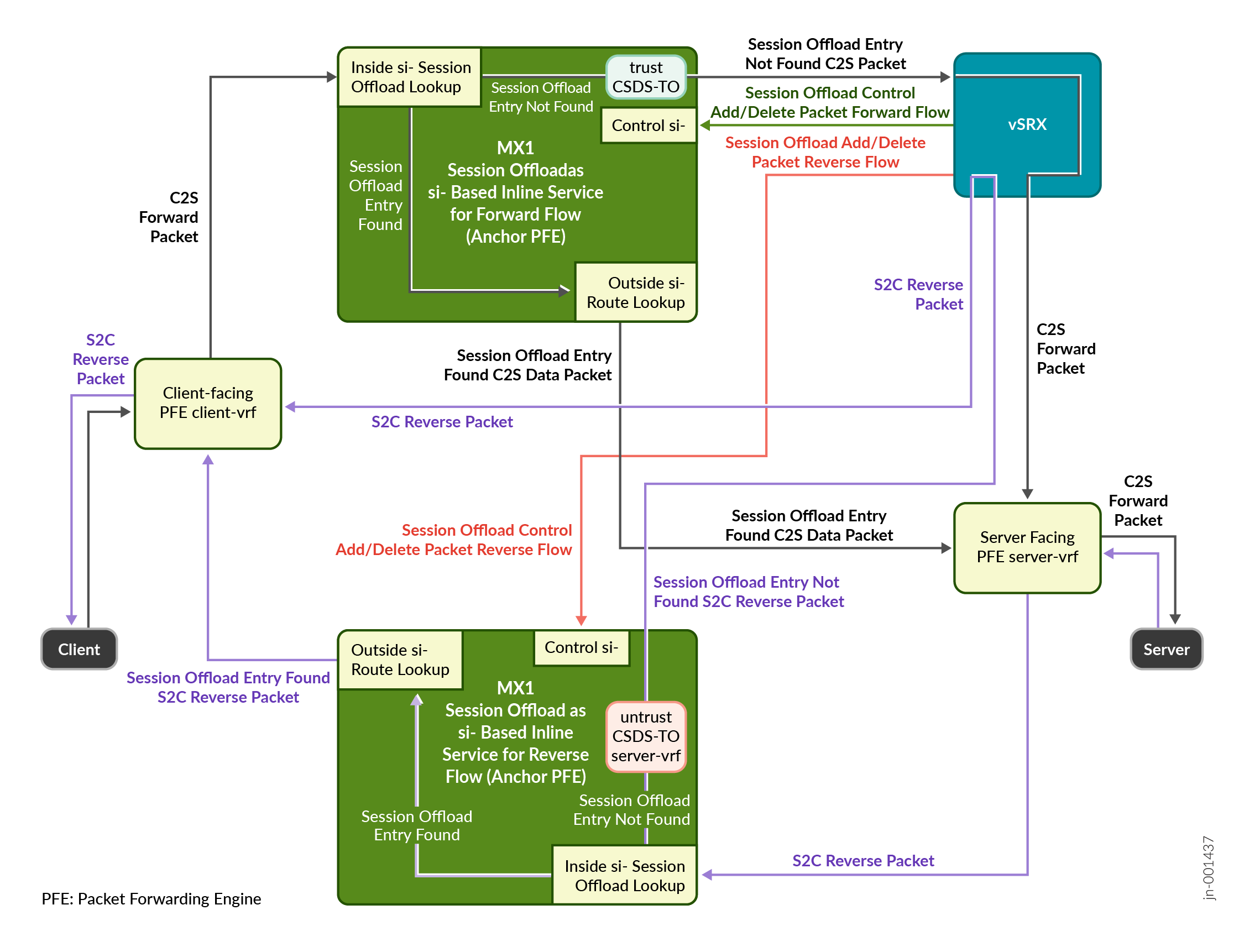
Figure 2 illustrates the high-level block diagram of the packet flow with anchor Packet Forwarding Engine in the router using si- interface.
Read the following steps to understand the packet flow during a session offload process.
-
Forward-flow indicates traffic flow from the client to the server (C2S).
-
Reverse-flow indicates traffic flow from the server to the client (S2C).
-
Filters present at the client and server side steers traffic to the Packet Forwarding Engine through the inside si- interface for session-offload lookup.
-
If there's a match (a hit), for session-offload lookup, Junos OS sends the packet to the outside si- interface for a routing lookup. The packet eventually reaches the destination.
-
If the session-offload lookup results in no match (a miss), Junos OS sends the packet to the trust side CSDS-TO VRF configured in the service-set. Here the packet is load-balanced to one the available firewalls for service processing. The packet eventually reaches the destination.
-
For every session that the firewall processes, the device sends a session‐offload control message to the router. The control packet's five-tuple includes:
- UDP as the communication protocol.
- Destination port on the router that is set to UDP port 38000.
- Source port that is derived from the fixed destination port number 38000 and the unique service ID. The service ID in a firewall identifies the unique service flow associated with the firewall. For service ID 1, the source port is 38001; for service ID 101, source port is 38101. The service IDs must be unique across firewalls in the CSDS topology.
- Remote IP that is the destination IP address on the router.
- Local IP as the source IP address on the firewall. The local IP on the firewall is the real service IP on the router.
Using the five-tuple information, the firewall creates the control packet header. Based on the control message type—add, delete, update, or additional information such as the NAT details—the control packet payload is available to the router. The router uses the regular route to send the control packet to the control si- interface. Eventually the anchor Packet Forwarding Engine adds an entry for the session-offload flow table. For any subsequent packet, based on the flow table entry, the router forwards the traffic without forwarding to the firewall.
-
The router periodically sends statistics to the firewall. The statistics contain the session information such as five-tuple and NAT details, if applicable. The firewall uses these statistics to update its flow table ensuring that both the router and the firewall maintain the same updated flow table entries.