
Common Criteria Evaluated Configuration Overview
This document describes the steps required to duplicate the configuration of the device running Junos OS Evolved when the device is evaluated. This document is referred to as the evaluated configuration. The following list describes the standards to which the device has been evaluated:
-
Common Criteria Version 3.1 Release 5
-
Collaborative Protection Profile for Network Devices (NDcPPv3.0e)—https://www.commoncriteriaportal.org/files/ppfiles/NDcPP_v3_0e.pdf
-
Functional Package for SSHv1—https://www.commoncriteriaportal.org/files/ppfiles/pkg_ssh_v1.0.pdf
Common Criteria Overview
Common Criteria for information technology are an international agreement signed by several countries that permits the evaluation of security products against a common set of standards. In the Common Criteria Recognition Arrangement (CCRA) at https://www.commoncriteriaportal.org/ccra/index.cfm, the participants agree to mutually recognize evaluations of products performed in other countries. All evaluations are performed using a common methodology for information technology security evaluation.
For more information about Common Criteria, see https://www.commoncriteriaportal.org/.
A Target of Evaluation (TOE) is a device or system subjected to evaluation based on Collaborative Protection Profile (cPP).
Supported Platforms
For the features described in this document, the following platforms are supported to qualify NDcPP:
Operational Environment for Junos OS Evolved in CC evaluated Configuration
A Juniper Networks device with Junos OS Evolved in CC evaluated configuration creates a hardware and software operational environment different from the environment of a device in the normal mode. Figure 1 shows the operational environment for Junos OS Evolved in CC evaluated configuration.
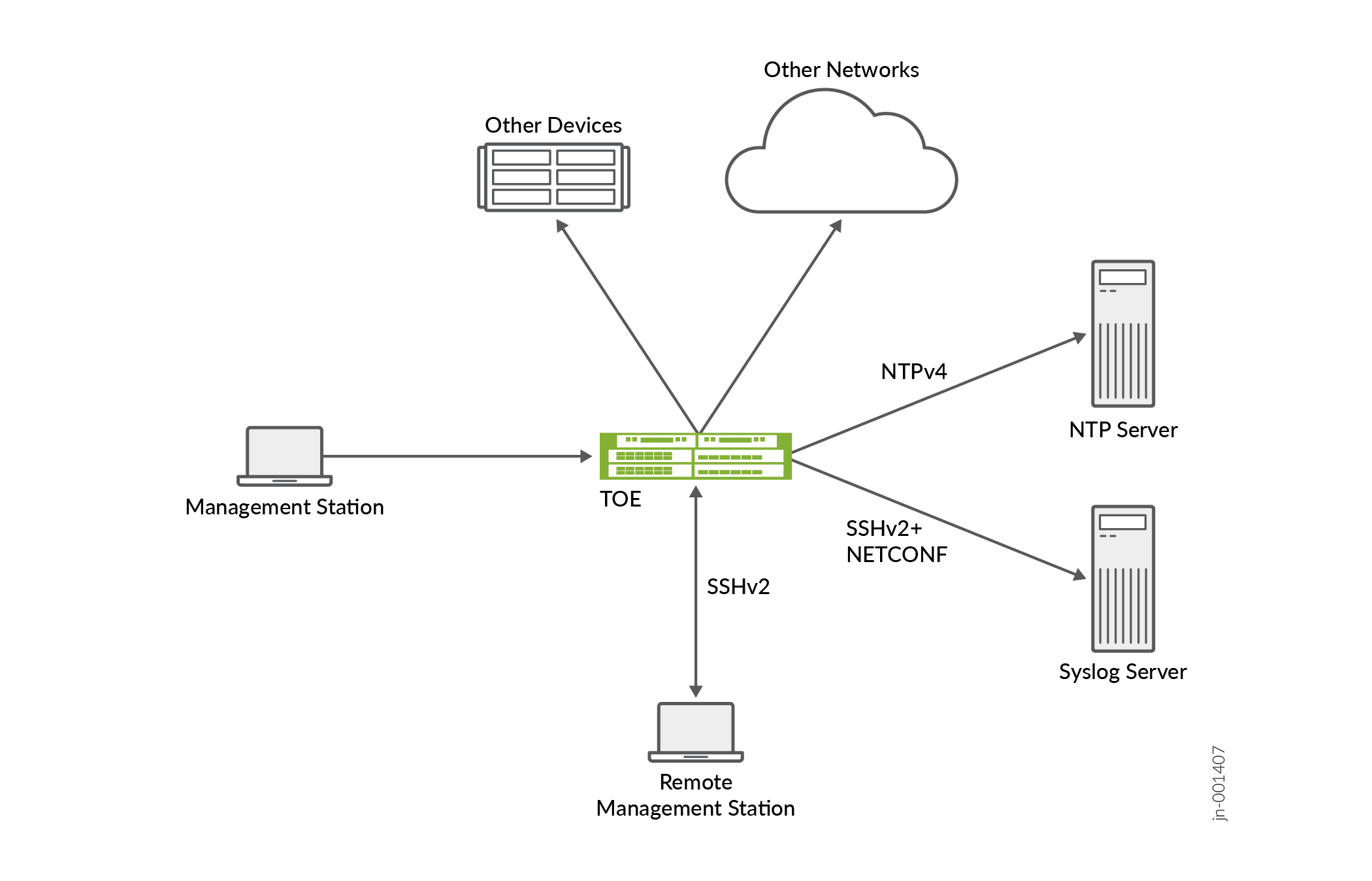
The TOE requires the following items in the network environment:
-
External Server or Syslog Server: An external server equipped with a syslog server and an SSHv2 client for connecting to the TOE through NETCONF, enabling the TOE to transmit audit logs.
-
NTP Servers: One or more optional NTP servers to provide accurate time for system time updates to the TOE.
-
Management Station: A management station connected to the TOE through a serial connection for local administration of the TOE.
-
Remote Management Station: A remote management station with an SSHv2 client for remote administration of the TOE.
Logical Boundary of Junos OS Evolved in CC Evaluated Configuration
Security Audit
The TOE features an audit function that collects and stores a comprehensive set of audit data in the form of audit records. Each audit record contains a timestamp that indicates the precise time of the audit record generated. Additionally, each audit record includes detailed information, enabling TOE administrators to review events and investigate potential or attempted security breaches.
Audit records are stored in log files within the TOE. The administrator also configures the TOE to forward the audit records to an external syslog server. The syslog server is not part of the TOE. Forwarding the audit records to a syslog server takes place over a trusted channel protected with the SSHv2 protocol.
Cryptographic Support
The TOE implements cryptographic functionality for the following purposes:
-
To protect user passwords
-
To establish trusted channels and trusted paths using the SSHv2 protocol
-
Symmetric key authentication for the NTP protocol
-
Digital signature verification for TOE trusted updates.
The TOE includes several cryptographic libraries:
- Kernel Cryptographic Module features a Deterministic Random Bit Generator (DRBG) that adheres to SP800-90A standards for generating random data and cryptographic keys. Additionally, it includes hashing algorithms designed to safeguard user passwords.
-
OpenSSL Cryptographic Module, utilizing the open source OpenSSL library, offers the remaining cryptographic algorithms.
Identification and authentication
The TOE guarantees that only users who have been successfully identified and authenticated are granted access to administrative functions. The TOE provides password-based authentication for both local and remote users. For remote authentication, it uses a trusted path established through SSHv2. Additionally, remote authentication can be performed using public-key authentication.
The CLI might be accessed locally from the console or remotely over an SSH connection. There are no alternative methods of administering the TOE. The TOE allows the display of a banner before and after a user logs in. The TOE also controls idle remote sessions and finishes the session after a period of time.
Trusted Path and Trusted Channels
The TOE implements a secure channel for administrators to manage the TOE remotely. Administrators can connect to the TOE from a remote management station using the SSHv2 protocol. Any SSH client supporting SSHv2 (for example, OpenSSH) can be used. The remote administrator should have access to the appropriate credentials (password or SSH private key) to authenticate to the TOE. Once successfully identified and authenticated, the administrator has access to the CLI. The TOE also establishes a secure channel using SSHv2 for sending audit records to an external syslog server.
The TOE integrates the OpenSSH library version 9.8p1 to facilitate the SSHv2 protocol. It supports both password-based and public key-based authentication methods. The necessary cryptographic algorithms for the protocol are supplied by the OpenSSL Cryptographic Module.
Excluded TOE Features
Administrators must not use the following protocols and services in association with the TOE.
-
Do not use Telnet. Telnet is not secure and violates the trusted path and trusted channel requirements.
-
Do not use FTP. FTP is not secure and violates the trusted path and trusted channel requirements.
-
Do not use SNMP. SNMP is not secure and violates the trusted path and trusted channel requirements.
-
Do not use TLS and IPSEC protocols. The certification does not cover these protocols.
-
Administrators can only manage the TOE through the Command Line Interface (CLI). They must not use J-Web, JUNOScript, or JUNOScope.
-
Create Security Administrators of the TOE by assigning them to the super-user class. Use the Linux root account only for the TOE’s initial configuration. Do not use the root account in the evaluated configuration.
-
Do not install or run third-party applications and tools that the Junos OS Evolved architecture allows.
-
Do not initiate the SSHv2 protocol on the TOE (for example, by using the
sshcommand). The TOE only allows SSHv2 as a trusted channel and a trusted path when communication begins at the other endpoint, so the TOE functions as an SSH server.
Use the following configuration to avoid incoming packets to SNMP and NTP ports (123 and 161):
[edit]
security-administrator@host:fips# set firewall family inet filter DENY_SNMP_NTP term deny_snmp_ntp from protocol udp destination-port [123 161]
security-administrator@host:fips# set firewall family inet filter DENY_SNMP_NTP term deny_snmp_ntp  then discard
security-administrator@host:fips# set firewall family inet filter DENY_SNMP_NTP term default then accept
security-administrator@host:fips# set interfaces re0:mgmt-0 unit 0 family inet filter input DENY_SNMP_NTP