
DNS Sinkhole Overview
The DNS Sinkhole feature enables you to block DNS requests for the disallowed domains by resolving the domains to a sinkhole server or by rejecting the DNS requests.
You can configure DNS filtering on SRX Series Firewalls to identify and block DNS requests for disallowed domains.
Feature support is determined by the platform and release you are using. Use Feature Explorer to determine if the feature is supported on your platform.
After identifying the DNS requests for disallowed domains, you can perform any of the following actions:
-
Block access to the disallowed domain— Configure your SRX Series Firewall to send a DNS response that directs traffic to a sinkhole server. This server will have an IP address or a fully qualified domain name (FQDN) that you specify. When a client tries to access the disallowed domain, their traffic will be redirected to the sinkhole server instead of reaching its intended destination.
-
Log the DNS request and reject access—The DNS request for the known malicious domains is handled as per the query type (QTYPE). The DNS queries of types A, AAAA, MX, CNAME, TXT, SRV and ANY will result in sinkhole action. These queries are individually counted and reported. The DNS queries of other types will only be logged when the queries match a malicious domain. These queries are allowed to proceed and collectively reported under the type miscellaneous.
The sinkhole server can block further access to a disallowed domain from unauthorized users or take other actions while allowing access. The actions of the sinkhole server are independent of the DNS filtering feature. You must configure the sinkhole server actions separately.
DNS Sinkhole Deployment Models
The SRX Series Firewall offers following ways to implement DNS sinkhole functionality:
-
Transparent DNS inspection—SRX Series Firewall is positioned inline between clients and the DNS server. Clients are configured to use the DNS server, and the SRX Series Firewall inspects DNS traffic passing through it. When a malicious domain is detected, the SRX Series Firewall intercepts the response and substitutes the sinkhole IP address.
-
DNS proxy—The clients are configured to use the SRX Series Firewall as their DNS server. The SRX Series Firewall forwards DNS queries to the DNS server and inspects the responses. For malicious domains, the SRX Series Firewall responds with the sinkhole IP address instead of the actual IP address.
Benefits
-
Redirects DNS requests for disallowed domains to sinkhole servers and prevents anyone operating the system from accessing these domains.
-
Provides inline blocking for disallowed domains through SecIntel feeds.
-
Helps to identify the infected host in your network.
Workflow to Identify an Infected Host Using DNS Sinkhole
The logical topology for DNS Sinkhole is shown in Figure 1.
Figure 1 shows a deployment where the SRX Series Firewall is placed between the clients and the corporate DNS server, providing transparent DNS inspection. In this configuration, the sinkhole IP address is assigned directly to an interface on the SRX Series Firewall rather than a separate physical server. This configuration allows the SRX Series Firewall to intercept and analyze DNS queries, and then redirect malicious requests to the sinkhole IP address to prevent harm.
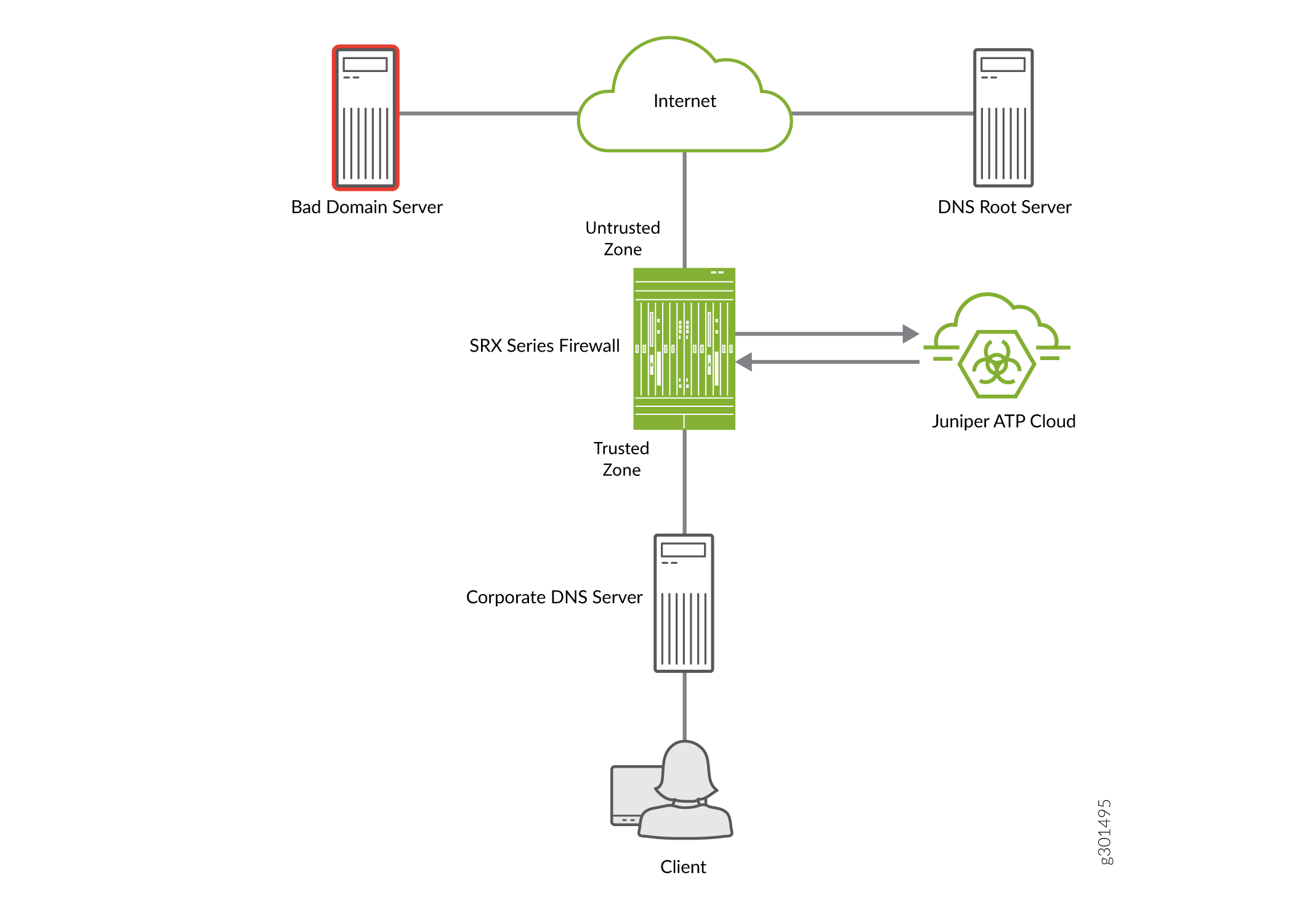
A high-level workflow to identify an infected host in a network using DNS Sinkhole feature is as follows:
|
Step |
Description |
|---|---|
|
1 |
Client sends a DNS request for Bad Domain Server. |
|
2 |
The SRX Series Firewall first queries the DNS server for the domain. |
|
3 |
The SRX Series Firewall, configured with Juniper ATP Cloud policy, intercepts the traffic based on the DNS security profile. The SRX Series Firewall then streams the unknown DNS query from the DNS server to the Juniper ATP Cloud for inspection. |
|
4 |
Juniper ATP Cloud provides per tenant (Logical System (LSYS)/Tenant System (TSYS)) domain feeds such as allowlist DNS feeds, custom DNS feeds and global DNS feeds to the SRX Series Firewall. Juniper ATP Cloud collects the FQDN information from third party source, and Juniper threat lab for its global DNS feeds. You can post your own customized DNS feed through OpenAPI. |
|
5 |
The SRX Series Firewall downloads the DNS domain feeds from ATP Cloud and applies actions such as sinkhole, block (drop/close), permit, or recommended for the matched domains.
Note:
By default, the SRX Series Firewall responds to the DNS queries for the disallowed domain with the default sinkhole server. |
|
6 |
In this example, the SRX Series Firewall is configured with the sinkhole action. After Juniper ATP Cloud has identified bad domain server as a malicious domain the SRX Series Firewall responds to queries for bad domain server with its own sinkhole IP address. |
|
7 |
When the client attempts to communicate with bad domain server, the client traffic is redirected to the sinkhole IP address that is configured on the SRX Series Firewall. The SRX Series Firewall then performs security actions such as logging the connection attempt or applying specific security policies to the traffic. |
|
8 |
The infected client connecting to the sinkhole IP address is identified, added to the infected-hosts feed, and quarantined. The system administrator can identify all clients trying to communicate with the sinkhole IP address by searching for the sinkhole IP address in the threat and traffic logs. |
DNS sinkhole feature is available only with a Juniper ATP Cloud license. For feature-specific licensing information, see Software Licenses for ATP Cloud.