Help us improve your experience.

Let us know what you think.

Do you have time for a two-minute survey?


Deploy Apstra ConnectorOps for Infected Host Isolation and Verify Connectivity

Use the following steps to deploy Apstra ConnectorOps and verify connectivity to Apstra DC Director and ATP Cloud

  1. Create a directory for the Apstra ConnectorOps image.
  2. Download the latest Apstra ConnectorOps image onto the VM, host, or server.

    Use the following download link under Application Tools: https://support.juniper.net/support/downloads/?p=apstra.

  3. Install Docker and Docker Compose.
  4. Load the Docker image.

    The following is an example docker-compose.yml

  5. Start Apstra ConnectorOps for Infected Host Isolation.
    Apstra ConnectorOps generates an ih-acl-configlet if one doesn’t already exist.
  6. Import the ih-acl-configlet into your blueprint:
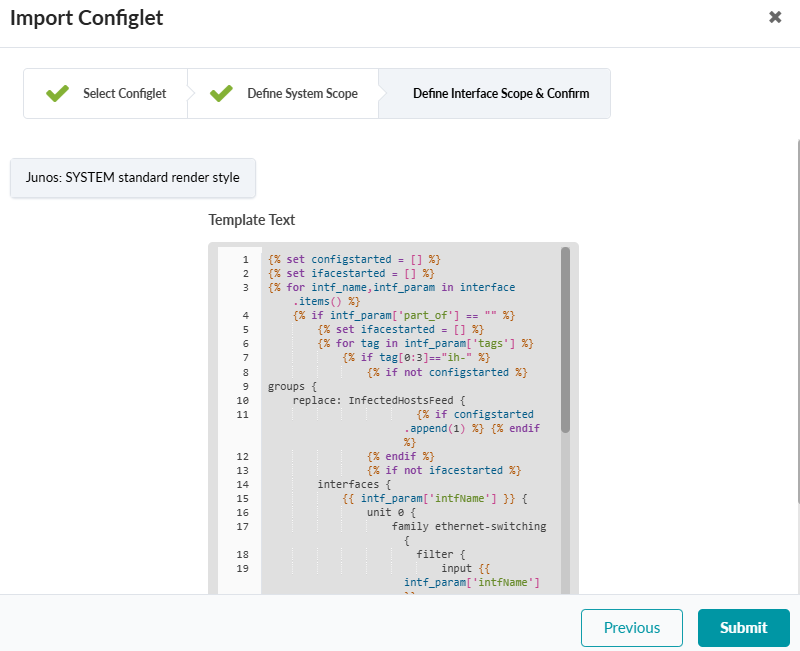
    1. From your blueprint, navigate to Staged > Catalog > Configlets > Import Configlet.

    2. b. Select the ih-acl-configlet from the dropdown and click Next.

    3. Review the rendered template and click Submit.

  7. Repeat this process for each blueprint where you want IH isolation.