
Custom Configlets
You can apply custom configurations on top of base configurations generated by ConnectorOps using Configlet objects. Configlet objects define custom configs.
Name configlets according to this naming convention:
-
Blueprint level (applies to all SRX devices in the Blueprint):
-
custom-<BlueprintName>
custom-<BlueprintName>-<suffix>
-
-
Device specific (applies to that SRX device only):
-
– custom-<BlueprintName>-<SRX-Name>
-
– custom-<BlueprintName>-<SRX-Name>-<suffix>
-
You can have multiple configletswith different suffixes for a single device.
-
Suffixes are optional for both levels. You can use them to add descriptive labels, for example "custom-MyBP-security" or "custom-MyBP-SRX1-bgp-policy".
ConnectorOps supports both Hierarchical and Set commands during creation.
commitConfig flag is "true".If commitConfig=false, ConnectorOps does not save configurations to a
file on the SRX. This is a "no action" for ConnectorOps.
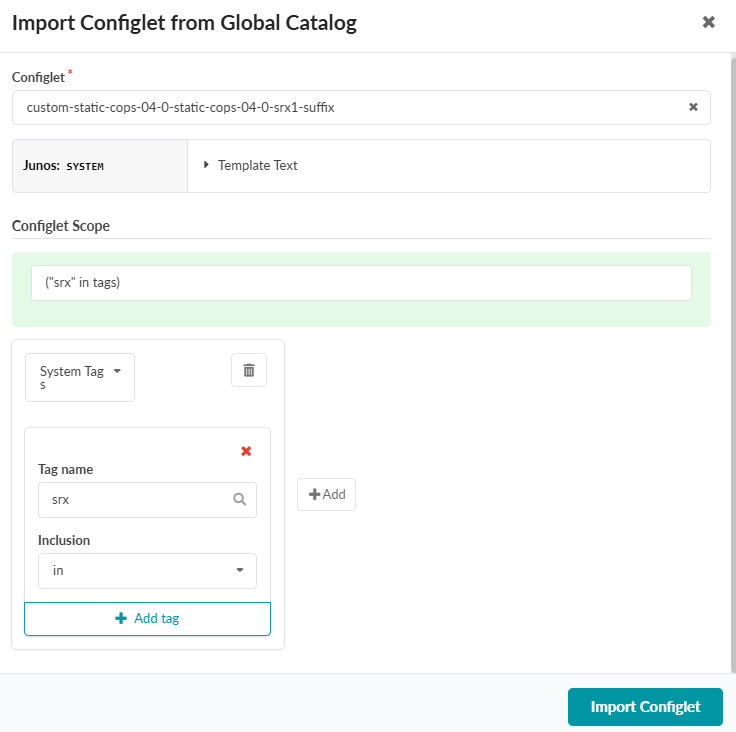
After you create a custom Configlet at the Global scope, you must import it into your Blueprint at Staged > Catalog > Configlets > Import Configlet.
Select your custom Configlet from the dropdown.
Click the Role dropdown and select System Tags
Enter "srx" in the Tag name field.
Click Import Configlet.
The following is an example custom Configlet:
policy-options {
    route-filter-list BL1-pref {
        <example-subnet> exact;
    }
    route-filter-list BL2-pref {
        <example-subnet> exact;
    }
    policy-statement BL1-in {
        term 10 {
            from {
                route-filter-list BL1-pref;
            }
            then {
                local-preference 200;
                accept;
            }
        }
        term 20 {
            then {
                local-preference 100;
                accept;
            }
        }
    }
    policy-statement BL2-in {
        term 10 {
            from {
                route-filter-list BL2-pref;
            }
            then {
                local-preference 200;
                accept;
            }
        }
        term 20 {
            then {
                local-preference 100;
                accept;
            }
        }
    }
}
protocols {
    bgp {
        group EVPN-FABRIC {
            neighbor <example-IP> {
                import BL1-in;
            }
            neighbor <example-IP> {
                import BL2-in;
            }
        }
    }
}