
Before You Start
- Prerequisites
- Required OpenShift Operators
- Infrastructure Requirements
- Network Infrastructure
- Docker Registry
- Management Node Requirements
- Network Access Requirements for Management Node
- Management Node Requirements
- Network Access Requirements
- Notes
Prerequisites
Before you can automate workflows, streamline decision-making, and activate rulebooks, you need to make sure you have the following software installed and/or configured:
| Component | Version | Purpose |
|---|---|---|
| OpenShift Container Platform | 4.17+ | Container orchestration platform |
| Red Hat Ansible Automation Platform | 2.5+ | Event-driven automation and execution |
| Juniper Apstra | 5.0, 5.1, 6.0, and 6.1 | Network fabric management |
| Docker | 20.10+ (CE recommended) | Container image management |
Required OpenShift Operators
The following operators must be installed and configured:
-
Red Hat Ansible Automation Platform Operator
-
Provides Automation Controller and Event-Driven Ansible
-
Enables rulebook activation and job execution
For step-by-step installation instructions, see Install Ansible Automation Platform on OpenShift.
-
-
Kubernetes NMState Operator
-
Manages network interface configuration
-
Required for LLDP neighbor discovery
-
For more information, see Installation Guide.
-
-
OpenShift SR-IOV Network Operator
-
Enables high-performance networking for workloads
-
For more information, see Installation Guide
-
-
(Optional) OpenShift Virtualization
-
Required only if deploying virtual machines
-
Enables KubeVirt functionality
-
Infrastructure Requirements
-
OpenShift Cluster
-
Master Nodes: Minimum three bare metal hosts
-
Worker Nodes: Minimum of three bare metal hosts
-
Each worker must have at least one SR-IOV-capable NIC (Intel E810 or XXV710)
-
Each worker needs a separate NIC for management and default Kubernetes networking
-
-
See https://docs.redhat.com/en/documentation/openshift_container_platform/4.11/html/installing/installing-on-bare-metal for information on how to install an OpenShift Cluster on bare metal hosts.
Network Infrastructure
- Leaf Switches: Any Juniper Apstra supported QFX switch
- Spine Switches: Any Juniper Apstra supported QFX switch
Docker Registry
- Container registry accessible from the management node
- Used for Decision Environment and Execution Environment images
- Can be OpenShift internal registry or external registry (for example, Juniper Artifactory)
Management Node Requirements
A dedicated management node is required for image preparation, cluster management, and running the AAP configuration playbook.
-
Supported OS: Debian 12 (bookworm), RHEL 8/9, Ubuntu 22.04+ (Debian 12 verified)
-
Architecture: x86_64 (amd64)
-
Minimum free disk space: 10 GB (container images are ~500 MB each)
-
Required tools:
Note:oc create tokenrequires oc v4.11+. On older versions ofoc, usekubectl create tokeninstead.Tool Minimum Version Install Reference Docker CE 20.10+ Debian: https://docs.docker.com/engine/install/debian/ / RHEL: https://docs.docker.com/engine/install/rhel/ OpenShift CLI ( oc)4.6+ https://mirror.openshift.com/pub/openshift-v4/clients/ocp/latest/ kubectl1.28+ https://kubernetes.io/docs/tasks/tools/install-kubectl-linux/ git2.30+ apt install gitoryum install gitansible2.14+ with awx.awxandansible.edacollectionshttps://docs.ansible.com/ansible/latest/installation_guide/ -
Verify installed tools:
docker version
oc version
kubectl version --client
git version
ansible --version
ansible-galaxy collection list | grep -E "awx|eda"
-
Network connectivity required to:
-
OpenShift cluster API endpoint
-
Container registry (accessible from the management node) for image push
-
Juniper Support portal for downloading images
-
All AAP component hostnames (Gateway, Controller, EDA, Hub) resolve via DNS or
/etc/hosts
-
Network Access Requirements for Management Node
-
Access to the Juniper public Git repository that contains the automation project files:
-
(Optional) https://github.com/Juniper/apstra-ansible-collection
Customize the solution, playbooks, and learn how to use modules with Apstra Ansible.
-
(Optional) https://github.com/Juniper/k8s.eda
Explains how to use the Kubernetes event source for Ansible. Also, you can use this repository to run events for other resources.
- Juniper Apstra EDA only recognizes objects that are labeled with
type=eda. - We require that you set Projects, Credentials, Apstra Blueprint name, and Rulebook Activations to run Juniper Apstra EDA as described in this guide.
Management Node Requirements
-
Access to the Juniper public Git repository that contains the automation project files
-
(Optional) https://github.com/Juniper/apstra-ansible-collection
Customize the solution, playbooks, and learn how to use modules with Apstra Ansible.
-
(Optional) https://github.com/Juniper/k8s.eda
Explains how to use the Kubernetes event source for Ansible. Also, you can use this repository to run events for other resources.
Network Access Requirements
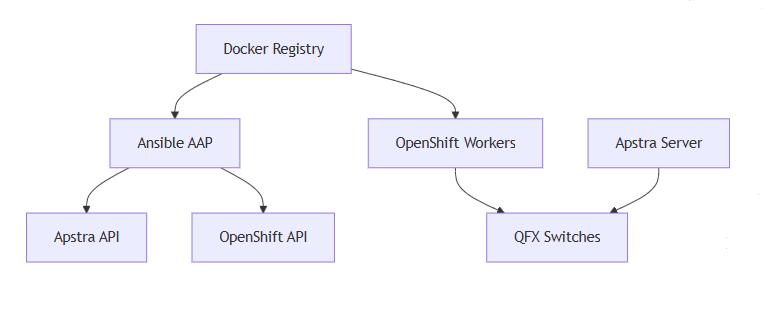
Notes
-
Juniper Apstra EDA only recognizes objects that are labeled with type=eda.
-
We require that you set Projects, Credentials, Apstra Blueprint name, and Rulebook Activations to run Juniper Apstra EDA as described in this guide.