
Custom Configlets
You can apply custom configurations on top of base configurations generated by ConnectorOps using Configlet objects. Configlet objects define custom configs.
Name configlets according to this naming convention:
-
Per device:
custom-<blueprintname>-<srx-device-name>-<optional-suffix>You can have multiple configlets with different suffixes for a single device.

-
Global level (all devices):
custom-<blueprintname>
-
If the SRX name is included at the end, the configlet targets only that specific SRX.
-
If not, the configlet is applied to all SRX devices in the Blueprint.
ConnectorOps supports both Hierarchical and Set commands during creation.
commitConfig flag is "true".If commitConfig=false, ConnectorOps does not save configurations to a
file on the SRX. This is a "no action" for ConnectorOps.
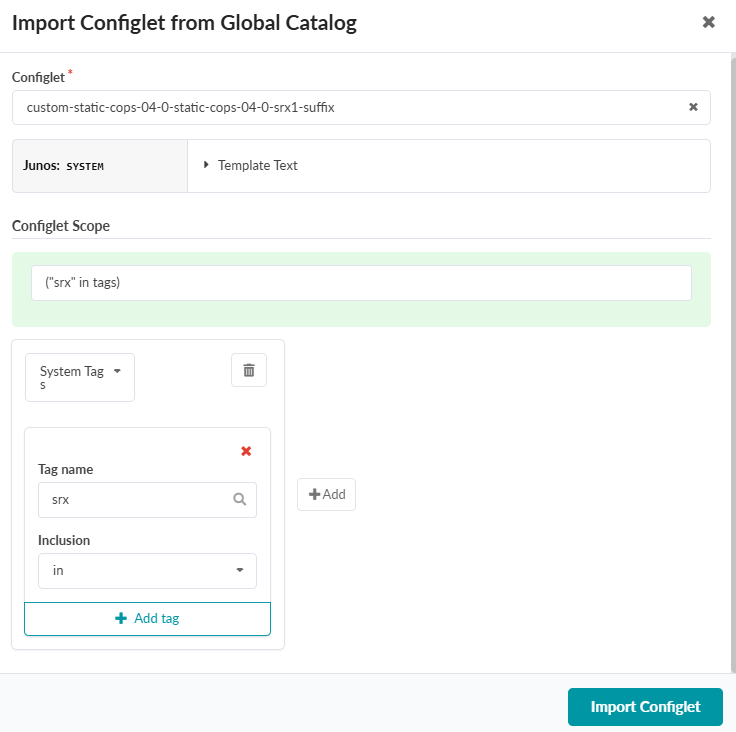
After you create a custom Configlet at the Global scope, you must import it into your Blueprint at Staged > Catalog > Configlets > Import Configlet.
Select your custom Configlet from the dropdown.
Click the Role dropdown and select System Tags
Enter "srx" in the Tag name field.
Click Import Configlet.
The following is an example custom Configlet:
policy-options {
    route-filter-list BL1-pref {
        <example-subnet> exact;
    }
    route-filter-list BL2-pref {
        <example-subnet> exact;
    }
    policy-statement BL1-in {
        term 10 {
            from {
                route-filter-list BL1-pref;
            }
            then {
                local-preference 200;
                accept;
            }
        }
        term 20 {
            then {
                local-preference 100;
                accept;
            }
        }
    }
    policy-statement BL2-in {
        term 10 {
            from {
                route-filter-list BL2-pref;
            }
            then {
                local-preference 200;
                accept;
            }
        }
        term 20 {
            then {
                local-preference 100;
                accept;
            }
        }
    }
}
protocols {
    bgp {
        group EVPN-FABRIC {
            neighbor <example-IP> {
                import BL1-in;
            }
            neighbor <example-IP> {
                import BL2-in;
            }
        }
    }
}