
Event Log (Audit Log)
Event Log Introduction
As users work in the Apstra environment their actions are logged. These event logs are useful when investigating general usage, network outages, and possible suspicious activity. See below for the information that's collected.
Types of Events that are Logged
Events for the following event types are logged:
|
Event |
Description |
|---|---|
|
Login |
A user logged in (success and failure). |
|
Logout |
A user logged out. |
|
BlueprintCommit |
Changes were applied from the staged blueprint to the active blueprint. |
|
BlueprintRevert |
Changes in the staged blueprint were discarded. |
|
BlueprintRollback |
The staged blueprint was rolled back to a previous version. |
|
BlueprintDelete |
The entire blueprint was deleted. |
|
DeviceConfigChange |
The configuration of a device was changed. This includes any configuration change that Apstra pushes to any managed device (including Time Voyager). The event is attributed to the logged-in user making the change. |
| MigrationCheckpoint | When you upgrade the Apstra server on a new VM (VM-VM) to versions 5.0.0 and higher, a MigrationCheckpoint event is logged. This event includes upgrade details, such as the Apstra version of the old Apstra server (source), the Apstra version of the new Apstra server (target), and a timestamp from during the upgrade process. The upgrade is followed up by a Metricdb data migration and upon a successful migration on the new VM, the Metricdb data before the timestamp is from the old VM and data after the timestamp is from the new VM. |
|
OperationModeChangeToMaintenance |
The blueprint operation mode was changed to Maintenance by a user. |
|
OperatonModeChangeToNormal |
The blueprint operation mode was changed to Normal by a user, or by the system when disk usage and memory are under the utilization threshold (the operation is in read/write mode). |
|
OperationModeChangeTo ReadOnly |
The blueprint operation mode was changed to Read Only by the user, or by the system when the utilization threshold is surpassed (the operation is in read only mode). |
|
RatelimitExceptionAdd |
A ratelimit exception was added. |
|
RatelimitExceptionDelete |
A ratelimit exception was deleted. |
|
RatelimitClear |
A ratelimit was cleared. |
|
SyslogCreate |
Syslog was created. |
|
SyslogUpdate |
Syslog was updated. |
|
SyslogDelete |
Syslog was deleted. |
|
UserCreate |
A user profile was created (by creating or cloning). |
|
UserUpdate |
A user profile was updated. |
|
UserDelete |
A user profile was deleted. |
|
AuthAclEnable |
Access control rules were enabled. |
|
AuthAClDisable |
Access control rules were disabled. |
|
AuthAclRuleAdd |
An access control rule was added. |
|
AuthAclRuleUpdate |
An access control rule was updated. |
|
AuthAclRuleDelete |
An access control rule was deleted. |
Types of Event Details that are Collected
The following details are logged for each event (as applicable):
|
Property |
Description |
|---|---|
|
Time Range |
The timeframe of when the event occurred (hover over time field to see date and time). |
|
User |
The user who performed the activity, the system or a username such as admin. |
|
User IP Address |
The IP address associated with the user who made the change. |
|
Type (of Event) |
The type of event (listed in table above). |
|
Blueprint Name (Blueprint ID) |
The ID of the blueprint where the change was made. |
|
Blueprint Commit Message |
The description of the changes that were committed to the blueprint, if provided. |
|
Device Key (Device ID) |
Typically, the serial number of the managed device where the change was made. |
|
Device Configuration |
The configuration that's pushed and applied to the device. |
|
Result |
The outcome of the activity. Success means operation is accepted by the system. In the case of an error, the error string is included (unauthorized, for example). |
Search Event Logs
-
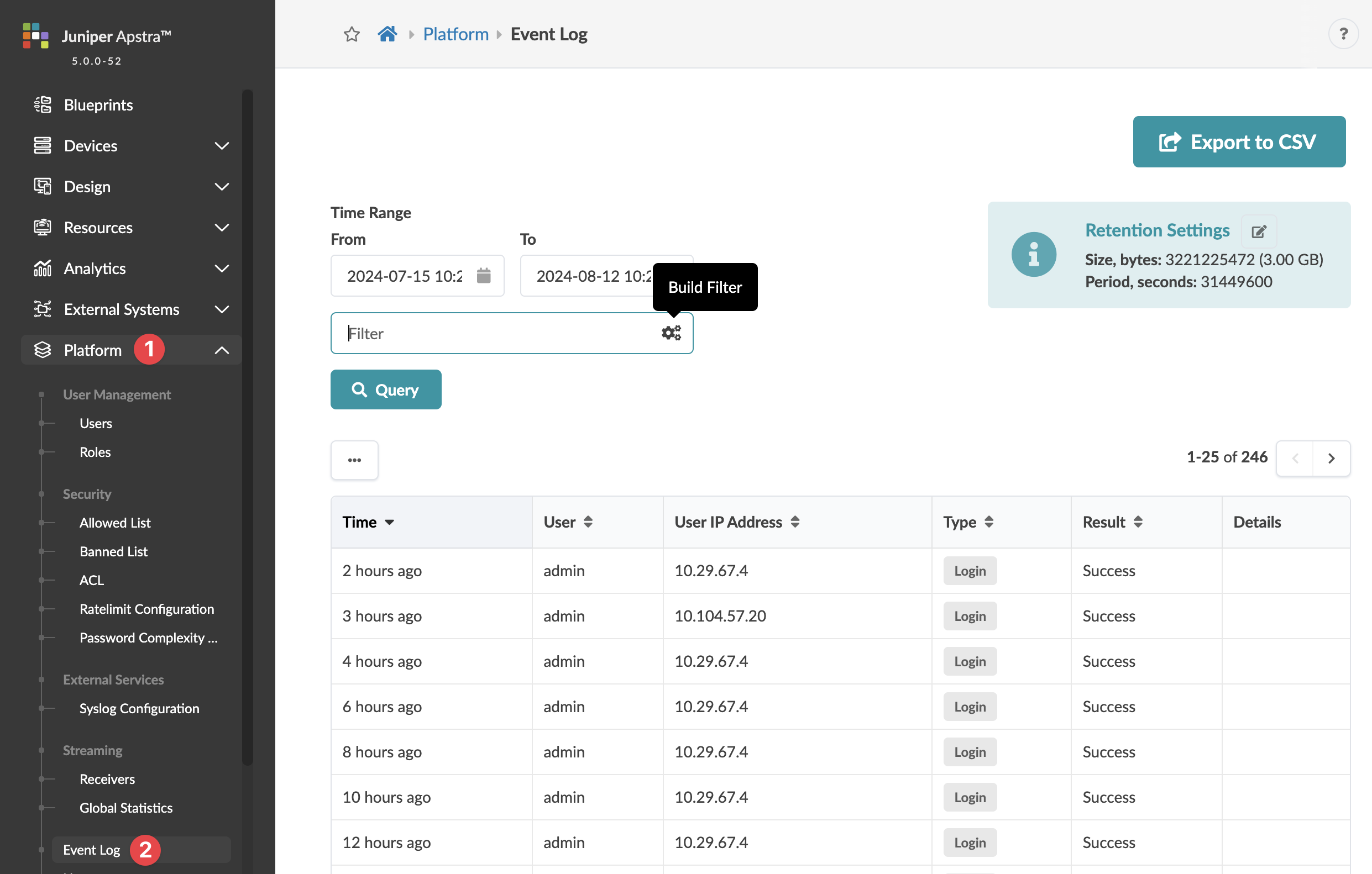
From the left navigation menu, navigate to Platform > Event
Log to go to the table of logged events.
-
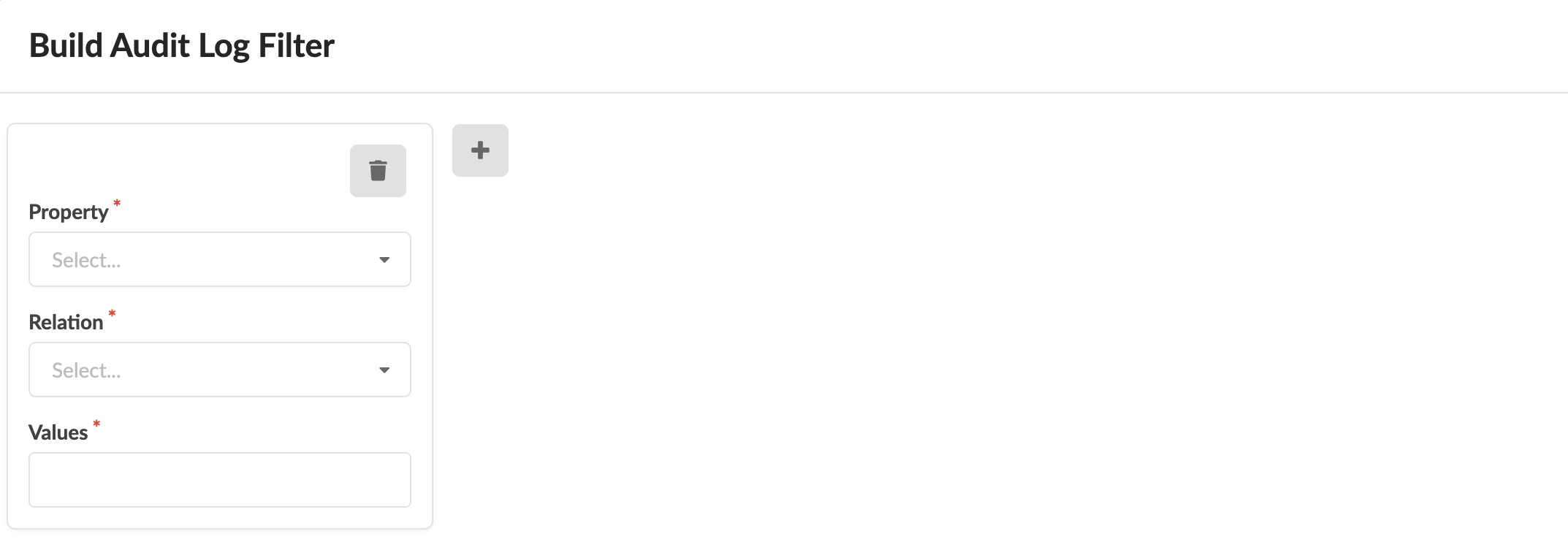
Click the Query Builder, enter/select your query from the
available search fields. You can enter multiple values in some fields; events that match
criteria for all fields are returned. Click Apply for
results.
 Note:
Note:The event log is based on the number of events. Up to 10,000 events are retained. They're written to log-rotated files as a second repository. You can configure logrotate parameters in the Apstra server configuration file (
/etc/aos/aos.conf).
Export Event Log to CSV File
- From the left navigation menu, navigate to Platform > Event Log and click Export to CSV (top-right).
- To filter the data to export, enter your query.
- Click Save as CSV File to download the CSV file.
Send Event Log to External Syslog Server
For details about sending the event log to an external system with the Syslog protocol, see Syslog Configuration.
Parse Apstra Logs
Apstra uses Common Event Format (CEF), a standard for the interoperability of event or log-generating devices and applications. The standard defines a syntax for log records. It comprises a standard prefix and a variable extension formatted as key-value pairs.
Apstra Log Format
'{timestamp} {host} '
       'CEF:{version}|{device_vendor}|{device_product}|{device_version}|'
       '{device_event_class_id}|{name}|{severity}|{extension}
Where:
-
versionis always “0” -
device_vendoris always “Apstra” -
device_productis always “Apstra” -
device_versionis the current Apstra version -
device_event_class_idis “100” for audit logs and “101” for anomaly logs -
nameis always “Audit even” for audit logs and “Alert” for anomaly logs -
severityis always “medium” for audit logs and “Very-High” for anomaly logs
And where:
-
{extension} is either:
-
For anomaly logs: msg=<json payload>
-
For audit logs: cat=<activity> src=<src_IP> suser=<username> act=<activity result> cs1Label=<field1_type> cs1=<field1_value>cs2Label=<field2_type> cs2=<field2_value> cs3Label=<field2_type> cs2=<field2_value>
-
Audit Log Fields
| Field | Description | Applies to |
| cat | Activity performed. Valid values: “Login”, “Logout”, “BlueprintCommit”, “DeviceConfigChange”, “BlueprintDelete”. | All messages |
| src | Source IP of the client making HTTP requests | All messages |
| suser | Who performed the activity | All messages |
| act | Outcome of the activity - free-form string. “Success” means operation is accepted by system. In case of error, include error string. Ex: Unauthorized | All messages |
| cs1Label | The string “Blueprint Name” | Cat = “BlueprintCommit” or “BlueprintDelete” |
| cs1 | Name of the blueprint on which action was taken. | Cat = “BlueprintCommit” or “BlueprintDelete” |
| cs2Label | The string “Blueprint ID” | Cat = “BlueprintCommit” or “BlueprintDelete” |
| cs2 | Id of the blueprint on which action was taken. | Cat = “BlueprintCommit” or “BlueprintDelete” |
| cs3Label | The string “Commit Message”. Only exists if user has added a commit message (optional) | Cat = “BlueprintCommit” or “BlueprintDelete” |
| cs3 | Commit Message. Only exists if user has added a commit message (optional) | Cat = “BlueprintCommit” |
| deviceExternalId | Id (typically serial number) of the managed device on which action was taken. | Cat = “DeviceConfigChange” |
| deviceConfig | Config that is pushed and applied on the device where “#012” is used to indicate a line break to log collectors and parsers. | Cat = “DeviceConfigChange” |
Anomalies JSON Fields
| Field | Description | Applies to |
| u'blueprint_label' | String. Name of the blueprint the anomaly was raised in. | All messages |
| u'timestamp' | String. Name of the blueprint the anomaly was raised in. | All messages |
| u'origin_name' | String. Name of the blueprint the anomaly was raised in. | All messages |
| u'alert' | The value is a JSON Payload with the actual anomaly (see next table) | |
| u'origin_hostname' | String. Hostname of the device the anomaly affects. | All messages |
| u'device_hostname' | String. Hostname of the device the anomaly affects. | All messages |
| u'origin_role | String. Hostname of the device the anomaly affects. | All messages |
| Field | Description | Applies to |
| u'first_seen' | String. Unix timestamp when the Anomaly was raised for the first time. | All messages |
| u'raised' | Always True | All messages |
| u'severity | The severity level of the anomaly. In Apstra today, all anomalies are raised with severity level 3. | All messages |
Anomaly Log Examples
- IBA Anomaly “MLAG Anomaly”
- IBA Anomaly “Unexpected Hostname”
- User Logout and Logging
- Blueprint Delete
- Blueprint Commit
- Device Config Change
- Device Config
IBA Anomaly “MLAG Anomaly”
The device_event_class_id = 101 for all anomalies
06 04 2020 08:42:50 10.23.59.188 <SLOG:INFO> 1 2020-06-04T13:26:54.195385Z aos-server - - - 2020-06-04T13:26:54.194168+0000 aos-server CEF:0|Apstra|Apstra|3.2.2-12|101|Alert|Very-High|msg={u'blueprint_label': u'LAB', u'timestamp': 1591277214194168, u'origin_name': u'FDO21260P7L', u'alert': {u'first_seen': 1591277214194141, u'raised': True, u'severity': 3, u'mlag_alert': {u'peer_link_status': u'down', u'actual_domain_state': 1, u'mlag_id': 0, u'expected_intf_state': 0, u'hostname': u'USDAL1-LAB93108-LF1', u'peer_link': u'port-channel3', u'expected_peer_link_status': u'up', u'actual_intf_state': 0, u'expected_domain_state': 4, u'ifname': u'', u'domain_id': u'1'}, u'id': u'6656a961-3139-4825-b89d-93f071271891'}, u'origin_hostname': u'LAB1_HOST1', 'device_hostname': 'LAB1_HOST1', u'origin_role': u'leaf'}IBA Anomaly “Unexpected Hostname”
Jun 8 21:35:25 aos-server - 2020-06-08T21:35:25.757009+0000 aos-server CEF:0|Apstra|Apstra|3.3.0-299|101|Alert|Very-High|msg={u'blueprint_label': u'test', u'timestamp': 1591652125757009, u'origin_name': u'505400C5CAAA', u'alert': {u'first_seen': 1591652125757001, u'raised': True, u'severity': 3, u'hostname_alert': {u'expected_hostname': u'spine1', u'actual_hostname': u'localhost'}, u'id': u'7f693f1d-2aeb-44a4-93f1-656400cfff7e'}, u'origin_hostname': u'localhost', 'device_hostname': 'localhost', u'origin_role': u''}User Logout and Logging
The device_event_class_id = 100 for all events
Jun  8 19:43:33 aos-server - 2020-06-08T19:43:33.392984+0000 aos-server CEF:0|Apstra|Apstra|3.3.0-299|100|Audit event|medium|cat=Logout src=10.1.253.6 suser=admin act=Success
Jun  8 19:43:39 aos-server - 2020-06-08T19:43:39.267262+0000 aos-server CEF:0|Apstra|Apstra|3.3.0-299|100|Audit event|medium|cat=Login src=10.1.253.6 suser=admin act=Success
Blueprint Delete
Jun 8 21:23:41 aos-server - 2020-06-08T21:23:41.426107+0000 aos-server CEF:0|Apstra|Apstra|3.3.0-299|100|Audit event|medium|cat=BlueprintDelete src=10.1.253.6 suser=admin act=Success cs1Label=Blueprint Name cs1=test cs2Label=Blueprint ID cs2=2bd8f38f-9242-461c-855e-8146a4f68bb9
Blueprint Commit
Jun 8 21:42:19 aos-server - 2020-06-08T21:42:19.550216+0000 aos-server CEF:0|Apstra|Apstra|3.3.0-299|100|Audit event|medium|cat=BlueprintCommit src=10.1.253.6 suser=admin act=Success cs1Label=Blueprint Name cs1=test cs2Label=Blueprint ID cs2=5ba55c14-6c01-4537-9dd7-d32c8c41616b cs3Label=Commit Message cs3=New_Virtual_Network
Device Config Change
Revert a full day-0 BP deployment
Jun  8 21:35:27 aos-server - 2020-06-08T21:35:27.132831+0000 aos-server CEF:0|Apstra|Apstra|3.3.0-299|100|Audit event|medium|cat=DeviceConfigChange src=10.1.253.6 suser=admin act=Success deviceExternalId=505400C5CAAA deviceConfig=
...
<Device Config, see next table>
...
Device Config
Note that “#012” is used to indicate a line break
service interface inactive expose#012
!#012
spanning-tree mode none#012
!#012
hostname spine1#012
interface Ethernet1#012
  description facing_l2-virtual-ext-001-leaf1:Ethernet1#012
  no switchport#012
  ip address 203.0.113.4/31#012
  no shutdown#012
  description facing_l2-virtual-ext-002-leaf1:Ethernet1/1#012
  no switchport#012
  ip address 203.0.113.6/31#012
  no shutdown#012
  exit#012
!#012
interface Ethernet3#012
  description facing_l2-virtual-ext-003-leaf1:Ethernet1/1#012
  no switchport#012
  ip address 203.0.113.8/31#012
  no shutdown#012
  exit#012!#012
interface Ethernet4#012
  description facing_l2-virtual-ext-004-leaf1:Ethernet1#012
  no switchport#012
  ip address 203.0.113.10/31#012
  no shutdown#012
  exit#012!#012
interface Ethernet5#012
  no switchport#012
  no shutdown#012
  exit#012
!#012
interface Ethernet6#012
  no switchport#012
  no shutdown#012
  exit#012
!#012
interface Ethernet7#012
  no switchport#012
  no shutdown#012
  exit#012
!#012
ip routing#012!#012
service routing protocols model multi-agent#012
interface loopback 0#012
  ip address 203.0.113.20/32#012
  exit#012
!#012
ip prefix-list AllPodNetworks seq 5 permit 0.0.0.0/0 le 32#012
ip as-path access-list MyASN permit ^$#012
route-map AllPodNetworks permit 10#012
  match ip address prefix-list AllPodNetworks#012
  exit#012
!#012
route-map EVPN permit 10#012
  set ip next-hop unchanged#012
  exit#012
!#012
router bgp 4200000000#012
  router-id 203.0.113.20#012
  no bgp default ipv4-unicast#012
  bgp log-neighbor-changes#012
  bgp bestpath as-path multipath-relax#012
  redistribute connected route-map AllPodNetworks#012!#012
  neighbor l3clos-s peer-group#012
  neighbor l3clos-s timers 1 3#012
  neighbor l3clos-s soft-reconfiguration inbound#012
  neighbor l3clos-s maximum-routes 0 warning-limit 90 percent#012
  neighbor l3clos-s-evpn peer-group#012
  neighbor l3clos-s-evpn ebgp-multihop 2#012
  neighbor l3clos-s-evpn timers 1 3#012
  neighbor l3clos-s-evpn send-community extended#012
  neighbor l3clos-s-evpn soft-reconfiguration inbound#012
  neighbor l3clos-s-evpn update-source loopback0#012
  neighbor l3clos-s-evpn maximum-routes 0 warning-limit 90 percent#
!#012
!#012
  neighbor 203.0.113.0 remote-as 64512#012
  neighbor 203.0.113.0 peer-group l3clos-s-evpn#012
  neighbor 203.0.113.0 description facing_l2-virtual-ext-001-leaf1-evpn-overlay#012
  neighbor 203.0.113.5 remote-as 64512#012
  neighbor 203.0.113.5 peer-group l3clos-s#012
  neighbor 203.0.113.5 description facing_l2-virtual-ext-001-leaf1#012
  neighbor 203.0.113.1 remote-as 64513#012
  neighbor 203.0.113.1 peer-group l3clos-s-evpn#012
  neighbor 203.0.113.1 description facing_l2-virtual-ext-002-leaf1-evpn-overlay#012
  neighbor 203.0.113.7 remote-as 64513#012
  neighbor 203.0.113.7 peer-group l3clos-s#012
  neighbor 203.0.113.7 description facing_l2-virtual-ext-002-leaf1#012
  neighbor 203.0.113.2 remote-as 64514#012
  neighbor 203.0.113.2 peer-group l3clos-s-evpn#012
  neighbor 203.0.113.2 description facing_l2-virtual-ext-003-leaf1-evpn-overlay#012
  neighbor 203.0.113.9 remote-as 64514#012
  neighbor 203.0.113.9 peer-group l3clos-s#012
  neighbor 203.0.113.9 description facing_l2-virtual-ext-003-leaf1#012
  neighbor 203.0.113.3 remote-as 64515#012
  neighbor 203.0.113.3 peer-group l3clos-s-evpn#012
  neighbor 203.0.113.3 description facing_l2-virtual-ext-004-leaf1-evpn-overlay#012
  neighbor 203.0.113.11 remote-as 64515#012
  neighbor 203.0.113.11 peer-group l3clos-s#012
  neighbor 203.0.113.11 description facing_l2-virtual-ext-004-leaf1#012
  address-family evpn#012
    neighbor l3clos-s-evpn route-map EVPN out#012
    neighbor 203.0.113.0 activate#012
    neighbor 203.0.113.1 activate#012
    neighbor 203.0.113.2 activate#012
    neighbor 203.0.113.3 activate#012
    exit#012
  address-family ipv4#012
    neighbor 203.0.113.11 activate#012
    neighbor 203.0.113.5 activate#012
    neighbor 203.0.113.7 activate#012
    neighbor 203.0.113.9 activate#012
    exit#012
  maximum-paths 32#012
  exit#012