
ON THIS PAGE
SRX4120 Chassis
Learn about the components in the SRX4120 chassis.
The SRX4120 chassis is a rigid sheet-metal structure that houses all components of the device.
SRX4120 Specifications
| Specification | Value |
|---|---|
|
Height |
1.74 in (4.42 cm) |
|
Width |
17.28 in (43.89 cm) |
|
Depth |
18.20 in (46.23 cm) |
|
Weight |
We ship the SRX4120 with only one power supply unit (PSU). As shipped (one PSU): 17.10 lb (7.6 kg) Fully-loaded with 2 PSUs: 19.12 lb (8.5 kg) |
| Specification | Value |
|---|---|
|
Operating altitude |
6000 ft (1828 m) |
|
Operating temperature |
32 °F to 104 °F (0 °C to 40 °C) |
|
Storage temperature |
-40 °F to 158 °F (-40 °C to 70 °C) |
|
Relative humidity (operating) (non-condensing) |
5% through 90% |
SRX4120 Front Panel
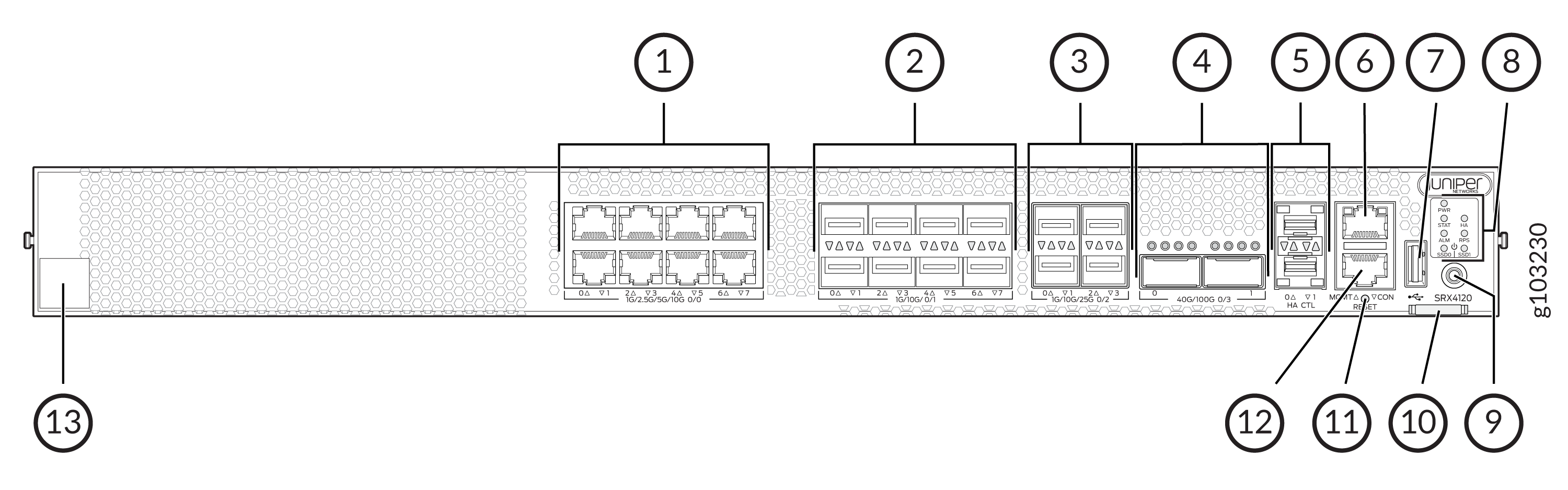
| Callout | Item | Description |
|---|---|---|
|
1 |
Ethernet ports |
Eight 1/2.5/5/10-Gigabit Ethernet (GbE) MACsec ports for network traffic |
|
2 |
SFP+ ports |
Eight 1/10 GbE SFP+ MACsec ports for network traffic |
|
3 |
SFP28 ports |
Four 1/10/25 GbE SFP28 MACsec ports for network traffic |
|
4 |
QSFP28 |
Two 40/100 GbE QSFP28 MACsec ports for network traffic |
|
5 |
Chassis cluster ports (HA) |
Two 1 GbE SFP chassis cluster control CTL ports with MACsec support |
|
6 |
Management port (MGMT) |
1 GbE RJ-45 port |
|
7 |
USB port |
One USB 3.0 Type A port that accepts a USB storage device. |
|
8 |
Chassis LEDs |
Indicate component and system status and troubleshooting information at a glance. |
|
9 |
Power button |
Power button |
|
10 |
Pull tab | Contains the CLEI code and serial number of the device. |
|
11 |
RESET |
Reset button. To reset the system, press and hold the RESET button for around 250 ms. |
|
12 |
Console port (CON) |
You can connect a laptop to the device for CLI management. The port uses an RJ-45 serial connection and supports the RS-232 (EIA-232) standard. |
|
13 |
Claim code |
You can use the QR code to claim and onboard your device to Juniper Security Director. |
SRX4120 Rear Panel
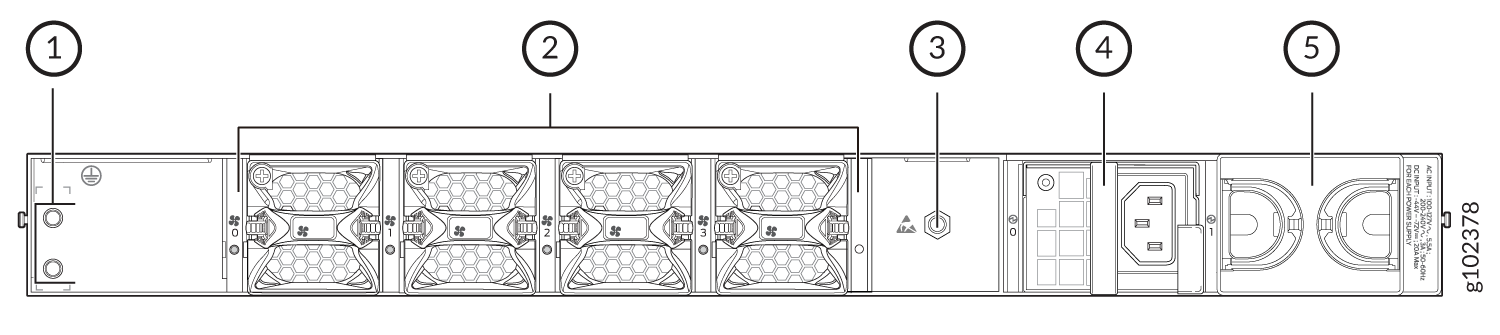
| Callout | Item | Description |
|---|---|---|
|
1 |
Grounding point |
Used to connect the device to earth ground. |
|
2 |
Fan modules |
Four airflow out (AFO) fan modules (3+1 redundancy). Three fan modules are required for proper airflow across the chassis internal components. The fourth fan module provides redundancy. |
|
3 |
ESD |
ESD socket. |
|
4 |
PSU (Power Supply Unit) |
A 450 W AC PSU is provided with the SRX4120. |
|
5 |
Empty PSU slot |
A blank slot to install an additional PSU (1+1 redundancy). |
We ship the SRX4120 with only one power supply. You can order the second power supply separately, if required.
You must not mix AC and DC power supplies in the same chassis.
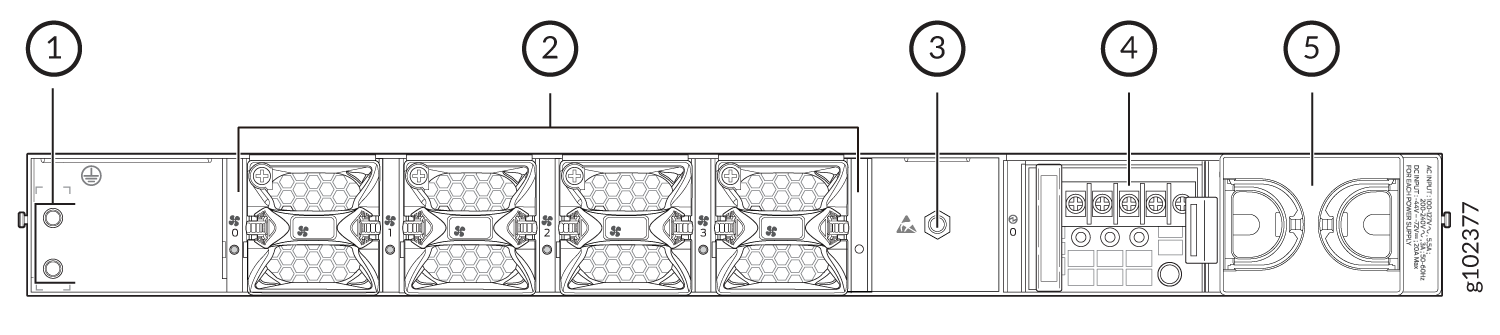
| Callout | Item | Description |
|---|---|---|
|
1 |
Grounding point |
Used to connect the device to earth ground. |
|
2 |
Fan modules |
Four airflow out (AFO) fan modules (3+1 redundancy). Three fan modules are required for proper airflow across the chassis internal components. The fourth fan module provides redundancy. |
|
3 |
ESD |
ESD socket |
|
4 |
PSU (Power Supply Unit) |
A 650W DC PSU is provided with the SRX4120. |
|
5 |
Empty PSU slot |
A blank slot to install an additional PSU (1+1 redundancy). |
We ship the SRX4120 with only one power supply. You can order the second power supply separately, if required.
You must not mix AC and DC power supplies in the same chassis.