
SRX400 Firewalls Chassis LEDs
This topic describes the status LEDs for the chassis and ports on the SRX400 Firewalls.
The LEDs on the SRX400 Firewalls indicate the status of the device and its components. You can also use the LEDs for troubleshooting.
Chassis Status LED
The System LED is a multi-color LED located on the front panel of the firewall. It provides a high level indicator of the firewall status.
| Component | LED | Color | Description |
|---|---|---|---|
|
System LED |
Status |
Multicolor |
Steady Green: Device is operating normally. |
|
Amber: Device is starting up. |
|||
|
Purple: Minor alarms |
|||
|
Red: Major alarms |
|||
|
Off: Device has shut down. |
SFP Network Port Status LEDs
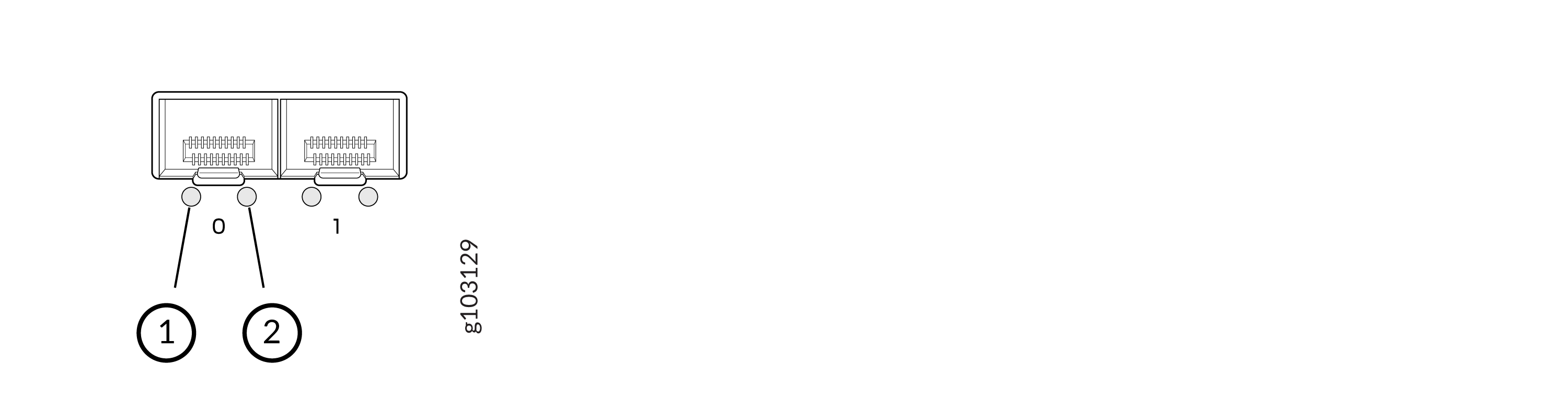
| Callout | LED | Color and State | Description |
|---|---|---|---|
|
1 |
Link Activity |
Blinking Green |
The port and the link are active, and there is link activity. |
|
Glowing steadily |
The port and the link are active, but there is no link activity. |
||
|
Unlit |
The port is inactive. |
||
|
2 |
Port speed |
Blinking Green |
1000 Mbps (1 blink per second) |
|
Unlit |
The port is inactive. |
RJ-45 Network Ports Status LEDs
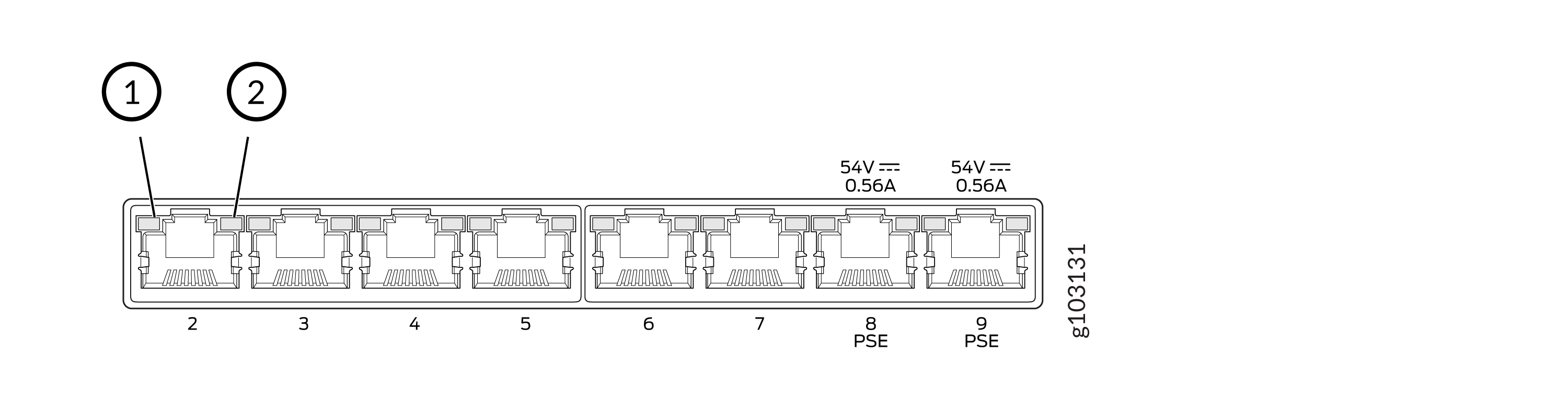
| Callout | LED | Port Parameters | Color and State | Description |
|---|---|---|---|---|
|
1 |
Link Activity |
— |
Blinking Green |
The port and the link are active, and there is link activity. |
|
Glowing steadily |
The port and the link are active, but there is no link activity. |
|||
|
Unlit |
The port is inactive. |
|||
|
2 |
Status |
Speed (SPD) |
Blinking Green |
100 Mbps (1 blink per second) |
|
Glowing steadily |
1000 Mbps |
|||
|
Unlit |
10 Mbps or the port is inactive |
MGMT Port Status LED
The MGMT port is located on the rear of the chassis and the two LEDs link activity and port speed.

| Callout | LED | Color and State | Description |
|---|---|---|---|
|
1 |
Link Activity |
Blinking Green |
The port and the link are active, and there is link activity. |
|
Glowing steadily |
The port and the link are active, but there is no link activity. |
||
|
Unlit |
The port is inactive. |
||
|
2 |
Status |
Blinking Green |
1000 Mbps (1 blink per second) |
|
Glowing steadily |
10 Mbps or 100 Mbps |
||
|
Unlit |
The link is down. |
Power Supply Adapter LED
The Power Supply Adapter (PSA) LED is located on the rear of the chassis to indicate the status of the PSA.
| LED | Color and State | Description |
|---|---|---|
|
Status |
Steady Green |
Receiving power |
|
Unlit |
Failure or no power |