
QFX5140 Site Guidelines and Requirements
QFX5140 Environmental Requirements and Specifications
The switch must be installed in a rack or cabinet in a dry, clean, well‑ventilated, and temperature‑controlled environment.
Follow these environmental guidelines:
-
Keep the installation site as dust‑free as possible. Dust can clog air intake vents and reduce cooling efficiency.
-
Ensure adequate ambient airflow. Restricted airflow or elevated intake temperatures can cause the switch to overheat and trigger protective shutdown.
Table 1 lists the supported environmental tolerances.
Description |
Tolerance |
|---|---|
Altitude |
|
Operating temperature |
32°F through 104°F (0°C through 40°C) |
Storage temperature |
–40°F through 158°F (–40°C through 70°C) |
Relative humidity |
5% through 90%, noncondensing |
Seismic |
Tested as per GR 63 ZONE 4. |
General Site Guidelines
Efficient device operation requires proper site planning. For the device to operate properly, you must ensure maintenance and proper layout of the equipment, rack or cabinet, and wiring closet.
To plan and create an acceptable operating environment for your device and prevent environmentally caused equipment failures:
Keep the area around the chassis free from dust and conductive material, such as metal flakes.
Follow the prescribed airflow guidelines to ensure that the cooling system functions properly. Ensure that the exhaust from other equipment does not blow into the intake vents of the device.
Follow the prescribed electrostatic discharge (ESD) prevention procedures to prevent damaging the equipment. Static discharge can cause components to fail completely or intermittently over time.
Install the device in a secure area, so that only authorized personnel can access the device.
QFX5140 Grounding Cable and Lug Specifications
For installations requiring a separate grounding conductor, the switch must be properly grounded before power is connected to meet safety and electromagnetic interference (EMI) requirements.
Always use the chassis grounding terminal to ground the switch. For AC systems, use the grounding conductor in the power cord in addition to the chassis grounding terminal.
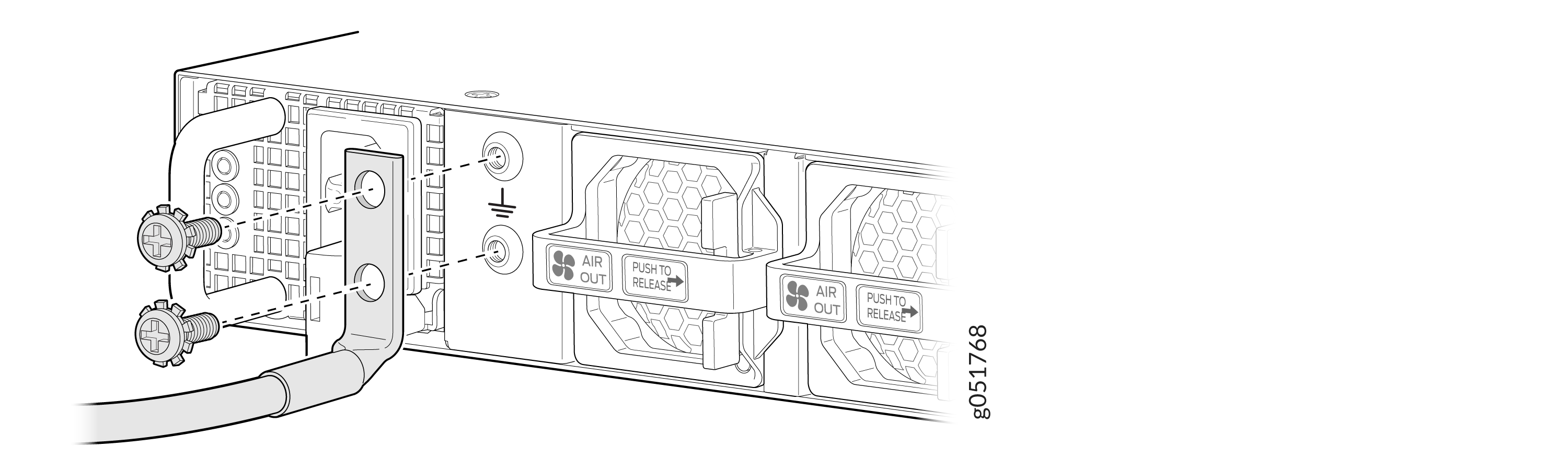
The QFX5140 is pluggable Type A equipment installed in a restricted‑access location and must be permanently connected to earth ground.
A licensed electrician must attach a cable lug to the grounding cable before installation. An incorrectly attached lug can damage the switch.
-
Use a two‑hole grounding lug equivalent to Panduit LCD10‑10A‑L (not provided).
-
Use a minimum 14‑AWG (2 mm²), 60°C grounding cable, or as required by local code.
QFX5140 Clearance Requirements for Airflow and Hardware Maintenance
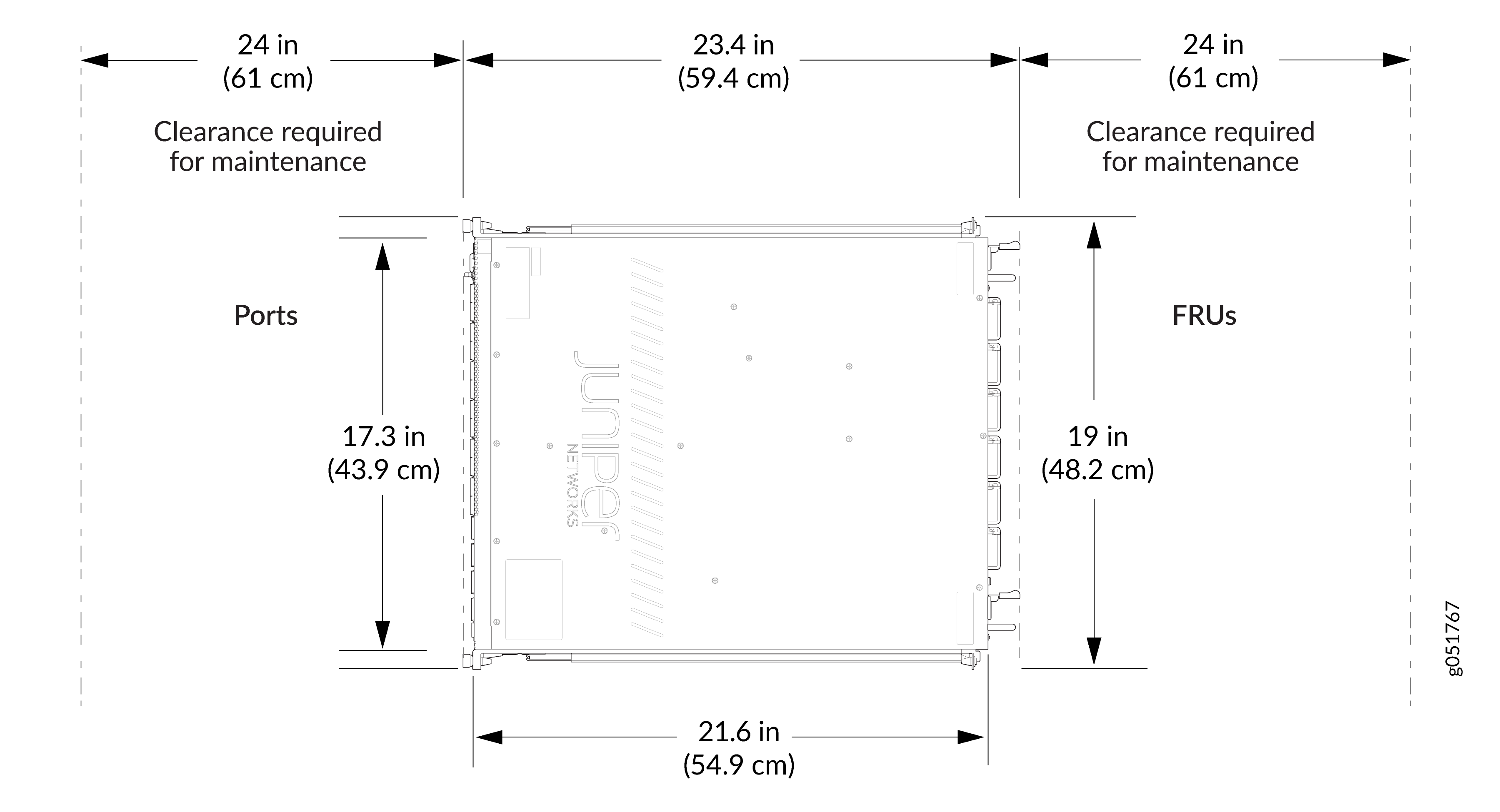
Provide sufficient clearance around the switch to ensure proper airflow and allow service personnel to replace hardware components.
-
Leave at least 24 in. (61 cm) of clearance at the front and rear of the chassis.
-
Align airflow direction with the data center hot‑aisle and cold‑aisle layout.
-
Ensure exhaust air from adjacent equipment does not enter the intake vents.
QFX5140 Rack Requirements
QFX5140 switches are designed for installation in four‑post racks.
Requirement |
Guidelines |
|---|---|
Rack type |
Four‑post rack with 1‑U (1.75 in. / 4.45 cm) hole spacing. |
Rail spacing |
Front‑to‑rear rail spacing between 23.6 in. and 36 in. (60 cm to 91.4 cm). |
Structural support |
Rack must support the full weight of the switch with power supplies and fans installed. |
QFX5140 Cabinet Requirements
The switch can be installed in a cabinet that contains a four‑post 19‑in. rack.
Requirement |
Guidelines |
|---|---|
Depth |
Minimum cabinet depth of 36 in. (91.4 cm) recommended. |
Airflow |
Ensure adequate ventilation to prevent hot air recirculation and overheating. |
Site Electrical Wiring Guidelines
Table 4 describes the factors you must consider while planning the electrical wiring at your site.
You must provide a properly grounded and shielded environment and use electrical surge-suppression devices.
Avertissement Vous devez établir un environnement protégé et convenablement mis à la terre et utiliser des dispositifs de parasurtension.
|
Site Wiring Factor |
Guidelines |
|---|---|
|
Signaling limitations |
If your site experiences any of the following problems, consult experts in electrical surge suppression and shielding:
|
|
Radio frequency interference |
To reduce or eliminate RFI from your site wiring, do the following:
|
|
Electromagnetic compatibility |
If your site is susceptible to problems with electromagnetic compatibility (EMC), particularly from lightning or radio transmitters, seek expert advice. Strong sources of electromagnetic interference (EMI) can cause:
|