
Contact Customer Support and Return the Chassis or Components
If you need to return a hardware component to Juniper Networks, Inc., you need a Return Material Authorization (RMA) number and the equipment serial number. Contact the Juniper Networks Technical Assistance Center (JTAC) to generate an RMA number. You may also need to locate the chassis or component details using the CLI or by referring to equipment labels. You then pack and ship the component.
Contact Customer Support
You can contact JTAC 24 hours a day, seven days a week.
| Chat |
Use the Ask me icon at the bottom right of the Support page. Don't see the Chat icon? Read this. |
| Web | |
| Telephone |
U.S. and Canada (Toll-free): 1-888-314-JTAC (5822) Outside the US or Canada, use the relevant country number listed on the regional tabs listed on the Contact Support page. Federal Government Support: 1-833-900-1454 |
We do not support opening new cases through e-mail. Please use one of the above options to contact JTAC.
Return a Hardware Component to Juniper Networks
If a hardware component fails, contact Juniper Networks to obtain an RMA number. We use this number to track the returned material at the factory and to return the repaired or new components to you, as needed.
Do not return any component to Juniper Networks unless you have first obtained an RMA number. Juniper Networks reserves the right to refuse shipments that do not have an RMA number. Refused shipments are returned to you by collect freight.
To return a defective hardware component:
- Determine the part number and the serial number of the defective component. See Locate the Serial Number of the PTX10002-60MR or its Components.
- Obtain an RMA number from JTAC as described in Request a Return Material Authorization.
- Pack the component for shipment. See Guidelines for Packing and Shipping Hardware Components.
For more information about return and repair policies, see the Support page at https://support.juniper.net/support/.
Locate the Serial Number of the PTX10002-60MR or its Components
If the router is operational and you can access the CLI, you can list serial numbers
for the router and for some components with a CLI command - show chassis
hardware. If you don’t have access to the CLI, or if the serial number
for the component doesn’t appear in the command output, you can locate the serial
number ID label on the router or component.
If you want to find the serial number ID label on a component, you need to remove the component from the router chassis.
- List the PTX10002-60MR Chassis and Component Details Using the CLI
- Locate the Chassis Serial Number ID Label
- Locate the Serial Number ID Label on the AC/HVAC/HVDC Power Supply Module
- Locate the Serial Number ID Label on the DC Power Supply Module
- Locate the Serial Number ID Label on the Fan Tray
List the PTX10002-60MR Chassis and Component Details Using the CLI
To list the router and router components and their serial numbers, enter the
show chassis hardware command on the CLI.
host@device> show chassis hardware
Hardware inventory:
Item             Version  Part number  Serial number     Description
Chassis                                JA384             PTX10002-60MR [PTX10002-60MR]
FPM 0            REV 01   711-183788   BCGN0741          FPM-PTX10002
PSM 0            REV 10   740-073765   1GE2D347952       AC AFO 2200W PSM
PSM 1            REV 02   740-148504   1GH5E490532       AC AFO 2200W PSM
Routing Engine 0          BUILTIN      BUILTIN           RE-PTX10002-60MR
CB 0             REV 04   750-182877   BCGM2789          Control Board
FPC 0            REV 04   750-187625   BCGM1578          FPC-PTX10002-60MR
  PIC 0                   BUILTIN      BUILTIN           12x800GE 48x100GE PIC
    Xcvr 0       REV 01   740-067443   1ACP13131K5       QSFP+-40G-SR4
    Xcvr 8       REV 01   740-067443   1ACP16280DJ       QSFP+-40G-SR4
    Xcvr 12      REV 01   740-067443   1ACP162806B       QSFP+-40G-SR4
    Xcvr 16      REV 02   740-067442   1A2CP1A63811L     QSFP+-40G-SR4
    Xcvr 24      REV 01   740-054053   2E1TP3AA0711M     QSFP+-4X10G-SR
    Xcvr 25      REV 01   740-054053   2E1TP3AA0711W     QSFP+-4X10G-SR
    Xcvr 36      REV 02   740-067442   1A2CP1A6272EV     QSFP+-40G-SR4
    Xcvr 40      REV 01   740-067443   QI4102DP          QSFP+-40G-SR4
FTC 0            REV 02   711-183786   BCGM1740          Fan Control Board
Fan Tray 0       REV 02   760-187795   BCGP9042          PTX10002 Fan Tray, Front to Back Airflow - AFO
Fan Tray 1       REV 02   760-187795   BCGP9054          PTX10002 Fan Tray, Front to Back Airflow - AFO
Fan Tray 2       REV 02   760-187795   BCGP9045          PTX10002 Fan Tray, Front to Back Airflow - AFO
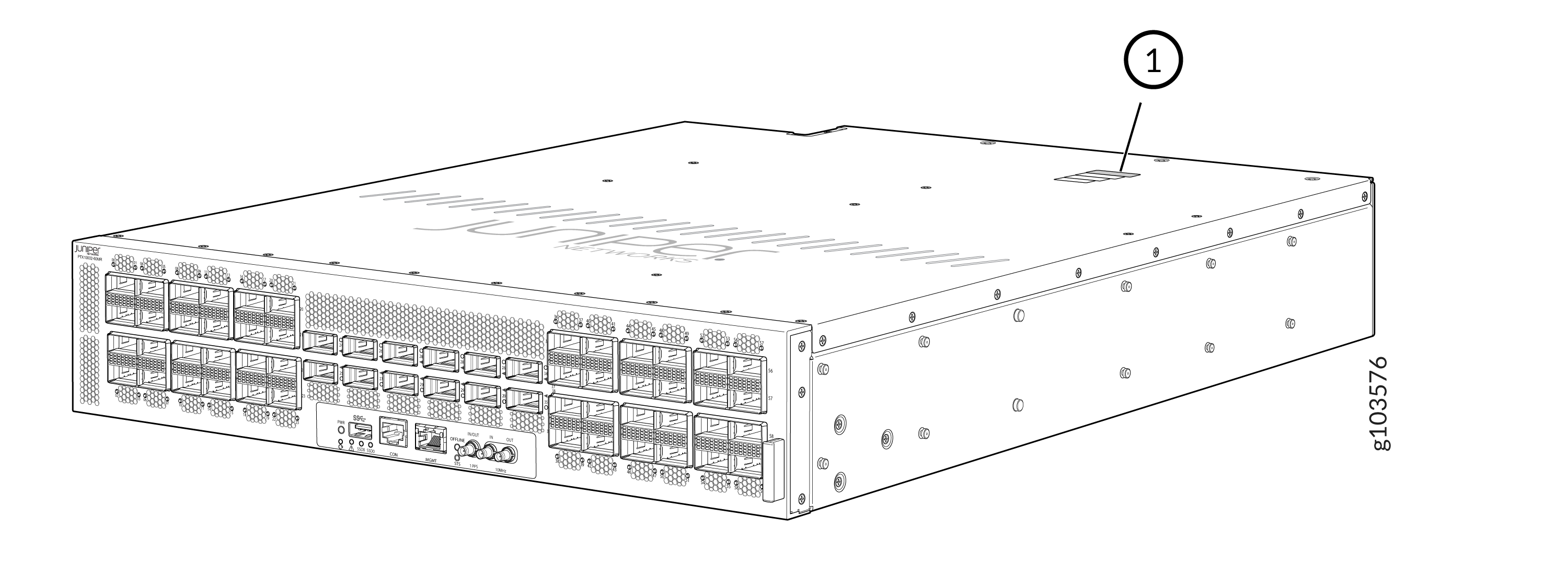
Locate the Chassis Serial Number ID Label
You can find the serial number ID label on the right-hand side of the chassis.
Locate the Serial Number ID Label on the AC/HVAC/HVDC Power Supply Module
You can find the serial number ID label on the top side of the AC/HVAC/HVDC power supply module (PSM).
The PSMs are supplied by two suppliers. The name of the supplier is displayed on the serial number ID label.
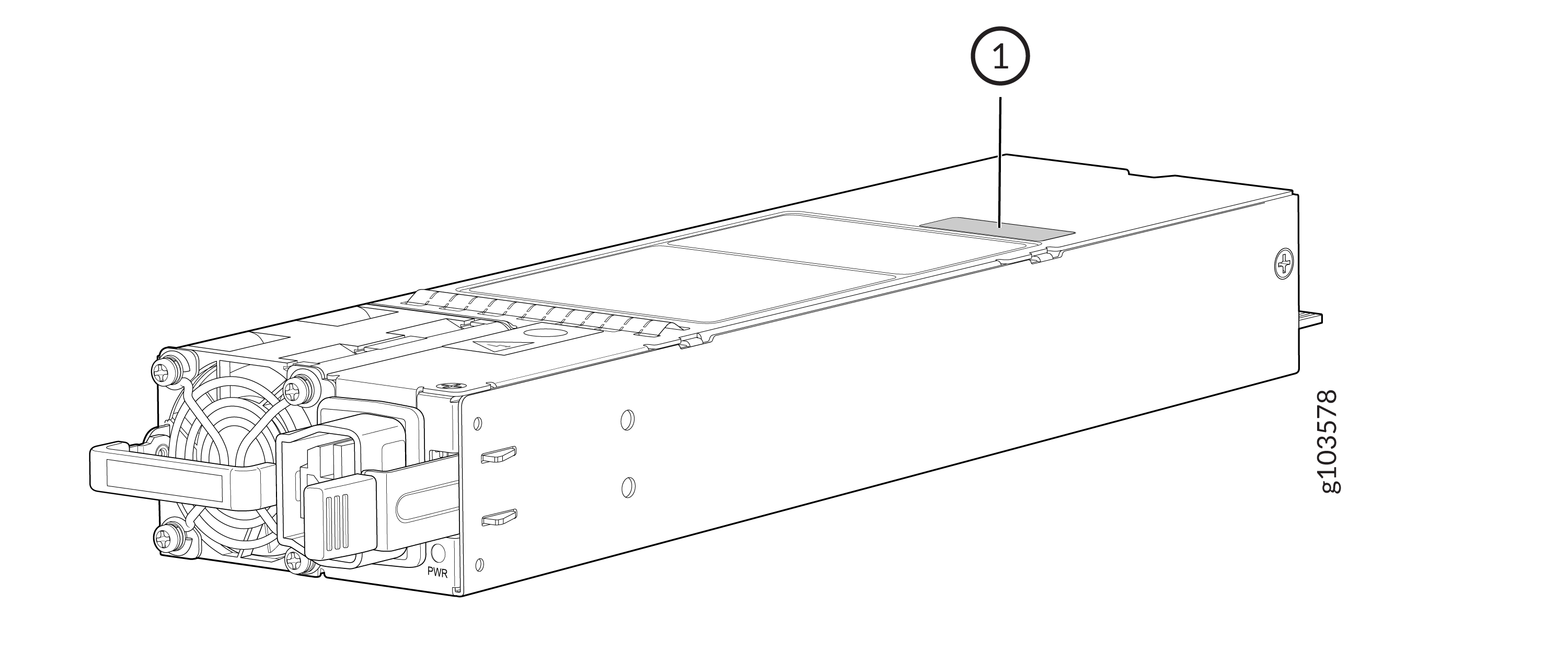
1 — Serial number ID label |
Locate the Serial Number ID Label on the DC Power Supply Module
You can find the serial number ID label on the top side of the DC PSM.
The PSMs are supplied by two suppliers. The name of the supplier is displayed on the serial number ID label.
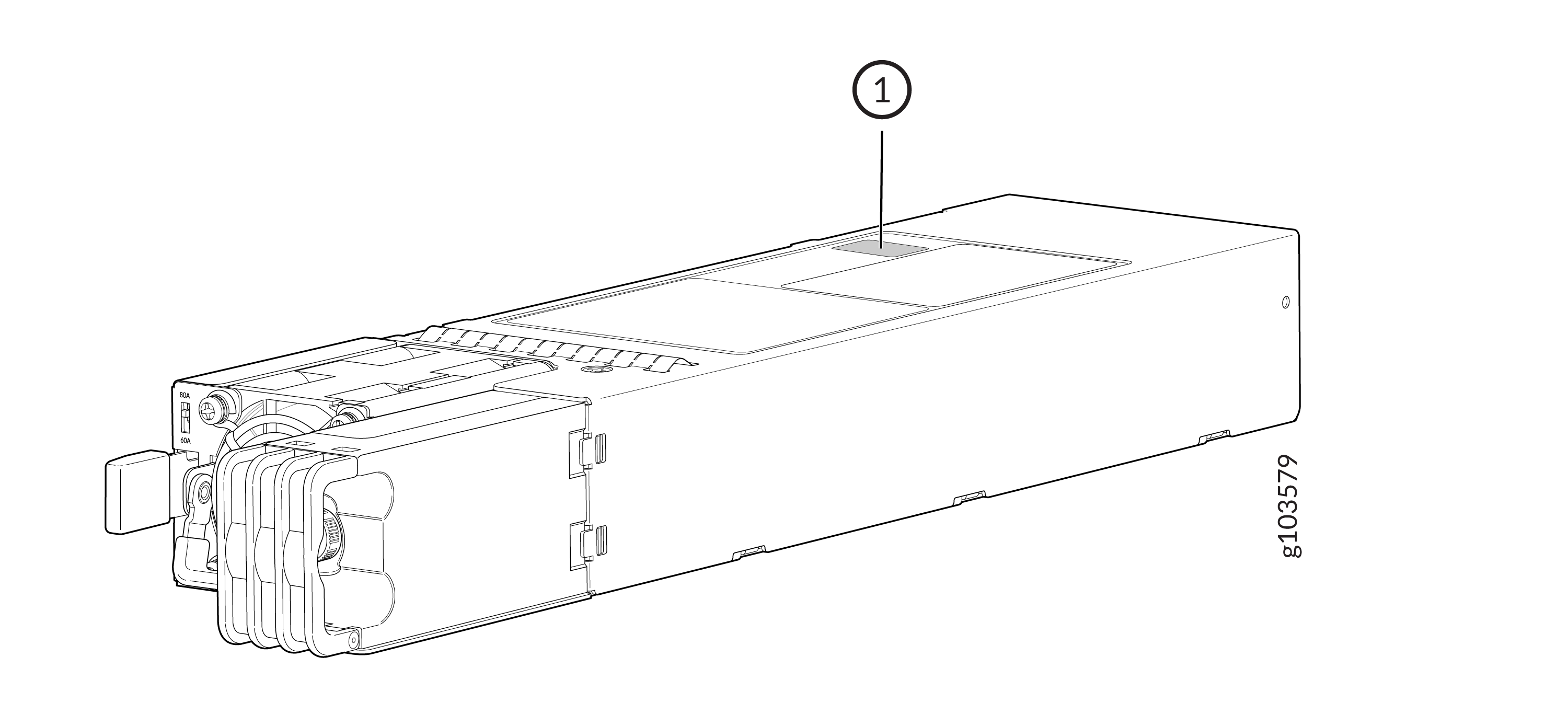
1 — Serial number ID label |
Locate the Serial Number ID Label on the Fan Tray
You can find the serial number ID label on the top side of the fan tray.
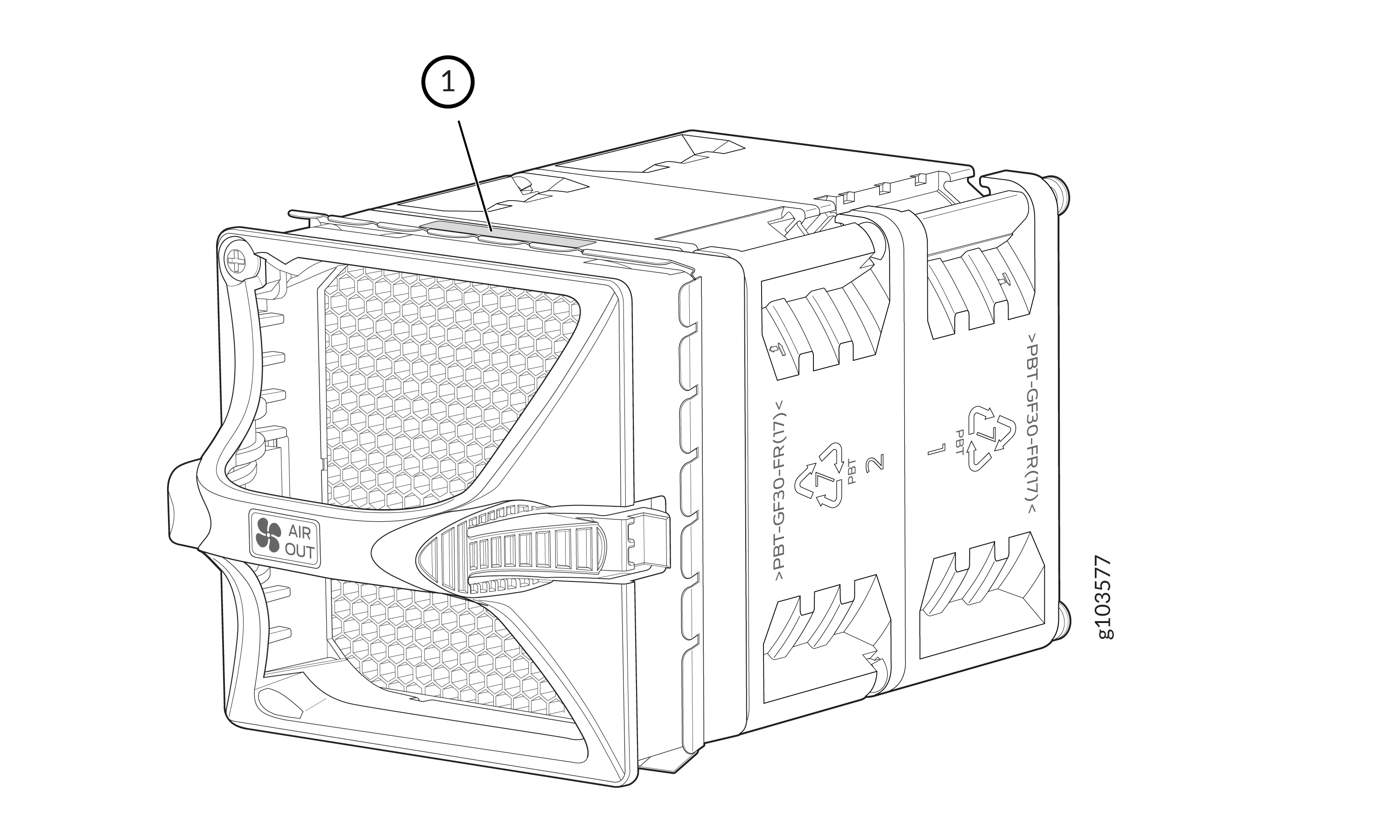
1 — Serial number ID label |
Request a Return Material Authorization
If you are returning a device or hardware component to Juniper Networks for repair or replacement, obtain an RMA number from JTAC.
Before you request an RMA from JTAC, be prepared to provide the following information:
-
Your existing service request number, if you have one
-
Serial number of the device or component
-
Your name, organization name, telephone number, fax number, and shipping address
-
Details of the failure or problem
-
Type of activity you were performing on the device when the problem occurred
-
Configuration data displayed by one or more
showcommands
If you're contacting JTAC by telephone:
-
To report a new incident, press the star (*) key to be routed to the next available support engineer.
-
To enquire about an existing case, enter your 12-digit service request number followed by the pound (#) key.
The support representative validates your request and issues an RMA number for return of the device or component.
Guidelines for Packing and Shipping Hardware Components
When you return the chassis or components:
- Make sure to adequately protect them with packing materials. Pack them properly to prevent the pieces from moving around the carton.
- Use the original shipping materials, if they are available.
- Place the individual components in antistatic bags.
- Write the RMA number on the exterior of the box to ensure proper tracking.