
ON THIS PAGE
MX301 and MX301-M Cooling System
The cooling systems on the MX301 and MX301-M work together to keep the temperature of all internal components within the acceptable range. The cooling system components in the MX301 and MX301-M include fan modules and power supply cooling systems.
The MX301 and MX301-M routers includes six fan modules (JNP-FAN3-1RU) that support 5+1 redundancy. Each fan module uses two 40 mm x 40 mm counter-rotating fans.
The fan modules in the MX301 and MX301-M are hot-insertable and hot-removable field-replaceable units (FRUs). You can install the fans in the fan module slots on the rear of the chassis. The fans are numbered 0 through 5 starting from the fan module closest to the grounding points on the chassis.
Airflow
The MX301 and MX301-M have a front-to-back (AIR OUT) cooling system.
In a front-to-back cooling system, cool air enters through the front vents. The fan modules then exhaust hot air through the rear of the chassis. Figure 1 shows the airflow through the MX301 and MX301-M chassis.
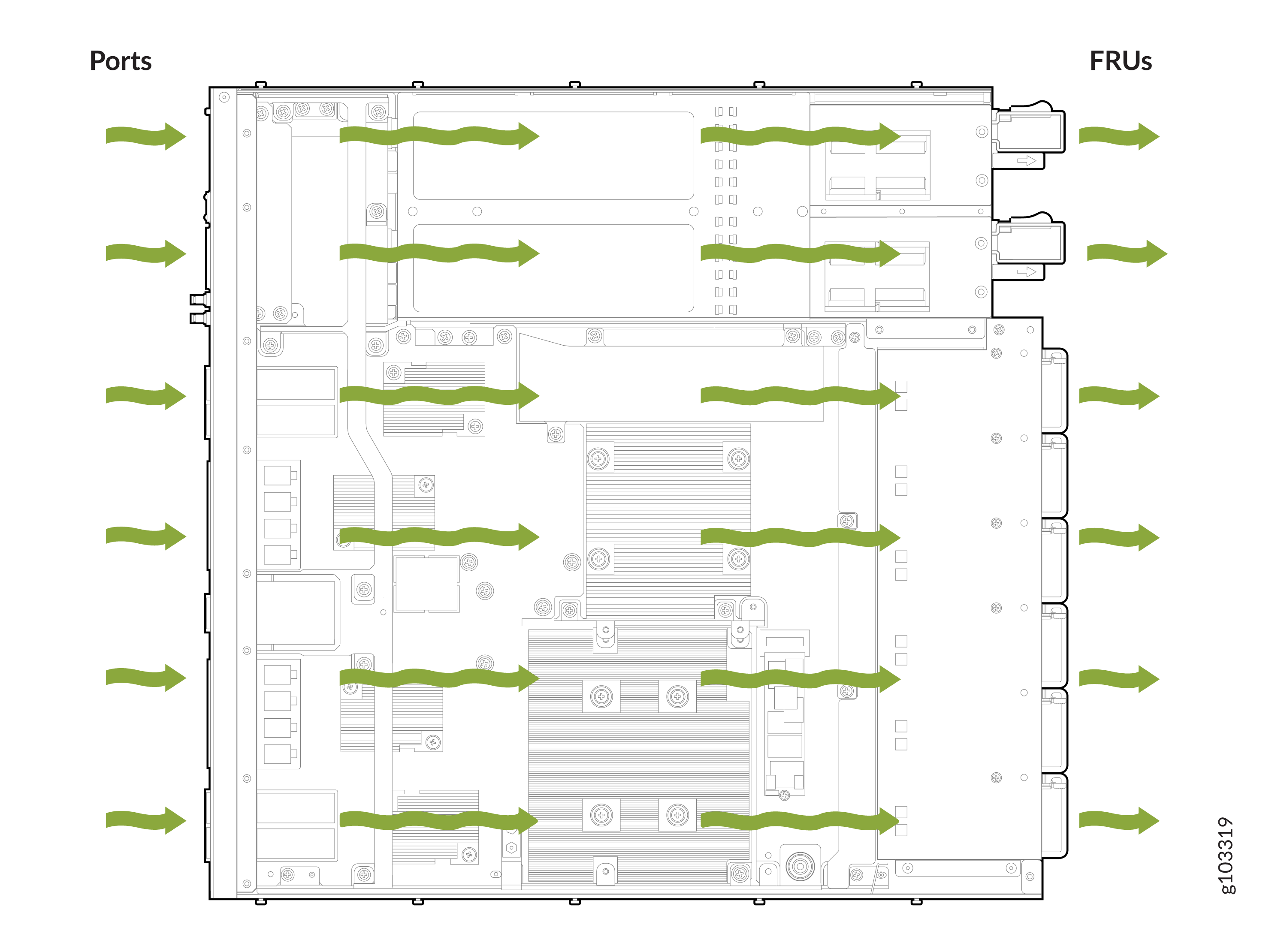
Temperature sensors in the chassis monitor the temperature within the chassis. Under normal operating conditions, the fan modules operate at a moderate speed. If a fan fails, the speed of the remaining fans is automatically adjusted to keep the temperature within the acceptable range. If the ambient temperature rises above a threshold, similarly, fan speeds are automatically adjusted to maintain the acceptable temperature range. If the ambient temperature exceeds the specified threshold and the system cannot adequately cool down, the Routing Engine shuts down the router by disabling output power from each power supply.
If one of the fans in a fan module fails, the MX301 and MX301-M routers will raise an alarm for the fan tray slot with the failed fan. The router will however continue to operate without issues. You can leave the fan module with the failed fan in the chassis until a replacement fan module is available. When a replacement fan module is available and if the router is online, you can replace one fan module at a time. During replacement, the router will raise a major alarm for the missing fan module and continue to operate for a certain period after which the router will shut down. For information on how long you can safely replace a fan module under different optics and temperature settings, see Table 1. To avoid the router from shutting down, you must replace the fan module within this time.
If you remove more than one fan module while the router is online, the router will shut down within 30 seconds.
To avoid disturbing the airflow and cooling, don't operate the router when a fan module is removed.
| Optics | Ambient Temperature (at Sea Level) | Time Available to Replace a Fan Module (Seconds) |
|---|---|---|
|
Up to 100G |
25 °C (77 °F) |
600 |
|
40 °C (104 °F) |
240 |
|
|
55 °C (131 °F) |
60 |
|
|
400G |
25 °C (77 °F) |
500 |
|
40 °C (104 °F) |
30 |
Power Supply Cooling System
The power supply units (PSUs) are self-cooling with inbuilt fans. The PSUs are located at the rear of the MX301 and MX301-M. A baffle directs airflow through an isolated air channel from the front of the chassis specifically to help the PSUs maintain thermal requirements.
JNP-FAN3-1RU
Figure 2 shows the location of the fan modules on the back panel of the MX301 and MX301-M.
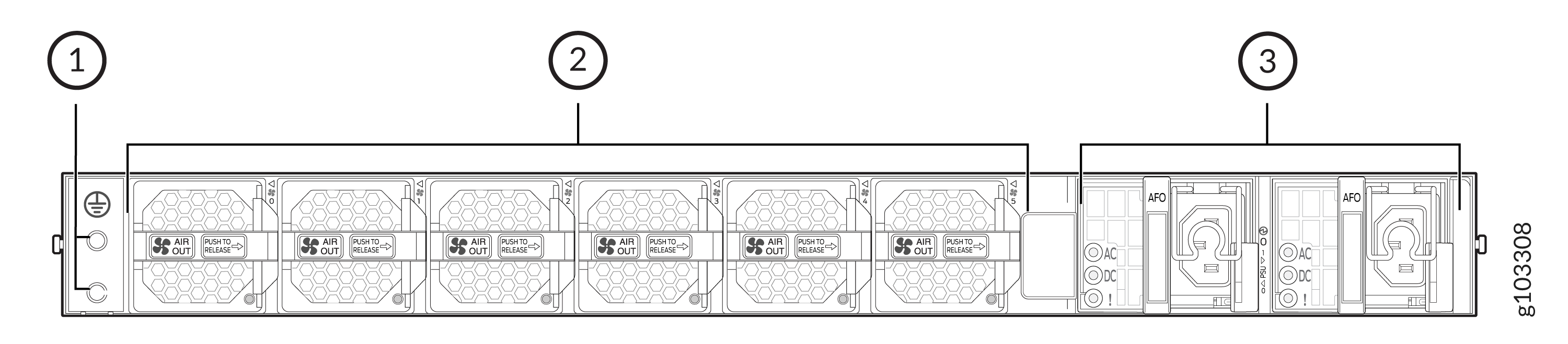
1 — Grounding point | 3 — Power supply module (2 units) - AC variant |
2 — Fan modules (6 units) |
Figure 3 shows the JNP-FAN3-1RU fan module.
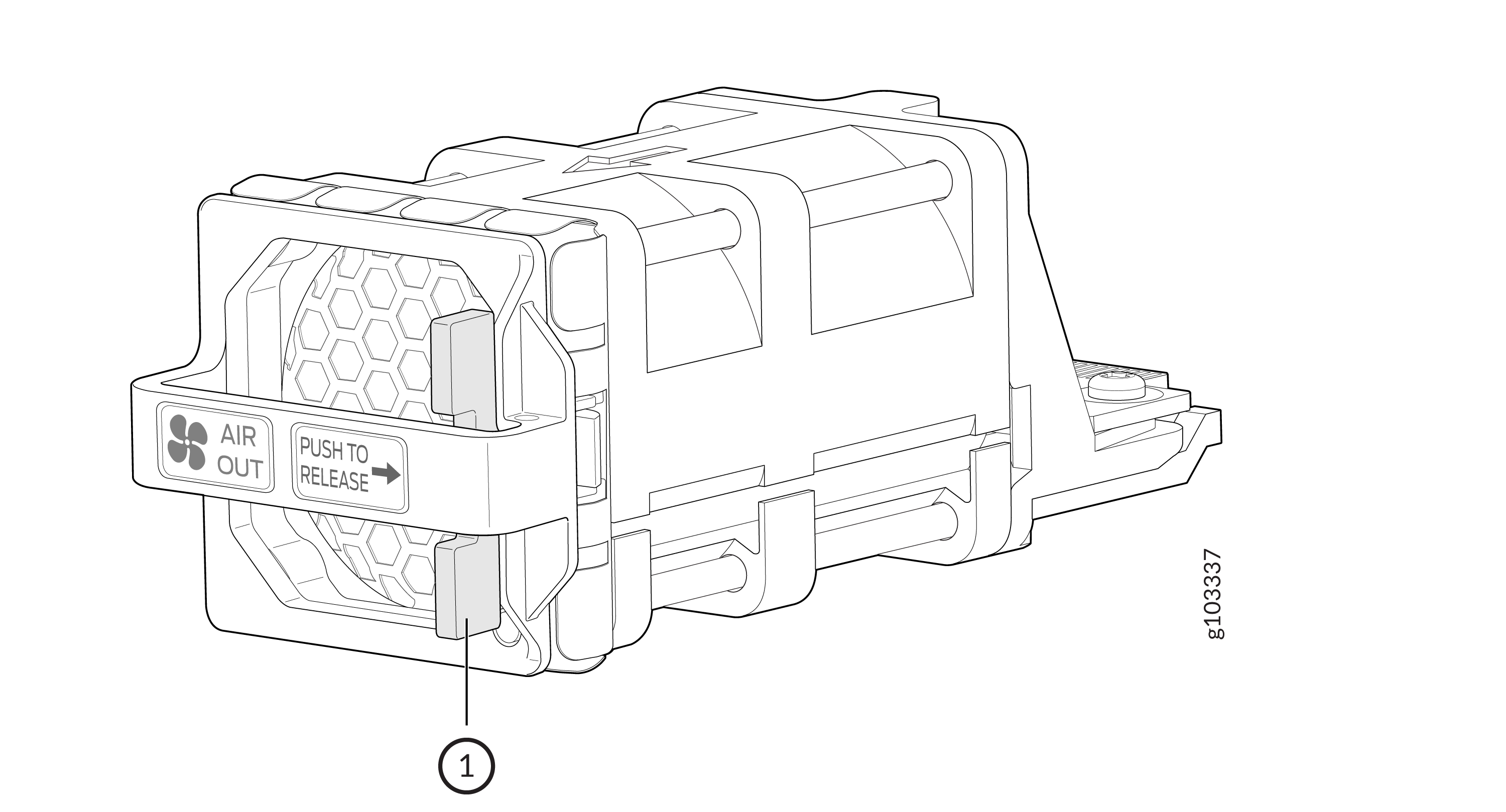
The AIR OUT label and the Juniper Gold handle indicates front-to-back airflow.
Table 2 shows the components of the JNP-FAN3-1RU fan module.
| Callout | Name |
|---|---|
|
1 |
Release latch |
JNP-FAN3-1RU Specifications
| Specification | Value |
|---|---|
|
Height |
1.57 in. (3.98 cm) |
|
Width |
1.57 in. (3.98 cm) |
|
Depth |
4.46 in. (11.33 cm) |
|
Weight |
0.264 lb (0.12 kg) per unit |
|
Airflow |
AFO |
Table 4 shows the power requirements for the fan module.
| Specification | Value |
|---|---|
|
Maximum power requirement |
112 W (18.6 W per unit) |
|
Typical power requirement |
33 W (5.5 W per unit) |
JNP-FAN3-1RU LED
You can check the status of each fan module through the show chassis
temperature-thresholds, show system alarms, or show
chassis environment commands. You can also check the status by looking at the LED
of each fan module. The LED is positioned beneath the handle of the fan module, on the right
side.
Figure 4 shows the location of the LED on the fan module.
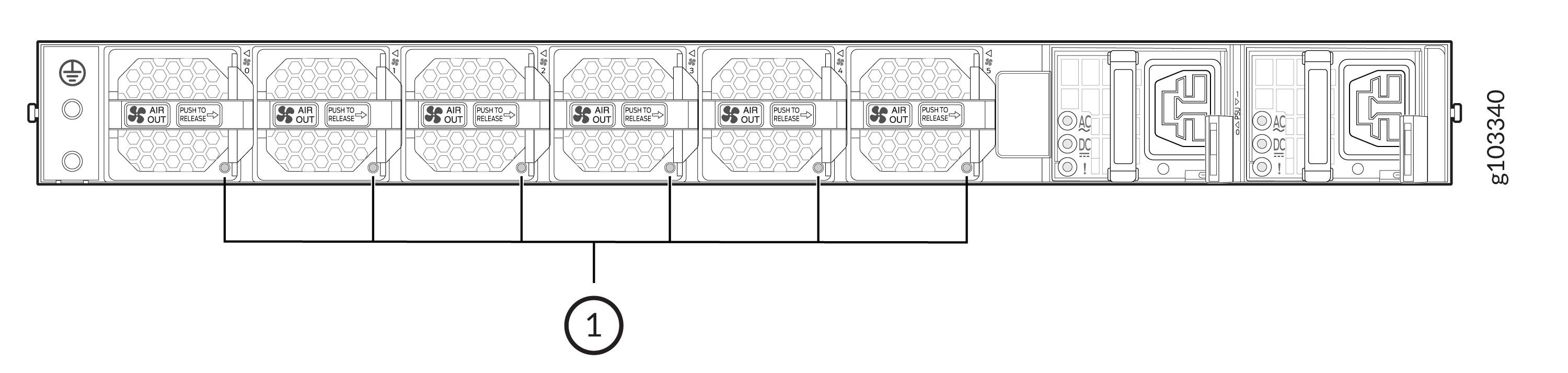
Table 5 describes the JNP-FAN3-1RU fan module status LED.
| Callout | LED Color | State | Description |
|---|---|---|---|
|
1 |
Green |
Blinking |
Fan module hardware initialization is complete and software initialization is in progress. |
|
On steadily |
Fan module is functioning normally. |
||
|
Red |
On steadily |
The system has detected an error in the fan module. Either a fan in the fan module has failed, or the fan module is seated incorrectly. If the fan has failed, replace the fan module immediately. To maintain proper airflow through the chassis, leave the fan module installed in the chassis until you are ready to replace it. |
|
|
Unlit |
Off |
Fan module is not present, or the fan module is powered off. |
You can also get information about the fan modules using the show chassis
fan command. Here is an example of the CLI output:
MX301 and MX301-M with Six Fan Modules
user@device> show chassis fan
Item                      Status   % RPM     Measurement
Fan Tray 0 Fan 0          OK       31%       6600 RPM
Fan Tray 0 Fan 1          OK       31%       6000 RPM
Fan Tray 1 Fan 0          OK       31%       6600 RPM
Fan Tray 1 Fan 1          OK       33%       6300 RPM
Fan Tray 2 Fan 0          OK       30%       6300 RPM
Fan Tray 2 Fan 1          OK       31%       6000 RPM
Fan Tray 3 Fan 0          OK       31%       6600 RPM
Fan Tray 3 Fan 1          OK       31%       6000 RPM
Fan Tray 4 Fan 0          OK       31%       6600 RPM
Fan Tray 4 Fan 1          OK       31%       6000 RPM
Fan Tray 5 Fan 0          OK       31%       6600 RPM
Fan Tray 5 Fan 1          OK       31%       6000 RPM