
Ports and Interfaces
This topic describes the ports on the and their corresponding interfaces.
Network Ports on the
The support a maximum throughput of 1.6 Tbps through the WAN ports located in the front panel. A total of 26 WAN ports exist, divided into four groups. Each group is capable of a maximum of 400-Gbps throughput (see Figure 1). Depending on the optics and the ports used, the router can support speeds of 400 Gbps, 100 Gbps, 50 Gbps, 40 Gbps, 25 Gbps, 10 Gbps, and 1 Gbps.
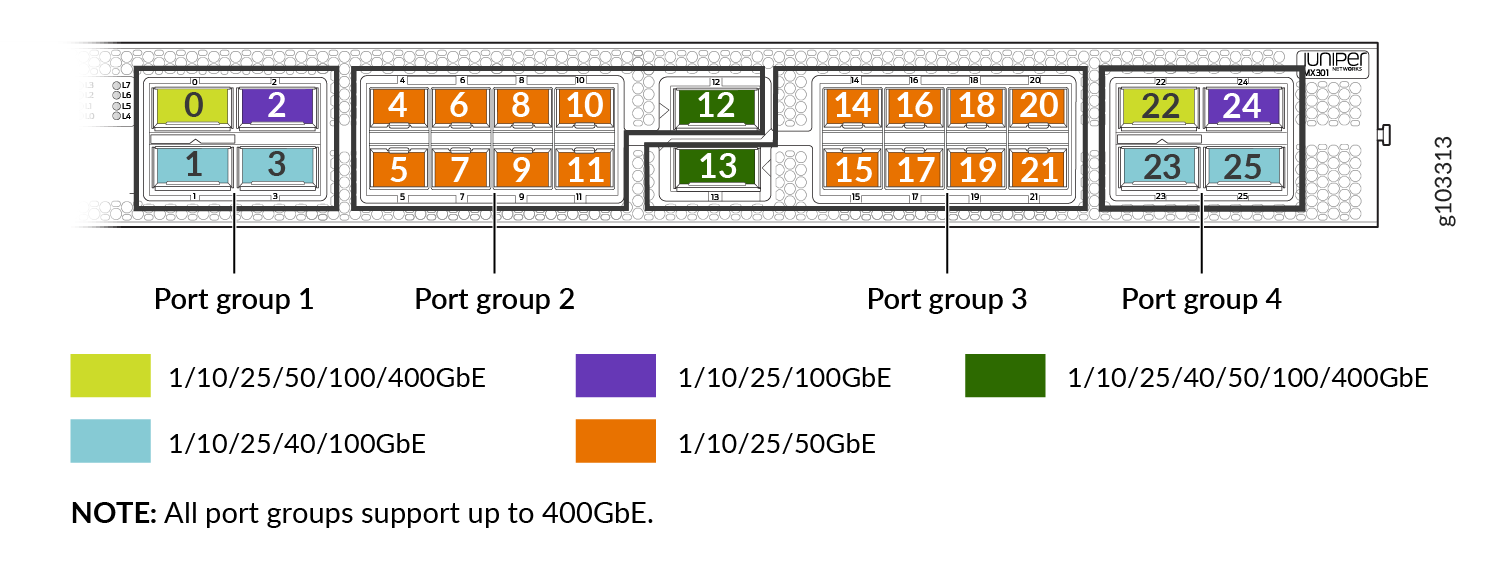
Table 1 summarizes the port speed capability of .
| Form Factor | Port Component | Port Count | Port Number | Speeds Supported |
|---|---|---|---|---|
|
QSFP |
QSFP56-DD |
2 |
0, 22 |
|
|
2 |
12, 13 |
|
||
|
QSFP28 |
4 |
1, 3, 23, 25 |
|
|
|
2 |
2, 24 |
|
||
|
SFP |
SFP, SFP+, SFP28, SFP56 |
16 |
4–11, 14–21 |
|
See the Port Checker Tool for information on port combinations, port speeds, and channelizations supported on the .
See the Hardware Compatibility Tool for a list of all supported optics for the .
Interface Naming on the
The ports on the have interfaces associated with them in . These interfaces follow the naming convention described below:
type-fpc/pic/port:channel
-
type—Media type of the interface. For some interfaces, the media type depends on the transceiver plugged into the physical port.
-
ge—1 Gigabit Ethernet (GbE) interface
-
xe—10 GbE interface
-
et—25/40/50/100/200/400 GbE interfaces
-
-
fpc—Flexible PIC Concentrator. On the , FPC number is 0.
-
pic—Physical Interface Card. On the , PIC number is 0.
-
port—You can check the port number from the front panel of the .
-
channel—Applicable only for channelized interfaces.
Interfaces on the
Each network port on the has a unique interface on associated with it.
You can use the show chassis hardware and show interfaces
terse commands to view the hardware, installed transceivers, and corresponding
interfaces.
The example below shows the actual hardware or transceivers plugged into a device and how creates the corresponding interfaces. The output has been truncated to only show the relevant sections.
Output of show chassis hardware command on MX301:
host@device> show chassis hardware
Hardware inventory:
Item             Version  Part number  Serial number     Description
Chassis                                RF497             JNP301 [MX301]
Routing Engine 0          BUILTIN      BUILTIN           RE 3500 10C 128G
CB 0             REV 31   750-182793   EBBZ2126          Control Board
FPC 0                     BUILTIN      BUILTIN           FPC-BUILTIN
  PIC 0                   BUILTIN      BUILTIN           MRATE PIC 4x400G/14x100G/8x50G
    Xcvr 2       REV 01   740-061001   1P1C42A615257     QSFP28-100G-CU3M
    Xcvr 4       REV 02   740-011613   AM15372BEJD       SFP-SX
    Xcvr 5       REV 02   740-011613   PH34NPC           SFP-SX
    Xcvr 6       REV 01   740-031980   APG1HNF           SFP+-10G-SR
    Xcvr 7       REV 01   740-011613   PDL07BM           SFP-SX
    Xcvr 8       REV 02   740-011613   PPH0HX8           SFP-SX
    Xcvr 10      REV 02   740-011613   PJH4R1A           SFP-SX
    Xcvr 11      REV 02   740-013111   D332818           SFP-T
    Xcvr 13      REV 01   740-085351   1F2CZ7A72300E     QSFP56-DD-400GBASE-DR4
    Xcvr 22      REV 04   740-157132   2E4CZFAA19002     QSFP56-DD-400G-ZR
    Xcvr 23      REV 01   740-061405   1A3CQ1A8210HP     QSFP-100GBASE-SR4
Output of show chassis hardware command on MX301-M:
host@device> show chassis hardware
Hardware inventory:
Item             Version  Part number  Serial number     Description
Chassis                                RF468             JNP301 [MX301]
Routing Engine 0          BUILTIN      BUILTIN           RE 3500 10C 64G
CB 0             REV 31   750-182793   EBBZ2114          Control Board
FPC 0                     BUILTIN      BUILTIN           FPC-BUILTIN
  PIC 0                   BUILTIN      BUILTIN           MRATE PIC 4x400G/14x100G/8x50G
    Xcvr 4       REV 01   740-031980   NCEAU0P           SFP+-10G-SR
    Xcvr 5       REV 01   740-031980   ARQ0X46           SFP+-10G-SR
    Xcvr 6       REV 01   740-021308   NDKAH98           SFP+-10G-SR
    Xcvr 7       REV 01   740-021308   NDJCN5K           SFP+-10G-SR
    Xcvr 8       REV 01   740-021308   NDJCMZ9           SFP+-10G-SR
    Xcvr 9       REV 01   740-021308   NDKAX6Q           SFP+-10G-SR
    Xcvr 10      REV 01   740-031980   AMS0UXA           SFP+-10G-SR
    Xcvr 11      REV 01   740-031980   NCDCL94           SFP+-10G-SR
    Xcvr 14      REV 01   740-031980   NCEBVRS           SFP+-10G-SR
    Xcvr 15      REV 01   740-021308   NDJA34B           SFP+-10G-SR
    Xcvr 16      REV 01   740-021308   NDKA5SV           SFP+-10G-SR
    Xcvr 17      REV 01   740-021308   NDJAP92           SFP+-10G-SR
    Xcvr 20      REV 01   740-031980   NCEBW3K           SFP+-10G-SR
    Xcvr 21      REV 01   740-031980   NCEBX5L           SFP+-10G-SR
    Xcvr 23      REV 01   740-067443   XWR0RYY           QSFP+-40G-SR4
    Xcvr 24      REV 02   740-013111   A273163           SFP-T
Output of show interfaces terse command on :
host@device> show interfaces terse
Interface               Admin Link Proto    Local                 Remote
ge-0/0/4                up    up
ge-0/0/4.16386          up    up
ge-0/0/5                up    up
ge-0/0/5.16386          up    up
xe-0/0/6:0              up    up
xe-0/0/6:0.16386        up    up
ge-0/0/7                up    up
ge-0/0/7.16386          up    up
ge-0/0/8                up    up
ge-0/0/8.16386          up    up
ge-0/0/10               up    up
ge-0/0/10.16386         up    up
et-0/0/13:0             up    up
et-0/0/13:0.16386       up    up
et-0/0/13:1             up    up
et-0/0/13:1.16386       up    up
et-0/0/13:2             up    up
et-0/0/13:2.16386       up    up
et-0/0/13:3             up    up
et-0/0/13:3.16386       up    up