
MX301 and MX301-M Chassis
Learn about the components in the MX301 and MX301-M chassis.
The MX301 and MX301-M chassis is a rigid sheet-metal structure that houses all components of the device.
MX301 and MX301-M Specifications
Starting from 26.2R1, the MX301 and MX301-M router will always operate in normal mode.
| Specification | Value |
|---|---|
|
Height |
1.75 in. (4.45 cm) |
|
Width |
17.28 in. (44 cm) |
|
Depth |
17.71 in. (45 cm) |
|
Weight |
As shipped: 34.81 lb (15.79 kg) Fully-loaded:
|
| Specification | Value |
|---|---|
|
Operating altitude |
0 ft to 6000 ft (0 m to 1829 m) |
|
Operating temperature |
With 100G optics and below:
With 400G optics:
|
|
Storage temperature |
-40 °C to 70 °C (-40 °F to 158 °F) |
|
Relative humidity (operating) (noncondensing) |
5% to 90% |
|
Relative humidity (nonoperating) (noncondensing) |
5% to 90% |
|
Seismic tolerance |
Designed to meet Telcordia Technologies Zone 4 earthquake requirements. |
|
Average Thermal Output |
300 W x 3.412 = 1024 BTU/hour |
|
Acoustic noise level |
Typical: 58 through 67 dBA |
MX301 and MX301-M Front Panel
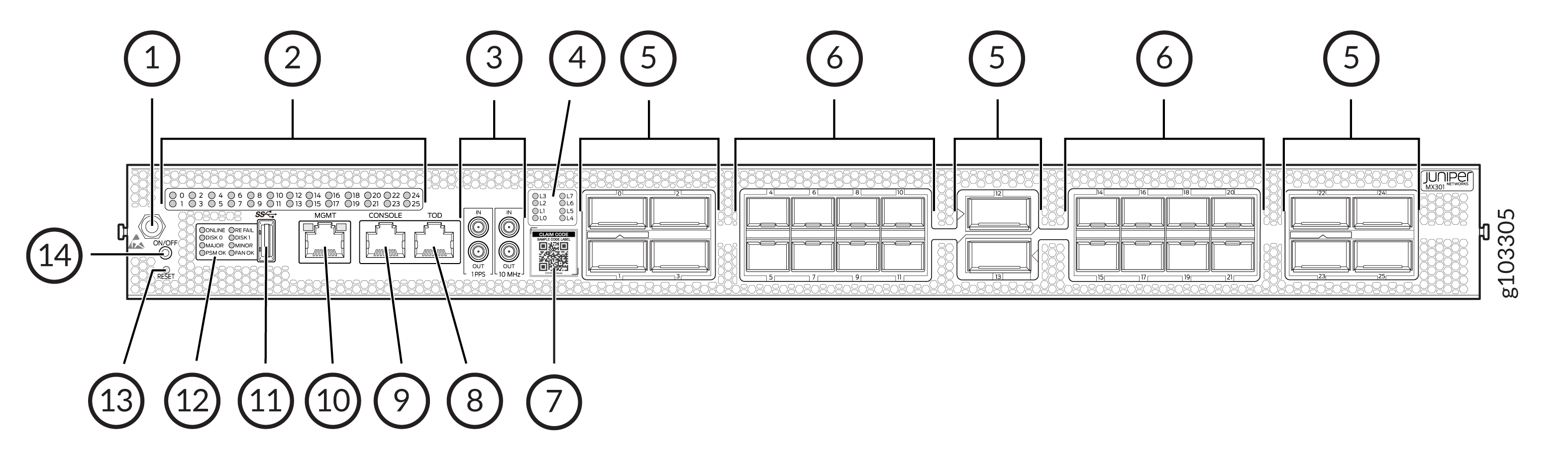
| Callout | Item | Description |
|---|---|---|
|
1 |
ESD point |
Electrostatic discharge (ESD) point. |
|
2 |
WAN port LEDs |
26 LEDs (labeled 0–25) to indicate the status of each of the 26 network ports. |
|
3 |
1PPS and 10 MHz GPS input and output ports |
1-PPS and 10-MHz input and output external clocking ports with DIN connectors. |
|
4 |
Lane LEDs |
Eight LEDs (labeled L0–L7) to indicate the lane position. |
|
5 |
QSFP ports |
10 QSFP form factor ports where:
|
|
6 |
SFP ports |
16 SFP form factor ports support up to 50GbE speeds. |
|
7 |
Claim code |
Use the QR code to claim, onboard, and monitor your device to Juniper® Routing Director and Juniper® Routing Assurance. |
|
8 |
Time of day (TOD) port |
Ensures precise time synchronization by connecting to external timing sources. |
|
9 |
CONSOLE port |
Enables you to connect a laptop directly to the MX301 and MX301-M console port and manage the device using the CLI. The port uses an RJ-45 serial connection. |
|
10 |
Management port (MGMT) |
Enables you to connect the MX301 and MX301-M to a management network and perform out-of-band management remotely. The management port uses an autosensing RJ-45 Ethernet connector (supports 10-Mbps, 100-Mbps, and 1000-Mbps port speeds). |
|
11 |
USB port |
A USB 3.0 Type A port for plugging in USB storage devices to install Junos OS manually. |
|
12 |
Chassis LEDs |
Eight LEDs to indicate component status, system status, and troubleshooting information at a glance. |
|
13 |
RESET push button |
To reset the device, briefly press the RESET push button. To enter BIOS recovery mode, press and hold the RESET push button for approximately 10 seconds. Once the operation is complete, power cycle the router. |
|
14 |
ON/OFF push button |
To take the device offline, press the ON/OFF push button for approximately 4 seconds. To bring the device online, press the ON/OFF push button momentarily. |
MX301 and MX301-M Rear Panel
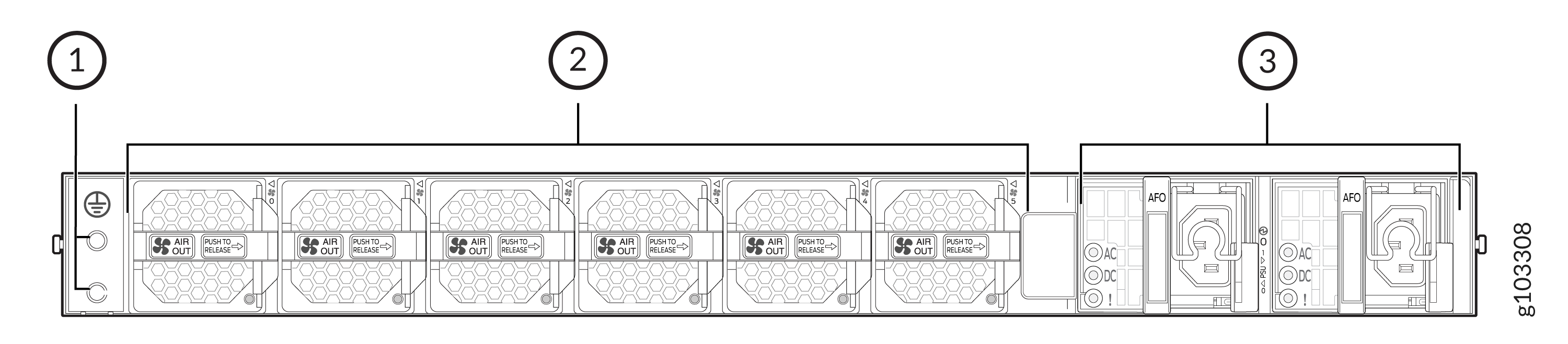
| Callout | Item | Description |
|---|---|---|
|
1 |
Grounding point |
Enables you to connect a grounding cable to earth ground and attach it to the MX301 and MX301-M grounding point to ground the device. |
|
2 |
Fan modules |
Six airflow out (AFO) fan modules (5+1 redundancy) |
|
3 |
AC PSU |
Two 850-W AC PSUs (1+1 redundancy) |
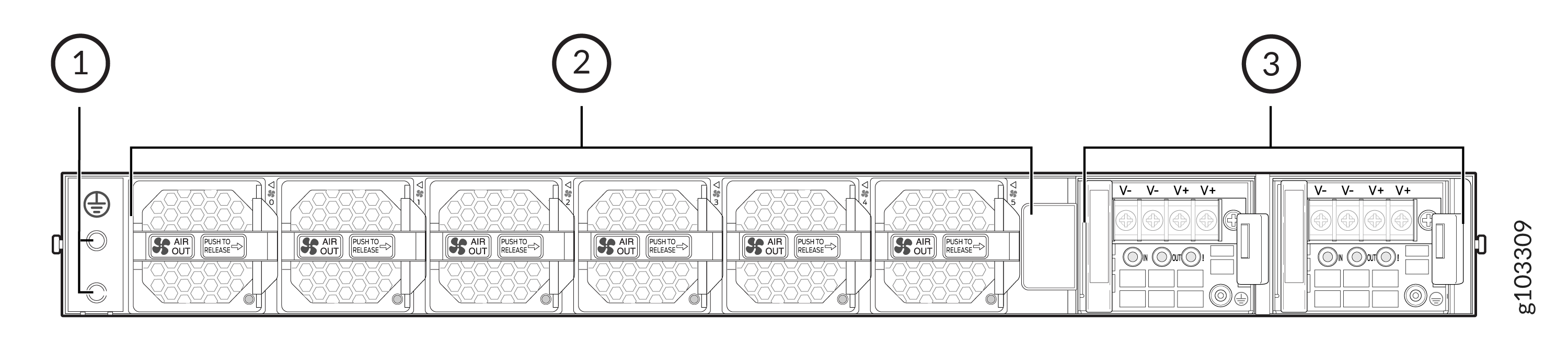
| Callout | Item | Description |
|---|---|---|
|
1 |
Grounding point |
Enables you to connect a grounding cable to earth ground and attach it to the MX301 and MX301-M grounding point to ground the device. |
|
2 |
Fan modules |
Six airflow out (AFO) fan modules (5+1 redundancy) |
|
3 |
DC PSUs |
Two 850-W DC PSUs (1+1 redundancy) |
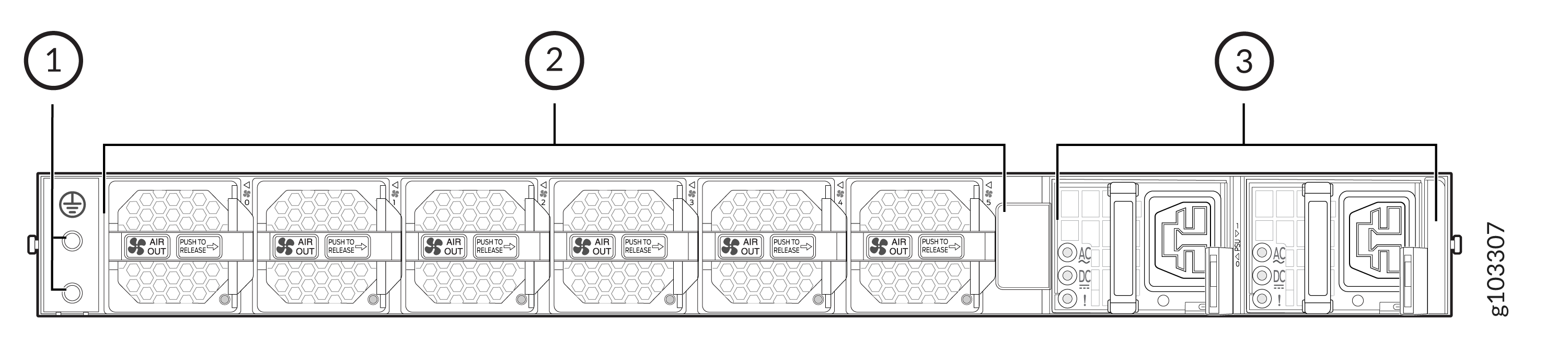
| Callout | Item | Description |
|---|---|---|
|
1 |
Grounding point |
Enables you to connect a grounding cable to earth ground and attach it to the MX301 and MX301-M grounding point to ground the device. |
|
2 |
Fan modules |
Six airflow out (AFO) fan modules (5+1 redundancy) |
|
3 |
HVAC/DC PSUs |
Two 850-W high voltage AC/DC PSUs (1+1 redundancy) |