|
Software release
|
Junos OS Release 25.2R1 and later when installed in MX10004 or MX10008 routers.
|
|
Description
|
-
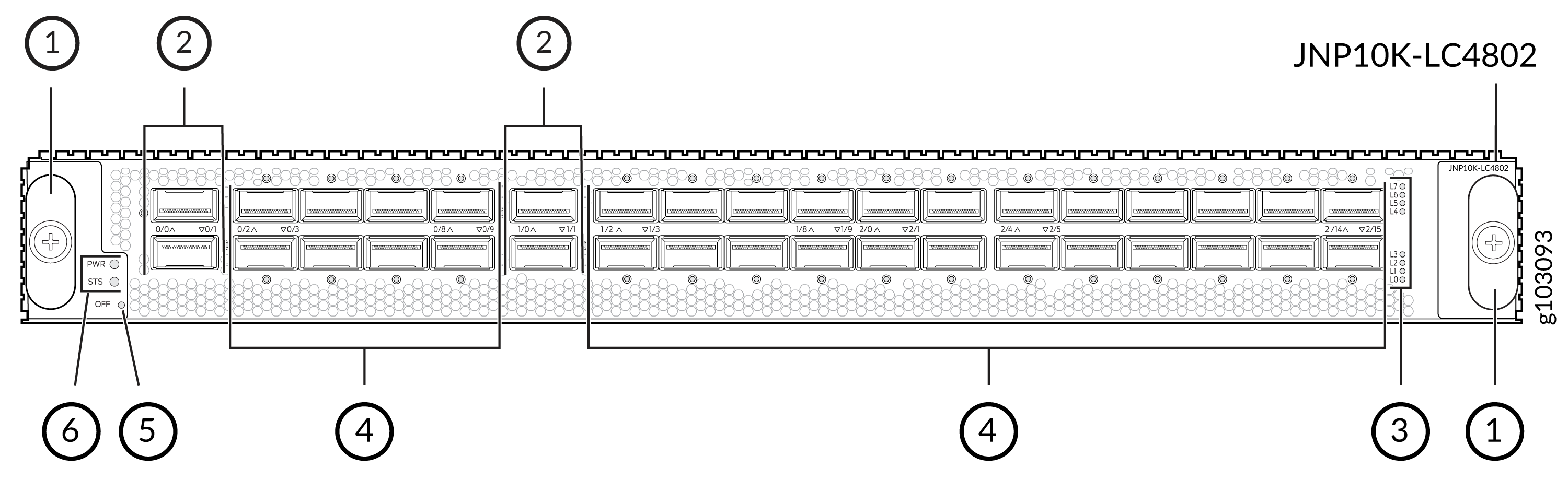
Model number: JNP10K-LC4802
-
Name in the CLI: JNP10K-LC4802
-
Weight: 40 lb (18.14 kg)
-
Dimensions: Height = 1.89 in. (48.01 mm), width = 17.2 in (436.88 mm), depth =
19.05 in. (484 mm) (excluding the ejectors)
|
|
Hardware features
|
-
Is a fixed-configuration line card with 36 ports (32 QSFP28 ports and four
QSFP56-DD ports).
-
Supports channelization of the ports, using breakout cables, as follows:
-
Each QSFP28 port supports the following speeds: 1 Gbps, 4x10 Gbps, 4x25
Gbps, 40 Gbps, and 100 Gbps.
Note: 1 Gbps and 10 Gbps speeds through pluggable SFP
QSA adaptor.
-
Each QSFP56-DD port supports the following speeds: 4x10 Gbps, 4x25 Gbps, 40
Gbps, 100 Gbps, 2x100 Gbps, 4x100 Gbps, and 400 Gbps.
Note:
The MX10K-LC4802 line card does not support mixed breakout port speeds
within a single port cage. For example, you cannot configure 4x25 Gbps and
4x10 Gbps speeds simultaneously within a single port cage.
-
Port configurations supported in 40G, 4x10G, and 4x25G modes:
-
40G PIC-Mode—Ports supported on:
-
PIC-0 and PIC-1: Ports 0, 1, 2, 3, 6, and 7
-
PIC-2: Ports 0, 1, 4, 5, 8, 9, 12, and 13.
Note: Physical interface (IFDs) are created for
these ports.
-
40G, 4x10G, and 4x25G port profile—Port pairs supported on:
-
PIC-0 and PIC-1: Port pairs (2 and 4), (3 and 5), (6 and 8), and (7
and 9).
-
PIC-2: Port pairs (0 and 2), (1 and 3), (4 and 6), (5 and 7), (8
and 10), (9 and 11), (12 and 14), and (13 and 15).
Note: You can configure only single port at a time
from each port pair. Also, if you configure any port as 100G port the
other port in the pair cannot be configured as 40G/4x10G/4x25G
port.
-
Offers a line-rate throughput of up to 4.8 Tbps. However, when all the 32
QSFP28 ports operate at a speed of 100 Gbps and the 4 QSFP56-DD ports operate at
400 Gbps by default, providing a maximum bandwidth of 4.8 Tbps.
-
Has three forwarding ASICs, each hosting two Packet Forwarding Engines. Each
Packet Forwarding Engine supports a maximum bandwidth of 800 Gbps.
-
Supports up to 64-GB Double Data Rate 4 (DDR4) memory.
-
Is compatible with the JNP10004-SF2 (in the MX10004) and JNP10008-SF2 (in the
MX10008) Switch Fabric Boards (SFBs).
All SFBs slots must be installed to achieve full line rate performance.
-
Interoperates with the MX10K-LC2101, MX10K-LC480, MX10K-LC9600, and
MX10K-LC4800 line cards.
-
Operates with the JNP10K-RE1, JNP10K-RE1-LT, and
JNP10K-RE1-128;
JNP10K-RE3, JNP10K-RE3-LT, JNP10K-RE3-256, and JNP10K-RE3LT256
Routing and Control Boards (RCBs).
-
Operates only with the following power supply units (PSUs) and fan trays:
-
JNP10K-PWR-AC2
-
JNP10K-PWR-DC2
-
JNP10K-PWR-AC3
-
JNP10K-PWR-AC3H
-
JNP10K-PWR-DC3
-
JNP10008-FAN2 or JNP10008-FAN3 (in the MX10008)
-
JNP10008-FTC2 or JNP10008-FTC3 (in the MX10008)
-
JNP10004-FAN2 or JNP10004-FAN3 (in the MX10004)
-
JNP10004-FTC2 or JNP10004-FTC3 (in the MX10004)
-
Supports a maximum transmission unit (MTU) of 16,000 bytes for transit traffic
and host-bound packets.
Note:
If you configure an QSFP28 port as a 1-Gbps port, the port supports an MTU of
3800 bytes.
-
Adheres to the complete NEBS compliance (NEBS GR63-CORE, GR1089-CORE, and
SR3580 compliance).
|
|
Software features
|
-
Supports rate selectability at the port level
-
By default, the ports are configured as 100-Gigabit Ethernet ports
-
Supports optical diagnostics and related alarms
-
Has three logical PICs, each serviced by a dedicated forwarding ASIC
|
|
Power requirements
|
Power requirement of the LC4802 is approximately 1215 W including optics.
Power consumption at different temperatures when all the ports are configured to
operate at 100-Gbps speed:
-
25°C: 1082 W
-
40°C: 1099 W
-
55°C: 1133 W
|
|
LEDs
|
PWR LED
- Steady green—Line card is receiving power.
- Steady red—Line card has failed to power on.
- Off—Line card is not receiving power.
STS LED
- Steady
green—Line
card is online.
- Blinking green—The line card is booting.
- Steady
red—Line
card is faulty or an alarm has been raised.
- Off—Line card is disabled or offline.
Port LED (next to each port)
- Off—Port does not have a transceiver module.
- Steady green (when the beacon or the port location is on)—Port link is up with
no alarms or failures.
- Steady amber (when the beacon or the port location is on)—Port link is down
because the port is disabled through the CLI, or the port encountered errors such
as loss of signal, local fault, or remote fault.
Lane LEDs
-
The lane LEDs for the corresponding ports indicate the port status.
-
Similar to the port status LED, each individual lane LED supports four states:
OFF, AMBER, GREEN, and RED.
|
|
Cables and connectors
|
Tip:
You can use the Hardware Compatibility Tool to find information about
the pluggable transceivers that your Juniper Networks device supports.
The following 400G-ZR optics are only supported up to 40°C. For more information,
see Hardware Compatibility Tool.
-
JCO400-QDD-ZR
-
JCO400-QDD-ZR-M
-
QDD-400G-ZR
-
QDD-400G-ZR-M
-
QDD-400G-ZR-M-HP
|