
1-Gigabit/10-Gigabit Ethernet MIC with SFP+ (10 Ports)
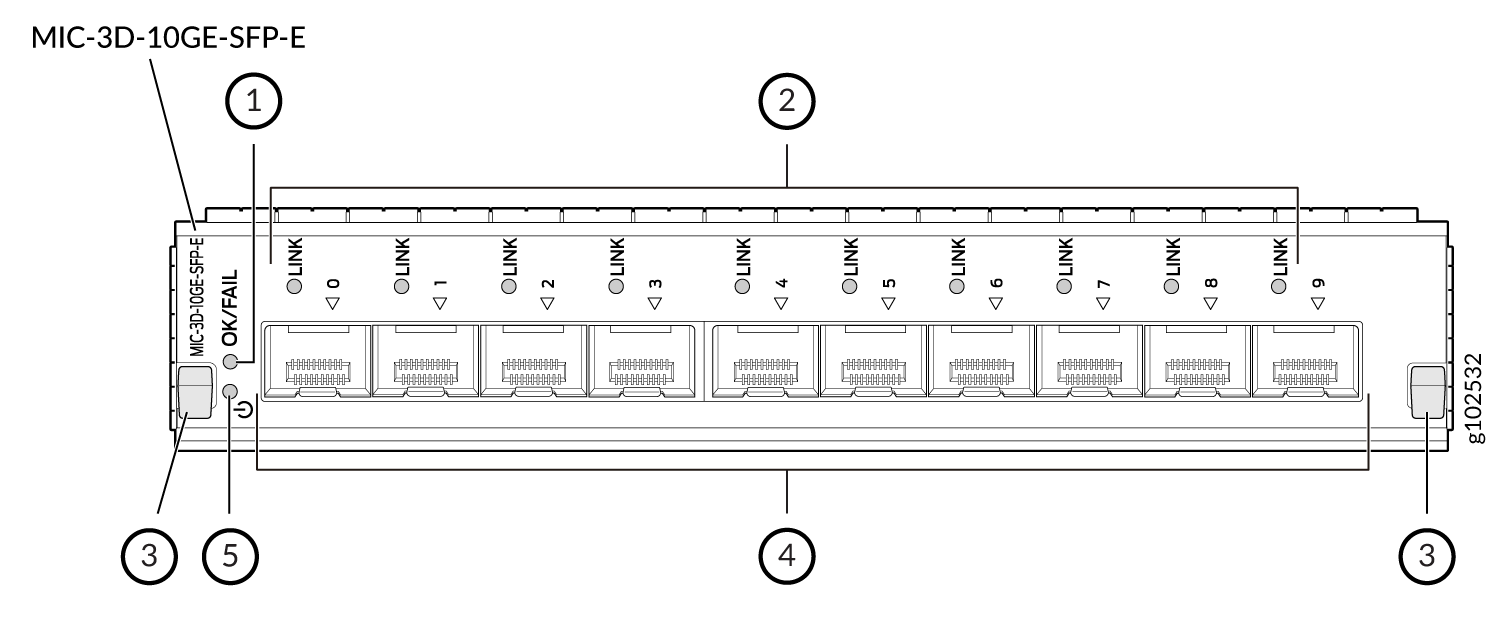
1 — MIC LED | 4 — Ports |
2 — Link LEDs | 5 — MIC Power Button |
3 — Ejector Levers |
You can switch the Modular Interface Card (MIC) on or off by pressing the MIC power button using a pin.
|
Software release |
|
|
Description |
|
|
Hardware features |
|
|
Software features |
|
|
Environmental tolerances |
|
|
Cables and connectors |
Tip:
You can use the Hardware Compatibility Tool to find information about the optical transceivers supported on your Juniper Networks device. Note:
|
|
LEDs |
MIC status LED
LINK LED, one per port:
|
The MIC has one logical PIC. When the MIC is installed in slot 0 of an MPC, the PIC number is 0; when the MIC is installed in slot 1 of an MPC, the PIC number is 2. For example, when the MIC is installed in slot 1 of an MPC installed in slot 3 of a router, the interfaces are numbered xe-3/2/0 through xe-3/2/9.