
Maintain Fiber-Optic Cables
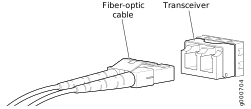
Connect a Fiber-Optic Patch Cable
Before you connect a fiber-optic patch cable to an optical transceiver installed in a device, take the necessary precautions for safe handling of lasers (see Laser and LED Safety Guidelines and Warnings).
To connect a fiber-optic patch cable to an optical transceiver installed in a device:
Do not look directly into a fiber-optic transceiver or into the ends of fiber-optic patch cables. Fiber-optic transceivers and fiber-optic patch cables connected to transceivers emit laser light that can damage your eyes.
-
Insert the cable connector into the optical
transceiver.
Disconnect a Fiber-Optic Patch Cable
Before you disconnect a fiber-optic patch cable from an optical transceiver, ensure that you have taken the necessary precautions for safe handling of lasers. See Laser and LED Safety Guidelines and Warnings.
Ensure that you have the following parts and tools available:
A rubber safety cap to cover the transceiver
A rubber safety cap to cover the fiber-optic patch cable connector
Juniper Networks devices have optical transceivers to which you can connect fiber-optic patch cables.
To disconnect a fiber-optic patch cable from an optical transceiver installed in the device:
How to Handle Fiber-Optic Patch Cables
Fiber-optic patch cables connect to optical transceivers that are installed in Juniper Networks devices.
Follow these guidelines when handling fiber-optic patch cables:
When you unplug a fiber-optic patch cable from a transceiver, place rubber safety caps over the transceiver and on the end of the cable.
Anchor fiber-optic patch cables to prevent stress on the connectors. When attaching a fiber-optic patch cable to a transceiver, secure the fiber-optic patch cable so that it does not support its own weight as it hangs to the floor. Never let a fiber-optic patch cable hang free from the connector.
Avoid bending the fiber-optic patch cables beyond their minimum bend radius. Bending fiber-optic patch cables into arcs smaller than a few inches in diameter can damage the cables and cause problems that are difficult to diagnose.
Frequent plugging and unplugging of fiber-optic patch cables in and out of optical instruments can damage the instruments, which are expensive to repair. To prevent damage from overuse, attach a short fiber extension to the optical equipment. The short fiber extension absorbs wear and tear due to frequent plugging and unplugging. It is easier and more cost-efficient to replace the short fiber extension than to replace the instruments.
Keep fiber-optic patch cable connections clean. Microdeposits of oil and dust in the canal of the transceiver or cable connector can cause loss of light, reduction in signal power, and possibly intermittent problems with the optical connection.
To clean the transceiver canal, use an appropriate fiber-cleaning device such as RIFOCS Fiber Optic Adaptor Cleaning Wands (part number 946). Follow the instructions in the cleaning kit you use.
After cleaning the transceiver, make sure that the connector tip of the fiber-optic patch cable is clean. Use only an approved alcohol-free fiber-optic cable cleaning kit such as the Opptex Cletop-S® Fiber Cleaner. Follow the instructions in the cleaning kit you use.