EX4100-H Site Guidelines and Requirements
Environmental Requirements and Specifications for EX4100-H Switches
You must install the switch/device/chassis (switch or switch along with external PSU) in a cabinet. You must house it in a dry, clean, well-ventilated, and temperature-controlled environment.
Switch, device, chassis, and switch chassis all refer to the switch or the switch along with its external PSU(s).
Follow these environmental guidelines:
-
Ensure that the site is as dust-free as possible. Dust can clog air intake vents and filters, reducing the efficiency of the switch cooling system.
-
Maintain ambient airflow for normal switch operation. If the airflow is blocked or restricted, or if the intake air is too warm, the switch might overheat. If the switch overheats, the switch temperature monitor may shut down the switch to protect the hardware components.
-
Ensure that the temperature inside cabinet does not cross 60° C when installing EX4100-H-24MP and EX4100-H-24F switches.
-
Ensure that the temperature inside cabinet does not cross 60° C when installing the EX4100-H-24F switch.
The following are the required environmental conditions for normal switch operation of EX4100-H switches.
-
Switch: All EX4100-H switch models
-
Altitude: No performance degradation up to 15,000 feet (4572 meters)
-
Relative humidity: Normal operation ensured in relative humidity range of 5% through 95%, noncondensing
-
Seismic tolerance: Tested for Zone 4 earthquake safety.
-
Temperature:
-
Normal operation ensured in sealed enclosure in temperature range of -40 °F through 140 °F (-40 °C to 60 °C) , up to 15000 feet.
-
Normal operation ensured in ventilated enclosure in temperature range of -40 °F through 158 °F (-40 °C to 70 °C) , up to 15000 feet.
-
Normal operation ensured in blower equipped enclosure in temperature range of -40 °F through 167 °F (-40 °C to 75 °C) , up to 15000 feet.
-
Non-operating storage temperature in shipping container: -40 °F through 185 °F (–40 °C through 85 °C).
-
-
Note:
EX4100-H-12MP, EX4100-H-24MP, and EX4100-H-24F are safety certified for an operating temperature of 60° C.
- Environment Specifications for 10 G Industrial Grade Optics for EX4100-H-12MP
- Environment Specifications for 10 G Industrial Grade Optics, 10 G Base-T Optics, and 1 G Industrial Grade Optics for EX4100-H-24F
- Environment Specifications for 10 G Industrial Grade Optics for EX4100-H-24MP
Environment Specifications for 10 G Industrial Grade Optics for EX4100-H-12MP
Table 1 shows the environmental specification for 10 G industrial grade optics.
|
Optics Module |
ZR |
ER |
LR |
SR |
Industrial Grade 10G base-T |
Commercial Grade 10G Base-T |
|||||
|---|---|---|---|---|---|---|---|---|---|---|---|
|
Power |
1.4 W |
1.2 W |
0.9 W |
0.65 W |
2.3 W |
2.0W |
|||||
|
Warning/Spec |
85 |
85 |
85 |
85 |
85 |
60 |
|||||
|
Alarm |
88 |
90 |
90 |
90 |
90 |
90 |
|||||
|
Altitude |
High Altitude |
Sea level |
High Altitude |
Sea level |
High Altitude |
Sea level |
High Altitude |
High Altitude |
Sea Level |
High Altitude |
Sea Level |
|
Ambient and Altitude |
52 C, 0LFM, 15000 ft |
55 C, 0 LFM |
52 C, 0 LFM, 15000 ft |
55 C, 0 LFM |
54 C, 0 LFM, 15000 ft |
57 C, 0 LFM |
60 C, 0 LFM, 15000 ft |
45 C, 0 LFM, 15000 ft |
48 C, 0 LFM |
20C, 0LFM, 15000ft |
23C, 0LFM |
|
62 C, 40 LFM, 15000 ft |
65 C, 40 LFM |
62 C, 40 LFM, 15000 ft |
65 C, 40 LFM |
64 C, 40 LFM, 15000 ft |
67 C, 40 LFM |
70 C, 40 LFM, 15000 ft |
50 C, 40 LFM, 15000 ft |
53 C, 40 LFM |
25C, 40LFM, 15000ft |
28C, 40LFM |
|
|
67 C, 200 LFM, 15000 ft |
70 C, 200 LFM |
67 C, 200 LFM, 15000 ft |
70 C, 200 LFM |
69 C, 200 LFM, 15000 ft |
72 C, 200 LFM |
75 C, 200 LFM, 15000 ft |
65 C, 200 LFM, 15000 ft |
68 C, 200 LFM |
35 C, 200 LFM, 15000 ft |
38 C, 200 LFM |
|
|
52 C, Desktop, 15000 ft |
55 C, Desktop |
52 C, Desktop, 15000 ft |
55 C, Desktop |
54 C, Desktop, 15000 ft |
57 C, Desktop |
60 C, DTP, 15000 ft |
45 C, DTP, 15000 ft |
48 C, Desktop |
20 C, DTP, 15000 ft |
23 C, Desktop |
|
EX4100-H-12MP switch must be installed in cabinet or enclosure whether the switch is installed outdoor or indoor.
Environment Specifications for 10 G Industrial Grade Optics, 10 G Base-T Optics, and 1 G Industrial Grade Optics for EX4100-H-24F
Table 2 shows the environment specifications for 10 G industrial grade optics for EX4100-H-24F.
Table 3 shows the environment specifications (supported ambient) for 10 G industrial grade optics for EX4100-H-24F.
Table 4 shows the environment specifications for 10 G Base-T optics for EX4100-H-24F.
Table 5 shows the environment specifications (supported ambient) for 10 G Base-T optics for EX4100-H-24F.
Table 6 shows the environment specifications for 1 G industrial grade optics for EX4100-H-24F.
Table 7 shows the environment specificatons (supported ambient) for 1 G industrial grade optics for EX4100-H-24F.
Table 8 shows the supported ambient stacked units.
|
Specification |
Optics Module |
|||
|---|---|---|---|---|
|
ZR |
ER |
LR |
SR |
|
|
Power |
1.4 W |
1.2 W |
0.9 W |
0.65 W |
|
Warning/Spec |
85 |
85 |
85 |
85 |
|
Alarm |
88 |
90 |
90 |
90 |
|
Guidance value |
Optics Module |
|||
|---|---|---|---|---|
|
ZR |
ER |
LR |
SR |
|
|
Supported Ambient |
Supported Ambient |
Supported Ambient |
Supported Ambient |
|
|
60 C, 0 LFM, 15000 ft |
56 C, 0 LFM, 15000 ft |
59 C, 0 LFM, 15000 ft |
60 C, 0 LFM, 15000 ft |
60, C 0 LFM, 15000 ft |
|
70 C, 40 LFM, 15000 ft |
61 C, 40 LFM, 15000 ft |
65 C, 40 LFM, 15000 ft |
69 C, 40 LFM, 15000 ft |
70 C, 40 LFM, 15000 ft |
|
75 C, 200 LFM, 15000 ft |
67 C, 200 LFM, 15000 ft |
69 C, 200 LFM, 15000 ft |
74 C, 200 LFM, 15000 ft |
75 C, 200 LFM, 15000 ft |
|
Specification |
Optics Module |
|
|---|---|---|
|
Industrial Grade 10 G base-T |
Commercial Grade 10 G Base-T |
|
|
Power |
2.3 W |
2.0 W |
|
Warning/Spec |
85 |
60 |
|
Alarm |
90 |
70 |
|
Guidance Value |
Optics Module |
|
|---|---|---|
|
Industrial Grade 10 G base-T |
Commercial Grade 10 G Base-T |
|
|
Supported Ambient |
Supported Ambient |
|
|
60 C, 0 LFM, 15000 ft |
48 C, 0 LFM, 15000 ft |
29 C, 0 LFM, 15000 ft |
|
70 C, 40 LFM, 15000 ft |
57 C, 40 LFM, 15000 ft |
37 C, 40 LFM, 15000 ft |
|
75 C, 200 LFM, 15000 ft |
62 C, 200 LFM, 15000 ft |
44 C, 200 LFM, 15000 ft |
|
Specification |
Optics Module |
|---|---|
|
SFP-SX |
|
|
Power |
- |
|
Warning/Spec |
85 |
|
Alarm |
86 |
|
Guidance Value |
Optics Module |
|---|---|
|
SFP-SX |
|
|
Supported Ambient |
|
|
60 C, 0 LFM, 15000 ft |
60 C, 0 LFM, 15000 ft |
|
70 C, 40 LFM, 15000 ft |
64 C, 40 LFM, 15000 ft |
|
75 C, 200 LFM, 15000 ft |
64 C, 200 LFM, 15000 ft |
|
Derating Summary |
|||
|---|---|---|---|
|
Gap |
Optics |
Ambient temperature derating factor (C) |
Remarks |
|
1 RU |
SR |
2 |
|
|
LR |
2 |
||
|
ER |
7 |
||
|
ZT |
11 |
||
Environment Specifications for 10 G Industrial Grade Optics for EX4100-H-24MP
Table 9 shows the environment specifications for 10 G industrial grade optics for EX4100-H-24MP.
Table 10 shows the environment specifications (supported ambient) for 10 G industrial grade optics for EX4100-H-24MP.
|
Specification |
Optics Module |
|||
|---|---|---|---|---|
|
ZR |
ER |
LR |
SR |
|
|
Power |
1.4 W |
1.2 W |
0.9 W |
0.65 W |
|
Warning/Spec |
85 |
85 |
85 |
85 |
|
Alarm |
88 |
90 |
90 |
90 |
|
Guidance value |
Optics Module |
|||
|---|---|---|---|---|
|
ZR |
ER |
LR |
SR |
|
|
Supported Ambient |
Supported Ambient |
Supported Ambient |
Supported Ambient |
|
|
60 C, 0 LFM, 15000 ft |
53 C, 0 LFM, 15000 ft |
57 C, 0 LFM, 15000 ft |
60 C, 0 LFM, 15000 ft |
60, C 0 LFM, 15000 ft |
|
70 C, 40 LFM, 15000 ft |
62 C, 40 LFM, 15000 ft |
65 C, 40 LFM, 15000 ft |
67 C, 40 LFM, 15000 ft |
68 C, 40 LFM, 15000 ft |
|
75 C, 200 LFM, 15000 ft |
66 C, 200 LFM, 15000 ft |
70 C, 200 LFM, 15000 ft |
71 C, 200 LFM, 15000 ft |
72 C, 200 LFM, 15000 ft |
|
Requirement |
EX4100-H-12MP |
EX4100-H-24F |
EX4100-H-24MP |
|---|---|---|---|
|
Operational temperature range upto 15000 feet altitude
|
Supported |
Supported |
Supported |
|
Storage temperature range - -40 deg C to +85 deg C Storage temperature range altitude upto 15000 feet |
Supported |
Supported |
Supported |
|
Altitude - upto 15000 feet without temperature derating. |
Supported |
Supported |
Supported |
-
Protect switch from moisture, salt fog, outdoor containments when deployed in vented cabinets in outdoor location and in non-office indoor environment locations.
-
Corrosion: components such as RJ 45 connector, SFP Cage, EMI fingers, fasteners, chassis- should not corrode due to salt fog when the switch is in vented outdoor cabinet.
-
When the switch installed in an enclosure or cabinet, the temperature within the enclosure is greater than room temperature outside the enclosure. Ensure temperature inside the enclosure conforms to device specification detailed in Environmental Guidelines.
General Site Guidelines
Efficient device operation requires proper site planning. For the device to operate properly, you must ensure maintenance and proper layout of the equipment, rack or cabinet, and wiring closet.
To plan and create an acceptable operating environment for your device and prevent environmentally caused equipment failures:
Keep the area around the chassis free from dust and conductive material, such as metal flakes.
Follow the prescribed airflow guidelines to ensure that the cooling system functions properly. Ensure that the exhaust from other equipment does not blow into the intake vents of the device.
Follow the prescribed electrostatic discharge (ESD) prevention procedures to prevent damaging the equipment. Static discharge can cause components to fail completely or intermittently over time.
Install the device in a secure area, so that only authorized personnel can access the device.
Site Electrical Wiring Guidelines
Table 12 describes the factors you must consider while planning the electrical wiring at your site.
You must provide a properly grounded and shielded environment and use electrical surge-suppression devices.
Avertissement Vous devez établir un environnement protégé et convenablement mis à la terre et utiliser des dispositifs de parasurtension.
|
Site Wiring Factor |
Guidelines |
|---|---|
|
Signaling limitations |
If your site experiences any of the following problems, consult experts in electrical surge suppression and shielding:
|
|
Radio frequency interference |
To reduce or eliminate RFI from your site wiring, do the following:
|
|
Electromagnetic compatibility |
If your site is susceptible to problems with electromagnetic compatibility (EMC), particularly from lightning or radio transmitters, seek expert advice. Strong sources of electromagnetic interference (EMI) can cause:
|
Cabinet Requirements for EX4100-H Switches
Cabinet requirements consist of:
-
Cabinet size.
-
Clearance requirements.
-
Cabinet airflow requirements.
|
Cabinet Requirement |
Guidelines |
|---|---|
|
Cabinet depth |
|
|
Cabinet width |
|
|
Cabinet airflow requirements |
When you mount the device in a cabinet, ensure that ventilation through the cabinet is sufficient to prevent overheating, as follows:
|
Clearance Requirements for Airflow and Hardware Maintenance for EX4100-H Switches
When planning the site for installing an EX4100-H switch, you must allow sufficient clearance around the installed switch.
See:
-
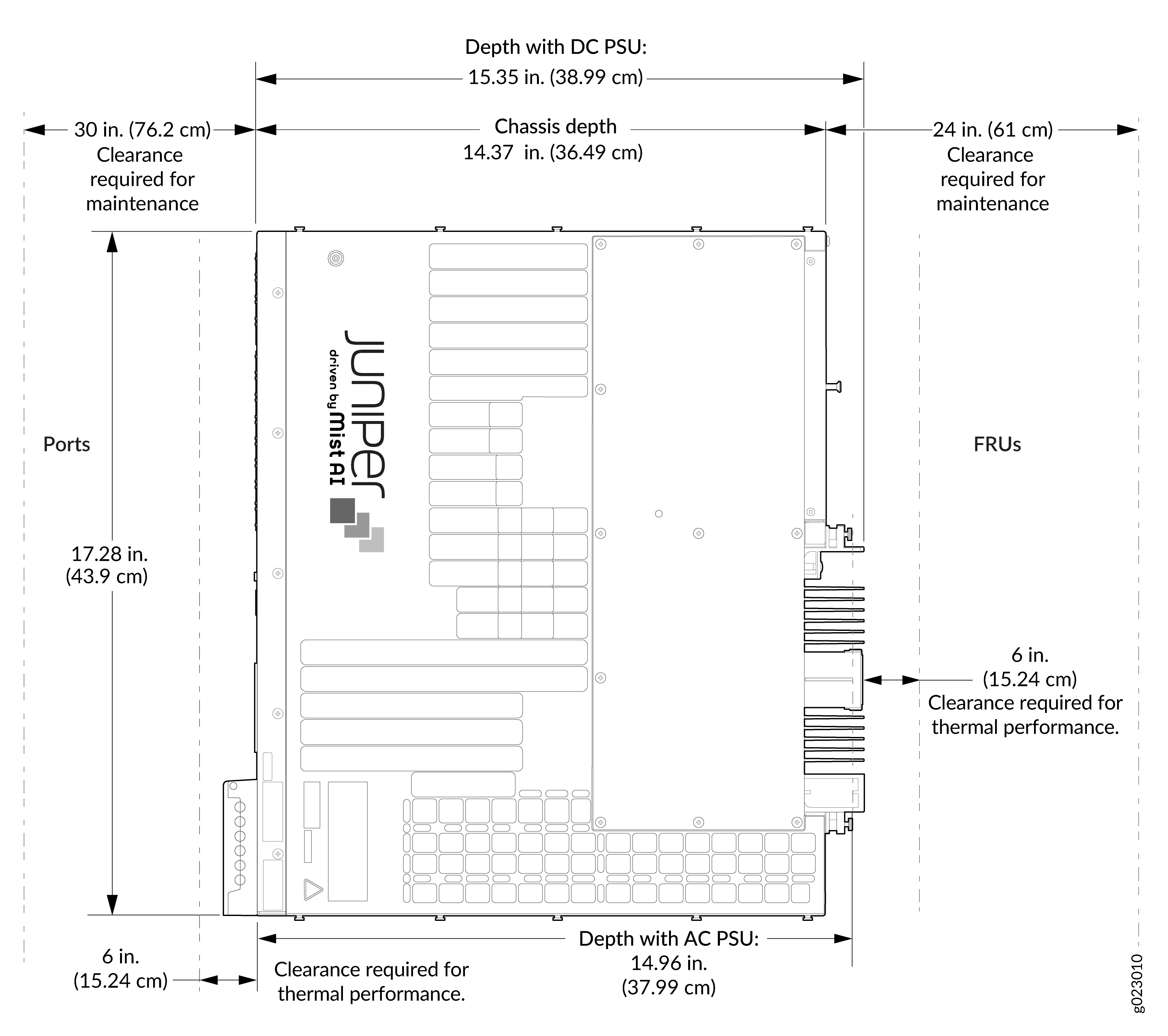
Figure 1 for clearance requirements for airflow and hardware maintenance for EX4100-H-12MP switches.
-
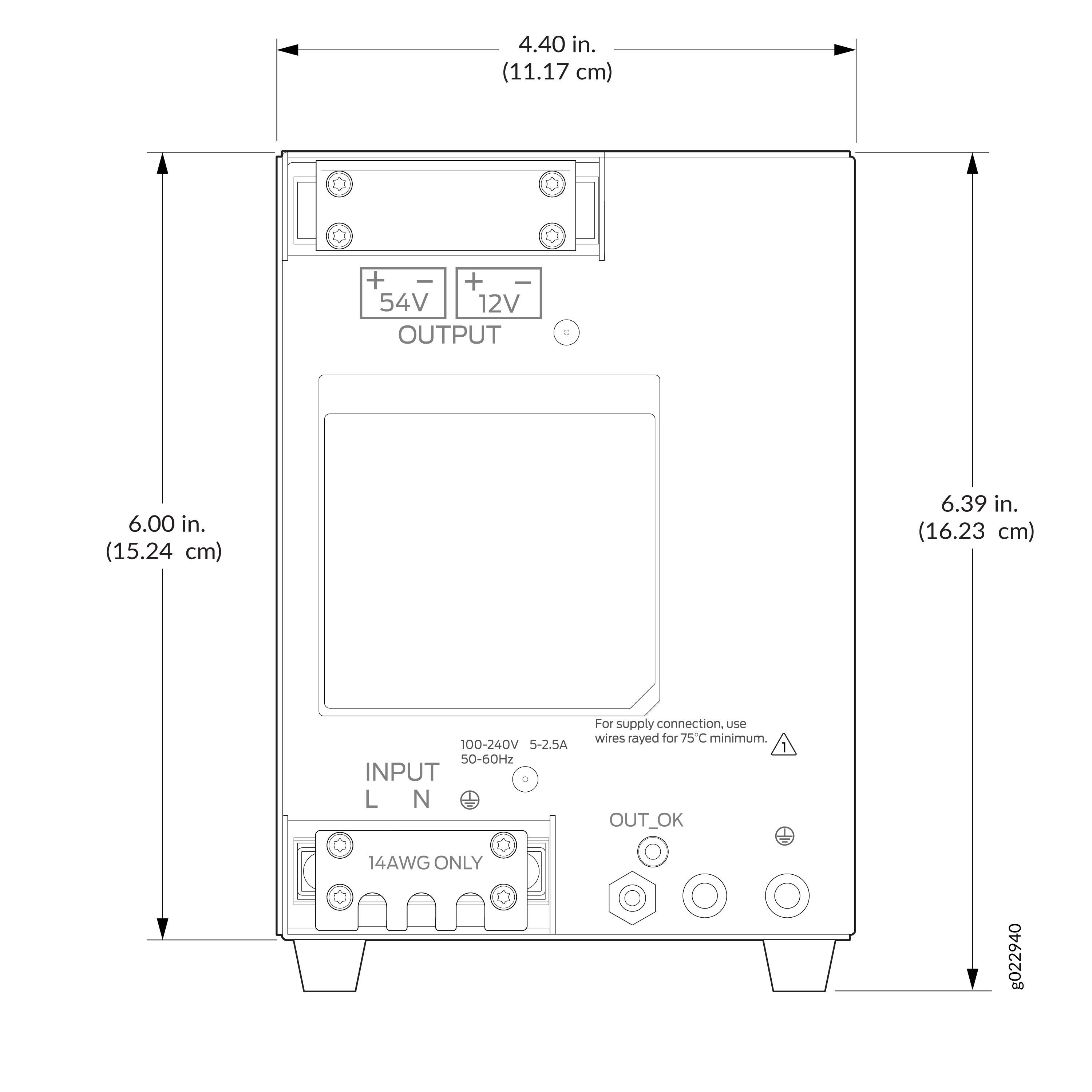
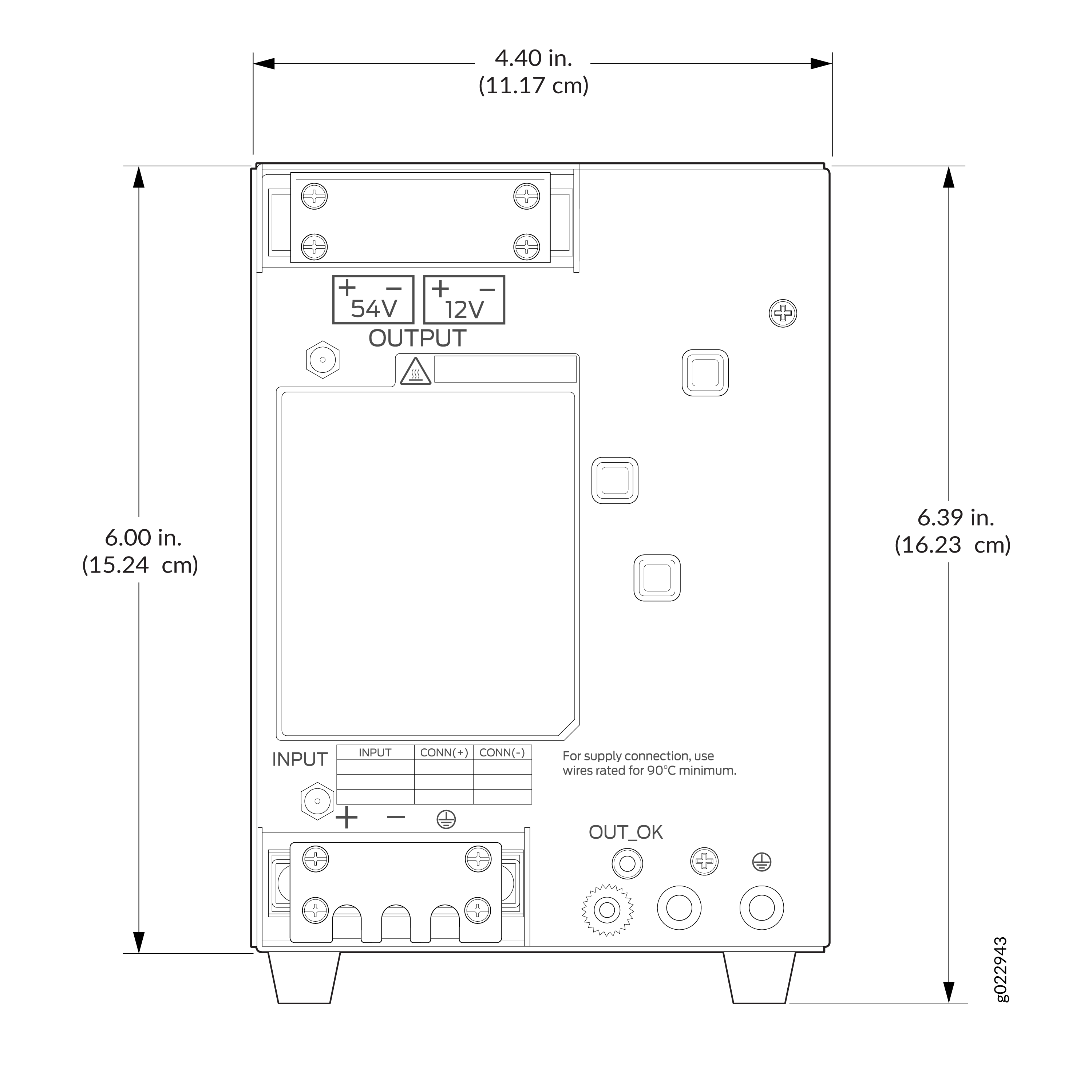
Figure 2 and Figure 3 for clearance requirements for airflow and hardware maintenance for the external PSUs of the EX4100-H-12MP switch.
-
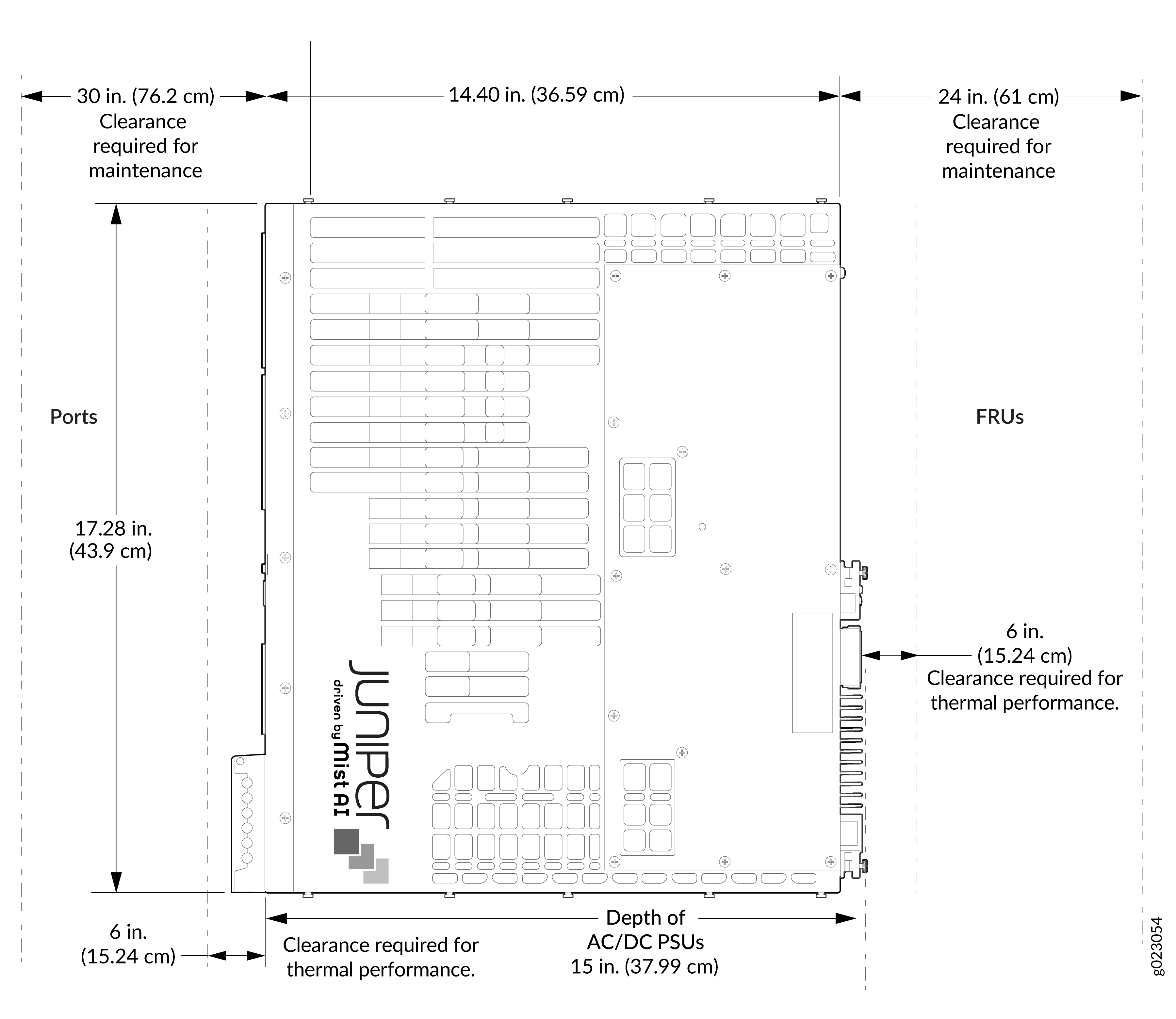
Figure 4 for clearance requirements for airflow and hardware maintenance for the external PSU of the EX4100-H-24MP switch.
-
Figure 5 for clearance requirements for airflow and hardware maintenance for the external PSU of the EX4100-H-24F switch.
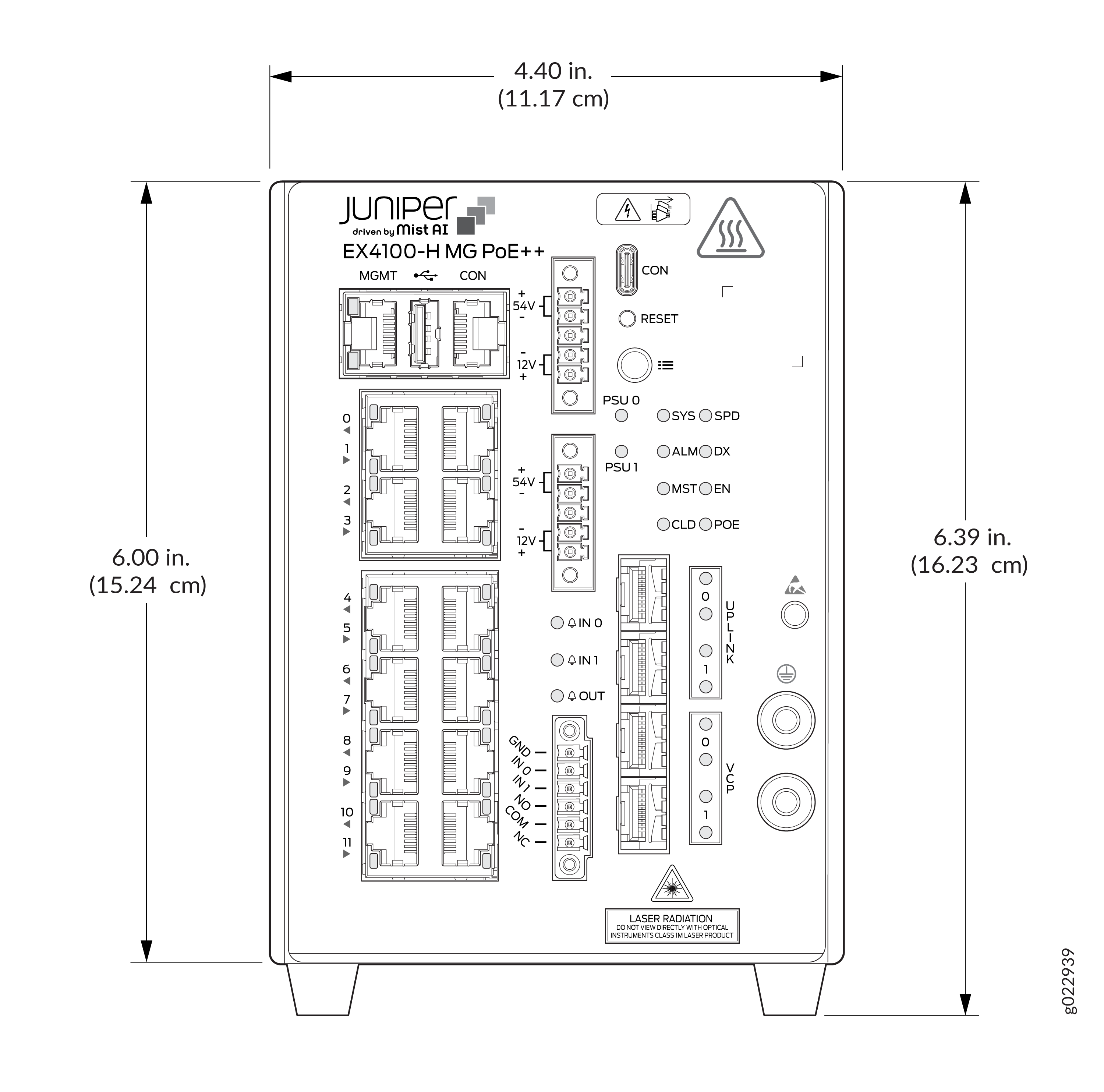
If you are mounting the switch in a cabinet with other equipment ensure that the exhaust from other equipment does not blow into the intake vents of the switch chassis. Ensure temperature inside the enclosure conform to environmental specification. See Environment Guidelines.
-
Clearance requirements for thermal performance
-
Leave at least 2 in around the device except mounting side for proper airflow around the units and the fin surface.
-
-
Clearance requirements for hardware maintenance
-
Leave at least 24 in around the device except mounting side for proper airflow around the units and the fin surface.
-