
Ethernet Redundancy and Connecting the AP47 to the Network
The two 10 Gbps Ethernet ports on the AP47 not only provide PoE redundancy but also support redundant Ethernet links to ensure continued operation during infrastructure outages or upgrades in mission critical environments. The AP47 supports single uplink, dual uplink, individual uplink and downlink, and dual downlink connectivity.
Single Uplink
For single uplink we recommend that you connect Eth0 to the network uplink for simplicity and consistency. However, there is no restriction on using Eth1 to connect to the network uplink on an AP47.
If you enforce a MAC limit on your AP switch ports, such as when you tunnel traffic to a Mist Edge, you must configure the MAC limit to two or more.
Dual Uplink
If you leverage dual uplinks, here are a few good things to know:
-
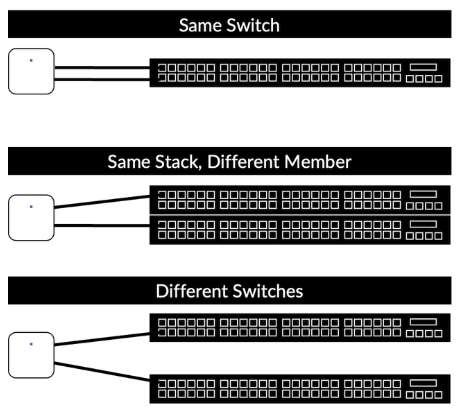
Connecting the AP47 to the network requires no switch configuration. You can connect the AP to the same switch or different switches. Ensure the L2 VLAN is the same on both switch ports so clients don’t need to obtain new IP addresses if a failover occurs.
-
New AP47s arrive configured with dual uplinks in an active-standby configuration.
-
You can configure uplink, downlink and dual downlink (mesh relay) connectivity by manually configuring the port VLANs in the Mist portal.
-
-
The AP47 employs passive failover detection based on link status and activity which results in three to five-second failover.
-
The AP47 is capable of non-traffic impacting (hitless) PoE failover when you use dual 802.3bt power sources.
-
If you use two 802.3at or mixed 802.3at and 802.3bt power sources, the AP47 combines the received power for full functionality. The AP may brownout or reboot in the event it needs to reduce functionality due to a single power source failure.
AP47 Ethernet MAC Addresses
-
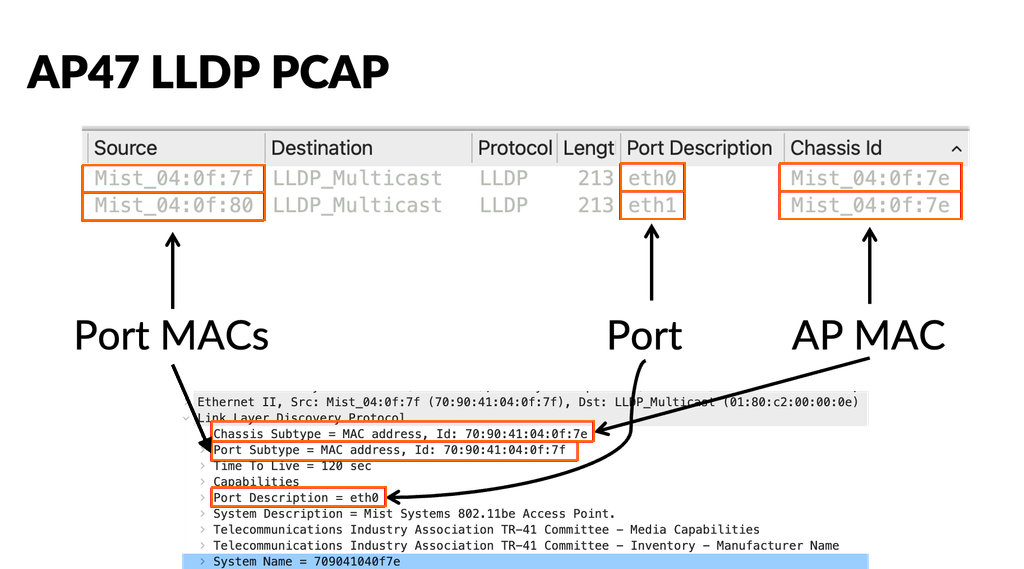
The AP47 uses three MAC addresses for Ethernet, because it supports multiple uplinks. The MAC address for the AP wireless interface is known as the AP MAC address, then each Ethernet port MAC address is incremented by 1. For example:
-
AP MAC Address = 70:90:41:XX:XX:7E
-
AP Eth0 MAC Address = 70:90:41:XX:XX:7F
-
AP Eth1 MAC Address = 70:90:41:XX:XX:80
-
-
The AP47 uses the AP MAC address for switch virtual interfaces (SVIs) and IP communication, such as DHCP, ARP, DNS, NTP, AP Management, L2TPv3, and RADIUS.
-
The AP47 uses the unique Ethernet port MACs for link-local packets, such as LLDP and Dot1x Supplicant.
-
Connected switches use the AP47's multiple MAC addresses primarily when you configure switch-side MAC-based policies. For example:
-
To perform MAC authentication bypass (MAB) authentication against the APs, add both the AP MAC address and the port MAC addresses to your switch's MAB database,
-
If you leverage LLDP, the Chassis ID is the AP MAC address.
-
If you enforce a MAC limit on your AP switch ports, such as when tunneling traffic to a Mist Edge, set the MAC limit to two or more: one for the Ethernet MAC and one for the AP MAC.
-
-
If you leverage 802.1X authentication against the APs with dual uplinks, both ports authenticate to the network independently of each other. Thus, two separate auths appear in your RADIUS server.
