
Ejemplo: Configuración manual de SA de AS PIC
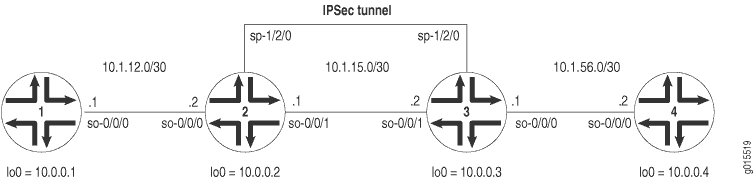 de topología SA manual de AS PIC
La figura 1 muestra una topología IPSec similar a la utilizada en el ejemplo de SA manual de ES PIC. La diferencia es que los enrutadores 2 y 3 establecen un túnel IPSec utilizando una PIC de AS y utilizan configuraciones de SA manuales ligeramente modificadas. Los enrutadores 1 y 4 también proporcionan conectividad básica y se utilizan para verificar que el túnel IPSec esté operativo.
En el enrutador 1, proporcione conectividad OSPF básica al enrutador 2.
Enrutador 1
[edit]
interfaces {
    so-0/0/0 {
        description "To R2 so-0/0/0";
        unit 0 {
            family inet {
                address 10.1.12.2/30;
            }
        }
    }
    lo0 {
        unit 0 {
            family inet {
                address 10.0.0.1/32;
            }
        }
    }
}
routing-options {
    router-id 10.0.0.1;
}
protocols {
    ospf {
        area 0.0.0.0 {
            interface so-0/0/0.0;
            interface lo0.0;
        }
    }
}
En el enrutador 2, habilite OSPF como protocolo de enrutamiento subyacente para conectarse a los enrutadores 1 y 3. Configure una SA manual bidireccional en una regla denominada rule-manual-SA-BiEspshades en el nivel jerárquico [edit ipsec-vpn rule] . Haga referencia a esta regla en un conjunto de servicios denominado service-set-manual-BiEspshades en el nivel jerárquico [edit services service-set] .
Configure todas las especificaciones para su SA manual. Utilice ESP para el protocolo, 261 para el SPI, HMAC-SHA1-96 para la autenticación, DES-CBC para el cifrado, una clave de autenticación ASCII de 20 bits para la clave de autenticación SHA-1 y una clave de cifrado ASCII de 8 bits para la clave de autenticación DES-CBC. (Para obtener más información acerca de las longitudes de clave, consulte Longitudes de clave de autenticación y cifrado).
Para dirigir el tráfico hacia la PIC del AS y el túnel IPSec, configure un conjunto de servicios de estilo de salto siguiente y agregue la interfaz lógica de servicios adaptables utilizada como interfaz interna IPSec a la configuración de OSPF.
Enrutador 2
[edit]
interfaces {
    so-0/0/0 {
        description "To R1 so-0/0/0";
        unit 0 {
            family inet {
                address 10.1.12.1/30;
            }
        }
    }
    so-0/0/1 {
        description "To R3 so-0/0/1";
        unit 0 {
            family inet {
                address 10.1.15.1/30;
            }
        }
    }
    sp-1/2/0 {
        services-options {
            syslog {
                host local {
                    services info;
                }
            }
        }
        unit 0 {
            family inet {
            }
                                 unit 1 { # sp-1/2/0.1 is the IPSec inside interface.
                family inet;
                service-domain inside;
            }
                                 unit 2 { # sp-1/2/0.2 is the IPSec outside interface.
                family inet;
                service-domain outside;
            }
        }
        lo0 {
            unit 0 {
                family inet {
                    address 10.0.0.2/32;
                }
            }
        }
    }
    routing-options {
        router-id 10.0.0.2;
    }
    protocols {
        ospf {
            area 0.0.0.0 {
                interface so-0/0/0.0;
                interface lo0.0;
                                     interface sp-1/2/0.1; # This sends OSPF traffic over the IPSec tunnel.
            }
        }
    }
    services {
                           service-set service-set-manual-BiEspshades { # Define your service set here.
                                 next-hop-service { # Required for dynamic routing protocols such as OSPF.
                inside-service-interface sp-1/2/0.1;
                outside-service-interface sp-1/2/0.2;
            }
            ipsec-vpn-options {
                                     local-gateway 10.1.15.1; # Specify the local IP address of the IPSec tunnel.
            }
                               ipsec-vpn-rules rule-manual-SA-BiEspshades; # Reference the IPSec rule here.
        }
        ipsec-vpn {
                                 rule rule-manual-SA-BiEspshades { # Define your IPSec VPN rule here.
                term term-manual-SA-BiEspshades {
                    then {
                                                 remote-gateway 10.1.15.2; # The remote IP address of the IPSec tunnel.
                                                   manual { # Define the manual SA specifications here.
                                                         direction bidirectional {
                                protocol esp;
                                spi 261;
                                authentication {
                                    algorithm hmac-sha1-96;
                                    key ascii-text "$ABC123";
                                    ## The unencrypted key is juniperjuniperjunipe (20 characters for HMAC-SHA-1-96).
                                }
                                                               encryption {
                                    algorithm des-cbc;
                                    key ascii-text "$ABC123";
                                    ## The unencrypted key is juniperj (8 characters for DES-CBC).
                                }
                            }
                        }
                    }
                }
                                     match-direction input; # Correct match direction for next-hop service sets.
            }
        }
    }
    }
security {
    pki {
        auto-re-enrollment {
            certificate-id certificate-name {
                ca-profile ca-profile-name;
                challenge-password password;
                re-enroll-trigger-time-percentage percentage; #Percentage of validity-period
# (specified in certificate) when automatic
# reenrollment should be initiated.
                re-generate-keypair;
                validity-period number-of-days;
            }
        }
    }
En el enrutador 3, habilite OSPF como protocolo de enrutamiento subyacente para conectarse a los enrutadores 2 y 4. Configure una SA manual bidireccional en una regla denominada rule-manual-SA-BiEspshades en el nivel jerárquico [edit ipsec-vpn rule] . Haga referencia a esta regla en un conjunto de servicios denominado service-set-manual-BiEspshades en el nivel jerárquico [edit services service-set] .
Configure las mismas especificaciones para su SA manual que especificó en el enrutador 2. Utilice ESP para el protocolo, 261 para el SPI, HMAC-SHA1-96 para la autenticación, DES-CBC para el cifrado, una clave de autenticación ASCII de 20 bits para la clave de autenticación SHA-1 y una clave de cifrado ASCII de 8 bits para la clave de autenticación DES-CBC. (Para obtener más información acerca de las longitudes de clave, consulte Longitudes de clave de autenticación y cifrado).
Para dirigir el tráfico hacia la PIC del AS y el túnel IPSec, configure un conjunto de servicios de estilo de salto siguiente y agregue la interfaz lógica de servicios adaptables utilizada como interfaz interna IPSec a la configuración de OSPF.
Enrutador 3
[edit]
interfaces {
    so-0/0/0 {
        description "To R4 so-0/0/0";
        unit 0 {
            family inet {
                address 10.1.56.1/30;
            }
        }
    }
    so-0/0/1 {
        description "To R2 so-0/0/1";
        unit 0 {
            family inet {
                address 10.1.15.2/30;
            }
        }
    }
    sp-1/2/0 {
        services-options {
            syslog {
                host local {
                    services info;
                }
            }
        }
        unit 0 {
            family inet {
            }
                                 unit 1 { # sp-1/2/0.1 is the IPSec inside interface.
                family inet;
                service-domain inside;
            }
                                 unit 2 { # sp-1/2/0.2 is the IPSec outside interface.
                family inet;
                service-domain outside;
            }
        }
        lo0 {
            unit 0 {
                family inet {
                    address 10.0.0.3/32;
                }
            }
        }
    }
    routing-options {
        router-id 10.0.0.3;
    }
    protocols {
        ospf {
            area 0.0.0.0 {
                interface so-0/0/0.0;
                interface lo0.0;
                                     interface sp-1/2/0.1; # This sends OSPF traffic over the IPSec tunnel.
            }
        }
    }
    services {
                           service-set service-set-manual-BiEspshades { # Define your service set here.
                                 next-hop-service { # Required for dynamic routing protocols such as OSPF.
                inside-service-interface sp-1/2/0.1;
                outside-service-interface sp-1/2/0.2;
            }
            ipsec-vpn-options {
                                     local-gateway 10.1.15.2; # Specify the local IP address of the IPSec tunnel.
            }
                               ipsec-vpn-rules rule-manual-SA-BiEspshades; # Reference the IPSec rule here.
        }
        ipsec-vpn {
                                 rule rule-manual-SA-BiEspshades { # Define your IPSec VPN rule here.
                term term-manual-SA-BiEspshades {
                    then {
                                                 remote-gateway 10.1.15.1; # The remote IP address of the IPSec tunnel.
                                                   manual { # Define the manual SA specifications here.
                                                         direction bidirectional {
                                protocol esp;
                                spi 261;
                                authentication {
                                    algorithm hmac-sha1-96;
                                    key ascii-text "$ABC123";
                                    ## The unencrypted key is juniperjuniperjunipe (20 characters for HMAC-SHA-1-96).
                                }
                                                               encryption {
                                    algorithm des-cbc;
                                    key ascii-text "$ABC123";
                                    ## The unencrypted key is juniperj (8 characters for DES-CBC).
                                }
                            }
                        }
                    }
                }
                                     match-direction input; # Specify in which direction the rule should match.
            }
        }
    }
}
En el enrutador 4, proporcione conectividad OSPF básica al enrutador 3.
Enrutador 4
[edit]
interfaces {
    so-0/0/0 {
        description "To R3 so-0/0/0";
        unit 0 {
            family inet {
                address 10.1.56.2/30;
            }
        }
    }
    lo0 {
        unit 0 {
            family inet {
                address 10.0.0.4/32;
            }
        }
    }
}
routing-options {
        router-id 10.0.0.4;
}
protocols {
    ospf {
        area 0.0.0.0 {
            interface so-0/0/0.0;
            interface lo0.0;
        }
    }
}
Verificación de su trabajo
Para comprobar el correcto funcionamiento de una SA IPSec manual en la PIC AS, utilice los siguientes comandos:
-
Señal
-
show services ipsec-vpn ipsec security-associations(detalle) -
show services ipsec-vpn ipsec statistics
En las secciones siguientes se muestra el resultado de estos comandos utilizados con el ejemplo de configuración:
Enrutador 1
En el enrutador 1, emita un ping comando a la interfaz lo0 del enrutador 4 para enviar tráfico a través del túnel IPsec.
user@R1> ping 10.0.0.4
PING 10.0.0.4 (10.0.0.4): 56 data bytes
64 bytes from 10.0.0.4: icmp_seq=0 ttl=254 time=1.375 ms
64 bytes from 10.0.0.4: icmp_seq=1 ttl=254 time=18.375 ms
64 bytes from 10.0.0.4: icmp_seq=2 ttl=254 time=1.120 ms
^C
--- 10.0.0.4 ping statistics ---
3 packets transmitted, 3 packets received, 0% packet loss
round-trip min/avg/max/stddev = 1.120/6.957/18.375/8.075 ms
Enrutador 2
Para comprobar que la asociación de seguridad IPSec está activa, ejecute el comando show services ipsec-vpn ipsec security-associations . Observe que la SA contiene la configuración especificada, como ESP para el protocolo y HMAC-SHA1-96 para el algoritmo de autenticación.
user@R2> show services ipsec-vpn ipsec security-associations detail
Service set: service-set-manual-BiEspshades
  Rule: rule-manual-SA-BiEspshades, Term: term-manual-SA-BiEspshades,
  Tunnel index: 1
  Local gateway: 10.1.15.1, Remote gateway: 10.1.15.2
  Local identity: ipv4_subnet(any:0,[0..7]=10.0.0.0/8)
  Remote identity: ipv4_subnet(any:0,[0..7]=0.0.0.0/0)

    Direction: inbound, SPI: 261, AUX-SPI: 0
    Mode: tunnel, Type: manual, State: Installed
    Protocol: ESP, Authentication: hmac-sha1-96, Encryption: des-cbc
    Anti-replay service: Disabled

    Direction: outbound, SPI: 261, AUX-SPI: 0
    Mode: tunnel, Type: manual, State: Installed
    Protocol: ESP, Authentication: hmac-sha1-96, Encryption: des-cbc
    Anti-replay service: Disabled
Para comprobar que el tráfico viaja a través del túnel IPsec bidireccional, emita el show services ipsec-vpn statistics comando:
user@R2> show services ipsec-vpn ipsec statistics

PIC: sp-1/2/0, Service set: service-set-manual-BiEspshades

ESP Statistics:
  Encrypted bytes:             1616
  Decrypted bytes:             1560
  Encrypted packets:             20
  Decrypted packets:             19
AH Statistics:
  Input bytes:                    0
  Output bytes:                   0
  Input packets:                  0
  Output packets:                 0
Errors:
  AH authentication failures: 0, Replay errors: 0
  ESP authentication failures: 0, ESP decryption failures: 0
  Bad headers: 0, Bad trailers: 0
Enrutador 3
Para comprobar que la asociación de seguridad IPsec está activa, ejecute el show services ipsec-vpn ipsec security-associations detail comando. Para que se realice correctamente, la SA del enrutador 3 debe contener la misma configuración que especificó en el enrutador 2.
user@R3> show services ipsec-vpn ipsec security-associations detail
Service set: service-set-manual-BiEspshades
  Rule: rule-manual-SA-BiEspshades, Term: term-manual-SA-BiEspshades,
  Tunnel index: 1
  Local gateway: 10.1.15.2, Remote gateway: 10.1.15.1
  Local identity: ipv4_subnet(any:0,[0..7]=10.0.0.0/8)
  Remote identity: ipv4_subnet(any:0,[0..7]=0.0.0.0/0)

    Direction: inbound, SPI: 261, AUX-SPI: 0
    Mode: tunnel, Type: manual, State: Installed
    Protocol: ESP, Authentication: hmac-sha1-96, Encryption: des-cbc
    Anti-replay service: Disabled

    Direction: outbound, SPI: 261, AUX-SPI: 0
    Mode: tunnel, Type: manual, State: Installed
    Protocol: ESP, Authentication: hmac-sha1-96, Encryption: des-cbc
    Anti-replay service: Disabled
Para comprobar que el tráfico viaja a través del túnel IPsec bidireccional, emita el show services ipsec-vpn statistics comando:
user@R3> show services ipsec-vpn ipsec statistics
PIC: sp-1/2/0, Service set: service-set-manual-BiEspshades
ESP Statistics:
  Encrypted bytes:             1560
  Decrypted bytes:             1616
  Encrypted packets:             19
  Decrypted packets:             20
AH Statistics:
  Input bytes:                    0
  Output bytes:                   0
  Input packets:                  0
  Output packets:                 0
Errors:
  AH authentication failures: 0, Replay errors: 0
  ESP authentication failures: 0, ESP decryption failures: 0
  Bad headers: 0, Bad trailers: 0