
레이어 3 VPN의 송신 보호
이 주제에서는 레이어 3 VPN의 송신 보호에 대한 개념과 구성 요소를 소개합니다. 여기서는 보호, 보호자 및 PLR(Point of Local Repair) 라우터를 구성하는 방법에 대한 설명과 예를 제공합니다.
BGP labeled unicast에 대한 송신 보호
네트워크 노드 또는 링크 장애가 발생하면 기존 라우팅 테이블 컨버전스를 사용하여 서비스를 복원하는 데 다소 시간이 걸립니다. 로컬 수리 절차는 가능한 한 장애에 가까운 로컬 보호를 구축하여 훨씬 더 빠른 복원을 제공할 수 있습니다. 송신 노드에 대한 빠른 보호는 BGP 레이블링된 유니캐스트가 IGP 영역, 수준 또는 AS(Autonomous System)를 상호 연결하는 서비스에서 사용할 수 있습니다. 프로바이더 라우터가 송신 라우터(AS 또는 영역 경계 라우터)가 다운되었음을 감지하면, 즉시 해당 라우터로 향하는 트래픽을 트래픽 다운스트림을 대상으로 전달하는 보호자 라우터로 전달합니다.
BGP 레이블이 지정된 유니캐스트에 대한 송신 보호를 제공하려면, 장애가 발생하기 전에 보호자 노드가 다운스트림 대상에 대한 백업 상태를 생성해야 합니다. 솔루션의 기본 아이디어는 보호자 노드가 보호 노드와 연결된 포워딩 상태를 구성하고 보호 노드가 할당한 MPLS 레이블을 최종 대상에 더 다운스트림으로 중계한다는 것입니다.
이 기능은 Inter-AS 옵션 C 및 Seamless MPLS 애플리케이션을 지원합니다.
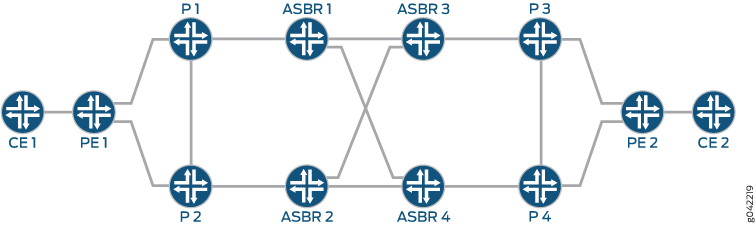
AS 간 옵션 C - BGP 레이블 유니캐스트는 AS 내 LSP를 함께 연결하여 종단 간 전송 레이블 스위치 경로(LSP)를 제공합니다. AS 경계 라우터는 EBGP를 다른 AS 경계 라우터로 실행하여 /32 PE 루프백 경로에 대한 레이블을 교환합니다. IBGP는 각 AS 내의 프로바이더 에지 라우터와 AS 경계 라우터 간에 실행됩니다. 그림 1에서 트래픽은 CE1에서 CE2로 이동합니다. ASBR1은 보호된 AS 경계 라우터이고, ASBR2는 보호자이며, 디바이스 P1은 로컬 수리 포인트(PLR)입니다. 기본 경로는 ASBR1 및 ASBR3을 통해 PE1에서 PE2로 선택됩니다. ASBR1에 장애가 발생하면 라우터 P1은 ASBR1 장애를 감지하고 트래픽을 ASBR2로 전달하며, ASBR2는 백업 서비스를 제공하고 트래픽을 다운스트림으로 전달합니다.
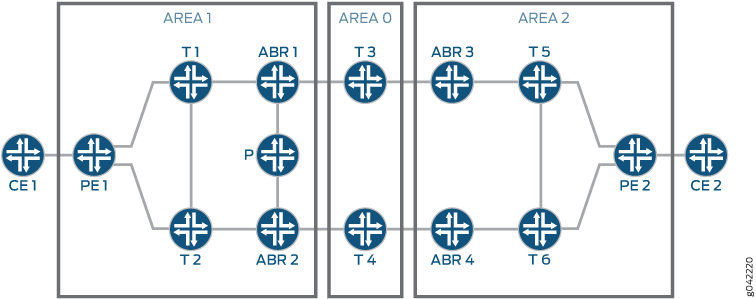
원활한 MPLS - BGP labeled 유니캐스트는 영역 내/수준 LSP를 연결하여 엔드 투 엔드 전송 LSP를 제공합니다. 영역 경계 라우터(ABR)는 BGP labeled 유니캐스트를 다른 ABR로 실행하여 /32 PE 루프백 경로에 대한 레이블을 교환합니다. 그림 2에서 트래픽은 디바이스 CE1에서 디바이스 CE2로 이동합니다. ABR1은 보호된 ABR, ABR2는 보호기, T1은 PLR입니다. 기본 경로는 ABR1 및 ABR3을 통해 PE1에서 PE2로 선택됩니다. ABR1에 장애가 발생하면 라우터 T1은 ABR1 장애를 감지하고 트래픽을 ABR2로 전달하며, ABR2는 백업 서비스를 제공하고 트래픽을 다운스트림으로 전달합니다.
이러한 각 애플리케이션에서 보호되는 노드는 보호가 필요한 기본 BGP 레이블이 지정된 유니캐스트 경로를 보급합니다. 고속 보호가 활성화되면 BGP는 특수 주소를 다음 홉으로 레이블 경로를 보급합니다. 이 특수 주소는 CLI를 통해 구성되는 컨텍스트 식별자입니다. 또한 보호 노드는 컨텍스트 식별자에 대해 IGP의 컨텍스트 식별자와 LDP의 NULL 레이블을 광고합니다.
백업 노드는 보호된 경로에 대한 백업 BGP 레이블이 지정된 유니캐스트 경로를 보급합니다. 보호 노드는 백업 노드에서 광고하는 레이블을 사용하여 트래픽을 백업 노드로 전달합니다.
보호자 노드는 보호 노드에서 생성된 레이블과 백업 노드에서 생성된 레이블을 교차 연결하여 백업 서비스를 제공합니다. 보호 노드는 보호된 노드에 장애가 발생할 경우 트래픽을 백업 노드로 전달합니다. 보호자 노드는 동일한 컨텍스트 식별자를 높은 메트릭으로 IGP에 보급합니다. 또한 컨텍스트 식별자를 위해 LDP에서 실제 레이블을 광고합니다. 보호 노드는 보호 노드와 백업 노드 모두에서 보급된 BGP 레이블이 지정된 유니캐스트 경로를 수신하고 컨텍스트 레이블 테이블과 백업 FIB를 채웁니다. 실제 컨텍스트 LDP 레이블이 있는 트래픽이 도착하면 조회는 보호된 노드의 컨텍스트에서 수행됩니다. 보호 노드는 종종 백업 노드 역할을 합니다.
PLR은 보호 노드 장애를 감지하고 MPLS 트래픽을 보호 노드로 전달합니다. 보호 노드에 의해 광고되는 LDP 레이블과 함께 높은 IGP 메트릭은 PLR이 보호 노드를 LDP 백업 LSP로 사용하도록 보장합니다.
지원되는 보호 유형에는 배치된 보호기와 중앙 집중식 보호기의 두 가지가 있습니다. 코로케이션된 유형에서 보호자 노드는 백업 노드이기도 합니다. 중앙 집중식 유형에서 백업 노드는 보호 노드와 다릅니다.
BGP Labeled Unicast에 대한 송신 보호 구성
송신 노드에 대한 빠른 보호는 BGP labeled 유니캐스트가 IGP 영역, 수준 또는 AS를 상호 연결하는 서비스에서 사용할 수 있습니다. 프로바이더 라우터가 송신 라우터(AS 또는 영역 경계 라우터)가 다운되었음을 감지하면, 즉시 해당 라우터로 향하는 트래픽을 트래픽 다운스트림을 대상으로 전달하는 보호자 라우터로 전달합니다.
BGP 레이블이 지정된 유니캐스트에 대한 송신 보호를 구성하기 전에 AS 또는 영역의 모든 라우터가 Junos OS 14.1 이상 릴리스를 실행하고 있는지 확인하십시오.
BGP 레이블이 지정된 유니캐스트에 대한 송신 보호 구성:
또한보십시오
예: BGP labeled unicast에 대한 송신 보호 구성
이 예는 AS 간 옵션 C 토폴로지에서 PE 장애 발생 시 사용할 수 있는 BGP 레이블 유니캐스트 보호를 구성하는 방법을 보여줍니다.
요구 사항
이 예에서 사용되는 하드웨어 및 소프트웨어 구성 요소는 다음과 같습니다.
-
M Series 멀티서비스 에지 라우터, MX 시리즈 5G 유니버설 라우팅 플랫폼 또는 T 시리즈 코어 라우터
-
Junos OS 릴리스 14.1 이상
개요
네트워크 노드 또는 링크 장애가 발생하면 기존 라우팅 테이블 컨버전스를 사용하여 서비스를 복원하는 데 다소 시간이 걸립니다. 로컬 수리 절차는 가능한 한 장애에 가까운 로컬 보호를 구축하여 훨씬 더 빠른 복원을 제공할 수 있습니다. 송신 노드에 대한 빠른 보호는 BGP 레이블링된 유니캐스트가 IGP 영역, 수준 또는 AS(Autonomous System)를 상호 연결하는 서비스에서 사용할 수 있습니다. 프로바이더 라우터가 송신 라우터(AS 또는 영역 경계 라우터)가 다운되었음을 감지하면, 즉시 해당 라우터로 향하는 트래픽을 트래픽 다운스트림을 대상으로 전달하는 보호자 라우터로 전달합니다.
이 예는 레이어 3 VPN에서 레이블이 지정된 유니캐스트 송신 보호를 구성하는 방법을 보여줍니다.
토폴로지
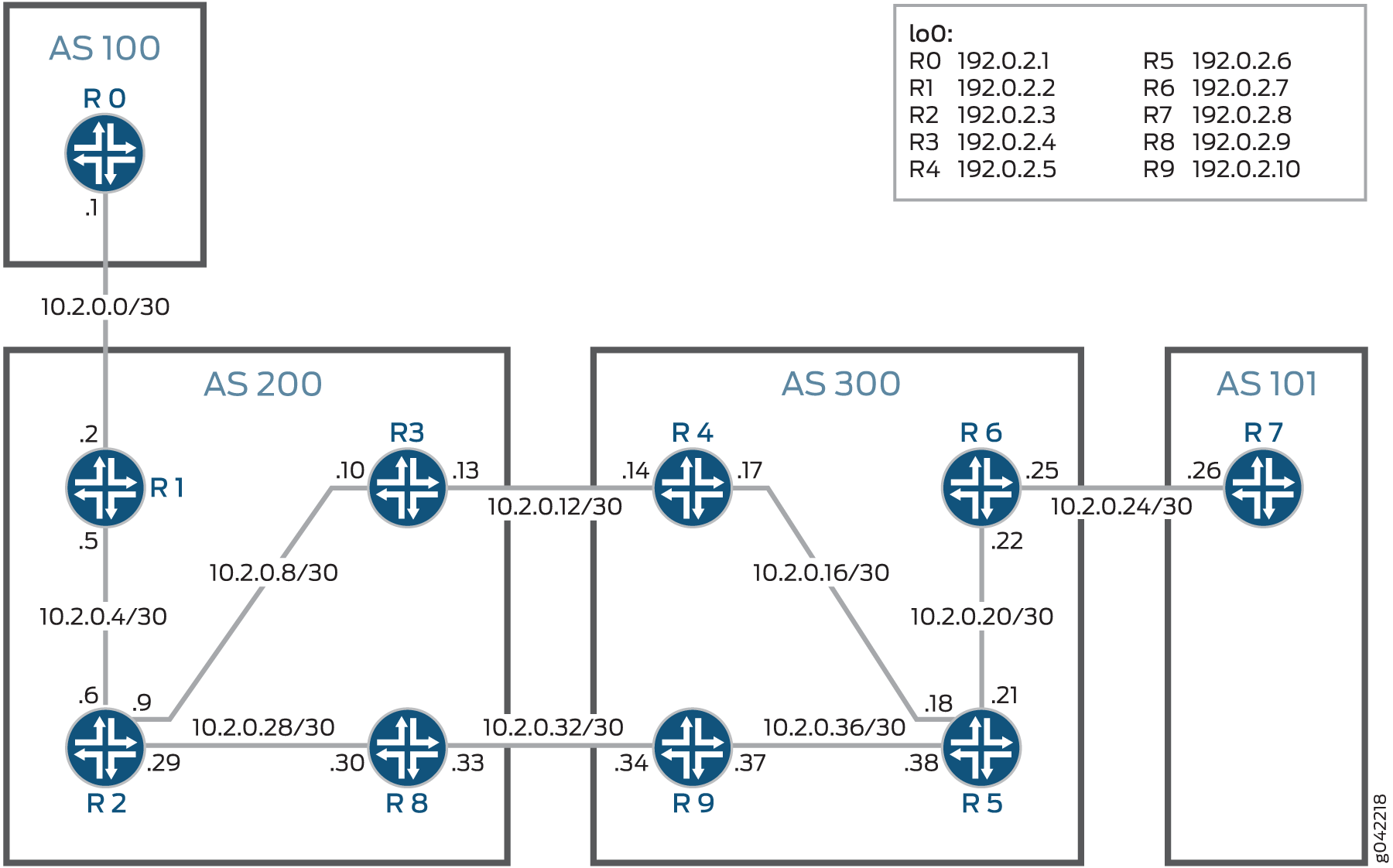
이 예에서는 4개의 자율 시스템에서 2개의 고객 에지(CE) 디바이스와 6개의 서비스 프로바이더 에지(PE) 디바이스를 구성하여 AS 간 옵션 C 토폴로지를 설정합니다. CE 디바이스는 AS100 및 AS101로 구성됩니다. PE 디바이스는 AS200 및 AS300으로 구성됩니다.
그림 3 은 이 예에서 사용되는 토폴로지를 보여줍니다.
 의 송신 보호
이 예의 목적은 PE 라우터 R4를 보호하는 것입니다. 송신 보호는 라우터 R4와 라우터 R9에 구성되어 라우터 R4(또는 R5에서 R4로의 링크)가 다운될 때 트래픽이 백업 링크(R9에서 R8로)를 통해 라우팅될 수 있습니다. 이 예에서 라우터 R4는 보호 라우터, 라우터 R9는 보호 라우터, 라우터 R5는 로컬 수리 지점(PLR)입니다.
구성
CLI 빠른 구성
이 예를 빠르게 구성하려면, 아래 명령을 복사하여 텍스트 파일로 붙여 넣은 다음 모든 라인브레이크를 제거하고, 네트워크 구성을 일치하는 데 필요한 세부 사항을 변경한 다음, 계층 수준에서 [edit] 명령을 복사하여 CLI에 붙여 넣습니다.
라우터 R0
set interfaces ge-0/0/0 unit 0 description toR1
set interfaces ge-0/0/0 unit 0 family inet address 10.2.0.1/30
set interfaces lo0 unit 0 family inet address 192.0.2.1/24 primary
set routing-options router-id 192.0.2.1
set routing-options autonomous-system 100
set protocols ospf area 0.0.0.0 interface lo0.0 passive
set protocols ospf area 0.0.0.0 interface ge-0/0/0.0 metric 10
라우터 R1
set interfaces ge-0/0/0 unit 0 description toR0
set interfaces ge-0/0/0 unit 0 family inet address 10.2.0.2/30
set interfaces ge-0/0/0 unit 0 family mpls
set interfaces ge-0/0/1 unit 0 description toR2
set interfaces ge-0/0/1 unit 0 family inet address 10.2.0.5/30
set interfaces ge-0/0/1 unit 0 family mpls
set interfaces lo0 unit 0 family inet address 192.0.2.2/24
set routing-options router-id 192.0.2.2
set routing-options autonomous-system 200
set protocols mpls label-switched-path ToR3 to 192.0.2.4
set protocols mpls label-switched-path ToR8 to 192.0.2.9
set protocols mpls interface all
set protocols bgp group parent-vpn-peers type internal
set protocols bgp group parent-vpn-peers local-address 192.0.2.2
set protocols bgp group parent-vpn-peers family inet unicast
set protocols bgp group parent-vpn-peers family inet labeled-unicast rib inet.3
set protocols bgp group parent-vpn-peers neighbor 192.0.2.4
set protocols bgp group parent-vpn-peers neighbor 192.0.2.9
set protocols bgp group toR6 type external
set protocols bgp group toR6 multihop ttl 10
set protocols bgp group toR6 local-address 192.0.2.2
set protocols bgp group toR6 family inet-vpn unicast
set protocols bgp group toR6 peer-as 300
set protocols bgp group toR6 neighbor 192.0.2.7
set protocols ospf traffic-engineering
set protocols ospf area 0.0.0.0 interface lo0.0 passive
set protocols ospf area 0.0.0.0 interface ge-0/0/1.0 metric 10
set protocols ldp interface ge-0/0/1.0
set protocols ldp interface lo0.0
set policy-options policy-statement child_vpn_routes term 1 from protocol bgp
set policy-options policy-statement child_vpn_routes term 1 then accept
set policy-options policy-statement child_vpn_routes term 2 then reject
set policy-options policy-statement vpnexport term 1 from protocol ospf
set policy-options policy-statement vpnexport term 1 then community add test_comm
set policy-options policy-statement vpnexport term 1 then accept
set policy-options policy-statement vpnexport term 2 then reject
set policy-options policy-statement vpnimport term 1 from protocol bgp
set policy-options policy-statement vpnimport term 1 from community test_comm
set policy-options policy-statement vpnimport term 1 then accept
set policy-options policy-statement vpnimport term 2 then reject
set policy-options community text_comm members target:1:200
set routing-instances customer-provider-vpn instance-type vrf
set routing-instances customer-provider-vpn interface ge-0/0/0.0
set routing-instances customer-provider-vpn route-distinguisher 192.0.2.4:1
set routing-instances customer-provider-vpn vrf-import vpnimport
set routing-instances customer-provider-vpn vrf-export vpnexport
set routing-instances customer-provider-vpn vrf-target target:200:1
set routing-instances customer-provider-vpn protocols ospf export child_vpn_routes
set routing-instances customer-provider-vpn protocols ospf area 0.0.0.0 interface ge-0/0/0.0
라우터 R2
set interfaces ge-0/0/0 unit 0 description toR3
set interfaces ge-0/0/0 unit 0 family inet address 10.2.0.9/30
set interfaces ge-0/0/0 unit 0 family mpls
set interfaces ge-0/0/1 unit 0 description toR1
set interfaces ge-0/0/1 unit 0 family inet address 10.2.0.6/30
set interfaces ge-0/0/1 unit 0 family mpls
set interfaces ge-0/0/2 unit 0 description toR8
set interfaces ge-0/0/2 unit 0 family inet address 10.2.0.29/30
set interfaces ge-0/0/2 unit 0 family mpls
set interfaces lo0 unit 0 family inet address 192.0.2.3/24
set routing-options router-id 192.0.2.3
set routing-options autonomous-system 200
set protocols mpls interface all
set protocols ospf traffic-engineering
set protocols ospf area 0.0.0.0 interface lo0.0 passive
set protocols ospf area 0.0.0.0 interface ge-0/0/0.0 metric 10
set protocols ospf area 0.0.0.0 interface ge-0/0/1.0 metric 10
set protocols ospf area 0.0.0.0 interface ge-0/0/2.0 metric 10
set protocols ldp interface ge-0/0/0.0
set protocols ldp interface ge-0/0/1.0
set protocols ldp interface ge-0/0/2.0
set protocols ldp interface lo0.0
라우터 R3
set interfaces ge-0/0/0 unit 0 description toR2
set interfaces ge-0/0/0 unit 0 family inet address 10.2.0.10/30
set interfaces ge-0/0/0 unit 0 family mpls
set interfaces ge-0/0/1 unit 0 description toR4
set interfaces ge-0/0/1 unit 0 family inet address 10.2.0.13/30
set interfaces ge-0/0/1 unit 0 family mpls
set interfaces lo0 unit 0 family inet address 192.0.2.4/24
set routing-options router-id 192.0.2.4
set routing-options autonomous-system 200
set protocols mpls traffic-engineering bgp-igp-both-ribs
set protocols mpls label-switched-path ToR1 to 192.0.2.2
set protocols mpls interface all
set protocols bgp group toR4 type external
set protocols bgp group toR4 family inet unicast
set protocols bgp group toR4 family inet labeled-unicast rib inet.3
set protocols bgp group toR4 export send-pe
set protocols bgp group toR4 neighbor 10.2.0.14 peer-as 300
set protocols bgp group parent-vpn-peers type internal
set protocols bgp group parent-vpn-peers local-address 192.0.2.4
set protocols bgp group parent-vpn-peers family inet unicast
set protocols bgp group parent-vpn-peers family inet labeled-unicast rib inet.3
set protocols bgp group parent-vpn-peers export next-hop-self
set protocols bgp group parent-vpn-peers neighbor 192.0.2.2
set protocols bgp group parent-vpn-peers neighbor 192.0.2.9
set protocols ospf traffic-engineering
set protocols ospf export from-bgp
set protocols ospf area 0.0.0.0 interface lo0.0 passive
set protocols ospf area 0.0.0.0 interface ge-0/0/0.0 metric 10
set protocols ldp interface ge-0/0/0.0
set protocols ldp interface ge-0/0/1.0
set protocols ldp interface lo0.0
set policy-options policy-statement next-hop-self term 1 then next-hop-self
set policy-options policy-statement send-pe from route-filter 192.0.2.2/24 exact
set policy-options policy-statement send-pe then accept
라우터 R4
set interfaces ge-0/0/0 unit 0 description toR5
set interfaces ge-0/0/0 unit 0 family inet address 10.2.0.17/30
set interfaces ge-0/0/0 unit 0 family iso
set interfaces ge-0/0/0 unit 0 family mpls
set interfaces ge-0/0/1 unit 0 description toR3
set interfaces ge-0/0/1 unit 0 family inet address 10.2.0.14/30
set interfaces ge-0/0/1 unit 0 family mpls
set interfaces lo0 unit 0 family inet address 192.0.2.5/24
set interfaces lo0 unit 0 family iso address 47.0005.80ff.f800.0000.0108.0001.0102.5507.2049.00
set routing-options router-id 192.0.2.5
set routing-options autonomous-system 300
set protocols mpls traffic-engineering bgp-igp-both-ribs
set protocols mpls label-switched-path ToR6 to 192.0.2.7
set protocols mpls interface all
set protocols mpls interface fxp.0 disable
set protocols mpls egress-protection context-identifier 203.0.113.1 primary
set protocols bgp group parent-vpn-peers type internal
set protocols bgp group parent-vpn-peers local-address 192.0.2.5
set protocols bgp group parent-vpn-peers family inet unicast
set protocols bgp group parent-vpn-peers family inet labeled-unicast rib inet.3
set protocols bgp group parent-vpn-peers family inet labeled-unicast egress-protection context-identifier 203.0.113.1
set protocols bgp group parent-vpn-peers export next-hop-self
set protocols bgp group parent-vpn-peers neighbor 192.0.2.7
set protocols bgp group parent-vpn-peers neighbor 192.0.2.10
set protocols bgp group toR3 type external
set protocols bgp group toR3 family inet labeled-unicast rib inet.3
set protocols bgp group toR3 export send-pe
set protocols bgp group toR3 peer-as 200
set protocols bgp group toR3 neighbor 10.2.0.13
set protocols isis level 1 disable
set protocols isis level 2 wide-metrics-only
set protocols isis interface ge-0/0/0.0 level 2 metric 10
set protocols isis interface lo0.0 passive
set protocols ldp interface ge-0/0/0.0
set protocols ldp interface ge-0/0/1.0
set protocols ldp interface lo0.0
set policy-options policy-statement next-hop-self term 1 then next-hop-self
set policy-options policy-statement send-pe from route-filter 192.0.2.7/24 exact
set policy-options policy-statement send-pe then accept
라우터 R5
set interfaces ge-0/0/0 unit 0 description toR4
set interfaces ge-0/0/0 unit 0 family inet address 10.2.0.18/30
set interfaces ge-0/0/0 unit 0 family iso
set interfaces ge-0/0/0 unit 0 family mpls
set interfaces ge-0/0/1 unit 0 description toR6
set interfaces ge-0/0/1 unit 0 family inet address 10.2.0.21/30
set interfaces ge-0/0/1 unit 0 family iso
set interfaces ge-0/0/1 unit 0 family mpls
set interfaces ge-0/0/2 unit 0 description toR9
set interfaces ge-0/0/2 unit 0 family inet address 10.2.0.38/30
set interfaces ge-0/0/2 unit 0 family iso
set interfaces ge-0/0/2 unit 0 family mpls
set interfaces lo0 unit 0 family inet address 192.0.2.6/24
set interfaces lo0 unit 0 family iso address 47.0005.80ff.f800.0000.0108.0001.0102.5507.2050.00
set routing-options router-id 192.0.2.6
set routing-options autonomous-system 300
set protocols mpls interface all
set protocols mpls interface fxp0.0 disable
set protocols isis backup-spf-options per-prefix-calculation
set protocols isis level 1 disable
set protocols isis level 2 wide-metrics-only
set protocols isis interface all node-link-protection
set protocols isis interface fxp0.0 disable
set protocols isis interface ge-0/0/0.0 link-protection
set protocols isis interface ge-0/0/0.0 level 2 metric 10
set protocols isis interface ge-0/0/1.0 link-protection
set protocols isis interface ge-0/0/1.0 level 2 metric 10
set protocols isis interface ge-0/0/2.0 link-protection
set protocols isis interface ge-0/0/2.0 level 2 metric 10
set protocols isis interface lo0.0 passive
set protocols ldp track-igp-metric
set protocols ldp interface all
set protocols ldp interface fxp0.0 disable
라우터 R6
set interfaces ge-0/0/0 unit 0 description toR7
set interfaces ge-0/0/0 unit 0 family inet address 10.2.0.25/30
set interfaces ge-0/0/0 unit 0 family iso
set interfaces ge-0/0/0 unit 0 family mpls
set interfaces ge-0/0/1 unit 0 description toR5
set interfaces ge-0/0/1 unit 0 family inet address 10.2.0.22/30
set interfaces ge-0/0/1 unit 0 family iso
set interfaces ge-0/0/1 unit 0 family mpls
set interfaces lo0 unit 0 family inet address 192.0.2.7/24
set interfaces lo0 unit 0 family iso address 47.0005.80ff.f800.0000.0108.0001.0102.5507.2048.00
set routing-options router-id 192.0.2.7
set routing-options autonomous-system 300
set protocols mpls label-switched-path ToR4 to 192.0.2.5
set protocols mpls label-switched-path ToR9 to 192.0.2.10
set protocols mpls interface all
set protocols bgp group parent-vpn-peers type internal
set protocols bgp group parent-vpn-peers local-address 192.0.2.7
set protocols bgp group parent-vpn-peers family inet unicast
set protocols bgp group parent-vpn-peers family inet labeled-unicast rib inet.3
set protocols bgp group parent-vpn-peers neighbor 192.0.2.5
set protocols bgp group parent-vpn-peers neighbor 192.0.2.10
set protocols bgp group toR1 type external
set protocols bgp group toR1 multihop ttl 10
set protocols bgp group toR1 local-address 192.0.2.7
set protocols bgp group toR1 family inet-vpn unicast
set protocols bgp group toR1 peers-as 200
set protocols bgp group toR1 neighbor 192.0.2.2
set protocols isis level 1 disable
set protocols isis level 2 wide-metrics-only
set protocols isis interface ge-0/0/1.0 level 2 metric 10
set protocols isis interface lo0.0 passive
set protocols ldp interface ge-0/0/1.0
set protocols ldp interface lo0.0
set policy-options policy-statement child-vpn-routes term 1 from protocol bgp
set policy-options policy-statement child-vpn-routes term 1 then accept
set policy-options policy-statement child-vpn-routes term 2 then reject
set policy-options policy-statement vpnexport term 1 from protocol ospf
set policy-options policy-statement vpnexport term 1 then community add test_comm
set policy-options policy-statement vpnexport term 1 then accept
set policy-options policy-statement vpnexport term 2 then reject
set policy-options policy-statement vpnimport term 1 from protocol bgp
set policy-options policy-statement vpnimport term 1 from community test_comm
set policy-options policy-statement vpnimport term 1 then accept
set policy-options policy-statement vpnimport term 2 then reject
set policy-options community test_comm members target:1:300
set routing-instances customer-provider-vpn instance-type vrf
set routing-instances customer-provider-vpn interface ge-0/0/0.0
set routing-instances customer-provider-vpn route-distinguisher 192.0.2.5:1
set routing-instances customer-provider-vpn vrf-import vpnimport
set routing-instances customer-provider-vpn vrf-export vpnexport
set routing-instances customer-provider-vpn vrf-target target:300:1
set routing-instances customer-provider-vpn protocols ospf export child-vpn-routes
set routing-instances customer-provider-vpn protocols ospf area 0.0.0.0 interface ge-0/0/0.0
라우터 R7
set interfaces ge-0/0/0 unit 0 description toR6
set interfaces ge-0/0/0 unit 0 family inet address 10.2.0.26/30
set interfaces ge-0/0/0 unit 0 family mpls
set interfaces lo0 unit 0 family inet address 192.0.2.8/24 primary
set routing-options router-id 192.0.2.8
set routing-options autonomous-system 101
set protocols ospf area 0.0.0.0 interface lo0.0 passive
set protocols ospf area 0.0.0.0 interface ge-0/0/0.0 metric 10
라우터 R8
set interfaces ge-0/0/0 unit 0 description toR9
set interfaces ge-0/0/0 unit 0 family inet address 10.2.0.33/30
set interfaces ge-0/0/0 unit 0 family mpls
set interfaces ge-0/0/1 unit 0 description toR2
set interfaces ge-0/0/1 unit 0 family inet address 10.2.0.30/30
set interfaces ge-0/0/1 unit 0 family mpls
set interfaces lo0 unit 0 family inet address 192.0.2.9/24
set routing-options router-id 192.0.2.9
set routing-options autonomous-system 200
set protocols mpls traffic-engineering bgp-igp-both-ribs
set protocols mpls label-switched-path ToR1 to 192.0.2.2
set protocols mpls interface all
set protocols bgp group toR9 type external
set protocols bgp group toR9 family inet unicast
set protocols bgp group toR9 family inet labeled-unicast rib inet.3
set protocols bgp group toR9 export send-pe
set protocols bgp group toR9 neighbor 10.2.0.34 peer-as 300
set protocols bgp group parent-vpn-peers type internal
set protocols bgp group parent-vpn-peers local-address 192.0.2.9
set protocols bgp group parent-vpn-peers family inet unicast
set protocols bgp group parent-vpn-peers family inet labeled-unicast rib inet.3
set protocols bgp group parent-vpn-peers export next-hop-self
set protocols bgp group parent-vpn-peers neighbor 192.0.2.2
set protocols bgp group parent-vpn-peers neighbor 192.0.2.4
set protocols ospf traffic-engineering
set protocols ospf area 0.0.0.0 interface lo0.0 passive
set protocols ospf area 0.0.0.0 interface ge-0/0/1.0 metric 10
set protocols ldp interface ge-0/0/0.0
set protocols ldp interface ge-0/0/1.0
set protocols ldp interface lo0.0
set policy-options policy-statement from-bgp from protocol bgp
set policy-options policy-statement from-bgp then metric add 100
set policy-options policy-statement from-bgp then accept
set policy-options policy-statement next-hop-self term 1 then next-hop-self
set policy-options policy-statement send-pe from route-filter 192.0.2.2/24 exact
set policy-options policy-statement send-pe then accept
라우터 R9
set interfaces ge-0/0/0 unit 0 description toR8
set interfaces ge-0/0/0 unit 0 family inet address 10.2.0.34/30
set interfaces ge-0/0/0 unit 0 family mpls
set interfaces ge-0/0/1 unit 0 description toR5
set interfaces ge-0/0/1 unit 0 family inet address 10.2.0.37/30
set interfaces ge-0/0/1 unit 0 family iso
set interfaces ge-0/0/1 unit 0 family mpls
set interfaces lo0 unit 0 family inet address 192.0.2.10/24
set interfaces lo0 unit 0 family iso address 47.0005.80ff.f800.0000.0108.0001.0102.5507.2062.00
set routing-options router-id 192.0.2.10
set routing-options autonomous-system 300
set protocols mpls traffic-engineering bgp-igp-both-ribs
set protocols mpls label-switched-path ToR6 to 192.0.2.7
set protocols mpls interface all
set protocols mpls egress-protection context-identifier 203.0.113.1 protector
set protocols bgp group parent-vpn-peers type internal
set protocols bgp group parent-vpn-peers local-address 192.0.2.10
set protocols bgp group parent-vpn-peers family inet unicast
set protocols bgp group parent-vpn-peers family inet labeled-unicast rib inet.3
set protocols bgp group parent-vpn-peers family inet labeled-unicast egress-protection
set protocols bgp group parent-vpn-peers export next-hop-self
set protocols bgp group parent-vpn-peers neighbor 192.0.2.7
set protocols bgp group parent-vpn-peers neighbor 192.0.2.5
set protocols bgp group toR8 type external
set protocols bgp group toR8 family inet labeled-unicast rib inet.3
set protocols bgp group toR8 export send-pe
set protocols bgp group toR8 neighbor 10.2.0.33 peer-as 200
set protocols isis level 1 disable
set protocols isis level 2 wide-metrics-only
set protocols isis interface ge-0/0/1.0 level 2 metric 10
set protocols isis interface lo0.0 passive
set protocols ldp interface ge-0/0/0.0
set protocols ldp interface ge-0/0/1.0
set protocols ldp interface lo0.0
set policy-options policy-statement next-hop-self term 1 then next-hop-self
set policy-options policy-statement send-pe from route-filter 192.0.2.7/24 exact
set policy-options policy-statement send-pe then accept
레이어 3 VPN에서 송신 보호 구성
단계별 절차
다음 예에서는 구성 계층에서 다양한 수준의 탐색이 필요합니다. CLI 탐색에 대한 정보는 CLI 사용자 가이드의 구성 모드에서 CLI 편집기 사용을 참조하십시오.
레이블이 지정된 유니캐스트 송신 보호를 구성하려면 다음을 수행합니다.
-
각 라우터에서 인터페이스를 구성합니다. 예:
[edit interfaces]
user@R4# set ge-0/0/0 unit 0 description toR5
user@R4# set ge-0/0/0 unit 0 family inet address 10.2.0.17/30
user@R4# set ge-0/0/0 unit 0 family iso
user@R4# set ge-0/0/0 unit 0 family mpls
user@R4# set ge-0/0/1 unit 0 description toR3
user@R4# set ge-0/0/1 unit 0 family inet address 10.2.0.14/30
user@R4# set ge-0/0/1 unit 0 family mpls
user@R4# set lo0 unit 0 family inet address 192.0.2.5/24
user@R4# set lo0 unit 0 family iso address 47.0005.80ff.f800.0000.0108.0001.0102.5507.2049.00
-
각 라우터에 대한 라우터 ID 및 AS(Autonomous System) 번호를 구성합니다. 예:
[edit routing-options]
user@R4# set router-id 192.0.2.5
user@R4# set autonomous-system 300
이 예에서 라우터 ID는 라우터에 구성된 루프백 주소와 동일하게 선택됩니다.
-
각 라우터에서 프로토콜을 구성합니다. 예:
[edit protocols]
user@R4# set mpls traffic-engineering bgp-igp-both-ribs
user@R4# set mpls label-switched-path ToR6 to 192.0.2.7
user@R4# set mpls interface all
user@R4# set mpls interface fxp.0 disable
user@R4# set bgp group parent-vpn-peers type internal
user@R4# set bgp group parent-vpn-peers local-address 192.0.2.5
user@R4# set bgp group parent-vpn-peers family inet unicast
user@R4# set bgp group parent-vpn-peers family inet labeled-unicast rib inet.3
user@R4# set bgp group parent-vpn-peers export next-hop-self
user@R4# set bgp group parent-vpn-peers neighbor 192.0.2.7
user@R4# set bgp group parent-vpn-peers neighbor 192.0.2.10
user@R4# set bgp group toR3 type external
user@R4# set bgp group toR3 family inet labeled-unicast rib inet.3
user@R4# set bgp group toR3 export send-pe
user@R4# set bgp group toR3 peer-as 200
user@R4# set bgp group toR3 neighbor 10.2.0.13
user@R4# set isis level 1 disable
user@R4# set isis level 2 wide-metrics-only
user@R4# set isis interface ge-0/0/0.0 level 2 metric 10
user@R4# set isis interface lo0.0 passive
user@R4# set ldp interface ge-0/0/0.0
user@R4# set ldp interface ge-0/0/1.0
user@R4# set ldp interface lo0.0
-
모든 PE 라우터 및 AS 경계 라우터(라우터 R1, R3, R4, R6, R8 및 R9)에서 라우팅 정책을 구성합니다. 예:
user@R4# set policy-options policy-statement next-hop-self term 1 then next-hop-self
user@R4# set policy-options policy-statement send-pe from route-filter 192.0.2.7/24 exact
user@R4# set policy-options policy-statement send-pe then accept
-
라우터 R1 및 R6에서 VPN 라우팅 인스턴스를 구성합니다.
user@R1# set routing-instances customer-provider-vpn instance-type vrf
user@R1# set routing-instances customer-provider-vpn interface ge-0/0/0.0
user@R1# set routing-instances customer-provider-vpn route-distinguisher 192.0.2.4:1
user@R1# set routing-instances customer-provider-vpn vrf-import vpnimport
user@R1# set routing-instances customer-provider-vpn vrf-export vpnexport
user@R1# set routing-instances customer-provider-vpn vrf-target target:200:1
user@R1# set routing-instances customer-provider-vpn protocols ospf export child_vpn_routes
user@R1# set routing-instances customer-provider-vpn protocols ospf area 0.0.0.0 interface ge-0/0/0.0
그리고
user@R6# set routing-instances customer-provider-vpn instance-type vrf
user@R6# set routing-instances customer-provider-vpn interface ge-0/0/0.0
user@R6# set routing-instances customer-provider-vpn route-distinguisher 192.0.2.5:1
user@R6# set routing-instances customer-provider-vpn vrf-import vpnimport
user@R6# set routing-instances customer-provider-vpn vrf-export vpnexport
user@R6# set routing-instances customer-provider-vpn vrf-target target:300:1
user@R6# set routing-instances customer-provider-vpn protocols ospf export child-vpn-routes
user@R6# set routing-instances customer-provider-vpn protocols ospf area 0.0.0.0 interface ge-0/0/0.0
-
라우터 R4를 보호 라우터로, 라우터 R9를 보호자로 설정하여 라우터 R4에 대한 라우터 보호를 구성합니다.
user@R4# set protocols mpls egress-protection context-identifier 203.0.113.1 primary
user@R4# set protocols bgp group parent-vpn-peers family inet labeled-unicast egress-protection context-identifier 203.0.113.1
그리고
user@R9# set protocols mpls egress-protection context-identifier 203.0.113.1 protector
user@R9# set protocols bgp group parent-vpn-peers family inet labeled-unicast egress-protection
결과
구성 모드에서 , show routing-options, , ( show policy-options 해당하는 경우) 및 show routing-instances (해당되는 경우) 명령을 입력show interfacesshow protocols하여 구성을 확인합니다.
출력에 의도한 구성이 표시되지 않으면 이 예의 지침을 반복하여 구성을 수정합니다.
user@R4# show interfaces
ge-0/0/0 {
    unit 0 {
        description toR5;
        family inet {
            address 10.2.0.17/30;
        }
        family iso;
        family mpls;
    }
}
ge-0/0/1 {
    unit 0 {
        description toR3;
        family inet {
            address 10.2.0.14/30;
        }
        family mpls;
    }
}
lo0 {
    unit 0 {
        family inet {
            address 192.0.2.5/24;
        }
        family iso {
            address 47.0005.80ff.f800.0000.0108.0001.0102.5507.2049.00;
        }
    }
}
user@R4# show routing-options
router-id 192.0.2.5;
autonomous-system 300;
user@R4# show protocols
mpls {
    traffic-engineering bgp-igp-both-ribs;
    label-switched-path ToR6 {
        to 192.0.2.7;
    }
    interface all;
    interface fxp0.0 {
        disable;
    }
    egress-protection {
        context-identifier 203.0.113.1 {
            primary;
        }
    }
}
bgp {
    group parent-vpn-peers {
        type internal;
        local-address 192.0.2.5;
        family inet {
            unicast;
            labeled-unicast {
                rib {
                    inet.3;
                }
                egress-protection {
                    context-identifier {
                        203.0.113.1;
                    }
                }
            }
        }
        export next-hop-self;
        neighbor 192.0.2.7;
        neighbor 192.0.2.10;
    }
    group toR3 {
        type external;
        family inet {
            unicast;
            labeled-unicast {
                rib {
                    inet.3;
                }
            }
        }
        export send-pe;
        peer-as 200;
        neighbor 10.2.0.13;
    }
}
isis {
    level 1 disable;
    level 2 wide-metrics-only;
    interface ge-0/0/0.0 {
        level 2 metric 10;
    }
    interface lo0.0 {
        passive;
    }
}
ldp {
    interface ge-0/0/0.0;
    interface ge-0/0/1.0;
    interface lo0.0;
}
user@R4# show policy-options
policy-statement next-hop-self {
    term 1 {
        then {
            next-hop self;
        }
    }
}
policy-statement send-pe {
    from {
        route-filter 192.0.2.7/24 exact;
    }
    then accept;
}
라우터 구성이 완료되면 구성 모드에서 들어갑니다 commit .
각 라우터에 대한 적절한 인터페이스 이름과 주소를 사용하여 이 예의 모든 라우터에 대해 절차를 반복합니다.
검증
송신 보호가 활성화되었는지 확인하기
목적
보호되는 라우터인 라우터 R4에서 송신 보호가 활성화되어 있는지 확인합니다.
작업
라우터 R4에서 실행 show bgp neighbor 하여 송신 보호가 활성화되었는지 확인합니다.
user@R4> show bgp neighbor
Peer: 192.0.2.10+45824 AS 300    Local: 192.0.2.5+27630 AS 300
  Type: Internal    State: Established    Flags: <Sync>
  Last State: OpenConfirm   Last Event: RecvKeepAlive
  Last Error: None
  Export: [ next-hop-self ]
  Options: <Preference LocalAddress AddressFamily Refresh>
  Address families configured: inet-unicast inet-labeled-unicast
  Local Address: 192.0.2.5 Holdtime: 90 Preference: 170
  NLRI configured with egress-protection: inet-labeled-unicast
  Egress-protection NLRI inet-labeled-unicast context-identifier: 203.0.113.1
  Number of flaps: 0
  ...
보호된 ASBR의 상태를 '기본'으로 확인
목적
보호되는 AS 경계 라우터인 라우터 R4의 상태가 '기본'인지 확인합니다.
작업
라우터 R4에서 실행 show mpls context-identifier 합니다.
user@R4> show mpls context-identifier
ID                Type        Metric     ContextTable
203.0.113.1         primary     1
Total 1, Primary 1, Protector 0
레이어 3 VPN 에지 보호에 대한 송신 보호 개요
일반적으로 멀티호밍 고객 에지(CE) 라우터에 대한 레이어 3 VPN 서비스 복원은 송신 PE 링크 또는 노드 실패를 감지하고 백업 PE 라우터로 트래픽을 전환하는 수신 공급자 에지(PE) 라우터에 의존합니다. 더 빠른 복원을 달성하기 위해 PE 라우터에 대한 보호 메커니즘을 사용하여 송신 PE 노드 실패 시 즉시 서비스의 로컬 복원을 수행할 수 있습니다. 이 메커니즘을 사용하려면 PLR(Point of Local Repair)의 라우터가 트래픽의 Fast Reroute를 위해 VPN 트래픽을 보호기 PE 라우터로 리디렉션해야 합니다.
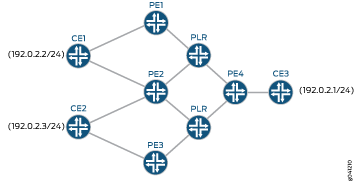
다음 토폴로지는 송신 보호의 개념을 설명합니다.
 를 위한 샘플 토폴로지
이 토폴로지에서:
라우터 PE3는 PE2 레이어 3 VPN 라우팅 인스턴스 또는 서브넷의 보호자 역할을 합니다.
CE 라우터는 라우터 CE1이 라우터 PE1 및 라우터 PE2와 멀티호밍되는 VPN의 일부입니다. 마찬가지로 라우터 CE2는 라우터 PE2 및 PE3와 멀티호밍됩니다.
라우터 PE1은 라우터 CE1에 대한 컨텍스트 식별자의 원본자가 될 수 있는 반면, 라우터 PE2는 해당 컨텍스트 식별자의 보호자입니다. 마찬가지로 PE2는 라우터 CE2에 대한 컨텍스트 식별자의 원본자가 될 수 있는 반면, 라우터 PE3는 해당 컨텍스트 식별자의 보호자입니다.
라우터 PE4가 취하는 작업 경로는 라우터 CE1과 라우터 CE2 모두에 대해 PLR>PE2를 통해 이루어질 수 있습니다. 라우터 CE1의 백업 경로는 PLR>PE1을 통과하는 것입니다. 라우터 CE2의 백업 경로는 PLR>PE3를 통과하는 것입니다. 트래픽은 정상적인 상황에서 작업 경로를 통해 흐릅니다.
라우터 PE4가 PE2 노드 또는 링크 장애를 감지하면 트래픽이 작업 경로에서 보호된 경로로 재라우팅됩니다. 일반적인 페일오버 프로세스에서 장애 감지 및 복구는 컨트롤 플레인에 의존하므로 상대적으로 느립니다.
일반적으로 코어 네트워크에 링크 또는 노드 장애가 있는 경우, 송신 장애에 대한 로컬 복구 옵션을 사용할 수 없기 때문에 송신 PE 라우터는 수신 PE 라우터에 의존하여 장애를 감지하고 백업 경로로 전환해야 합니다.
송신 PE 링크 또는 노드 장애에 대한 로컬 복구 솔루션을 제공하기 위해 송신 보호라고 하는 메커니즘을 사용하여 연결을 신속하게 복구하고 복원할 수 있습니다. 송신 보호가 구성된 경우, PLR 라우터는 PE2 링크 또는 노드 장애를 감지하고 백업 LDP 신호 레이블 스위치 경로(LSP)를 사용하여 보호자 라우터 PE3를 통해 트래픽을 재라우팅합니다. PLR 라우터는 접두사별 루프 프리 대체 경로를 사용하여 라우터 PE3을 통해 백업 다음 홉을 프로그래밍하고 트래픽은 대체 경로를 사용하여 라우터 CE1 및 CE2로 전달됩니다. 이 복원은 PLR 라우터가 라우터 PE2 송신 노드 또는 링크 장애를 감지한 후 신속하게 수행됩니다.
이중 보호 메커니즘은 송신 보호에도 사용될 수 있으며, 여기서 두 개의 PE 라우터는 각각의 컨텍스트 ID 경로 또는 다음 홉에 대해 기본 PE 라우터 및 보호기 PE 라우터 역할을 동시에 수행할 수 있습니다.
라우터 기능
그림 4에서 다음 라우터는 다음 기능을 수행합니다.
보호 PE 라우터
보호되는 PE2는 다음과 같은 기능을 수행합니다.
-
레이어 3 VPN 접두사에 대한 BGP 다음 홉에 대한 컨텍스트 식별자를 업데이트합니다.
-
IS-IS 도메인에 컨텍스트 식별자를 보급합니다.
프로텍터 PE 라우터
보호 PE 라우터인 PE3는 다음과 같은 기능을 수행합니다.
-
높은 메트릭으로 IS-IS 도메인에 컨텍스트 식별자를 보급합니다. LDP 레이블과 함께 높은 IGP 메트릭(구성 가능)은 송신 PE 라우터 실패 시 PLR 라우터가 LDP 신호 백업 LSP를 사용하도록 보장합니다.
-
경로 조회를 위한 컨텍스트 레이블 테이블과 보호된 PE 라우터(PE2)에 대한 백업 포워딩 테이블을 구축합니다.
참고:보호기 PE 라우터는 기본 PE 라우터의 전달 경로에 있어서는 안 됩니다.
PLR 라우터
PLR(Point of Local Repair) 역할을 하는 라우터는 다음 기능을 수행합니다.
-
접두사별 루프 프리 대체 경로를 계산합니다. 이 계산이 작동하려면 계층 수준에서
[edit protocols isis]문과backup-spf-options per-prefix-calculation문의 구성node-link-protection이 필요합니다. -
PE3 라우터(보호자 PE)를 통해 컨텍스트 식별자에 대한 백업 다음 홉을 설치합니다.
-
PE 라우터 장애를 감지하고 전송 LSP 트래픽을 보호기로 리디렉션합니다.
PLR 라우터는 보호 라우터(이 경우 PE3)에 직접 연결되어야 합니다. 그렇지 않으면 루프 프리 대체 경로는 보호기에 대한 백업 경로를 찾을 수 없습니다. 이 제한은 Junos OS 릴리스 13.3 이상에서 제거되었습니다.
보호 및 보호 모델
프로텍터는 송신 PE 노드 장애의 복원을 위한 새로운 역할 또는 기능입니다. 이 역할은 백업 송신 PE 라우터 또는 송신 노드 보호가 필요한 VPN 접두사의 VPN 컨트롤 플레인에 참여하는 다른 노드가 수행할 수 있습니다. 보호자의 위치와 역할에 따라 두 가지 보호 모델이 있습니다.
-
공동 위치 보호기 - 이 모델에서 보호자 PE 라우터와 백업 PE 라우터 구성은 동일한 라우터에서 수행됩니다. 보호기는 보호된 접두사에 대한 백업 PE 라우터와 같은 위치에 있으며, 보호된 접두사를 생성하는 멀티호밍 사이트에 직접 연결됩니다. 송신 PE 실패의 경우 보호기는 PLR 라우터에서 트래픽을 수신하고 멀티호밍 사이트로 트래픽을 라우팅합니다.
-
중앙 집중식 보호기 - 이 모델에서 보호기 PE 라우터와 백업 PE 라우터는 다릅니다. 중앙 집중식 보호기는 멀티홈 사이트에 직접 연결되지 않을 수 있습니다. 송신 PE 링크 또는 노드 실패의 경우, 중앙 집중식 보호자는 멀티호밍 사이트로 트래픽을 전송하는 역할을 대신하는 백업 송신 PE 라우터에 대해 보급된 VPN 레이블과 함께 백업 송신 PE 라우터로 트래픽을 다시 라우팅합니다.
네트워크는 요구 사항에 따라 보호 모델 중 하나를 사용하거나 둘 다를 조합하여 사용할 수 있습니다.
송신 노드 보호의 특별한 시나리오로, 라우터가 보호기이자 PLR인 경우 전송 LSP를 보호하기 위해 백업 다음 홉을 설치합니다. 특히 로컬 수리를 위해 우회 LSP가 필요하지 않습니다.
공동 위치 보호기 모델에서 PLR 또는 보호기는 백업 AC를 통해 CE에 직접 연결되는 반면, 중앙 집중식 보호기 모델에서는 PLR 또는 보호기에 백업 PE에 대한 MPLS 터널이 있습니다. 두 경우 모두 PLR 또는 보호자는 레이블과 함께 백업 다음 홉을 설치하고 그 뒤에 테이블__context__.mpls.0에서 context label 조회를 수행합니다. 송신 노드에 장애가 발생하면 PLR 또는 보호자는 트래픽을 PFE의 이 백업 다음 홉으로 전환합니다. 패킷의 외부 레이블(전송 LSP 레이블)이 팝업되고 내부 레이블(송신 노드에 의해 할당된 레이어 3 VPN 레이블)이 __context__.mpls.0조회되어 패킷이 CE(배치된 보호자 모델) 또는 백업 PE(중앙 집중식 보호자 모델)로 직접 전달됩니다.
송신 PE 장애 보호에 대한 자세한 내용은 인터넷 초안 draft-minto-2547-egress-node-fast-protection-00, 2547 송신 PE 고속 장애 보호를 참조하십시오. .
IGP 광고 모델
송신 보호 가용성은 내부 게이트웨이 프로토콜(IGP)에서 보급됩니다. CSPF(Constrained Shortest Path First)와 함께 레이블 프로토콜은 이 정보를 사용하여 송신 보호를 수행합니다.
레이어 3 VPN의 경우 IGP 광고는 다음 유형이 될 수 있습니다.
-
스텁 링크로서의 컨텍스트 식별자(Junos OS 11.4 R3 이상에서 지원). 스텁 노드를 전송 노드로 연결하는 링크는 스텁 링크입니다.
-
스텁 별칭 노드로서의 컨텍스트 식별자(Junos OS 13.3 이상에서 지원).
-
스텁 프록시 노드로서의 컨텍스트 식별자(Junos OS 13.3 이상에서 지원).
기본적으로 스텁 링크가 사용됩니다. 송신 실패 시 PLR이 서비스 트래픽을 다시 라우팅하는 향상된 PLR(Point-of-Local-Repair) 기능을 활성화하려면 다음과 같이 스텁 별칭 노드 또는 스텁 프록시 노드를 구성합니다.
[edit protocols mpls egress-protection context-identifier 192.0.2.6]
user@host# set advertise-mode ?
Possible completions:
  stub-alias           Alias
  stub-proxy           Proxy
이 두 방법은 네트워크 구축의 요구에 따라 서로 다른 이점을 제공합니다.
스텁 별칭 노드로서의 컨텍스트 식별자
스텁 별칭 방법에서, LSP 엔드포인트 주소는 보호된 LSP의 끝에서 두 번째 홉 노드에서 백업을 학습하거나 구성할 수 있는 명시적 백업 송신 노드를 가지고 있습니다. 이 모델에서, 보호된 LSP의 끝에서 두 번째 홉 노드는 우회 LSP 터널을 설정하여 기본 송신 노드를 피하여 송신 노드를 백업합니다. 이 모델은 코어 노드에서 Junos OS 업그레이드가 필요하지만 모든 트래픽 엔지니어링 제약을 지원할 수 있을 만큼 유연합니다.
PLR은 컨텍스트 ID에 보호기가 있음을 학습합니다. 기본 컨텍스트 ID가 다운되면 패킷은 사전 프로그래밍된 백업 경로를 통해 보호기로 다시 라우팅됩니다. 컨텍스트 ID 및 보호자 매핑은 PLR에서 구성 또는 학습되며 보호자에서 IGP로 신호됩니다. PLR에서 inet.5라고 하는 라우팅 테이블은 구성된 세부 정보 또는 IGP에서 학습한 세부 정보를 제공합니다.
IS-IS는 IP 주소 TLV를 통해 TED에 컨텍스트 ID를 보급합니다. IS-IS는 이 TLV를 확장 정보로 TED로 가져옵니다. IS-IS는 프로토콜 다음 홉이 보호자의 라우터 ID인 컨텍스트 ID에 대한 inet.5 경로의 보호자 TLV 경로를 보급합니다. 보호자 TLV에 레이블이 있는 경우, 레이블은 LDP가 사용할 inet.5 라우팅 테이블의 경로에 추가됩니다.
CSPF는 터널 엔드포인트 계산을 위해 IP 주소 TLV를 고려합니다.
스텁 별칭 모델을 사용하면 보호자 LSP 설정에 노드를 변경할 필요가 없습니다. 그러나 노드 보호를 위해 LSP 설정을 우회하려면 PHN과 보호기 라우터를 변경해야 합니다.
RSVP가 노드 보호 LSP에 대한 우회를 설정할 때, RSVP는 PLR이 LSP의 끝에서 두 번째 홉인 경우 보호기에 대한 조회도 수행합니다. LSP 대상에 보호기를 사용할 수 있는 경우, CSPF를 사용하여 송신 PE를 배제하는 제약 조건이 있는 경로를 계산하고 아직 설정되지 않은 경우 컨텍스트 ID에 우회 LSP 대상을 설정합니다. 컨텍스트 ID에 우회 LSP를 설정할 때 PLR은 모든 보호 옵션을 설정 해제합니다.
LDP는 네트워크가 100% LFA 커버리지를 지원하지만 접두사당 LFA 커버리지는 100%를 지원하지 않는 경우에 유용합니다. LDP는 보호자가 서비스 포인트에 보급한 컨텍스트 레이블을 사용하여 보호자와 함께 백업 경로를 설정합니다.
100% LFA 범위를 사용할 수 없는 네트워크에서는 RSVP 기반 터널을 사용하여 백업 LSP LFA를 보유하는 것이 유용합니다.
정상 상태에서, 포워딩은 PLR의 다른 보호된 LSP에서와 동일합니다. 보호기에서 컨텍스트 ID에 대해 보급되고 시그널링되는 NULL이 아닌 레이블은 피어의 레이블이 프로그래밍되는 MPLS 컨텍스트 테이블에 대한 테이블 다음 홉을 가집니다.
장애 발생 시 PLR은 컨텍스트 ID에 대한 전송 레이블을 우회 LSP와 스왑하거나 레이블 컨텍스트 레이블(컨텍스트 ID에 대한 보호자 보급 레이블)을 스왑하고 전송 레이블을 보호자 lo0 인터페이스 주소로 푸시합니다.
스텁 프록시 노드로서의 컨텍스트 식별자
스텁 프록시 노드로서의 컨텍스트 식별자(Junos OS 13.3 이상에서 지원). 스텁 노드는 AS 경로의 끝에만 나타나는 노드로, 이는 전송 서비스를 제공하지 않는다는 것을 의미합니다. 가상 또는 프록시 모드로 알려진 이 모드에서 LSP 엔드포인트 주소는 LSP의 기본 송신 노드 및 백업 송신 노드와 함께 양방향 링크가 있는 노드로 표시됩니다. 이 표현으로, LSP 기본 송신 지점의 끝에서 두 번째 홉은 기본 송신 노드를 피하여 송신을 백업하기 위해 우회 터널을 설정하는 데 있어 PLR처럼 동작할 수 있습니다. 이 모델은 코어 노드에서 Junos OS를 업그레이드할 필요가 없으므로 운영자가 이 기술을 구축하는 데 도움이 된다는 장점이 있습니다.
컨텍스트 ID는 트래픽 엔지니어링(TE) 및 IGP 데이터베이스에서 노드로 표시됩니다. 기본 PE 디바이스는 컨텍스트 노드를 IGP 및 TE 데이터베이스에 보급합니다. 기본 PE 디바이스와 보호되는 PE 디바이스는 대역폭과 TE 메트릭을 사용하여 컨텍스트 노드에 대한 하나의 링크를 지원합니다. TE 링크의 다른 TE 특성은 Junos OS에 의해 보급되지 않습니다.
IS-IS에서 기본 PE 라우터는 기본 라우터 및 보호기 라우터에 대한 링크와 함께 프록시 노드를 보급합니다. 기본 및 보호자 라우터는 프록시 노드에 대한 링크를 보급합니다. 프록시 노드는 다음 정보를 빌드합니다.
-
시스템 ID - 컨텍스트 ID를 기반으로 하는 이진수 코드 10진수입니다.
-
호스트 이름—Protector-name:context ID
-
LSP-ID - <시스템 ID>.00
-
PDU 유형—구성 기반 레벨 2 및 레벨 1
-
LSP 속성:
-
과부하—1
-
IS_TYPE_L1(0x01) | 레벨 2 PDU의 경우 IS_TYPE_L2(0x02)
-
레벨 1에 대한 IS_TYPE_L1
-
다중 영역—아니요
-
기타 모든 속성—0
-
프록시 노드에는 영역, MT, 호스트 이름, 라우터 ID, 프로토콜 및 IS 도달 가능성 TLV만 포함됩니다. 영역, MT, 인증 및 프로토콜 TLV는 기본에서와 동일합니다. IS 도달 가능성 TLV에는 Cnode-primary-link 및 Cnode-protector-link라는 두 개의 링크가 포함되어 있습니다. 두 링크 모두 TE TLV를 포함합니다. 다음 TE-link-TLV는 컨텍스트 링크에서 보급됩니다.
-
IPv4 인터페이스 또는 이웃 주소
-
최대 대역폭
-
TE 기본 메트릭
-
링크(로컬 또는 원격) 식별자
하위 TLV 값:
-
대역폭—제로
-
TE 메트릭—최대 TE 메트릭
-
인터페이스 주소—컨텍스트 ID
-
보호자 이웃 주소—보호자 라우터 ID
-
기본 이웃 주소 - 보호된 라우터 ID
-
링크 local-ID 보호기 - 0x80fffff1
-
링크 local-ID primary—0x80fffff2
-
링크 remote-ID 보호기 - 보호기에서 학습한 항목
-
Link remote-ID primary—기본에서 학습됨
컨텍스트 노드에 대한 보호된 PE 링크(기본은 다음 세부 정보를 사용하여 링크를 보급함):
-
대역폭—최대
-
TE 메트릭—1
-
인터페이스 주소—라우터 ID
-
Context neighbor address - 컨텍스트 ID
-
Link local-ID to context node—자동 생성(가짜 링크와 유사)
-
원격 ID를 컨텍스트 노드에 링크—0x80fffff2
컨텍스트 노드에 대한 보호자 PE 링크:
-
보호자는 최대 라우팅 가능 링크 메트릭과 최대 TE 메트릭 및 0대역폭으로 번호가 지정되지 않은 전송 링크를 컨텍스트 노드에 보급합니다. 다른 TE 특성은 광고되지 않습니다.
번호가 지정되지 않은 링크는 다음 속성으로 보급됩니다.
-
대역폭—0
-
TE 메트릭—최대 TE 메트릭
-
인터페이스 주소—라우터 ID
-
Context neighbor address - 컨텍스트 ID
-
로컬 ID를 컨텍스트 노드에 링크 - 자동 생성(가짜 링크와 유사)
-
원격 ID를 컨텍스트 노드에 링크—0x80fffff1
RSVP에서 동작 변경은 보호자 및 기본 라우터에서만 발생합니다. RSVP는 LSP와 우회 LSP를 컨텍스트 ID로 종료합니다. 컨텍스트 ID가 보호기인 경우 NULL이 아닌 레이블이 신호됩니다. 그렇지 않으면 구성 또는 요청된 레이블 유형을 기반으로 합니다. RSVP는 경로에서 ERO(Explicit Route Object)와 컨텍스트 ID를 확인합니다. RSVP는 두 개의 RRO(Record Route Object) 개체(하나는 컨텍스트 ID용, 다른 하나는 자체용)와 함께 Resv 메시지를 보냅니다. 이는 PHN(Penultimate-Hop Node)을 시뮬레이션하여 컨텍스트 ID LSP에 대한 기본에 대한 보호기와 함께 노드 보호를 수행합니다. FRR(Fast Reroute) 필수 우회로서, LSP는 기본을 피하여 보호기를 통해 컨텍스트 ID로 보호 LSP PHN 설정 우회로로 다시 병합해야 합니다.
또한 보호자는 컨텍스트 ID에 대한 백업 LSP를 종료하여 수신 노드가 LSP를 다시 신호할 때까지 장애 발생 시 보호된 LSP를 활성 상태로 유지합니다. 새로운 LSP는 보호기를 통해 재설정되지만 서비스 프로토콜이 컨텍스트 ID를 사용하지 않으므로 이 LSP는 서비스 트래픽에 사용되지 않습니다. LSP는 기본이 작동하더라도 보호기를 통해 트래버스합니다. 재최적화만 기본을 통해 LSP를 다시 신호합니다. 스텁 프록시 모드에서는 제약이 있는 우회 LSP가 지원되지 않습니다.
LDP는 IGP에서 광고되는 부풀려진 메트릭으로 인해 스텁 프록시 방법을 사용할 수 없습니다.
포워딩 상태와 관련해서, 다른 PE에 연결된 하나 이상의 세그먼트를 보호하는 PE 라우터를 보호자 PE라고 합니다. 보호 PE는 보호 중인 기본 PE로부터 보호하는 세그먼트의 전송 상태를 학습해야 합니다.
지정된 세그먼트에 대해 보호자 PE가 세그먼트와 연결된 CE 디바이스에 직접 연결되어 있지 않은 경우, 적어도 하나의 백업 PE로부터 전달 상태도 학습해야 합니다. 이러한 상황은 송신 PE 장애 보호의 경우에만 발생할 수 있습니다.
보호자 PE는 기본 PE의 컨텍스트에서 지정된 세그먼트에 대한 전송 상태를 유지합니다. 보호자 PE는 기본 PE의 세그먼트 하위 집합 또는 기본 PE의 모든 세그먼트에 대한 상태를 유지할 수 있습니다.
예: 레이어 3 VPN 서비스에 대한 MPLS 송신 보호 구성
이 예에서는 고객 에지(CE) 라우터가 둘 이상의 PE 라우터와 멀티호밍되는 시나리오에서 송신 프로바이더 에지(PE) 라우터 장애로부터 레이어 3 VPN 서비스를 보호하기 위한 로컬 라우터 메커니즘을 설명합니다.
이 예에서 사용되는 용어는 다음과 같습니다.
발신자 PE 라우터 - 기본 레이어 3 VPN 라우터를 배포하는 보호된 라우팅 인스턴스 또는 서브넷이 있는 PE 라우터입니다.
백업 PE 라우터 - 백업 레이어 3 VPN 경로를 알리는 PE 라우터입니다.
보호자 PE 라우터 - 발신자 PE 라우터에 의해 배포된 VPN 레이블을 백업 PE 라우터에 의해 생성된 레이블에 교차 연결하는 라우터입니다. 보호기 PE 라우터는 백업 PE 라우터가 될 수도 있습니다.
전송 LSP - BGP 다음 홉을 위한 LDP 신호 레이블 스위치 경로(LSP).
PLR—레이어 3 VPN 트래픽을 보호 PE 라우터로 리디렉션하여 빠른 복원 및 재라우팅을 가능하게 할 수 있는 PLR(Point of Local Repair) 역할을 하는 라우터입니다.
루프 없는 대체 경로 - IGP의 모든 기본 경로에 대한 백업 경로를 미리 계산하여 내부 게이트웨이 프로토콜(IGP)에 대한 IP fast-reroute 기능을 본질적으로 추가하는 기술입니다. 이 문서의 맥락에서 IGP는 IS-IS입니다.
멀티호밍 - CE 디바이스를 여러 PE 라우터에 연결할 수 있는 기술입니다. 기본 PE 라우터에 대한 연결이 실패할 경우, 트래픽은 자동으로 백업 PE 라우터로 전환될 수 있습니다.
Context identifier—보호가 필요한 VPN 접두사를 식별하는 데 사용되는 IPv4 주소입니다. 식별자는 PE 및 PLR 코어 라우터로 전파되므로 보호된 송신 PE 라우터가 보호 PE 라우터에 송신 보호를 시그널링할 수 있습니다.
이중 보호 - 두 개의 PE 라우터가 각각의 컨텍스트 ID 경로 또는 다음 홉에 대해 기본 PE 라우터 및 보호자 PE 라우터 역할을 동시에 수행할 수 있는 보호 메커니즘을 말합니다. 예를 들어, 두 개의 PE 라우터 PE1과 PE2 사이에서 PE1은 컨텍스트 식별자 203.0.113.1에 대한 기본 PE 라우터 및 컨텍스트 식별자 203.0.113.2에 대한 보호자가 될 수 있습니다. 마찬가지로 PE2 라우터는 컨텍스트 식별자 203.0.113.1에 대한 보호자 및 컨텍스트 식별자 203.0.113.2에 대한 기본 PE 라우터가 될 수 있습니다.
예: 레이어 3 VPN 서비스에 대한 송신 보호 구성
이 예에서는 레이어 3 VPN 서비스의 빠른 복원을 위해 송신 보호를 구성하는 방법을 보여줍니다.
요구 사항
이 예에서는 다음과 같은 하드웨어 및 소프트웨어 구성 요소를 사용합니다
MX 시리즈 5G 유니버설 라우팅 플랫폼
터널 PIC 또는 향상된 IP 네트워크 서비스 모드의 구성(계층 수준에서
[edit chassis]문 사용network-services enhanced-ip).디바이스에서 실행되는 Junos OS 릴리스 11.4R3 이상
시작하기 전에:
디바이스 인터페이스를 구성합니다. Junos OS 네트워크 인터페이스 구성 가이드를 참조하십시오.
모든 PE 및 PLR 라우터에서 다음 라우팅 프로토콜을 구성합니다.
MPLS, LSP 및 LDP. Junos OS MPLS 애플리케이션 구성 가이드를 참조하십시오.
BGP 및 IS-IS. Junos OS 라우팅 프로토콜 구성 가이드를 참조하십시오.
레이어 3 VPN을 구성합니다. Junos OS VPN 구성 가이드를 참조하십시오.
개요
일반적으로 레이어 3 VPN 서비스 복원은 송신 PE 라우터 실패의 경우(멀티홈 고객 에지[CE] 라우터의 경우) 수신 PE 라우터에 따라 송신 PE 노드 실패를 감지하고 멀티호밍 CE 사이트의 백업 PE 라우터로 트래픽을 전환합니다.
Junos OS 릴리스 11.4R3 이상을 사용하면 CE 사이트가 두 개 이상의 PE 라우터와 멀티호밍되는 시나리오에서 송신 PE 노드 장애로부터 서비스를 보호하는 레이어 3 VPN 서비스에 대한 송신 보호를 구성할 수 있습니다. 이 메커니즘을 사용하면 송신 노드 실패 즉시 로컬 복구를 수행할 수 있습니다. PLR(Point of Local Repair) 역할을 하는 라우터는 VPN 트래픽을 보호기 PE 라우터로 리디렉션하여 서비스를 신속하게 복원하여 MPLS Fast Reroute에 필적하는 빠른 보호를 달성합니다.
송신 보호를 구성하는 데 사용되는 문은 다음과 같습니다.
egress-protection—[edit protocols mpls] 계층 수준에서 구성된 경우, 이 문은 레이어 3 VPN 및 에지 보호 가상 서킷에 대한 보호자 정보와 컨텍스트 식별자를 지정합니다.[edit protocols mpls] egress-protection { context-identifier context-id { primary | protector; metric igp-metric-value; } },
[edit protocols bgp group group-name family inet6-vpn unicast]또는[edit protocols bgp group group-name family iso-vpn unicast]계층 수준에서[edit protocols bgp group group-name family inet-vpn unicast]구성될 경우, egress-protection 문은 구성된 BGP VPN NLRI(Network Layer Reachability Information)에 대한 송신 보호를 활성화하는 컨텍스트 식별자를 지정합니다.[edit protocols bgp] group internal { type internal; local-address ip-address; family <inet-vpn|inet6-vpn|iso-vpn> { unicast { egress-protection { context-identifier { context-id-ip-address; } } } } }계층 수준에서
[edit routing-instances]구성할 경우, 문은egress-protection보호되는 PE 라우터의 컨텍스트 식별자를 보유합니다.이 구성은 기본 PE 라우터에서만 수행되어야 하며 다음 홉에 대한 아웃바운드 BGP 업데이트에 사용됩니다.
[edit routing-instance]
routing-instance-name {
    egress-protection {
        context-identifier {
            context-id-ip-address;
        }
    }
}
계층 수준에서
[edit routing-instances routing-instance-name]문을 구성하면context-identifier각 VRF 인스턴스에 대한 고객 에지 VRF 수준 컨텍스트 ID 세분화가 제공됩니다.context-identifier- 이 문은 송신 보호 LSP에 참여하는 PE 라우터 쌍을 정의하는 데 사용되는 IPV4 주소를 지정합니다. 컨텍스트 식별자는 보호자 PE 라우터에 식별자를 할당하는 데 사용됩니다. 식별자는 네트워크에 참여하는 다른 PE 라우터로 전파되므로 보호되는 송신 PE 라우터가 송신 보호 LSP를 보호자 PE 라우터에 시그널링할 수 있습니다.
구성
CLI 빠른 구성
이 예는 보호된 라우터, PE2, 보호자 라우터, PE3 및 PLR 라우터에서 레이어 3 VPN 서비스에 대한 송신 PE 보호를 구성하는 것과 관련된 샘플 구성만 보여줍니다.
이 예를 빠르게 구성하려면, 아래 명령을 복사하여 텍스트 파일로 붙여 넣은 다음 모든 라인브레이크를 제거하고, 네트워크 구성을 일치하는 데 필요한 세부 사항을 변경한 다음, 계층 수준에서 [edit] 명령을 복사하여 CLI에 붙여 넣습니다.
PE2(보호 PE 라우터)
set protocols mpls interface all
set protocols mpls interface fxp0.0 disable
set protocols mpls egress-protection context-identifier 192.0.2.6 primary
set protocols bgp group ibgp type internal
set protocols bgp group ibgp local-address 10.255.245.194
set protocols bgp group ibgp family inet-vpn unicast egress-protection context-identifier 192.0.2.6
PE3(프로텍터 PE 라우터)
set protocols mpls interface all
set protocols mpls interface fxp0.0 disable
set protocols mpls egress-protection context-identifier 192.0.2.6 protector
set protocols bgp group ibgp type internal
set protocols bgp group ibgp local-address 10.255.245.196
set protocols bgp group ibgp family inet-vpn unicast egress-protection keep-import remote-vrf
set policy-options policy-statement remote-vrf from community rsite1
set policy-options policy-statement remote-vrf from community rsite24
set policy-options policy-statement remote-vrf then accept
set policy-options community rsite1 members target:1:1
set policy-options community rsite24 members target:100:1023
PLR 라우터
set protocols mpls interface all
set protocols mpls interface fxp0.0 disable
set protocols isis level 1 disable
set protocols isis interface all node-link-protection
set protocols isis backup-spf-options per-prefix-calculation
set protocols ldp track-igp-metric
set protocols ldp interface all
set protocols ldp interface fxp0.0 disable
보호된 PE 라우터(PE2) 구성
단계별 절차
보호되는 PE 라우터 PE2를 구성하려면 다음과 같이 하십시오.
인터페이스에 MPLS를 구성합니다.
[edit protocols mpls]
user@PE2# set interface all
user@PE2#set interface fxp0.0 disable
송신 보호 및 컨텍스트 식별자를 구성합니다.
참고:컨텍스트 식별자 유형은 로 설정되어야 합니다.
primary[edit protocols mpls] user@PE2# set egress-protection context-identifier 192.0.2.6 primary
구성된 BGP NRLI에 대한 송신 보호를 구성합니다.
참고:계층 수준에서
[edit protocols bgp group group-name family inet-vpn]구성된 컨텍스트 식별자는 계층 수준에서[edit protocols mpls]구성된 컨텍스트 식별자와 일치해야 합니다.[edit protocols bgp] user@PE2# set group ibgp type internal user@PE2# set group ibgp local-address 10.255.245.194 user@PE2# set group ibgp family inet-vpn unicast egress-protection context-identifier 192.0.2.6
참고:계층 수준에서
[edit routing-instances routing-instance-name]context-identifier를 구성하면 각 가상 라우팅 및 포워딩(VRF) 인스턴스에 대한 CE VRF 수준 context-id 세분성을 제공합니다.디바이스 구성을 마친 후 구성을 커밋합니다.
[edit]
user@PE2#  commit
결과
show protocols 명령을 실행하여 구성을 확인합니다. 출력에 의도한 구성이 표시되지 않으면 이 예의 지침을 반복하여 구성을 수정합니다.
user@PE2# show protocols
mpls {
    interface all;
    interface fxp0.0 {
        disable;
    }
    egress-protection {
        context-identifier 192.0.2.6 {
            primary;
        }
    }
}
    bgp {
        group ibgp {
            type internal;
            local-address 10.255.245.194;
            family inet-vpn {
                unicast {
                    egress-protection {
                        context-identifier {
                            192.0.2.6;
                        }
                    }
                }
            }
        }
    }
보호 PE 라우터(PE3) 구성
단계별 절차
보호기 PE 라우터 PE3를 구성하려면 다음을 수행합니다.
인터페이스에 MPLS를 구성합니다.
[edit protocols mpls]
user@PE3# set interface all
user@PE3#set mpls interface fxp0.0 disable
송신 보호 및 컨텍스트 식별자를 구성합니다.
[edit protocols mpls]
user@PE3#set egress-protection context-identifier 192.0.2.6 protector
IPv4 레이어 3 VPN NRLI 매개 변수를 구성합니다.
[edit protocols bgp]
user@PE3# set group ibgp type internal
user@PE3# set group ibgp local-address 10.255.245.196
user@PE3# set group ibgp family inet-vpn unicast egress-protection keep-import remote-vrf
라우팅 정책 옵션을 구성합니다.
[edit policy-options]
user@PE3# set policy-statement remote-vrf from community rsite1
user@PE3# set policy-statement remote-vrf from community rsite24
user@PE3# set policy-statement remote-vrf then accept
user@PE3# set community rsite1 members target:1:1
user@PE3# set community rsite24 members target:100:1023
디바이스 구성을 마친 후 구성을 커밋합니다.
[edit]
user@PE3#  commit
결과
및 show protocols 명령을 실행하여 구성을 확인합니다. show policy-options 출력에 의도한 구성이 표시되지 않으면 이 예의 지침을 반복하여 구성을 수정합니다.
user@PE3# show protocols
mpls {
    interface all;
    interface fxp0.0 {
        disable;
    }
    egress-protection {
        context-identifier 192.0.2.6 {
            protector;
        }
    }
}
    bgp {
        group ibgp {
            type internal;
            local-address 10.255.245.196;
            family inet-vpn {
                unicast {
                    egress-protection {
                        keep-import remote-vrf;
                    }
                }
            }
        }
    }
user@PE3# show policy-options
policy-statement remote-vrf {
    from community [ rsite1 rsite24 ];
    then accept;
    }
    community rsite1 members target:1:1;
community rsite24 members target:100:1023;
PLR 라우터 구성
단계별 절차
로컬 수리 지점(PLR) 역할을 하는 라우터를 구성하려면 다음을 수행합니다.
인터페이스에 MPLS를 구성합니다.
[edit protocols mpls]
user@PLR# set interface all
user@PLR# set interface fxp0.0 disable
링크 보호와 함께 접두사별 LFA 계산을 구성합니다.
[edit protocols isis]
user@PLR# set backup-spf-options per-prefix-calculation
user@PLR# set level 1 disable
user@PLR# set interface all node-link-protection
user@PLR# set interface fxp0.0 disable
기본 IGP 라우팅 메트릭(기본 LDP 라우팅 메트릭은 1) 대신 내부 게이트웨이 프로토콜(IGP) 라우팅 메트릭을 사용하도록 LDP를 구성합니다.
[edit protocols ldp]
user@PLR# set track-igp-metric
user@PLR# set interface all
user@PLR# set interface fxp0.0 disable
결과
명령을 실행 show protocols 하여 구성을 확인합니다. 출력에 의도한 구성이 표시되지 않으면 이 예의 지침을 반복하여 구성을 수정합니다.
user@PLR# show protocols
mpls {
    interface all;
    interface fxp0.0 {
        disable;
    }
}
isis {
    backup-spf-options per-prefix-calculation;
    level 1 disable;
    interface all {
        node-link-protection;
    }
}
ldp {
    track-igp-metric;
    interface all;
    interface fxp0.0 {
        disable;
    }
}
검증
구성이 제대로 작동하고 있는지 확인합니다.
송신 보호 세부 정보 확인
목적
송신 보호 구성을 확인합니다.
작업
user@PE3> show mpls egress-protection details

Instance                 Type      Protection-Type
rsite1                  remote-vrf  Protector
  RIB __192.0.2.6-rsite1__.inet.0, Context-Id 192.0.2.6, Enhanced-lookup
  Route Target 1:1
rsite24                 remote-vrf  Protector
  RIB __192.0.2.6-rsite24__.inet.0, Context-Id 192.0.2.6, Enhanced-lookup
  Route Target 100:1023
의미
Instance라우팅 인스턴스 이름을 나타냅니다. Type VRF의 유형을 보여줍니다. 또는 중 하나 local-vrf 일 수 있습니다. RIB (라우팅 정보 베이스)는 에지 보호가 생성한 라우팅 테이블 Context-Id 을 나타냅니다. 는 RIB와 연관된 컨텍스트 ID를 보여줍니다. Route Target 은 라우팅 인스턴스와 연관된 루트 대상을 remote-vrf보여줍니다.
라우팅 인스턴스 확인
목적
라우팅 인스턴스를 확인합니다.
작업
user@PE3> show route instance site1 detail

site1:
  Router ID: 198.51.100.1
  Type: vrf               State: Active
  Interfaces:
    lt-1/3/0.8
  Route-distinguisher: 10.255.255.11:150
  Vrf-import: [ site1-import ]
  Vrf-export: [ __vrf-export-site1-internal__ ]
  Vrf-export-target: [ target:100:250 ]
  Fast-reroute-priority: low
  Vrf-edge-protection-id:  192.0.2.6
  Tables:
    site1.inet.0           : 27 routes (26 active, 0 holddown, 0 hidden)
    site1.iso.0            : 0 routes (0 active, 0 holddown, 0 hidden)
    site1.inet6.0          : 0 routes (0 active, 0 holddown, 0 hidden)
    site1.mdt.0            : 0 routes (0 active, 0 holddown, 0 hidden)
의미
Vrf-edge-protection-id 라우팅 인스턴스와 함께 보호기 PE 라우터에서 구성된 송신 보호를 보여줍니다.
BGP NRLI 확인
목적
BGP VPN 네트워크 레이어 연결성 정보의 세부 사항을 확인합니다.
작업
user@PE3> show bgp neighbor

Peer: 10.255.55.1+179 AS 65535 Local: 10.255.22.1+59264 AS 65535
  Type: Internal    State: Established    Flags: <ImportEval Sync>
  Last State: OpenConfirm   Last Event: RecvKeepAlive
  Last Error: None
  Options: <Preference LocalAddress KeepAll AddressFamily Rib-group Refresh>
  Address families configured: inet-vpn-unicast
  Local Address: 10.255.22.1 Holdtime: 90 Preference: 170
  NLRI configured with egress-protection: inet-vpn-unicast
  Egress-protection NLRI inet-vpn-unicast, keep-import: [ VPN-A-remote ]
  Number of flaps: 0
의미
NLRI configured with egress-protection 송신 보호로 구성된 BGP family를 보여줍니다. egress-protection NLRI inet-vpn-unicast, keep-import: [remote-vrf] BGP 그룹에 대한 송신 보호 라우팅 정책을 보여줍니다.
예: RSVP 및 LDP를 사용한 레이어 3 VPN 송신 보호 구성
이 예는 고객이 서비스 프로바이더에 멀티호밍된 경우 레이어 3 VPN의 송신에서 빠른 서비스 복원을 구성하는 방법을 보여줍니다. 또한 이 예에는 송신 실패 시 PLR이 서비스 트래픽을 재라우팅하는 향상된 PLR(Point-of-Local-Repair) 기능이 포함되어 있습니다.
Junos OS 릴리스 13.3부터는 송신 실패 시 PLR이 서비스 트래픽을 재라우팅하는 향상된 PLR 기능을 사용할 수 있습니다. 이러한 향상의 일환으로 PLR 라우터는 더 이상 보호자 라우터에 직접 연결할 필요가 없습니다. 이전에는 PLR이 보호자 라우터에 직접 연결되지 않은 경우 루프 없는 대체 경로가 보호자의 백업 경로를 찾을 수 없었습니다.
요구 사항
이 예제를 구성하기 전에 디바이스 초기화 이외의 특별한 구성은 필요하지 않습니다.
이 예는 Junos OS 릴리스 13.3 이상이 필요합니다.
개요
이 예에서 고객 에지(CE) 디바이스는 디바이스 CE1이 디바이스 PE2 및 디바이스 PE3과 멀티호밍되는 VPN의 일부입니다.
디바이스 PE3는 레이어 3 VPN 라우팅 인스턴스 또는 서브넷의 보호기 역할을 합니다.
디바이스 PE1은 디바이스 CE1에 대한 컨텍스트 식별자의 원본자이고, 디바이스 PE2는 해당 컨텍스트 식별자의 기본 라우터이며, 디바이스 PE3는 해당 컨텍스트 식별자의 보호자입니다.
디바이스 P1은 로컬 수리 지점(PLR) 역할을 합니다. 따라서 디바이스 P1은 레이어 3 VPN 트래픽을 보호기 PE 라우터로 리디렉션하여 빠른 복원 및 재라우팅을 가능하게 할 수 있습니다.
작업 경로는 P1>PE2를 통과합니다. 백업 경로는 P1>PE3을 통과합니다. 트래픽은 정상적인 상황에서 작업 경로를 통해 흐릅니다. 디바이스 PE2 노드 또는 링크 장애가 감지되면 트래픽이 작업 경로에서 보호된 경로로 재라우팅됩니다. 일반적인 페일오버 프로세스에서 장애 감지 및 복구는 컨트롤 플레인에 의존하므로 상대적으로 느립니다. 일반적으로 코어 네트워크에 링크 또는 노드 장애가 있는 경우, 송신 장애에 대한 로컬 복구 옵션을 사용할 수 없기 때문에 송신 PE 라우터는 수신 PE 라우터에 의존하여 장애를 감지하고 백업 경로로 전환해야 합니다. 송신 PE 링크 또는 노드 장애에 대한 로컬 복구 솔루션을 제공하기 위해 이 예에서는 송신 보호라고 하는 메커니즘을 사용하여 연결을 신속하게 복구하고 복원합니다. 송신 보호가 구성되었기 때문에 PLR 라우터는 디바이스 PE2 링크 또는 노드 장애를 감지하고 백업 LDP 신호 레이블 스위치 경로(LSP)를 사용하여 보호기 디바이스 PE3를 통해 트래픽을 재라우팅합니다. PLR 라우터는 접두사별 루프 프리 대체 경로를 사용하여 디바이스 PE3를 통해 백업 다음 홉을 프로그래밍하고 트래픽은 대체 경로를 사용하여 디바이스 CE2로 전달됩니다. 이 복원은 PLR 라우터가 디바이스 PE2 송신 노드 또는 링크 장애를 감지한 후 신속하게 수행됩니다. 이중 보호 메커니즘은 송신 보호에도 사용될 수 있으며, 여기서 두 개의 PE 라우터는 각각의 컨텍스트 ID 경로 또는 다음 홉에 대해 기본 PE 라우터 및 보호기 PE 라우터 역할을 동시에 수행할 수 있습니다.
송신 보호 외에도, 이 예는 송신 실패 시 PLR이 서비스 트래픽을 재라우팅하는 향상된 PLR 기능을 보여줍니다. 이 개선 사항은 Junos OS 릴리스 13.3 이상에서 지원됩니다. 이 예에서 디바이스 P1(PLR)은 디바이스 PE3(보호기)에 직접 연결됩니다. 새 구성 문을 advertise-mode 사용하면 내부 게이트웨이 프로토콜(IGP)이 송신 보호 가용성을 보급하는 방법을 설정할 수 있습니다.
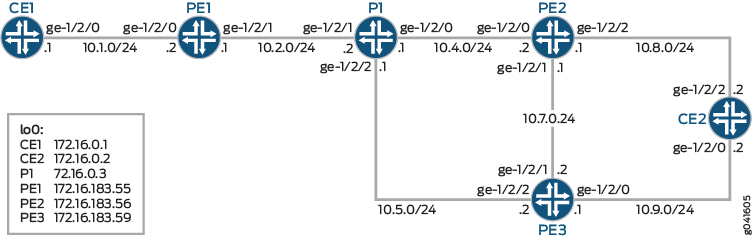
구성
CLI 빠른 구성
이 예를 빠르게 구성하려면, 아래 명령을 복사하여 텍스트 파일로 붙여 넣은 다음 모든 라인브레이크를 제거하고, 네트워크 구성을 일치하는 데 필요한 세부 사항을 변경한 다음, 계층 수준에서 [edit] 명령을 복사하여 CLI에 붙여 넣습니다.
디바이스 CE1
set interfaces ge-1/2/0 unit 0 description to_PE1
set interfaces ge-1/2/0 unit 0 family inet address 10.1.0.1/24
set interfaces lo0 unit 0 family inet address 172.16.0.1/32
set protocols ospf area 0.0.0.0 interface ge-1/2/0.0
디바이스 CE2
set interfaces ge-1/2/2 unit 0 description to_PE2
set interfaces ge-1/2/2 unit 0 family inet address 10.8.0.2/24
set interfaces ge-1/2/0 unit 0 description to_PE3
set interfaces ge-1/2/0 unit 0 family inet address 10.9.0.2/24
set interfaces lo0 unit 0 family inet address 172.16.0.2/32
set protocols ospf area 0.0.0.0 interface ge-1/2/2.0
set protocols ospf area 0.0.0.0 interface ge-1/2/0.0
디바이스 P1
set interfaces ge-1/2/1 unit 0 description to_PE1
set interfaces ge-1/2/1 unit 0 family inet address 10.2.0.2/24
set interfaces ge-1/2/1 unit 0 family iso
set interfaces ge-1/2/1 unit 0 family mpls
set interfaces ge-1/2/0 unit 0 description to_PE2
set interfaces ge-1/2/0 unit 0 family inet address 10.4.0.1/24
set interfaces ge-1/2/0 unit 0 family iso
set interfaces ge-1/2/0 unit 0 family mpls
set interfaces ge-1/2/2 unit 0 description to_PE3
set interfaces ge-1/2/2 unit 0 family inet address 10.5.0.1/24
set interfaces ge-1/2/2 unit 0 family iso
set interfaces ge-1/2/2 unit 0 family mpls
set interfaces lo0 unit 0 family inet address 172.16.0.3/32
set interfaces lo0 unit 0 family iso address 49.0002.0172.0016.0003.00
set protocols rsvp interface all
set protocols rsvp interface fxp0.0 disable
set protocols mpls interface all
set protocols isis backup-spf-options per-prefix-calculation
set protocols isis level 1 disable
set protocols isis level 2 wide-metrics-only
set protocols isis interface all node-link-protection
set protocols isis interface fxp0.0 disable
set protocols isis interface lo0.0
set protocols ldp track-igp-metric
set protocols ldp interface all
set protocols ldp interface fxp0.0 disable
디바이스 PE1
set interfaces ge-1/2/0 unit 0 description to_CE1
set interfaces ge-1/2/0 unit 0 family inet address 10.1.0.2/24
set interfaces ge-1/2/1 unit 0 description to_P1
set interfaces ge-1/2/1 unit 0 family inet address 10.2.0.1/24
set interfaces ge-1/2/1 unit 0 family iso
set interfaces ge-1/2/1 unit 0 family mpls
set interfaces lo0 unit 0 family inet address 172.16.183.55/32
set interfaces lo0 unit 0 family iso address 49.0002.1720.1618.3055.00
set protocols rsvp interface all
set protocols rsvp interface fxp0.0 disable
set protocols mpls label-switched-path toPrimary192.0.2.6 to 192.0.2.6
set protocols mpls label-switched-path toPrimary192.0.2.6 egress-protection
set protocols mpls interface all
set protocols bgp group ibgp type internal
set protocols bgp group ibgp local-address 172.16.183.55
set protocols bgp group ibgp family inet-vpn unicast
set protocols bgp group ibgp neighbor 172.16.183.56
set protocols bgp group ibgp neighbor 172.16.183.59
set protocols isis level 1 disable
set protocols isis level 2 wide-metrics-only
set protocols isis interface all
set protocols isis interface fxp0.0 disable
set protocols isis interface lo0.0
set protocols ldp track-igp-metric
set protocols ldp interface all
set protocols ldp interface fxp0.0 disable
set routing-instances vpn1 instance-type vrf
set routing-instances vpn1 interface ge-1/2/0.0
set routing-instances vpn1 route-distinguisher 172.16.183.55:10
set routing-instances vpn1 vrf-target target:10:10
set routing-instances vpn1 routing-options static route 100.0.0.0/24 next-hop 10.1.0.1
set routing-instances vpn1 protocols ospf area 0.0.0.0 interface ge-1/2/0.0
set routing-options autonomous-system 64510
디바이스 PE2
set interfaces ge-1/2/0 unit 0 description to_P1
set interfaces ge-1/2/0 unit 0 family inet address 10.4.0.2/24
set interfaces ge-1/2/0 unit 0 family iso
set interfaces ge-1/2/0 unit 0 family mpls
set interfaces ge-1/2/2 unit 0 description to_CE2
set interfaces ge-1/2/2 unit 0 family inet address 10.8.0.1/24
set interfaces ge-1/2/1 unit 0 description to_PE3
set interfaces ge-1/2/1 unit 0 family inet address 10.7.0.1/24
set interfaces ge-1/2/1 unit 0 family iso
set interfaces ge-1/2/1 unit 0 family mpls
set interfaces lo0 unit 0 family inet address 172.16.183.56/32
set interfaces lo0 unit 0 family iso address 49.0002.1720.1618.3056.00
set protocols rsvp interface all
set protocols rsvp interface fxp0.0 disable
set protocols mpls label-switched-path toPE1 to 172.16.183.55
set protocols mpls label-switched-path toPrimary192.0.2.6 to 192.0.2.6
set protocols mpls label-switched-path toPrimary192.0.2.6 egress-protection
set protocols mpls interface all
set protocols mpls egress-protection context-identifier 192.0.2.6 primary
set protocols mpls egress-protection context-identifier 192.0.2.6 advertise-mode stub-proxy
set protocols bgp group ibgp type internal
set protocols bgp group ibgp local-address 172.16.183.56
set protocols bgp group ibgp family inet-vpn unicast egress-protection context-identifier 192.0.2.6
set protocols bgp group ibgp neighbor 172.16.183.55
set protocols bgp group ibgp neighbor 172.16.183.59
set protocols isis level 1 disable
set protocols isis level 2 wide-metrics-only
set protocols isis interface all
set protocols isis interface fxp0.0 disable
set protocols isis interface lo0.0
set protocols ldp track-igp-metric
set protocols ldp interface all
set protocols ldp interface fxp0.0 disable
set routing-options autonomous-system 64510
디바이스 PE3
set interfaces ge-1/2/2 unit 0 description to_P1
set interfaces ge-1/2/2 unit 0 family inet address 10.5.0.2/24
set interfaces ge-1/2/2 unit 0 family iso
set interfaces ge-1/2/2 unit 0 family mpls
set interfaces ge-1/2/0 unit 0 description to_CE2
set interfaces ge-1/2/0 unit 0 family inet address 10.9.0.1/24
set interfaces ge-1/2/1 unit 0 description to_PE2
set interfaces ge-1/2/1 unit 0 family inet address 10.7.0.2/24
set interfaces ge-1/2/1 unit 0 family iso
set interfaces ge-1/2/1 unit 0 family mpls
set interfaces lo0 unit 0 family inet address 172.16.183.59/32
set interfaces lo0 unit 0 family iso address 49.0002.1720.1618.3059.00
set protocols rsvp interface all
set protocols rsvp interface fxp0.0 disable
set protocols mpls label-switched-path toPE1 to 172.16.183.55
set protocols mpls interface all
set protocols mpls egress-protection context-identifier 192.0.2.6 protector
set protocols mpls egress-protection context-identifier 192.0.2.6 advertise-mode stub-proxy
set protocols bgp group ibgp type internal
set protocols bgp group ibgp local-address 172.16.183.59
set protocols bgp group ibgp family inet-vpn unicast egress-protection keep-import remote-vrf
set protocols bgp group ibgp neighbor 172.16.183.55
set protocols bgp group ibgp neighbor 172.16.183.56
set protocols isis level 1 disable
set protocols isis level 2 wide-metrics-only
set protocols isis interface all
set protocols isis interface fxp0.0 disable
set protocols isis interface lo0.0
set protocols ldp track-igp-metric
set protocols ldp interface all
set policy-options policy-statement remote-vrf from community rsite1
set policy-options policy-statement remote-vrf from community rsite24
set policy-options policy-statement remote-vrf then accept
set policy-options community rsite1 members target:1:1
set policy-options community rsite24 members target:100:1023
set routing-options autonomous-system 64510
절차
단계별 절차
다음 예에서는 구성 계층에서 다양한 수준의 탐색이 필요합니다. CLI 탐색에 대한 정보는 CLI 사용자 가이드의 구성 모드에서 CLI 편집기 사용을 참조하십시오.
디바이스 P1(PLR)을 구성하려면:
-
디바이스 인터페이스를 구성합니다.
[edit interfaces]
user@P1# set ge-1/2/1 unit 0 description to_PE1
user@P1# set ge-1/2/1 unit 0 family inet address 10.2.0.2/24
user@P1# set ge-1/2/1 unit 0 family iso
user@P1# set ge-1/2/1 unit 0 family mpls
user@P1# set ge-1/2/0 unit 0 description to_PE2
user@P1# set ge-1/2/0 unit 0 family inet address 10.4.0.1/24
user@P1# set ge-1/2/0 unit 0 family iso
user@P1# set ge-1/2/0 unit 0 family mpls
user@P1# set ge-1/2/2 unit 0 description to_PE3
user@P1# set ge-1/2/2 unit 0 family inet address 10.5.0.1/24
user@P1# set ge-1/2/2 unit 0 family iso
user@P1# set ge-1/2/2 unit 0 family mpls
user@P1# set lo0 unit 0 family inet address 172.16.0.3/32
user@P1# set lo0 unit 0 family iso address 49.0002.0172.0016.0003.00
-
IS-IS를 구성합니다.
노드 링크 보호와 함께 접두사별 LFA 계산을 구성합니다.
[edit protocols isis]
user@P1# set backup-spf-options per-prefix-calculation
user@P1# set level 1 disable
user@P1# set level 2 wide-metrics-only
user@P1# set interface all node-link-protection
user@P1# set interface fxp0.0 disable
user@P1# set interface lo0.0
-
MPLS를 활성화합니다.
[edit protocols mpls ]
user@P1# set interface all
-
RSVP를 활성화합니다.
[edit protocols rsvp]
user@P1# set interface all
user@P1# set interface fxp0.0 disable
-
LDP를 활성화합니다.
[edit protocols ldp]
user@P1# set track-igp-metric
user@P1# set interface all
user@P1# set interface fxp0.0 disable
단계별 절차
다음 예에서는 구성 계층에서 다양한 수준의 탐색이 필요합니다. CLI 탐색에 대한 정보는 CLI 사용자 가이드의 구성 모드에서 CLI 편집기 사용을 참조하십시오.
디바이스 PE1 구성:
-
디바이스 인터페이스를 구성합니다.
[edit interfaces]
user@PE1# set ge-1/2/0 unit 0 description to_CE1
user@PE1# set ge-1/2/0 unit 0 family inet address 10.1.0.2/24
user@PE1# set ge-1/2/1 unit 0 description to_P1
user@PE1# set ge-1/2/1 unit 0 family inet address 10.2.0.1/24
user@PE1# set ge-1/2/1 unit 0 family iso
user@PE1# set ge-1/2/1 unit 0 family mpls
user@PE1# set lo0 unit 0 family inet address 172.16.183.55/32
user@PE1# set lo0 unit 0 family iso address 49.0002.1720.1618.3055.00
-
RSVP를 활성화합니다.
[edit protocols rsvp]
user@PE1# set interface all
user@PE1# set interface fxp0.0 disable
-
MPLS를 구성합니다.
[edit protocols mpls]
user@PE1# set label-switched-path toPrimary192.0.2.6 to 192.0.2.6
user@PE1# set label-switched-path toPrimary192.0.2.6 egress-protection
user@PE1# set interface all
-
IBGP를 구성합니다.
[edit protocols bgp group ibgp]
user@PE1# set type internal
user@PE1# set local-address 172.16.183.55
user@PE1# set family inet-vpn unicast
user@PE1# set neighbor 172.16.183.56
user@PE1# set neighbor 172.16.183.59
-
IS-IS를 구성합니다.
[edit protocols isis]
user@PE1# set level 1 disable
user@PE1# set level 2 wide-metrics-only
user@PE1# set interface all
user@PE1# set interface fxp0.0 disable
user@PE1# set interface lo0.0
-
LDP를 활성화합니다.
[edit protocols ldp]
user@PE1# set track-igp-metric
user@PE1# set interface all
user@PE1# set interface fxp0.0 disable
-
라우팅 인스턴스를 구성합니다.
[edit routing-instances vpn1]
user@PE1# set instance-type vrf
user@PE1# set interface ge-1/2/0.0
user@PE1# set route-distinguisher 172.16.183.55:10
user@PE1# set vrf-target target:10:10
user@PE1# set routing-options static route 100.0.0.0/24 next-hop 10.1.0.1
user@PE1# set protocols ospf area 0.0.0.0 interface ge-1/2/0.0
-
AS(Autonomous System) 번호를 구성합니다.
[edit routing-options]
user@PE1# set autonomous-system 64510
단계별 절차
다음 예에서는 구성 계층에서 다양한 수준의 탐색이 필요합니다. CLI 탐색에 대한 정보는CLI 사용자 가이드의 구성 모드에서 CLI 편집기 사용을 참조하십시오.
디바이스 PE2 구성:
-
디바이스 인터페이스를 구성합니다.
[edit interfaces]
user@PE2# set ge-1/2/0 unit 0 description to_P1
user@PE2# set ge-1/2/0 unit 0 family inet address 10.4.0.2/24
user@PE2# set ge-1/2/0 unit 0 family iso
user@PE2# set ge-1/2/0 unit 0 family mpls
user@PE2# set ge-1/2/2 unit 0 description to_CE2
user@PE2# set ge-1/2/2 unit 0 family inet address 10.8.0.1/24
user@PE2# set ge-1/2/1 unit 0 description to_PE3
user@PE2# set ge-1/2/1 unit 0 family inet address 10.7.0.1/24
user@PE2# set ge-1/2/1 unit 0 family iso
user@PE2# set ge-1/2/1 unit 0 family mpls
user@PE2# set lo0 unit 0 family inet address 172.16.183.56/32
user@PE2# set lo0 unit 0 family iso address 49.0002.1720.1618.3056.00
-
RSVP를 활성화합니다.
[edit protocols rsvp]
user@PE2# set interface all
user@PE2# set interface fxp0.0 disable
-
MPLS를 구성합니다.
[edit protocols mpls]
user@PE2# set label-switched-path toPE1 to 172.16.183.55
user@PE2# set label-switched-path toPrimary192.0.2.6 to 192.0.2.6
user@PE2# set label-switched-path toPrimary192.0.2.6 egress-protection
user@PE2# set interface all
user@PE2# set egress-protection context-identifier 192.0.2.6 primary
user@PE2# set egress-protection context-identifier 192.0.2.6 advertise-mode stub-proxy
-
IBGP를 구성합니다.
[edit protocols bgp group ibgp]
user@PE2# set type internal
user@PE2# set local-address 172.16.183.56
user@PE2# set family inet-vpn unicast egress-protection context-identifier 192.0.2.6
user@PE2# set neighbor 172.16.183.55
user@PE2# set neighbor 172.16.183.59
-
IS-IS를 구성합니다.
[edit protocols isis]
user@PE2# set level 1 disable
user@PE2# set level 2 wide-metrics-only
user@PE2# set interface all
user@PE2# set interface fxp0.0 disable
user@PE2# set interface lo0.0
-
LDP를 활성화합니다.
[edit protocols ldp]
user@PE2# set track-igp-metric
user@PE2# set interface all
user@PE2# set interface fxp0.0 disable
-
AS 번호를 구성합니다.
[edit routing-options]
user@PE2# set autonomous-system 64510
단계별 절차
다음 예에서는 구성 계층에서 다양한 수준의 탐색이 필요합니다. CLI 탐색에 대한 정보는 CLI 사용자 가이드의 구성 모드에서 CLI 편집기 사용을 참조하십시오.
디바이스 PE3 구성:
-
디바이스 인터페이스를 구성합니다.
[edit interfaces]
user@PE3# set ge-1/2/2 unit 0 description to_P1
user@PE3# set ge-1/2/2 unit 0 family inet address 10.5.0.2/24
user@PE3# set ge-1/2/2 unit 0 family iso
user@PE3# set ge-1/2/2 unit 0 family mpls
user@PE3# set ge-1/2/0 unit 0 description to_CE2
user@PE3# set ge-1/2/0 unit 0 family inet address 10.9.0.1/24
user@PE3# set ge-1/2/1 unit 0 description to_PE2
user@PE3# set ge-1/2/1 unit 0 family inet address 10.7.0.2/24
user@PE3# set ge-1/2/1 unit 0 family iso
user@PE3# set ge-1/2/1unit 0 family mpls
user@PE3# set lo0 unit 0 family inet address 172.16.183.59/32
user@PE3# set lo0 unit 0 family iso address 49.0002.1720.1618.3059.00
-
RSVP를 활성화합니다.
[edit protocols rsvp]
user@PE3# set interface all
user@PE3# set interface fxp0.0 disable
-
MPLS를 구성합니다.
[edit protocols mpls]
user@PE3# set label-switched-path toPE1 to 172.16.183.55
user@PE3# set interface all
user@PE3# set egress-protection context-identifier 192.0.2.6 protector
user@PE3# set egress-protection context-identifier 192.0.2.6 advertise-mode stub-proxy
-
IBGP를 구성합니다.
[edit protocols bgp group ibgp]
user@PE3# set type internal
user@PE3# set local-address 172.16.183.59
user@PE3# set family inet-vpn unicast egress-protection keep-import remote-vrf
user@PE3# set neighbor 172.16.183.55
user@PE3# set neighbor 172.16.183.56
-
IS-IS를 구성합니다.
[edit protocols isis]
user@PE3# set level 1 disable
user@PE3# set level 2 wide-metrics-only
user@PE3# set interface all
user@PE3# set interface fxp0.0 disable
user@PE3# set interface lo0.0
-
LDP를 활성화합니다.
[edit protocols ldp]
user@PE3# set track-igp-metric
user@PE3# set interface all
-
라우팅 정책 구성합니다.
[edit policy-options]
user@PE3# set policy-statement remote-vrf from community rsite1
user@PE3# set policy-statement remote-vrf from community rsite24
user@PE3# set policy-statement remote-vrf then accept
user@PE3# set community rsite1 members target:1:1
user@PE3# set community rsite24 members target:100:1023
-
AS 번호를 구성합니다.
[edit routing-options]
user@PE3# set autonomous-system 64510
결과
구성 모드에서 and show protocols 명령을 입력 show interfaces 하여 구성을 확인합니다. 출력에 의도한 구성이 표시되지 않으면 이 예의 지침을 반복하여 구성을 수정합니다.
디바이스 P1
user@P1# show interfaces
ge-1/2/0 {
    unit 0 {
        description to_PE2;
        family inet {
            address 10.4.0.1/24;
        }
        family iso;
        family mpls;
    }
}
ge-1/2/1 {
    unit 0{
        description to_PE1;
        family inet {
            address 10.2.0.2/24;
        }
        family iso;
        family mpls;
    }
}
ge-1/2/2 {
    unit 0 {
        description to_PE3;
        family inet {
            address 10.5.0.1/24;
        }
        family iso;
        family mpls;
    }
}
lo0 {
    unit 0 {
        family inet {
            address 172.16.0.3/32;
        }
        family iso {
            address 49.0002.0172.0016.0003.00;
        }
    }
}
user@P1# show protocols
rsvp {
    interface all;
    interface fxp0.0 {
        disable;
    }
}
mpls {
    interface all;
}
isis {
    backup-spf-options per-prefix-calculation;
    level 1 disable;
    level 2 wide-metrics-only;
    interface all {
        node-link-protection;
    }
    interface fxp0.0 {
        disable;
    }
    interface lo0.0;
}
ldp {
    track-igp-metric;
    interface all;
    interface fxp0.0 {
        disable;
    }
}
디바이스 PE1
user@PE1# show interfaces
ge-1/2/0 {
    unit 0 {
        description to_CE1;
        family inet {
            address 10.1.0.2/24;
        }
    }
}
ge-1/2/1 {
    unit 0 {
        description to_P1;
        family inet {
            address 10.2.0.1/24;
        }
        family iso;
        family mpls;
    }
}
lo0 {
    unit 0 {
        family inet {
            address 172.16.183.55/32;
        }
        family iso {
            address 49.0002.1720.1618.3055.00;
        }
    }
}
user@PE1# show protocols
rsvp {
    interface all;
    interface fxp0.0 {
        disable;
    }
}
mpls {
    label-switched-path toPE2Primary192.0.2.6 {
        to 192.0.2.6;
        egress-protection;
    }
    interface all;
}
bgp {
    group ibgp {
        type internal;
        local-address 172.16.183.55;
        family inet-vpn {
            unicast;
        }
        neighbor 172.16.183.56;
        neighbor 172.16.183.59;
    }
}
isis {
    level 1 disable;
    level 2 wide-metrics-only;
    interface all;
    interface fxp0.0 {
        disable;
    }
    interface lo0.0;
}
ldp {
    track-igp-metric;
    interface all;
    interface fxp0.0 {
        disable;
    }
}
user@PE1# show routing-instances
vpn1 {
    instance-type vrf;
    interface ge-1/2/0.0;
    route-distinguisher 172.16.183.55:10;
    vrf-target target:10:10;
    routing-options {
        static {
            route 100.0.0.0/24 next-hop 10.1.0.1;
        }
    }
    protocols {
        ospf {
            area 0.0.0.0 {
                interface ge-1/2/0.0;
            }
        }
    }
}
user@PE1# show routing-options
autonomous-system 64510;
디바이스 PE2
user@PE2# show interfaces
ge-1/2/0 {
    unit 0 {
        description to_P1;
        family inet {
            address 10.4.0.2/24;
        }
        family iso;
        family mpls;
    }
}
ge-1/2/1 {
    unit 0 {
        description to_PE3;
        family inet {
            address 10.7.0.1/24;
        }
        family iso;
        family mpls;
    }
}
ge-1/2/2 {
    unit 0 {
        description to_CE2;
        family inet {
            address 10.8.0.1/24;
        }
    }
}
lo0 {
    unit 0 {
        family inet {
            address 172.16.183.56/32;
        }
        family iso {
            address 49.0002.1720.1618.3056.00;
        }
    }
}
user@PE2# show protocols
rsvp {
    interface all;
    interface fxp0.0 {
        disable;
    }
}
mpls {
    label-switched-path toPE1 {
        to 172.16.183.55;
    }
    label-switched-path toPE2Primary192.0.2.6 {
        to 192.0.2.6;
        egress-protection;
    }
    interface all;
    egress-protection {
        context-identifier 192.0.2.6 {
            primary;
            advertise-mode stub-proxy;
        }
    }
}
bgp {
    group ibgp {
        type internal;
        local-address 172.16.183.56;
        family inet-vpn {
            unicast {
                egress-protection {
                    context-identifier {
                        192.0.2.6;
                    }
                }
            }
        }
        neighbor 172.16.183.55;
        neighbor 172.16.183.59;
    }
}
isis {
    level 1 disable;
    level 2 wide-metrics-only;
    interface all;
    interface fxp0.0 {
        disable;
    }
    interface lo0.0;
}
ldp {
    track-igp-metric;
    interface all;
    interface fxp0.0 {
        disable;
    }
}
user@PE2# show routing-options
autonomous-system 64510;
디바이스 PE3
user@PE3# show interfaces
ge-1/2/0 {
    unit 0 {
        description to_CE2;
        family inet {
            address 10.9.0.1/24;
        }
    }
}
ge-1/2/1 {
    unit 0 {
        description to_PE2;
        family inet {
            address 10.7.0.2/24;
        }
        family iso;
        family mpls;
    }
}
ge-1/2/2 {
    unit 0 {
        description to_P1;
        family inet {
            address 10.5.0.2/24;
        }
        family iso;
        family mpls;
    }
}
lo0 {
    unit 0 {
        family inet {
            address 172.16.183.59/32;
        }
        family iso {
            address 49.0002.1720.1618.3059.00;
        }
    }
}
user@PE3# show protocols
rsvp {
    interface all;
    interface fxp0.0 {
        disable;
    }
}
mpls {
    label-switched-path toPE1 {
        to 172.16.183.55;
    }
    interface all;
    egress-protection {
        context-identifier 192.0.2.6 {
            protector;
            advertise-mode stub-proxy;
        }
    }
}
bgp {
    group ibgp {
        type internal;
        local-address 172.16.183.59;
        family inet-vpn {
            unicast {
                egress-protection {
                    keep-import remote-vrf;
                }
            }
        }
        neighbor 172.16.183.55;
        neighbor 172.16.183.56;
    }
}
isis {
    level 1 disable;
    level 2 wide-metrics-only;
    interface all;
    interface fxp0.0 {
        disable;
    }
    interface lo0.0;
}
ldp {
    track-igp-metric;
    interface all;
}
user@PE3# show policy-options
policy-statement remote-vrf {
    from community [ rsite1 rsite24 ];
    then accept;
}
community rsite1 members target:1:1;
community rsite24 members target:100:1023;
user@PE3# show routing-options
autonomous-system 64510;
디바이스 구성이 완료되면 구성 모드에서 들어갑니다 commit .
검증
구성이 제대로 작동하고 있는지 확인합니다.
- 보호자 노드 확인
- 기본 노드 확인
- 컨텍스트 식별자 경로 확인
- 송신 보호 확인
- 디바이스 PE1에서 라우팅 인스턴스 확인
- LSP 검증
- BGP NRLI 확인
- 트래픽 엔지니어링 데이터베이스 검증
- IS-IS 데이터베이스 확인
보호자 노드 확인
목적
보호자 노드(디바이스 PE3)에서 구성된 송신 보호 컨텍스트 식별자에 대한 정보를 확인합니다.
작업
user@PE3> show mpls context-identifer detail protector

ID: 192.0.2.6
  Type: protector, Metric: 16777215, Mode: proxy
  Context table: __PE3:192.0.2.6__.mpls.0
  Context LSPs:
    toPE2Primary192.0.2.6, from: 172.16.183.55
    toPE2Primary192.0.2.6, from: 172.16.183.56

Total 1, Primary 0, Protector 1
의미
디바이스 PE3은 디바이스 PE1(172.16.183.55) 및 디바이스 PE2(172.16.183.56)에서 구성된 두 LSP에 대한 보호 노드입니다.
기본 노드 확인
목적
기본 노드(디바이스 PE2)에서 구성된 송신 보호 컨텍스트 식별자에 대한 정보를 확인합니다.
작업
user@PE2> show mpls context-identifer detail primary

ID: 192.0.2.6
  Type: primary, Metric: 1, Mode: proxy

Total 1, Primary 1, Protector 0
의미
디바이스 PE2는 기본 노드입니다.
컨텍스트 식별자 경로 확인
목적
컨텍스트 식별자(192.0.2.6)에 대한 정보를 검토합니다.
작업
user@PE1> show route 192.0.2.6


inet.0: 10 destinations, 10 routes (10 active, 0 holddown, 0 hidden)
+ = Active Route, - = Last Active, * = Both

192.0.2.6/24         *[IS-IS/18] 00:53:39, metric 21
                    > to 10.2.0.2 via ge-1/2/1.0

inet.3: 4 destinations, 4 routes (4 active, 0 holddown, 0 hidden)
+ = Active Route, - = Last Active, * = Both

192.0.2.6/24         *[LDP/9] 00:53:39, metric 21
                    > to 10.2.0.2 via ge-1/2/1.0, Push 299808
user@PE2> show route 192.0.2.6


inet.0: 13 destinations, 14 routes (13 active, 0 holddown, 0 hidden)
+ = Active Route, - = Last Active, * = Both

192.0.2.6/24         *[MPLS/1] 3d 02:53:37, metric 1
                      Receive
                    [IS-IS/18] 00:06:08, metric 16777224
                    > to 10.7.0.2 via ge-1/2/1.0
user@PE3> show route 192.0.2.6
inet.0: 13 destinations, 14 routes (13 active, 0 holddown, 0 hidden)
+ = Active Route, - = Last Active, * = Both

192.0.2.6/24         *[MPLS/2] 3d 02:53:36, metric 16777215
                      Receive
                    [IS-IS/18] 3d 02:53:28, metric 11
                    > to 10.7.0.1 via ge-1/2/1.0

user@P1> show route 192.0.2.6

inet.0: 12 destinations, 12 routes (12 active, 0 holddown, 0 hidden)
+ = Active Route, - = Last Active, * = Both

192.0.2.6/24         *[IS-IS/18] 00:53:40, metric 11
                    > to 10.4.0.2 via ge-1/2/0.0

inet.3: 4 destinations, 4 routes (4 active, 0 holddown, 0 hidden)
+ = Active Route, - = Last Active, * = Both

192.0.2.6/24         *[LDP/9] 00:53:40, metric 11
                    > to 10.4.0.2 via ge-1/2/0.0
송신 보호 확인
목적
디바이스 PE3에서 라우팅 테이블의 경로를 확인합니다.
작업
user@PE3> show mpls egress-protection detail
Instance                 Type      Protection-Type
rsite1                  remote-vrf  Protector
  Route Target 1:1
rsite24                 remote-vrf  Protector
  Route Target 100:1023
의미
Instance 커뮤니티 이름을 나타냅니다. Type VRF의 유형을 보여줍니다. 또는 중 하나 local-vrf remote-vrf일 수 있습니다. Route Target 라우팅 인스턴스와 연관된 경로 대상을 표시합니다.
디바이스 PE1에서 라우팅 인스턴스 확인
목적
디바이스 PE1에서 라우팅 테이블의 경로를 확인합니다.
작업
user@PE1> show route instance vpn1 detail

vpn1:
  Router ID: 10.1.0.2
  Type: vrf               State: Active
  Interfaces:
    ge-1/2/0.0
  Route-distinguisher: 172.16.183.55:10
  Vrf-import: [ __vrf-import-vpn1-internal__ ]
  Vrf-export: [ __vrf-export-vpn1-internal__ ]
  Vrf-import-target: [ target:10:10 ]
  Vrf-export-target: [ target:10:10 ]
  Fast-reroute-priority: low
  Tables:
    vpn1.inet.0            : 4 routes (4 active, 0 holddown, 0 hidden)
LSP 검증
목적
모든 디바이스에서 LSP 정보를 확인합니다.
작업
user@PE1> show mpls lsp extensive

Ingress LSP: 1 sessions

192.0.2.6
  From: 172.16.183.55, State: Up, ActiveRoute: 0, LSPname: toPE2Primary192.0.2.6
  ActivePath:  (primary)
  LSPtype: Static Configured, Penultimate hop popping
  LoadBalance: Random
  Encoding type: Packet, Switching type: Packet, GPID: IPv4
 *Primary                    State: Up
    Priorities: 7 0
    SmartOptimizeTimer: 180
    Computed ERO (S [L] denotes strict [loose] hops): (CSPF metric: 16777234)
 10.2.0.2 S 10.5.0.2 S 192.0.2.6 S (link-id=2)
    Received RRO (ProtectionFlag 1=Available 2=InUse 4=B/W 8=Node 10=SoftPreempt 20=Node-ID):
          10.2.0.2 10.5.0.2
   17 Jun 10 13:13:04.973 CSPF: computation result accepted  10.2.0.2 10.5.0.2 192.0.2.6(link-id=2)
   16 Jun 10 13:12:36.155 CSPF failed: no route toward 192.0.2.6[4 times]
   15 Jun 10 13:11:26.269 CSPF: link down/deleted: 0.0.0.0(172.16.183.59:2147618818)(PE3.00/172.16.183.59)->0.0.0.0(192.0.2.6:2)(PE2-192.0.2.6.00/192.0.2.6)
   14 Jun 10 13:10:11.771 Selected as active path
   13 Jun 10 13:10:11.770 Record Route:  10.2.0.2 10.5.0.2
   12 Jun 10 13:10:11.770 Up
   11 Jun 10 13:10:11.634 Originate Call
   10 Jun 10 13:10:11.634 CSPF: computation result accepted  10.2.0.2 10.5.0.2 192.0.2.6(link-id=2)
    9 Jun 10 13:10:11.623 Clear Call
    8 Jun 10 13:10:11.622 Deselected as active
    7 Jun  7 11:23:08.224 Selected as active path
    6 Jun  7 11:23:08.224 Record Route:  10.2.0.2 10.5.0.2
    5 Jun  7 11:23:08.223 Up
    4 Jun  7 11:23:08.116 Originate Call
    3 Jun  7 11:23:08.116 CSPF: computation result accepted  10.2.0.2 10.5.0.2 192.0.2.6(link-id=2)
    2 Jun  7 11:22:38.132 CSPF failed: no route toward 192.0.2.6
    1 Jun  7 11:22:08.607 CSPF: could not determine self[8 times]
  Created: Fri Jun  7 11:18:46 2013
Total 1 displayed, Up 1, Down 0

Egress LSP: 2 sessions

172.16.183.55
  From: 172.16.183.59, LSPstate: Up, ActiveRoute: 0
  LSPname: toPE1, LSPpath: Primary
  Suggested label received: -, Suggested label sent: -
  Recovery label received: -, Recovery label sent: -
  Resv style: 1 FF, Label in: 3, Label out: -
  Time left:  126, Since: Mon Jun 10 13:10:11 2013
  Tspec: rate 0bps size 0bps peak Infbps m 20 M 1500
  Port number: sender 2 receiver 10941 protocol 0
  PATH rcvfrom: 10.2.0.2 (ge-1/2/1.0) 105 pkts
  Adspec: received MTU 1500
  PATH sentto: localclient
  RESV rcvfrom: localclient
  Record route: 10.5.0.2 10.2.0.2 <self>

172.16.183.55
  From: 172.16.183.56, LSPstate: Up, ActiveRoute: 0
  LSPname: toPE1, LSPpath: Primary
  Suggested label received: -, Suggested label sent: -
  Recovery label received: -, Recovery label sent: -
  Resv style: 1 FF, Label in: 3, Label out: -
  Time left:  156, Since: Mon Jun 10 13:10:11 2013
  Tspec: rate 0bps size 0bps peak Infbps m 20 M 1500
  Port number: sender 2 receiver 59956 protocol 0
  PATH rcvfrom: 10.2.0.2 (ge-1/2/1.0) 105 pkts
  Adspec: received MTU 1500
  PATH sentto: localclient
  RESV rcvfrom: localclient
  Record route: 10.4.0.2 10.2.0.2 <self>
Total 2 displayed, Up 2, Down 0

Transit LSP: 0 sessions
Total 0 displayed, Up 0, Down 0
-----

user@PE2> show mpls lsp extensive
Ingress LSP: 2 sessions

192.0.2.6
  From: 172.16.183.56, State: Up, ActiveRoute: 0, LSPname: toPE2Primary192.0.2.6
  ActivePath:  (primary)
  LSPtype: Static Configured, Penultimate hop popping
  LoadBalance: Random
  Encoding type: Packet, Switching type: Packet, GPID: IPv4
 *Primary                    State: Up
    Priorities: 7 0
    SmartOptimizeTimer: 180
    Computed ERO (S [L] denotes strict [loose] hops): (CSPF metric: 16777224)
 10.7.0.2 S 192.0.2.6 S (link-id=2)
    Received RRO (ProtectionFlag 1=Available 2=InUse 4=B/W 8=Node 10=SoftPreempt 20=Node-ID):
          10.7.0.2
   16 Jun 10 13:13:07.220 CSPF: computation result accepted  10.7.0.2 192.0.2.6(link-id=2)
   15 Jun 10 13:12:38.250 CSPF failed: no route toward 192.0.2.6[4 times]
   14 Jun 10 13:11:26.258 CSPF: link down/deleted: 0.0.0.0(172.16.183.59:2147618818)(PE3.00/172.16.183.59)->0.0.0.0(192.0.2.6:2)(PE2-192.0.2.6.00/192.0.2.6)
   13 Jun 10 13:10:11.746 Selected as active path
   12 Jun 10 13:10:11.743 Record Route:  10.7.0.2
   11 Jun 10 13:10:11.742 Up
   10 Jun 10 13:10:11.680 Originate Call
    9 Jun 10 13:10:11.680 CSPF: computation result accepted  10.7.0.2 192.0.2.6(link-id=2)
    8 Jun 10 13:10:11.674 Clear Call
    7 Jun 10 13:10:11.669 Deselected as active
    6 Jun  7 11:23:09.370 Selected as active path
    5 Jun  7 11:23:09.370 Record Route:  10.7.0.2
    4 Jun  7 11:23:09.369 Up
    3 Jun  7 11:23:09.349 Originate Call
    2 Jun  7 11:23:09.349 CSPF: computation result accepted  10.7.0.2 192.0.2.6(link-id=2)
    1 Jun  7 11:22:40.140 CSPF failed: no route toward 192.0.2.6[9 times]
  Created: Fri Jun  7 11:18:46 2013

172.16.183.55
  From: 172.16.183.56, State: Up, ActiveRoute: 0, LSPname: toPE1
  ActivePath:  (primary)
  LSPtype: Static Configured, Penultimate hop popping
  LoadBalance: Random
  Encoding type: Packet, Switching type: Packet, GPID: IPv4
 *Primary                    State: Up
    Priorities: 7 0
    SmartOptimizeTimer: 180
    Computed ERO (S [L] denotes strict [loose] hops): (CSPF metric: 20)
 10.4.0.1 S 10.2.0.1 S
    Received RRO (ProtectionFlag 1=Available 2=InUse 4=B/W 8=Node 10=SoftPreempt 20=Node-ID):
          10.4.0.1 10.2.0.1
   13 Jun 10 13:10:11.794 Selected as active path
   12 Jun 10 13:10:11.793 Record Route:  10.4.0.1 10.2.0.1
   11 Jun 10 13:10:11.793 Up
   10 Jun 10 13:10:11.679 Originate Call
    9 Jun 10 13:10:11.679 CSPF: computation result accepted  10.4.0.1 10.2.0.1
    8 Jun 10 13:10:11.660 Clear Call
    7 Jun 10 13:10:11.645 Deselected as active
    6 Jun  7 11:22:40.031 Selected as active path
    5 Jun  7 11:22:40.024 Record Route:  10.4.0.1 10.2.0.1
    4 Jun  7 11:22:40.012 Up
    3 Jun  7 11:22:39.687 Originate Call
    2 Jun  7 11:22:39.687 CSPF: computation result accepted  10.4.0.1 10.2.0.1
    1 Jun  7 11:22:10.235 CSPF failed: no route toward 172.16.183.55[8 times]
  Created: Fri Jun  7 11:18:45 2013
Total 2 displayed, Up 2, Down 0

Egress LSP: 0 sessions
Total 0 displayed, Up 0, Down 0

Transit LSP: 0 sessions
Total 0 displayed, Up 0, Down 0
user@PE3> show mpls lsp extensive
Ingress LSP: 1 sessions

172.16.183.55
  From: 172.16.183.59, State: Up, ActiveRoute: 0, LSPname: toPE1
  ActivePath:  (primary)
  LSPtype: Static Configured, Penultimate hop popping
  LoadBalance: Random
  Encoding type: Packet, Switching type: Packet, GPID: IPv4
 *Primary                    State: Up
    Priorities: 7 0
    SmartOptimizeTimer: 180
    Computed ERO (S [L] denotes strict [loose] hops): (CSPF metric: 20)
 10.5.0.1 S 10.2.0.1 S
    Received RRO (ProtectionFlag 1=Available 2=InUse 4=B/W 8=Node 10=SoftPreempt 20=Node-ID):
          10.5.0.1 10.2.0.1
   13 Jun 10 13:10:11.708 Selected as active path
   12 Jun 10 13:10:11.703 Record Route:  10.5.0.1 10.2.0.1
   11 Jun 10 13:10:11.703 Up
   10 Jun 10 13:10:11.599 Originate Call
    9 Jun 10 13:10:11.599 CSPF: computation result accepted  10.5.0.1 10.2.0.1
    8 Jun 10 13:10:11.558 Clear Call
    7 Jun 10 13:10:11.555 Deselected as active
    6 Jun  7 11:22:41.829 Selected as active path
    5 Jun  7 11:22:41.828 Record Route:  10.5.0.1 10.2.0.1
    4 Jun  7 11:22:41.827 Up
    3 Jun  7 11:22:41.767 Originate Call
    2 Jun  7 11:22:41.767 CSPF: computation result accepted  10.5.0.1 10.2.0.1
    1 Jun  7 11:22:12.289 CSPF failed: no route toward 172.16.183.55[8 times]
  Created: Fri Jun  7 11:18:45 2013
Total 1 displayed, Up 1, Down 0

Egress LSP: 2 sessions

192.0.2.6
  From: 172.16.183.55, LSPstate: Up, ActiveRoute: 0
  LSPname: toPE2Primary192.0.2.6, LSPpath: Primary
  Suggested label received: -, Suggested label sent: -
  Recovery label received: -, Recovery label sent: -
  Resv style: 1 FF, Label in: 299920, Label out: 3
  Time left:  141, Since: Mon Jun 10 13:10:11 2013
  Tspec: rate 0bps size 0bps peak Infbps m 20 M 1500
  Port number: sender 2 receiver 17060 protocol 0
  Attrib flags: Non-PHP OOB
  PATH rcvfrom: 10.5.0.1 (ge-1/2/2.0) 105 pkts
  Adspec: received MTU 1500
  PATH sentto: localclient
  RESV rcvfrom: localclient
  Record route: 10.2.0.1 10.5.0.1 <self>

192.0.2.6
  From: 172.16.183.56, LSPstate: Up, ActiveRoute: 0
  LSPname: toPE2Primary192.0.2.6, LSPpath: Primary
  Suggested label received: -, Suggested label sent: -
  Recovery label received: -, Recovery label sent: -
  Resv style: 1 FF, Label in: 299936, Label out: 3
  Time left:  152, Since: Mon Jun 10 13:10:11 2013
  Tspec: rate 0bps size 0bps peak Infbps m 20 M 1500
  Port number: sender 2 receiver 59957 protocol 0
  Attrib flags: Non-PHP OOB
  PATH rcvfrom: 10.7.0.1 (ge-1/2/1.0) 106 pkts
  Adspec: received MTU 1500
  PATH sentto: localclient
  RESV rcvfrom: localclient
  Record route: 10.7.0.1 <self>
Total 2 displayed, Up 2, Down 0

Transit LSP: 0 sessions
Total 0 displayed, Up 0, Down 0
user@P1> show mpls lsp extensive
Ingress LSP: 0 sessions
Total 0 displayed, Up 0, Down 0

Egress LSP: 0 sessions
Total 0 displayed, Up 0, Down 0

Transit LSP: 3 sessions

192.0.2.6
  From: 172.16.183.55, LSPstate: Up, ActiveRoute: 0
  LSPname: toPE2Primary192.0.2.6, LSPpath: Primary
  Suggested label received: -, Suggested label sent: -
  Recovery label received: -, Recovery label sent: 299920
  Resv style: 1 FF, Label in: 299904, Label out: 299920
  Time left:  141, Since: Mon Jun 10 13:10:11 2013
  Tspec: rate 0bps size 0bps peak Infbps m 20 M 1500
  Port number: sender 2 receiver 17060 protocol 0
  Attrib flags: Non-PHP OOB
  PATH rcvfrom: 10.2.0.1 (ge-1/2/1.0) 106 pkts
  Adspec: received MTU 1500 sent MTU 1500
  PATH sentto: 10.5.0.2 (ge-1/2/2.0) 105 pkts
  RESV rcvfrom: 10.5.0.2 (ge-1/2/2.0) 105 pkts
  Explct route: 10.5.0.2 192.0.2.6 (link-id=2)
  Record route: 10.2.0.1 <self> 10.5.0.2

172.16.183.55
  From: 172.16.183.59, LSPstate: Up, ActiveRoute: 0
  LSPname: toPE1, LSPpath: Primary
  Suggested label received: -, Suggested label sent: -
  Recovery label received: -, Recovery label sent: 3
  Resv style: 1 FF, Label in: 299888, Label out: 3
  Time left:  158, Since: Mon Jun 10 13:10:11 2013
  Tspec: rate 0bps size 0bps peak Infbps m 20 M 1500
  Port number: sender 2 receiver 10941 protocol 0
  PATH rcvfrom: 10.5.0.2 (ge-1/2/2.0) 106 pkts
  Adspec: received MTU 1500 sent MTU 1500
  PATH sentto: 10.2.0.1 (ge-1/2/1.0) 105 pkts
  RESV rcvfrom: 10.2.0.1 (ge-1/2/1.0) 105 pkts
  Explct route: 10.2.0.1
  Record route: 10.5.0.2 <self> 10.2.0.1

172.16.183.55
  From: 172.16.183.56, LSPstate: Up, ActiveRoute: 0
  LSPname: toPE1, LSPpath: Primary
  Suggested label received: -, Suggested label sent: -
  Recovery label received: -, Recovery label sent: 3
  Resv style: 1 FF, Label in: 299920, Label out: 3
  Time left:  141, Since: Mon Jun 10 13:10:11 2013
  Tspec: rate 0bps size 0bps peak Infbps m 20 M 1500
  Port number: sender 2 receiver 59956 protocol 0
  PATH rcvfrom: 10.4.0.2 (ge-1/2/0.0) 105 pkts
  Adspec: received MTU 1500 sent MTU 1500
  PATH sentto: 10.2.0.1 (ge-1/2/1.0) 105 pkts
  RESV rcvfrom: 10.2.0.1 (ge-1/2/1.0) 105 pkts
  Explct route: 10.2.0.1
  Record route: 10.4.0.2 <self> 10.2.0.1
Total 3 displayed, Up 3, Down 0
BGP NRLI 확인
목적
BGP VPN 네트워크 레이어 연결성 정보의 세부 사항을 확인합니다.
작업
user@PE3> show bgp neighbor

Peer: 172.16.183.55+179 AS 64510 Local: 172.16.183.59+61747 AS 64510
  Type: Internal    State: Established    Flags: <Sync>
  Last State: OpenConfirm   Last Event: RecvKeepAlive
  Last Error: None
  Options: <Preference LocalAddress AddressFamily Rib-group Refresh>
  Address families configured: inet-vpn-unicast
  Local Address: 172.16.183.59 Holdtime: 90 Preference: 170
  NLRI configured with egress-protection: inet-vpn-unicast
  Egress-protection NLRI inet-vpn-unicast, keep-import: [ remote-vrf ]
  Number of flaps: 0
  Peer ID: 172.16.183.55   Local ID: 172.16.183.59     Active Holdtime: 90
  Keepalive Interval: 30         Group index: 0    Peer index: 0
  BFD: disabled, down
  NLRI for restart configured on peer: inet-vpn-unicast
  NLRI advertised by peer: inet-vpn-unicast
  NLRI for this session: inet-vpn-unicast
  Peer supports Refresh capability (2)
  Stale routes from peer are kept for: 300
  Peer does not support Restarter functionality
  NLRI that restart is negotiated for: inet-vpn-unicast
  NLRI of received end-of-rib markers: inet-vpn-unicast
  Peer supports 4 byte AS extension (peer-as 64510)
  Peer does not support Addpath
  Table bgp.l3vpn.0
    RIB State: BGP restart is complete
    RIB State: VPN restart is complete
    Send state: not advertising
    Active prefixes:              0
    Received prefixes:            0
    Accepted prefixes:            0
    Suppressed due to damping:    0
  Last traffic (seconds): Received 25   Sent 21   Checked 11
  Input messages:  Total 32046  Updates 7       Refreshes 0     Octets 609365
  Output messages: Total 32050  Updates 0       Refreshes 5     Octets 609010
  Output Queue[0]: 0

Peer: 172.16.183.56+62754 AS 64510 Local: 172.16.183.59+179 AS 64510
  Type: Internal    State: Established    Flags: <Sync>
  Last State: OpenConfirm   Last Event: RecvKeepAlive
  Last Error: None
  Options: <Preference LocalAddress AddressFamily Rib-group Refresh>
  Address families configured: inet-vpn-unicast
  Local Address: 172.16.183.59 Holdtime: 90 Preference: 170
  NLRI configured with egress-protection: inet-vpn-unicast
  Egress-protection NLRI inet-vpn-unicast, keep-import: [ remote-vrf ]
  Number of flaps: 1
  Last flap event: TransportError
  Peer ID: 172.16.183.56   Local ID: 172.16.183.59     Active Holdtime: 90
  Keepalive Interval: 30         Group index: 0    Peer index: 1
  BFD: disabled, down
  NLRI for restart configured on peer: inet-vpn-unicast
  NLRI advertised by peer: inet-vpn-unicast
  NLRI for this session: inet-vpn-unicast
  Peer supports Refresh capability (2)
  Stale routes from peer are kept for: 300
  Peer does not support Restarter functionality
  NLRI that restart is negotiated for: inet-vpn-unicast
  Peer supports 4 byte AS extension (peer-as 64510)
  Peer does not support Addpath
  Table bgp.l3vpn.0
    RIB State: BGP restart is complete
    RIB State: VPN restart is complete
    Send state: not advertising
    Active prefixes:              0
    Received prefixes:            0
    Accepted prefixes:            0
    Suppressed due to damping:    0
  Last traffic (seconds): Received 19   Sent 8    Checked 34
  Input messages:  Total 10025  Updates 0       Refreshes 2     Octets 190523
  Output messages: Total 10024  Updates 0       Refreshes 2     Octets 190504
  Output Queue[0]: 0
의미
NLRI configured with egress-protection 송신 보호로 구성된 BGP family를 보여줍니다. egress-protection NLRI inet-vpn-unicast, keep-import: [remote-vrf] BGP 그룹에 대한 송신 보호 라우팅 정책을 보여줍니다.
트래픽 엔지니어링 데이터베이스 검증
목적
모든 장치에서 TED를 확인합니다.
작업
user@PE1> show ted database

TED database: 9 ISIS nodes 5 INET nodes
ID                            Type Age(s) LnkIn LnkOut Protocol
P1.00(172.16.0.3)         Rtr      44     3      3 IS-IS(2)
    To: P1.02, Local: 10.2.0.2, Remote: 0.0.0.0
      Local interface index: 149, Remote interface index: 0
    To: PE2.02, Local: 10.4.0.1, Remote: 0.0.0.0
      Local interface index: 150, Remote interface index: 0
    To: PE3.03, Local: 10.5.0.1, Remote: 0.0.0.0
      Local interface index: 133, Remote interface index: 0
ID                            Type Age(s) LnkIn LnkOut Protocol
P1.02                     Net     111     2      2 IS-IS(2)
    To: PE1.00(172.16.183.55), Local: 0.0.0.0, Remote: 0.0.0.0
      Local interface index: 0, Remote interface index: 0
    To: P1.00(172.16.0.3), Local: 0.0.0.0, Remote: 0.0.0.0
      Local interface index: 0, Remote interface index: 0
ID                            Type Age(s) LnkIn LnkOut Protocol
PE2-192.0.2.6.00(192.0.2.6)   Rtr     345     2      2 IS-IS(2)
    To: PE2.00(172.16.183.56), Local: 0.0.0.0, Remote: 0.0.0.0
      Local interface index: 1, Remote interface index: 2147618817
    To: PE3.00(172.16.183.59), Local: 0.0.0.0, Remote: 0.0.0.0
      Local interface index: 2, Remote interface index: 2147618818
ID                            Type Age(s) LnkIn LnkOut Protocol
PE1.00(172.16.183.55)     Rtr     487     1      1 IS-IS(2)
    To: P1.02, Local: 10.2.0.1, Remote: 0.0.0.0
      Local interface index: 148, Remote interface index: 0
ID                            Type Age(s) LnkIn LnkOut Protocol
PE2.00(172.16.183.56)     Rtr     353     3      3 IS-IS(2)
    To: PE2.02, Local: 10.4.0.2, Remote: 0.0.0.0
      Local interface index: 155, Remote interface index: 0
    To: PE3.02, Local: 10.7.0.1, Remote: 0.0.0.0
      Local interface index: 153, Remote interface index: 0
    To: PE2-192.0.2.6.00(192.0.2.6), Local: 0.0.0.0, Remote: 0.0.0.0
      Local interface index: 2147618817, Remote interface index: 1
ID                            Type Age(s) LnkIn LnkOut Protocol
PE2.02                    Net      59     2      2 IS-IS(2)
    To: P1.00(172.16.0.3), Local: 0.0.0.0, Remote: 0.0.0.0
      Local interface index: 0, Remote interface index: 0
    To: PE2.00(172.16.183.56), Local: 0.0.0.0, Remote: 0.0.0.0
      Local interface index: 0, Remote interface index: 0
ID                            Type Age(s) LnkIn LnkOut Protocol
PE3.00(172.16.183.59)     Rtr     435     3      3 IS-IS(2)
    To: PE3.02, Local: 10.7.0.2, Remote: 0.0.0.0
      Local interface index: 154, Remote interface index: 0
    To: PE3.03, Local: 10.5.0.2, Remote: 0.0.0.0
      Local interface index: 158, Remote interface index: 0
    To: PE2-192.0.2.6.00(192.0.2.6), Local: 0.0.0.0, Remote: 0.0.0.0
      Local interface index: 2147618818, Remote interface index: 2
ID                            Type Age(s) LnkIn LnkOut Protocol
PE3.02                    Net     706     2      2 IS-IS(2)
    To: PE2.00(172.16.183.56), Local: 0.0.0.0, Remote: 0.0.0.0
      Local interface index: 0, Remote interface index: 0
    To: PE3.00(172.16.183.59), Local: 0.0.0.0, Remote: 0.0.0.0
      Local interface index: 0, Remote interface index: 0
ID                            Type Age(s) LnkIn LnkOut Protocol
PE3.03                    Net     583     2      2 IS-IS(2)
    To: P1.00(172.16.0.3), Local: 0.0.0.0, Remote: 0.0.0.0
      Local interface index: 0, Remote interface index: 0
    To: PE3.00(172.16.183.59), Local: 0.0.0.0, Remote: 0.0.0.0
      Local interface index: 0, Remote interface index: 0
user@PE2> show ted database
TED database: 9 ISIS nodes 5 INET nodes
ID                            Type Age(s) LnkIn LnkOut Protocol
P1.00(172.16.0.3)         Rtr      44     3      3 IS-IS(2)
    To: PE2.02, Local: 10.4.0.1, Remote: 0.0.0.0
      Local interface index: 150, Remote interface index: 0
    To: P1.02, Local: 10.2.0.2, Remote: 0.0.0.0
      Local interface index: 149, Remote interface index: 0
    To: PE3.03, Local: 10.5.0.1, Remote: 0.0.0.0
      Local interface index: 133, Remote interface index: 0
ID                            Type Age(s) LnkIn LnkOut Protocol
P1.02                     Net     111     2      2 IS-IS(2)
    To: P1.00(172.16.0.3), Local: 0.0.0.0, Remote: 0.0.0.0
      Local interface index: 0, Remote interface index: 0
    To: PE1.00(172.16.183.55), Local: 0.0.0.0, Remote: 0.0.0.0
      Local interface index: 0, Remote interface index: 0
ID                            Type Age(s) LnkIn LnkOut Protocol
PE2-192.0.2.6.00(192.0.2.6)   Rtr     345     2      2 IS-IS(2)
    To: PE2.00(172.16.183.56), Local: 0.0.0.0, Remote: 0.0.0.0
      Local interface index: 1, Remote interface index: 2147618817
    To: PE3.00(172.16.183.59), Local: 0.0.0.0, Remote: 0.0.0.0
      Local interface index: 2, Remote interface index: 2147618818
ID                            Type Age(s) LnkIn LnkOut Protocol
PE1.00(172.16.183.55)     Rtr     487     1      1 IS-IS(2)
    To: P1.02, Local: 10.2.0.1, Remote: 0.0.0.0
      Local interface index: 148, Remote interface index: 0
ID                            Type Age(s) LnkIn LnkOut Protocol
PE2.00(172.16.183.56)     Rtr     353     3      3 IS-IS(2)
    To: PE2.02, Local: 10.4.0.2, Remote: 0.0.0.0
      Local interface index: 155, Remote interface index: 0
    To: PE3.02, Local: 10.7.0.1, Remote: 0.0.0.0
      Local interface index: 153, Remote interface index: 0
    To: PE2-192.0.2.6.00(192.0.2.6), Local: 0.0.0.0, Remote: 0.0.0.0
      Local interface index: 2147618817, Remote interface index: 1
ID                            Type Age(s) LnkIn LnkOut Protocol
PE2.02                    Net      60     2      2 IS-IS(2)
    To: P1.00(172.16.0.3), Local: 0.0.0.0, Remote: 0.0.0.0
      Local interface index: 0, Remote interface index: 0
    To: PE2.00(172.16.183.56), Local: 0.0.0.0, Remote: 0.0.0.0
      Local interface index: 0, Remote interface index: 0
ID                            Type Age(s) LnkIn LnkOut Protocol
PE3.00(172.16.183.59)     Rtr     435     3      3 IS-IS(2)
    To: PE3.02, Local: 10.7.0.2, Remote: 0.0.0.0
      Local interface index: 154, Remote interface index: 0
    To: PE3.03, Local: 10.5.0.2, Remote: 0.0.0.0
      Local interface index: 158, Remote interface index: 0
    To: PE2-192.0.2.6.00(192.0.2.6), Local: 0.0.0.0, Remote: 0.0.0.0
      Local interface index: 2147618818, Remote interface index: 2
ID                            Type Age(s) LnkIn LnkOut Protocol
PE3.02                    Net     706     2      2 IS-IS(2)
    To: PE2.00(172.16.183.56), Local: 0.0.0.0, Remote: 0.0.0.0
      Local interface index: 0, Remote interface index: 0
    To: PE3.00(172.16.183.59), Local: 0.0.0.0, Remote: 0.0.0.0
      Local interface index: 0, Remote interface index: 0
ID                            Type Age(s) LnkIn LnkOut Protocol
PE3.03                    Net     583     2      2 IS-IS(2)
    To: P1.00(172.16.0.3), Local: 0.0.0.0, Remote: 0.0.0.0
      Local interface index: 0, Remote interface index: 0
    To: PE3.00(172.16.183.59), Local: 0.0.0.0, Remote: 0.0.0.0
      Local interface index: 0, Remote interface index: 0
user@PE3> show ted database
TED database: 9 ISIS nodes 5 INET nodes
ID                            Type Age(s) LnkIn LnkOut Protocol
P1.00(172.16.0.3)         Rtr      44     3      3 IS-IS(2)
    To: P1.02, Local: 10.2.0.2, Remote: 0.0.0.0
      Local interface index: 149, Remote interface index: 0
    To: PE2.02, Local: 10.4.0.1, Remote: 0.0.0.0
      Local interface index: 150, Remote interface index: 0
    To: PE3.03, Local: 10.5.0.1, Remote: 0.0.0.0
      Local interface index: 133, Remote interface index: 0
ID                            Type Age(s) LnkIn LnkOut Protocol
P1.02                     Net     111     2      2 IS-IS(2)
    To: PE1.00(172.16.183.55), Local: 0.0.0.0, Remote: 0.0.0.0
      Local interface index: 0, Remote interface index: 0
    To: P1.00(172.16.0.3), Local: 0.0.0.0, Remote: 0.0.0.0
      Local interface index: 0, Remote interface index: 0
ID                            Type Age(s) LnkIn LnkOut Protocol
PE2-192.0.2.6.00(192.0.2.6)   Rtr     345     2      2 IS-IS(2)
    To: PE2.00(172.16.183.56), Local: 0.0.0.0, Remote: 0.0.0.0
      Local interface index: 1, Remote interface index: 2147618817
    To: PE3.00(172.16.183.59), Local: 0.0.0.0, Remote: 0.0.0.0
      Local interface index: 2, Remote interface index: 2147618818
ID                            Type Age(s) LnkIn LnkOut Protocol
PE1.00(172.16.183.55)     Rtr     487     1      1 IS-IS(2)
    To: P1.02, Local: 10.2.0.1, Remote: 0.0.0.0
      Local interface index: 148, Remote interface index: 0
ID                            Type Age(s) LnkIn LnkOut Protocol
PE2.00(172.16.183.56)     Rtr     353     3      3 IS-IS(2)
    To: PE3.02, Local: 10.7.0.1, Remote: 0.0.0.0
      Local interface index: 153, Remote interface index: 0
    To: PE2.02, Local: 10.4.0.2, Remote: 0.0.0.0
      Local interface index: 155, Remote interface index: 0
    To: PE2-192.0.2.6.00(192.0.2.6), Local: 0.0.0.0, Remote: 0.0.0.0
      Local interface index: 2147618817, Remote interface index: 1
ID                            Type Age(s) LnkIn LnkOut Protocol
PE2.02                    Net      59     2      2 IS-IS(2)
    To: PE2.00(172.16.183.56), Local: 0.0.0.0, Remote: 0.0.0.0
      Local interface index: 0, Remote interface index: 0
    To: P1.00(172.16.0.3), Local: 0.0.0.0, Remote: 0.0.0.0
      Local interface index: 0, Remote interface index: 0
ID                            Type Age(s) LnkIn LnkOut Protocol
PE3.00(172.16.183.59)     Rtr     435     3      3 IS-IS(2)
    To: PE3.02, Local: 10.7.0.2, Remote: 0.0.0.0
      Local interface index: 154, Remote interface index: 0
    To: PE3.03, Local: 10.5.0.2, Remote: 0.0.0.0
      Local interface index: 158, Remote interface index: 0
    To: PE2-192.0.2.6.00(192.0.2.6), Local: 0.0.0.0, Remote: 0.0.0.0
      Local interface index: 2147618818, Remote interface index: 2
ID                            Type Age(s) LnkIn LnkOut Protocol
PE3.02                    Net     706     2      2 IS-IS(2)
    To: PE2.00(172.16.183.56), Local: 0.0.0.0, Remote: 0.0.0.0
      Local interface index: 0, Remote interface index: 0
    To: PE3.00(172.16.183.59), Local: 0.0.0.0, Remote: 0.0.0.0
      Local interface index: 0, Remote interface index: 0
ID                            Type Age(s) LnkIn LnkOut Protocol
PE3.03                    Net     583     2      2 IS-IS(2)
    To: PE3.00(172.16.183.59), Local: 0.0.0.0, Remote: 0.0.0.0
      Local interface index: 0, Remote interface index: 0
    To: P1.00(172.16.0.3), Local: 0.0.0.0, Remote: 0.0.0.0
      Local interface index: 0, Remote interface index: 0
-----

user@P1> show ted database
TED database: 9 ISIS nodes 5 INET nodes
ID                            Type Age(s) LnkIn LnkOut Protocol
P1.00(172.16.0.3)         Rtr      44     3      3 IS-IS(2)
    To: PE2.02, Local: 10.4.0.1, Remote: 0.0.0.0
      Local interface index: 150, Remote interface index: 0
    To: P1.02, Local: 10.2.0.2, Remote: 0.0.0.0
      Local interface index: 149, Remote interface index: 0
    To: PE3.03, Local: 10.5.0.1, Remote: 0.0.0.0
      Local interface index: 133, Remote interface index: 0
ID                            Type Age(s) LnkIn LnkOut Protocol
P1.02                     Net     111     2      2 IS-IS(2)
    To: P1.00(172.16.0.3), Local: 0.0.0.0, Remote: 0.0.0.0
      Local interface index: 0, Remote interface index: 0
    To: PE1.00(172.16.183.55), Local: 0.0.0.0, Remote: 0.0.0.0
      Local interface index: 0, Remote interface index: 0
ID                            Type Age(s) LnkIn LnkOut Protocol
PE2-192.0.2.6.00(192.0.2.6)   Rtr     345     2      2 IS-IS(2)
    To: PE2.00(172.16.183.56), Local: 0.0.0.0, Remote: 0.0.0.0
      Local interface index: 1, Remote interface index: 2147618817
    To: PE3.00(172.16.183.59), Local: 0.0.0.0, Remote: 0.0.0.0
      Local interface index: 2, Remote interface index: 2147618818
ID                            Type Age(s) LnkIn LnkOut Protocol
PE1.00(172.16.183.55)     Rtr     487     1      1 IS-IS(2)
    To: P1.02, Local: 10.2.0.1, Remote: 0.0.0.0
      Local interface index: 148, Remote interface index: 0
ID                            Type Age(s) LnkIn LnkOut Protocol
PE2.00(172.16.183.56)     Rtr     353     3      3 IS-IS(2)
    To: PE2.02, Local: 10.4.0.2, Remote: 0.0.0.0
      Local interface index: 155, Remote interface index: 0
    To: PE3.02, Local: 10.7.0.1, Remote: 0.0.0.0
      Local interface index: 153, Remote interface index: 0
    To: PE2-192.0.2.6.00(192.0.2.6), Local: 0.0.0.0, Remote: 0.0.0.0
      Local interface index: 2147618817, Remote interface index: 1
ID                            Type Age(s) LnkIn LnkOut Protocol
PE2.02                    Net      59     2      2 IS-IS(2)
    To: P1.00(172.16.0.3), Local: 0.0.0.0, Remote: 0.0.0.0
      Local interface index: 0, Remote interface index: 0
    To: PE2.00(172.16.183.56), Local: 0.0.0.0, Remote: 0.0.0.0
      Local interface index: 0, Remote interface index: 0
ID                            Type Age(s) LnkIn LnkOut Protocol
PE3.00(172.16.183.59)     Rtr     435     3      3 IS-IS(2)
    To: PE3.02, Local: 10.7.0.2, Remote: 0.0.0.0
      Local interface index: 154, Remote interface index: 0
    To: PE3.03, Local: 10.5.0.2, Remote: 0.0.0.0
      Local interface index: 158, Remote interface index: 0
    To: PE2-192.0.2.6.00(192.0.2.6), Local: 0.0.0.0, Remote: 0.0.0.0
      Local interface index: 2147618818, Remote interface index: 2
ID                            Type Age(s) LnkIn LnkOut Protocol
PE3.02                    Net     706     2      2 IS-IS(2)
    To: PE2.00(172.16.183.56), Local: 0.0.0.0, Remote: 0.0.0.0
      Local interface index: 0, Remote interface index: 0
    To: PE3.00(172.16.183.59), Local: 0.0.0.0, Remote: 0.0.0.0
      Local interface index: 0, Remote interface index: 0
ID                            Type Age(s) LnkIn LnkOut Protocol
PE3.03                    Net     583     2      2 IS-IS(2)
    To: P1.00(172.16.0.3), Local: 0.0.0.0, Remote: 0.0.0.0
      Local interface index: 0, Remote interface index: 0
    To: PE3.00(172.16.183.59), Local: 0.0.0.0, Remote: 0.0.0.0
      Local interface index: 0, Remote interface index: 0
IS-IS 데이터베이스 확인
목적
모든 디바이스에서 IS-IS 데이터베이스를 확인합니다.
작업
user@PE1> show isis database

IS-IS level 1 link-state database:
  0 LSPs

IS-IS level 2 link-state database:
LSP ID                      Sequence Checksum Lifetime Attributes
P1.00-00                   0x46b   0x1924      590 L1 L2
P1.02-00                   0x465   0xe67a      523 L1 L2
PE2-192.0.2.6.00-00          0xd0e   0x6b8d     1086 L1 L2 Overload
PE1.00-00                  0x46f    0xa8b      992 L1 L2
PE2.00-00                  0x46b   0xefd6     1077 L1 L2
PE2.02-00                  0x464   0x4db4      573 L1 L2
PE3.00-00                  0x46f   0xb6e8     1016 L1 L2
PE3.02-00                  0x465   0x2675      762 L1 L2
PE3.03-00                  0x465   0x47b2      797 L1 L2
  9 LSPs

user@PE2> show isis database
IS-IS level 1 link-state database:
  0 LSPs

IS-IS level 2 link-state database:
LSP ID                      Sequence Checksum Lifetime Attributes
P1.00-00                   0x46b   0x1924      590 L1 L2
P1.02-00                   0x465   0xe67a      523 L1 L2
PE2-192.0.2.6.00-00          0xd0e   0x6b8d     1090 L1 L2 Overload
PE1.00-00                  0x46f    0xa8b      988 L1 L2
PE2.00-00                  0x46b   0xefd6     1080 L1 L2
PE2.02-00                  0x464   0x4db4      576 L1 L2
PE3.00-00                  0x46f   0xb6e8     1018 L1 L2
PE3.02-00                  0x465   0x2675      763 L1 L2
PE3.03-00                  0x465   0x47b2      799 L1 L2
  9 LSPs
user@PE3> show isis database
IS-IS level 1 link-state database:
  0 LSPs

IS-IS level 2 link-state database:
LSP ID                      Sequence Checksum Lifetime Attributes
P1.00-00                   0x46b   0x1924      590 L1 L2
P1.02-00                   0x465   0xe67a      523 L1 L2
PE2-192.0.2.6.00-00          0xd0e   0x6b8d     1088 L1 L2 Overload
PE1.00-00                  0x46f    0xa8b      988 L1 L2
PE2.00-00                  0x46b   0xefd6     1079 L1 L2
PE2.02-00                  0x464   0x4db4      575 L1 L2
PE3.00-00                  0x46f   0xb6e8     1020 L1 L2
PE3.02-00                  0x465   0x2675      765 L1 L2
PE3.03-00                  0x465   0x47b2      801 L1 L2
  9 LSPs
user@P1> show isis database
IS-IS level 1 link-state database:
  0 LSPs

IS-IS level 2 link-state database:
LSP ID                      Sequence Checksum Lifetime Attributes
P1.00-00                   0x46b   0x1924      592 L1 L2
P1.02-00                   0x465   0xe67a      525 L1 L2
PE2-192.0.2.6.00-00          0xd0e   0x6b8d     1088 L1 L2 Overload
PE1.00-00                  0x46f    0xa8b      990 L1 L2
PE2.00-00                  0x46b   0xefd6     1079 L1 L2
PE2.02-00                  0x464   0x4db4      575 L1 L2
PE3.00-00                  0x46f   0xb6e8     1018 L1 L2
PE3.02-00                  0x465   0x2675      763 L1 L2
PE3.03-00                  0x465   0x47b2      799 L1 L2
  9 LSPs