
예: 모바일 백홀 시나리오에서 의사 회선 이중화 구성
이 예는 모바일 백홀 시나리오에서 레이어 2와 레이어 3 세그먼트가 상호 연결되는 유사 회선 중복을 구성하는 방법을 보여줍니다.
요구 사항
이 예는 다음 하드웨어 및 소프트웨어 구성 요소를 사용하여 구성할 수 있습니다.
-
Junos OS 릴리스 13.2 이상
-
액세스(A) 라우터로서의 ACX5000 라인 라우터
-
프로바이더 에지(PE) 라우터를 위한 5G 유니버설 라우팅 플랫폼 또는 M Series 멀티서비스 에지 라우터를 MX 시리즈
-
전송 레이블 스위칭 라우터 역할을 하는 PTX 시리즈 패킷 전송 라우터
-
코어 라우터를 위한 T 시리즈 코어 라우터
PE 라우터는 T 시리즈 코어 라우터일 수도 있지만 일반적이지는 않습니다. 확장 요구 사항에 따라 코어 라우터는 유니버설 라우팅 플랫폼 또는 멀티서비스 에지 라우터5G M Series MX 시리즈될 수도 있습니다. 고객 에지(CE) 디바이스는 주니퍼 네트웍스 또는 다른 벤더의 다른 라우터 또는 스위치일 수 있습니다.
이 예제를 구성하기 전에 디바이스 초기화 이외의 특별한 구성은 필요하지 않습니다.
개요
디바이스 CE1은 IPv4 인터페이스와 PE 디바이스를 가리키는 정적 경로가 있는 간단한 에지 라우터입니다. 디바이스 A1은 문을 hot-standby 사용하여 디바이스 PE1 및 디바이스 PE2에 대해 두 개의 가상 회로(VC)를 설정합니다. 디바이스 PE1 및 디바이스 PE2는 이러한 VC를 종료하고 논리적 터널 IPv4 서브넷에 정책 조건을 적용합니다. 디바이스 PE3는 디바이스 PE1 및 디바이스 PE2와 공유되는 레이어 3 VPN에서 IPv4 인터페이스를 보유함으로써 레이어 3 VPN 프로바이더 에지 디바이스로 작동합니다.
CLI 빠른 구성은 그림 1의 모든 디바이스에 대한 구성을 보여줍니다.
단계별 절차 섹션에서는 디바이스 A1 및 디바이스 PE1의 단계를 설명합니다.
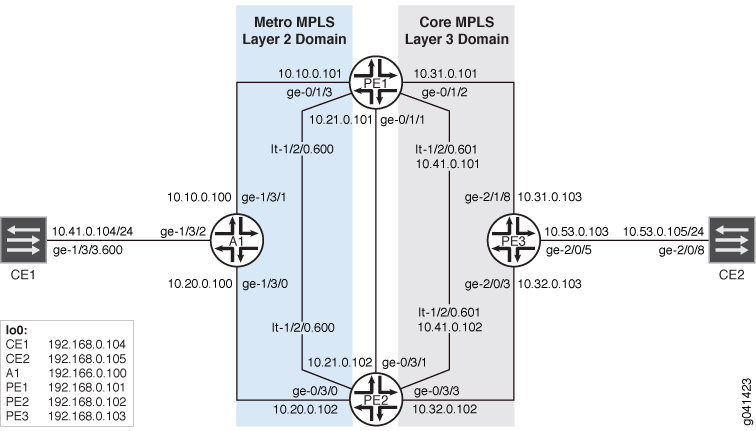 의 유사 회선 이중화
구성
절차
CLI 빠른 구성
이 예를 빠르게 구성하려면, 아래 명령을 복사하여 텍스트 파일로 붙여 넣은 다음 모든 라인브레이크를 제거하고, 네트워크 구성을 일치하는 데 필요한 세부 사항을 변경한 다음, 계층 수준에서 [edit] 명령을 복사하여 CLI에 붙여 넣습니다.
디바이스 CE1
set interfaces ge-1/3/3 vlan-tagging
set interfaces ge-1/3/3 unit 600 vlan-id 600
set interfaces ge-1/3/3 unit 600 family inet address 10.41.0.104/24
set interfaces lo0 unit 0 family inet address 192.168.0.104/32 primary
set protocols ospf area 0.0.0.0 interface ge-1/3/3.600
set protocols ospf area 0.0.0.0 interface lo0.0
set routing-options static route 192.168.0.0/8 next-hop 10.41.0.1
set routing-options static route 10.53.0.0/16 next-hop 10.41.0.1
set routing-options router-id 192.168.0.104
디바이스 A1
set interfaces ge-1/3/0 unit 0 family inet address 10.20.0.100/24
set interfaces ge-1/3/0 unit 0 family iso
set interfaces ge-1/3/0 unit 0 family mpls
set interfaces ge-1/3/1 unit 0 family inet address 10.10.0.100/24
set interfaces ge-1/3/1 unit 0 family iso
set interfaces ge-1/3/1 unit 0 family mpls
set interfaces ge-1/3/2 vlan-tagging
set interfaces ge-1/3/2 encapsulation vlan-ccc
set interfaces ge-1/3/2 unit 600 encapsulation vlan-ccc
set interfaces ge-1/3/2 unit 600 vlan-id 600
set interfaces ge-1/3/2 unit 600 family ccc
set interfaces lo0 unit 0 family inet address 192.168.0.100/32 primary
set interfaces lo0 unit 0 family iso address 49.0002.0192.0168.0100.00
set routing-options router-id 192.168.0.100
set routing-options autonomous-system 64510
set routing-options forwarding-table export pplb
set protocols rsvp interface ge-1/3/0.0
set protocols rsvp interface ge-1/3/1.0
set protocols rsvp interface lo0.0
set protocols mpls interface ge-1/3/0.0
set protocols mpls interface ge-1/3/1.0
set protocols isis interface ge-1/3/0.0
set protocols isis interface ge-1/3/1.0
set protocols isis interface lo0.0
set protocols ldp interface ge-1/3/0.0
set protocols ldp interface ge-1/3/1.0
set protocols ldp interface lo0.0
set protocols l2circuit neighbor 192.168.0.101 interface ge-1/3/2.600 virtual-circuit-id 1
set protocols l2circuit neighbor 192.168.0.101 interface ge-1/3/2.600 pseudowire-status-tlv
set protocols l2circuit neighbor 192.168.0.101 interface ge-1/3/2.600 revert-time 10 maximum 60
set protocols l2circuit neighbor 192.168.0.101 interface ge-1/3/2.600 backup-neighbor 192.168.0.102 virtual-circuit-id 2
set protocols l2circuit neighbor 192.168.0.101 interface ge-1/3/2.600 backup-neighbor 192.168.0.102 hot-standby
set policy-options policy-statement pplb then load-balance per-packet
디바이스 PE1
set interfaces ge-0/1/1 unit 0 family inet address 10.21.0.101/24
set interfaces ge-0/1/1 unit 0 family iso
set interfaces ge-0/1/1 unit 0 family mpls
set interfaces ge-0/1/2 unit 0 family inet address 10.31.0.101/24
set interfaces ge-0/1/2 unit 0 family iso
set interfaces ge-0/1/2 unit 0 family mpls
set interfaces ge-0/1/3 unit 0 family inet address 10.10.0.101/24
set interfaces ge-0/1/3 unit 0 family iso
set interfaces ge-0/1/3 unit 0 family mpls
set interfaces lt-1/2/0 unit 600 encapsulation vlan-ccc
set interfaces lt-1/2/0 unit 600 vlan-id 600
set interfaces lt-1/2/0 unit 600 peer-unit 601
set interfaces lt-1/2/0 unit 601 encapsulation vlan
set interfaces lt-1/2/0 unit 601 vlan-id 600
set interfaces lt-1/2/0 unit 601 peer-unit 600
set interfaces lt-1/2/0 unit 601 family inet filter input icmp_inet
set interfaces lt-1/2/0 unit 601 family inet filter output icmp_inet
set interfaces lt-1/2/0 unit 601 family inet address 10.41.0.101/24 vrrp-group 0 virtual-address 10.41.0.1
set interfaces lt-1/2/0 unit 601 family inet address 10.41.0.101/24 vrrp-group 0 accept-data
set interfaces lo0 unit 0 family inet address 192.168.0.101/32 primary
set interfaces lo0 unit 0 family iso address 49.0002.0192.0168.0003.00
set interfaces lo0 unit 1 family inet address 192.168.1.101/32
set routing-options router-id 192.168.0.101
set routing-options autonomous-system 64511
set protocols rsvp interface ge-0/1/1.0
set protocols rsvp interface ge-0/1/2.0
set protocols rsvp interface ge-0/1/3.0
set protocols rsvp interface lo0.0
set protocols mpls label-switched-path to_PE3 to 192.168.0.103
set protocols mpls label-switched-path to_PE2 to 192.168.0.102
set protocols mpls interface ge-0/1/1.0
set protocols mpls interface ge-0/1/2.0
set protocols mpls interface ge-0/1/3.0
set protocols bgp local-address 192.168.0.101
set protocols bgp group ibgp family inet-vpn any
set protocols bgp group ibgp peer-as 64511
set protocols bgp group ibgp neighbor 192.168.0.102
set protocols bgp group ibgp neighbor 192.168.0.103
set protocols isis interface ge-0/1/1.0
set protocols isis interface ge-0/1/2.0
set protocols isis interface ge-0/1/3.0
set protocols isis interface lo0.0
set protocols ldp interface ge-0/1/1.0
set protocols ldp interface ge-0/1/2.0
set protocols ldp interface ge-0/1/3.0
set protocols ldp interface lo0.0
set protocols l2circuit neighbor 192.168.0.100 interface lt-1/2/0.600 virtual-circuit-id 1
set protocols l2circuit neighbor 192.168.0.100 interface lt-1/2/0.600 pseudowire-status-tlv hot-standby-vc-on
set policy-options policy-statement l3vpn_export term primary from condition primary
set policy-options policy-statement l3vpn_export term primary then local-preference add 300
set policy-options policy-statement l3vpn_export term primary then community set l3vpn
set policy-options policy-statement l3vpn_export term primary then accept
set policy-options policy-statement l3vpn_export term standby from condition standby
set policy-options policy-statement l3vpn_export term standby then local-preference add 30
set policy-options policy-statement l3vpn_export term standby then community set l3vpn
set policy-options policy-statement l3vpn_export term standby then accept
set policy-options policy-statement l3vpn_export term default then community set l3vpn
set policy-options policy-statement l3vpn_export term default then accept
set policy-options policy-statement l3vpn_import term 1 from community l3vpn
set policy-options policy-statement l3vpn_import term 1 then accept
set policy-options policy-statement l3vpn_import term default then reject
set policy-options policy-statement ospf_export term 0 from community l3vpn
set policy-options policy-statement ospf_export term 0 then accept
set policy-options community l3vpn members target:64511:600
set policy-options condition primary if-route-exists address-family ccc lt-1/2/0.600
set policy-options condition primary if-route-exists address-family ccc table mpls.0
set policy-options condition primary if-route-exists address-family ccc peer-unit 601
set policy-options condition standby if-route-exists address-family ccc lt-1/2/0.600
set policy-options condition standby if-route-exists address-family ccc table mpls.0
set policy-options condition standby if-route-exists address-family ccc standby
set policy-options condition standby if-route-exists address-family ccc peer-unit 601
set firewall family inet filter icmp_inet interface-specific
set firewall family inet filter icmp_inet term 0 from source-address 10.41.0.101/32 except
set firewall family inet filter icmp_inet term 0 from source-address 10.0.0.0/8
set firewall family inet filter icmp_inet term 0 from protocol icmp
set firewall family inet filter icmp_inet term 0 then count icmp_inet
set firewall family inet filter icmp_inet term 0 then log
set firewall family inet filter icmp_inet term 0 then accept
set firewall family inet filter icmp_inet term 1 then accept
set routing-instances l3vpn instance-type vrf
set routing-instances l3vpn interface lt-1/2/0.601
set routing-instances l3vpn interface lo0.1
set routing-instances l3vpn route-distinguisher 192.168.1.101:64511
set routing-instances l3vpn vrf-import l3vpn_import
set routing-instances l3vpn vrf-export l3vpn_export
set routing-instances l3vpn vrf-table-label
set routing-instances l3vpn protocols ospf export ospf_export
set routing-instances l3vpn protocols ospf area 0.0.0.0 lt-1/2/0.601
set routing-instances l3vpn protocols ospf area 0.0.0.0 lo0.1
디바이스 PE2
set interfaces ge-0/3/0 unit 0 family inet address 10.20.0.102/24
set interfaces ge-0/3/0 unit 0 family iso
set interfaces ge-0/3/0 unit 0 family mpls
set interfaces ge-0/3/1 unit 0 family inet address 10.21.0.102/24
set interfaces ge-0/3/1 unit 0 family iso
set interfaces ge-0/3/1 unit 0 family mpls
set interfaces ge-0/3/3 unit 0 family inet address 10.32.0.102/24
set interfaces ge-0/3/3 unit 0 family iso
set interfaces ge-0/3/3 unit 0 family mpls
set interfaces lt-1/2/0 unit 600 encapsulation vlan-ccc
set interfaces lt-1/2/0 unit 600 vlan-id 600
set interfaces lt-1/2/0 unit 600 peer-unit 601
set interfaces lt-1/2/0 unit 601 encapsulation vlan
set interfaces lt-1/2/0 unit 601 vlan-id 600
set interfaces lt-1/2/0 unit 601 peer-unit 600
set interfaces lt-1/2/0 unit 601 family inet filter input icmp_inet
set interfaces lt-1/2/0 unit 601 family inet filter output icmp_inet
set interfaces lt-1/2/0 unit 601 family inet address 10.41.0.102/24 vrrp-group 0 virtual-address 10.41.0.1
set interfaces lt-1/2/0 unit 601 family inet address 10.41.0.102/24 vrrp-group 0 accept-data
set interfaces lo0 unit 0 family inet address 192.168.0.102/32 primary
set interfaces lo0 unit 0 family iso address 49.0002.0192.0168.0102.00
set interfaces lo0 unit 1 family inet address 192.168.1.102/32
set routing-options router-id 192.168.0.102
set routing-options autonomous-system 64511
set protocols rsvp interface ge-0/3/0.0
set protocols rsvp interface ge-0/3/1.0
set protocols rsvp interface ge-0/3/3.0
set protocols rsvp interface lo0.0
set protocols mpls label-switched-path to_PE1 to 192.168.0.101
set protocols mpls label-switched-path to_PE3 to 192.168.0.103
set protocols mpls interface ge-0/3/0.0
set protocols mpls interface ge-0/3/1.0
set protocols mpls interface ge-0/3/3.0
set protocols bgp local-address 192.168.0.102
set protocols bgp group ibgp family inet-vpn any
set protocols bgp group ibgp peer-as 64511
set protocols bgp group ibgp neighbor 192.168.0.101
set protocols bgp group ibgp neighbor 192.168.0.103
set protocols isis interface ge-0/3/0.0
set protocols isis interface ge-0/3/1.0
set protocols isis interface ge-0/3/3.0
set protocols isis interface lo0.0
set protocols ldp interface ge-0/3/0.0
set protocols ldp interface ge-0/3/1.0
set protocols ldp interface ge-0/3/3.0
set protocols ldp interface lo0.0
set protocols l2circuit neighbor 192.168.0.100 interface lt-1/2/0.600 virtual-circuit-id 2
set protocols l2circuit neighbor 192.168.0.100 interface lt-1/2/0.600 pseudowire-status-tlv hot-standby-vc-on
set policy-options policy-statement l3vpn_export term primary from condition primary
set policy-options policy-statement l3vpn_export term primary then local-preference add 300
set policy-options policy-statement l3vpn_export term primary then community set l3vpn
set policy-options policy-statement l3vpn_export term primary then accept
set policy-options policy-statement l3vpn_export term standby from condition standby
set policy-options policy-statement l3vpn_export term standby then local-preference add 30
set policy-options policy-statement l3vpn_export term standby then community set l3vpn
set policy-options policy-statement l3vpn_export term standby then accept
set policy-options policy-statement l3vpn_export term default then community set l3vpn
set policy-options policy-statement l3vpn_export term default then accept
set policy-options policy-statement l3vpn_import term 1 from community l3vpn
set policy-options policy-statement l3vpn_import term 1 then accept
set policy-options policy-statement l3vpn_import term default then reject
set policy-options policy-statement ospf_export term 0 from community l3vpn
set policy-options policy-statement ospf_export term 0 then accept
set policy-options community l3vpn members target:64511:600
set policy-options condition primary if-route-exists address-family ccc lt-1/2/0.600
set policy-options condition primary if-route-exists address-family ccc table mpls.0
set policy-options condition primary if-route-exists address-family ccc peer-unit 601
set policy-options condition standby if-route-exists address-family ccc lt-1/2/0.600
set policy-options condition standby if-route-exists address-family ccc table mpls.0
set policy-options condition standby if-route-exists address-family ccc standby
set policy-options condition standby if-route-exists address-family ccc peer-unit 601
set firewall family inet filter icmp_inet interface-specific
set firewall family inet filter icmp_inet term 0 from source-address 10.41.0.102/32 except
set firewall family inet filter icmp_inet term 0 from source-address 10.0.0.0/8
set firewall family inet filter icmp_inet term 0 from protocol icmp
set firewall family inet filter icmp_inet term 0 then count icmp_inet
set firewall family inet filter icmp_inet term 0 then log
set firewall family inet filter icmp_inet term 0 then accept
set firewall family inet filter icmp_inet term 1 then accept
set routing-instances l3vpn instance-type vrf
set routing-instances l3vpn interface lt-1/2/0.601
set routing-instances l3vpn interface lo0.1
set routing-instances l3vpn route-distinguisher 192.168.1.102:64511
set routing-instances l3vpn vrf-import l3vpn_import
set routing-instances l3vpn vrf-export l3vpn_export
set routing-instances l3vpn vrf-table-label
set routing-instances l3vpn protocols ospf export ospf_export
set routing-instances l3vpn protocols ospf area 0.0.0.0 interface lt-1/2/0.601
set routing-instances l3vpn protocols ospf area 0.0.0.0 interface lo0.1
디바이스 PE3
set interfaces ge-2/0/3 unit 0 family inet address 10.32.0.103/24
set interfaces ge-2/0/3 unit 0 family iso
set interfaces ge-2/0/3 unit 0 family mpls
set interfaces ge-2/0/5 unit 0 family inet address 10.53.0.103/24
set interfaces ge-2/0/5 unit 0 family mpls
set interfaces ge-2/1/8 unit 0 family inet address 10.31.0.103/24
set interfaces ge-2/1/8 unit 0 family iso
set interfaces ge-2/1/8 unit 0 family mpls
set interfaces lo0 unit 0 family inet address 192.168.0.103/32 primary
set interfaces lo0 unit 0 family iso address 49.0002.0192.0168.0103.00
set interfaces lo0 unit 1 family inet address 192.168.1.103/32
set routing-options router-id 192.168.0.103
set routing-options autonomous-system 64511
set protocols rsvp interface ge-2/0/3.0
set protocols rsvp interface ge-2/1/8.0
set protocols rsvp interface lo0.0
set protocols mpls label-switched-path to_PE1 to 192.168.0.101
set protocols mpls label-switched-path to_PE2 to 192.168.0.102
set protocols mpls interface ge-2/0/3.0
set protocols mpls interface ge-2/1/8.0
set protocols bgp local-address 192.168.0.103
set protocols bgp group ibgp family inet-vpn any
set protocols bgp group ibgp peer-as 64511
set protocols bgp group ibgp neighbor 192.168.0.101
set protocols bgp group ibgp neighbor 192.168.0.102
set protocols isis interface ge-2/0/3.0
set protocols isis interface ge-2/1/8.0
set protocols isis interface lo0.0
set protocols ldp interface ge-2/0/3.0
set protocols ldp interface ge-2/1/8.0
set protocols ldp interface lo0.0
set policy-options policy-statement l3vpn_ospf_export term 0 from protocol direct
set policy-options policy-statement l3vpn_ospf_export term 0 then accept
set policy-options policy-statement l3vpn_ospf_import term 0 from protocol bgp
set policy-options policy-statement l3vpn_ospf_import term 0 from community l3vpn
set policy-options policy-statement l3vpn_ospf_import term 0 then accept
set policy-options policy-statement ospf_export term 0 from community l3vpn
set policy-options policy-statement ospf_export term 0 then accept
set policy-options community l3vpn members target:64511:600
set routing-instances l3vpn instance-type vrf
set routing-instances l3vpn interface ge-2/0/5.0
set routing-instances l3vpn interface lo0.1
set routing-instances l3vpn route-distinguisher 192.168.0.103:64511
set routing-instances l3vpn vrf-target target:64511:600
set routing-instances l3vpn vrf-table-label
set routing-instances l3vpn protocols ospf export ospf_export
set routing-instances l3vpn protocols ospf area 0.0.0.0 interface ge-2/0/5.0
set routing-instances l3vpn protocols ospf area 0.0.0.0 interface lo0.1
디바이스 CE2
set interfaces ge-2/0/8 unit 0 family inet address 10.53.0.105/24
set interfaces lo0 unit 0 family inet address 192.168.0.105/32 primary
set protocols ospf area 0.0.0.0 interface ge-2/0/8.0
set protocols ospf area 0.0.0.0 interface lo0.0
set routing-options router-id 192.168.0.105
단계별 절차
다음 예에서는 구성 계층에서 다양한 수준을 탐색해야 합니다. CLI 탐색에 대한 정보는 CLI 사용자 가이드의 구성 모드에서 CLI 편집기 사용을 참조하십시오.
디바이스 A1 구성:
-
인터페이스를 구성합니다.
코어 대면 인터페이스에서 MPLS를 활성화합니다. IS-IS는 프로바이더 네트워크에서 내부 게이트웨이 프로토콜(IGP)으로 사용되기 때문에 ISO 주소 패밀리도 활성화됩니다.
고객 대면 인터페이스에서는 MPLS를 활성화할 필요가 없습니다. 이 인터페이스에서 CCC 캡슐화 및 주소 패밀리 CCC를 활성화합니다.
[edit interfaces]
user@A1# set ge-1/3/0 unit 0 family inet address 10.20.0.100/24
user@A1# set ge-1/3/0 unit 0 family iso
user@A1# set ge-1/3/0 unit 0 family mpls
user@A1# set ge-1/3/1 unit 0 family inet address 10.10.0.100/24
user@A1# set ge-1/3/1 unit 0 family iso
user@A1# set ge-1/3/1 unit 0 family mpls
user@A1# set ge-1/3/2 vlan-tagging
user@A1# set ge-1/3/2 encapsulation vlan-ccc
user@A1# set ge-1/3/2 unit 600 encapsulation vlan-ccc
user@A1# set ge-1/3/2 unit 600 vlan-id 600
user@A1# set ge-1/3/2 unit 600 family ccc
user@A1# set lo0 unit 0 family inet address 192.168.0.100/32 primary
user@A1# set lo0 unit 0 family iso address 49.0002.0192.0168.0100.00
-
코어 대면 인터페이스와 루프백 인터페이스에서 RSVP를 구성합니다.
RSVP는 레이어 3 도메인에서 사용됩니다.
[edit protocols rsvp]
user@A1# set interface ge-1/3/0.0
user@A1# set interface ge-1/3/1.0
user@A1# set interface lo0.0
-
코어 대면 인터페이스와 루프백 인터페이스에서 LDP를 구성합니다.
LDP는 레이어 2 도메인에서 사용됩니다.
[edit protocols ldp]
user@A1# set interface ge-1/3/0.0
user@A1# set interface ge-1/3/1.0
user@A1# set interface lo0.0
-
코어 대면 인터페이스에서 MPLS를 구성합니다.
[edit protocols mpls]
user@A1# set interface ge-1/3/0.0
user@A1# set interface ge-1/3/1.0
-
코어 대면 인터페이스 및 루프백 인터페이스에서 IS-IS 또는 OSPF와 같은 내부 게이트웨이 프로토콜을 구성합니다.
[edit protocols isis]
user@A1# set interface ge-1/3/0.0
user@A1# set interface ge-1/3/1.0
user@A1# set interface lo0.0
-
고객 에지를 향하는 인터페이스에서 레이어 2 서킷을 구성합니다.
활성 및 대기 가상 회로(VC)(토폴로지의 디바이스 A1)가 모두 있는 라우터에서 문을 구성
hot-standby합니다. 액세스 라우터에 문을 포함pseudowire-status-tlv해야 합니다. 상태 TLV 신호가 없으면 대기 플래그는 원격 프로바이더 에지(PE) 디바이스에 보급될 수 없습니다.revert-time문 및maximum옵션은 액세스 라우터에서도 구성되어야 합니다. 문이revert-time없으면 복원 완료 시 모든 VC의 트래픽이 기본 경로로 전환되지 않습니다. 지연이revert-time정의되었지만 지연이maximum정의되지 않은 경우 VC는 되돌리기 타이머가 만료되는 즉시 복원됩니다. 최대 옵션을 사용하면 VC를 한 번에 모두 복원하는 것이 아니라 분산된 방식으로 복원할 수 있습니다.[edit protocols l2circuit neighbor 192.168.0.101 interface ge-1/3/2.600] user@A1# set virtual-circuit-id 1 user@A1# set pseudowire-status-tlv user@A1# set revert-time 10 maximum 60 user@A1# set backup-neighbor 192.168.0.102 virtual-circuit-id 2 user@A1# set backup-neighbor 192.168.0.102 hot-standby
-
유니리스트 다음 홉이 다른 액세스 라우터에 푸시되도록 하려면 패킷당 로드 밸런싱을 구성합니다.
[edit policy-options policy-statement pplb]
user@A1# set then load-balance per-packet
-
패킷별 로드 밸런싱 정책을 적용합니다.
[edit routing-options forwarding-table]
user@A1# set export pplb
-
AS(Autonomous System) ID 및 라우터 ID를 구성합니다.
[edit routing-options]
user@A1# set router-id 192.168.0.100
user@A1# set autonomous-system 64510
마찬가지로 다른 액세스 디바이스도 구성합니다.
단계별 절차
다음 예에서는 구성 계층에서 다양한 수준을 탐색해야 합니다. CLI 탐색에 대한 정보는 CLI 사용자 가이드의 구성 모드에서 CLI 편집기 사용을 참조하십시오.
디바이스 PE1 구성:
-
인터페이스를 구성합니다.
코어 대면 인터페이스에서 MPLS를 활성화합니다.
[edit interfaces]
user@PE1# set ge-0/1/1 unit 0 family inet address 10.21.0.101/24
user@PE1# set ge-0/1/1 unit 0 family iso
user@PE1# set ge-0/1/1 unit 0 family mpls
user@PE1# set ge-0/1/2 unit 0 family inet address 10.31.0.101/24
user@PE1# set ge-0/1/2 unit 0 family iso
user@PE1# set ge-0/1/2 unit 0 family mpls
user@PE1# set ge-0/1/3 unit 0 family inet address 10.10.0.101/24
user@PE1# set ge-0/1/3 unit 0 family iso
user@PE1# set ge-0/1/3 unit 0 family mpls
user@PE1# set lo0 unit 0 family inet address 192.168.0.101/32 primary
user@PE1# set lo0 unit 0 family iso address 49.0002.0192.0168.0003.00
user@PE1# set lo0 unit 1 family inet address 192.168.1.101/32
-
어그리게이션 라우터인 디바이스 PE1 및 디바이스 PE2에서 LT(x) 및 LT(y)를 나타내는 논리 터널 인터페이스 쌍을 구성합니다.
이 솔루션은 레이어 2 및 레이어 3 도메인을 연결하기 위해 논리 터널(lt-) 쌍 인터페이스를 사용합니다.
레이어 2 유사 회선은 CCC(Circuit Cross-Connect) 주소 패밀리로 정의된 논리적 터널 인터페이스 LT(x) 중 하나에서 종료됩니다. 레이어 3 VPN은 IPv4(inet) 주소 패밀리로 정의된 두 번째 논리 터널 인터페이스 LT(y)를 종료합니다. LT(x) 및 LT(y)는 쌍입니다.
[edit interfaces]
user@PE1# set lt-1/2/0 unit 600 encapsulation vlan-ccc
user@PE1# set lt-1/2/0 unit 600 vlan-id 600
user@PE1# set lt-1/2/0 unit 600 peer-unit 601
user@PE1# set lt-1/2/0 unit 601 encapsulation vlan
user@PE1# set lt-1/2/0 unit 601 vlan-id 600
user@PE1# set lt-1/2/0 unit 601 peer-unit 600
user@PE1# set lt-1/2/0 unit 601 family inet filter input icmp_inet
user@PE1# set lt-1/2/0 unit 601 family inet filter output icmp_inet
-
(선택 사항) 고유한 VRRP 주소를 디바이스 PE1 및 디바이스 PE2 모두와 연결합니다.
이 경우, 디바이스 PE1과 디바이스 PE2 모두 정의된 VIP IPv4 주소의 기본 상태를 가정하므로 라우터 간에 VRRP Hello 메시지가 교환되지 않습니다.
[edit interfaces lt-1/2/0 unit 601 family inet address 10.41.0.101/24]
user@PE1# set vrrp-group 0 virtual-address 10.41.0.1
user@PE1# set vrrp-group 0 accept-data
-
IS-IS 또는 다른 IGP를 구성합니다.
[edit protocols isis]
user@PE1# set interface ge-0/1/1.0
user@PE1# set interface ge-0/1/2.0
user@PE1# set interface ge-0/1/3.0
user@PE1# set interface lo0.0
-
코어 대면 인터페이스에서 MPLS를 구성합니다.
[edit protocols mpls]
user@PE1# set interface ge-0/1/1.0
user@PE1# set interface ge-0/1/2.0
user@PE1# set interface ge-0/1/3.0
-
다른 PE 디바이스에 대한 레이블 스위칭 경로를 구성합니다.
BGP는 정책 기반 프로토콜이므로 필요한 라우팅 정책을 구성하고 적용합니다. 예를 들어, 정적 경로를 BGP로 내보내고 싶을 수 있습니다.
[edit protocols mpls]
user@PE1# set label-switched-path to_PE3 to 192.168.0.103
user@PE1# set label-switched-path to_PE2 to 192.168.0.102
-
코어 대면 인터페이스와 루프백 인터페이스에서 LDP를 구성합니다.
[edit protocols ldp]
user@PE1# set interface ge-0/1/1.0
user@PE1# set interface ge-0/1/2.0
user@PE1# set interface ge-0/1/3.0
user@PE1# set interface lo0.0
-
코어 대면 인터페이스와 루프백 인터페이스에서 RSVP를 구성합니다.
[edit protocols rsvp]
user@PE1# set interface ge-0/1/1.0
user@PE1# set interface ge-0/1/2.0
user@PE1# set interface ge-0/1/3.0
user@PE1# set interface lo0.0
-
내부 BGP(IBGP)를 구성합니다.
[edit protocols bgp]
user@PE1# set local-address 192.168.0.101
user@PE1# set group ibgp family inet-vpn any
user@PE1# set group ibgp peer-as 64511
user@PE1# set group ibgp neighbor 192.168.0.102
user@PE1# set group ibgp neighbor 192.168.0.103
-
논리적 터널 인터페이스에서 레이어 2 서킷을 구성합니다.
상태 TLV 도착 시 핫 스탠바이 유사 회선을 설정하려는 경우 명령문을 구성PW_FWD_STDBY
hot-standby-vc-on.[edit protocols l2circuit neighbor 192.168.0.100 interface lt-1/2/0.600] user@PE1# set virtual-circuit-id 1 user@PE1# set pseudowire-status-tlv hot-standby-vc-on
-
레이어 3 VPN 인스턴스 내에 정의된 송신 정책에 적용할 조건 쌍을 정의합니다.
조건
primary및 조건standby모두에서 일치하는 경로는 인터페이스 lt-1/2/0.600(y)에 해당합니다. 이는 송신 경로가 주어진 유사 회선을 나타내기 위해 라우팅 테이블 mpls.0에 나타나는 형식이기 때문입니다.이러한 조건 간의 차이는 속성에 있습니다.
standby디바이스 PE1 또는 디바이스 PE2에 TLV PW_FWD_STDBY 상태가 도착하면 Junos OS 조건standby이 일치하므로 정책 내의l3vpn용어standby만 실행됩니다. 반면, PW_FWD_STDBY 상태 TLV가 없는 경우 정책은 조건primary만 일치하며 정책에서 용어primary를l3vpn실행합니다. 또한 논리적 터널 기반 CCC 서비스의 경우, 논리적 터널 CCC 인터페이스 LT(x)와 연결된 논리적 터널 인터페이스 LT(y)를 지정해야 합니다. (의사 회선 이중화 모바일 백홀 시나리오 이해를 참조하십시오.)마지막으로, CCC 기반 조건의 경우 Junos OS는 일치하는 라우팅 테이블로 mpls.0만 허용합니다. 속성의
address경우, Junos OS는 논리적 인터페이스 단위 형식(예: lt-0/0/0.0)의 문자열만 허용합니다.[edit policy-options condition primary if-route-exists address-family ccc] user@PE1# set lt-1/2/0.600 user@PE1# set table mpls.0 user@PE1# set peer-unit 601 [edit policy-options condition standby if-route-exists address-family ccc] user@PE1# set lt-1/2/0.600 user@PE1# set table mpls.0 user@PE1# set standby user@PE1# set peer-unit 601
-
레이어 3 VPN 내보내기 정책을 구성합니다.
레이어 2 가상 서킷(VC)이 기본인 경우, 해당 프로바이더 에지(PE) 라우팅 디바이스는 더 높은 로컬 선호로 연결 서킷(AC)의 서브넷을 보급합니다. 모든 어그리게이션 PE 디바이스는 처음에 동일한 로컬 기본 설정으로 AC의 서브넷을 보급합니다.
이 라우팅 정책은 레이어 2 VC가 활성화된 경우 더 높은 로컬 선호 값을 보급할 수 있도록 허용합니다.
[edit policy-options policy-statement l3vpn_export]
user@PE1# set term primary from condition primary
user@PE1# set term primary then local-preference add 300
user@PE1# set term primary then community set l3vpn
user@PE1# set term primary then accept
user@PE1# set term standby from condition standby
user@PE1# set term standby then local-preference add 30
user@PE1# set term standby then community set l3vpn
user@PE1# set term standby then accept
user@PE1# set term default then community set l3vpn
user@PE1# set term default then accept
-
레이어 3 VPN 커뮤니티 멤버를 구성합니다.
[edit policy-options community l3vpn]
user@PE1# set members target:64511:600
-
레이어 3 VPN 커뮤니티를 기반으로 레이어 3 VPN 가져오기 정책을 구성합니다.
[edit policy-options policy-statement l3vpn_import]
user@PE1# set term 1 from community l3vpn
user@PE1# set term 1 then accept
user@PE1# set term default then reject
-
레이어 3 VPN 커뮤니티를 기반으로 OSPF 내보내기 정책을 구성합니다.
[edit policy-options policy-statement ospf_export term 0]
user@PE1# set from community l3vpn
user@PE1# set then accept
-
(선택 사항) 트래픽이 취한 경로를 확인하도록 방화벽 필터를 구성합니다.
[edit firewall family inet filter icmp_inet]
user@PE1# set interface-specific
user@PE1# set term 0 from source-address 10.41.0.101/32 except
user@PE1# set term 0 from source-address 10.0.0.0/8
user@PE1# set term 0 from protocol icmp
user@PE1# set term 0 then count icmp_inet
user@PE1# set term 0 then log
user@PE1# set term 0 then accept
user@PE1# set term 1 then accept
-
라우팅 인스턴스를 구성합니다.
이 라우팅 인스턴스는 디바이스 PE1과 디바이스 PE2가 멀티액세스 미디어(이더넷)를 통해 메트로 링에 상호 연결된 레이어 2 도메인에 있습니다. 레이어 3 도메인을 향한 논리 터널(lt-) 인터페이스에 해당하는 직접 서브넷 접두사의 보급을 활성화하려면 디바이스 PE1 및 디바이스 PE2에 ' 문을 포함
vrf-table-label해야 합니다.디바이스 PE1 및 디바이스 PE2는 디바이스 CE1과의 레이어 3 VPN 통신에 최단 경로 우선(OSPF)을 사용합니다.
[edit routing-instances l3vpn]
user@PE1# set instance-type vrf
user@PE1# set interface lt-1/2/0.601
user@PE1# set interface lo0.1
user@PE1# set route-distinguisher 192.168.1.101:64511
user@PE1# set vrf-import l3vpn_import
user@PE1# set vrf-export l3vpn_export
user@PE1# set vrf-table-label
user@PE1# set protocols ospf export ospf_export
user@PE1# set protocols ospf area 0.0.0.0 interface lt-1/2/0.601
user@PE1# set protocols ospf area 0.0.0.0 interface lo0.1
-
AS(Autonomous System) ID 및 라우터 ID를 구성합니다.
[edit routing-options]
user@PE1# set router-id 192.168.0.101
user@PE1# set autonomous-system 64511
마찬가지로 디바이스 PE2를 구성합니다.
결과
구성 모드에서 , show firewall, show routing-optionsshow protocolsshow policy-options및 show routing-instances 명령을 show interfaces입력하여 구성을 확인합니다. 출력에 의도한 구성이 표시되지 않으면 이 예의 지침을 반복하여 구성을 수정합니다.
디바이스 A1
user@A1#

                     show interfaces


ge-1/3/0 {
    unit 0 {
        family inet {
            address 10.20.0.100/24;
        }
        family iso;
        family mpls;
    }
}
ge-1/3/1 {
    unit 0 {
        family inet {
            address 10.10.0.100/24;
        }
        family iso;
        family mpls;
    }
}
ge-1/3/2 {
    vlan-tagging;
    encapsulation vlan-ccc;
    unit 600 {
        encapsulation vlan-ccc;
        vlan-id 600;
        family ccc;
    }
}
lo0 {
    unit 0 {
        family inet {
            address 192.168.0.100/32 {
                primary;
            }
        }
        family iso {
            address 49.0002.0192.0168.0100.00;
        }
    }
}
user@A1#

                     show protocols


rsvp {
    interface ge-1/3/0.0;
    interface ge-1/3/1.0;
    interface lo0.0;
}
mpls {
    interface ge-1/3/0.0;
    interface ge-1/3/1.0;
}
isis {
    interface ge-1/3/0.0;
    interface ge-1/3/1.0;
    interface lo0.0;
}
ldp {
    interface ge-1/3/0.0;
    interface ge-1/3/1.0;
    interface lo0.0;
}
l2circuit {
    neighbor 192.168.0.101 {
        interface ge-1/3/2.600 {
            virtual-circuit-id 1;
            pseudowire-status-tlv;
            backup-neighbor 192.168.0.102 {
                virtual-circuit-id 2;
                hot-standby;
            }
        }
    }
}
user@A1#

                     show policy-options


policy-statement pplb {
    then {
        load-balance per-packet;
    }
}
user@A1#

                     show routing-options


autonomous-system 64510;
router-id 192.168.0.100;
forwarding-table {
    export pplb;
}
디바이스 PE1
user@PE1#

                     show interfaces


ge-0/1/1 {
    unit 0 {
        family inet {
            address 10.21.0.101/24;
        }
        family iso;
        family mpls;
    }
}
ge-0/1/2 {
    unit 0 {
        family inet {
            address 10.31.0.101/24;
        }
        family iso;
        family mpls;
    }
}
ge-0/1/3 {
    unit 0 {
        family inet {
            address 10.10.0.101/24;
        }
        family iso;
        family mpls;
    }
}
lt-1/2/0 {
    unit 600 {
        encapsulation vlan-ccc;
        vlan-id 600;
        peer-unit 601;
    }
    unit 601 {
        encapsulation vlan;
        vlan-id 600;
        peer-unit 600;
        family inet {
            filter {
                input icmp_inet;
                output icmp_inet;
            }
            address 10.41.0.101/24 {
                vrrp-group 0 {
                    virtual-address 10.41.0.1;
                    accept-data;
                }
            }
        }
    }
}
lo0 {
    unit 0 {
        family inet {
            address 192.168.0.101/32 {
                primary;
            }
        }
        family iso {
            address 49.0002.0192.0168.0003.00;
        }
    }
    unit 1 {
        family inet {
            address 192.168.1.101/32;
        }
    }
}
user@PE1#

                     show firewall


family inet {
    filter icmp_inet {
        interface-specific;
        term 0 {
            from {
                source-address {
                    10.41.0.101/32 except;
                    10.0.0.0/8;
                }
                protocol icmp;
            }
            then {
                count icmp_inet;
                log;
                accept;
            }
        }
        term 1 {
            then accept;
        }
    }
}
user@PE1#

                     show protocols


rsvp {
    interface ge-0/1/1.0;
    interface ge-0/1/2.0;
    interface ge-0/1/3.0;
    interface lo0.0;
}
mpls {
    label-switched-path to_PE3 {
        to 192.168.0.103;
    }
    label-switched-path to_PE2 {
        to 192.168.0.102;
    }
    interface ge-0/1/1.0;
    interface ge-0/1/2.0;
    interface ge-0/1/3.0;
}
bgp {
    local-address 192.168.0.101;
    group ibgp {
        family inet-vpn {
            any;
        }
        peer-as 64511;
        neighbor 192.168.0.102;
        neighbor 192.168.0.103;
    }
}
isis {
    interface ge-0/1/1.0;
    interface ge-0/1/2.0;
    interface ge-0/1/3.0;
    interface lo0.0;
}
ldp {
    interface ge-0/1/1.0;
    interface ge-0/1/2.0;
    interface ge-0/1/3.0;
    interface lo0.0;
}
l2circuit {
    neighbor 192.168.0.100 {
        interface lt-1/2/0.600 {
            virtual-circuit-id 1;
            pseudowire-status-tlv hot-standby-vc-on;
        }
    }
}
user@PE1#

                     show policy-options


policy-statement l3vpn_export {
    term primary {
        from condition primary;
        then {
            local-preference add 300;
            community set l3vpn;
            accept;
        }
    }
    term standby {
        from condition standby;
        then {
            local-preference add 30;
            community set l3vpn;
            accept;
        }
    }
    term default {
        then {
            community set l3vpn;
            accept;
        }
    }
}
policy-statement l3vpn_import {
    term 1 {
        from community l3vpn;
        then accept;
    }
    term default {
        then reject;
    }
}
policy-statement ospf_export {
    term 0 {
        from community l3vpn;
        then accept;
    }
}
community l3vpn members target:64511:600;
condition primary {
    if-route-exists {
        address-family {
            ccc {
                lt-1/2/0.600;
                table mpls.0;
                peer-unit 601;
            }
        }
    }
}
condition standby {
    if-route-exists {
        address-family {
            ccc {
                lt-1/2/0.600;
                table mpls.0;
                standby;
                peer-unit 601;
            }
        }
    }
}
user@PE1#

                     show routing-options


router-id 192.168.0.101;
autonomous-system 64511;
user@PE1#

                     show routing-instances


l3vpn {
    instance-type vrf;
    interface lt-1/2/0.601;
    interface lo0.1;
    route-distinguisher 192.168.1.101:64511;
    vrf-import l3vpn_import;
    vrf-export l3vpn_export;
    vrf-table-label;
    protocols {
        ospf {
            export ospf_export;
            area 0.0.0.0 {
                interface lt-1/2/0.601;
                interface lo0.1;
            }
        }
    }
}
디바이스 구성이 완료되면 구성 모드에서 들어갑니다 commit .
검증
구성이 제대로 작동하고 있는지 확인합니다.
레이어 2 회로 확인
목적
레이어 2 가상 서킷(VC)이 설정되면 명령 출력 show l2circuit connections 에 활성 및 핫 스탠바이 VC가 표시됩니다. 또한 핫 스탠바이 VC에 대한 컨트롤 플레인 세부 정보가 표시됩니다.
작업
운영 모드에서 명령을 입력합니다.show l2circuit connections extensive
user@A1> show l2circuit connections extensive

Layer-2 Circuit Connections:

Legend for connection status (St)
EI -- encapsulation invalid      NP -- interface h/w not present
MM -- mtu mismatch               Dn -- down
EM -- encapsulation mismatch     VC-Dn -- Virtual circuit Down
CM -- control-word mismatch      Up -- operational
VM -- vlan id mismatch           CF -- Call admission control failure
OL -- no outgoing label          IB -- TDM incompatible bitrate
NC -- intf encaps not CCC/TCC    TM -- TDM misconfiguration
BK -- Backup Connection          ST -- Standby Connection
CB -- rcvd cell-bundle size bad  SP -- Static Pseudowire
LD -- local site signaled down   RS -- remote site standby
RD -- remote site signaled down  HS -- Hot-standby Connection
XX -- unknown

Legend for interface status
Up -- operational
Dn -- down
Neighbor: 192.168.0.101
    Interface                 Type  St     Time last up          # Up trans
    ge-1/3/2.600(vc 1)        rmt   Up     Jan 24 11:00:26 2013           1
      Remote PE: 192.168.0.101, Negotiated control-word: Yes (Null)
      Incoming label: 299776, Outgoing label: 299776
      Negotiated PW status TLV: Yes
      local PW status code: 0x00000000, Neighbor PW status code: 0x00000000
      Local interface: ge-1/3/2.600, Status: Up, Encapsulation: VLAN
    Connection History:
        Jan 24 11:00:26 2013  status update timer
        Jan 24 11:00:26 2013  PE route changed
        Jan 24 11:00:26 2013  Out lbl Update                    299776
        Jan 24 11:00:26 2013  In lbl Update                     299776
        Jan 24 11:00:26 2013  loc intf up                 ge-1/3/2.600
Neighbor: 192.168.0.102
    Interface                 Type  St     Time last up          # Up trans
    ge-1/3/2.600(vc 2)        rmt   HS     -----                       ----
      Remote PE: 192.168.0.102, Negotiated control-word: Yes (Null)
      Incoming label: 299792, Outgoing label: 299776
      Negotiated PW status TLV: Yes
      local PW status code: 0x00000020, Neighbor PW status code: 0x00000000
      Local interface: ge-1/3/2.600, Status: Up, Encapsulation: VLAN
user@PE1> show l2circuit connections extensive

Layer-2 Circuit Connections:

Legend for connection status (St)
EI -- encapsulation invalid      NP -- interface h/w not present
MM -- mtu mismatch               Dn -- down
EM -- encapsulation mismatch     VC-Dn -- Virtual circuit Down
CM -- control-word mismatch      Up -- operational
VM -- vlan id mismatch           CF -- Call admission control failure
OL -- no outgoing label          IB -- TDM incompatible bitrate
NC -- intf encaps not CCC/TCC    TM -- TDM misconfiguration
BK -- Backup Connection          ST -- Standby Connection
CB -- rcvd cell-bundle size bad  SP -- Static Pseudowire
LD -- local site signaled down   RS -- remote site standby
RD -- remote site signaled down  HS -- Hot-standby Connection
XX -- unknown

Legend for interface status
Up -- operational
Dn -- down
Neighbor: 192.168.0.100
    Interface                 Type  St     Time last up          # Up trans
    lt-1/2/0.600(vc 1)        rmt   Up     Jan 24 11:06:36 2013           1
      Remote PE: 192.168.0.100, Negotiated control-word: Yes (Null)
      Incoming label: 299776, Outgoing label: 299776
      Negotiated PW status TLV: Yes
      local PW status code: 0x00000000, Neighbor PW status code: 0x00000000
      Local interface: lt-1/2/0.600, Status: Up, Encapsulation: VLAN
    Connection History:
        Jan 24 11:06:36 2013  status update timer
        Jan 24 11:06:36 2013  PE route changed
        Jan 24 11:06:36 2013  Out lbl Update                    299776
        Jan 24 11:06:36 2013  In lbl Update                     299776
        Jan 24 11:06:36 2013  loc intf up                 lt-1/2/0.600
user@PE2> show l2circuit connections extensive

Layer-2 Circuit Connections:

Legend for connection status (St)
EI -- encapsulation invalid      NP -- interface h/w not present
MM -- mtu mismatch               Dn -- down
EM -- encapsulation mismatch     VC-Dn -- Virtual circuit Down
CM -- control-word mismatch      Up -- operational
VM -- vlan id mismatch           CF -- Call admission control failure
OL -- no outgoing label          IB -- TDM incompatible bitrate
NC -- intf encaps not CCC/TCC    TM -- TDM misconfiguration
BK -- Backup Connection          ST -- Standby Connection
CB -- rcvd cell-bundle size bad  SP -- Static Pseudowire
LD -- local site signaled down   RS -- remote site standby
RD -- remote site signaled down  HS -- Hot-standby Connection
XX -- unknown

Legend for interface status
Up -- operational
Dn -- down
Neighbor: 192.168.0.100
    Interface                 Type  St     Time last up          # Up trans
    lt-1/2/0.600(vc 2)        rmt   Up     Jan 24 10:55:31 2013           1
      Remote PE: 192.168.0.100, Negotiated control-word: Yes (Null)
      Incoming label: 299776, Outgoing label: 299792
      Negotiated PW status TLV: Yes
      local PW status code: 0x00000000, Neighbor PW status code: 0x00000020
      Local interface: lt-1/2/0.600, Status: Up, Encapsulation: VLAN
    Connection History:
        Jan 24 10:55:31 2013  status update timer
        Jan 24 10:55:31 2013  PE route changed
        Jan 24 10:55:31 2013  Out lbl Update                    299792
        Jan 24 10:55:31 2013  In lbl Update                     299776
        Jan 24 10:55:31 2013  loc intf up                 lt-1/2/0.600
의미
디바이스 PE1 및 디바이스 PE2의 관점에서 단일 레이어 2 서킷이 액세스 라우터를 향해 설정되므로 명령의 show l2circuit connections CLI 출력에 대기 디바이스 정보가 없습니다. 핫 스탠바이 역할을 하는 VC에 대한 타이밍 및 플랩핑 정보는 제공되지 않습니다. Junos OS는 활성 VC에 대해서만 이러한 카운터를 추적할 수 있습니다.
정책 조건 확인
목적
PE 디바이스에서 레이어3 VPN의 송신 정책의 일부로 정의된 다양한 조건의 상태를 확인합니다. 여기서 10.41.0.0/24는 논리 터널(y) 서브넷에 해당합니다.
작업
운영 모드에서 명령을 입력합니다.show policy conditions detail
user@PE1> show policy conditions detail
Configured conditions:
Condition primary (static), event: Existence of a route in a specific routing table
Dependent routes:
 10.41.0.0/24, generation 8
 192.168.0.104/32, generation 8

Condition standby (static), event: Existence of a route in a specific routing table
Dependent routes:
None

Condition tables:
Table mpls.0, generation 0, dependencies 0, If-route-exists conditions: primary (static) standby (static)
Table l3vpn.inet.0, generation 12, dependencies 2
user@PE2> show policy conditions detail
Configured conditions:
Condition primary (static), event: Existence of a route in a specific routing table
Dependent routes:
 10.41.0.0/24, generation 18

Condition standby (static), event: Existence of a route in a specific routing table
Dependent routes:
 10.41.0.0/24, generation 18

Condition tables:
Table mpls.0, generation 0, dependencies 0, If-route-exists conditions: primary (static) standby (static)
Table l3vpn.inet.0, generation 367, dependencies 2