
예: IS-IS 경로의 우선 순위를 지정하는 라우팅 정책 구성
IS-IS 경로가 많은 네트워크에서는 네트워크 토폴로지 변경에 따라 경로가 업데이트되는 순서를 제어하는 것이 유용할 수 있습니다. 이 예는 일부 IS-IS 경로를 다른 경로보다 우선시하도록 라우팅 정책을 정의하는 방법을 보여줍니다. IS-IS 토폴로지가 변경되는 경우, 우선 순위가 높은 접두사가 먼저 라우팅 테이블에서 업데이트된 다음 중간 접두사와 낮은 우선 순위 접두사가 업데이트됩니다. 인터넷 서비스 프로바이더(ISP)는 이 기능을 사용하여 중요한 고객을 위해 더 빠른 컨버전스를 보장할 수 있습니다.
요구 사항
이 예제를 구성하기 전에 디바이스 초기화 이외의 특별한 구성은 필요하지 않습니다.
이 예에서 사용되는 하드웨어 및 소프트웨어 구성 요소는 다음과 같습니다.
라우터 3개
모든 디바이스에서 실행되는 Junos OS
개요
라우팅 테이블에 설치된 IS-IS 경로의 우선 순위를 지정하거나 거부할 수 있습니다. 정책 옵션을 사용하여 reject 특정 접두사의 경로 또는 특정 태그로 표시된 경로를 거부합니다.
더 나은 컨버전스와 차별화된 서비스 제공을 위해 IS-IS 경로의 우선 순위를 지정할 수 있습니다. BGP 레이어 3 VPN을 사용하는 많은 수의 IGP 접두사가 있는 네트워크 또는 일부 IGP 접두사 위에 설정된 레이블 기반 IGP 회선 서비스에서는 포워딩 테이블에서 경로가 업데이트되는 순서를 제어하는 것이 중요합니다. 우선 순위 high를 , medium또는 네트워크 요구 사항에 따라 가져오기 정책을 구성하고 경로 태그를 사용하거나 접 low 두사를 기반으로 경로를 필터링할 수 있습니다. IS-IS 프로토콜은 구성된 우선순위에 따라 경로를 rpd 라우팅 테이블로 다운로드합니다. 가져오기 정책을 구성하지 않으면 모든 경로가 기본적으로 중간 우선 순위로 설정됩니다.
IS-IS 가져오기 정책을 사용하여 다음 기준에 따라 우선 순위를 설정하거나 IS-IS 외부 경로를 필터링할 수 있습니다.
| Prefix | 정책 옵션을 사용하여 |
| Route Tag | 정책 옵션을 사용하여 |
IS-IS 가져오기 정책이 적용 reject 되어 외부가 아닌 경로 reject 에 대한 종료 작업이 발생하면 작업이 무시되고 경로가 수락됩니다. 기본적으로 이러한 경로는 이제 우선 순위가 낮음으로 라우팅 테이블에 설치됩니다. 이 동작은 일관된 라우팅을 보장하여 트래픽 블랙홀, 즉 조용히 폐기된 트래픽을 방지합니다. 그러나 정책 옵션을 사용하여 reject 접두사 또는 구성된 태그를 기반으로 경로를 거부할 수 있습니다.
경로 다운로드 순서가 변경됨에 따라 마이크로 루프 트래픽이 증가하는 것을 볼 수 있습니다.
위상수학
그림 1에서 라우터 R1은 라우터 R2를 통해 라우터 R3에 연결되어 있습니다. 더 빠른 컨버전스를 보장하기 위해 라우터 R3에 대한 경로에 높은 우선 순위를 설정해야 합니다. 가져오기 라우팅 정책은 라우터 R1에서 구성되며, 라우터 R3에 연결된 경로에 높은 우선 순위를 설정합니다. 203.0.113.3/32와 일치하는 경로는 우선순위가 높음이므로 먼저 설치됩니다. LDP는 IS-IS에서 경로와 구성 우선 순위를 가져옵니다. 이 경로는 네트워크 토폴로지가 변경되는 경우 먼저 복원됩니다.
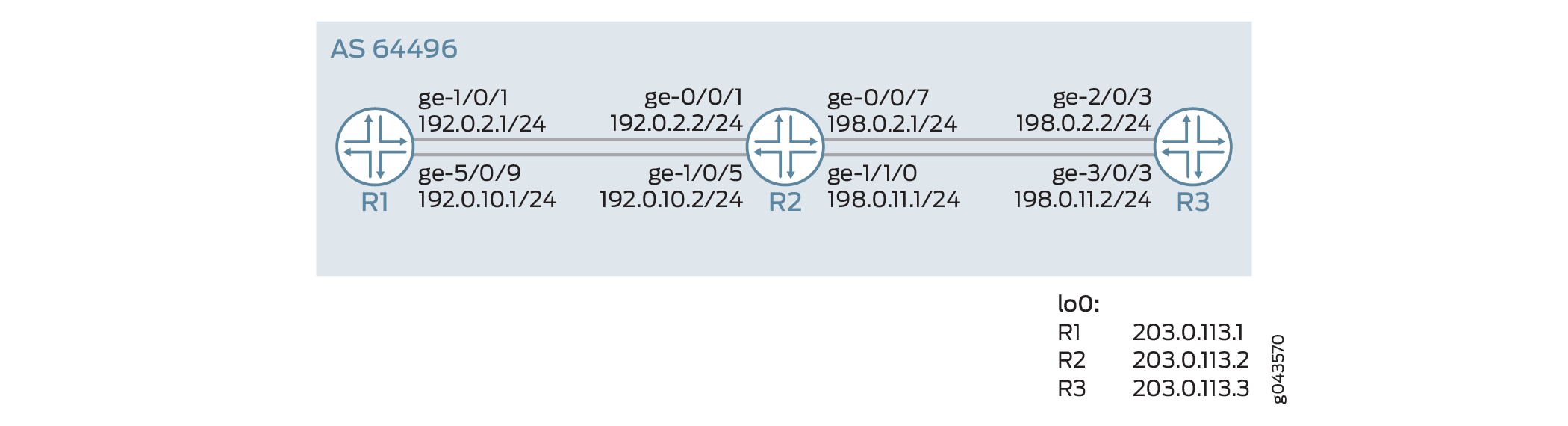 의 우선 순위를 지정하는 라우팅 정책 구성
구성
CLI 빠른 구성
이 예를 빠르게 구성하려면, 아래 명령을 복사하여 텍스트 파일로 붙여 넣은 다음 모든 라인브레이크를 제거하고, 네트워크 구성을 일치하는 데 필요한 세부 사항을 변경하고, 계층 수준에서 [edit] 명령을 복사하여 CLI에 붙여 넣은 다음, 구성 모드에서 commit을 입력합니다.
라우터 R1
set interfaces ge-1/0/1 unit 0 description R1->R2
set interfaces ge-1/0/1 unit 0 family inet address 192.0.2.1/24
set interfaces ge-1/0/1 unit 0 family iso
set interfaces ge-1/0/1 unit 0 family inet6 address 2001:db8:1:2::1/64
set interfaces ge-1/0/1 unit 0 family mpls
set interfaces ge-5/0/9 unit 0 description R1->R2
set interfaces ge-5/0/9 unit 0 family inet address 192.0.10.1/24
set interfaces ge-5/0/9 unit 0 family iso
set interfaces ge-5/0/9 unit 0 family inet6 address 2001:db8:1:1::1/64
set interfaces ge-5/0/9 unit 0 family mpls
set interfaces lo0 unit 0 family inet address 203.0.113.1/32
set interfaces lo0 unit 0 family iso address 49.0002.0103.0000.0010.00
set interfaces lo0 unit 0 family inet6 address 2001:db8:1:1::1/128
set interfaces lo0 unit 0 family mpls
set protocols mpls ipv6-tunneling
set protocols mpls interface ge-5/0/9.0
set protocols mpls interface ge-1/0/1.0
set protocols isis level 1 disable
set protocols isis interface ge-1/0/1.0
set protocols isis interface ge-5/0/9.0
set protocols isis interface lo0.0 passive
set protocols ldp interface ge-1/0/1.0
set protocols ldp interface ge-5/0/9.0
set protocols ldp interface lo0.0
set policy-options policy-statement test_rf term t1 from route-filter 203.0.113.3/32 exact
set policy-options policy-statement test_rf term t1 then priority high
set protocols isis import test_rf
set routing-options router-id 203.0.113.1
set routing-options autonomous-system 64496
라우터 R2
set interfaces ge-0/0/1 unit 0 description R2->R1
set interfaces ge-0/0/1 unit 0 family inet address 192.0.2.2/24
set interfaces ge-0/0/1 unit 0 family iso
set interfaces ge-0/0/1 unit 0 family inet6 address 2001:db8:1:2::2/64
set interfaces ge-0/0/1 unit 0 family mpls
set interfaces ge-0/0/7 unit 0 description R2->R3
set interfaces ge-0/0/7 unit 0 family inet address 198.0.2.1/24
set interfaces ge-0/0/7 unit 0 family iso
set interfaces ge-0/0/7 unit 0 family inet6 address 2001:db8:1:2::1/64
set interfaces ge-0/0/7 unit 0 family mpls
set interfaces ge-1/0/5 unit 0 description R2->R1
set interfaces ge-1/0/5 unit 0 family inet address 192.0.10.2/24
set interfaces ge-1/0/5 unit 0 family iso
set interfaces ge-1/0/5 unit 0 family inet6 address 2001:db8:1:1::2/64
set interfaces ge-1/0/5 unit 0 family mpls
set interfaces ge-1/1/0 unit 0 family inet address 198.0.10.1/24
set interfaces ge-1/1/0 unit 0 family iso
set interfaces ge-1/1/0 unit 0 family inet6 address 2001:db8:::1::1/64
set interfaces ge-1/1/0 unit 0 family mpls
set interfaces lo0 unit 0 family inet address 203.0.113.2/32
set interfaces lo0 unit 0 family iso address 49.0002.0103.0000.0030.00
set interfaces lo0 unit 0 family inet6 address 2001:db8:2:2::1/128
set interfaces lo0 unit 0 family mpls
set protocols mpls interface ge-1/0/5.0
set protocols mpls interface ge-0/0/1.0
set protocols mpls interface ge-1/1/0.0
set protocols mpls interface ge-0/0/7.0
set protocols isis level 1 disable
set protocols isis interface ge-0/0/1.0
set protocols isis interface ge-0/0/7.0
set protocols isis interface ge-1/0/5.0
set protocols isis interface ge-1/1/0.0
set protocols isis interface lo0.0 passive
set protocols ldp interface ge-0/0/1.0
set protocols ldp interface ge-0/0/7.0
set protocols ldp interface ge-1/0/5.0
set protocols ldp interface ge-1/1/0.0
set protocols ldp interface lo0.0
set routing-options router-id 203.0.113.2
set routing-options autonomous-system 64496
라우터 R3
set interfaces ge-2/0/3 unit 0 description R3->R2
set interfaces ge-2/0/3 unit 0 family inet address 198.1.2.2/24
set interfaces ge-2/0/3 unit 0 family iso
set interfaces ge-2/0/3 unit 0 family inet6 address 2001:db8:1:2::2/64
set interfaces ge-2/0/3 unit 0 family mpls
set interfaces ge-3/0/10unit 0 description R3->R4
set interfaces ge-3/0/0 unit 0 family inet address 198.0.1.2/24
set interfaces ge-3/0/0 unit 0 family iso
set interfaces ge-3/0/0 unit 0 family inet6 address 2001:db8::1:1::2/64
set interfaces ge-3/0/0 unit 0 family mpls
set interfaces lo0 unit 0 family inet address 203.0.113.3/32
set interfaces lo0 unit 0 family iso address 49.0002.0103.0000.0020.00
set interfaces lo0 unit 0 family inet6 address 2001:db8:3:3::3/128
set interfaces lo0 unit 0 family mpls
set protocols mpls ipv6-tunneling
set protocols mpls interface ge-3/0/0.0
set protocols mpls interface ge-2/0/3.0
set protocols isis level 1 disable
set protocols isis interface ge-2/0/3.0
set protocols isis interface ge-3/0/0.0
set protocols isis interface lo0.0 passive
set protocols ldp interface ge-2/0/3.0
set protocols ldp interface ge-3/0/0.0
set protocols ldp interface lo0.0
set policy-options policy-statement add_tag term t1 from route-filter 203.0.113.3/32 exact
set policy-options policy-statement add_tag term t1 then tag 18
set protocols isis export add_tag
set routing-options router-id 203.0.113.3
set routing-options autonomous-system 64496
라우터 R1 구성
단계별 절차
다음 예에서는 구성 계층에서 다양한 수준의 탐색이 필요합니다. CLI 탐색에 대한 정보는 CLI 사용자 가이드의 구성 모드에서 CLI 편집기 사용을 참조하십시오.
라우터 R1을 구성하려면 다음을 수행합니다.
적절한 인터페이스 이름, 주소 및 기타 매개 변수를 수정한 후 다른 라우터에 이 절차를 반복합니다.
IPv4 및 IPv6 주소로 인터페이스를 구성합니다.
[edit interfaces]
user@R1# set ge-1/0/1 unit 0 description R1->R2
user@R1# set ge-1/0/1 unit 0 family inet address 192.0.2.1/24
user@R1# set ge-1/0/1 unit 0 family iso
user@R1# set ge-1/0/1 unit 0 family inet6 address 2001:db8:1:2::1/64
user@R1# set ge-1/0/1 unit 0 family mpls
user@R1# set ge-1/0/1 unit 0 description R1->R2
user@R1# set ge-5/0/9 unit 0 family inet address 192.0.10.1/24
user@R1# set ge-5/0/9 unit 0 family iso
user@R1# set ge-5/0/9 unit 0 family inet6 address 2001:db8:1:1::1/64
user@R1# set ge-5/0/9 unit 0 family mpls
루프백 주소를 구성합니다.
[edit interfaces]
user@R1# set lo0 unit 0 family inet address 203.0.113.1/32
user@R1# set lo0 unit 0 family iso address 49.0002.0103.0000.0010.00
user@R1# set lo0 unit 0 family inet6 address 2001:db8:1:1::1/128
user@R1# set lo0 unit 0 family mpls
MPLS를 구성합니다.
[edit protocols]
user@R1# set mpls ipv6-tunneling
user@R1# set mpls interface ge-5/0/9.0
user@R1# set mpls interface ge-1/0/1.0
인터페이스에서 IS-IS 프로토콜을 활성화합니다.
[edit protocols]
user@R1# set isis level 1 disable
user@R1# set isis interface ge-1/0/1.0
user@R1# set isis interface ge-5/0/9.0
user@R1# set isis interface lo0.0 passive
user@R1# set isis import test_rf
인터페이스에 LDP 프로토콜을 구성합니다.
[edit protocols]
user@R1# set ldp interface ge-1/0/1.0
user@R1# set ldp interface ge-5/0/9.0
user@R1# set ldp interface lo0.0
라우터 R3에 대한 IS-IS 경로의 우선 순위를 지정하는 정책을 정의합니다. .
[edit policy-options]
user@R1# set policy-statement test_rf term t1 from route-filter 203.0.113.3/32 exact
user@R1# set policy-statement test_rf term t1 then priority high
라우터 ID 및 AS(Autonomous System) 번호를 구성합니다.
[edit routing--options]
user@R1# set routing-options router-id 203.0.113.1
user@R1# set routing-options autonomous-system 64496
결과
구성 모드에서 , show protocols및 show policy-options show routing-options 명령을 show interfaces입력하여 구성을 확인합니다. 출력에 의도한 구성이 표시되지 않으면 이 예의 지침을 반복하여 구성을 수정합니다.
[edit]
user@R1> show interfaces
ge-1/0/1 {
    unit 0 {
        family inet {
            address 192.0.2.1/24;
        }
        family iso;
        family inet6 {
            address 2001:db8:1:2::1/64;
        }
        family mpls;
    }
}
ge-5/0/9 {
    unit 0 {
        family inet {
            address 192.0.2.1/24;
        }
        family iso;
        family inet6 {
            address 2001:db8:1:1::1/64;
        }
        family mpls;
    }
}
lo0 {
    unit 0 {
        family inet {
            address 203.0.113.1/32;
        }
        family iso {
            address 49.0002.0103.0000.0010.00;
        }
        family inet6 {
            address 2001:db8:1:1::1/128;
        }
        family mpls;
    }
}
[edit]
user@R1> show protocols
mpls {
    ipv6-tunneling;
    interface ge-5/0/9.0;
    interface ge-1/0/1.0;
}
isis {
    import test_rf;
    level 1 disable;
    interface ge-1/0/1.0;
    interface ge-5/0/9.0;
    interface lo0.0 {
        passive;
    }
}
ldp {
    interface ge-1/0/1.0;
    interface ge-5/0/9.0;
    interface lo0.0;
}
[edit]
user@R1> show routing-options
router-id 203.0.113.1;
autonomous-system 64496;
user@R1> sshow configuration policy-options
policy-statement test_rf {
    term t1 {
        from {
            route-filter 203.0.113.3/32 exact;
        }
        then priority high;
    }
}
확인
LDP 경로의 우선 순위 확인
목적
LDP가 IS-IS 프로토콜에서 경로 203.0.113.3을 상속하는지 확인합니다.
행동
운영 모드의 라우터 R1에서 명령을 실행합니다 show route extensive .
user@R1> show route 203.0.113.3 extensive
inet.0: 26 destinations, 26 routes (26 active, 0 holddown, 0 hidden)

203.0.113.3/32 (1 entry, 1 announced)
        State: <FlashAll>
TSI:
KRT in-kernel 203.0.113.3/32 -> {16.1.2.2}
         *IS-IS  Preference: 18
                 Level: 2
                 Next hop type: Router, Next hop index: 0
                 Address: 0x4a1f43c
                 Next-hop reference count: 4
                 Next hop: 16.1.2.2 via ge-1/0/1.0, selected
                 Session Id: 0x0
                 Next hop: 16.1.1.2 via ge-5/0/9.0
                 Session Id: 0x0
                 State:  <Active Int HighPriority>
                 Local AS: 64496
                 Age: 59 	Metric: 20
                 Validation State: unverified
                 ORR Generation-ID: 0
                 	Tag: 18
                 Task: IS-IS
                 Announcement bits (2): 0-KRT 4-LDP
                 AS path: I

  inet.3: 2 destinations, 2 routes (2 active, 0 holddown, 0 hidden)

  203.0.113.3/32 (1 entry, 1 announced)
         State: <FlashAll>
         *LDP    Preference: 9
                 Next hop type: Router, Next hop index: 0
                 Address: 0x4a1e55c
                 Next-hop reference count: 2
                 Next hop: 16.1.2.2 via ge-1/0/1.0, selected
                 Label operation: Push 299776
                 Label TTL action: prop-ttl
                 Load balance label: Label 299776: None;
                 Label element ptr: 0x4b99100
                 Label parent element ptr: 0x0
                 Label element references: 2
                 Label element child references: 0
                 Label element lsp id: 0
                 Session Id: 0x0
                 Next hop: 16.1.1.2 via ge-5/0/9.0
                 Label operation: Push 299776
                 Label TTL action: prop-ttl
                 Load balance label: Label 299776: None;
                 Label element ptr: 0x4b99100
                 Label parent element ptr: 0x0
                 Label element references: 2
                 Label element child references: 0
                 Label element lsp id: 0
                 Session Id: 0x0
                 State:<Active Int HighPriority>
                 Local AS: 64496
                 Age: 59 	Metric: 1
                 Validation State: unverified
                 Task: LDP
                 Announcement bits (1): 2-Resolve tree 1
                 AS path: I
                 Secondary Tables: inet6.3
의미
출력은 LDP가 IS-IS에서 우선 순위 high 로 경로 203.0.113.3을 상속한다는 것을 보여줍니다.
IS-IS 경로의 우선 순위 확인
목적
IS-IS에서 경로 203.0.113.3에 대한 우선 순위가 설정되어 있는지 확인합니다.
행동
user@R1> show isis route download-priority
IS-IS routing table             Current version: L1: 0 L2: 122
IPv4/IPv6 Routes
----------------
Prefix             L Version   Metric Type Interface       NH   Via                 Backup Score
203.0.113.3/32         2     122       20 int  ge-1/0/1.0      IPV4 R2
                                           ge-5/0/9.0      IPV4 R2
203.0.113.2/32         2     122       10 int  ge-1/0/1.0      IPV4 R2
                                           ge-5/0/9.0      IPV4 R2
198.1.1.0/24        2     122       20 int  ge-1/0/1.0      IPV4 R2
                                           ge-5/0/9.0      IPV4 R2
198.1.2.0/24        2     122       20 int  ge-1/0/1.0      IPV4 R2
                                           ge-5/0/9.0      IPV4 R2
2001:db8:2:2::1/128  2     122       10 int  ge-1/0/1.0      IPV6 R2
                                           ge-5/0/9.0      IPV6 R2
2001:db8:3:3::3/128  2     122       20 int  ge-1/0/1.0      IPV6 R2
                                           ge-5/0/9.0      IPV6 R2
2001:db8:1:1::/64   2     122       20 int  ge-1/0/1.0      IPV6 R2
                                           ge-5/0/9.0      IPV6 R2
2001:db8:1:2::/64   2     122       20 int  ge-1/0/1.0      IPV6 R2
                                           ge-5/0/9.0      IPV6 R2
의미
경로는 설정된 우선순위 순서대로 표시됩니다. 우선 순위로 high 설정된 경로 203.0.113.3이 맨 위에 표시되고 우선 순위가 중간 또는 낮은 경로가 그 뒤에 표시됩니다.