
예: 레벨 2 영역에서 레벨 1 영역으로 IS-IS 경로 누출 구성
이 예는 IS-IS 네트워크의 접두사를 레벨 2 영역에서 레벨 1 영역으로 유출하는 방법을 보여줍니다.
요구 사항
이 예를 구성하기 전에 디바이스 초기화를 제외한 특별한 구성은 필요하지 않습니다.
개요
모든 라우팅 프로토콜은 라우팅 정보를 라우팅 계층의 위 또는 아래로 전달합니다. 이러한 라우팅 정보의 양방향 흐름을 경로 유출이라고 합니다.
기본적으로 IS-IS 프로토콜은 레벨 1 영역에서 레벨 2 영역으로 라우팅 정보를 유출합니다. 그러나 레벨 2 영역에서 레벨 1 영역으로 라우팅 정보를 유출하려면 내보내기 정책을 명시적으로 구성해야 합니다.
위상수학
이 예에서 디바이스 R3 및 R4는 레벨 2 영역에서 구성됩니다. 디바이스 R5, R6 및 R7은 레벨 1 영역에서 구성됩니다.
그림 1 은 이 예에서 사용되는 토폴로지입니다.
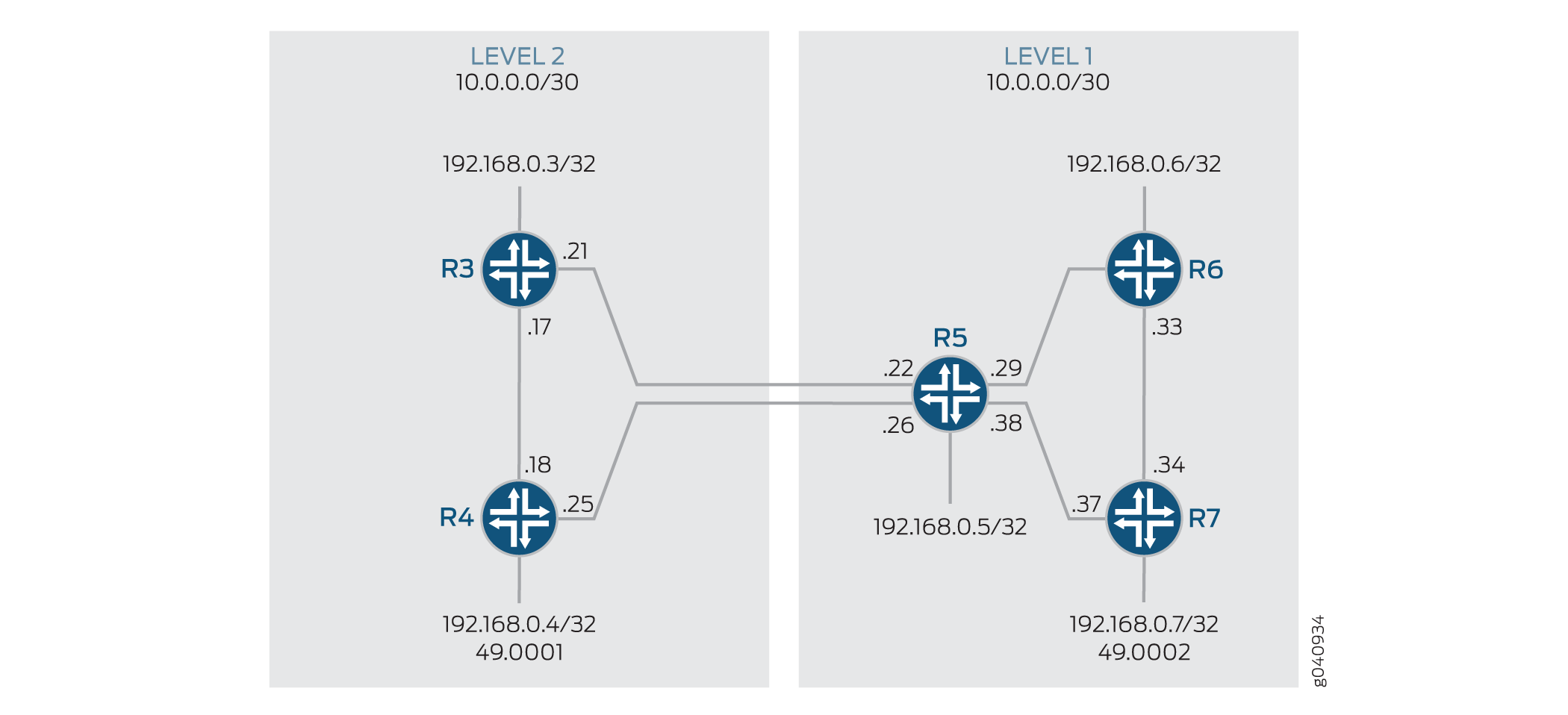 으로 누출되는 경로
구성
레벨 2 영역에서 레벨 1 영역으로 경로 유출 구성
CLI 빠른 구성
수준 2 영역에서 수준 1 영역으로 경로 유출을 신속하게 구성하려면 다음 명령을 복사하여 텍스트 파일에 붙여 넣고 줄 바꿈을 제거한 다음 네트워크 구성에 맞게 필요한 세부 정보를 변경한 다음 명령을 복사하여 계층 수준에서 CLI에 [edit] 붙여 넣습니다.
디바이스 R3
set interfaces fe-1/2/0 unit 0 description to-R4
set interfaces fe-1/2/0 unit 0 family inet address 10.0.0.17/30
set interfaces fe-1/2/0 unit 0 family iso
set interfaces fe-1/2/1 unit 0 description to-R5
set interfaces fe-1/2/1 unit 0 family inet address 10.0.0.21/30
set interfaces fe-1/2/1 unit 0 family iso
set interfaces lo0 unit 0 family inet address 192.168.0.3/32
set interfaces lo0 unit 0 family iso address 49.0001.0192.0168.0003.00
set policy-options policy-statement leak-L2-to-L1 from route-filter 192.168.0.0/24 orlonger
set policy-options policy-statement leak-L2-to-L1 from protocol isis
set policy-options policy-statement leak-L2-to-L1 from level 2
set policy-options policy-statement leak-L2-to-L1 to protocol isis
set policy-options policy-statement leak-L2-to-L1 to level 1
set policy-options policy-statement leak-L2-to-L1 then accept
set protocols isis interface fe-1/2/0.0 level 1 disable
set protocols isis interface fe-1/2/1.0 level 1 disable
set protocols isis interface lo0.0 level 1 disable
set protocols isis export leak-L2-to-L1
디바이스 R4
set interfaces fe-1/2/0 unit 0 description to-R3
set interfaces fe-1/2/0 unit 0 family inet address 10.0.0.18/30
set interfaces fe-1/2/0 unit 0 family iso
set interfaces fe-1/2/1 unit 0 description to-R5
set interfaces fe-1/2/1 unit 0 family inet address 10.0.0.25/30
set interfaces fe-1/2/1 unit 0 family iso
set interfaces lo0 unit 0 family inet address 192.168.0.4/32
set interfaces lo0 unit 0 family iso address 49.0001.0192.0168.0004.00
set policy-options policy-statement leak-L2-to-L1 from route-filter 192.168.0.0/24 orlonger
set policy-options policy-statement leak-L2-to-L1 from protocol isis
set policy-options policy-statement leak-L2-to-L1 from level 2
set policy-options policy-statement leak-L2-to-L1 to protocol isis
set policy-options policy-statement leak-L2-to-L1 to level 1
set policy-options policy-statement leak-L2-to-L1 then accept
set protocols isis interface fe-1/2/0.0 level 1 disable
set protocols isis interface fe-1/2/1.0 level 1 disable
set protocols isis interface lo0.0 level 1 disable
set protocols isis export leak-L2-to-L1
디바이스 R5
set interfaces fe-1/2/0 unit 0 description to-R3
set interfaces fe-1/2/0 unit 0 family inet address 10.0.0.22/30
set interfaces fe-1/2/0 unit 0 family iso
set interfaces fe-1/2/1 unit 0 description to-R4
set interfaces fe-1/2/1 unit 0 family inet address 10.0.0.26/30
set interfaces fe-1/2/1 unit 0 family iso
set interfaces fe-1/2/2 unit 0 description to-R6
set interfaces fe-1/2/2 unit 0 family inet address 10.0.0.29/30
set interfaces fe-1/2/2 unit 0 family iso
set interfaces fe-1/2/3 unit 0 description to-R7
set interfaces fe-1/2/3 unit 0 family inet address 10.0.0.38/30
set interfaces fe-1/2/3 unit 0 family iso
set interfaces lo0 unit 0 family inet address 192.168.0.5/32
set interfaces lo0 unit 0 family iso address 49.0002.0192.0168.0005.00
set protocols isis interface fe-1/2/0.0 level 1 disable
set protocols isis interface fe-1/2/1.0 level 1 disable
set protocols isis interface fe-1/2/2.0 level 2 disable
set protocols isis interface fe-1/2/3.0 level 2 disable
set protocols isis interface lo0.0 level 1 disable
디바이스 R6
set interfaces fe-1/2/0 unit 0 description to-R5
set interfaces fe-1/2/0 unit 0 family inet address 10.0.0.30/30
set interfaces fe-1/2/0 unit 0 family iso
set interfaces fe-1/2/1 unit 0 description to-R7
set interfaces fe-1/2/1 unit 0 family inet address 10.0.0.33/30
set interfaces fe-1/2/1 unit 0 family iso
set interfaces lo0 unit 0 family inet address 192.168.0.6/32
set interfaces lo0 unit 0 family iso address 49.0002.0192.0168.0006.00
set protocols isis interface fe-1/2/0.0 level 2 disable
set protocols isis interface fe-1/2/1.0 level 2 disable
set protocols isis interface lo0.0 level 2 disable
디바이스 R7
set interfaces fe-1/2/0 unit 0 description to-R6
set interfaces fe-1/2/0 unit 0 family inet address 10.0.0.34/30
set interfaces fe-1/2/0 unit 0 family iso
set interfaces fe-1/2/1 unit 0 description to-R5
set interfaces fe-1/2/1 unit 0 family inet address 10.0.0.37/30
set interfaces fe-1/2/1 unit 0 family iso
set interfaces lo0 unit 0 family inet address 192.168.0.7/32
set interfaces lo0 unit 0 family iso address 49.0002.0192.0168.0007.00
set protocols isis interface fe-1/2/0.0 level 2 disable
set protocols isis interface fe-1/2/1.0 level 2 disable
set protocols isis interface lo0.0 level 2 disable
단계별 절차
레벨 2 영역에서 레벨 1 영역으로 경로 유출 구성
단계별 절차
다음 예는 구성 계층에서 다양한 수준의 탐색이 필요합니다. CLI 탐색 관련 정보는 Junos OS CLI 사용자 가이드의 구성 모드에서 CLI 편집기 사용을 참조하십시오.
레벨 2 영역에서 레벨 1 영역으로 경로 유출을 구성하려면 다음을 수행합니다.
네트워크 인터페이스를 구성합니다.
각 인터페이스에 ISO 주소 패밀리를 포함하여 인터페이스에서 IS-IS(Intermediate System to Intermediate System)를 활성화합니다.
[edit interfaces]
user@R3# set fe-1/2/0 unit 0 description to-R4
user@R3# set fe-1/2/0 unit 0 family inet address 10.0.0.17/30
user@R3# set fe-1/2/0 unit 0 family iso
user@R3# set fe-1/2/1 unit 0 description to-R5
user@R3# set fe-1/2/1 unit 0 family inet address 10.0.0.21/30
user@R3# set fe-1/2/1 unit 0 family iso
마찬가지로 다른 라우터를 구성합니다.
두 개의 루프백 인터페이스 주소를 구성합니다.
한 주소는 IPv4용이고 다른 주소는 라우터가 해당 영역의 다른 라우터와 인접성을 형성할 수 있도록 하는 것입니다.
[edit interfaces lo0 unit 0]
user@R3# set family inet address 192.168.0.3/32
user@R3# set family iso address 49.0001.0192.0168.0003.00
인터페이스별로 IS-IS 수준을 지정합니다.
[edit protocols isis interface]
user@R3# set fe-1/2/0.0 level 1 disable
user@R3# set fe-1/2/1.0 level 1 disable
user@R3# set lo0.0 level 1 disable
레벨 2 영역에서 구성된 라우터에서 경로 유출 정책을 구성하여 레벨 1 영역으로 경로를 유출합니다.
[edit policy-options policy-statement leak-L2-to-L1]
user@R3# set from route-filter 192.168.0.0/24 orlonger
user@R3# set from protocol isis
user@R3# set from level 2
user@R3# set to protocol isis
user@R3# set to level 1
user@R3# set then accept
[edit protocols isis]
user@R3# set export leak-L2-to-L1
마찬가지로 디바이스 R4를 구성합니다.
결과
구성 모드에서 , show protocols isis, 및 show policy-options 명령을 입력하여 show interfaces구성을 확인합니다.
출력 결과가 의도한 구성대로 표시되지 않으면 이 예의 지침을 반복하여 구성을 수정하십시오.
user@R3# show interfaces
fe-1/2/0 {
        unit 0 {
            description to-R4;
            family inet {
                address 10.0.0.17/30;
            }
            family iso;
        }
    }
fe-1/2/1 {
        unit 0 {
            description to-R5;
            family inet {
                address 10.0.0.21/30;
            }
            family iso;
        }
    }
lo0 {
        unit 0 {
            family inet {
                address 192.168.0.3/32;
            }
            family iso {
                address 49.0001.0192.0168.0003.00;
            }
        }
    }
user@R3# show protocols isis
export leak-L2-to-L1;
        interface fe-1/2/0.0 {
            level 1 disable;
        }
        interface fe-1/2/1.0 {
            level 1 disable;
        }
        interface lo0.0 {
            level 1 disable;
        }
user@R3# show policy-options
policy-statement leak-L2-to-L1 {
        from {
            protocol isis;
            level 2;
            route-filter 192.168.0.0/24 orlonger;
        }
        to {
            protocol isis;
            level 1;
        }
        then accept;
    }
마찬가지로 다른 모든 라우터의 구성을 확인합니다. 라우터 구성을 마친 경우, 구성 모드에서 을(를) 입력합니다 commit .
확인
레벨 2 영역에서 레벨 1 영역으로 경로 누출 확인
목적
IS-IS(Intermediate System to Intermediate System)가 레벨 2 영역에서 레벨 1 영역으로 경로를 유출하는지 확인합니다.
행동
경로 유출이 발생하고 있는지 확인하려면 다음 명령을 사용합니다.
show isis adjacency (IS-IS 네트워크가 작동 중이고 인접성이 설정되었는지 확인하기 위해)
show isis database detail (유출된 경로의 존재 여부를 확인하기 위해)
디바이스 R3의 작동 모드에서 명령을 실행합니다 show isis adjacency .
user@R3> show isis adjacency
Interface            System     L State        Hold (secs) SNPA
fe-1/2/0.0           R4         2  Up          7           0:5:85:8f:94:bd
fe-1/2/1.0           R5         2  Up          7           0:5:85:8f:94:bd
출력으로 디바이스 R3의 인터페이스가 작동 중이고 라우터 R4 및 R5의 연결 인터페이스와 인접성을 설정했는지 확인합니다. 인터페이스가 작동하지 않는 경우 구성 문제 해결을 위한 결과 섹션을 참조하십시오.
디바이스 R3의 작동 모드에서 명령을 실행합니다 show isis database detail .
user@R3> show isis database detail
IS-IS level 1 link-state database:

R3.00-00 Sequence: 0x19, Checksum: 0x3453, Lifetime: 1078 secs
   IP prefix: 192.168.0.4/32                  Metric:       10 Internal Down
   IP prefix: 192.168.0.5/32                  Metric:       10 Internal Down
   IP prefix: 192.168.0.6/32                  Metric:       20 Internal Down
   IP prefix: 192.168.0.7/32                  Metric:       20 Internal Down

IS-IS level 2 link-state database:

R3.00-00 Sequence: 0x1c, Checksum: 0xc657, Lifetime: 1078 secs
   IS neighbor: R4.02                     Metric:       10
   IS neighbor: R5.02                     Metric:       10
   IP prefix: 10.0.0.16/30                    Metric:       10 Internal Up
   IP prefix: 10.0.0.20/30                    Metric:       10 Internal Up
   IP prefix: 192.168.0.3/32                  Metric:        0 Internal Up

R4.00-00 Sequence: 0x19, Checksum: 0xea13, Lifetime: 1076 secs
   IS neighbor: R4.02                     Metric:       10
   IS neighbor: R5.03                     Metric:       10
   IP prefix: 10.0.0.16/30                    Metric:       10 Internal Up
   IP prefix: 10.0.0.24/30                    Metric:       10 Internal Up
   IP prefix: 192.168.0.4/32                  Metric:        0 Internal Up

R4.02-00 Sequence: 0x17, Checksum: 0xecab, Lifetime: 1076 secs
   IS neighbor: R3.00                     Metric:        0
   IS neighbor: R4.00                     Metric:        0

R5.00-00 Sequence: 0x12, Checksum: 0xf4e5, Lifetime: 1076 secs
   IS neighbor: R5.02                     Metric:       10
   IS neighbor: R5.03                     Metric:       10
   IP prefix: 10.0.0.20/30                    Metric:       10 Internal Up
   IP prefix: 10.0.0.24/30                    Metric:       10 Internal Up
   IP prefix: 10.0.0.28/30                    Metric:       10 Internal Up
   IP prefix: 10.0.0.32/30                    Metric:       20 Internal Up
   IP prefix: 10.0.0.36/30                    Metric:       10 Internal Up
   IP prefix: 192.168.0.5/32                  Metric:        0 Internal Up
   IP prefix: 192.168.0.6/32                  Metric:       10 Internal Up
   IP prefix: 192.168.0.7/32                  Metric:       10 Internal Up

R5.02-00 Sequence: 0xb, Checksum: 0x2d74, Lifetime: 1076 secs
   IS neighbor: R3.00                     Metric:        0
   IS neighbor: R5.00                     Metric:        0

R5.03-00 Sequence: 0xb, Checksum: 0x6c32, Lifetime: 1076 secs
   IS neighbor: R4.00                     Metric:        0
   IS neighbor: R5.00                     Metric:        0
키워드는
Down레벨 2 영역에서 레벨 1 영역으로 성공적으로 유출된 경로를 식별합니다.
의미
레벨 2에서 레벨 1 영역으로의 경로 누출이 예상대로 작동합니다.