
예: IS-IS(Intermediate System to Intermediate System)에 대한 무중단 인증 키 롤오버 구성
이 예에서는 IS-IS(Intermediate System to Intermediate System)에 대한 무중단 인증 키 롤오버를 구성하는 방법을 보여 줍니다.
요구 사항
IS-IS(Intermediate System to Intermediate System)에 대한 무중단 인증 키 롤오버를 구성하기 전에 디바이스 초기화 이외의 특별한 구성은 필요하지 않습니다.
개요
인증은 신뢰할 수 있는 라우터만 라우팅 업데이트에 참여하도록 보장합니다. 이 키체인 인증 방법을 무중단이라고 하는데, 이는 피어링 세션을 재설정하거나 라우팅 프로토콜을 중단하지 않고 키가 한 키에서 다음 키로 롤오버되기 때문입니다. Junos OS는 RFC 5304, IS-IS 암호화 인증 과 RFC 5310, IS-IS 일반 암호화 인증을 모두 지원합니다.
이 예제에는 키체인을 구성하기 위한 다음 문이 포함되어 있습니다.
-
algorithm - 키체인의 각 키에 대해 암호화 알고리즘을 지정할 수 있습니다. 알고리즘은 SHA-1 또는 MD-5일 수 있습니다.
-
key - 키체인에는 여러 개의 키가 있을 수 있습니다. 키체인 내의 각 키는 고유한 정수 값으로 식별되어야 합니다. 유효한 식별자 값의 범위는 0에서 63까지입니다.
-
key-chain - 각 키체인에 대해 이름을 지정해야 합니다. 이 예제에서는 base-key-global 및 base-key-inter라는 두 개의 키 체인을 정의합니다.
-
options - 키체인의 각 키에 대해 메시지 인증 코드의 인코딩을 지정할 수 있습니다. isis-enhanced 또는 basic. 기본(RFC 5304) 작업은 기본적으로 활성화됩니다.
isis-enhanced 옵션을 구성하면 Junos OS는 RFC 5310 인코딩 라우팅 프로토콜 패킷을 전송하고 다른 디바이스에서 수신하는 RFC 5304 인코딩 및 RFC 5310 인코딩 라우팅 프로토콜 패킷을 모두 수락합니다.
기본을 구성하거나 키 구성에 options 문을 포함하지 않을 때, Junos OS는 RFC 5304 인코딩 라우팅 프로토콜 패킷을 송수신하고 다른 디바이스에서 수신한 5310 인코딩 라우팅 프로토콜 패킷을 드롭합니다.
이 설정은 IS-IS(Intermediate System to Intermediate System) 전용이기 때문에 TCP 및 BFD 프로토콜은 키에 구성된 인코딩 옵션을 무시합니다.
-
secret - 키체인의 각 키에 대해 암호를 설정해야 합니다. 이 암호는 비밀 문에 암호화된 또는 일반 텍스트 형식으로 입력할 수 있습니다. 항상 암호화된 형식으로 표시됩니다.
-
start-time - 각 키는 ISO 8601 형식을 사용하여 UTC를 기준으로 시작 시간을 지정해야 합니다. 제어는 한 키에서 다음 키로 전달됩니다. 구성된 시작 시간이 도달하면(라우팅 디바이스의 클럭 기준), 해당 시작 시간이 있는 키가 활성화됩니다. 시작 시간은 라우팅 디바이스의 현지 시간대로 지정되며 키 체인 내에서 고유해야 합니다.
키체인을 모든 인터페이스에 전역적으로 적용하거나 특정 인터페이스에 더 세부적으로 적용할 수 있습니다.
이 예에는 모든 인터페이스 또는 특정 인터페이스에 키체인을 적용하기 위한 다음 문이 포함되어 있습니다.
-
authentication-key-chain—모든 레벨 1 또는 모든 레벨 2 인터페이스에 대해 글로벌 IS-IS(Intermediate System to Intermediate System) 레벨에서 키체인을 적용할 수 있습니다.
-
hello-authentication-key-chain—개별 IS-IS 인터페이스 수준에서 키체인을 적용할 수 있습니다. 인터페이스 구성은 글로벌 구성을 재정의합니다.
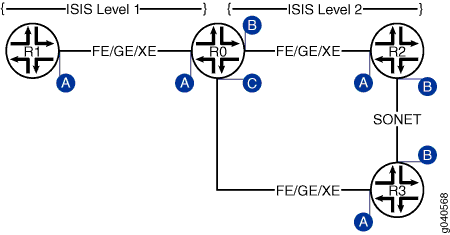
구성
절차
R0에 대한 CLI 빠른 구성
IS-IS(Intermediate System to Intermediate System)에 대한 무중단 인증 키 롤오버를 신속하게 구성하려면 다음 명령을 복사하여 CLI에 붙여넣으십시오.
[edit]
set interfaces ge-0/0/0 unit 0 description "interface A"
set interfaces ge-0/0/0 unit 0 family inet address 10.0.0.1/30
set interfaces ge-0/0/0 unit 0 family iso
set interfaces ge-0/0/0 unit 0 family inet6 address fe80::200:f8ff:fe21:67cf/128
set interfaces ge-0/0/1 unit 0 description "interface B"
set interfaces ge-0/0/1 unit 0 family inet address 10.0.0.5/30
set interfaces ge-0/0/1 unit 0 family iso
set interfaces ge-0/0/1 unit 0 family inet6 address 10FB::C:ABC:1F0C:44DA/128
set interfaces ge-0/0/2 unit 0 description "interface C"
set interfaces ge-0/0/2 unit 0 family inet address 10.0.0.9/30
set interfaces ge-0/0/2 unit 0 family iso
set interfaces ge-0/0/2 unit 0 family inet6 address ff06::c3/128
set security authentication-key-chains key-chain base-key-global key 63 secret "$ABC123"
set security authentication-key-chains key-chain base-key-global key 63 start-time "2011-8-6.06:54:00-0700"
set security authentication-key-chains key-chain base-key-global key 63 algorithm hmac-sha-1
set security authentication-key-chains key-chain base-key-global key 63 options isis-enhanced
set security authentication-key-chains key-chain base-key-global key 64 secret "$ABC1234"
set security authentication-key-chains key-chain base-key-global key 64 start-time "2011-10-6.06:54:00-0700"
set security authentication-key-chains key-chain base-key-global key 64 algorithm hmac-sha-1
set security authentication-key-chains key-chain base-key-global key 64 options isis-enhanced
set security authentication-key-chains key-chain base-key-inter key 0 secret "$ABC123"
set security authentication-key-chains key-chain base-key-inter key 0 start-time "2011-8-6.06:54:00-0700"
set security authentication-key-chains key-chain base-key-inter key 0 algorithm md5
set security authentication-key-chains key-chain base-key-inter key 0 options basic
set security authentication-key-chains key-chain base-key-inter key 1 secret "$ABC1234"
set security authentication-key-chains key-chain base-key-inter key 1 start-time "2011-10-6.06:54:00-0700"
set security authentication-key-chains key-chain base-key-inter key 1 algorithm md5
set security authentication-key-chains key-chain base-key-inter key 1 options basic
set protocols isis level 2 authentication-key-chain base-key-global
set protocols isis interface ge-0/0/0.0 level 1 hello-authentication-key-chain base-key-inter
단계별 절차
IS-IS(Intermediate System to Intermediate System)에 대한 무중단 인증 키 롤오버 구성:
-
라우터 R0 인터페이스를 구성합니다.
[edit]
user@host# edit interfaces ge-0/0/0 unit 0
[edit interfaces ge-0/0/0 unit 0]
user@host# set description "interface A"
user@host# set family inet address 10.0.0.1/30
user@host# set family iso
user@host# set family inet6 address fe80::200:f8ff:fe21:67cf/128
user@host# exit
[edit]
user@host# edit interfaces ge-0/0/1 unit 0
[edit interfaces ge-0/0/1 unit 0]
user@host# set interfaces ge-0/0/1 unit 0 description "interface B"
user@host# set interfaces ge-0/0/1 unit 0 family inet address 10.0.0.5/30
user@host# set interfaces ge-0/0/1 unit 0 family iso
user@host# set interfaces ge-0/0/1 unit 0 family inet6 address 10FB::C:ABC:1F0C:44DA/128
user@host# exit
[edit]
user@host# edit interfaces ge-0/0/2 unit 0
[edit interfaces ge-0/0/2 unit 0]
user@host# set description "interface C"
user@host# set family inet address 10.0.0.9/30
user@host# set interfaces ge-0/0/2 unit 0 family iso
user@host# set interfaces ge-0/0/2 unit 0 family inet6 address ff06::c3/128
user@host# exit
-
하나 이상의 인증 키 체인 및 키를 구성합니다. 이 예에서는 두 개의 키가 있는 전역 및 인터페이스 수준 키 체인을 모두 사용하는 방법을 보여 줍니다. 글로벌 키 체인은 모든 ISIS 레벨 2 인터페이스에 적용됩니다. 이 키 체인은 Hello 및 LSP 교환을 모두 인증합니다. 인터페이스 키 체인은 ISIS 레벨 1의 ge-0/0/0 인터페이스(인터페이스 A)에 특별히 적용되며 hello 교환 인증에만 사용됩니다.
[edit]
user@host# edit security authentication-key-chains key-chain base-key-global
[edit security authentication-key-chains key-chain base-key-global]
user@host# set key 63 secret "$ABC123"
user@host# set key 63 start-time "2011-8-6.06:54:00-0700"
user@host# set key 63 algorithm hmac-sha-1
user@host# set key 63 options isis-enhanced

user@host# set key 64 secret "$ABC1234"
user@host# set key 64 start-time "2011-10-6.06:54:00-0700"
user@host# set key 64 algorithm hmac-sha-1
user@host# set key 64 options isis-enhanced

user@host# exit
[edit]
user@host# edit security authentication-key-chains key-chain base-key-inter
[edit security authentication-key-chains key-chain base-key-inter]
user@host# set key 0 secret "$ABC123"
user@host# set key 0 start-time "2011-8-6.06:54:00-0700"
user@host# set key 0 algorithm md5
user@host# set key 0 options basic

user@host# set key 1 secret "$ABC1234"
user@host# set key 1 start-time "2011-10-6.06:54:00-0700"
user@host# set key 1 algorithm md5
user@host# set key 1 options basic
user@host# exit
-
라우터 R0의 모든 레벨 2 ISIS 인터페이스에 base-key-global 키 체인을 적용합니다.
[edit]
user@host# edit protocols isis level 2
[edit protocols isis level 1]
set authentication-key-chain base-key-global
user@host# exit
-
수준 1에서 ISIS Hello 인증을 위한 base-key-inter 키 체인을 라우터 R0 의 ge-0/0/0.0 인터페이스에 적용합니다.
[edit]
user@host# edit protocols isis interface ge-0/0/0.0 level 1
[edit protocols isis interface ge-0/0/0.0 level 1]
set hello-authentication-key-chain base-key-inter
user@host# exit
-
디바이스 구성을 완료하면 해당 구성을 커밋합니다.
[edit]
user@host# commit
결과
show interfaces, show protocols 및 show security 명령을 입력하여 구성을 확인합니다.
user@host# show interfaces
ge-0/0/0 {
    unit 0 {
        description "interface A";
        family inet {
            address 10.0.0.1/30;
        }
        family iso;
        family inet6 {
            address fe80::200:f8ff:fe21:67cf/128;
        }
    }
}
ge-0/0/1 {
    unit 0 {
        description "interface B";
        family inet {
            address 10.0.0.5/30;
        }
        family iso;
        family inet6 {
            address 10FB::C:ABC:1F0C:44DA/128;
        }
    }
}
ge-0/0/2 {
    unit 0 {
        description "interface C";
        family inet {
            address 10.0.0.9/30;
        }
        family iso;
        family inet6 {
            address ff06::c3/128;
        }
    }
}
user@host# show protocols
isis {
    level 2 authentication-key-chain base-key-global;
    interface ge-0/0/0.0 {
        level 1 hello-authentication-key-chain base-key-inter;
    }
}
user@host# show security
authentication-key-chains {
    key-chain base-key-global {
        key 63 {
            secret "ABC123”;
            start-time "2011-8-6.06:54:00-0700";
            algorithm hmac-sha-1;
            options isis-enhanced;
        }

        key 64 {
            secret "ABC1234”;
            start-time "2011-10-6.06:54:00-0700";
            algorithm hmac-sha-1;
            options isis-enhanced;
        }
    key-chain base-key-inter {
        key 0 {
            secret "$ABC123”;
            start-time "2011-8-6.06:54:00-0700";
            algorithm md5;
            options basic;
        }
        key 1 {
            secret "$ABC1234”;
            start-time "2011-10-6.06:54:00-0700";
            algorithm md5;
            options basic;
        }
    }
}
확인
구성을 확인하려면 다음 명령을 실행합니다.
-
isis 인증 표시
-
보안 키체인 표시