
이더넷 링 보호 스위칭 구성
아래 단계에 따라 디바이스에서 이더넷 링 보호 스위칭(ERPS)을 구성하십시오.
이더넷 링 보호 스위칭 구성
상속 모델은 다음과 같습니다.
[edit protocols]
protection-group {
    ethernet-ring ring-name (
        node-id mac-address;
        ring-protection-link-owner;
        east-interface {
            control-channel channel-name {
            ring-protection-link-end;
        }
        west-interface {
            node-id mac-address;
            control-channel channel-name {
            ring-protection-link-end;
        }
        data-channel {
            vlan number;
        }
        guard-interval number;
        restore-interval number;
    }
}
각 링에 대해 보호 그룹을 구성해야 합니다. 각 노드에 여러 개의 링이 있을 수 있으므로 관련 이더넷 링에 해당하는 보호 그룹이 여러 개 있어야 합니다.
보호 그룹 수준에서 세 개의 간격 매개 변수(restore-interval, guard-interval, hold-interval)를 구성할 수 있습니다. 이러한 구성은 전역 구성이며 이더넷 링에 이러한 값에 대한 보다 구체적인 구성이 없는 경우 모든 이더넷 링에 적용됩니다. 보호 그룹 수준에서 매개 변수가 구성되지 않은 경우 이 매개 변수의 전역 구성은 기본값을 사용합니다.
예: MX 라우터의 이더넷 링 보호 스위칭 구성
다음 예에서는 MX 시리즈 라우터에서 이더넷 링 보호 스위칭을 구성하는 방법을 설명합니다.
요구 사항
이 예에서 사용되는 하드웨어 및 소프트웨어 구성 요소는 다음과 같습니다.
-
2개의 기가비트 이더넷 인터페이스를 통해 Junos OS를 실행하는 라우터 노드 1.
-
2개의 기가비트 이더넷 인터페이스로 Junos OS를 실행하는 라우터 노드 2.
-
2개의 기가비트 이더넷 인터페이스로 Junos OS를 실행하는 라우터 노드 3.
이더넷 링 개요 및 토폴로지
이 섹션에서는 3노드 링의 구성 예를 설명합니다. 링 토폴로지는 그림 1에 나와 있습니다.
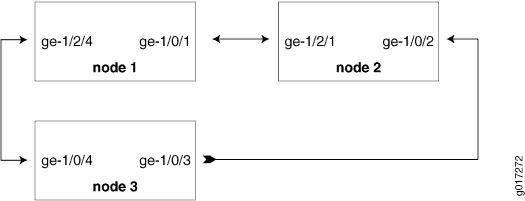 의 예
의 예
위상수학
이 섹션의 구성은 RAPS 채널에만 해당됩니다. 사용자 트래픽에 대한 브리지 도메인은 일반 브리지 도메인과 동일합니다. 유일한 예외는 브리지 도메인에 링 포트가 포함된 경우 동일한 링의 다른 링 포트도 포함해야 한다는 것입니다.
3노드 링 구성
3노드 링에서 이더넷 링 보호 스위칭을 구성하려면 다음 작업을 수행합니다.
3노드 링에서 이더넷 링 보호 스위칭 구성
단계별 절차
- 노드 1
interfaces { ge-1/0/1 { vlan-tagging; encapsulation flexible-ethernet-services; unit 1 { encapsulation vlan-bridge; vlan-id 100; } } ge-1/2/4 { vlan-tagging; encapsulation flexible-ethernet-services; unit 1 { encapsulation vlan-bridge; vlan-id 100; } } } bridge-domains { bd1 { domain-type bridge; interface ge-1/2/4.1; interface ge-1/0/1.1; } } protocols { protection-group { ethernet-ring pg101 { node-id 00:01:01:00:00:01; ring-protection-link-owner; east-interface { control-channel ge-1/0/1.1; ring-protection-link-end; } west-interface { control-channel ge-1/2/4.1; } } } } protocols { oam { ethernet { connectivity-fault-management { action-profile rmep-defaults { default-action { interface-down; } } maintenance-domain d1 { level 0; maintenance-association 100 { mep 1 { interface ge-1/0/1; remote-mep 2 { action-profile rmep-defaults; } } } } maintenance-domain d2 { level 0; maintenance-association 100 { mep 1 { interface ge-1/2/4; remote-mep 2 { action-profile rmep-defaults; } } } } } } } } - 노드 2
interfaces { ge-1/0/2 { vlan-tagging; encapsulation flexible-ethernet-services; unit 1 { encapsulation vlan-bridge; vlan-id 100; } } ge-1/2/1 { vlan-tagging; encapsulation flexible-ethernet-services; unit 1 { encapsulation vlan-bridge; vlan-id 100; } } } bridge-domains { bd1 { domain-type bridge; interface ge-1/2/1.1; interface ge-1/0/2.1; } } protocols { protection-group { ethernet-ring pg102 { east-interface { control-channel ge-1/0/2.1; } west-interface { control-channel ge-1/2/1.1; } } } } protocols { oam { ethernet { connectivity-fault-management { action-profile rmep-defaults { default-action { interface-down; } } maintenance-domain d1 { level 0; maintenance-association 100 { mep 2 { interface ge-1/2/1; remote-mep 1 { action-profile rmep-defaults; } } } } maintenance-domain d3 { level 0; maintenance-association 100 { mep 1 { interface ge-1/0/2; remote-mep 2 { action-profile rmep-defaults; } } } } } } } } - 노드 3
interfaces {
    ge-1/0/4 {
        vlan-tagging;
        encapsulation flexible-ethernet-services;
        unit 1 {
             encapsulation vlan-bridge;
             vlan-id 100;
        }
    }

    ge-1/0/3 {
        vlan-tagging;
        encapsulation flexible-ethernet-services;
        unit 1 {
            encapsulation vlan-bridge;
            vlan-id 100;
        }
    }
}

bridge-domains {
    bd1 {
        domain-type bridge;
        interface ge-1/0/4.1;
        interface ge-1/0/3.1;
    }
}


protocols {
    protection-group {
        ethernet-ring pg103 {
            east-interface {
                control-channel ge-1/0/3.1;
            }
            west-interface {
                control-channel ge-1/0/4.1;
            }
        }
    }
}


protocols {
    oam {
        ethernet {
            connectivity-fault-management {
                action-profile rmep-defaults {
                    default-action {
                        interface-down;
                    }
                }
                maintenance-domain d2 {
                    level 0;
                    maintenance-association 100 {
                        mep 2 {
                            interface ge-1/0/4;
                            remote-mep 1 {
                                action-profile rmep-defaults;
                            }
                        }
                    }
                }
                maintenance-domain d3 {
                    level 0;
                    maintenance-association 100 {
                        mep 2 {
                            interface ge-1/0/3;
                            remote-mep 1 {
                                action-profile rmep-defaults;
                            }
                        }
                    }
                }
            }
        }
    }
}
예: 이더넷 RPS 출력
이 섹션은 예: MX 라우터에서 이더넷 링 보호 스위칭 구성에 표시된 구성을 기반으로 출력 예를 제공합니다. 이 예에서 사용된 show 명령은 컨피그레이션 및 올바른 작동을 확인하는 데 도움이 될 수 있습니다.
정상 상황 - RPL 소유자 노드
링에 장애가 show 없는 경우 명령은 노드 1에 대해 다음과 같은 출력을 갖게 됩니다.
user@node1> show protection-group ethernet-ring aps

Ethernet Ring Name  Request/state  No Flush  Ring Protection Link Blocked
pg101               NR             No        Yes

Originator  Remote Node ID
Yes

user@node1> show protection-group ethernet-ring interface
Ethernet ring port parameters for protection group pg101

Interface    Control Channel  Forward State  Ring Protection Link End
ge-1/0/1     ge-1/0/1.1       discarding     Yes
ge-1/2/4     ge-1/2/4.1       forwarding     No

Signal Failure  Admin State
Clear          IFF ready
Clear          IFF ready

user@node1> show protection-group ethernet-ring node-state
Ethernet ring    APS State    Event         Ring Protection Link Owner
pg101            idle         NR-RB         Yes

Restore Timer  Quard Timer  Operation state
disabled       disabled    operational
user@node1> show protection-group ethernet-ring statistics group-name pg101
Ethernet Ring statistics for PG pg101
RAPS sent                        : 1
RAPS received                    : 0
Local SF happened:               : 0
Remote SF happened:              : 0
NR event happened:               : 0
NR-RB event happened:            : 1
정상 상황 - 기타 노드
노드 2와 노드 3의 경우 출력은 동일해야 합니다.
user@node2> show protection-group ethernet-ring aps
Ethernet Ring Name  Request/state  No Flush  Ring Protection Link Blocked
pg102               NR             No        Yes

Originator  Remote Node ID
No          00:01:01:00:00:01

user@node2> show protection-group ethernet-ring interface
Ethernet ring port parameters for protection group pg102

Interface    Control Channel  Forward State  Ring Protection Link End
ge-1/2/1     ge-1/2/1.1       forwarding     No
ge-1/0/2     ge-1/0/2.1       forwarding     No

Signal Failure  Admin State
Clear          IFF ready
Clear          IFF ready

user@node2> show protection-group ethernet-ring node-state
Ethernet ring    APS State    Event         Ring Protection Link Owner
pg102            idle         NR-RB         No

Restore Timer  Quard Timer  Operation state
disabled       disabled    operational

user@node2> show protection-group ethernet-ring statistics group-name pg102
Ethernet Ring statistics for PG pg101
RAPS sent                        : 0
RAPS received                    : 1
Local SF happened:               : 0
Remote SF happened:              : 0
NR event happened:               : 0
NR-RB event happened:            : 1
실패 상황 - RPL 소유자 노드
링에 노드 2와 노드 3 show 사이에 링크 장애가 있는 경우 명령은 노드 1에 대해 다음과 같은 출력을 갖게 됩니다.
user@node1> show protection-group ethernet-ring aps
Ethernet Ring Name  Request/state  No Flush  Ring Protection Link Blocked
pg101               SF             NO        No

Originator  Remote Node ID
No          00:01:02:00:00:01

user@node1> show protection-group ethernet-ring interface
Ethernet ring port parameters for protection group pg101

Interface    Control Channel  Forward State  Ring Protection Link End
ge-1/0/1     ge-1/0/1.1       forwarding     Yes
ge-1/2/4     ge-1/2/4.1       forwarding     No

Signal Failure  Admin State
Clear           IFF ready
Clear           IFF ready

user@node1> show protection-group ethernet-ring node-state
Ethernet ring    APS State    Event         Ring Protection Link Owner
pg101            protected    SF            Yes

Restore Timer  Quard Timer  Operation state
disabled       disabled     operational

user@node1> show protection-group ethernet-ring statistics group-name pg101
Ethernet Ring statistics for PG pg101
RAPS sent                        : 1
RAPS received                    : 1
Local SF happened:               : 0
Remote SF happened:              : 1
NR event happened:               : 0
NR-RB event happened:            : 1
실패 상황—기타 노드
노드 2와 노드 3의 경우 출력은 동일해야 합니다.
user@node2> show protection-group ethernet-ring aps
Ethernet Ring Name  Request/state  No Flush  Ring Protection Link Blocked
pg102               SF             No        No

Originator  Remote Node ID
Yes         00:00:00:00:00:00

user@node2> show protection-group ethernet-ring interface
Ethernet ring port parameters for protection group pg102

Interface    Control Channel  Forward State  Ring Protection Link End
ge-1/2/1     ge-1/2/1.1       forwarding     No
ge-1/0/2     ge-1/0/2.1       discarding     No

Signal Failure  Admin State
Clear           IFF ready
set             IFF ready

user@node2> show protection-group ethernet-ring node-state
Ethernet ring    APS State    Event         Ring Protection Link Owner
pg102            idle         NR-RB         No

Restore Timer  Quard Timer  Operation state
disabled       disabled     operational

user@node2> show protection-group ethernet-ring statistics group-name pg102
Ethernet Ring statistics for PG pg101
RAPS sent                        : 1
RAPS received                    : 1
Local SF happened:               : 1
Remote SF happened:              : 0
NR event happened:               : 0
NR-RB event happened:            : 1