
예: 브리지 도메인의 레이어 2 E-LAN 서비스를 위한 MX104 라우터에서 RFC2544 기반 벤치마킹 테스트 구성
이 예는 브리지 도메인의 레이어 2 E-LAN 서비스에 대한 벤치마킹 테스트를 구성하는 방법을 보여줍니다. 이 예에서는 처리량, 프레임 손실, 백투백 및 지연의 네 가지 기본 테스트를 다룹니다.
요구 사항
MX 시리즈 라우터는 RFC2544 기반 벤치마킹 테스트에서 리플렉터 기능만 지원합니다. 이 예에서는 MX104 3D 유니버설 에지 라우터를 리플렉터로 사용합니다. 또한 MX80 릴리스 16.1 이상부터 MPC1, MPC2 및 16포트 10기가비트 이더넷 MPC가 있는 시리즈 라우터와 MX240, MX480 및 MX960 시리즈 라우터Junos OS 벤치마킹 테스트를 구성할 수 있습니다. MX240, MX480 MX960 시리즈 라우터에서 RFC2544 기반 벤치마킹 테스트를 구성하려면 MX 시리즈 라우터에서 RFC 2544 기반 벤치마킹 테스트 지원 활성화를 참조하십시오.
이 예에서 사용되는 하드웨어 및 소프트웨어 구성 요소는 다음과 같습니다.
-
MX104(리플렉터)
-
ACX 시리즈 라우터(개시자)
-
MX 시리즈 라우터용 Junos OS 릴리스 14.2 이상
개요
ACX 시리즈 라우터가 RFC2544 기반 벤치마킹 테스트를 위한 테스트 프레임의 개시자 및 종료자 역할을 하는 샘플 토폴로지를 고려하십시오. ACX 시리즈 라우터는 한쪽의 고객 에지 디바이스 CE1에 연결되며 레이어 2 네트워크를 통해 MX104 시리즈 라우터에 연결됩니다. MX104 시리즈 라우터는 ACX 시리즈 개시자로부터 수신한 테스트 프레임을 개시자로 다시 반영하는 리플렉터 역할을 합니다. MX04 시리즈 라우터는 고객 에지 디바이스 CE2에도 연결됩니다.
인터페이스에서 레이어 2 리플렉션이 활성화되면 테스트 인터페이스를 통한 테스트 트래픽을 제외한 수신 및 송신 트래픽을 차단하도록 필터가 내부적으로 구성됩니다.
그림 1 은 레이어 2 브리지 네트워크에서 UNI 방향에 대한 네 가지 RFC2544 기반 벤치마킹 테스트(처리량, 백투백 프레임, 지연 및 프레임 손실)를 모두 수행하기 위한 샘플 토폴로지를 보여줍니다.
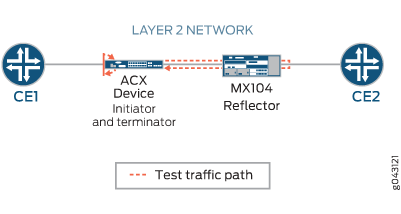
ACX 시리즈 라우터에서 ge-1/2/1.0은 레이어 2 NNI 인터페이스이고 ge-1/1/3.0은 레이어 2 UNI 인터페이스입니다. MX104 시리즈 라우터에서 ge-1/1/6.0은 레이어 2 NNI 인터페이스이고 ge-1/1/5.0은 레이어 2 UNI 인터페이스입니다. 벤치마킹 테스트는 브리지 도메인에서 E-LAN 서비스에 대한 성능 속성을 계산하는 데 사용됩니다.
테스트 패킷은 대상 MAC 주소, 소스 MAC 주소 및 테스트 인터페이스를 사용하여 식별할 수 있습니다. 태그 처리된 인터페이스와 태그 처리되지 않은 인터페이스가 모두 지원됩니다. 태그가 지정된 인터페이스의 경우, 테스트 인터페이스는 VLAN 하위 인터페이스입니다. 태그가 지정되지 않은 인터페이스의 경우, 물리적 포트는 테스트 인터페이스를 나타냅니다. 동일한 물리적 포트에 있는 다른 VLAN 하위 인터페이스를 통한 트래픽은 하위 인터페이스 중 하나에서 벤치마킹 테스트를 구성할 때 영향을 받지 않습니다.
구성
이 예에서는 상호 연결된 라우터의 성능을 감지하고 분석하기 위해 두 라우터 간에 활성화된 레이어 2 브리지 도메인의 E-LAN 서비스에 대한 UNI 방향에 대한 벤치마킹 테스트를 구성합니다. 이 예에서는 먼저 ACX 시리즈 라우터를 구성합니다. ACX 시리즈 라우터에서는 먼저 테스트 프로필, 테스트 속성을 지정하여 각 테스트를 구성한 다음 테스트와 테스트 프로필을 관련 속성과 연결하여 테스트를 정의합니다. 그런 다음 인터페이스를 구성할 수 있습니다. MX104 시리즈 라우터에서도 동일한 단계를 수행합니다. 그러나 외부 VLAN ID, 소스 UDP 포트, 대상 UDP 포트, 각 반복 기간 및 해당 값과 같은 몇 가지 속성은 개시자 또는 ACX 시리즈 라우터에만 적용됩니다.
레이어 2 리플렉션을 구성할 때 브리지 캡슐화를 사용하여 ELINE 서비스를 시뮬레이션하려는 경우 테스트 중인 서비스 유형을 ELINE로 지정할 수 있습니다.
- CLI 빠른 구성
- ACX 시리즈 라우터에서 처리량 벤치마킹 테스트 매개 변수 구성
- ACX 시리즈 라우터에서 백투백 프레임 벤치마킹 테스트 매개 변수 구성
- ACX 시리즈 라우터에서 지연 벤치마킹 테스트 매개 변수 구성
- ACX 시리즈 라우터에서 프레임 손실 벤치마킹 테스트 매개 변수 구성
- ACX 시리즈 라우터에서 다른 벤치마킹 테스트 매개 변수 구성
- MX104 라우터에서 벤치마킹 테스트 매개 변수 구성
- MX104 라우터에서 다른 벤치마킹 테스트 매개 변수 구성
- 결과
CLI 빠른 구성
이 예를 빠르게 구성하려면, 아래 명령을 복사하여 텍스트 파일에 붙여 넣은 다음 모든 라인브레이크를 제거하고, 네트워크 구성을 일치하는 데 필요한 세부 사항을 변경한 다음, 명령을 복사하여 [edit] 계층 수준의 CLI에 붙여 넣습니다.
ACX 시리즈 라우터에서 벤치마킹 테스트 매개 변수 구성
set services rpm rfc2544-benchmarking profiles test-profile tput test-type throughput
set services rpm rfc2544-benchmarking profiles test-profile tput packet-size 128
set services rpm rfc2544-benchmarking profiles test-profile tput bandwidth-kbps 900000
set services rpm rfc2544-benchmarking profiles test-profile b2bt test-type back-back-frames
set services rpm rfc2544-benchmarking profiles test-profile b2bt packet-size 512
set services rpm rfc2544-benchmarking profiles test-profile b2bt bandwidth-kbps 950000
set services rpm rfc2544-benchmarking profiles test-profile lty test-type latency
set services rpm rfc2544-benchmarking profiles test-profile lty packet-size 512
set services rpm rfc2544-benchmarking profiles test-profile lty bandwidth-kbps 1000000
set services rpm rfc2544-benchmarking profiles test-profile frloss test-type frame-loss
set services rpm rfc2544-benchmarking profiles test-profile frloss packet-size 1600
set services rpm rfc2544-benchmarking profiles test-profile frloss bandwidth-kbps 1000000
set services rpm rfc2544-benchmarking tests test-name tput-test test-profile tput
set services rpm rfc2544-benchmarking tests test-name tput-test source-mac-address 00:00:5e:00:53:11
set services rpm rfc2544-benchmarking tests test-name tput-test destination-mac-address 00:00:5e:00:53:22
set services rpm rfc2544-benchmarking tests test-name tput-test ovlan-id 400
set services rpm rfc2544-benchmarking tests test-name tput-test service-type elan
set services rpm rfc2544-benchmarking tests test-name tput-test mode initiate-and-terminate
set services rpm rfc2544-benchmarking tests test-name tput-test family bridge
set services rpm rfc2544-benchmarking tests test-name tput-test direction egress
set services rpm rfc2544-benchmarking tests test-name tput-test source-udp-port 200
set services rpm rfc2544-benchmarking tests test-name tput-test destination-udp-port 200
set services rpm rfc2544-benchmarking tests test-name tput-test test-iterator-duration 20
set services rpm rfc2544-benchmarking tests test-name tput-test test-interface ge-1/1/3.0
set services rpm rfc2544-benchmarking tests test-name b2b-test test-profile b2bt
set services rpm rfc2544-benchmarking tests test-name b2b-test source-mac-address 00:00:5e:00:53:11
set services rpm rfc2544-benchmarking tests test-name b2b-test destination-mac-address 00:00:5e:00:53:22
set services rpm rfc2544-benchmarking tests test-name b2b-test ovlan-id 400
set services rpm rfc2544-benchmarking tests test-name b2b-test service-type elan
set services rpm rfc2544-benchmarking tests test-name b2b-test mode initiate-and-terminate
set services rpm rfc2544-benchmarking tests test-name b2b-test family bridge
set services rpm rfc2544-benchmarking tests test-name b2b-test direction egress
set services rpm rfc2544-benchmarking tests test-name b2b-test test-iterator-duration 20
set services rpm rfc2544-benchmarking tests test-name b2b-test test-interface ge-1/1/3.0
set services rpm rfc2544-benchmarking tests test-name lty-test test-profile lty
set services rpm rfc2544-benchmarking tests test-name lty-test source-mac-address 00:00:5e:00:53:11
set services rpm rfc2544-benchmarking tests test-name lty-test destination-mac-address 00:00:5e:00:53:22
set services rpm rfc2544-benchmarking tests test-name lty-test ovlan-id 400
set services rpm rfc2544-benchmarking tests test-name lty-test service-type elan
set services rpm rfc2544-benchmarking tests test-name lty-test mode initiate-and-terminate
set services rpm rfc2544-benchmarking tests test-name lty-test family bridge
set services rpm rfc2544-benchmarking tests test-name lty-test direction egress
set services rpm rfc2544-benchmarking tests test-name lty-test source-udp-port 200
set services rpm rfc2544-benchmarking tests test-name lty-test destination-udp-port 200
set services rpm rfc2544-benchmarking tests test-name lty-test test-iterator-duration 20
set services rpm rfc2544-benchmarking tests test-name lty-test test-interface ge-1/1/3.0
set services rpm rfc2544-benchmarking tests test-name frloss-test test-profile frloss
set services rpm rfc2544-benchmarking tests test-name frloss-test source-mac-address 00:00:5e:00:53:11
set services rpm rfc2544-benchmarking tests test-name frloss-test destination-mac-address 00:00:5e:00:53:22
set services rpm rfc2544-benchmarking tests test-name frloss-test ovlan-id 400
set services rpm rfc2544-benchmarking tests test-name frloss-test service-type elan
set services rpm rfc2544-benchmarking tests test-name frloss-test mode initiate-and-terminate
set services rpm rfc2544-benchmarking tests test-name frloss-test family bridge
set services rpm rfc2544-benchmarking tests test-name frloss-test direction egress
set services rpm rfc2544-benchmarking tests test-name frloss-test source-udp-port 200
set services rpm rfc2544-benchmarking tests test-name frloss-test destination-udp-port 200
set services rpm rfc2544-benchmarking tests test-name frloss-test test-iterator-duration 20
set services rpm rfc2544-benchmarking tests test-name frloss-test test-interface ge-1/1/3.0
set interfaces ge-1/2/1 flexible-vlan-tagging
set interfaces ge-1/2/1 mtu 9192
set interfaces ge-1/2/1 encapsulation flexible-ethernet-services
set interfaces ge-1/2/1 unit 0 encapsulation vlan-bridge
set interfaces ge-1/2/1 unit 0 vlan-id 400
set interfaces ge-1/1/3 flexible-vlan-tagging
set interfaces ge-1/1/3 mtu 9192
set interfaces ge-1/1/3 encapsulation flexible-ethernet-services
set interfaces ge-1/1/3 unit 0 encapsulation vlan-bridge
set interfaces ge-1/1/3 unit 0 vlan-id 400
set bridge-domains bd1 vlan-id 600
set bridge-domains bd1 interface ge-1/2/1.0
set bridge-domains bd1 interface ge-1/1/3.0
MX104 라우터에서 벤치마킹 테스트 매개 변수 구성
set services rpm rfc2544-benchmarking tests test-name l2b-reflector source-mac-address 00:00:5e:00:53:11
set services rpm rfc2544-benchmarking tests test-name l2b-reflector destination-mac-address 00:00:5e:00:53:22
set services rpm rfc2544-benchmarking tests test-name l2b-reflector service-type elan
set services rpm rfc2544-benchmarking tests test-name l2b-reflector mode reflect
set services rpm rfc2544-benchmarking tests test-name l2b-reflector family bridge
set services rpm rfc2544-benchmarking tests test-name l2b-reflector direction egress
set services rpm rfc2544-benchmarking tests test-name l2b-reflector test-interface ge-1/1/5.0
set interfaces ge-1/1/6 flexible-vlan-tagging
set interfaces ge-1/1/6 mtu 9192
set interfaces ge-1/1/6 encapsulation flexible-ethernet-services
set interfaces ge-1/1/6 unit 0 encapsulation vlan-bridge
set interfaces ge-1/1/6 unit 0 vlan-id 400
set interfaces ge-1/1/5 flexible-vlan-tagging
set interfaces ge-1/1/5 mtu 9192
set interfaces ge-1/1/5 encapsulation flexible-ethernet-services
set interfaces ge-1/1/5 unit 0 encapsulation vlan-bridge
set interfaces ge-1/1/5 unit 0 vlan-id 400
set bridge-domains bd1 domain-type bridge
set bridge-domains bd1 vlan-id 500
set bridge-domains bd1 interface ge-1/1/6.0
set bridge-domains bd1 interface ge-1/1/5.0
ACX 시리즈 라우터에서 처리량 벤치마킹 테스트 매개 변수 구성
단계별 절차
다음 구성에서는 처리량 테스트에 대한 테스트 프로필을 구성하고 고유한 test-name에서 테스트 프로필을 참조해야 합니다. test-name은 ACX 시리즈 라우터에서 수행할 처리량 테스트에 대한 매개 변수를 정의합니다.
ACX 시리즈 라우터에서 처리량 테스트 매개 변수를 구성하려면 다음을 수행합니다.
-
구성 모드의 [
edit] 계층 수준에서 RPM 인스턴스에 대한 실시간 성능 모니터링 서비스(RPM) 인스턴스와 RFC2544 기반 벤치마킹 테스트를 구성합니다.[edit] user@host# edit services rpm rfc2544-benchmarking
-
첫 번째 테스트 프로필의 이름(예
tput: 처리량 테스트 프로필)을 정의합니다.[edit services rpm rfc2544-benchmarking] user@host# set profiles test-profile tput
-
수행할 테스트 유형을 처리량으로 구성하고, 패킷 크기를 128바이트로 지정하고, 테스트를 위한 이론적 최대 대역폭을 초당 킬로비트(Kbps)로 정의합니다. 1Kbps에서 1,000,000Kbps까지의 값으로
[edit services rpm rfc2544-benchmarking profiles test-profile tput]
user@host# set test-type throughput packet-size 128 bandwidth-kbps 900000
-
명령을 두 번 입력
up하여 구성 계층의 [edit services rpm rfc2544-benchmarking] 수준으로 이동합니다.[edit services rpm rfc2544-benchmarking profiles test-profile tput ] user@host# up user@host# up
-
처리량 테스트의 이름을 정의합니다(예:
tput-test). 테스트 이름의 길이는 최대 32자입니다.[edit services rpm rfc2544-benchmarking ] user@host# set tests test-name tput-test
-
테스트 이름과 연결할 테스트 프로필
tput의 이름을 지정합니다.[edit services rpm rfc2544-benchmarking tests test-name tput-test] user@host# set test-profile tput
-
테스트 패킷의 소스 및 대상 MAC 주소 구성합니다.
[edit services rpm rfc2544-benchmarking tests test-name tput-test]
user@host# set source-mac-address 00:00:5e:00:53:11 destination-mac-address 00:00:5e:00:53:22
-
테스트 프레임에 대한 외부 VLAN ID를 구성하고 테스트 대상 서비스 유형을 E-LAN으로 지정합니다.
[edit services rpm rfc2544-benchmarking tests test-name tput-test]
user@host# set ovlan-id 400 service-type elan
-
벤치마킹 테스트 중에 전송 패킷에 대한 테스트 모드를 시작 및 종료로 지정합니다.
[edit services rpm rfc2544-benchmarking tests test-name tput-test]
user@host# set mode initiate-and-terminate
-
벤치마킹 테스트를 위해 패밀리 유형을
bridge구성하고 방향, 송신을 지정합니다. 또한 테스트 패킷의 UDP 헤더에 사용할 소스 및 대상 UDP 포트를 지정합니다.[edit services rpm rfc2544-benchmarking tests test-name tput-test] user@host# set family bridge direction egress source-udp-port 200 destination-udp-port 200
-
각 반복의 기간을 10초에서 1,728,000초 사이의 값으로 초 단위로 지정하고 RFC2544 벤치마킹 테스트가 실행되는 논리적 인터페이스 ge-0/2/1.0을 지정합니다.
[edit services rpm rfc2544-benchmarking tests test-name tput-test]
user@host# set test-iterator-duration 20 test-interface ge-1/1/3.0
ACX 시리즈 라우터에서 백투백 프레임 벤치마킹 테스트 매개 변수 구성
단계별 절차
다음 구성에서는 연속 프레임 테스트에 대한 테스트 프로필을 구성하고 고유한 test-name에서 테스트 프로필을 참조해야 합니다. test-name은 ACX 시리즈 라우터에서 수행할 연속 프레임 테스트에 대한 매개 변수를 정의합니다.
ACX 시리즈 라우터에서 백투백 프레임 테스트 매개 변수를 구성하려면 다음을 수행합니다.
-
구성 모드의 [
edit] 계층 수준에서 RPM 인스턴스에 대한 실시간 성능 모니터링 서비스(RPM) 인스턴스와 RFC2544 기반 벤치마킹 테스트를 구성합니다.[edit] user@host# edit services rpm rfc2544-benchmarking
-
백투백 테스트 프로필의 이름을 정의합니다(예:
b2bt).[edit services rpm rfc2544-benchmarking] user@host# set profiles test-profile b2bt
-
백투백 프레임으로 수행할 테스트 유형을 구성하고, 패킷 크기를 128바이트로 지정하며, 테스트를 위한 이론적 최대 대역폭을 초당 킬로비트(킬로비트)로 정의합니다.
[edit services rpm rfc2544-benchmarking profiles test-profile b2bt]
user@host# set test-type back-toback-frames packet-size 4444 bandwidth-kbps 950000
-
명령을 두 번 입력
up하여 구성 계층의 [edit services rpm rfc2544-benchmarking] 수준으로 이동합니다.[edit services rpm rfc2544-benchmarking profiles test-profile b2bt ] user@host# up user@host# up
-
백투백 프레임 테스트의 이름을 정의합니다(예:
b2bt-test). 테스트 이름의 길이는 최대 32자입니다.[edit services rpm rfc2544-benchmarking ] user@host# set tests test-name b2bt-test
-
테스트 이름과 연결할 테스트 프로필
b2bt의 이름을 지정합니다.[edit services rpm rfc2544-benchmarking tests test-name b2bt-test] user@host# set test-profile b2bt
-
테스트 패킷의 소스 및 대상 MAC 주소 구성합니다.
[edit services rpm rfc2544-benchmarking tests test-name b2bt-test]
user@host# set source-mac-address 00:00:5e:00:53:11 destination-mac-address 00:00:5e:00:53:22
-
테스트 프레임에 대한 외부 VLAN ID를 구성하고 테스트 중인 서비스 유형을 지정합니다.
[edit services rpm rfc2544-benchmarking tests test-name b2bt-test]
user@host# set ovlan-id 400 service-type elan
-
벤치마킹 테스트 중에 전송 패킷에 대한 테스트 모드를 시작 및 종료로 지정합니다.
[edit services rpm rfc2544-benchmarking tests test-name b2bt-test]
user@host# set mode initiate-and-terminate
-
벤치마킹 테스트를 위해 패밀리 유형을
bridge구성하고 방향, 송신을 지정합니다.[edit services rpm rfc2544-benchmarking tests test-name b2bt-test] user@host# set family bridge direction egress
-
각 반복의 기간을 10초에서 1,728,000초 사이의 값으로 초 단위로 지정합니다. 또한 RFC2544 기반 벤치마킹 테스트가 실행되는 논리적 인터페이스 ge-0/2/1.0을 지정합니다.
[edit services rpm rfc2544-benchmarking tests test-name b2bt-test]
user@host# set test-iterator-duration 20 test-interface ge-1/1/3.0
ACX 시리즈 라우터에서 지연 벤치마킹 테스트 매개 변수 구성
단계별 절차
다음 구성에서는 지연 테스트를 위한 테스트 프로필을 구성하고 고유한 테스트 이름에서 테스트 프로필을 참조해야 합니다. test-name은 ACX 시리즈 라우터에서 수행할 지연 테스트에 대한 매개 변수를 정의합니다.
ACX 시리즈 라우터에서 지연 테스트 매개 변수를 구성하려면 다음을 수행합니다.
-
구성 모드의 [
edit] 계층 수준에서 RPM 인스턴스에 대한 실시간 성능 모니터링 서비스(RPM) 인스턴스와 RFC2544 기반 벤치마킹 테스트를 구성합니다.[edit] user@host# edit services rpm rfc2544-benchmarking
-
지연 테스트 프로필의 이름을 정의합니다(예:
lty).[edit services rpm rfc2544-benchmarking] user@host# set profiles test-profile lty
-
지연 시간으로 수행할 테스트 유형을 구성하고, 테스트 패킷의 패킷 크기를 지정하고, 1Kbps에서 1,000,000Kbps 형식의 값을 사용하여 테스트의 최대 대역폭을 초당 킬로비트로 정의합니다.
[edit services rpm rfc2544-benchmarking profiles]
user@host# set test-profile lty test-type latency packet-size 512 bandwidth-kbps 1000000
-
명령을 두 번 입력
up하여 구성 계층의 이전 수준으로 이동합니다.[edit services rpm rfc2544-benchmarking profiles test-profile lty] user@host# up user@host# up
-
지연 테스트의 이름을 정의합니다(예:
lty-test). 테스트 이름의 길이는 최대 32자입니다.[edit services rpm rfc2544-benchmarking ] user@host# set tests test-name lty-test
-
테스트 이름과 연결할 테스트 프로필
lty의 이름을 지정합니다.[edit services rpm rfc2544-benchmarking tests test-name lty-test] user@host# set test-profile lty
-
테스트 패킷의 소스 및 대상 MAC 주소 구성합니다.
[edit services rpm rfc2544-benchmarking tests test-name lty-test]
user@host# set source-mac-address 00:00:5e:00:53:11 destination-mac-address 00:00:5e:00:53:22
-
테스트 프레임에 대한 외부 VLAN ID를 구성하고 테스트 중인 서비스 유형을 지정합니다.
[edit services rpm rfc2544-benchmarking tests test-name lty-test]
user@host# set ovlan-id 400 service-type elan
-
벤치마킹 테스트 중에 전송 패킷에 대한 테스트 모드를 시작 및 종료로 지정합니다.
[edit services rpm rfc2544-benchmarking tests test-name lty-test]
user@host# set mode initiate-and-terminate
-
벤치마킹 테스트를 위해 패밀리 유형을
bridge구성하고 방향, 송신을 지정합니다. 또한 테스트 패킷의 UDP 헤더에 사용할 소스 및 대상 UDP 포트를 지정합니다.[edit services rpm rfc2544-benchmarking tests test-name lty-test] user@host# set family bridge direction egress source-udp-port 200 destination-udp-port 200
-
각 반복의 기간을 10초에서 1,728,000초 사이의 값으로 초 단위로 지정합니다. 또한 RFC2544 기반 벤치마킹 테스트가 실행되는 논리적 인터페이스 ge-0/2/1.0을 지정합니다.
[edit services rpm rfc2544-benchmarking tests test-name lty-test]
user@host# set test-iterator-duration 20 test-interface ge-1/1/3.0
ACX 시리즈 라우터에서 프레임 손실 벤치마킹 테스트 매개 변수 구성
단계별 절차
다음 구성에서는 프레임 손실 테스트를 위한 테스트 프로필을 구성하고 고유한 테스트 이름에서 테스트 프로필을 참조해야 합니다. test-name은 ACX 시리즈 라우터에서 수행할 프레임 손실 테스트에 대한 매개 변수를 정의합니다.
ACX 시리즈 라우터에서 프레임 손실 테스트 매개 변수를 구성하려면 다음을 수행합니다.
-
구성 모드의 [
edit] 계층 수준에서 RPM 인스턴스에 대한 실시간 성능 모니터링 서비스(RPM) 인스턴스와 RFC2544 기반 벤치마킹 테스트를 구성합니다.[edit] user@host# edit services rpm rfc2544-benchmarking
-
프레임 손실 테스트 프로필의 이름을 정의합니다(예:
frloss).[edit services rpm rfc2544-benchmarking] user@host# set profiles test-profile frloss
-
프레임 손실로 수행되는 테스트 유형을 구성하고, 테스트 패킷의 패킷 크기를 지정하고, 1Kbps에서 1,000,000Kbps까지의 값을 사용하여 테스트의 최대 대역폭을 초당 킬로비트로 정의합니다.
[edit services rpm rfc2544-benchmarking profiles]
user@host# set test-profile frloss test-type frame-loss packet-size 1600 bandwidth-kbps 1000000
-
구성 계층의 이전 수준으로 이동하려면 명령을 입력합니다
up.[edit services rpm rfc2544-benchmarking profiles ] user@host# up
-
프레임 손실 테스트의 이름을 정의합니다(예:
frloss-test). 테스트 이름의 길이는 최대 32자입니다.[edit services rpm rfc2544-benchmarking ] user@host# set tests test-name frloss-test
-
테스트 이름과 연결할 테스트 프로필
frloss의 이름을 지정합니다.[edit services rpm rfc2544-benchmarking tests test-name frloss-test] user@host# set test-profile frloss
-
테스트 패킷의 소스 및 대상 MAC 주소 구성합니다.
[edit services rpm rfc2544-benchmarking tests test-name frloss-test]
user@host# set source-mac-address 00:00:5e:00:53:11 destination-mac-address 00:00:5e:00:53:22
-
테스트 프레임에 대한 외부 VLAN ID를 구성하고 테스트 중인 서비스 유형을 지정합니다.
[edit services rpm rfc2544-benchmarking tests test-name frloss-test]
user@host# set ovlan-id 400 service-type elan
-
벤치마킹 테스트 중에 전송 패킷에 대한 테스트 모드를 시작 및 종료로 지정합니다.
[edit services rpm rfc2544-benchmarking tests test-name frloss-test]
user@host# set mode initiate-and-terminate
-
벤치마킹 테스트를 위해 패밀리 유형을
bridge구성하고 방향, 송신을 지정합니다. 또한 테스트 패킷의 UDP 헤더에 사용할 소스 및 대상 UDP 포트를 지정합니다.[edit services rpm rfc2544-benchmarking tests test-name frloss-test] user@host# set family bridge direction egress source-udp-port 200 destination-udp-port 200
-
각 반복의 기간을 10초에서 1,728,000초 사이의 값으로 초 단위로 지정합니다. 또한 RFC2544 기반 벤치마킹 테스트가 실행되는 논리적 인터페이스 ge-0/2/1.0을 지정합니다.
[edit services rpm rfc2544-benchmarking tests test-name frloss-test]
user@host# set test-iterator-duration 20 test-interface ge-1/1/3.0
-
명령을 입력하여
exit[edit] 계층 수준으로 이동합니다.[edit services rpm rfc2544-benchmarking tests test-name test4 ] user@host# exit
ACX 시리즈 라우터에서 다른 벤치마킹 테스트 매개 변수 구성
단계별 절차
다음 예에서는 구성 계층에서 다양한 수준을 탐색해야 합니다. CLI 탐색에 대한 정보는 구성 모드에서 CLI 편집기 사용을 참조하십시오.
ACX 시리즈 라우터에서 인터페이스 및 브리지 도메인을 구성하려면 다음을 수행합니다.
-
[
edit] 계층 수준에서 테스트를 실행해야 하는 레이어 2 NNI 인터페이스를 구성합니다.[edit] user@host# edit interfaces ge-1/2/1
-
논리적 인터페이스에서 태그 처리되지 않은 프레임 또는 802.1Q 단일 태그 및 이중 태그 처리된 프레임의 전송을 위해 유연한 VLAN 태그를 구성합니다. 또한 인터페이스 및 캡슐화에 대한 최대 전송 단위(MTU) 크기를 지정할 수 있습니다.
[edit interfaces ge-1/2/1]
user@host# set flexible-vlan-tagging mtu 9192 encapsulation flexible-ethernet-services
-
인터페이스의 논리적 단위를 구성하고, 캡슐화를 지정하고, 논리적 인터페이스에서 VLAN ID를 구성합니다.
[edit interfaces ge-1/2/1]
user@host# set unit 0 encapsulation vlan-bridge vlan-id 400
-
레이어 2 UNI 인터페이스를 구성합니다.
[edit]
user@host# edit interfaces ge-1/1/3
-
논리적 인터페이스에서 태그가 지정되지 않은 프레임 또는 802.1Q 단일 태그 및 이중 태그 프레임의 전송을 위해 유연한 VLAN 태깅을 구성합니다. 또한 인터페이스 및 캡슐화에 대한 최대 전송 단위(MTU) 크기를 지정할 수 있습니다.
[edit interfaces ge-1/1/3]
user@host# set flexible-vlan-tagging mtu 9192 encapsulation flexible-ethernet-services
-
인터페이스의 논리적 유닛을 구성하고 캡슐화를 지정하며 논리적 인터페이스에서 VLAN ID를 구성합니다.
[edit interfaces ge-1/1/3]
user@host# set unit 0 encapsulation vlan-bridge vlan-id 400
-
브리지 도메인 bd1을 구성하고 [
edit] 계층 수준에서 브리지 도메인 및 관련 인터페이스와 연결된 VLAN ID를 지정합니다.[edit] user@host# set bridge-domains bd1 vlan-id 600 interface ge-1/2/1.0 user@host# set bridge-domains bd1 vlan-id 600 intreface ge-1/1/3.0
MX104 라우터에서 벤치마킹 테스트 매개 변수 구성
단계별 절차
다음 구성에서는 MX104 시리즈 라우터에서 벤치마킹 테스트를 위한 고유한 테스트 이름을 구성해야 합니다. test-name은 수행할 벤치마킹 테스트에 대한 매개 변수를 정의합니다. 테스트 인터페이스와 테스트 MAC 주소가 동일하기 때문에 리플렉터(MX104)에서 단일 테스트 구성을 생성할 수 있습니다.
MX104 시리즈 라우터에서 벤치마킹 테스트 매개 변수를 구성하려면:
-
구성 모드의 [
edit] 계층 수준에서 RPM 인스턴스에 대한 실시간 성능 모니터링 서비스(RPM) 인스턴스와 RFC2544 기반 벤치마킹 테스트를 구성합니다.[edit] user@host# edit services rpm rfc2544-benchmarking
-
테스트의 이름을 정의합니다(예:
l2b-reflector). 테스트 이름의 길이는 최대 32자입니다.[edit services rpm rfc2544-benchmarking ] user@host# set tests test-name l2b-reflector
-
테스트 패킷의 소스 및 대상 MAC 주소를 지정합니다.
[edit services rpm rfc2544-benchmarking test-name l2b-reflector]
user@host# set source-mac-address 00:00:5e:00:53:11 destination-mac-address 00:00:5e:00:53:22
-
테스트 중인 서비스 유형과 리플렉터에서 모드(
reflect)를 지정합니다.[edit services rpm rfc2544-benchmarking test-name l2b-reflector] user@host# set service-type elan
-
리플렉터에 반사되는 모드를 지정합니다.
[edit services rpm rfc2544-benchmarking test-name l2b-reflector]
user@host# set mode reflect
-
패밀리 유형을 구성하고,
bridge벤치마킹 테스트를 위한 방향, 송신을 지정합니다. 또한 RFC2544 기반 벤치마킹 테스트가 실행되는 논리적 인터페이스 ge-1/1/5.0을 지정합니다.[edit services rpm rfc2544-benchmarking tests test-name l2b-reflector] user@host# set family bridge direction egress test-interface ge-1/1/5.0
MX104 라우터에서 다른 벤치마킹 테스트 매개 변수 구성
단계별 절차
다음 예에서는 구성 계층에서 다양한 수준을 탐색해야 합니다. CLI 탐색에 대한 정보는 구성 모드에서 CLI 편집기 사용을 참조하십시오.
MX104 시리즈 라우터에서 인터페이스 및 브리지 도메인을 구성하려면 다음 단계를 따릅니다.
-
테스트를 실행해야 하는 레이어 2 NNI 인터페이스를 구성합니다.
[edit]
user@host# edit interfaces ge-1/1/6
-
논리적 인터페이스에서 태그 처리되지 않은 프레임 또는 802.1Q 단일 태그 및 이중 태그 처리된 프레임의 전송을 위해 유연한 VLAN 태그를 구성합니다. 또한 인터페이스 및 캡슐화에 대한 최대 전송 단위(MTU) 크기를 지정할 수 있습니다.
[edit interfaces ge-1/1/6]
user@host# set flexible-vlan-tagging mtu 9192 encapsulation flexible-ethernet-services
-
인터페이스의 논리적 유닛을 구성하고, 캡슐화를 지정하며, 논리적 인터페이스에서 VLAN ID를 구성합니다.
[edit interfaces ge-1/1/6]
user@host# set unit 0 encapsulation vlan-bridge vlan-id 400
-
레이어 2 NNI 인터페이스를 구성합니다.
[edit]
user@host# edit interfaces ge-1/1/5
-
논리적 인터페이스에서 태그 처리되지 않은 프레임 또는 802.1Q 단일 태그 및 이중 태그 처리된 프레임의 전송을 위해 유연한 VLAN 태그를 구성합니다. 또한 인터페이스 및 캡슐화에 대한 최대 전송 단위(MTU) 크기를 지정할 수 있습니다.
[edit interfaces ge-1/1/5]
user@host# set flexible-vlan-tagging mtu 9192 encapsulation flexible-ethernet-services
-
인터페이스의 논리적 단위를 구성하고, 캡슐화를 지정하고, 논리적 인터페이스에서 VLAN ID를 구성합니다.
[edit interfaces ge-1/1/5]
user@host# set unit 0 encapsulation vlan-bridge vlan-id 400
-
브리지 도메인 bd1을 구성하고 브리
edit지 도메인과 연결된 VLAN ID와 [] 계층 수준의 관련 인터페이스를 지정합니다.[edit] user@host# set bridge-domains bd1 vlan-id 500 interface ge-1/1/6.0 user@host# set bridge-domains bd1 vlan-id 500 interface ge-1/1/5.0
-
리플렉터에서 벤치마킹 테스트를 시작합니다.
user@host> test services rpm rfc2544-benchamrking test l2b-reflector start
이니시에이터에서 테스트가 성공적으로 완료된 후 명령을 입력하여 리플렉터에서 테스트를 중지할 수 있습니다.
test services rpm rfc2544-benchmarking test l2b-reflector stop
결과
구성 모드에서 명령을 입력 show 하여 ACX 시리즈 라우터와 MX104 시리즈 라우터의 구성을 확인합니다. 출력에 의도한 구성이 표시되지 않으면 이 예의 구성 지침을 반복하여 수정합니다.
ACX 시리즈 라우터의 벤치마킹 테스트 매개 변수:
[edit interfaces]
  ge-1/2/1 {
      flexible-vlan-tagging;
      mtu 9192;
      encapsulation flexible-ethernet-services;
      unit 0 {
          encapsulation vlan-bridge;
          vlan-id 400;
      }
  }
  ge-1/1/3 {
      flexible-vlan-tagging;
      mtu 9192;
      encapsulation flexible-ethernet-services;
      unit 0 {
          encapsulation vlan-bridge;
          vlan-id 400;
      }
  }

[edit bridge-domains]
 bd1 {
    vlan-id 600;
    interface ge-1/2/1.0;
    interface ge-1/1/3.0;
 }

[edit services rpm]
  rfc2544-benchmarking {
      profiles {
          test-profile tput {
              test-type throughput
              packet-size 128;
              bandwidth-kbps 900000;
          }
          test-profile b2bt {
              test-type back-back-frames
              packet-size 512;
              bandwidth-kbps 950000;
          }
          test-profile lty {
              test-type latency
              packet-size 512;
              bandwidth-kbps 100000;
          }
          test-profile frloss {
              test-type frameloss
              packet-size 1600;
              bandwidth-kbps 1000000;
          }
      }
      tests {
          test-name tput-test {
              interface ge-1/1/3.0;
              test-profile tput;
              mode initiate-and-terminate;
              source-mac-address 00:00:5e:00:53:11;
              destination-mac-address 00:00:5e:00:53:22;
              ovlan-id 400;
              service-type elan;
              family bridge;
              direction egress;
              source-udp-port 200;
              destination-udp-port 200;
              test-iterator-duration 20;
          }
          test-name b2b-test {
              interface ge-1/1/3.0;
              test-profile b2bt;
              mode initiate-and-terminate;
              source-mac-address 00:00:5e:00:53:11;
              destination-mac-address 00:00:5e:00:53:22;
              ovlan-id 400;
              service-type elan;
              family bridge;
              direction egress;
              test-iterator-duration 20;
          }
          test-name lty-test {
              interface ge-1/1/3.0;
              test-profile lty;
              mode initiate-and-terminate;
              source-mac-address 00:00:5e:00:53:11;
              destination-mac-address 00:00:5e:00:53:22;
              ovlan-id 400;
              service-type elan;
              family bridge;
              direction egress;
              source-udp-port 200;
              destination-udp-port 200;
              test-iterator-duration 20;
          }
          test-name frloss-test {
              interface ge-1/1/3.0;
              test-profile frloss;
              mode initiate-and-terminate;
              source-mac-address 00:00:5e:00:53:11;
              destination-mac-address 00:00:5e:00:53:22;
              ovlan-id 400;
              service-type elan;
              family bridge;
              direction egress;
              source-udp-port 200;
              destination-udp-port 200;
              test-iterator-duration 20;
          }
      }
  }
MX104 시리즈 라우터의 벤치마킹 테스트 매개 변수:
[edit interfaces]
  ge-1/1/6 {
      flexible-vlan-tagging;
      mtu 9192;
      encapsulation flexible-ethernet-services;
      unit 0 {
          encapsulation vlan-bridge;
          vlan-id 400;
      }
  }

 ge-1/1/5 {
      flexible-vlan-tagging;
      mtu 9192;
      encapsulation flexible-ethernet-services;
      unit 0 {
          encapsulation vlan-bridge;
          vlan-id 400;
      }
 }
}
[edit bridge-domains]
 bd1 {
    vlan-id 500;
    interface ge-1/1/6.0;
    interface ge-1/1/5.0;
 }
[edit services rpm]
  rfc2544-benchmarking {
      # Note, When in reflector mode, test profile is not needed
      tests {
          test-name l2b-reflector {
              interface ge-1/1/5.0;
              source-mac-address 00:00:5e:00:53:11;
              destination-mac-address 00:00:5e:00:53:22;
              family bridge;
              mode reflect;
              service-type elan;
              family bridge;
              direction egress;
           }
      }
  }
브리지 도메인의 레이어 2 서비스(E-LAN)에 대한 벤치마킹 테스트 결과 검증
ACX 시리즈 라우터와 MX104 시리즈 라우터 간에 구성된 서비스에서 수행된 벤치마킹 테스트 결과를 검토합니다. 먼저 리플렉터에서 테스트를 시작한 다음 이니시에이터에서 테스트를 시작합니다.
처리량 벤치마킹 테스트 결과 확인
목적
ACX 시리즈 라우터와 MX104 시리즈 라우터 간에 구성된 서비스에서 실행되는 벤치마킹 테스트에 필요한 통계적 값이 표시되는지 확인합니다.
작업
운영 모드에서, ACX 시리즈 라우터에 명령을 입력합니다 show services rpm rfc2544-benchmarking test-id test-id-number detail .
user@host> show services rpm rfc2544-benchmarking test-id 1 detail
Test information :
      Test id: 1, Test name: tput_test, Test type: Throughput
      Test mode: Initiate-and-Terminate
      Test packet size: 128
      Test state: TEST_STATE_COMPLETED
      Status: Test-Completed
      Test start time: 2014-09-24 22:21:09 PDT
      Test finish time: 2014-09-24 22:21:33 PDT
      Counters last cleared: Never

      Test-profile Configuration:
          Test-profile name: tput
          Test packet size: 128
          Theoretical max bandwidth : 900000 kbps

      Test Configuration:
          Test mode: Initiate-and-Terminate
          Duration in seconds: 20
          Test finish wait duration in seconds: 1
          Test family: Bridge
          Test iterator pass threshold: 0.50 %
          Test receive failure threshold: 0.00 %
          Test transmit failure threshold: 0.50 %

      Bridge family Configuration:
          Interface : ge-1/1/3.0
          Test direction: Egress
          Source mac address: 00:00:5e:00:53:11
          Destination mac address: 00:00:5e:00:53:22
          Outer vlan-id: 400
          Outer vlan priority: 0
          Outer vlan cfi: 0
          Outer tag protocol id: 0x8100
          Source ipv4 address: 192.168.1.10
          Destination ipv4 address: 192.168.1.20
          Source udp port: 200
          Destination udp port: 200

  Rfc2544 throughput test information :
      Initial test load percentage : 100.00 %
      Test iteration mode : Binary
      Test iteration step : 50.00 %
      Theoretical max bandwidth : 900000 kbps

Test packet size: 128
Iteration  Internal Duration  Elapsed  --------  Throughput ---------
           Overhead  (sec)     time    Theoretical  Transmit Measured
   1         0       20        20       100.00 %    100.00 % 100.00 %

Result of the iteration runs : Throughput Test complete for packet size 128
Best iteration : 1, Best iteration (pps) : 760135
Best iteration throughput : 100.00 %

RFC2544 Throughput test results summary:
----------------------------------------

  Packet  Internal    Theoretical Transmit    Tx           Rx       Measured        Measured
   Size   overhead    rate (pps)    pps     Packets      Packets   throughput %   bandwidth (kbps)
   128     0           760135     760135    15202700     15202700    100.00 %       900000
운영 모드에서, MX104 시리즈 라우터에 명령을 입력합니다 show services rpm rfc2544-benchmarking test-id test-id-number detail .
user@host> show services rpm rfc2544-benchmarking test-id 1 detail
Test information :
      Test id: 1, Test name: l2b-reflector, Test type: Reflect
      Test mode: Reflect
      Test packet size: 0
      Test state: TEST_STATE_RUNNING
      Status: Running
      Test start time: 2014-09-24 22:20:54 PDT
      Test finish time: TEST_RUNNING
      Counters last cleared: Never

      Test Configuration:
          Test mode: Reflect
          Duration in seconds: 864000
          Test finish wait duration in seconds: 1
          Test family: Bridge
          Test iterator pass threshold: 0.50 %
          Test receive failure threshold: 0.00 %
          Test transmit failure threshold: 0.50 %

      Bridge family Configuration:
          Interface : ge-1/1/5.0
          Test direction: Egress
          Source mac address: 00:00:5e:00:53:11
          Destination mac address: 00:00:5e:00:53:22
          Service type: Elan

Elapsed        Reflected            Reflected
 time           Packets               Bytes
     61        15202700            1945945600
또한 이 명령을 사용하여 show services rpm rfc2544-benchmarking (aborted-test | active-tests | completed-tests | summary) 각 실시간 성능 모니터링(RPM) 인스턴스에 대한 RFC2544 기반 벤치마킹 테스트의 각 범주 또는 상태에 대한 정보를 표시할 수 있습니다.
의미
출력에는 수행된 벤치마킹 테스트의 세부 정보가 표시됩니다. 운영 명령에 대한 run show services rpm rfc2544-benchmarking 자세한 내용은 CLI 탐색기를 참조하십시오 show services rpm rfc2544-benchmarking .
연속 벤치마킹 테스트 결과 검증
목적
ACX 시리즈 라우터와 MX104 시리즈 라우터 간에 구성된 서비스에서 실행되는 벤치마킹 테스트에 필요한 통계적 값이 표시되는지 확인합니다.
작업
운영 모드에서, ACX 시리즈 라우터에 명령을 입력합니다 show services rpm rfc2544-benchmarking test-id test-id-number detail .
user@host> show services rpm rfc2544-benchmarking test-id 4 detail
Test information :
      Test id: 4, Test name: b2b-test, Test type: Back-Back-Frames
      Test mode: Initiate-and-Terminate
      Test packet size: 128 512
      Test state: TEST_STATE_COMPLETED
      Status: Test-Completed
      Test start time: 2014-09-24 22:30:16 PDT
      Test finish time: 2014-09-24 22:31:03 PDT
      Counters last cleared: Never

      Test-profile Configuration:
          Test-profile name: b2bt
          Test packet size: 128 512
          Theoretical max bandwidth : 950000 kbps

      Test Configuration:
          Test mode: Initiate-and-Terminate
          Duration in seconds: 20
          Test finish wait duration in seconds: 1
          Test family: Bridge
          Test iterator pass threshold: 0.50 %
          Test receive failure threshold: 0.00 %
          Test transmit failure threshold: 0.50 %

      Bridge family Configuration:
          Interface : ge-1/1/3.0
          Test direction: Egress
          Source mac address: 00:00:5e:00:53:11
          Destination mac address: 00:00:5e:00:53:22
          Outer vlan-id: 400
          Outer vlan priority: 0
          Outer vlan cfi: 0
          Outer tag protocol id: 0x8100
          Source ipv4 address: 192.168.1.10
          Destination ipv4 address: 192.168.1.20
          Source udp port: 4040
          Destination udp port: 4041

  Rfc2544 Back-Back test information :
      Initial burst length: 20 seconds at 950000 kbps
      Test iteration mode : Binary
      Test iteration step : 50.00 %

Test packet size: 128
Iteration   Theoretical    Transmit     Internal Duration  Elapsed
            burst length  burst length  overhead   time
             (packets)     (packets)
    1    16047280         16047280        0       20        20

Result of the iteration runs : Back-Back Test complete for packet size 128
Best iteration : 1
Measured burst (num sec)  : 20 sec
Measured burst (num pkts)  : 16047280 packets

Test packet size: 512
Iteration   Theoretical    Transmit     Internal Duration  Elapsed
            burst length  burst length  overhead   time
             (packets)     (packets)
    1    4464280          4464280         0       20        20

Result of the iteration runs : Back-Back Test complete for packet size 512
Best iteration : 1
Measured burst (num sec)  : 20 sec
Measured burst (num pkts)  : 4464280 packets

RFC2544 Back-Back test results summary:
----------------------------------------

  Packet      Measured Burst      Time
   Size      length (Packets)   (seconds)
    128           16047280        20
    512            4464280        20
운영 모드에서, MX104 시리즈 라우터에 명령을 입력합니다 show services rpm rfc2544-benchmarking test-id test-id-number detail .
user@host> show services rpm rfc2544-benchmarking test-id 4 detail
Test information :
      Test id: 4, Test name: l2b-reflector, Test type: Reflect
      Test mode: Reflect
      Test packet size: 0
      Test state: TEST_STATE_RUNNING
      Status: Running
      Test start time: 2014-09-24 22:30:07 PDT
      Test finish time: TEST_RUNNING
      Counters last cleared: Never

      Test Configuration:
          Test mode: Reflect
          Duration in seconds: 864000
          Test finish wait duration in seconds: 1
          Test family: Bridge
          Test iterator pass threshold: 0.50 %
          Test receive failure threshold: 0.00 %
          Test transmit failure threshold: 0.50 %

      Bridge family Configuration:
          Interface : ge-1/1/5.0
          Test direction: Egress
          Source mac address: 00:00:5e:00:53:11
          Destination mac address: 00:00:5e:00:53:22
          Service type: Elan

Elapsed        Reflected            Reflected
 time           Packets               Bytes
     58        20511560            4339763200
또한 이 명령을 사용하여 show services rpm rfc2544-benchmarking (aborted-test | active-tests | completed-tests | summary) 각 실시간 성능 모니터링(RPM) 인스턴스에 대한 RFC2544 기반 벤치마킹 테스트의 각 범주 또는 상태에 대한 정보를 표시할 수 있습니다.
의미
출력에는 수행된 벤치마킹 테스트의 세부 정보가 표시됩니다. 운영 명령에 대한 run show services rpm rfc2544-benchmarking 자세한 내용은 CLI 탐색기를 참조하십시오 show services rpm rfc2544-benchmarking .
프레임 손실 벤치마킹 테스트 결과 검증
목적
ACX 시리즈 라우터와 MX104 시리즈 라우터 간에 구성된 서비스에서 실행되는 벤치마킹 테스트에 필요한 통계적 값이 표시되는지 확인합니다.
작업
운영 모드에서, ACX 시리즈 라우터에 명령을 입력합니다 show services rpm rfc2544-benchmarking test-id test-id-number detail .
user@host> show services rpm rfc2544-benchmarking test-id 3 detail
Test information :
      Test id: 3, Test name: frloss-test, Test type: Frame-Loss
      Test mode: Initiate-and-Terminate
      Test packet size: 1600
      Test state: TEST_STATE_COMPLETED
      Status: Test-Completed
      Test start time: 2014-09-24 22:26:45 PDT
      Test finish time: 2014-09-24 22:27:55 PDT
      Counters last cleared: Never

      Test-profile Configuration:
          Test-profile name: frloss
          Test packet size: 1600
          Theoretical max bandwidth : 1000000 kbps

      Test Configuration:
          Test mode: Initiate-and-Terminate
          Duration in seconds: 20
          Test finish wait duration in seconds: 1
          Test family: Bridge
          Test iterator pass threshold: 0.50 %
          Test receive failure threshold: 0.00 %
          Test transmit failure threshold: 0.50 %

      Bridge family Configuration:
          Interface : ge-1/1/3.0
          Test direction: Egress
          Source mac address: 00:00:5e:00:53:11
          Destination mac address: 00:00:5e:00:53:22
          Outer vlan-id: 400
          Outer vlan priority: 0
          Outer vlan cfi: 0
          Outer tag protocol id: 0x8100
          Source ipv4 address: 192.168.1.10
          Destination ipv4 address: 192.168.1.20
          Source udp port: 200
          Destination udp port: 200

  Rfc2544 frame-loss test information :
      Initial test load percentage : 100.00 %
      Test iteration mode : step-down
      Test iteration step : 10 %
      Theoretical max bandwidth : 1000000 kbps

Test packet size: 1600
Iteration Internal Duration  Elapsed  --------  Throughput ---------  Frame-loss
          Overhead  (sec)     time    Theoretical  Transmit Measured    rate %
   1        0        20       20       100.00 %     100.00 % 100.00 %  0.00 %
   2        0        20       20       100.00 %     100.00 % 100.00 %  0.00 %
   3        0        20       20       100.00 %     100.00 % 100.00 %  0.00 %

Result of the iteration runs : Frame-loss test complete for packet size 1600
Percentage throughput transmitted: 100.00 %
Frame-loss rate (percent) : 0.00 %

RFC2544 Frame-loss test results summary:
----------------------------------------

  Packet  Internal  Theoretical  Transmit    Transmit       Tx             Rx           Frame Loss
   Size   overhead  rate (pps)      pps     throughput    Packets        Packets       rate percent
    1600   0         77160       77160      100.00 %      1543200        1543200        0.00 %
운영 모드에서, MX104 시리즈 라우터에 명령을 입력합니다 show services rpm rfc2544-benchmarking test-id test-id-number detail .
user@host> show services rpm rfc2544-benchmarking test-id 3 detail
Test information :
      Test id: 3, Test name: l2b-reflector, Test type: Reflect
      Test mode: Reflect
      Test packet size: 0
      Test state: TEST_STATE_RUNNING
      Status: Running
      Test start time: 2014-09-24 22:25:36 PDT
      Test finish time: TEST_RUNNING
      Counters last cleared: Never

      Test Configuration:
          Test mode: Reflect
          Duration in seconds: 864000
          Test finish wait duration in seconds: 1
          Test family: Bridge
          Test iterator pass threshold: 0.50 %
          Test receive failure threshold: 0.00 %
          Test transmit failure threshold: 0.50 %

      Bridge family Configuration:
          Interface : ge-1/1/5.0
          Test direction: Egress
          Source mac address: 00:00:5e:00:53:11
          Destination mac address: 00:00:5e:00:53:22
          Service type: Elan

Elapsed        Reflected            Reflected
 time           Packets               Bytes
     95         1624361            2598977600
또한 이 명령을 사용하여 show services rpm rfc2544-benchmarking (aborted-test | active-tests | completed-tests | summary) 각 실시간 성능 모니터링(RPM) 인스턴스에 대한 RFC2544 기반 벤치마킹 테스트의 각 범주 또는 상태에 대한 정보를 표시할 수 있습니다.
의미
출력에는 수행된 벤치마킹 테스트의 세부 정보가 표시됩니다. 운영 명령에 대한 run show services rpm rfc2544-benchmarking 자세한 내용은 CLI 탐색기를 참조하십시오 show services rpm rfc2544-benchmarking .
지연 벤치마킹 테스트 결과 확인
목적
ACX 시리즈 라우터와 MX104 시리즈 라우터 간에 구성된 서비스에서 실행되는 벤치마킹 테스트에 필요한 통계적 값이 표시되는지 확인합니다.
작업
운영 모드에서, ACX 시리즈 라우터에 명령을 입력합니다 show services rpm rfc2544-benchmarking test-id test-id-number detail .
user@host> show services rpm rfc2544-benchmarking test-id 5 detail
Test information :
      Test id: 5, Test name: lty-test, Test type: Latency
      Test mode: Initiate-and-Terminate
      Test packet size: 512
      Test state: TEST_STATE_COMPLETED
      Status: Test-Completed
      Test start time: 2014-09-24 22:33:05 PDT
      Test finish time: 2014-09-24 22:40:46 PDT
      Counters last cleared: Never

      Test-profile Configuration:
          Test-profile name: lty
          Test packet size: 512
          Theoretical max bandwidth : 1000000 kbps

      Test Configuration:
          Test mode: Initiate-and-Terminate
          Duration in seconds: 20
          Test finish wait duration in seconds: 1
          Test family: Bridge
          Test iterator pass threshold: 0.50 %
          Test receive failure threshold: 0.00 %
          Test transmit failure threshold: 0.50 %

      Bridge family Configuration:
          Interface : ge-1/1/3.0
          Test direction: Egress
          Source mac address: 00:00:5e:00:53:11
          Destination mac address: 00:00:5e:00:53:22
          Outer vlan-id: 400
          Outer vlan priority: 0
          Outer vlan cfi: 0
          Outer tag protocol id: 0x8100
          Source ipv4 address: 192.168.1.10
          Destination ipv4 address: 192.168.1.20
          Source udp port: 200
          Destination udp port: 200

  Rfc2544 latency test information :
      Theoretical max bandwidth : 1000000 kbps
      Initial test load percentage : 100.00 %
      Duration in seconds: 20
      Measurement unit for timestamp: Nanoseconds

Test packet size: 512
Iteration  Duration   Elapsed  Theoretical   Transmit      Throughput    ------------------ Latency --------------------
            (sec)      time    rate (pps)       pps      percent          Minimum     Average      Maximum     Probe
   1        20        20      234962         234962        100.00 %        44008       45253        47424       45096
   2        20        20      234962         234962        100.00 %        44008       45237        47456       45256
   3        20        20      234962         234962        100.00 %        43864       45198        46976       45144
   4        20        20      234962         234962        100.00 %        43832       45243        47088       45096
   5        20        20      234962         234962        100.00 %        44072       45261        46976       45176
   6        20        20      234962         234962        100.00 %        43784       45214        46864       45032
   7        20        20      234962         234962        100.00 %        44024       45259        47216       45240
   8        20        20      234962         234962        100.00 %        44072       45290        46864       45192
   9        20        20      234962         234962        100.00 %        43976       45272        46792       45208
   10       20        20      234962         234962        100.00 %        44024       45206        46976       45112
   11       20        20      234962         234962        100.00 %        44040       45198        47088       45176
   12       20        20      234962         234962        100.00 %        44008       45223        46976       45160
   13       20        20      234962         234962        100.00 %        44088       45257        47408       45176
   14       20        20      234962         234962        100.00 %        43976       45183        46832       45080
   15       20        20      234962         234962        100.00 %        44024       45198        47088       45112
   16       20        20      234962         234962        100.00 %        43864       45206        46912       45208
   17       20        20      234962         234962        100.00 %        44056       45209        46960       45176
   18       20        20      234962         234962        100.00 %        44008       45198        46912       45112
   19       20        20      234962         234962        100.00 %        43816       45175        47248       45000
   20       20        20      234962         234962        100.00 %        43912       45202        46992       45192

Result of the iteration runs : Latency Test complete for packet size 512
Internal overhead per packet: 0
Avg (min) Latency                  : 43972
Avg (avg) latency                  : 45224
Avg (Max) latency                  : 47052
Avg (probe) latency                : 45147

RFC2544 Latency test results summary:
----------------------------------------

  Packet Internal  Theoretical  Transmit      Tx           Rx         ------------------ Latency --------------------
   Size  overhead  rate (pps)      pps     Packets       Packets      Minimum     Average      Maximum     Probe
   512     0        234962      234962      93984800      93984800     43972       45224        47052       45147
운영 모드에서, MX104 시리즈 라우터에 명령을 입력합니다 show services rpm rfc2544-benchmarking test-id test-id-number detail .
user@host> show services rpm rfc2544-benchmarking test-id 5 detail
Test information :
      Test id: 5, Test name: l2b-reflector, Test type: Reflect
      Test mode: Reflect
      Test packet size: 0
      Test state: TEST_STATE_RUNNING
      Status: Running
      Test start time: 2014-09-24 22:32:55 PDT
      Test finish time: TEST_RUNNING
      Counters last cleared: Never

      Test Configuration:
          Test mode: Reflect
          Duration in seconds: 864000
          Test finish wait duration in seconds: 1
          Test family: Bridge
          Test iterator pass threshold: 0.50 %
          Test receive failure threshold: 0.00 %
          Test transmit failure threshold: 0.50 %

      Bridge family Configuration:
          Interface : ge-1/1/5.0
          Test direction: Egress
          Source mac address: 00:00:5e:00:53:11
          Destination mac address: 00:00:5e:00:53:22
          Service type: Elan

Elapsed        Reflected            Reflected
 time           Packets               Bytes
    426        84586320           43308195840
또한 이 명령을 사용하여 show services rpm rfc2544-benchmarking (aborted-test | active-tests | completed-tests | summary) 각 실시간 성능 모니터링(RPM) 인스턴스에 대한 RFC2544 기반 벤치마킹 테스트의 각 범주 또는 상태에 대한 정보를 표시할 수 있습니다.
의미
출력에는 수행된 벤치마킹 테스트의 세부 정보가 표시됩니다. 운영 모드 명령에 show services rpm rfc2544-benchmarking 대한 자세한 내용은 CLI 탐색기의 주제를 참조하십시오 show services rpm rfc2544-benchmarking .