
예: EVPN을 사용하여 VXLAN Data Center Interconnect 구성
이 예에서는 이더넷 VPN(EVPN)을 사용하여 가상 확장형 로컬 영역 네트워크(VXLAN) 데이터센터 연결을 구성하여 EVPN의 이점을 DCI(Data Center Interconnect) 솔루션으로 활용하는 방법을 보여줍니다.
요구 사항
이 예에서 사용되는 하드웨어 및 소프트웨어 구성 요소는 다음과 같습니다.
-
서로 다른 데이터센터(DC)에 있는 두 개의 프로바이더 에지(PE) 디바이스가 VXLAN 터널 엔드포인트(VTEP) 역할을 합니다.
-
고객 에지(CE) 디바이스 2개.
-
각 PE 및 CE 디바이스에 연결된 4개의 호스트 디바이스.
시작하기 전에:
-
디바이스 인터페이스를 구성합니다.
-
모든 디바이스에 OSPF와 같은 IGP를 구성합니다.
-
PE 디바이스 간에 BGP 세션을 설정합니다.
-
PE 디바이스에서 MPLS 및 RSVP를 구성합니다.
-
CE 디바이스와 PE 디바이스의 라우팅 인스턴스에서 PIM을 구성합니다.
개요
VXLAN은 터널링 체계를 사용하여 중간에 있는 레이어 3 네트워크를 통해 레이어 2 연결을 확장하는 데이터센터 내부 연결을 제공하는 기술입니다.
반면 EVPN(Ethernet VPN) 기술은 MPLS/IP 네트워크를 통한 BGP 컨트롤 플레인을 사용하여 고급 멀티호밍 기능을 갖춘 멀티포인트 레이어 2 VPN 서비스를 위한 솔루션을 제공합니다.
데이터센터 연결에는 여러 가지 솔루션을 사용할 수 있지만 EVPN과 VXLAN을 통합하면 기존 MPLS DCI(Data Center Interconnect) 기술에 비해 추가적인 이점을 얻을 수 있습니다.
EVPN은 참여하는 데이터센터 경계 라우터(DCBR) 간에 레이어 2 MAC 주소 및 레이어 3 IP 주소 정보를 교환하는 확장된 컨트롤 플레인 절차를 추가하여 차세대 DCI를 위한 메커니즘을 제공합니다. 액티브-액티브 중복, 앨리어싱, 대량 MAC 철회와 같은 고급 기능을 갖춘 EVPN은 원활한 VM 모빌리티 및 최적의 IP 라우팅과 같은 DCI 문제를 해결하는 데 도움이 되므로 EVPN을 통한 VXLAN 솔루션을 제공하는 것이 필수적입니다.
그림 1 은 서로 다른 데이터센터(각각 DC1과 DC2)에 위치한 디바이스 PE1과 PE2 간에 EVPN을 사용하여 VXLAN 데이터센터 상호 연결을 보여주는 것입니다. 각 PE 디바이스는 하나의 CE 디바이스와 하나의 호스트에 연결됩니다. 모든 PE 및 CE 디바이스는 VLAN 10에서 구성되며 동일한 VXLAN 네트워크 식별자(VNI) 10으로 구성됩니다. 디바이스 CE1 및 PE1은 192.168.1.10의 멀티캐스트 그룹에 속하며, 디바이스 CE2 및 PE2는 172.16.1.10의 멀티캐스트 그룹에 속합니다.
토폴로지
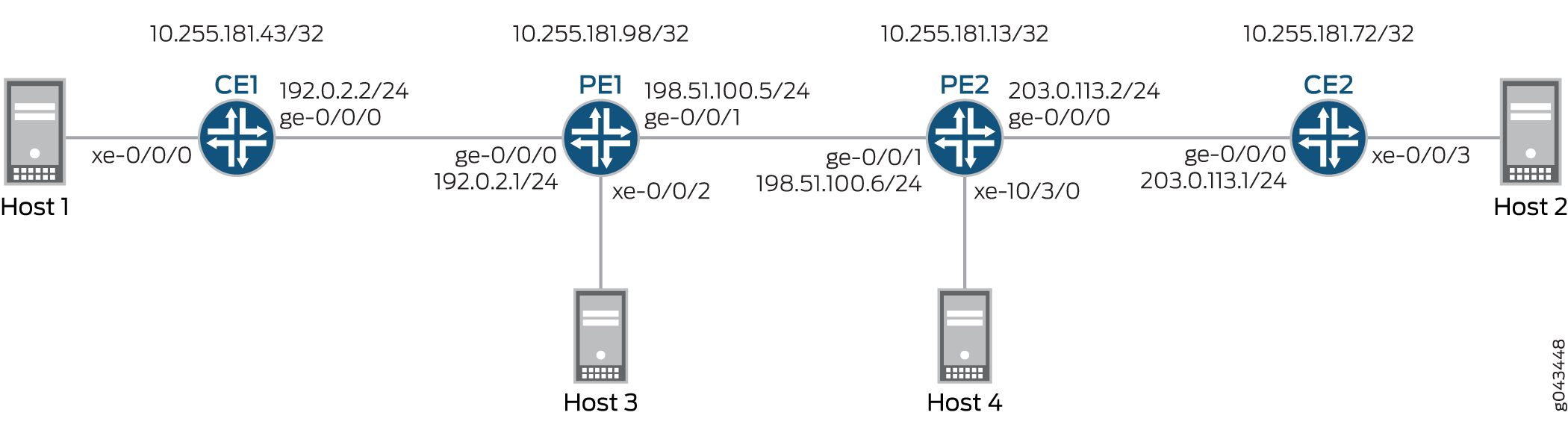
구성
CLI 빠른 구성
이 예제를 빠르게 구성하려면 다음 명령을 복사하여 텍스트 파일에 붙여 넣은 다음 줄 바꿈을 제거하고, 네트워크 구성과 일치하는 데 필요한 세부 정보를 변경하고, 명령을 복사하여 [edit] 계층 수준의 CLI에 붙여넣은 다음, 구성 모드에서 commit을 입력합니다.
세1
set interfaces xe-0/0/0 vlan-tagging
set interfaces xe-0/0/0 encapsulation flexible-ethernet-services
set interfaces xe-0/0/0 unit 10 encapsulation vlan-bridge
set interfaces xe-0/0/0 unit 10 vlan-id 10
set interfaces ge-0/0/0 unit 0 family inet address 192.0.2.2/24
set interfaces ge-0/0/0 unit 0 family mpls
set interfaces lo0 unit 0 family inet address 10.255.181.43/32
set protocols ospf area 0.0.0.0 interface ge-0/0/0.0
set protocols ospf area 0.0.0.0 interface lo0.0 passive
set protocols ospf area 0.0.0.0 interface fxp0.0 disable
set protocols pim rp local address 10.255.181.43
set protocols pim interface all
set bridge-domains evpn10 vlan-id 10
set bridge-domains evpn10 interface xe-0/0/0.10
set bridge-domains vxlan vni 10
set bridge-domains vxlan multicast-group 172.16.1.10
set bridge-domains vxlan encapsulate-inner-vlan
set bridge-domains vxlan decapsulate-accept-inner-vlan
세2
set interfaces xe-0/0/3 vlan-tagging
set interfaces xe-0/0/3 encapsulation flexible-ethernet-services
set interfaces xe-0/0/3 unit 10 encapsulation vlan-bridge
set interfaces xe-0/0/3 unit 10 vlan-id 10
set interfaces lo0 unit 0 family inet address 10.255.181.72/32
set protocols ospf area 0 interface ge-0/0/0.0
set protocols ospf area 0 interface lo0.0 passive
set protocols ospf area 0 interface fxp0.0 disable
set protocols pim rp local address 10.255.181.72
set protocols pim interface all
set bridge-domains evpn10 vlan-id 10
set bridge-domains evpn10 interface xe-0/0/3.10
set bridge-domains vxlan vni 10
set bridge-domains vxlan multicast-group 192.168.1.10
set bridge-domains vxlan encapsulate-inner-vlan
set bridge-domains vxlan decapsulate-accept-inner-vlan
PE1
set interfaces xe-0/0/2 vlan-tagging
set interfaces xe-0/0/2 encapsulation flexible-ethernet-services
set interfaces xe-0/0/2 unit 10 encapsulation vlan-bridge
set interfaces xe-0/0/2 unit 10 vlan-id 10
set interfaces ge-0/0/0 unit 0 family inet address 192.0.2.1/24
set interfaces ge-0/0/1 mtu 1600
set interfaces ge-0/0/1 unit 0 family inet address 198.51.100.5/24
set interfaces ge-0/0/1 unit 0 family mpls
set interfaces lo0 unit 1 family inet address 10.255.181.98/32
set protocols rsvp interface all
set protocols mpls no-cspf
set protocols mpls label-switched-path to-PE2 to 10.255.181.13
set protocols mpls interface all
set protocols bgp family evpn signaling
set protocols bgp group ibgp type internal
set protocols bgp group ibgp neighbor 10.255.181.13 local-address 10.255.181.98
set protocols ospf area 0 interface ge-0/0/1.0
set protocols ospf area 0 interface fxp0.0 disable
set protocols ospf area 0 interface lo0.0 passive
set routing-instances evpn10 vtep-source-interface lo0.0
set routing-instances evpn10 instance-type evpn
set routing-instances evpn10 vlan-id 10
set routing-instances evpn10 interface xe-0/0/2.10
set routing-instances evpn10 vxlan vni 10
set routing-instances evpn10 vxlan multicast-group 172.16.1.10
set routing-instances evpn10 vxlan encapsulate-inner-vlan
set routing-instances evpn10 vxlan decapsulate-accept-inner-vlan
set routing-instances evpn10 route-distinguisher 10.255.181.98:10
set routing-instances evpn10 vrf-target target:10:10
set routing-instances evpn10 protocols evpn
set routing-instances evpna instance-type vrf
set routing-instances evpna route-distinguisher 10.255.181.98:11
set routing-instances evpna vrf-target target:65000:11
set routing-instances evpna vrf-table-label
set routing-instances vrf instance-type vrf
set routing-instances vrf interface ge-0/0/0.0
set routing-instances vrf interface lo0.0
set routing-instances vrf route-distinguisher 10.255.181.98:100
set routing-instances vrf vrf-target target:100:100
set routing-instances vrf protocols ospf area 0 interface lo0.0 passive
set routing-instances vrf protocols ospf area 0 interface ge-0/0/0.0
set routing-instances vrf protocols pim rp static address 10.255.181.43
set routing-instances vrf protocols pim interface all
PE2
set interfaces ge-0/0/1 mtu 1600
set interfaces ge-0/0/1 unit 0 family inet address 198.51.100.6/24
set interfaces ge-0/0/1 unit 0 family mpls
set interfaces xe-10/3/0 vlan-tagging
set interfaces xe-10/3/0 encapsulation flexible-ethernet-services
set interfaces xe-10/3/0 unit 10 encapsulation vlan-bridge
set interfaces xe-10/3/0 unit 10 vlan-id 10
set interfaces lo0 unit 1 family inet address 10.255.181.13/32
set protocols rsvp interface all
set protocols mpls no-cspf
set protocols mpls label-switched-path to-PE1 to 10.255.181.98
set protocols mpls interface all
set protocols bgp family evpn signaling
set protocols bgp group ibgp type internal
set protocols bgp group ibgp neighbor 10.255.181.98 local-address 10.255.181.13
set protocols ospf area 0 interface ge-0/0/1.0
set protocols ospf area 0 interface fxp0.0 disable
set protocols ospf area 0 interface lo0.0 passive
set routing-instances evpn10 vtep-source-interface lo0.0
set routing-instances evpn10 instance-type evpn
set routing-instances evpn10 vlan-id 10
set routing-instances evpn10 interface xe-10/3/0.10
set routing-instances evpn10 vxlan vni 10
set routing-instances evpn10 vxlan multicast-group 192.168.1.10
set routing-instances evpn10 vxlan encapsulate-inner-vlan
set routing-instances evpn10 vxlan decapsulate-accept-inner-vlan
set routing-instances evpn10 route-distinguisher 10.255.181.13:10
set routing-instances evpn10 vrf-target target:10:10
set routing-instances evpn10 protocols evpn
set routing-instances evpna instance-type vrf
set routing-instances evpna route-distinguisher 10.255.181.13:11
set routing-instances evpna vrf-target target:65000:11
set routing-instances evpna vrf-table-label
set routing-instances vrf instance-type vrf
set routing-instances vrf interface xe-10/3/0.0
set routing-instances vrf interface lo0.0
set routing-instances vrf route-distinguisher 10.255.181.13:100
set routing-instances vrf vrf-target target:100:100
set routing-instances vrf protocols ospf area 0 interface lo0.0 passive
set routing-instances vrf protocols ospf area 0 interface xe-10/3/0.0
set routing-instances vrf protocols pim rp static address 10.255.181.72
set routing-instances vrf protocols pim interface all
절차
단계별 절차
다음 예에서는 구성 계층에서 다양한 수준을 탐색해야 합니다. CLI 탐색에 대한 정보는 구성 모드에서 CLI 편집기 사용을 참조하십시오.
디바이스 CE1 구성:
적절한 인터페이스 이름, 주소 및 기타 매개 변수를 수정한 후 디바이스 CE2에 대해 이 절차를 반복합니다.
-
디바이스 CE1 인터페이스를 구성합니다.
[edit interfaces]
user@CE1# set xe-0/0/0 vlan-tagging
user@CE1# set xe-0/0/0 encapsulation flexible-ethernet-services
user@CE1# set xe-0/0/0 unit 10 encapsulation vlan-bridge
user@CE1# set xe-0/0/0 unit 10 vlan-id 10
user@CE1# set ge-0/0/0 unit 0 family inet address 192.0.2.2/24
user@CE1# set ge-0/0/0 unit 0 family mpls
user@CE1# set lo0 unit 0 family inet address 10.255.181.43/32
-
관리 인터페이스를 제외한 디바이스 CE1 인터페이스에서 OSPF를 활성화합니다.
[edit protocols]
user@CE1# set ospf area 0.0.0.0 interface ge-0/0/0.0
user@CE1# set ospf area 0.0.0.0 interface lo0.0 passive
user@CE1# set ospf area 0.0.0.0 interface fxp0.0 disable
-
디바이스 CE1의 모든 인터페이스에서 PIM을 활성화합니다.
[edit protocols]
user@CE1# set pim rp local address 10.255.181.43
user@CE1# set pim interface all
-
EVPN 브리지 도메인을 구성하고 VLAN ID 및 인터페이스를 할당합니다.
[edit bridge-domains]
user@CE1# set evpn10 vlan-id 10
user@CE1# set evpn10 interface xe-0/0/0.10
-
VXLAN 브리지 도메인을 구성하고, VXLAN ID, 멀티캐스트 그룹 주소, 캡슐화 및 캡슐화 해제 매개 변수를 할당합니다.
[edit bridge-domains]
user@CE1# set vxlan vni 10
user@CE1# set vxlan multicast-group 172.16.1.10
user@CE1# set vxlan encapsulate-inner-vlan
user@CE1# set vxlan decapsulate-accept-inner-vlan
단계별 절차
디바이스 PE1 구성:
적절한 인터페이스 이름, 주소 및 기타 매개 변수를 수정한 후 디바이스 PE2에 대해 이 절차를 반복합니다.
-
디바이스 PE1 인터페이스를 구성합니다.
[edit interfaces]
user@PE1# set xe-0/0/2 vlan-tagging
user@PE1# set xe-0/0/2 encapsulation flexible-ethernet-services
user@PE1# set xe-0/0/2 unit 10 encapsulation vlan-bridge
user@PE1# set xe-0/0/2 unit 10 vlan-id 10
user@PE1# set ge-0/0/0 unit 0 family inet address 192.0.2.1/24
user@PE1# set ge-0/0/1 mtu 1600
user@PE1# set ge-0/0/1 unit 0 family inet address 198.51.100.5/24
user@PE1# set ge-0/0/1 unit 0 family mpls
user@PE1# set lo0 unit 1 family inet address 10.255.181.98/32
-
디바이스 PE1의 모든 인터페이스에서 MPLS 및 RSVP를 활성화합니다.
[edit protocols]
user@PE1# set rsvp interface all
user@PE1# set mpls no-cspf
user@PE1# set mpls interface all
-
디바이스 PE1에서 디바이스 PE2로의 label-switched-path를 구성합니다.
[edit protocols]
user@PE1# set mpls label-switched-path to-PE2 to 10.255.181.13
-
디바이스 PE1과 PE2 간에 내부 BGP 피어링을 구성하고 BGP 세션에 대한 EVPN 신호를 활성화합니다.
[edit protocols]
user@PE1# set bgp family evpn signaling
user@PE1# set bgp group ibgp type internal
user@PE1# set bgp group ibgp neighbor 10.255.181.13 local-address 10.255.181.98
-
관리 인터페이스를 제외한 디바이스 PE1 인터페이스에 OSPF를 구성합니다.
[edit protocols]
user@PE1# set ospf area 0 interface ge-0/0/1.0
user@PE1# set ospf area 0 interface fxp0.0 disable
user@PE1# set ospf area 0 interface lo0.0 passive
-
EVPN 라우팅 인스턴스를 구성하고, VXLAN 터널 엔드포인트 소스 인터페이스, VLAN ID를 할당하고, 경로 구분자 및 VRF 대상 값을 할당하고, 라우팅 인스턴스에 디바이스 PE1 인터페이스를 할당합니다.
[edit routing-instances]
user@PE1# set evpn10 vtep-source-interface lo0.0
user@PE1# set evpn10 instance-type evpn
user@PE1# set evpn10 vlan-id 10
user@PE1# set evpn10 interface xe-0/0/2.10
user@PE1# set evpn10 route-distinguisher 10.255.181.13:10
user@PE1# set evpn10 vrf-target target:10:10
user@PE1# set evpn10 protocols evpn
-
EVPN 라우팅 인스턴스에 대한 VXLAN ID, 멀티캐스트 그룹 주소, 캡슐화 및 캡슐화 해제 매개 변수를 할당합니다.
[edit routing-instances]
user@PE1# set evpn10 vxlan vni 10
user@PE1# set evpn10 vxlan multicast-group 172.16.1.10
user@PE1# set evpn10 vxlan encapsulate-inner-vlan
user@PE1# set evpn10 vxlan decapsulate-accept-inner-vlan
-
첫 번째 VPN 라우팅 및 포워딩(VRF) 라우팅 인스턴스를 구성하고 경로 식별자 및 vrf-target 값을 할당합니다.
[edit routing-instances]
user@PE1# set evpna instance-type vrf
user@PE1# set evpna route-distinguisher 10.255.181.13:11
user@PE1# set evpna vrf-target target:65000:11
user@PE1# set evpna vrf-table-label
-
두 번째 VRF 라우팅 인스턴스를 구성하고 디바이스 PE1 인터페이스, 경로 식별자 및 vrf-target 값을 할당합니다.
[edit routing-instances]
user@PE1# set vrf instance-type vrf
user@PE1# set vrf interface ge-0/0/0.0
user@PE1# set vrf interface lo0.0
user@PE1# set vrf route-distinguisher 10.255.181.13:100
user@PE1# set vrf vrf-target target:100:100
-
두 번째 VRF 라우팅 인스턴스에 대한 OSPF 및 PIM 프로토콜을 구성합니다.
[edit routing-instances]
user@PE1# set vrf protocols ospf area 0 interface lo0.0 passive
user@PE1# set vrf protocols ospf area 0 interface ge-0/0/0.0
user@PE1# set vrf protocols pim rp static address 10.255.181.43
user@PE1# set vrf protocols pim interface all
결과
구성 모드에서 , show protocols및 show routing-instances 명령을 show interfaces입력하여 구성을 확인합니다. 출력에 의도한 구성이 표시되지 않으면 이 예의 지침을 반복하여 구성을 수정합니다.
세1
user@CE1# show interfaces
xe-0/0/0 {
    vlan-tagging;
    encapsulation flexible-ethernet-services;
    unit 10 {
        encapsulation vlan-bridge;
        vlan-id 10;
    }
}
ge-0/0/0 {
    unit 0 {
        family inet {
            address 192.0.2.2/24;
        }
        family mpls;
    }
}
lo0 {
    unit 0 {
        family inet {
            address 10.255.181.43/32;
        }
    }
}
user@CE1# show protocols
ospf {
    area 0.0.0.0 {
        interface ge-0/0/0.0;
        interface lo0.0 {
            passive;
        }
        interface fxp0.0 {
            disable;
        }
    }
}
pim {
    rp {
        local {
            address 10.255.181.43;
        }
    }
    interface all;
}
user@CE1# show bridge-domains
evpn10 {
    vlan-id 10;
    interface xe-0/0/0.10;
    vxlan {
        vni 10;
        multicast-group 172.16.1.10;
        encapsulate-inner-vlan;
        decapsulate-accept-inner-vlan;
    }
}
PE1
user@PE1# show interfaces
xe-0/0/2 {
    vlan-tagging;
    encapsulation flexible-ethernet-services;
    unit 10 {
        encapsulation vlan-bridge;
        vlan-id 10;
    }
}
ge-0/0/0 {
    unit 0 {
        family inet {
            address 192.0.2.1/24;
        }
    }
}
ge-0/0/1 {
    mtu 1600;
    unit 0 {
        family inet {
            address 198.51.100.5/24;
        }
        family mpls;
    }
}
lo0 {
    unit 1 {
        family inet {
            address 10.255.181.98/32;
        }
    }
}
user@PE1# show protocols
rsvp {
    interface all;
}
mpls {
    no-cspf;
    label-switched-path to-PE2 {
        to 10.255.181.13;
    }
    interface all;
}
bgp {
    family evpn {
        signaling;
    }
    group ibgp {
        type internal;
        neighbor 10.255.181.13 {
            local-address 10.255.181.98;
        }
    }
}
ospf {
    area 0.0.0.0 {
        interface ge-0/0/1.0;
        interface fxp0.0 {
            disable;
        }
        interface lo0.0 {
            passive;
        }
    }
}
user@PE1# show routing-instances
evpn10 {
    vtep-source-interface lo0.0;
    instance-type evpn;
    vlan-id 10;
    interface xe-0/0/2.10;
    vxlan {
        vni 10;
        multicast-group 172.16.1.10;
        encapsulate-inner-vlan;
        decapsulate-accept-inner-vlan;
    }
    route-distinguisher 10.255.181.13:10;
    vrf-target target:10:10;
    protocols {
        evpn;
    }
}
evpna {
    instance-type vrf;
    route-distinguisher 10.255.181.98:11;
    vrf-target target:65000:11;
    vrf-table-label;
}
vrf {
    instance-type vrf;
    interface ge-0/0/0.0;
    interface lo0.0;
    route-distinguisher 10.255.181.98:100;
    vrf-target target:100:100;
    protocols {
        ospf {
            area 0.0.0.0 {
                interface lo0.0 {
                    passive;
                }
                interface ge-0/0/0.0;
            }
        }
        pim {
            rp {
                static {
                    address 10.255.181.43;
                }
            }
            interface all;
        }
    }
}
검증
구성이 제대로 작동하고 있는지 확인합니다.
MAC 학습 확인
목적
CE 및 PE 디바이스에서 브리징 및 EVPN MAC 테이블 항목을 확인합니다.
작업
디바이스 CE1에서 브리징 MAC 테이블 항목을 결정합니다.
운영 모드에서 명령을 실행합니다 show bridge mac-table .
user@CE1> show bridge mac-table

 MAC flags       (S -static MAC, D -dynamic MAC, L -locally learned, C -Control MAC
     O -OVSDB MAC, SE -Statistics enabled, NM -Non configured MAC, R -Remote PE MAC)

 Routing instance : default-switch
  Bridging domain : evpn10, VLAN : 10
    MAC                 MAC      Logical          NH     RTR
    address             flags    interface        Index  ID
    00:00:00:00:00:11   D        xe-0/0/0.10
    00:00:00:00:00:22   D        vtep.32769
디바이스 PE1에서 EVPN MAC 테이블 항목을 결정합니다.
운영 모드에서 명령을 실행합니다 show evpn mac-table .
user@PE1> show evpn mac-table

 MAC flags       (S -static MAC, D -dynamic MAC, L -locally learned, C -Control MAC
     O -OVSDB MAC, SE -Statistics enabled, NM -Non configured MAC, R -Remote PE MAC)

 Routing instance : evpn10
  Bridging domain : __evpn10__, VLAN : 10
    MAC                 MAC      Logical          NH     RTR
    address             flags    interface        Index  ID
    00:00:00:00:00:11   D        vtep.32769
    00:00:00:00:00:22   DC                        1048576 1048576
의미
브리징 및 EVPN MAC 테이블은 VLAN 구성을 학습했습니다.
PIM 도달 가능성 확인
목적
PIM 구성이 CE 및 PE 디바이스에서 제대로 작동하고 있는지 확인합니다.
작업
디바이스 CE1에서 PIM 구성을 확인합니다.
운영 모드에서 명령을 실행합니다 show pim rps extensive .
user@CE1> show pim rps extensive
 Instance: PIM.master

 address-family INET

 RP: 10.255.181.43
 Learned via: static configuration
 Mode: Sparse
 Time Active: 00:06:08
 Holdtime: 150
 Device Index: 161
 Subunit: 32769
 Interface: pd-0/2/0.32769
 Static RP Override: Off
 Group Ranges:
         224.0.0.0/4
 Register State for RP:
 Group           Source          FirstHop        RP Address      State    Timeout
 172.16.1.10      203.1.113.11       203.1.113.11       10.255.181.43   Receive      171

 address-family INET6
운영 모드에서 명령을 실행합니다 show pim join extensive .
user@CE1> show pim join extensive
 Instance: PIM.master Family: INET
 R = Rendezvous Point Tree, S = Sparse, W = Wildcard

 Group: 172.16.1.10
     Source: *
     RP: 10.255.181.43
     Flags: sparse,rptree,wildcard
     Upstream interface: Local
     Upstream neighbor: Local
     Upstream state: Local RP
     Uptime: 00:06:08
     Downstream neighbors:
         Interface: ge-0/0/0.0 (assert winner)
             192.0.2.1 State: Join Flags: SRW Timeout: 201
             Uptime: 00:05:08 Time since last Join: 00:00:08
             Assert Winner: 192.0.2.2 Metric: 0 Pref: 2147483648 Timeout: 82
         Interface: Pseudo-VXLAN
     Number of downstream interfaces: 2

 Group: 172.16.1.10
     Source: 10.255.181.43
     Flags: sparse,spt
     Upstream interface: Local
     Upstream neighbor: Local
     Upstream state: Local Source, Local RP, No Prune to RP
     Keepalive timeout: 338
     Uptime: 00:04:15
     Downstream neighbors:
         Interface: ge-0/0/0.0
             192.0.2.1 State: Join Flags: S Timeout: 201
             Uptime: 00:04:15 Time since last Join: 00:00:08
         Interface: Pseudo-VXLAN
     Number of downstream interfaces: 2

 Group: 172.16.1.10
     Source: 203.1.113.11
     Flags: sparse,spt
     Upstream interface: ge-0/0/0.0
     Upstream neighbor: 192.0.2.1 (assert winner)
     Upstream state: Local RP, Join to Source, No Prune to RP
     Keepalive timeout: 338
     Uptime: 00:04:15
     Downstream neighbors:
         Interface: ge-0/0/0.0 (pruned)
             192.0.2.1 State: Prune Flags: SR Timeout: 201
             Uptime: 00:04:15 Time since last Prune: 00:00:08
             Assert Winner: 192.0.2.1 Metric: 0 Pref: 0 Timeout: 179
         Interface: Pseudo-VXLAN
     Number of downstream interfaces: 2

 Instance: PIM.master Family: INET6
 R = Rendezvous Point Tree, S = Sparse, W = Wildcard
의미
PIM을 사용하는 디바이스 연결성은 구성된 대로 작동합니다.
VXLAN 연결성 확인
목적
서로 다른 데이터센터에 있는 VTEP 간의 연결을 확인합니다.
작업
운영 모드에서 , 및 명령을 show l2-learning vxlan-tunnel-end-point source실행합니다show interfaces vtep. show l2-learning vxlan-tunnel-end-point remote
user@PE1> show l2-learning vxlan-tunnel-end-point source
 Logical System Name       Id  SVTEP-IP         IFL   L3-Idx
        <default>                 0   203.1.113.11        lo0.0    7
     L2-RTT                   Bridge Domain              VNID     MC-Group-IP

     evpn10                   __evpn10__                 10       172.16.1.10
user@PE2> show l2-learning vxlan-tunnel-end-point source
 Logical System Name       Id  SVTEP-IP         IFL   L3-Idx
        <default>                 0   203.1.113.12        lo0.0    7
     L2-RTT                   Bridge Domain              VNID     MC-Group-IP
     evpn10                   __evpn10__                 10       192.168.1.10
user@PE1> show l2-learning vxlan-tunnel-end-point remote
 Logical System Name       Id  SVTEP-IP         IFL   L3-Idx
        <default>                 0   203.1.113.11        lo0.0    7
  RVTEP-IP         IFL-Idx   NH-Id
  10.255.181.43    2684275660 2684275660
     VNID          MC-Group-IP
     10            172.16.1.10
user@PE2> show l2-learning vxlan-tunnel-end-point remote
 Logical System Name       Id  SVTEP-IP         IFL   L3-Idx
        <default>                 0   203.1.113.12        lo0.0    7
  RVTEP-IP         IFL-Idx   NH-Id
  10.255.181.98    351       661
     VNID          MC-Group-IP
     10            192.168.1.10
user@PE1> show interfaces vtep
 Physical interface: vtep, Enabled, Physical link is Up
   Interface index: 133, SNMP ifIndex: 508
   Type: Software-Pseudo, Link-level type: VxLAN-Tunnel-Endpoint, MTU: 1600, Speed: Unlimited
   Device flags   : Present Running
   Interface flags: SNMP-Traps
   Link type      : Full-Duplex
   Link flags     : None
   Last flapped   : Never
     Input packets : 0
     Output packets: 0

   Logical interface vtep.32768 (Index 339) (SNMP ifIndex 560)
     Flags: Up SNMP-Traps Encapsulation: ENET2
     Ethernet segment value: 00:00:00:00:00:00:00:00:00:00, Mode: Single-homed, Multi-homed status: Forwarding
     VXLAN Endpoint Type: Source, VXLAN Endpoint Address: 203.1.113.11, L2 Routing Instance: evpn10, L3 Routing Instance: vrf
     Input packets : 0
     Output packets: 0

   Logical interface vtep.32769 (Index 341) (SNMP ifIndex 567)
     Flags: Up SNMP-Traps Encapsulation: ENET2
     VXLAN Endpoint Type: Remote, VXLAN Endpoint Address: 10.255.181.43, L2 Routing Instance: evpn10, L3 Routing Instance: vrf
     Input packets : 143746
     Output packets: 95828
     Protocol bridge, MTU: 1600
       Flags: Trunk-Mode
의미
출력은 올바른 터널 소스 IP 주소(루프백 인터페이스에 할당됨), VLAN 및 VXLAN에 대한 멀티캐스트 그룹을 보여줍니다. 디바이스 PE1은 IP 주소(루프백 인터페이스에 할당된 주소)가 출력에 나타나기 때문에 도달할 수 있습니다. 또한 출력은 VXLAN(VNI 10) 및 해당 멀티캐스트 그룹이 원격 VTEP, 디바이스 PE2에서 올바르게 구성되었음을 보여줍니다.