
BGP 오류 메시지
BGP 업데이트 메시지에 대한 오류 처리 이해
BGP 메시지는 메시지 속성 중 하나라도 형식이 잘못된 경우 잘못된 형식으로 간주됩니다. BGP 세션에 참여하는 라우터가 잘못된 형식의 업데이트 메시지를 수신하면 전체 세션이 기본적으로 재설정됩니다. 유효한 경로가 있는 업데이트 메시지도 영향을 받기 때문에 바람직하지 않습니다. 이러한 바람직하지 않은 동작을 방지하려면 BGP 업데이트 메시지에 대한 오류 처리를 수정해야 합니다.
BGP 업데이트 메시지에 대한 오류 처리를 구성하려면 , [edit protocols bgp group group-name], 또는 [edit protocols bgp group group-name neighbor address] 계층 수준에서 [edit protocols bgp]문을 구성 bgp-error-tolerance 합니다.
bgp-error-tolerance {
    malformed-route-limit number;
    malformed-update-log-interval seconds;
    no-malformed-route-limit;
}
속성에 속성 유형 필드의 값과 충돌하는 속성 플래그가 포함된 경우, 속성 플래그는 올바른 값으로 재설정되고 업데이트 메시지가 처리됩니다. 속성 플래그의 확장 길이 비트 값은 속성 길이가 1옥텟인지 2옥텟인지를 정의하기 때문에 변경되지 않습니다. 따라서 속성 플래그의 값은 BGP 업데이트 패킷이 구문 분석되는 방식에 영향을 줍니다.
경로 속성의 속성 플래그 값에 대한 명시적인 사양은 없습니다.
Junos OS 릴리스 24.2R1부터는 BGP 오류 처리가 기본적으로 활성화됩니다. 이 구성 문 아래에서 , malformed-route-limit, malformed-update-log-interval등의 no-malformed-route-limit 하위 옵션을 구성할 수 있습니다. 이 문을 삭제 bgp-error-tolerance 해도 기능은 여전히 활성화된 상태로 유지되며 하위 옵션은 기본값으로 재설정됩니다.
잘못된 형식의 업데이트 메시지는 메시지에 포함된 속성의 값에 따라 사례별로 처리됩니다. 심각도가 내림차순으로 나열된 잘못된 형식의 BGP 업데이트 메시지를 처리하는 세 가지 방법이 있습니다.
-
Notification message approach- 잘못된 형식의 메시지 오류가 로컬에 기록되고, 오류 코드 업데이트 메시지가 피어 관리에 전송되며, 전체 BGP 세션이 재설정됩니다.
이 접근 방식은 다음과 같은 경우에 선택됩니다.
-
BGP 업데이트 메시지에는 MP 도달 속성 또는 MP 도달 금지 속성이 포함되어 있습니다.
-
NLRI 필드 또는 BGP 업데이트 메시지는 속성 길이와 속성 길이 필드의 값 간의 불일치로 인해 올바르게 구문 분석할 수 없습니다.
-
-
Treat-as-withdraw approach—문이 구성되지 않는 한
keep none잘못된 형식의 업데이트 메시지 내의 모든 경로는 숨겨진 경로로 처리되며, 이 경우 경로가 삭제됩니다. 문keep none이 없는 경우, 숨겨진 잘못된 형식의 경로 수는 제한으로 구성되며, 이를 초과하면 해당 경로가 폐기되고 더 이상 잘못된 형식의 경로가 숨겨지지 않도록 합니다. Junos OS는 잘못된 형식의 경로 제한에 도달하면 새로 수신된 잘못된 형식의 경로를 제거합니다. -
Attribute discard approach- 업데이트 메시지에서 잘못된 형식의 속성은 폐기됩니다. 그러나 메시지는 처리됩니다. 삭제할 속성이 경로 선택 또는 설치에 영향을 줄 수 있는 경우에는 이 접근 방식을 사용하지 않는 것이 좋습니다.
참고:업데이트된 메시지에 속성이 두 번 이상 나타나면 첫 번째 항목을 제외한 해당 속성의 모든 발생이 삭제되고 메시지가 처리됩니다.
BGP 업데이트 메시지는 다음 속성에 대해 스캔되며 이러한 속성의 값에 따라 잘못된 형식으로 처리됩니다.
-
The origin attribute—철회로 처리 접근 방식에 의해 처리됩니다.
-
The AS path attribute—철회로 처리 접근 방식에 의해 처리됩니다.
-
The AS 4 path attribute—속성 폐기 접근 방식으로 처리됩니다.
-
The aggregator attribute—속성 폐기 접근 방식으로 처리됩니다.
-
The aggregator 4 attribute—속성 폐기 접근 방식으로 처리됩니다.
-
The next-hop attribute—철회로 처리 접근 방식에 의해 처리됩니다.
-
The multiple exit discriminator attribute—철회로 처리 접근 방식에 의해 처리됩니다.
-
The local preference attribute—철회로 처리 접근 방식에 의해 처리됩니다.
-
The atomic aggregate attribute—속성 폐기 접근 방식으로 처리됩니다.
-
The community attribute—철회로 처리 접근 방식에 의해 처리됩니다.
-
The extended community attribute—철회로 처리 접근 방식에 의해 처리됩니다.
-
The originator attribute—철회로 처리 접근 방식에 의해 처리됩니다.
-
The cluster attribute—철회로 처리 접근 방식에 의해 처리됩니다.
-
The PMSI attribute—철회로 처리 접근 방식에 의해 처리됩니다.
-
The MP reach attribute—알림 메시지 접근 방식에 의해 처리됩니다.
-
The MP unreach attribute—알림 메시지 접근 방식에 의해 처리됩니다.
-
The attribute set attribute—철회로 처리 접근 방식에 의해 처리됩니다.
-
The AIGP attribute—철회로 처리 접근 방식에 의해 처리됩니다.
-
Unknown attribute—BGP 플래그가 선택적 속성임을 나타내지 않는 경우, 이 잘못된 형식의 속성은 알림 메시지 접근 방식에 의해 처리됩니다.
BGP 업데이트 메시지에 여러 개의 잘못된 형식의 속성이 포함된 경우 속성 중 하나에 의해 트리거된 가장 심각한 접근 방식이 따릅니다.
다음은 BGP 오류 메시지 출력의 예입니다.
user@R1> show log messages
Sep 18 17:54:13 R1 rpd[86600]: Received malformed update from 10.10.10.2 (External AS 64511)
Sep 18 17:54:13 R1 rpd[86600]: Family inet-unicast, prefix 100.1.1.0/24
Sep 18 17:54:13 R1 rpd[86600]: Malformed Attribute ORIGIN(1) flag 0x40 length 1 error 6 (Unrecognized ORIGIN attribute).
Sep 18 17:54:13 R1 rpd[86600]: Malformed Attribute LOCAL_PREF(5) flag 0x40 length 6 error 5 (Attribute length error).
이 예에서는 원본(ORIGIN) 및 로컬 선호(LOCAL_PREF) 잘못된 형식의 속성을 볼 수 있습니다.
또한보십시오
예: BGP 업데이트 메시지에 대한 오류 처리 구성
이 예는 BGP 오류 처리를 구성하는 방법을 보여줍니다.
요구 사항
시작하기 전에:
-
라우터 인터페이스를 구성합니다.
-
내부 게이트웨이 프로토콜(IGP)을 구성합니다.
-
BGP를 구성합니다.
-
라우팅 정책을 구성합니다.
개요
라우팅 디바이스가 잘못된 형식의 속성이 포함된 업데이트 메시지를 수신하면 라우터는 세션을 재설정해야 합니다. 이는 RFC 4271, BGP-4(Border Gateway Protocol 4)에 명시되어 있습니다. 세션 재설정은 문제가 되는 속성이 있는 경로뿐만 아니라 세션을 통해 교환되는 다른 유효한 경로에도 영향을 미칩니다. 또한 이 동작은 선택적 전이적 속성의 경우 잠재적인 보안 취약점을 나타낼 수 있습니다. 잘못된 형식의 업데이트 메시지로 인한 라우팅 영향을 최소화하기 위해 인터넷 초안 draft-ietf-idr-error-handling-01.txt, BGP UPDATE 메시지에 대한 수정된 오류 처리 에서는 잘못된 형식의 특성을 가진 BGP 업데이트 메시지를 처리하기 위한 수정 사항을 지정합니다. 새로운 오류 처리를 통해 잘못된 형식의 UPDATE 메시지에 전달된 경로를 제거하는 동시에 설정된 세션을 유지하고 교환된 유효한 경로를 유지할 수 있습니다.
토폴로지
그림 1에서 디바이스 R1은 디바이스 R0과의 내부 BGP 피어링 세션 및 디바이스 R2와의 외부 BGP 피어링 세션을 갖습니다.
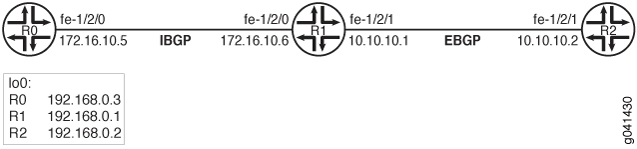
네트워크 불안정을 야기하는 잘못된 형식의 업데이트 메시지로부터 보호하기 위해 디바이스 R1에는 다음과 같이 BGP 오류 처리가 구성되어 있습니다.
bgp-error-tolerance {
    malformed-update-log-interval 10;
    malformed-route-limit 5;
}
기본적으로 메시지 속성 중 하나라도 형식이 잘못된 경우 BGP 메시지는 잘못된 형식으로 간주됩니다. BGP 세션에 참여하는 라우터가 잘못된 형식의 업데이트 메시지를 수신하면 전체 세션이 재설정됩니다. 명령문은 bgp-error-tolerance 다음 BGP 오류 처리가 적용되도록 이 동작을 재정의합니다.
-
치명적인 오류의 경우, Junos OS는 오류 코드 업데이트 메시지라는 제목의 알림 메시지를 보내고 BGP 세션을 재설정합니다. MP_{UN}REACH 속성의 오류는 치명적인 것으로 간주됩니다. 하나의 BGP 업데이트에 여러 개의 MP_{UN}REACH 속성이 있는 경우에도 치명적인 오류로 간주됩니다. Junos OS는 NLRI 필드 또는 BGP 업데이트를 올바르게 구문 분석할 수 없는 경우 BGP 세션을 재설정합니다. BGP 업데이트 패킷을 구문 분석하지 못하는 것은 속성 길이가 속성 값의 길이와 일치하지 않을 때 발생할 수 있습니다.
-
일부 치명적이지 않은 오류의 경우, Junos OS는 BGP 구성에 문이 포함되지 않는 한
keep none잘못된 형식의 BGP 업데이트 메시지에 포함된 모든 경로를 철회된 경로로 처리하고 숨겨진 것으로 설치합니다. Junos OS ORIGIN, AS_PATH, NEXT_HOP, MULTI_EXIT_DISC, LOCAL_PREF, ORIGINATOR, CLUSTER, ATTRSET, PMSI, Community 및 Extended Community 속성과 관련된 케이스에 대해 이 오류 처리 접근 방식을 사용합니다. 또한 필수 잘 알려진 경로 속성이 누락된 경우 Junos OS는 BGP 업데이트를 잘못된 형식으로 처리합니다. 이러한 잘못된 형식의 숨겨진 경로의 메모리 사용을 제한하기 위해 Junos OS는 이러한 잘못된 형식의 숨겨진 경로의 최대 수에 도달한 후 새로운 잘못된 형식의 숨겨진 경로 설치를 중지합니다. 이 예에서는 문을 사용하여 최대 수가 5로 설정됩니다.malformed-route-limit기본값은 1000입니다. 선택적으로 잘못된 속성으로 인해 숨겨진 경로를 무제한으로 허용할 수 있습니다. 문을 포함하여 이 작업을 수행합니다.no-malformed-route-limit -
다른 치명적이지 않은 오류의 경우, Junos OS는 잘못된 형식의 경로 속성을 폐기하고 BGP 업데이트 메시지를 계속 처리합니다. 경로 선택 또는 설치에 영향을 줄 수 있는 경로 속성에 이 접근 방식을 사용하는 것은 안전하지 않습니다. Junos OS ATOMIC_AGGREGATE, AGGREGATOR, AGGREGATOR4 및 AS4PATH 속성과 관련된 사례에 대해 이 오류 처리 방법을 사용합니다.
잘못된 형식의 패킷 문제 해결을 용이하게 하기 위해 Junos OS는 잘못된 형식의 경로 속성 코드, 플래그, 길이, 피어 및 패밀리에 대한 정보, 잘못된 형식의 BGP 업데이트의 첫 번째 접두사를 나열하는 오류를 기록합니다. 짧은 시간에 상당한 수의 잘못된 형식의 패킷이 수신되는 경우 잘못된 형식의 패킷을 로깅하면 Junos OS 성능이 느려질 수 있습니다. 성능에 미치는 영향을 제한하기 위해 Junos OS는 알고리즘을 구현하여 잘못된 형식의 업데이트를 로깅하고, 일정 간격 동안 로깅을 억제하며, 요약을 로깅합니다. 로깅 억제 타이머가 만료되면 소프트웨어는 간격 동안 수신된 잘못된 형식의 속성의 총 수를 로깅합니다. 이 예에서 타이머는 문을 사용하여 10초로 설정됩니다. malformed-update-log-interval 기본값은 300초(5분)입니다.
CLI 빠른 구성 은 그림 1의 모든 디바이스에 대한 구성을 보여줍니다.
절차 섹션에서는 디바이스 R1의 단계를 설명합니다.
구성
CLI 빠른 구성
이 예를 빠르게 구성하려면, 아래 명령을 복사하여 텍스트 파일로 붙여 넣은 다음 모든 라인브레이크를 제거하고, 네트워크 구성을 일치하는 데 필요한 세부 사항을 변경한 다음, 계층 수준에서 [edit] 명령을 복사하여 CLI에 붙여 넣습니다.
디바이스 R0
set  interfaces fe-1/2/0 unit 0 description to-R1
set  interfaces fe-1/2/0 unit 0 family inet address 172.16.10.5/30
set  interfaces lo0 unit 0 family inet address 192.168.0.3/32
set  protocols bgp group internal-peers type internal
set  protocols bgp group internal-peers local-address 192.168.0.3
set  protocols bgp group internal-peers export local-direct
set  protocols bgp group internal-peers neighbor 192.168.0.1
set  protocols ospf area 0.0.0.0 interface fe-1/2/0.0
set  protocols ospf area 0.0.0.0 interface lo0.0 passive
set  policy-options policy-statement local-direct from protocol [local direct]
set  policy-options policy-statement local-direct then accept
set  routing-options autonomous-system 64510
set  routing-options router-id 192.168.0.3
디바이스 R1
set  interfaces fe-1/2/1 unit 0 description to-R2
set  interfaces fe-1/2/1 unit 0 family inet address 10.10.10.1/30
set  interfaces fe-1/2/0 unit 0 description to-R0
set  interfaces fe-1/2/0 unit 0 family inet address 172.16.10.6/30
set  interfaces lo0 unit 0 family inet address 192.168.0.1/32
set  protocols bgp bgp-error-tolerance malformed-update-log-interval 10
set  protocols bgp bgp-error-tolerance malformed-route-limit 5
set  protocols bgp group internal-peers type internal
set  protocols bgp group internal-peers local-address 192.168.0.1
set  protocols bgp group internal-peers export local-direct
set  protocols bgp group internal-peers neighbor 192.168.0.3
set  protocols bgp group external-peers type external
set  protocols bgp group external-peers export local-direct
set  protocols bgp group external-peers peer-as 64511
set  protocols bgp group external-peers neighbor 10.10.10.2
set  protocols ospf area 0.0.0.0 interface fe-1/2/1.0
set  protocols ospf area 0.0.0.0 interface fe-1/2/0.0
set  protocols ospf area 0.0.0.0 interface lo0.0 passive
set  policy-options policy-statement local-direct from protocol [local direct]
set  policy-options policy-statement local-direct then accept
set  routing-options autonomous-system 64510
set  routing-options router-id 192.168.0.1
디바이스 R2
set  interfaces fe-1/2/1 unit 0 description to-R1
set  interfaces fe-1/2/1 unit 0 family inet address 10.10.10.2/30
set  interfaces lo0 unit 0 family inet address 192.168.0.2/32
set  protocols bgp group external-peers type external
set  protocols bgp group external-peers export local-direct
set  protocols bgp group external-peers peer-as 64510
set  protocols bgp group external-peers neighbor 10.10.10.1
set  protocols ospf area 0.0.0.0 interface fe-1/2/1.0
set  protocols ospf area 0.0.0.0 interface lo0.0 passive
set  policy-options policy-statement local-direct from protocol [local direct]
set  policy-options policy-statement local-direct then accept
set  routing-options autonomous-system 64511
set  routing-options router-id 192.168.10.2
절차
단계별 절차
다음 예에서는 구성 계층에서 다양한 수준을 탐색해야 합니다. CLI 탐색에 대한 정보는 Junos OS CLI 사용자 가이드의 구성 모드에서 CLI 편집기 사용을 참조하십시오.
BGP 오류 처리를 구성하려면 다음을 수행합니다.
-
라우터 인터페이스를 구성합니다.
[edit interfaces]
user@R1# set fe-1/2/1 unit 0 description to-R2
user@R1# set fe-1/2/1 unit 0 family inet address 10.10.10.1/30
user@R1# set fe-1/2/0 unit 0 description to-R0
user@R1# set fe-1/2/0 unit 0 family inet address 172.16.10.6/30
user@R1# set lo0 unit 0 family inet address 192.168.0.1/32
-
OSPF 또는 IS-IS와 같은 내부 게이트웨이 프로토콜(IGP)을 구성합니다.
[edit protocols ospf area 0.0.0.0]
user@R1# set interface fe-1/2/1.0
user@R1# set interface fe-1/2/0.0
user@R1# set interface lo0.0 passive
-
AS(Autonomous System) 번호 및 라우터 ID를 구성합니다.
[edit routing-options]
user@R1# set autonomous-system 64510
user@R1# set router-id 192.168.0.1
-
라우팅 정책 구성합니다.
[edit policy-options policy-statement local-direct]
user@R1# set from protocol [local direct]
user@R1# set then accept
-
EBGP 세션을 구성합니다.
[edit protocols bgp group external-peers]
user@R1# set type external
user@R1# set export local-direct
user@R1# set peer-as 64511
user@R1# set neighbor 10.10.10.2
-
IBGP 세션을 구성합니다.
[edit protocols bgp group internal-peers]
user@R1# set type internal
user@R1# set local-address 192.168.0.1
user@R1# set export local-direct
user@R1# set neighbor 192.168.0.3
-
BGP 오류 허용 능력을 활성화합니다.
[edit protocols bgp]
user@R1# set bgp-error-tolerance
-
(선택 사항) 로그 간격을 구성합니다.
[edit protocols bgp bgp-error-tolerance]
user@R1# set malformed-update-log-interval 10
-
(선택 사항) 저장할 숨겨진 경로 수에 대한 제한을 구성합니다.
[edit protocols bgp bgp-error-tolerance]
user@R1# set malformed-route-limit 5
결과
구성 모드에서 , show protocols, show policy-options및 show routing-options, show interfaces명령을 입력하여 구성을 확인합니다. 출력에 의도한 구성이 표시되지 않으면 이 예의 지침을 반복하여 구성을 수정합니다.
user@R1#
show interfaces

fe-1/2/0 {
    unit 0 {
        description to-R0;
        family inet {
            address 172.16.10.6/30;
        }
    }
}
fe-1/2/1 {
    unit 0 {
        description to-R2;
        family inet {
            address 10.10.10.1/30;
        }
    }
}
lo0 {
    unit 0 {
        family inet {
            address 192.168.0.1/32;
        }
    }
}
user@R1# show protocols

bgp {
    bgp-error-tolerance {
        malformed-update-log-interval 10;
        malformed-route-limit 5;
    }
    group internal-peers {
        type internal;
        local-address 192.168.0.1;
        export local-direct;
        neighbor 192.168.0.3;
    }
    group external-peers {
        type external;
        export local-direct;
        peer-as 64511;
        neighbor 10.10.10.2;
    }
}
ospf {
    area 0.0.0.0 {
        interface fe-1/2/1.0;
        interface fe-1/2/0.0;
        interface lo0.0 {
            passive;
        }
    }
}
user@R1#
show policy-options

policy-statement local-direct {
    from protocol [local direct];
    then accept;
}
user@R1#
show routing-options

router-id 192.168.0.1;
autonomous-system 64510;
디바이스 구성이 완료되면 구성 모드에서 들어갑니다 commit .
검증
구성이 제대로 작동하고 있는지 확인합니다.
BGP 인접 세션 확인하기
목적
BGP 오류 허용 기능이 활성화되었는지 확인하고 잘못된 형식의 경로 속성과 관련된 카운터를 표시합니다.
작업
user@R1# show bgp neighbor
Peer: 10.10.10.2+50058 AS 64511 Local: 10.10.10.1+179 AS 64510
  Type: External    State: Established    Flags: <Sync>
  Last State: OpenConfirm   Last Event: RecvKeepAlive
  Last Error: None
  Export: [ local-direct ]
  Options: <Preference PeerAS Refresh>
  Holdtime: 90 Preference: 170
  Number of flaps: 0
  Malformed attributes    log interval: 10   route limit: 5


                      Attribute:           ORIGIN(1) Last Received: 0 Total Received: 3
    Attribute:       LOCAL_PREF(5) Last Received: 0 Total Received: 2
  Peer ID: 192.168.10.2    Local ID: 192.168.10.1      Active Holdtime: 90
  Keepalive Interval: 30         Group index: 0    Peer index: 0
  BFD: disabled, down
  Local Interface: fe-1/2/1.0
  NLRI for restart configured on peer: inet-unicast
  NLRI advertised by peer: inet-unicast
  NLRI for this session: inet-unicast
  Peer supports Refresh capability (2)
  Stale routes from peer are kept for: 300
  Peer does not support Restarter functionality
  NLRI that restart is negotiated for: inet-unicast
  NLRI of received end-of-rib markers: inet-unicast
  NLRI of all end-of-rib markers sent: inet-unicast
  Peer supports 4 byte AS extension (peer-as 64511)
  Peer does not support Addpath
  Table inet.0 Bit: 10000
    RIB State: BGP restart is complete
    Send state: in sync
    Active prefixes:              0
    Received prefixes:            3
    Accepted prefixes:            0
    Suppressed due to damping:    0
    Advertised prefixes:          2
  Last traffic (seconds): Received 25   Sent 17   Checked 73
  Input messages:  Total 2702   Updates 10      Refreshes 0     Octets 51652
  Output messages: Total 2701   Updates 6       Refreshes 0     Octets 51571
  Output Queue[0]: 0

Peer: 192.168.10.3+179 AS 64510 Local: 192.168.10.1+51127 AS 64510
  Type: Internal    State: Established    Flags: <Sync>
  Last State: OpenConfirm   Last Event: RecvKeepAlive
  Last Error: None
  Export: [ local-direct ]
  Options: <Preference LocalAddress Refresh>
  Local Address: 192.168.10.1 Holdtime: 90 Preference: 170
  Number of flaps: 0
  Malformed attributes    log interval: 10   route limit: 5
  Peer ID: 192.168.10.3    Local ID: 192.168.10.1      Active Holdtime: 90
  Keepalive Interval: 30         Group index: 1    Peer index: 0
  BFD: disabled, down
  NLRI for restart configured on peer: inet-unicast
  NLRI advertised by peer: inet-unicast
  NLRI for this session: inet-unicast
  Peer supports Refresh capability (2)
  Stale routes from peer are kept for: 300
  Peer does not support Restarter functionality
  NLRI that restart is negotiated for: inet-unicast
  NLRI of received end-of-rib markers: inet-unicast
  NLRI of all end-of-rib markers sent: inet-unicast
  Peer supports 4 byte AS extension (peer-as 64510)
  Peer does not support Addpath
  Table inet.0 Bit: 10001
    RIB State: BGP restart is complete
    Send state: in sync
    Active prefixes:              0
    Received prefixes:            3
    Accepted prefixes:            0
    Suppressed due to damping:    0
    Advertised prefixes:          2
  Last traffic (seconds): Received 5    Sent 24   Checked 51
  Input messages:  Total 417    Updates 3       Refreshes 0     Octets 8006
  Output messages: Total 421    Updates 2       Refreshes 0     Octets 8136
  Output Queue[0]: 0
의미
잘못된 형식의 속성 필드는 오류 허용 범위가 활성화되어 있음을 보여줍니다. 로그 간격 및 경로 제한 필드에는 구성된 값이 표시됩니다.
속성 카운터는 EBGP 연결에서 디바이스 R2로부터 몇 가지 잘못된 형식의 속성이 수신되었음을 보여줍니다.
숨겨진 경로 확인하기
목적
숨겨진 경로에 대한 정보를 보고 숨겨진 경로가 숨겨진 이유를 알아보십시오.
작업
user@R1> show route hidden detail
inet.0: 42 destinations, 45 routes (36 active, 0 holddown, 6 hidden)
10.0.0.0/32 (1 entry, 0 announced)
         BGP
                Next hop type: Router
                Address: 0x93d8b0c
                Next-hop reference count: 5
                Source: 10.10.10.2
                Next hop type: Router, Next hop index: 782
                Next hop: via fe-1/2/1.0, selected
                Session Id: 0x1
                State: <Hidden  Ext>
                Local AS:     1 Peer AS:     1
                Age: 5:32       Metric2: 1
                Validation State: unverified
                Task: BGP_1.10.10.5.62+56218
                AS path: I (MalformedAttr)
                Router ID: 192.168.0.2

10.0.0.1/32 (1 entry, 0 announced)
         BGP
                Next hop type: Router
                Address: 0x93d8b0c
                Next-hop reference count: 5
                Source: 10.10.10.2
                Next hop type: Router, Next hop index: 782
                Next hop: via fe-1/2/1.0, selected
                Session Id: 0x1
                Indirect next hop: 953c000 - INH Session ID: 0x3
                State: <Hidden Int Ext>
                Local AS:     1 Peer AS:     1
                Age: 5:32       Metric2: 1
                Validation State: unverified
                Task: BGP_1.10.10.5.62+56218
                AS path: I (MalformedAttr)
                Router ID: 192.168.0.2
의미
잘못된 형식의 숨겨진 경로는 AS 경로 필드에서 MalformedAttr로 표시됩니다.
명령을 실행 clear bgp neighbor 10.10.10.2 malformed-route 하여 숨겨진 경로를 제거할 수 있습니다.
숨겨진 경로의 소스 확인
목적
숨겨진 경로에 대한 정보를 보고 숨겨진 경로가 숨겨진 이유를 알아보십시오.
작업
user@R1> show route receive-protocol bgp 10.10.10.2 detail hidden
inet.0: 42 destinations, 45 routes (36 active, 0 holddown, 6 hidden)
  10.0.0.0/32 (1 entry, 0 announced)
     Nexthop: 10.10.10.2
     Localpref: 100
     AS path: I (MalformedAttr)

  10.0.0.1/32 (1 entry, 0 announced)
     Nexthop: 10.10.10.2
     Localpref: 100
     AS path: I (MalformedAttr)
의미
Junos OS는 명령 출력의 AS 경로 필드에 MalformedAttr을 표시합니다.show route receive-protocol bgp 10.10.10.2 detail hidden
명령을 실행 clear bgp neighbor 10.10.10.2 malformed-route 하여 숨겨진 경로를 제거할 수 있습니다.