Help us improve your experience.

Let us know what you think.

Do you have time for a two-minute survey?


スイッチレベルでのポート設定の上書き

管理者ユーザーは、スイッチ レベルで特定のスイッチ ポート設定パラメータ セットを上書きして、個々のポート設定をより詳細に制御できます。これらのオーバーライドは既存のポート設定に追加され、1 つまたは複数のスイッチ ポートに適用できます。

手記:

ポートの上書きは、動的ポート設定を使用するポートでは許可されません。

スイッチ レベルでオーバーライド パラメーターを適用するには:

  1. [スイッチ(Switches)] をクリックし、スイッチを選択してスイッチの詳細ページを開きます。
  2. [ポート] タイルに移動します。
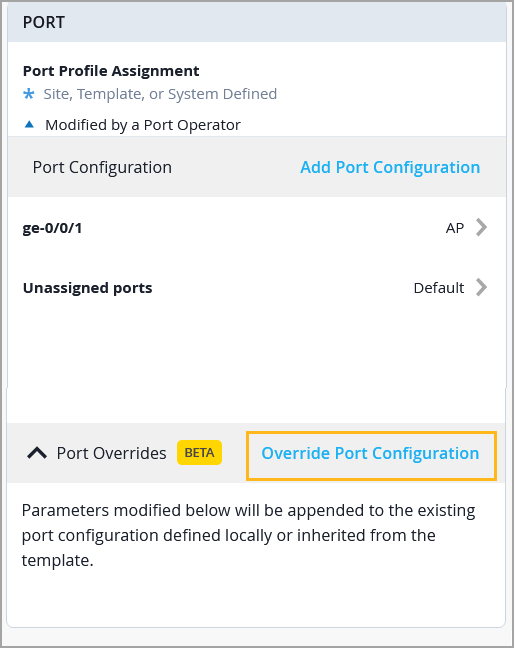
  3. [ポート] タイルで、[ポートのオーバーライド] セクションを展開します。
    [Port Overrides] セクションは、少なくとも 1 つのポート プロファイル設定が存在する場合にのみ表示されます。
  4. [Override Port Configuration] をクリックします。
    User interface for configuring network port settings, showing port profile assignment at site, template, or system-defined levels, specific port ge-0/0/1 assigned profile AP, unassigned ports set to Default, option to add port configuration, and highlighted Override Port Configuration button for modifying or appending port settings.
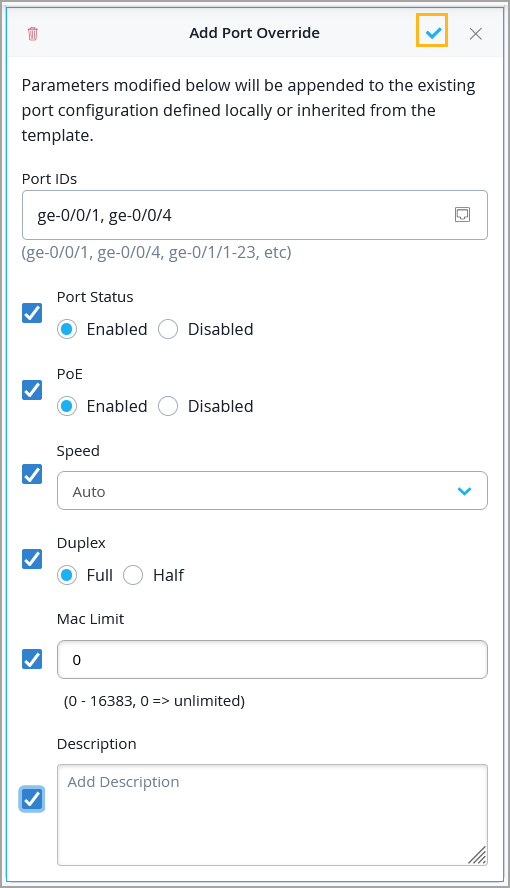
  5. オーバーライド パラメータを設定するポート ID を指定します。
  6. オーバーライドするパラメータを選択するには、対応するチェックボックスをオンにします。
  7. 選択したパラメータを設定し、[Add Port Overrides] ウィンドウの右側にあるチェック マーク(✓)をクリックします。
    [ポート ステータス(Port Status)]、[PoE]、[速度(Speed)]、[デュプレックス(Duplex)]、[MAC 制限(MAC Limit)]、[ポートの説明(Port Description)] の各パラメータを上書きできます。
    Configuration interface for adding port overrides in a network management system, showing options to modify port IDs, status, PoE, speed, duplex, MAC limit, and description, with save and delete buttons.
  8. スイッチの詳細ページの右上にある [保存(Save)] をクリックして、設定を保存します。

適用されたポートの上書きは、スイッチの [Insights] ページの [Switch Ports] セクションで確認できます。