Help us improve your experience.

Let us know what you think.

Do you have time for a two-minute survey?


サポートチケットを表示する

以下の手順に従って、サポートダッシュボードに移動し、チケットのステータスを確認します。

サポートチケットは、ジュニパーのMist™ポータルから確認できます。
  1. ジュニパー Mistポータルの右上隅にある質問アイコンをクリックし、 サポートチケットをクリックします。
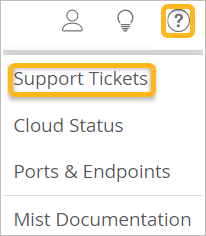
    Menu interface with highlighted Support Tickets option in yellow and a yellow-highlighted question mark icon in the top-right corner for help or support. Other menu options include Cloud Status, Ports Endpoints, and Mist Documentation. Top icons represent user actions, ideas, and help.
  2. (オプション)期間を選択します。
    Support Tickets dashboard with a time range filter dropdown and a table listing tickets by number, type, created date, last update, requester, and status, showing two pending tickets.
  3. 表示するチケットをクリックします。
