Help us improve your experience.

Let us know what you think.

Do you have time for a two-minute survey?


SOTI MobiControl統合

これらの手順に従って、SOTI MobiControlの統合を理解し、SOTI MobiControlアカウントをジュニパーMist組織にリンクし、ポリシールールを作成し、クライアントイベントを表示します。

ジュニパー Mist Access Assuranceは、SOTI MobiControlとのネイティブ統合をサポートしており、ラップトップや携帯電話などのデバイス全体のエンドポイントコンプライアンスを包括的に評価できます。SOTI MobiControlは、事前定義されたポリシーを使用して、アンチウィルスの有無、ファイアウォールステータス、OSパッチレベルなどのセキュリティパラメーターに基づいてデバイスのコンプライアンスを評価します。ジュニパー Mist Access Assuranceは、SOTI MobiControlから最新のデバイスのコンプライアンスステータスを取得し、それを認証ポリシーに適用して、アクセス制御の決定を適用します。
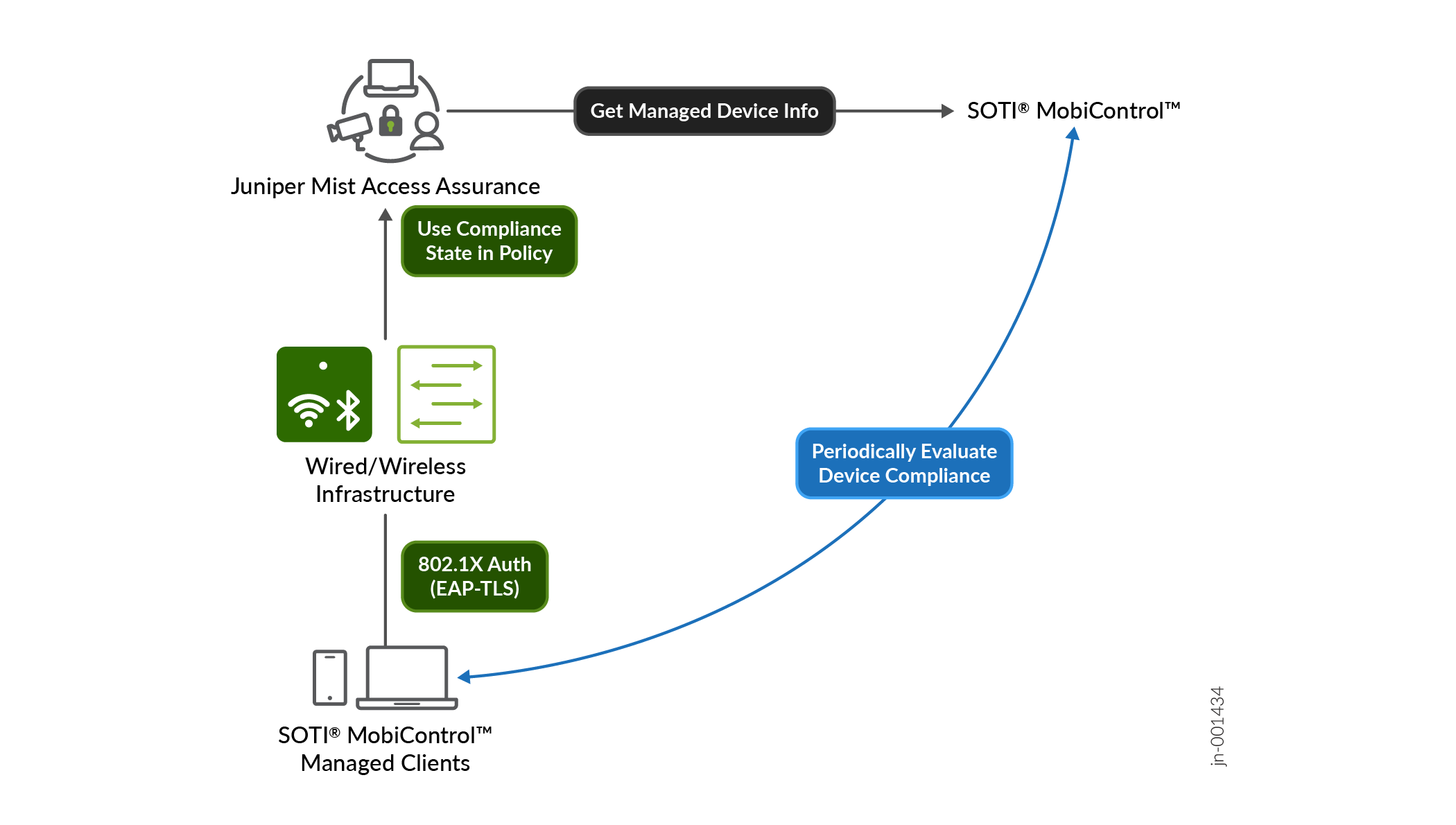
Flow diagram of SOTI MobiControl integration with Juniper Mist Access Assurance for device compliance and network access.

SOTI MobiControlからのコンプライアンスデータの取得

ジュニパー Mist Access Assuranceは、APIベースのポーリングメカニズムを使用して、認証された各マネージドクライアントに対して2時間ごとにSOTI MobiControlにクエリーします。コンプライアンスステータス情報はキャッシュされ、すばやく取得できます。

さらなる遅延を防ぐため、認証プロセスの完了後にコンプライアンス情報が取得されます。デバイスの最初のオンボーディングが完了すると、コンプライアンスステータスが2時間ごとに更新されます。

デバイスのコンプライアンス状態が変化した場合、ジュニパー Mist Access Assuranceは自動的にChange of Authorization(CoA)をトリガーしてポリシーを再評価し、適切なアクセス制御措置を実施します。このCoAの自動トリガーにより、コンプライアンスの変更に迅速に対応し、手動介入を必要とせずにセキュリティとポリシーの遵守を維持できます。

図1 は、ジュニパー Mist Access AssuranceがSOTI MobiControl管理対象デバイスのコンプライアンスデータを取得して認証を行う方法を示しています。
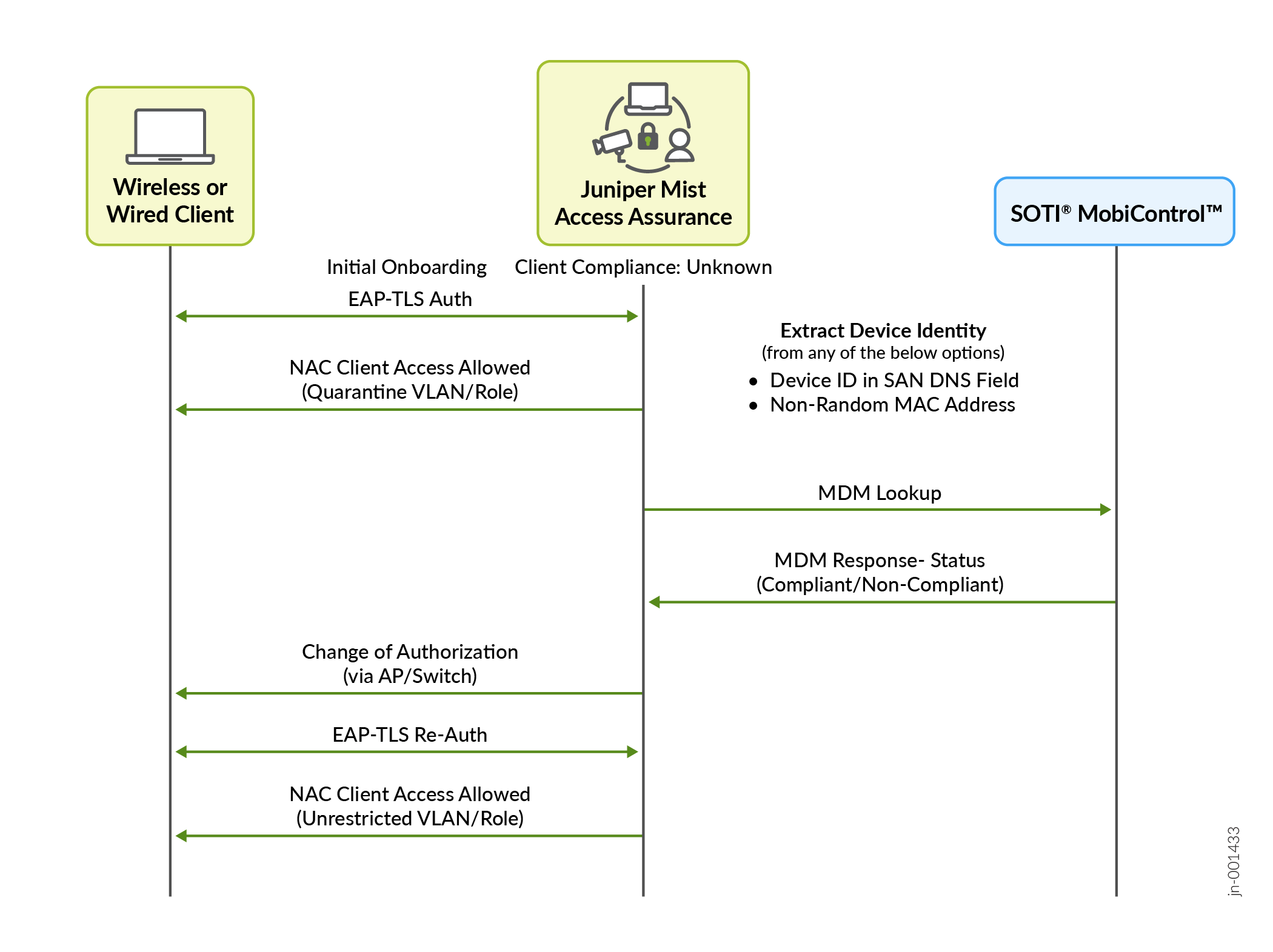
図1:SOTI MobiControl Flow diagram showing the process of network access control and device compliance verification using Juniper Mist Access Assurance and SOTI MobiControl. Key steps include EAP-TLS authentication, device compliance check via MDM lookup, and authorization update for secure network access.の認証および承認プロセス
注:

CoA 機能をサポートするには、AP はファームウェア バージョン 0.14 以降を実行する必要があります

ジュニパー Mist Access Assuranceは、クライアント認証時に以下の情報を使用して、クライアントをSOTI MobiControlのデバイスレコードと照合します。

注:

このトピックに含まれるスクリーンショットの一部は、サードパーティ製アプリケーションから取得したものです。これらのスクリーンショットは時間の経過とともに変更される可能性があり、アプリケーションの現在のバージョンと必ずしも一致するとは限らないことに注意してください。

  • 非ランダム化MACアドレス—EAP-TTLSまたはEAP-TLSを使用した認証では、クライアントデバイスのMACアドレスがSOTI MobiControlの管理対象デバイスレコードと照合されます。正確なMACベースのデバイスマッチングを確保するには、クライアントデバイスのWi-Fi設定プロファイルでMACアドレスのランダム化を無効にする必要があります。この記事の執筆時点では、SOTI MobiControl は、iOS および Android デバイスのみの Wi-Fi 構成プロファイルで MACアドレスのランダム化を無効にする機能をサポートしています。
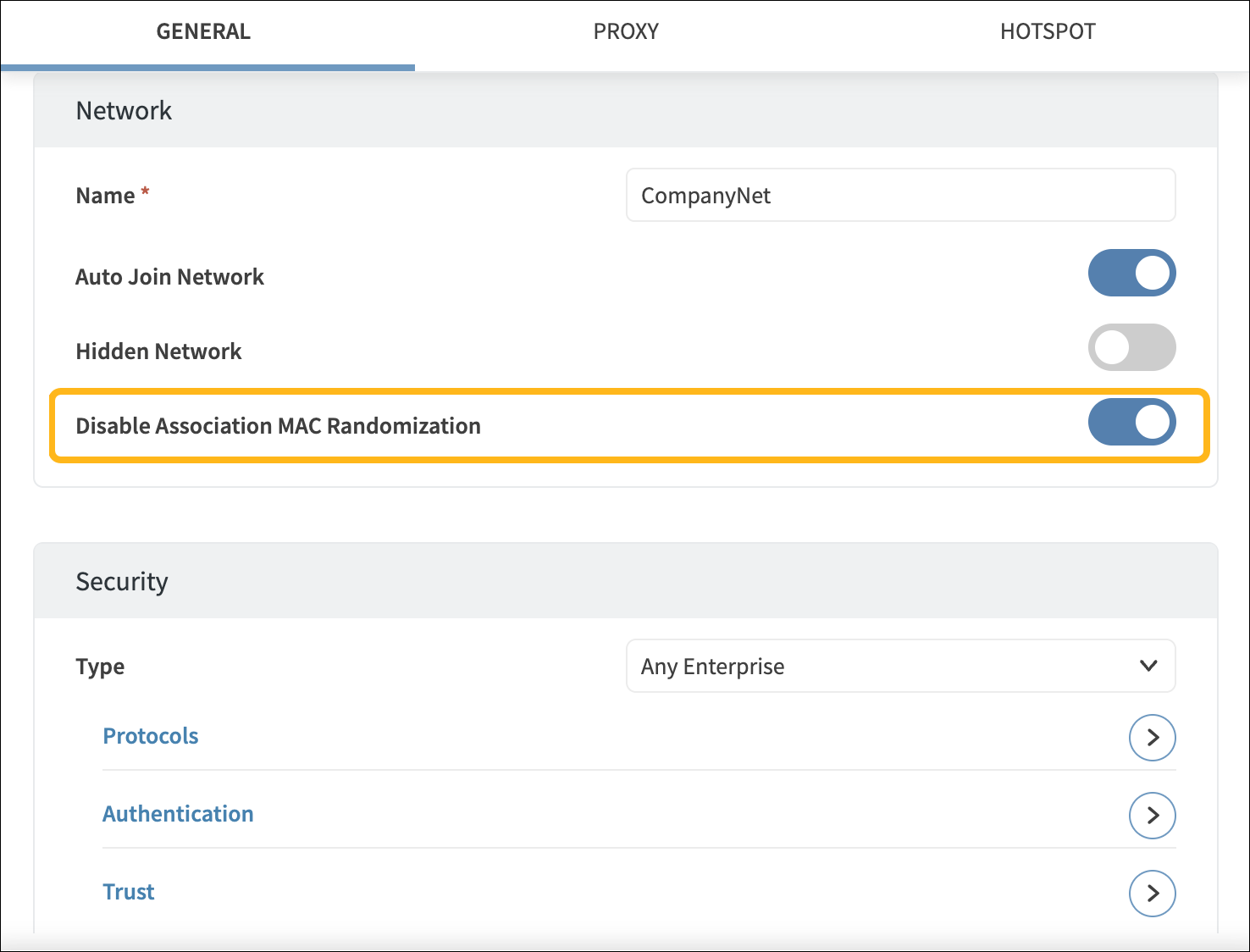
    Network configuration interface with sections for Network Settings and Security Settings. Network name set to CompanyNet. Auto Join Network enabled, Hidden Network disabled, and Disable Association MAC Randomization enabled. Security type set to Any Enterprise with options for Protocols, Authentication, and Trust.

  • SAN:DNS証明書属性でエンコードされたSOTI MobiControlデバイスID - SOTI MobiControl証明書テンプレートで、 %DeviceIdentifier% 変数を使用して、SAN:DNS証明書フィールドのデバイスIDをエンコードします。
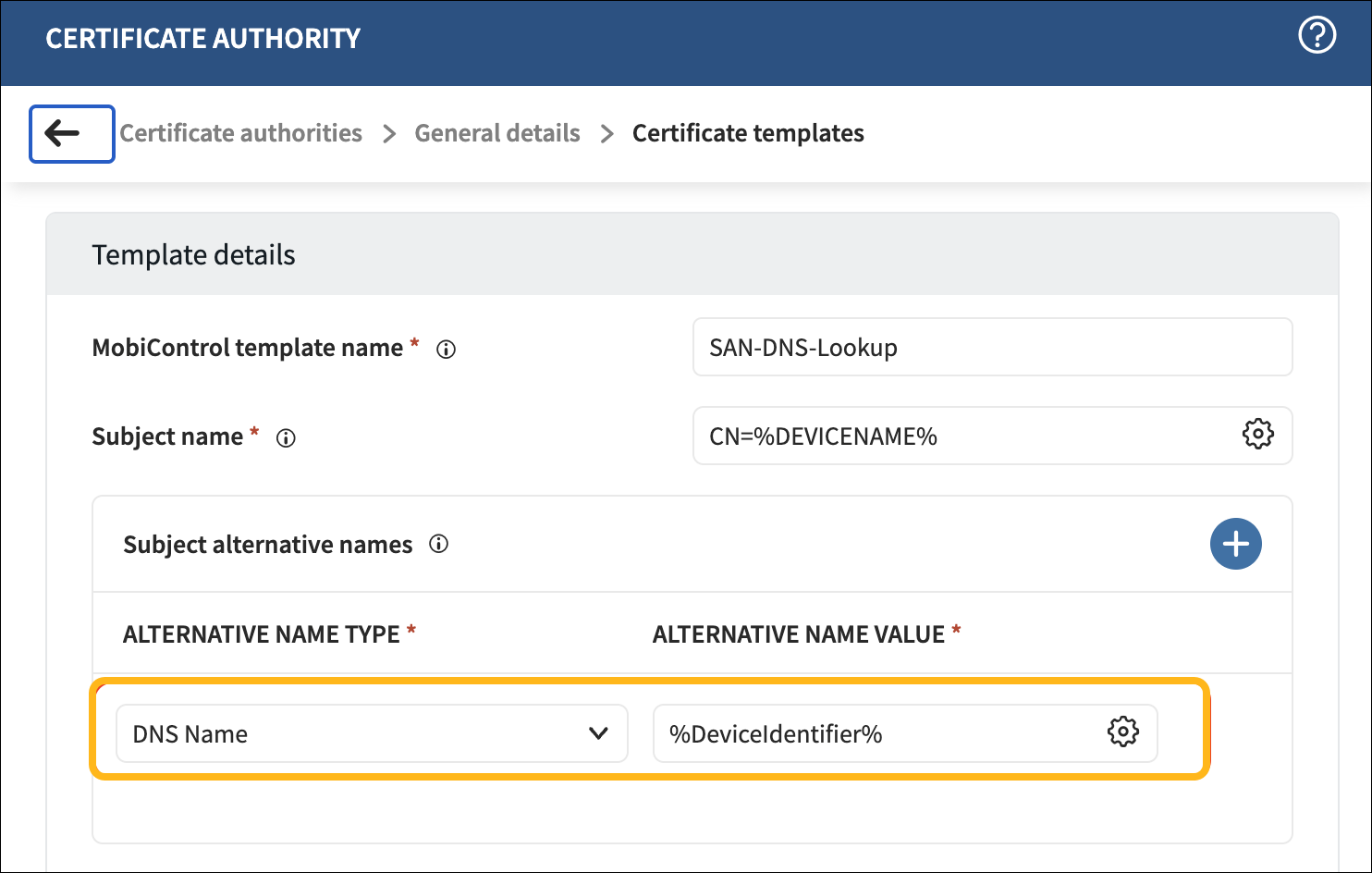
    Certificate Authority setup screen with MobiControl template name SAN-DNS-Lookup. Subject name is CN=%DEVICENAME%. DNS Name alternative set as %DeviceIdentifier%. Options for adding or modifying entries.

SOTI MobiControl の設定

SOTI MobiControlをジュニパーMistと統合するには、SOTI MobiControl APIクライアントIDを設定する必要があります。

注:

サードパーティ製アプリケーションのスクリーンショットは、公開時点のものです。スクリーンショットがいつ、または将来正確になるかを知る方法はありません。これらの画面の変更や関連するワークフローのガイダンスについては、サードパーティーのWebサイトを参照してください。

  1. SOTI MobiControlで、グローバル設定>サービスAPIクライアントに移動します。+をクリックして、新しいクライアントIDとクライアントシークレットを生成します。これらの値をコピーします。
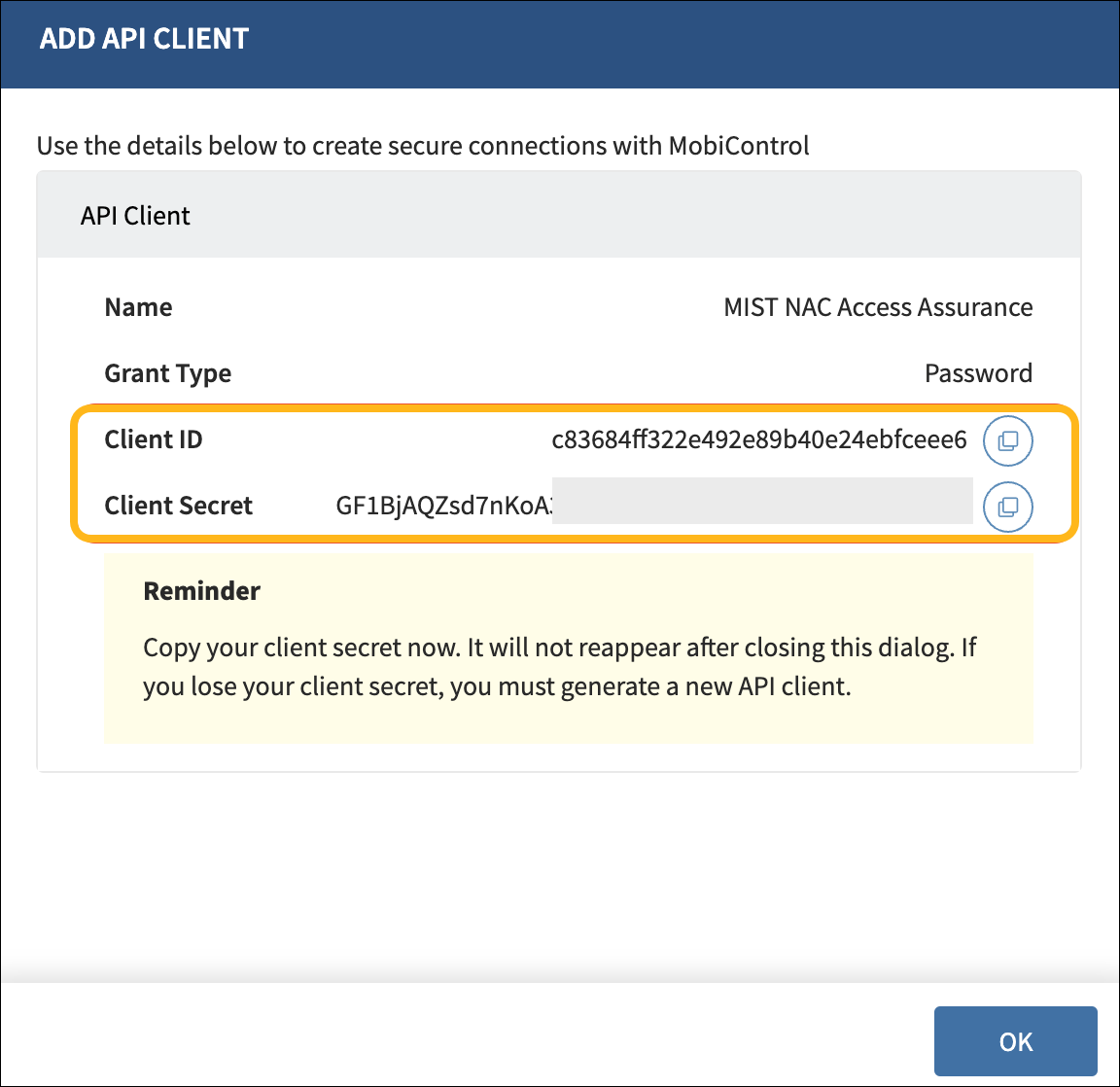
    User interface for adding an API client in MobiControl with fields for Name, Grant Type as Password, Client ID, and partially visible Client Secret. Reminder to copy Client Secret immediately, as it will not be shown again. Includes buttons to copy credentials and confirm action.
  2. MobiControl Webコンソールの表示専用アクセス権を持つユーザ資格情報を作成します。ユーザーと権限>ユーザーに移動し、+をクリックしてユーザーを追加します。
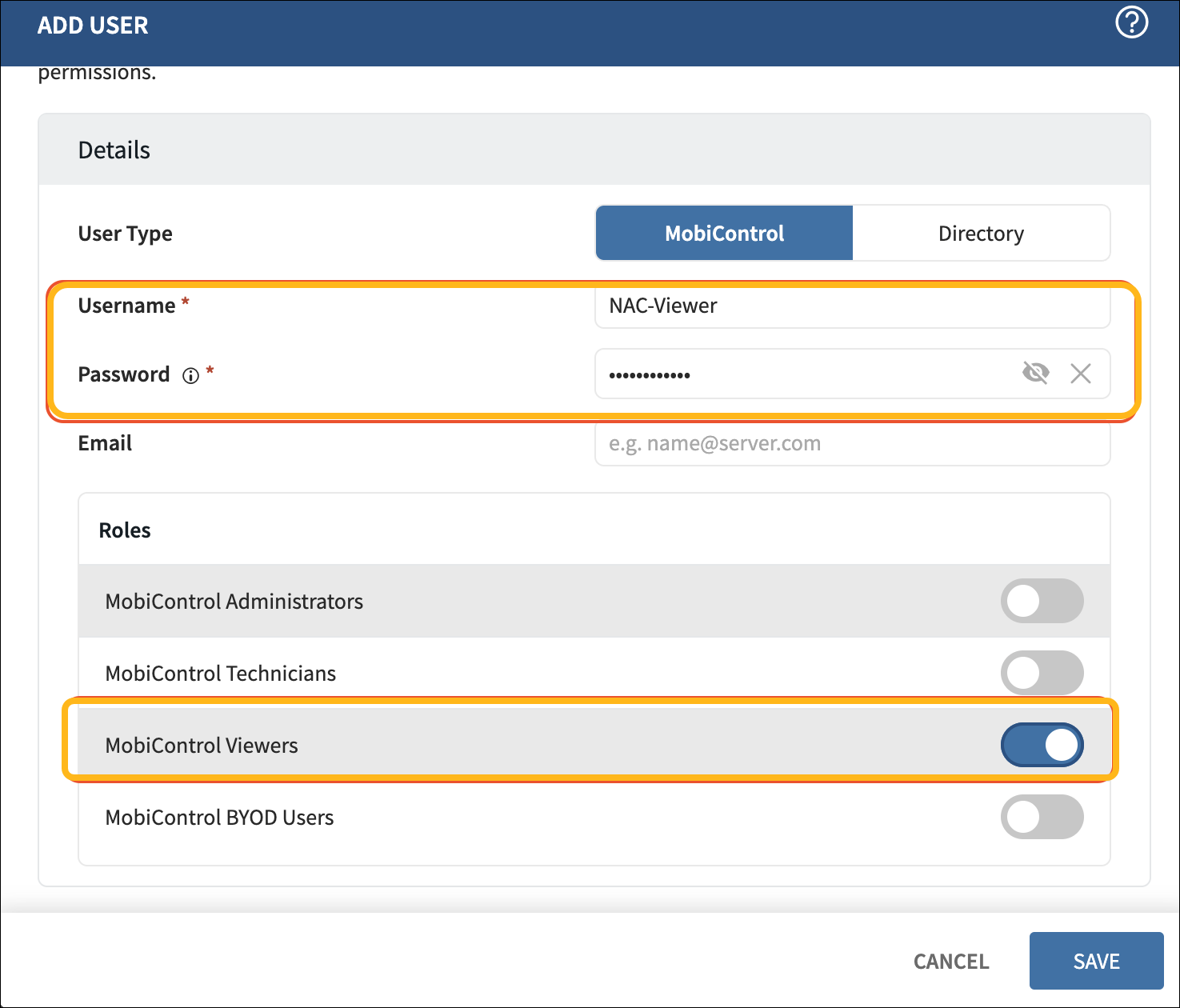
    User interface for adding a new user in MobiControl with fields for username, password, email, user type selection, role assignment, and save or cancel options.
  3. デバイスが登録されるデバイスグループへのアクセス権がユーザにあることを確認します。
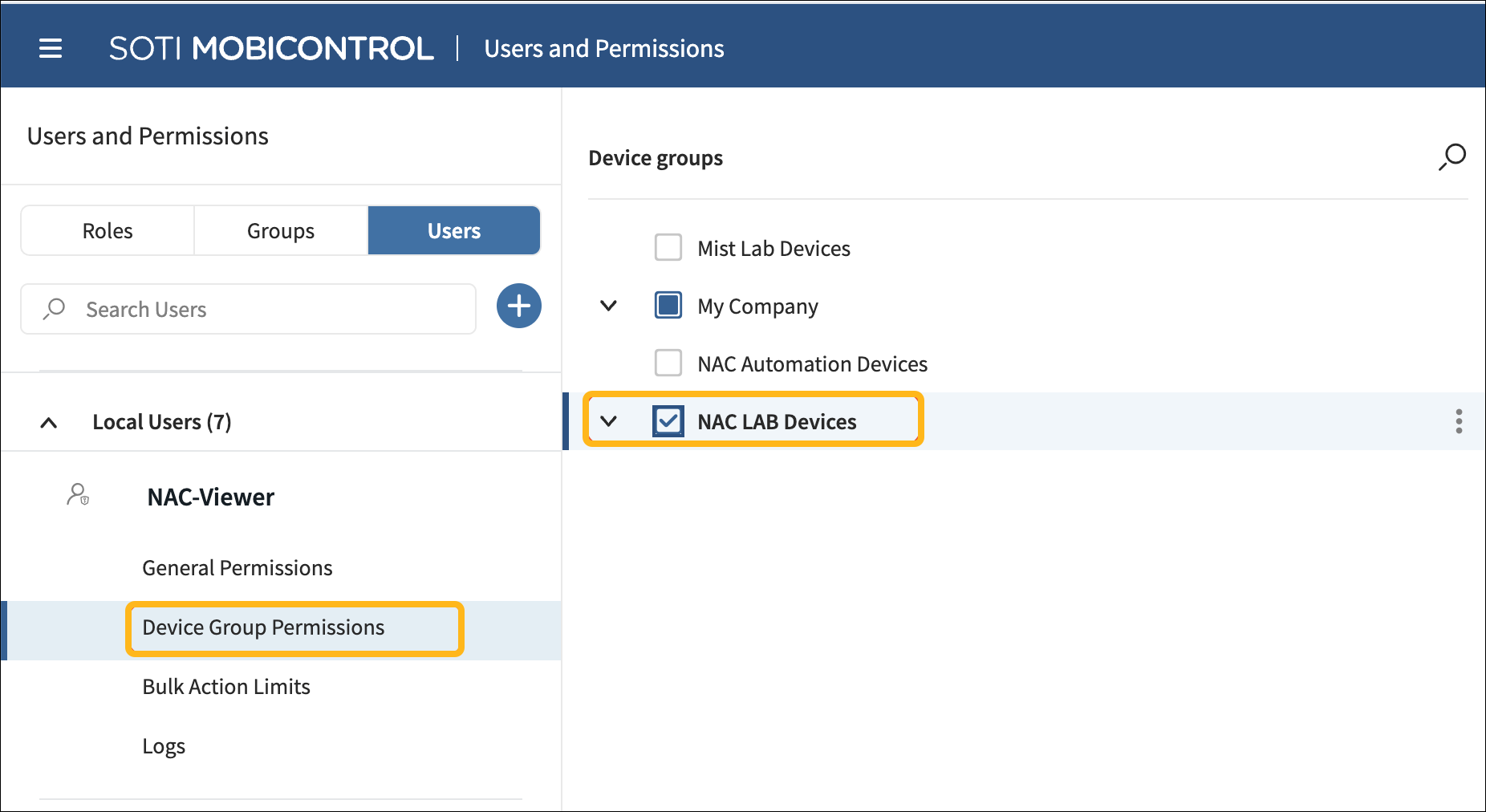
    Users and Permissions section in SOTI MobiControl with tabs for Roles, Groups, and Users; selected user NAC-Viewer shows permission options and device group NAC LAB Devices under My Company.

SOTI MobiControlをジュニパーMistポータルに追加

SOTI MobiControlをジュニパー Mistポータルに追加するには:

  1. ジュニパー Mistポータルの左側のメニューから、 組織> アクセス>IDプロバイダーを選択します。
  2. [リンクされたアカウント]セクションで、[アカウントのリンク]をクリックします。
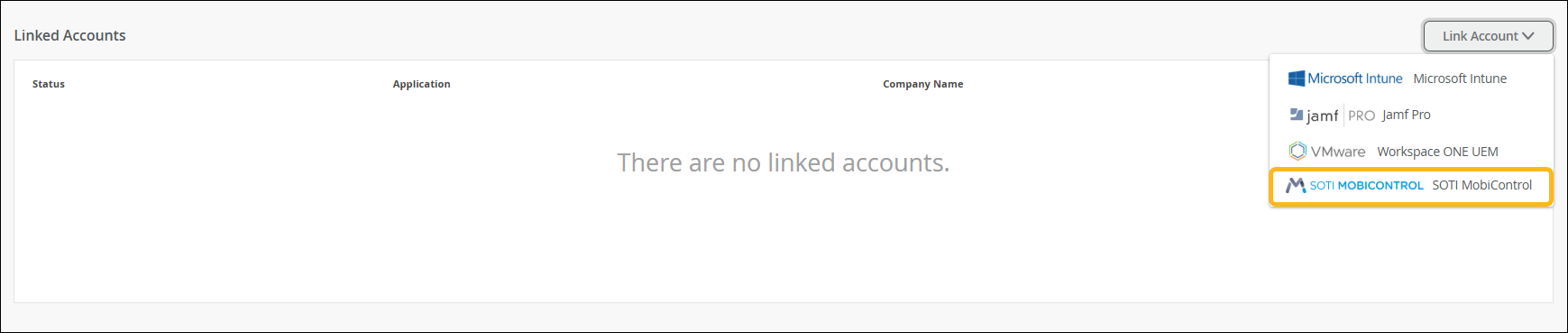
    User interface for managing linked accounts with message stating no linked accounts and dropdown menu labeled Link Account listing options including Microsoft Intune, Jamf Pro, VMware Workspace ONE UEM, and SOTI MobiControl highlighted in yellow.
  3. [SOTI MobiControl] を選択します。
  4. アカウントのリンクページで、クライアントID、クライアントシークレット、ユーザー名、パスワード、SOTI MobiControlインスタンスURL(例:https://ABC.mobicontrol.cloud)を入力します。
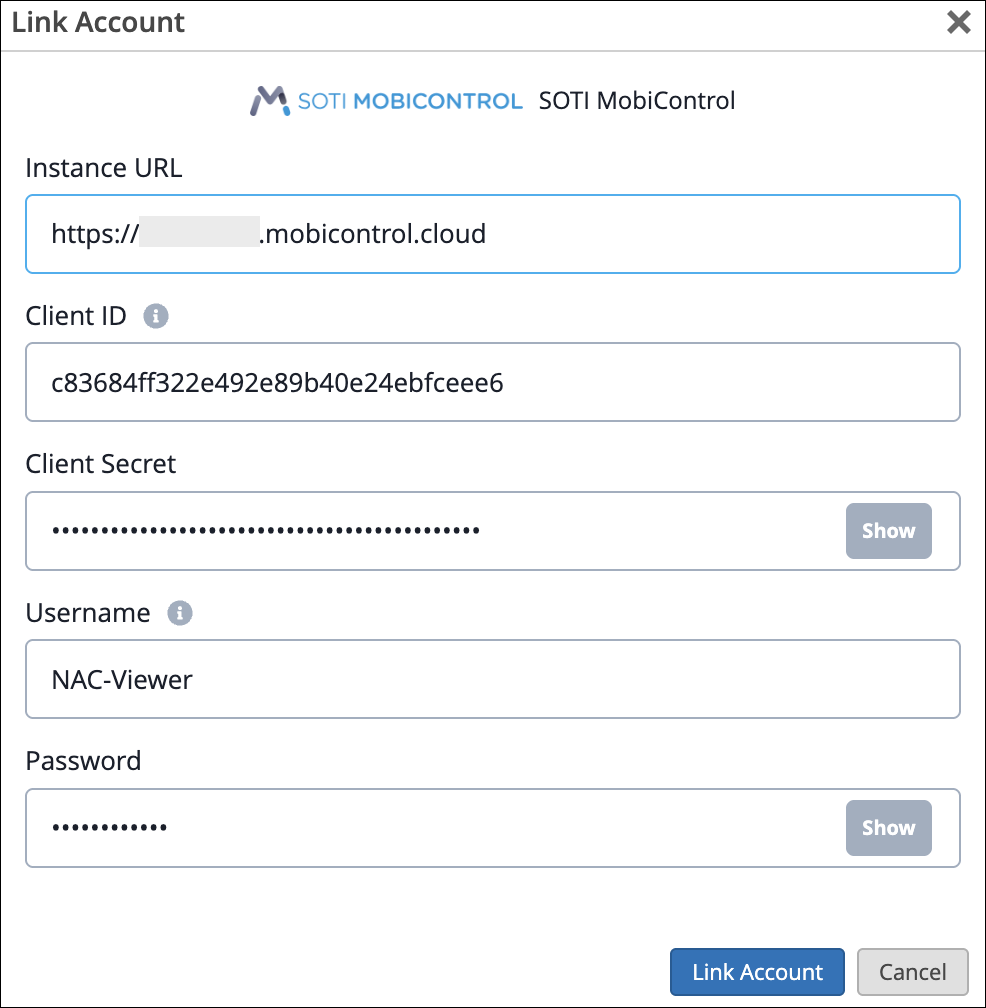
    Link Account configuration window for SOTI MobiControl with fields for Instance URL, Client ID, Client Secret, Username, Password, and buttons to Show hidden fields, Link Account, or Cancel.
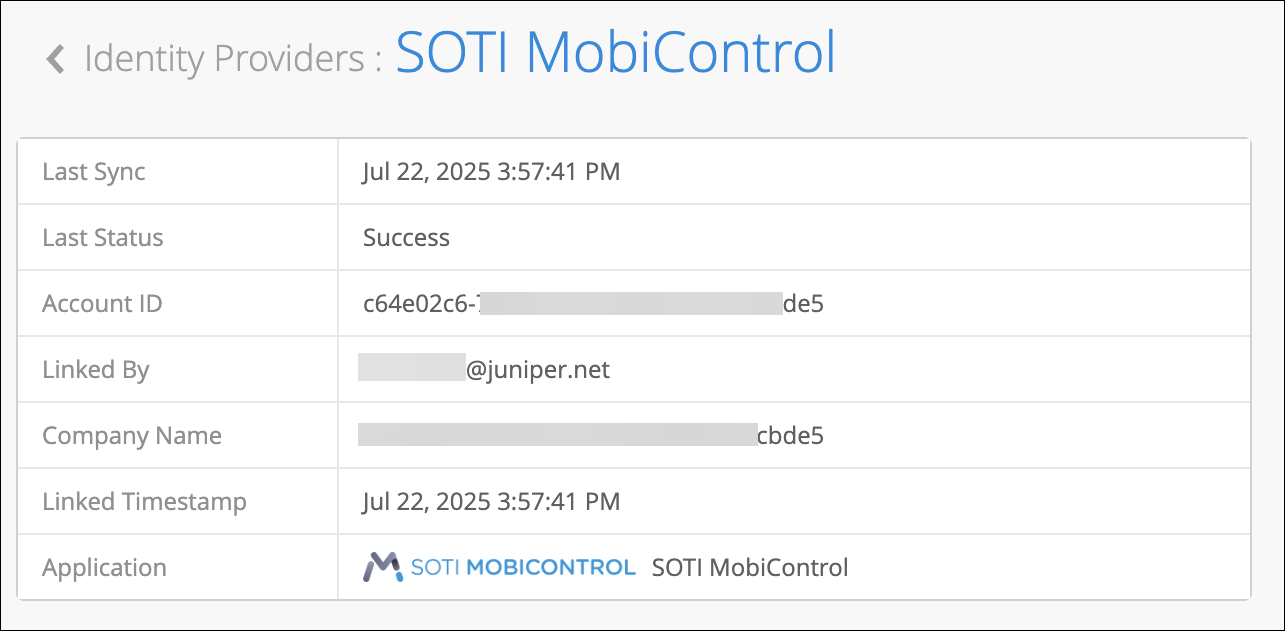
    SOTI MobiControlアカウントをリンクすると、IDプロバイダーページでSOTI MobiControlアカウントのステータスを確認できます。

    アカウントをクリックすると、最後の同期の詳細を表示できます。

    SOTI MobiControl dashboard showing linked identity provider details: last sync July 22 2025 at 3:57:41 PM, status success, partially redacted account ID, linked by partially redacted email, partially redacted company name, linked timestamp July 22 2025 at 3:57:41 PM, and application name SOTI MobiControl.

SOTI MobiControlの検証

新しいクライアントの最初のMDMルックアップは、デバイスが初めて認証された後に行われます。このルックアップを容易にするには、デバイスの初回接続を許可し、デバイスを隔離VLANに割り当てる認証ルールを作成する必要があります。

注:このルールの一致条件に [準拠] または [非準拠] の MDM コンプライアンス ラベルを含めないでください。オプションで、Unknown Compliantラベルを一致条件として使用できます。このルールの優先度が標準のアクセスポリシーよりも低いことを確認してください。

User interface for managing authentication policies in a network access control system. Features title Auth Policies, description of policy rule evaluation, buttons for adding rules, viewing NAC events, and selecting hit count time range. Includes a policy table with columns for policy number, name, match criteria, policy status, assigned actions like VLAN assignments, and hit counts. Save and cancel buttons allow changes to be saved or discarded.

クライアントが接続されると、インサイトページにNACクライアントアクセスが許可されたイベントが表示されます。
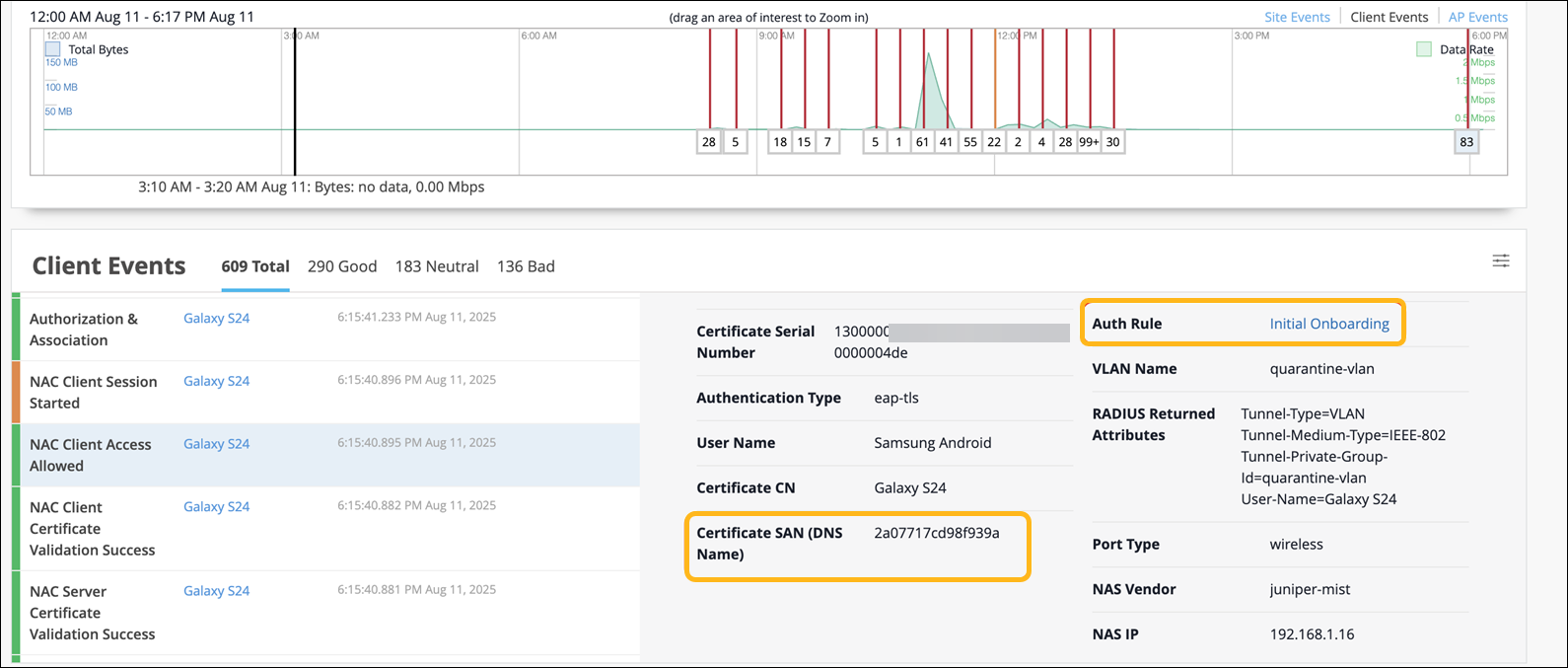
Network monitoring interface showing data usage graph with activity spikes, client events like authorization and session start, and detailed authentication info for a device.

クライアントが接続すると、ジュニパー Mist Access Assuranceは以下を実行します。

  1. デバイスのコンプライアンスステータスをSOTI MobiControlから取得します。
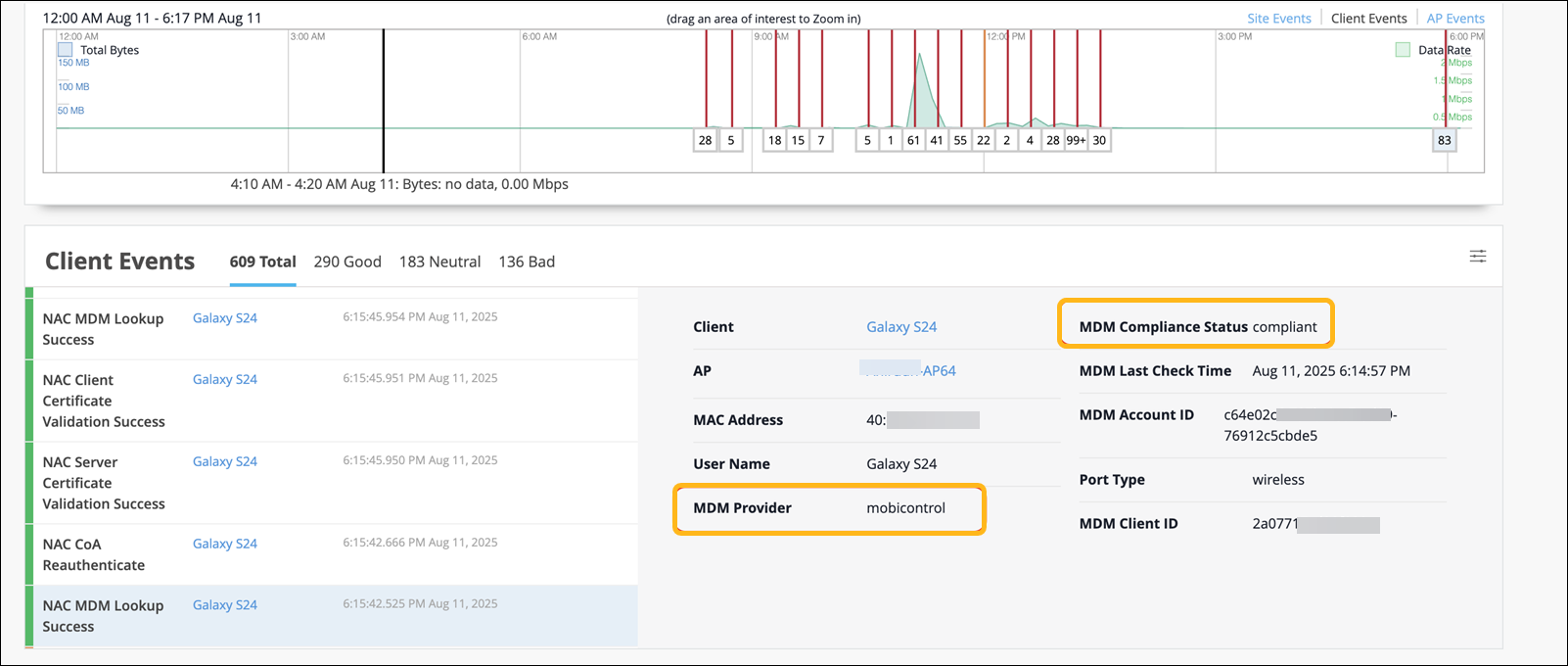
    Network monitoring dashboard showing data usage graph, client events, and device compliance. Highlights Galaxy S24 details, MDM status as compliant, and wireless port type.

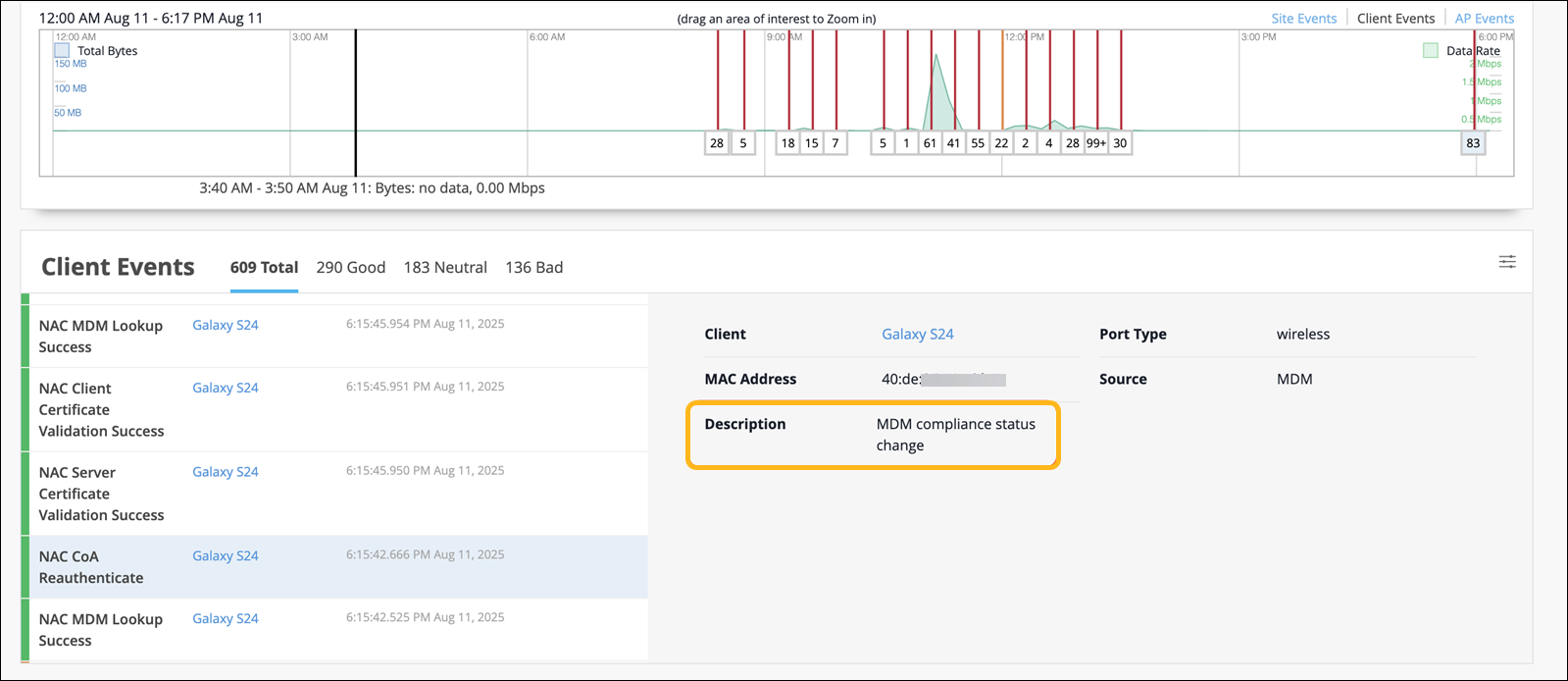
  2. クライアントを再認証するためのChange of Authorization(CoA)をトリガーします。
    Network monitoring interface showing data usage graph with timestamps and data rates, client events listing event types and statuses, and details panel with client info and compliance status.

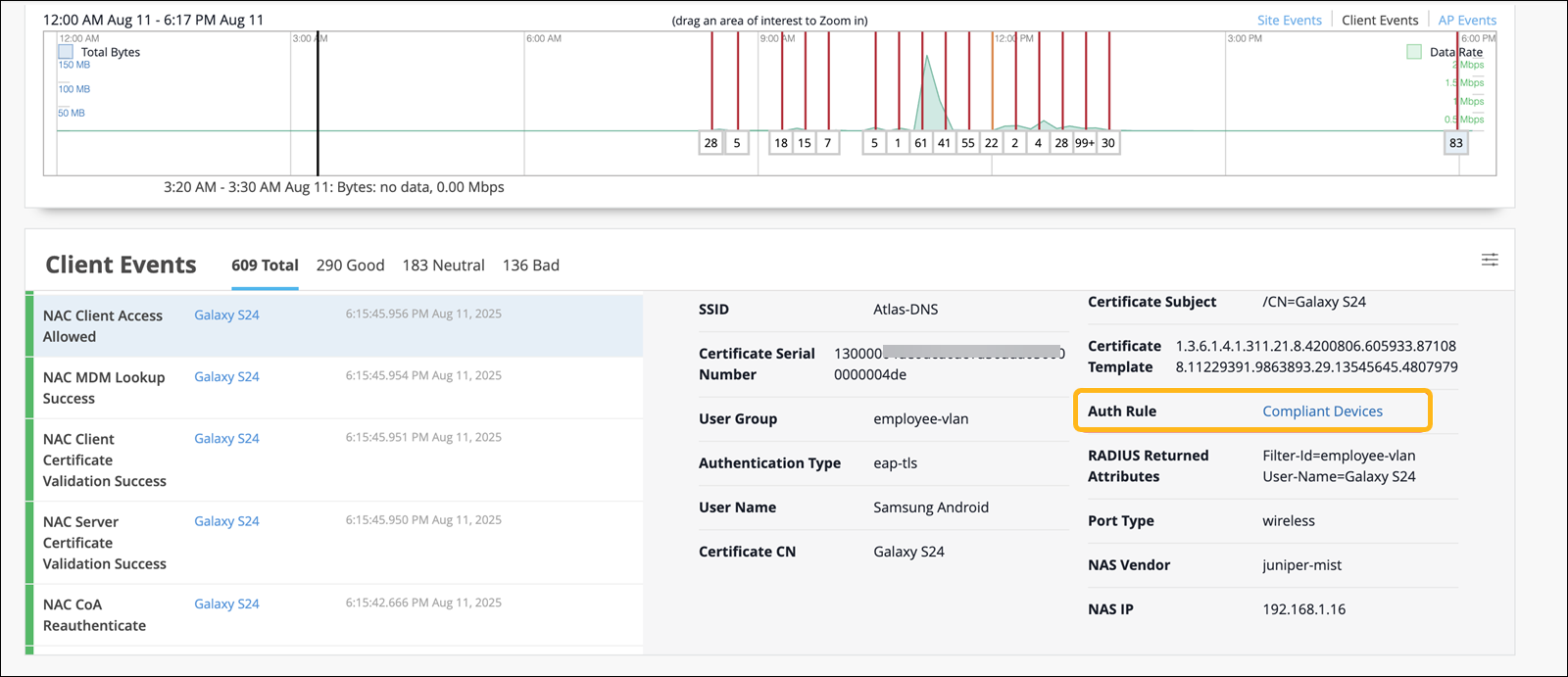
  3. 再認証時に、クライアントは更新されたコンプライアンスステータスに基づいて適切なポリシーと照合されます。
    Network monitoring dashboard showing a graph of data usage and events over time, client events log, and detailed information about a connected device including SSID, certificate details, user group, and authentication type.

その後のすべての認証において、ジュニパー Mist Access AssuranceはキャッシュされたMDMデータを使用し、コンプライアンスの変更をキャプチャするために2時間ごとに自動的に更新されます。