
Marvis Actionsの概要
概要 Marvis Actionsを使い始めて、Marvis Actionsダッシュボードの主な機能について理解しましょう。
Marvis Actionsとは何ですか?
Marvis®はMist AIを活用して問題の根本的原因を特定します。Marvisは、問題を自動的に修正したり(自動運転モード)、ユーザーの介入を必要とするアクションを推奨したり(運転支援モード)することができます。Marvis Actionsページには、Marvisが検出した影響の大きいネットワーク問題の一覧が一覧表示されます。Marvis Actionsには、組織のネットワークに対して推奨されるアクションも表示されます。Marvis Actionsは、MSP(マネージドサービスプロバイダ)レベル、組織レベル、サイトレベルで、有線、WAN、無線ネットワーク全体の問題に対するインサイトを提供します。Marvis Actionsでは、APのファームウェアのコンプライアンスの追跡、不良ケーブルの特定、L2ループの特定、WANリンクの障害の検出などを、すべて1つのページから行うことができます。
Marvis Actionsは、ネットワークに対するリアルタイムのAIネイティブのインサイトにより、事前対応型の問題の検出と解決を可能にするため、トラブルシューティングの労力と時間が大幅に削減されます。
このビデオでは、Marvis Actionsの概要を説明します。
Marvis Actions is the proactive way to use the Mist AI engine to bubble up user impacting issues across a customer's organization. This is the next level in Mist's AI journey to the self-driving network, turning root cause into human action. Here we take a look at the switches and see some are missing VLANs.
This is one of the most common use cases we see at our customers with thousands of APs. This would show as users complaining in certain areas that they lost their Wi-Fi. With a normal Wi-Fi installation, you would troubleshoot capacity, look at the WLAN, look at the coverage, when ultimately ends up being the VLAN was never brought to the AP.
With Marvis Actions, we can now own the issue and fix the problem. Let's mark this issue as in progress and we'll assign it to Jeff. Jeff can now go fix the problem and report back that Marvis AI actually found the problem and it is now resolved.
Latest updates contain the list of issues which have been resolved in the last seven days and is split into three categories, AI validated, resolved, or reoccurring. Let's look at authentication failures. Mist anomaly detection will indicate if a RADIUS server isn't responding to requests or if an AP is missing as a NAS client based on all the clients failing authentication on that AP.
Let's mark this one as in progress and we'll assign it to Matt. Matt will go take a look at the RADIUS server and maybe restart it and then mark this issue as resolved. Note that as we resolve problems, the AI engine is validated and condition has been truly resolved.
Now we can back up and take a look at all of our sites. In this case, there's a noted firmware release flagged by support as needing an upgrade. Marvis Actions, turning root cause into human action.
Marvis Actionsダッシュボード
Marvis Actionsダッシュボードは、組織内のユーザーエクスペリエンスに影響を与えるサイト全体の進行中のネットワークの問題を可視化するワンストップの情報センターです。スーパーユーザーはMarvis Actionsを表示できます。他の役割を持つユーザーは、どのサイトにも割り当てられていない場合、Marvis Actionsを表示できます。情報を確認して、早急に注意が必要な問題に優先順位を付けることができます。
Marvis Actionsダッシュボードを表示するには、ジュニパー Mist™ポータルの左側のメニューから Marvis>Marvis Actions を選択します。
Marvis Actionsページは次のようになります。このページには、さまざまなカテゴリの情報が表示されていることがわかります。Marvisは、カテゴリで検出された問題の数を示します。たとえば、次のスクリーンショットでは、Marvisが接続カテゴリに15件の課題をリストしていることがわかります。
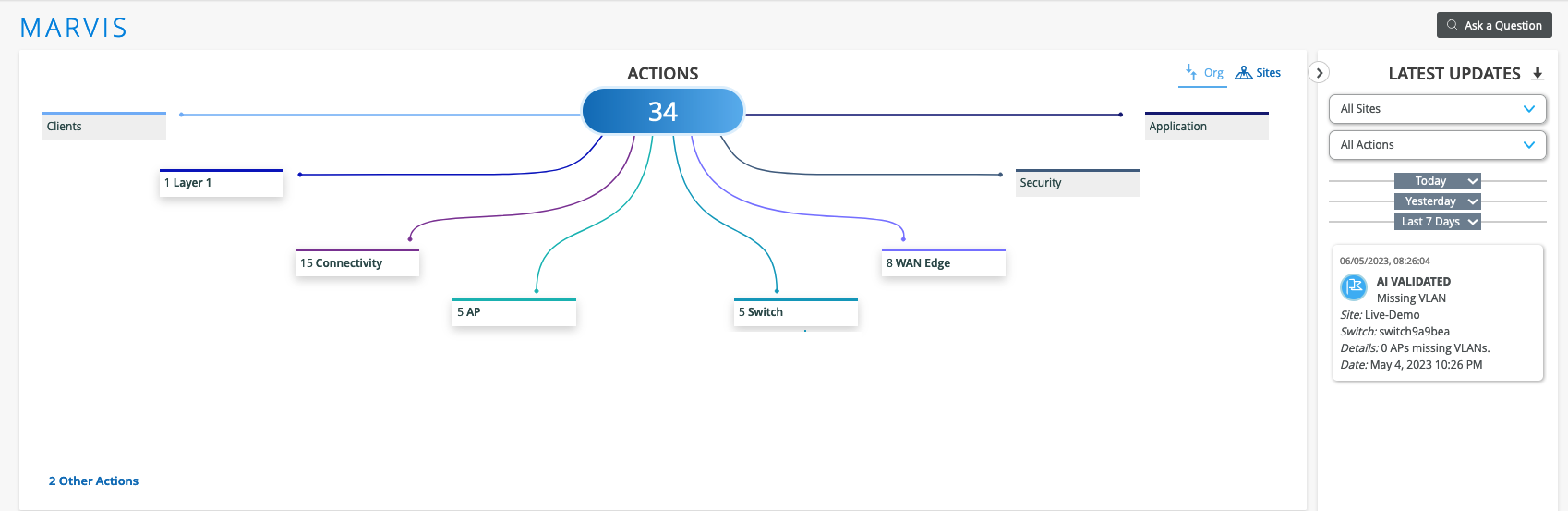
サイト タブを選択して 、サイトの課題を表示することもできます。 サイトタブ には、検出されたすべてのサイトと問題のGoogleマップビューが表示されます。
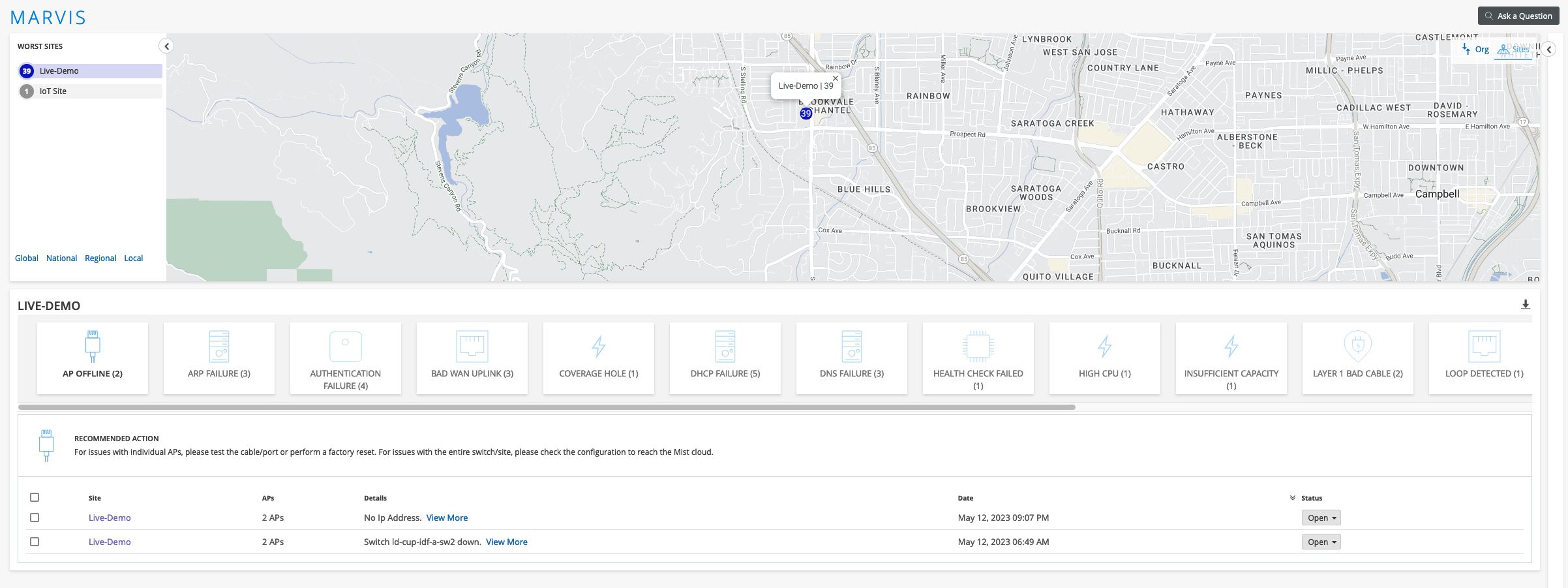
問題とMarvisが推奨するアクションの詳細ビュー
各カテゴリの下には、アクションのグループがあります。各アクションには、1つまたは複数の課題を関連付けることができます。Marvisがアクションに関連する異常を検出しない場合、アクションは淡色表示されます。
カテゴリをクリックすると、そのカテゴリのアクションを表示できます。アクションをクリックすると、問題と推奨アクションを含む詳細ビューが表示されます。Marvisは、すべての問題に対して推奨されるアクションを提供します。
これは、スイッチカテゴリにあるMissing VLANアクションをドリルダウンした後のMarvis Actionsビューです。Marvisは、サイト、スイッチ、および問題(VLANが欠落している2つのAP)の詳細を提供します。また、Marvisが推奨するソリューションは、VLAN構成をスイッチ構成に追加することです。
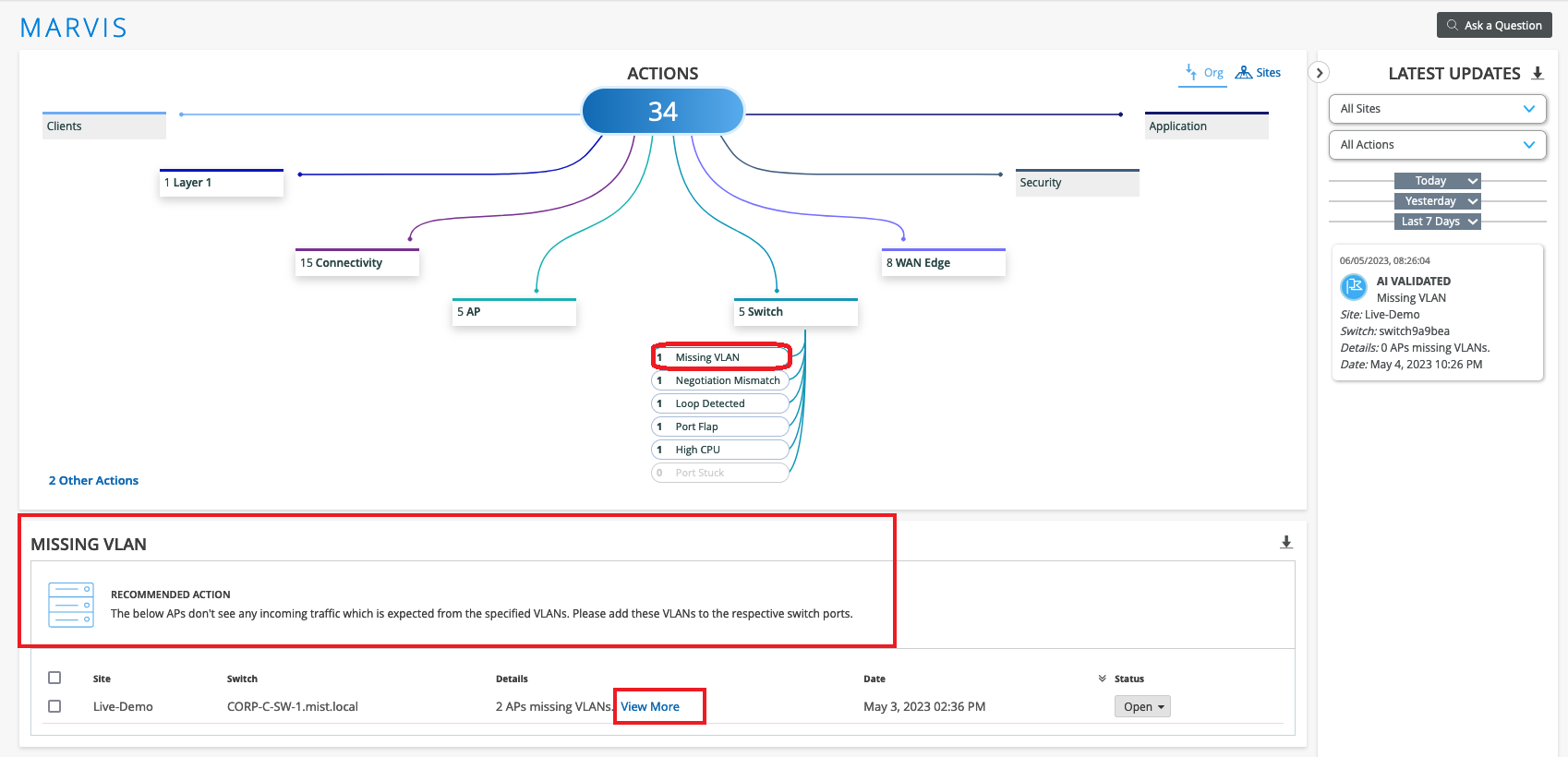
詳細列のさらに表示リンクを使用して、VLANが欠落しているポートに関する特定の詳細を表示できます。ポートの詳細を示すページの例を次に示します。
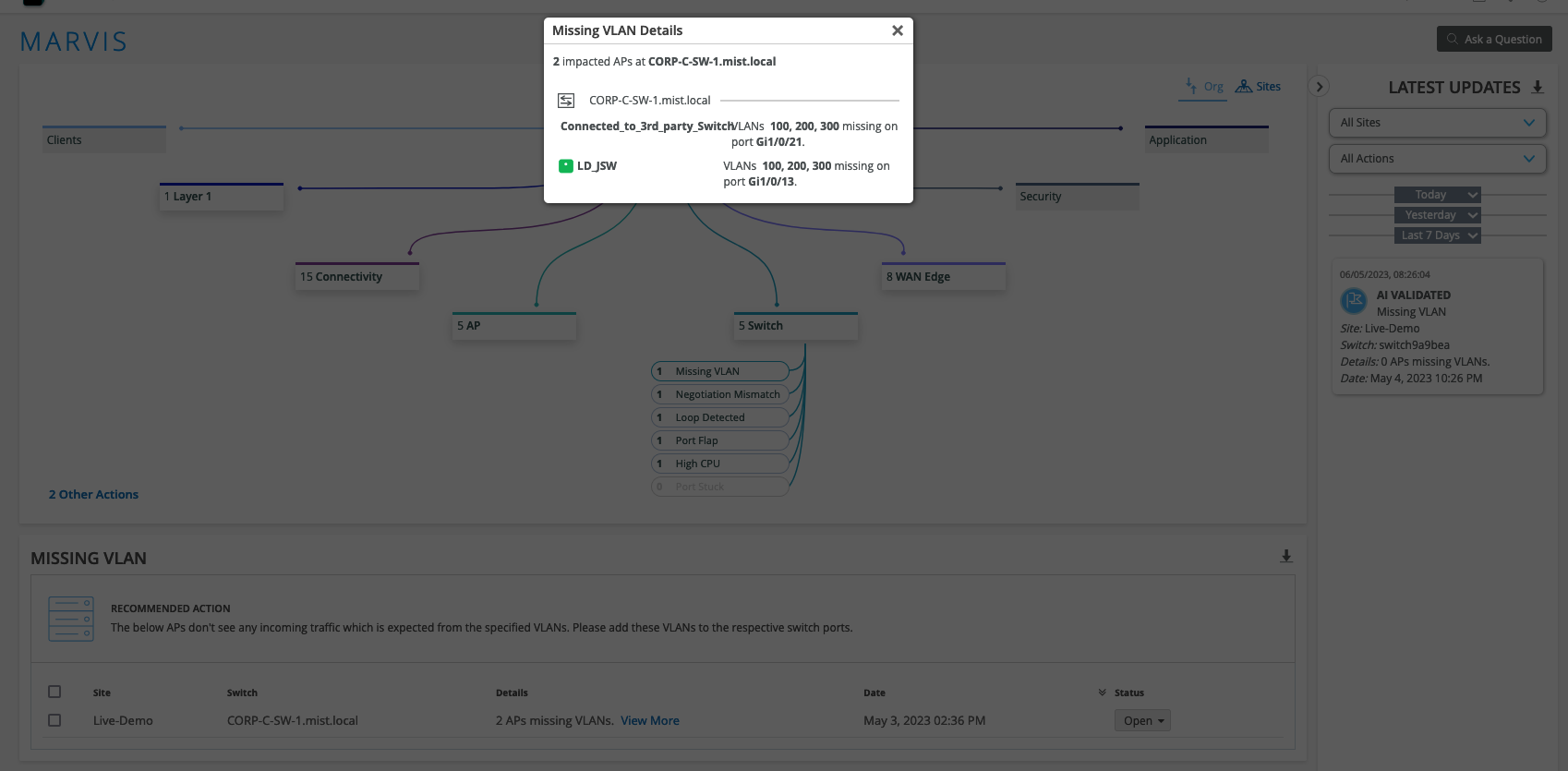
ダウンロード可能な問題リスト
問題のリストを にダウンロードできます。CSVファイル形式。CSVファイルには、失敗の理由やデバイスの詳細など、アクションページに表示されるすべての詳細が含まれています。ダウンロード(下矢印)アイコンは、詳細セクションの右上隅にあります。
問題解決
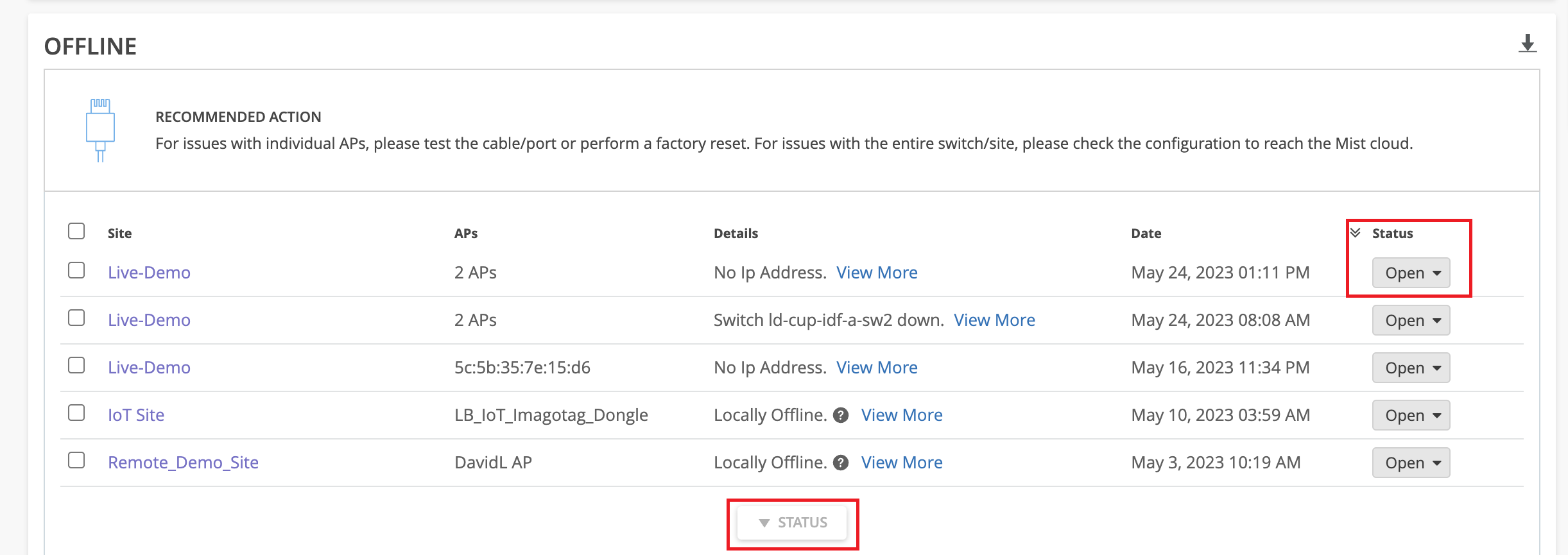
問題を解決した後、1つまたは複数の問題のステータスを変更できます。課題グループのステータスを変更する場合は、ページ下部の ステータス ボタンを使用します。
Marvisはフィードバックを求め、Mistはアクションの有効性を判断するために内部でこれを使用します。
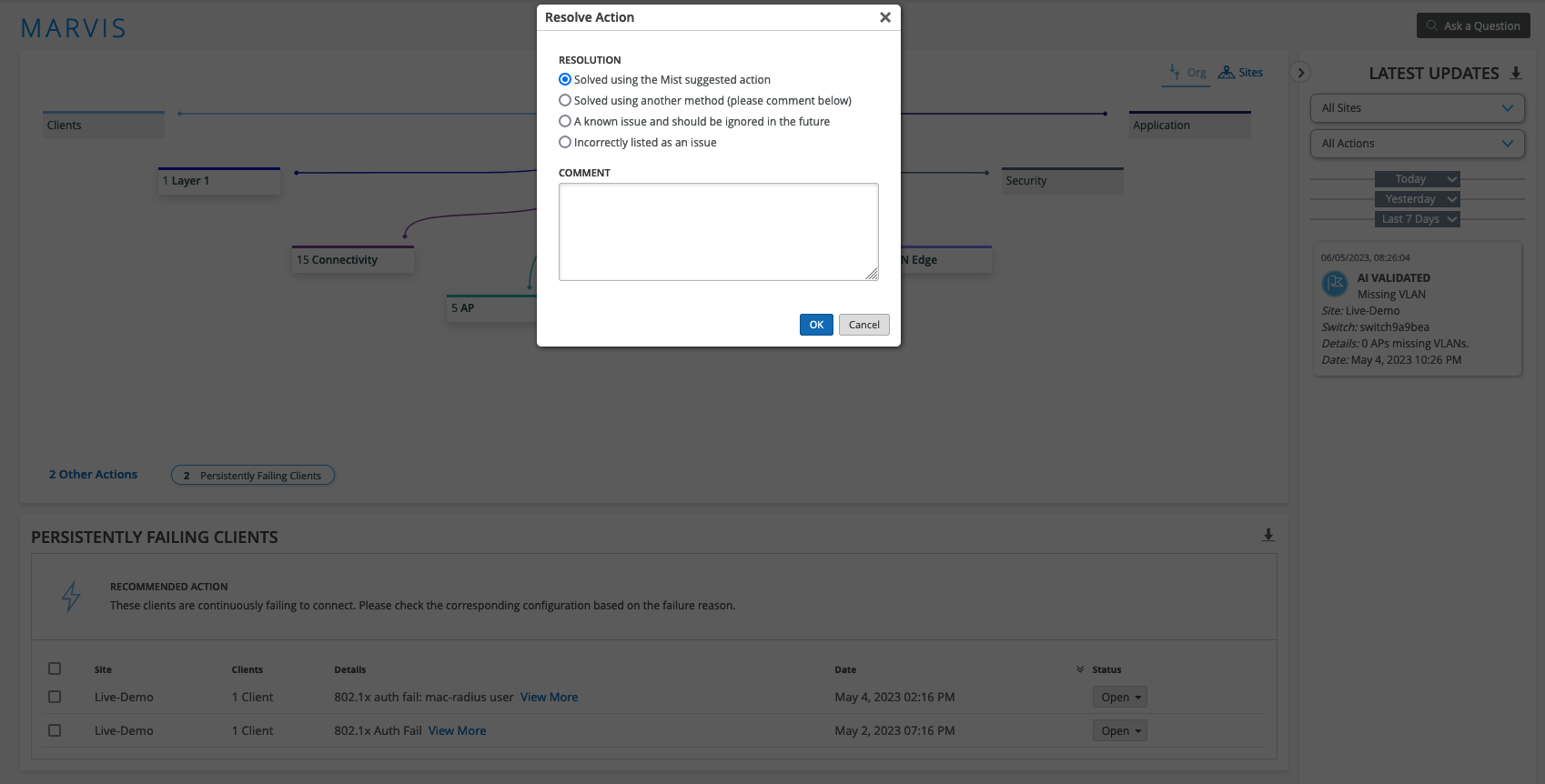
問題に関する最新情報
Marvis Actionsページの右側にある最新のアップデートセクションには、過去7日間に解決された問題のリストが表示されます。Marvisは、問題を以下のいずれかの状態に分類します。
-
AI検証—アクティブでなくなった問題(APにVLANがないなど)をリストアップします。問題のステータスを「解決」に更新すると、Marvisは問題が解決されたことを確認し、その問題を「AI検証済み」として分類します。問題を修正してもステータスを更新しない場合、Marvisは問題が解決されたことを検出し、それを最新の更新セクションに移動します。
-
解決済み—正常に完了した自動アクション(自動アップグレード、自動RMAなど)または手動アクション(手動APアップグレードまたは手動RMAリクエストなど)を一覧表示します。Marvisは、[アクション]ページからアクションをトリガーした場合にのみ、問題を解決済みとして分類します。
- 繰り返し発生する問題—まだ解決されていない、または再発した解決済みの問題をリストアップします。解決済みとしてマークした問題が、まだ完全には解決されていないとMarvisが判断することがあります。その後、Marvisはその問題を再発問題として分類します。
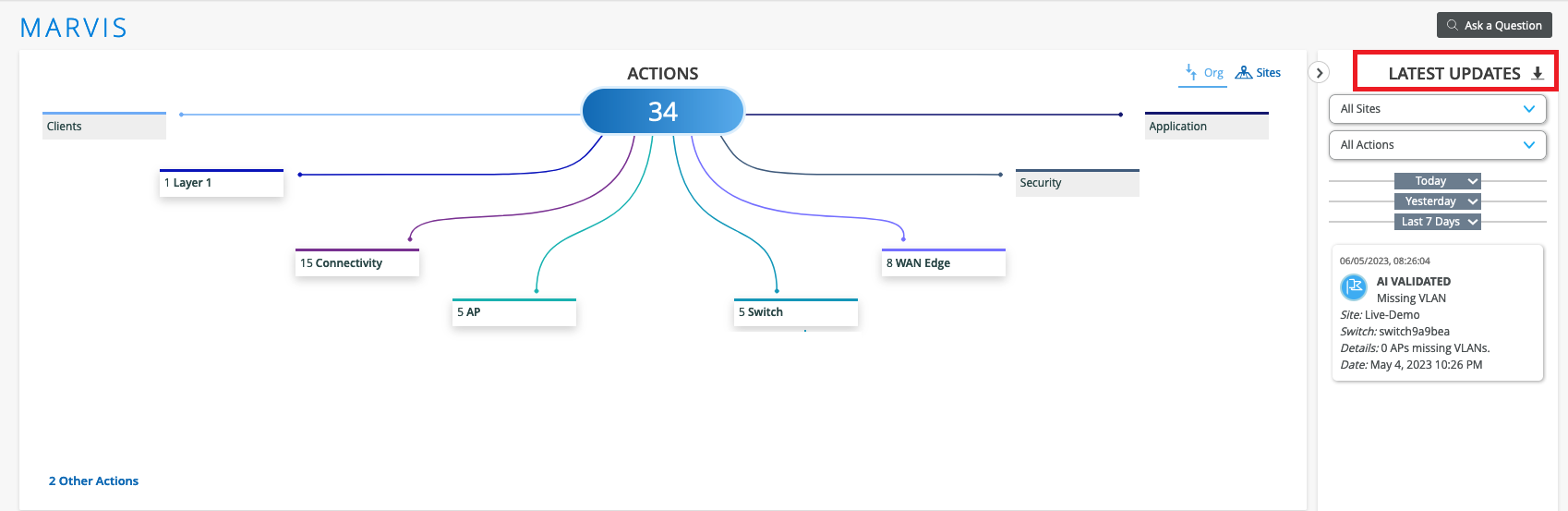
最新の更新テキストの横にあるダウンロード(下矢印)アイコンをクリックすると、組織のアクションのリストをCSV形式でダウンロードできます。完全なリストまたは特定のタイプの障害のリストのいずれかをダウンロードできます。