
付録:EVPNマルチホーミングファブリックのDHCPリレーの例
以下は、以下の設定でEVPNマルチホーミング仮想ゲートウェイファブリックでDHCPリレーをテストするためのラボ設計例です。
- ファブリック タイプ = EVPN マルチホーミング
- オーバーレイループバックプール設定 = 該当なし(ゲートウェイIPアドレスとして使用される静的IRB IPアドレス)
- WANルーターの統合=テストの時点ではまだ実行されていません。
- DHCPサーバーの場所 = 仮想サービスブロック機能を介してファブリックと統合。
- DHCP サーバーの到達可能性 = 同じ VRF に割り当てられた異なる VLAN 間のファブリック内。
- 使用サードパーティのDHCPサーバー = VMとしてのMicrosoft Windows 2022 DHCPサーバー。
追加のサーバースイッチが追加されたのは、Microsoft Windows 2022がVMにインストールされている場合、「チーム」インターフェイスでLACPバンドリングを使用できないためです。したがって、これはこれら 2 つの世界間を翻訳するためのより良いオプションでした。
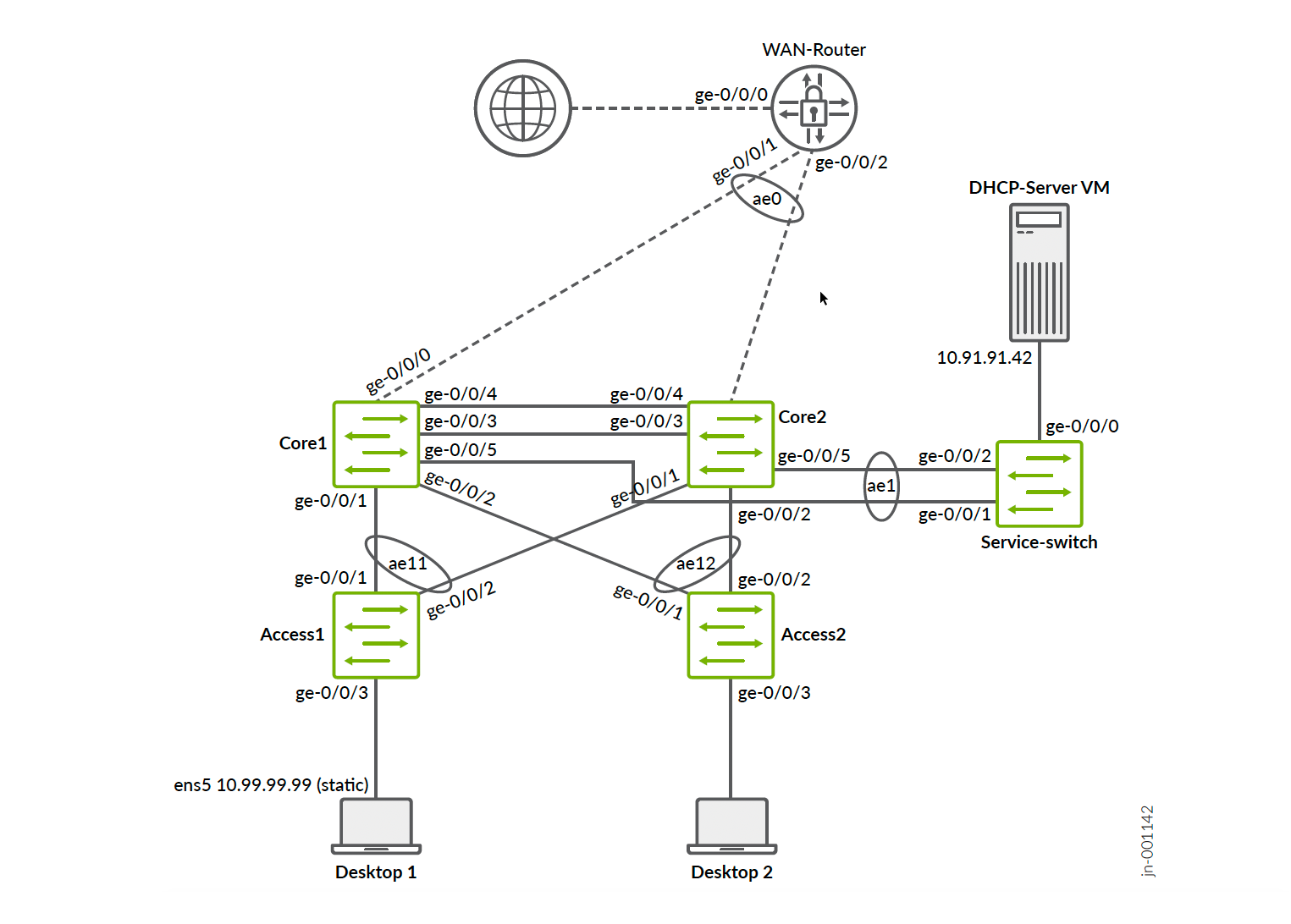
以下に示す設定例は、簡潔にするためにDHCPリレー統合に関連する設定のみを示しています。完全なワークフローは、すでに投稿されている利用可能なJVDと拡張機能から推測できます。
以下のJSONをインポートすることで、提供済みのスイッチテンプレートを再利用し、この設定の進行を迅速化できます。
{
  "ntp_servers": [],
  "dns_servers": [
    "8.8.8.8",
    "9.9.9.9"
  ],
  "dns_suffix": [],
  "additional_config_cmds": [],
  "networks": {
    "vlan1099": {
      "vlan_id": 1099,
      "subnet": "10.99.99.0/24"
    },
    "vlan1091": {
      "vlan_id": "1091",
      "subnet": "10.91.91.0/24",
      "subnet6": ""
    }
  },
  "port_usages": {
    "vlan1099": {
      "mode": "access",
      "disabled": false,
      "port_network": "vlan1099",
      "voip_network": null,
      "stp_edge": false,
      "all_networks": false,
      "networks": null,
      "port_auth": null,
      "speed": "auto",
      "duplex": "auto",
      "mac_limit": 0,
      "persist_mac": false,
      "poe_disabled": false,
      "enable_qos": false,
      "storm_control": {},
      "mtu": 9014,
      "description": "",
      "disable_autoneg": false
    },
    "vlan1091": {
      "disabled": false,
      "mode": "access",
      "port_network": "vlan1091",
      "voip_network": null,
      "stp_edge": false,
      "stp_p2p": false,
      "stp_no_root_port": false,
      "mac_auth_protocol": null,
      "all_networks": false,
      "networks": null,
      "port_auth": null,
      "allow_multiple_supplicants": null,
      "enable_mac_auth": null,
      "mac_auth_only": null,
      "guest_network": null,
      "bypass_auth_when_server_down": null,
      "dynamic_vlan_networks": null,
      "speed": "auto",
      "duplex": "auto",
      "mac_limit": 0,
      "persist_mac": false,
      "poe_disabled": false,
      "enable_qos": false,
      "storm_control": {},
      "mtu": 9014,
      "description": "",
      "disable_autoneg": false
    },
    "dynamic": {
      "mode": "dynamic",
      "reset_default_when": "link_down",
      "rules": []
    }
  },
  "switch_matching": {
    "enable": true,
    "rules": [
      {
        "name": "core",
        "port_config": {
          "ge-0/0/5": {
            "usage": "vlan1091",
            "dynamic_usage": null,
            "critical": false,
            "description": "",
            "no_local_overwrite": true,
            "aggregated": true,
            "ae_disable_lacp": false,
            "ae_lacp_force_up": false,
            "ae_lacp_slow": false,
            "ae_idx": 1,
            "esilag": true
          }
        },
        "additional_config_cmds": [
          "set groups top routing-instances customera forwarding-options dhcp-relay forward-only",
          "set groups top routing-instances customera forwarding-options dhcp-relay group vlan1099 relay-option-82 circuit-id vlan-id-only",
          "set groups top routing-instances customera forwarding-options dhcp-relay group vlan1099 relay-option-82 server-id-override",
          "",
          ""
        ],
        "oob_ip_config": {
          "type": "dhcp",
          "use_mgmt_vrf": false
        },
        "ip_config": {
          "type": "dhcp",
          "network": "default"
        },
        "port_mirroring": {},
        "match_name[0:4]": "core"
      }
    ]
  },
  "switch_mgmt": {
    "config_revert_timer": 10,
    "root_password": "juniper123",
    "protect_re": {
      "enabled": false
    },
    "tacacs": {
      "enabled": false
    }
  },
  "radius_config": {
    "auth_servers": [],
    "acct_servers": [],
    "auth_servers_timeout": 5,
    "auth_servers_retries": 3,
    "fast_dot1x_timers": false,
    "acct_interim_interval": 0,
    "auth_server_selection": "ordered",
    "coa_enabled": false,
    "coa_port": ""
  },
  "vrf_config": {
    "enabled": false
  },
  "remote_syslog": {
    "enabled": false
  },
  "snmp_config": {
    "enabled": false
  },
  "dhcp_snooping": {
    "enabled": false
  },
  "acl_policies": [],
  "mist_nac": {
    "enabled": true,
    "network": null
  },
  "disabled_system_defined_port_usages": [],
  "bgp_config": null,
  "routing_policies": {},
  "port_mirroring": {},
  "name": "DHCPLab1"
}
キャンパスファブリックダイアログの設定
キャンパスファブリックダイアログの設定では、以下を設定することが重要です。
- 正しいファブリックタイプ = EVPNマルチホーミング
- 仮想ゲートウェイv4 MACアドレス=有効(すべてのVLANで使用されるグローバルMACアドレスがないため、デバッグが容易になります)。
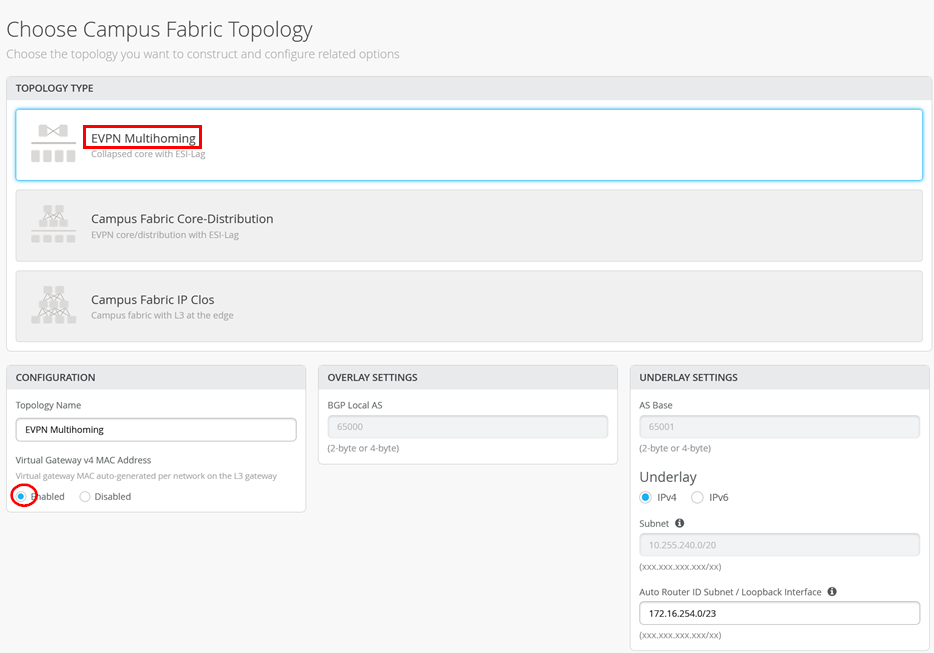
次のペインで、スイッチを折りたたみコアおよびアクセススイッチとして割り当てます。
次に、「ネットワーク」ファブリックダイアログで、スイッチテンプレートから2つのVLANをインポートします。
- 最初のVLAN(リースを必要とするデスクトップクライアントはここにあります):
- 名前 = vlan1099
- VLAN ID = 1099
- IPv4サブネット = 10.99.99.0/24
- IPv4 仮想ゲートウェイ = 10.99.99.1
- 2番目のVLAN(DHCPサーバーはここにあります):
- 名前 = vlan1091
- VLAN ID = 1091
- IPv4サブネット = 10.91.91.0/24
- IPv4 仮想ゲートウェイ = 10.91.91.1
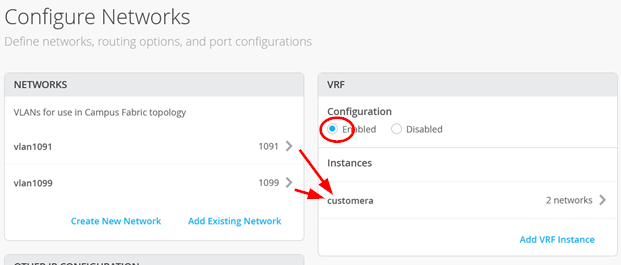
次に、それらを単一のVRFに追加します。
- VRF 設定 = 有効
- VRF:
- 名前 = customera
- ネットワーク = vlan1099 および vlan1091
例を参照してください。
また、DHCPリレー情報も追加します。
- DHCP リレー = 有効
- vlan1099:
- ネットワーク = vlan1099
- DHCP サーバー = 10.91.91.42
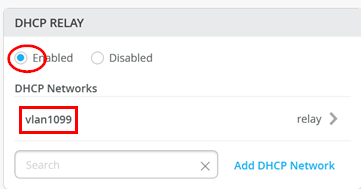
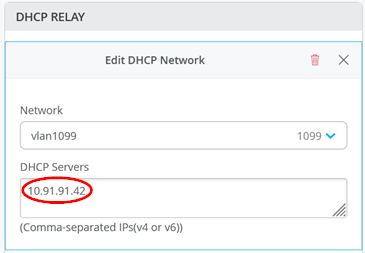
すべてのキャンパスファブリック設計でDHCPリレーを設定するには、必ずこのダイアログを使用してください。
残りのダイアログを終了して、ジュニパーMistクラウドが設定をプッシュしてファブリックをセットアップするようにします。
アクセス スイッチの設定
Desktop1クライアントは、以下のポート設定を介してAccess1スイッチのge-0/0/3インターフェイスに接続されています。
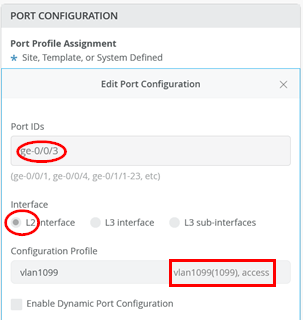
この設定に基づいて、ジュニパー Mist クラウドは、このファブリック内の VRF が配置されている 2 台のコラプストコア スイッチ上で、以下の Junos OS 設定を設定します。
set groups top routing-instances customera instance-type vrf
set groups top routing-instances customera interface irb.1091
set groups top routing-instances customera interface irb.1099
set groups top routing-instances customera forwarding-options dhcp-relay server-group vlan1099 10.91.91.42
              set groups top routing-instances customera forwarding-options dhcp-relay group vlan1099 interface irb.1099
              set groups top routing-instances customera forwarding-options dhcp-relay group vlan1099 active-server-group vlan1099
set groups top routing-instances customera route-distinguisher 172.16.254.1:101
set groups top routing-instances customera vrf-target target:65000:101
set groups top routing-instances customera vrf-table-label
set groups top routing-instances customera routing-options auto-export
このドキュメントの作成時点では、「ソリューションアーキテクチャ」の章で説明されているJunos OSのすべてのオプションが作成されているわけではありません。そこで、テスト対象の様々なDHCPサーバーで最適なエクスペリエンスを実現するために、各コラプストコアスイッチに以下のJunos OS設定を手動で追加しました。

set groups top routing-instances customera forwarding-options dhcp-relay forward-only
set groups top routing-instances customera forwarding-options dhcp-relay group vlan1099 relay-option-82 circuit-id vlan-id-only
set groups top routing-instances customera forwarding-options dhcp-relay group vlan1099 relay-option-82 server-id-override
DHCP サーバー統合
私たちは、ファブリックと仮想マシンであるDHCPサーバーの間にスイッチを配置することにしました。Microsoft Windowsは、サーバーがVMの場合のLACPの使用をサポートしていません。ただし、ファブリック側でそれを行うため、一種の変換要素としてスイッチを使用します。もう一つの利点は、VMに対して、すべてのメッセージを含む単一のインターフェイスがあるため、デバッグが容易になることです。
2つのコラプストコアスイッチで、以下を設定します。
- ポートID = ge-0/0/5
- 設定プロファイル = vlan1091
- ポートアグリゲーション = 有効
- AEインデックス = 1
- ESI-LAG = 有効
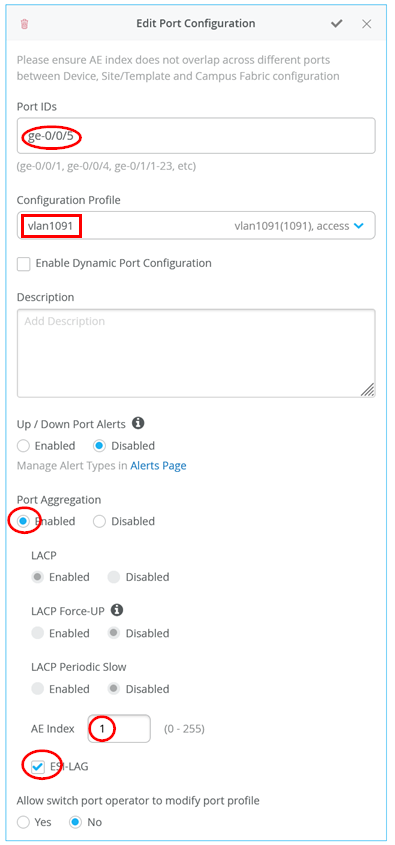
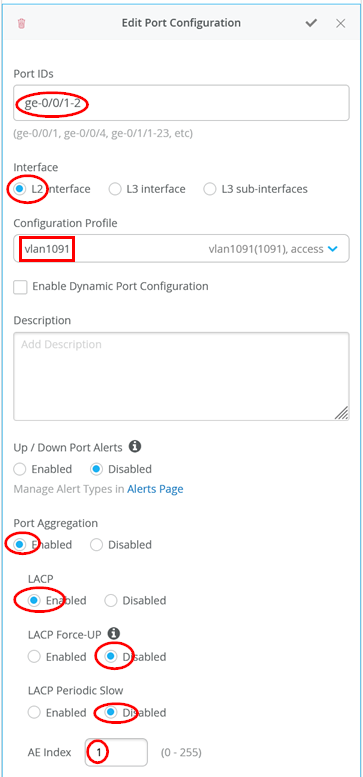
ファブリックとDHCPサーバー間のスイッチ上で、以下のようなシンプルなLAG設定を追加します。
- ポートID = ge-0/0/1-2
- インターフェイス = L2インターフェイス
- 設定プロファイル = vlan1091
- ポートアグリゲーション = 有効
- LACP = 有効
- LACP フォースアップ = 無効
- LACP 定期的なスロー = 無効
- AEインデックス = 1
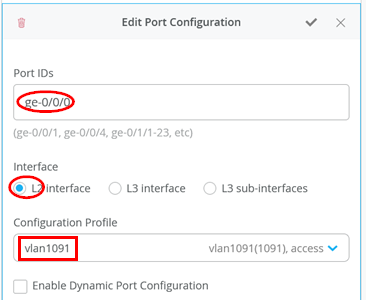
DHCPサーバーへの単一のインターフェイスは、次のようになります。
- ポートID = ge-0/0/0
- インターフェイス = L2インターフェイス
- 設定プロファイル = vlan1091
DHCP サーバー自体を確認する
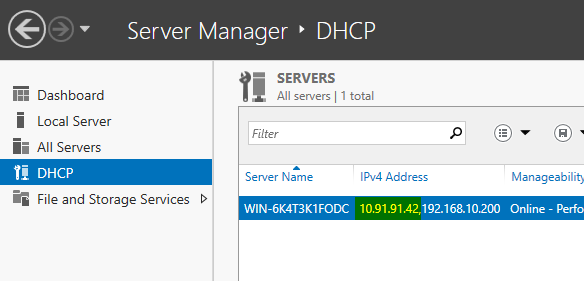
Microsoft Windows 2022 Serverエディションをインストールし、上記の章付録:テストに使用されるMicrosoft DHCPサーバー設定例の設定例を適用していることを前提としています。これが完了したら、ファブリックへの接続をチェックして、サーバーがリレーメッセージを受信していることを確認する必要があります。私たちの場合、サーバーにはブートストラップ用の複数のインターフェイスがありました。
PS C:\Users\Administrator> ipconfig
Windows IP Configuration
Ethernet adapter Ethernet:
   Connection-specific DNS Suffix  . :
   Link-local IPv6 Address . . . . . : fe80::7d5a:47ae:2892:3d88%5
   IPv4 Address. . . . . . . . . . . : 192.168.10.200
   Subnet Mask . . . . . . . . . . . : 255.255.255.0
   Default Gateway . . . . . . . . . :
Ethernet adapter Ethernet 2:
   Connection-specific DNS Suffix  . :
   IPv4 Address. . . . . . . . . . . : 10.91.91.42
   Subnet Mask . . . . . . . . . . . : 255.255.255.0
   Default Gateway . . . . . . . . . : 10.91.91.1
# ping the VGA of this subnet
PS C:\Users\Administrator> ping 10.91.91.1
Pinging 10.91.91.1 with 32 bytes of data:
Reply from 10.91.91.1: bytes=32 time=1ms TTL=64
Reply from 10.91.91.1: bytes=32 time=1ms TTL=64
Reply from 10.91.91.1: bytes=32 time=1ms TTL=64
Reply from 10.91.91.1: bytes=32 time=1ms TTL=64
Ping statistics for 10.91.91.1:
    Packets: Sent = 4, Received = 4, Lost = 0 (0% loss),
Approximate round trip times in milli-seconds:
    Minimum = 1ms, Maximum = 1ms, Average = 1ms
# ping desktop1 client who should have a static IP-Address now
PS C:\Users\Administrator> ping 10.99.99.99
Pinging 10.99.99.99 with 32 bytes of data:
Reply from 10.99.99.99: bytes=32 time=2ms TTL=63
Reply from 10.99.99.99: bytes=32 time=2ms TTL=63
Reply from 10.99.99.99: bytes=32 time=2ms TTL=63
Reply from 10.99.99.99: bytes=32 time=1ms TTL=63
Ping statistics for 10.99.99.99:
    Packets: Sent = 4, Received = 4, Lost = 0 (0% loss),
Approximate round trip times in milli-seconds:
    Minimum = 1ms, Maximum = 2ms, Average = 1ms
サーバーが IP アドレス 10.91.91.42 でリッスンしていることを確認します。
有線クライアントを使用した最終テスト
インストールを完了するには、有線クライアントで最終テストを実行します。クライアントの初期状態は、静的IPアドレスが割り当てられており、インターネットに向けて通信できることです。
root@desktop1:~# ifconfig ens5
ens5: flags=4163<UP,BROADCAST,RUNNING,MULTICAST>  mtu 1500
        inet 10.99.99.99  netmask 255.255.255.0  broadcast 10.99.99.255
        inet6 fe80::5054:ff:feae:1e5b  prefixlen 64  scopeid 0x20<link>
        ether 52:54:00:ae:1e:5b  txqueuelen 1000  (Ethernet)
        RX packets 142  bytes 10653 (10.6 KB)
        RX errors 0  dropped 51  overruns 0  frame 0
        TX packets 158  bytes 14096 (14.0 KB)
        TX errors 0  dropped 0 overruns 0  carrier 0  collisions 0
# do ping the VGA shared GW IP
root@desktop1:~# ping -c3 10.99.99.1
PING 10.99.99.1 (10.99.99.1) 56(84) bytes of data.
64 bytes from 10.99.99.1: icmp_seq=1 ttl=64 time=0.785 ms
64 bytes from 10.99.99.1: icmp_seq=2 ttl=64 time=1.03 ms
64 bytes from 10.99.99.1: icmp_seq=3 ttl=64 time=1.19 ms
--- 10.99.99.1 ping statistics ---
3 packets transmitted, 3 received, 0% packet loss, time 2003ms
rtt min/avg/max/mdev = 0.785/1.003/1.193/0.167 ms
# we ping the static IP of the one collapsed core switch
root@desktop1:~# ping -c3 10.99.99.2
PING 10.99.99.2 (10.99.99.2) 56(84) bytes of data.
64 bytes from 10.99.99.2: icmp_seq=1 ttl=64 time=0.766 ms
64 bytes from 10.99.99.2: icmp_seq=2 ttl=64 time=0.959 ms
64 bytes from 10.99.99.2: icmp_seq=3 ttl=64 time=0.824 ms
--- 10.99.99.2 ping statistics ---
3 packets transmitted, 3 received, 0% packet loss, time 2003ms
rtt min/avg/max/mdev = 0.766/0.849/0.959/0.080 ms
# we ping the static IP of the other collapsed core switch
root@desktop1:~# ping -c3 10.99.99.3
PING 10.99.99.3 (10.99.99.3) 56(84) bytes of data.
64 bytes from 10.99.99.3: icmp_seq=1 ttl=64 time=2.91 ms
64 bytes from 10.99.99.3: icmp_seq=2 ttl=64 time=1.35 ms
64 bytes from 10.99.99.3: icmp_seq=3 ttl=64 time=1.43 ms
--- 10.99.99.3 ping statistics ---
3 packets transmitted, 3 received, 0% packet loss, time 2004ms
rtt min/avg/max/mdev = 1.354/1.897/2.912/0.718 ms
# we review the ARP-cache for the 3 MAC-Addresses
root@desktop1:~# arp -an
? (10.99.99.3) at 2c:6b:f5:f8:9b:f0 [ether] on ens5
? (10.99.99.2) at 2c:6b:f5:ac:da:f0 [ether] on ens5
? (10.99.99.1) at 00:00:5e:e4:04:4b [ether] on ens5
# we try to test connectivity towards DHCP server
# Server must allow ICMP Ping which is not a default
root@desktop1:~# ping -c3 10.91.91.42
PING 10.91.91.42 (10.91.91.42) 56(84) bytes of data.
64 bytes from 10.91.91.42: icmp_seq=1 ttl=127 time=2.35 ms
64 bytes from 10.91.91.42: icmp_seq=2 ttl=127 time=2.32 ms
64 bytes from 10.91.91.42: icmp_seq=3 ttl=127 time=2.51 ms
--- 10.91.91.42 ping statistics ---
3 packets transmitted, 3 received, 0% packet loss, time 2003ms
rtt min/avg/max/mdev = 2.322/2.392/2.506/0.081 ms
このクライアントとそのIPアドレスは、ジュニパーMistポータルの有線クライアントの概要で確認できます。
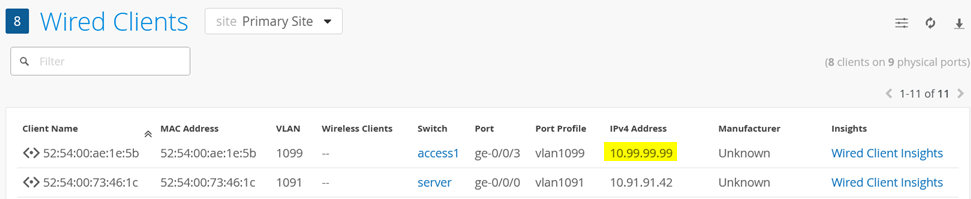
次に、静的IPアドレスの設定を解除し、代わりにDHCPリースの取得を試みます。以下の追加設定により、クライアントは静的設定とDHCPリースの事前知識を失うようになります。次に、フォアグラウンドでDHCPクライアントを起動して、もう少しデバッグメッセージを確認します。
root@desktop1:~# ifconfig ens5 0.0.0.0 up
root@desktop1:~# pkill dhclient
root@desktop1:~# rm -f /var/lib/dhcp/*.leases
root@desktop1:~# dhclient -v ens5
Internet Systems Consortium DHCP Client 4.4.1
Copyright 2004-2018 Internet Systems Consortium.
All rights reserved.
For info, please visit https://www.isc.org/software/dhcp/
Listening on LPF/ens5/52:54:00:ae:1e:5b
Sending on   LPF/ens5/52:54:00:ae:1e:5b
Sending on   Socket/fallback
DHCPDISCOVER on ens5 to 255.255.255.255 port 67 interval 3 (xid=0x8599fa19)
DHCPOFFER of 10.99.99.63 from 10.99.99.3
DHCPREQUEST for 10.99.99.63 on ens5 to 255.255.255.255 port 67 (xid=0x19fa9985)
DHCPACK of 10.99.99.63 from 10.99.99.3 (xid=0x8599fa19)
bound to 10.99.99.63 -- renewal in 304223 seconds.
しばらくすると(ローカルARPのエージアウトによって異なります)、この変更が有線クライアントの概要に表示されます。
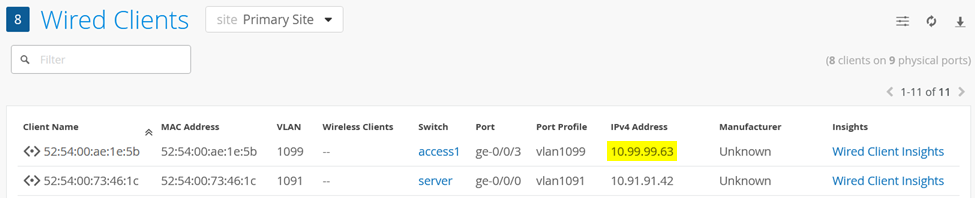
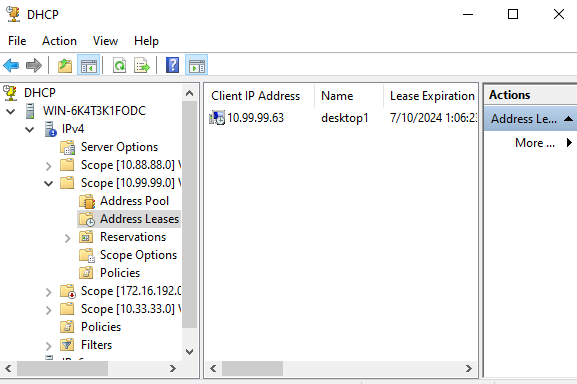
また、DHCP Manager を開いたときに、DHCP サーバー自体にリース配布資料を以下のように表示することもできます。
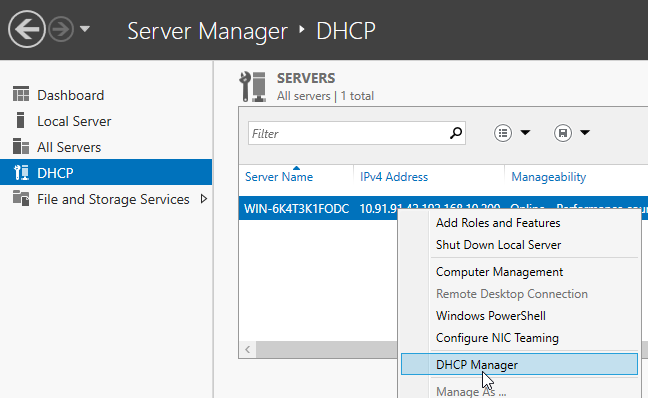
以下は、DHCPサーバーのリースデータベースに表示されるようになったクライアントの例です。
DHCPリース配布資料のトレース例
以下に、発信元有線クライアントと、ファブリックのリレーエージェントから転送されたメッセージを受け取るDHCPサーバー側を見るDHCPリース配布資料の全シーケンスを示します。これはtcpdumpを通じて同時にキャプチャされました。
クライアントでトレースを開始し、ファブリックリレーエージェントにブロードキャストを介してディスカバリーメッセージを送信します。
10:14:30.770921 52:54:00:ae:1e:5b > ff:ff:ff:ff:ff:ff, ethertype IPv4 (0x0800), length 342: (tos 0x10, ttl 128, id 0, offset 0, flags [none], proto UDP (17), length 328)
    0.0.0.0.68 > 255.255.255.255.67: BOOTP/DHCP, Request from 52:54:00:ae:1e:5b, length 300, xid 0xb7d35449, Flags [none]
          Client-Ethernet-Address 52:54:00:ae:1e:5b
          Vendor-rfc1048 Extensions
            Magic Cookie 0x63825363
            DHCP-Message Option 53, length 1: Discover
            Hostname Option 12, length 8: "desktop1"
            Parameter-Request Option 55, length 13:
              Subnet-Mask, BR, Time-Zone, Default-Gateway
              Domain-Name, Domain-Name-Server, Option 119, Hostname
              Netbios-Name-Server, Netbios-Scope, MTU, Classless-Static-Route
              NTP
次に、ゲートウェイIPやオプション82などのファブリックリレーエージェントからの埋め込み情報とともに、DHCPサーバーに到着するリレーメッセージを確認します。
10:14:30.772605 2c:6b:f5:f8:9b:f0 > 52:54:00:73:46:1c, ethertype IPv4 (0x0800), length 394: (tos 0x0, ttl 64, id 19866, offset 0, flags [none], proto UDP (17), length 380)
    10.99.99.3.67 > 10.91.91.42.67: BOOTP/DHCP, Request from 52:54:00:ae:1e:5b, length 352, xid 0xb7d35449, Flags [none]
          Gateway-IP 10.99.99.3
          Client-Ethernet-Address 52:54:00:ae:1e:5b
          Vendor-rfc1048 Extensions
            Magic Cookie 0x63825363
            DHCP-Message Option 53, length 1: Discover
            Hostname Option 12, length 8: "desktop1"
            Parameter-Request Option 55, length 13:
              Subnet-Mask, BR, Time-Zone, Default-Gateway
              Domain-Name, Domain-Name-Server, Option 119, Hostname
              Netbios-Name-Server, Netbios-Scope, MTU, Classless-Static-Route
              NTP
            Agent-Information Option 82, length 50:
              Circuit-ID SubOption 1, length 4: 1099
              Unknown SubOption 5, length 4:
                0x0000:  0a63 6303
              Unknown SubOption 11, length 4:
                0x0000:  0a63 6303
              Unknown SubOption 9, length 30:
                0x0000:  0000 0a4c 1904 1749 5242 2d69 7262 2e31
                0x0010:  3039 393a 7674 6570 2e33 3237 3639
DHCP サーバーは、ファブリック リレー エージェントに対して、クライアント向けのオファーを返します。
10:14:30.773018 52:54:00:73:46:1c > 00:00:5e:e4:04:43, ethertype IPv4 (0x0800), length 384: (tos 0x0, ttl 128, id 47992, offset 0, flags [none], proto UDP (17), length 370)
    10.91.91.42.67 > 10.99.99.3.67: BOOTP/DHCP, Reply, length 342, xid 0xb7d35449, Flags [none]
          Your-IP 10.99.99.63
          Server-IP 10.91.91.42
          Gateway-IP 10.99.99.3
          Client-Ethernet-Address 52:54:00:ae:1e:5b
          Vendor-rfc1048 Extensions
            Magic Cookie 0x63825363
            DHCP-Message Option 53, length 1: Offer
            Subnet-Mask Option 1, length 4: 255.255.255.0
            RN Option 58, length 4: 345600
            RB Option 59, length 4: 604800
            Lease-Time Option 51, length 4: 691200
            Server-ID Option 54, length 4: 10.99.99.3
            Default-Gateway Option 3, length 4: 10.99.99.1
            Domain-Name-Server Option 6, length 8: 8.8.8.8,9.9.9.9
            Agent-Information Option 82, length 50:
              Circuit-ID SubOption 1, length 4: 1099
              Unknown SubOption 5, length 4:
                0x0000:  0a63 6303
              Unknown SubOption 11, length 4:
                0x0000:  0a63 6303
              Unknown SubOption 9, length 30:
                0x0000:  0000 0a4c 1904 1749 5242 2d69 7262 2e31
                0x0010:  3039 393a 7674 6570 2e33 3237 3639
ファブリックリレーエージェントは、一部の情報をフィルタリングし(オプション82など)、レイヤー2ユニキャストとしてオファーをクライアントに転送します。
10:14:30.774479 2c:6b:f5:f8:9b:f0 > 52:54:00:ae:1e:5b, ethertype IPv4 (0x0800), length 332: (tos 0x0, ttl 64, id 19869, offset 0, flags [none], proto UDP (17), length 318)
    10.99.99.3.67 > 10.99.99.63.68: BOOTP/DHCP, Reply, length 290, xid 0xb7d35449, Flags [none]
          Your-IP 10.99.99.63
          Server-IP 10.91.91.42
          Client-Ethernet-Address 52:54:00:ae:1e:5b
          Vendor-rfc1048 Extensions
            Magic Cookie 0x63825363
            DHCP-Message Option 53, length 1: Offer
            Subnet-Mask Option 1, length 4: 255.255.255.0
            RN Option 58, length 4: 345600
            RB Option 59, length 4: 604800
            Lease-Time Option 51, length 4: 691200
            Server-ID Option 54, length 4: 10.99.99.3
            Default-Gateway Option 3, length 4: 10.99.99.1
            Domain-Name-Server Option 6, length 8: 8.8.8.8,9.9.9.9
受信した以前のオファーに基づいて、クライアントはブロードキャストを介してファブリックリレーエージェントにリクエストメッセージを送信します。
10:14:30.776566 52:54:00:ae:1e:5b > ff:ff:ff:ff:ff:ff, ethertype IPv4 (0x0800), length 342: (tos 0x10, ttl 128, id 0, offset 0, flags [none], proto UDP (17), length 328)
    0.0.0.0.68 > 255.255.255.255.67: BOOTP/DHCP, Request from 52:54:00:ae:1e:5b, length 300, xid 0xb7d35449, Flags [none]
          Client-Ethernet-Address 52:54:00:ae:1e:5b
          Vendor-rfc1048 Extensions
            Magic Cookie 0x63825363
            DHCP-Message Option 53, length 1: Request
            Server-ID Option 54, length 4: 10.99.99.3
            Requested-IP Option 50, length 4: 10.99.99.63
            Hostname Option 12, length 8: "desktop1"
            Parameter-Request Option 55, length 13:
              Subnet-Mask, BR, Time-Zone, Default-Gateway
              Domain-Name, Domain-Name-Server, Option 119, Hostname
              Netbios-Name-Server, Netbios-Scope, MTU, Classless-Static-Route
              NTP
次に、ゲートウェイIPやオプション82などのファブリックリレーエージェントからの埋め込み情報を使用して、DHCPサーバーに到着するリレーメッセージを確認します(先に転送したディスカバリーメッセージと同様)。
10:14:30.778142 2c:6b:f5:f8:9b:f0 > 52:54:00:73:46:1c, ethertype IPv4 (0x0800), length 394: (tos 0x0, ttl 64, id 19872, offset 0, flags [none], proto UDP (17), length 380)
    10.99.99.3.67 > 10.91.91.42.67: BOOTP/DHCP, Request from 52:54:00:ae:1e:5b, length 352, xid 0xb7d35449, Flags [none]
          Gateway-IP 10.99.99.3
          Client-Ethernet-Address 52:54:00:ae:1e:5b
          Vendor-rfc1048 Extensions
            Magic Cookie 0x63825363
            DHCP-Message Option 53, length 1: Request
            Server-ID Option 54, length 4: 10.99.99.3
            Requested-IP Option 50, length 4: 10.99.99.63
            Hostname Option 12, length 8: "desktop1"
            Parameter-Request Option 55, length 13:
              Subnet-Mask, BR, Time-Zone, Default-Gateway
              Domain-Name, Domain-Name-Server, Option 119, Hostname
              Netbios-Name-Server, Netbios-Scope, MTU, Classless-Static-Route
              NTP
            Agent-Information Option 82, length 50:
              Circuit-ID SubOption 1, length 4: 1099
              Unknown SubOption 5, length 4:
                0x0000:  0a63 6303
              Unknown SubOption 11, length 4:
                0x0000:  0a63 6303
              Unknown SubOption 9, length 30:
                0x0000:  0000 0a4c 1904 1749 5242 2d69 7262 2e31
                0x0010:  3039 393a 7674 6570 2e33 3237 3639
DHCP サーバーは、ファブリック リレー エージェントに対してリース確認応答を返します。
10:14:30.778534 52:54:00:73:46:1c > 00:00:5e:e4:04:43, ethertype IPv4 (0x0800), length 384: (tos 0x0, ttl 128, id 47993, offset 0, flags [none], proto UDP (17), length 370)
    10.91.91.42.67 > 10.99.99.3.67: BOOTP/DHCP, Reply, length 342, xid 0xb7d35449, Flags [none]
          Your-IP 10.99.99.63
          Gateway-IP 10.99.99.3
          Client-Ethernet-Address 52:54:00:ae:1e:5b
          Vendor-rfc1048 Extensions
            Magic Cookie 0x63825363
            DHCP-Message Option 53, length 1: ACK
            RN Option 58, length 4: 345600
            RB Option 59, length 4: 604800
            Lease-Time Option 51, length 4: 691200
            Server-ID Option 54, length 4: 10.99.99.3
            Subnet-Mask Option 1, length 4: 255.255.255.0
            Default-Gateway Option 3, length 4: 10.99.99.1
            Domain-Name-Server Option 6, length 8: 8.8.8.8,9.9.9.9
            Agent-Information Option 82, length 50:
              Circuit-ID SubOption 1, length 4: 1099
              Unknown SubOption 5, length 4:
                0x0000:  0a63 6303
              Unknown SubOption 11, length 4:
                0x0000:  0a63 6303
              Unknown SubOption 9, length 30:
                0x0000:  0000 0a4c 1904 1749 5242 2d69 7262 2e31
                0x0010:  3039 393a 7674 6570 2e33 3237 3639
ファブリックリレーエージェントは、一部の情報をフィルタリングし(オプション82など)、リース確認をレイヤー2ユニキャストとしてクライアントに転送します。
10:14:30.780034 2c:6b:f5:f8:9b:f0 > 52:54:00:ae:1e:5b, ethertype IPv4 (0x0800), length 332: (tos 0x0, ttl 64, id 19875, offset 0, flags [none], proto UDP (17), length 318)
    10.99.99.3.67 > 10.99.99.63.68: BOOTP/DHCP, Reply, length 290, xid 0xb7d35449, Flags [none]
          Your-IP 10.99.99.63
          Client-Ethernet-Address 52:54:00:ae:1e:5b
          Vendor-rfc1048 Extensions
            Magic Cookie 0x63825363
            DHCP-Message Option 53, length 1: ACK
            RN Option 58, length 4: 345600
            RB Option 59, length 4: 604800
            Lease-Time Option 51, length 4: 691200
            Server-ID Option 54, length 4: 10.99.99.3
            Subnet-Mask Option 1, length 4: 255.255.255.0
            Default-Gateway Option 3, length 4: 10.99.99.1
            Domain-Name-Server Option 6, length 8: 8.8.8.8,9.9.9.9