
例:VPWS の FEC 129 BGP 自動検出の設定
この例では、仮想プライベートワイヤサービス(VPWS)の設定方法を示しています。リモートプロバイダエッジ(PE)デバイスはBGPによって動的に自動的に検出され、疑似配線はFEC 129を使用してLDPによってシグナリングされます。この配置により、基盤となるシグナリングプロトコルとしてLDPを使用しながら、静的に設定されたレイヤー2回線に関連する設定負担を軽減できます。
要件
この例では、PEデバイスにはJunos OSリリース13.2以降が必要です。
概要
VPWSはポイントツーポイントサービスであるため、FEC 129 VPWSルーティングインスタンスは instance-type l2vpnとして設定されます。FEC 129 VPLSと同様に、FEC 129 VPWSでは l2vpn-id ステートメントを使用して、ルーティングインスタンスがメンバーであるレイヤー2 VPNを定義します。 l2vpn-id ステートメントが存在する場合は、ルーティング インスタンスに FEC 129 LDP シグナリングが使用されていることを示します。 l2vpn-id がない場合は、代わりにBGPシグナリングが使用されていることを示します。
VPWSのポイントツーポイントの性質上、送信元アクセス個体識別子(SAII)とターゲットアクセス個体識別子(TAII)を指定する必要があります。このSAII-TAIIペアは、2つのPEデバイス間の一意の疑似配線を定義します。
SAIIは、FEC 129 VPWSルーティングインスタンス内の source-attachment-identifier ステートメントで指定されます。送信元添付ファイル識別子と、その送信元添付ファイル識別子に関連付けるインターフェイスを設定します。各インターフェイスで、 target-attachment-identifier ステートメントでTAIIを設定できます。設定されたターゲット識別子が、BGP自動検出メッセージを介してリモートPEデバイスによってアドバタイズされたソース識別子と一致する場合、そのソースとターゲットのペア間の疑似配線が通知されます。アドバタイズされた送信元識別子と設定されたターゲット識別子の間に一致しない場合、疑似回線は確立されません。
サンプル:複数のインターフェイスとサイトを使用した VPWS 設定
routing-instances {
    FEC129-VPWS {
        instance-type l2vpn;
        interface ge-0/0/1.0;
        interface ge-0/0/2.0;
        interface ge-0/0/3.0;
        route-distinguisher 10.255.0.1:200;
        l2vpn-id l2vpn-id:100:200;
        vrf-target target:100:200;
        protocols l2vpn {
            site CUSTOMER-1 {
                source-attachment-identifier 1;
                interface ge-0/0/1.0 {
                    target-attachment-identifier 2;
                }
                interface ge-0/0/2.0 {
                    target-attachment-identifier 3;
                }
            }
        }
    }
}
サンプル設定の擬似配線 1-2 および 1-3 で示すように、各 SAII-TAII ペアが一意の擬似配線を定義するため、サイト内で複数のインターフェイスを設定できます。送信元とターゲットのアクセス識別子は両方とも4バイト数で、 instance-type が l2vpn で l2vpn-id 設定ステートメントが存在するFEC 129 VPWSインスタンスでのみ設定可能です。
ソース識別子とターゲット識別子は、1から4,292,967,295の範囲の単純な符号なし整数として指定できます。
レイヤー 2 回線およびレイヤー 2 VPN サービスでは、多くのオプション パラメーターを擬似回線ごとに含めることができます。FEC 129 VPWSでは、この設定例に示すように、MTU設定、コミュニティタグ付け、制御ワードのインクルードなどのパラメータを使用できます。
サンプル:オプションの設定パラメータを使用した VPWS 設定
routing-instances {
    FEC129-VPWS {
        instance-type l2vpn;
        interface ge-0/0/1.0;
        interface ge-0/0/2.0;
        interface ge-0/0/3.0;
        route-distinguisher 10.255.0.1:200;
        l2vpn-id l2vpn-id:100:200;
        vrf-target target:100:200;
        protocols l2vpn {
            site CUSTOMER-1 {
                source-attachment-identifier 1;
                community COMM;
                control-word ;
                encapsulation-type ethernet;
                ignore-encapsulation-mismatch;
                ignore-mtu-mismatch;
                mtu 1500;
                no-control-word;
                interface ge-0/0/1.0 {
                    target-attachment-identifier 2;
                }
                interface ge-0/0/2.0 {
                    target-attachment-identifier 3;
                    community COMM;
                    control-word;
                    encapsulation-type ethernet;
                    ignore-encapsulation-mismatch;
                    ignore-mtu-mismatch;
                    mtu 1500;
                    no-control-word;
                }
            }
        }
    }
}
サイト内で設定されると、定義されたパラメータは、そのサイトから発信されるすべての疑似回線に影響します。インターフェイスの下で設定された場合、定義されたパラメータは、その単一の特定の疑似配線に影響します。これにより、設定内の1か所にある特定のローカルサイトに関連するすべての疑似配線のパラメーターを操作できます。
他のポイントツーポイントサービスと同様に、FEC 129 VPWSインスタンスのメンバーとして設定されるインターフェイスは、次に示すように、CCCカプセル化とCCCアドレスファミリー用に設定する必要があります。
interfaces {
    ge-0/0/1 {
        encapsulation ethernet-ccc;
        unit 0 {
            family ccc;
        }
    }
    ge-0/0/2 {
        encapsulation ethernet-ccc;
        unit 0 {
            family ccc;
        }
    }
    ge-0/0/3 {
        encapsulation ethernet-ccc;
        unit 0 {
            family ccc;
        }
    }
}
ethernet-cccの代わりにvlan-cccを使用できます。
FEC 129 VPWSの基本機能をサポートするには、PEデバイス上のBGPセッションもBGP auto-discovery-only アドレスファミリーで設定し、自動検出ルートの交換を可能にする必要があります。従来のBGP VPLSまたはレイヤー2 VPNサービスがPEデバイスにもプロビジョニングされている場合は、次に示すように、アドレスファミリー l2vpn signaling も必要になります。
bgp {
    group pe {
        type internal;
        local-address 10.255.0.1;
        family l2vpn {
            auto-discovery-only;
            signaling;
        }
        neighbor 10.255.0.2;
        neighbor 10.255.0.3;
    }
}
次の設定例は、OAM(Operation, Administration, and Maintenance)(pingおよびBFD)設定オプションを備えたFEC 129 VPWSルーティングインスタンスを示しています。
サンプル:OAMを使用したVPWS設定
routing-instances {
    FEC129-VPWS {
        instance-type l2vpn;
        interface ge-0/0/1.0;
        route-distinguisher 10.255.0.1:200;
        l2vpn-id l2vpn-id:100:200;
        vrf-target target:100:200;
        protocols l2vpn {
            oam {
                ping-interval 600;
                bfd-liveness-detection {
                    minimum-interval 200;
                }
            }
            site CUSTOMER {
                source-attachment-identifier 1;
                oam {
                    ping-interval 600;
                    bfd-liveness-detection {
                        minimum-interval 200;
                    }
                }
                interface ge-0/0/1.0 {
                    oam {
                        ping-interval 600;
                        bfd-liveness-detection {
                            minimum-interval 200;
                        }
                    }
                    target-attachment-identifier 2;
                }
            }
        }
    }
}
protocols l2vpnで設定したOAMオプションは、ルーティングインスタンス内のすべてのサイトと疑似配線に適用されます。特定のサイトで設定されたOAMオプションは、そのサイトで設定された疑似回線に適用されます。特定のインターフェイスで設定されたOAMオプションは、そのインターフェイスで設定された疑似回線に適用されます。
トポロジー図
図1 は、この例で使用されているトポロジーを示しています。
この例では、2 台の PE デバイスと 2 台のカスタマー エッジ(CE)デバイスを備えたシンプルなトポロジーを使用します。
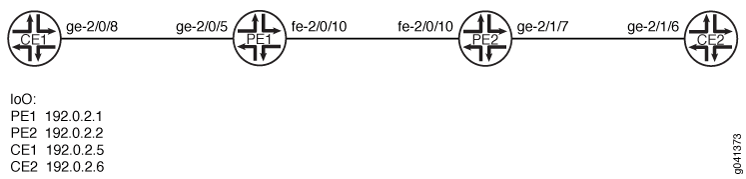
CLIクイックコンフィグレーション は、 図1に示すすべてのデバイスの構成を示しています。「 ステップバイステップの手順」 では、デバイスPE1とデバイスPE2の手順について説明します。
設定
CLIクイックコンフィグレーション
この例をすばやく設定するには、以下のコマンドをコピーしてテキスト ファイルに貼り付け、改行を削除して、ネットワーク構成に合わせて必要な詳細を変更し、 [edit] 階層レベルのCLIにコマンドをコピー アンド ペーストします。
デバイスCE1
set interfaces ge-2/0/8 unit 0 description CE1_to_PE1
set interfaces ge-2/0/8 unit 0 family inet address 172.16.0.1/24
set interfaces lo0 unit 0 family inet address 192.0.2.5/24
set protocols ospf area 0.0.0.0 interface lo0.0 passive
set protocols ospf area 0.0.0.0 interface ge-2/0/8.0
デバイスCE2
set interfaces ge-2/1/6 unit 0 description CE2_to_PE2
set interfaces ge-2/1/6 unit 0 family inet address 172.16.0.4/24
set interfaces lo0 unit 0 family inet address 192.0.2.6/24
set protocols ospf area 0.0.0.0 interface lo0.0 passive
set protocols ospf area 0.0.0.0 interface ge-2/1/6.0
デバイスPE1
set interfaces ge-2/0/5 encapsulation ethernet-ccc
set interfaces ge-2/0/5 unit 0 description PE1_to_CE1
set interfaces ge-2/0/5 unit 0 family ccc
set interfaces fe-2/0/10 unit 0 description to_PE2
set interfaces fe-2/0/10 unit 0 family inet address 10.0.0.1/30
set interfaces fe-2/0/10 unit 0 family mpls
set interfaces lo0 unit 0 family inet address 192.0.2.1/24
set protocols mpls interface fe-2/0/10.0
set protocols bgp local-address 192.0.2.1
set protocols bgp group pe-pe type internal
set protocols bgp group pe-pe family l2vpn auto-discovery-only
set protocols bgp group pe-pe family l2vpn signaling
set protocols bgp group pe-pe neighbor 192.0.2.2
set protocols ospf traffic-engineering
set protocols ospf area 0.0.0.0 interface lo0.0 passive
set protocols ospf area 0.0.0.0 interface fe-2/0/10.0
set protocols ldp interface fe-2/0/10.0
set protocols ldp interface lo0.0
set routing-instances FEC129-VPWS instance-type l2vpn
set routing-instances FEC129-VPWS interface ge-2/0/5.0
set routing-instances FEC129-VPWS route-distinguisher 192.0.2.1:100
set routing-instances FEC129-VPWS l2vpn-id l2vpn-id:100:100
set routing-instances FEC129-VPWS vrf-target target:100:100
set routing-instances FEC129-VPWS protocols l2vpn site ONE source-attachment-identifier 1
set routing-instances FEC129-VPWS protocols l2vpn site ONE interface ge-2/0/5.0 target-attachment-identifier 2
set routing-options autonomous-system 64510
デバイスPE2
set interfaces ge-2/1/7 encapsulation ethernet-ccc
set interfaces ge-2/1/7 unit 0 description PE2_to_CE2
set interfaces ge-2/1/7 unit 0 family ccc
set interfaces fe-2/0/10 unit 0 description to_PE1
set interfaces fe-2/0/10 unit 0 family inet address 10.0.0.2/30
set interfaces fe-2/0/10 unit 0 family mpls
set interfaces lo0 unit 0 family inet address 192.0.2.2/24
set protocols mpls interface fe-2/0/10.0
set protocols bgp local-address 192.0.2.2
set protocols bgp group pe-pe type internal
set protocols bgp group pe-pe family l2vpn auto-discovery-only
set protocols bgp group pe-pe family l2vpn signaling
set protocols bgp group pe-pe neighbor 192.0.2.1
set protocols ospf traffic-engineering
set protocols ospf area 0.0.0.0 interface fe-2/0/10.0
set protocols ospf area 0.0.0.0 interface lo0.0 passive
set protocols ldp interface fe-2/0/10.0
set protocols ldp interface lo0.0
set routing-instances FEC129-VPWS instance-type l2vpn
set routing-instances FEC129-VPWS interface ge-2/1/7.0
set routing-instances FEC129-VPWS route-distinguisher 192.0.2.2:100
set routing-instances FEC129-VPWS l2vpn-id l2vpn-id:100:100
set routing-instances FEC129-VPWS vrf-target target:100:100
set routing-instances FEC129-VPWS protocols l2vpn site TWO source-attachment-identifier 2
set routing-instances FEC129-VPWS protocols l2vpn site TWO interface ge-2/1/7.0 target-attachment-identifier 1
set routing-options autonomous-system 64510
手順
ステップバイステップの手順
FEC 129 VPWSを設定するには:
-
インターフェイスを設定します。
[edit interfaces]
user@PE1# set ge-2/0/5 encapsulation ethernet-ccc
user@PE1# set ge-2/0/5 unit 0 description PE1_to_CE1
user@PE1# set ge-2/0/5 unit 0 family ccc
user@PE1# set fe-2/0/10 unit 0 description to_PE2
user@PE1# set fe-2/0/10 unit 0 family inet address 10.0.0.1/30
user@PE1# set fe-2/0/10 unit 0 family mpls
user@PE1# set lo0 unit 0 family inet address 192.0.2.1/24
-
コアに面するインターフェイスで MPLS を設定します。
[edit protocols mpls]
user@PE1# set interface fe-2/0/10.0
-
BGPを設定します。
[edit protocols bgp]
user@PE1# set local-address 192.0.2.1
user@PE1# set group pe-pe type internal
user@PE1# set group pe-pe family l2vpn auto-discovery-only
user@PE1# set group pe-pe family l2vpn signaling
user@PE1# set group pe-pe neighbor 192.0.2.2
-
IS-ISやOSPFなどの内部ゲートウェイプロトコルを設定します。
OSPFを使用する場合は、トラフィックエンジニアリングを有効にします。トラフィック制御は、デフォルトでIS-ISによってサポートされています。
[edit protocols ospf]
user@PE1# set traffic-engineering
user@PE1# set area 0.0.0.0 interface lo0.0 passive
user@PE1# set area 0.0.0.0 interface fe-2/0/10.0
-
コアに面するインターフェイスとループバック インターフェイスで LDP を設定します。
[edit protocols ldp]
user@PE1# set interface fe-2/0/10.0
user@PE1# set interface lo0.0
-
VPWSルーティングインスタンスを設定します。
LDP は、FEC 129 VPWS に設定されたインスタンスについて、instance.l2vpn.0 からのルートをリッスンします。これらのルートは、ルーティングインスタンスの
instance-type l2vpnステートメントとl2vpn-idステートメントの存在によって識別されます。target-attachment-identifierがリモートPEデバイスの対応するサイトのsource-attachment-identifierと一致していることを確認します。この例では、デバイス PE1 とデバイス PE2 の間に擬似配線が確立されています。デバイス PE1 は SAI 1 と TAI 2 を使用し、デバイス PE2 はその逆の SAI 2 と TAI 1 を使用します。[edit routing-instances FEC129-VPWS] user@PE1# set instance-type l2vpn user@PE1# set interface ge-2/0/5.0 user@PE1# set route-distinguisher 192.0.2.1:100 user@PE1# set l2vpn-id l2vpn-id:100:100 user@PE1# set vrf-target target:100:100 user@PE1# set protocols l2vpn site ONE source-attachment-identifier 1 user@PE1# set protocols l2vpn site ONE interface ge-2/0/5.0 target-attachment-identifier 2
-
自律システム(AS)番号を設定します。
[edit routing-options]
user@PE1# set autonomous-system 64510
-
デバイスの設定が完了したら、設定をコミットします。
[edit]
user@PE1# commit
結果
設定モードから、 show interfaces、 show protocols、 show routing-instances、および show routing-options コマンドを入力して設定を確認します。出力に意図した設定が表示されない場合は、この例の手順を繰り返して設定を修正します。
user@PE1# show interfaces
ge-2/0/5 {
    encapsulation ethernet-ccc;
    unit 0 {
        description PE1_to_CE1;
        family ccc;
    }
}
fe-2/0/10 {
    unit 1 {
        description to_PE2;
        family inet {
            address 10.0.0.1/30;
        }
        family mpls;
    }
}
lo0 {
    unit 0 {
        family inet {
            address 192.0.2.1/24;
        }
    }
}
user@PE1# show protocols
mpls {
    interface fe-2/0/10.0;
}
bgp {
    local-address 192.0.2.1;
    group pe-pe {
        type internal;
        family l2vpn {
            auto-discovery-only;
            inactive: signaling;
        }
        neighbor 192.0.2.2;
    }
}
ospf {
    traffic-engineering;
    area 0.0.0.0 {
        interface lo0.0 {
            passive;
        }
        interface fe-2/0/10.0;
    }
}
ldp {
    interface fe-2/0/10.0;
    interface lo0.0;
}
user@PE1# show routing-instances
FEC129-VPWS {
    instance-type l2vpn;
    interface ge-2/0/5.0;
    route-distinguisher 192.0.2.1:100;
    l2vpn-id l2vpn-id:100:100;
    vrf-target target:100:100;
    protocols {
        l2vpn {
            site ONE {
                source-attachment-identifier 1;
                interface ge-2/0/5.0 {
                    target-attachment-identifier 2;
                }
            }
        }
    }
}
user@PE1# show routing-options
autonomous-system 64510;
検証
設定が正常に機能していることを確認します。
ルートの検証
目的
期待ルートが学習されていることを確認します。
アクション
動作モードから、 show route コマンドを入力します。
user@PE1> show route
inet.0: 5 destinations, 5 routes (5 active, 0 holddown, 0 hidden)
+ = Active Route, - = Last Active, * = Both

192.0.2.1/24         *[Direct/0] 6d 21:16:32
                    > via lo0.0
192.0.2.2/24         *[OSPF/10] 6d 21:15:31, metric 1
                    > to 10.0.0.2 via fe-2/0/10.0
10.0.0.0/30        *[Direct/0] 6d 21:16:31
                    > via fe-2/0/10.0
10.0.0.1/32        *[Local/0] 6d 21:16:32
                      Local via fe-2/0/10.0
203.0.113.0/24       *[OSPF/10] 6d 21:16:34, metric 1
                      MultiRecv

inet.3: 1 destinations, 1 routes (1 active, 0 holddown, 0 hidden)
+ = Active Route, - = Last Active, * = Both

192.0.2.2/24         *[LDP/9] 5d 22:25:19, metric 1
                    > to 10.0.0.2 via fe-2/0/10.0

mpls.0: 8 destinations, 8 routes (8 active, 0 holddown, 0 hidden)
+ = Active Route, - = Last Active, * = Both

0                  *[MPLS/0] 6d 21:16:33, metric 1
                      Receive
1                  *[MPLS/0] 6d 21:16:33, metric 1
                      Receive
2                  *[MPLS/0] 6d 21:16:33, metric 1
                      Receive
13                 *[MPLS/0] 6d 21:16:33, metric 1
                      Receive
299808             *[LDP/9] 5d 22:25:19, metric 1
                    > to 10.0.0.2 via fe-2/0/10.0, Pop
299808(S=0)        *[LDP/9] 5d 22:25:19, metric 1
                    > to 10.0.0.2 via fe-2/0/10.0, Pop
299824             *[L2VPN/7] 5d 22:25:18
                    > via ge-2/0/5.0, Pop
ge-2/0/5.0         *[L2VPN/7] 5d 22:13:02, metric2 1
                    > to 10.0.0.2 via fe-2/0/10.0, Push 299872

bgp.l2vpn.0: 1 destinations, 1 routes (1 active, 0 holddown, 0 hidden)
+ = Active Route, - = Last Active, * = Both

192.0.2.2:100:0.0.0.2/96 AD
                   *[BGP/170] 6d 20:51:23, localpref 100, from 192.0.2.2
                      AS path: I, validation-state: unverified
                    > to 10.0.0.2 via fe-2/0/10.0

ldp.l2vpn.0: 1 destinations, 1 routes (1 active, 0 holddown, 0 hidden)
+ = Active Route, - = Last Active, * = Both

192.0.2.2:NoCtrlWord:5:100:100:0.0.0.2:0.0.0.1/176
                   *[LDP/9] 5d 22:13:02
                      Discard

FEC129-VPWS.l2vpn.0: 4 destinations, 4 routes (4 active, 0 holddown, 0 hidden)
+ = Active Route, - = Last Active, * = Both

192.0.2.1:100:0.0.0.1/96 AD
                   *[L2VPN/170] 6d 20:53:26, metric2 1
                      Indirect
192.0.2.2:100:0.0.0.2/96 AD
                   *[BGP/170] 6d 20:51:23, localpref 100, from 192.0.2.2
                      AS path: I, validation-state: unverified
                    > to 10.0.0.2 via fe-2/0/10.0
192.0.2.2:NoCtrlWord:5:100:100:0.0.0.1:0.0.0.2/176
                   *[L2VPN/7] 6d 20:51:23, metric2 1
                    > to 10.0.0.2 via fe-2/0/10.0
192.0.2.2:NoCtrlWord:5:100:100:0.0.0.2:0.0.0.1/176
                   *[LDP/9] 5d 22:13:02
                      Discard
意味
出力には、AD(自動検出)ルートを含む、学習したすべてのルートが表示されます。
CE デバイス間の接続の確認
目的
デバイスCE1がデバイスCE2にpingを実行できることを確認します。
アクション
user@CE1> ping 192.0.2.6
PING 192.0.2.6 (192.0.2.6): 56 data bytes
64 bytes from 192.0.2.6: icmp_seq=0 ttl=64 time=0.679 ms
64 bytes from 192.0.2.6: icmp_seq=1 ttl=64 time=0.524 ms
^C
--- 192.0.2.6 ping statistics ---
2 packets transmitted, 2 packets received, 0% packet loss
round-trip min/avg/max/stddev = 0.524/0.602/0.679/0.078 ms
意味
出力は、VPWSが動作していることを示しています。
VPWS 接続の確認
目的
すべてのFEC 129 VPWS接続が正しく起動することを確認します。
アクション
user@PE1> show l2vpn connections
Layer-2 VPN connections:

Legend for connection status (St)
EI -- encapsulation invalid      NC -- interface encapsulation not CCC/TCC/VPLS
EM -- encapsulation mismatch     WE -- interface and instance encaps not same
VC-Dn -- Virtual circuit down    NP -- interface hardware not present
CM -- control-word mismatch      -> -- only outbound connection is up
CN -- circuit not provisioned    <- -- only inbound connection is up
OR -- out of range               Up -- operational
OL -- no outgoing label          Dn -- down
LD -- local site signaled down   CF -- call admission control failure
RD -- remote site signaled down  SC -- local and remote site ID collision
LN -- local site not designated  LM -- local site ID not minimum designated
RN -- remote site not designated RM -- remote site ID not minimum designated
XX -- unknown connection status  IL -- no incoming label
MM -- MTU mismatch               MI -- Mesh-Group ID not available
BK -- Backup connection          ST -- Standby connection
PF -- Profile parse failure      PB -- Profile busy
RS -- remote site standby        SN -- Static Neighbor
LB -- Local site not best-site   RB -- Remote site not best-site
VM -- VLAN ID mismatch

Legend for interface status
Up -- operational
Dn -- down

Instance: FEC129-VPWS
  L2vpn-id: 100:100
  Local source-attachment-id: 1 (ONE)
    Target-attachment-id      Type  St     Time last up          # Up trans
    2                         rmt   Up     Nov 28 16:16:14 2012           1
      Remote PE: 192.0.2.2, Negotiated control-word: No
      Incoming label: 299792, Outgoing label: 299792
      Local interface: ge-2/0/5.0, Status: Up, Encapsulation: ETHERNET
意味
予想通り、接続はアップしています。出力には、ソース添付ファイルIDとターゲット添付ファイルIDが含まれます。
PE デバイス間の接続の確認
目的
デバイスPE1がデバイスPE2にpingを実行できることを確認します。 ping mpls l2vpn fec129 コマンドは、SAIとTAIを整数またはIPアドレスとして受け入れ、他のパラメーター(instance、 local-id、 remote-id、 remote-pe-address)の代わりにCE向けインターフェイスを使用することもできます。
アクション
user@PE1> ping mpls l2vpn fec129 instance FEC129-VPWS remote-id 2 remote-pe-address 192.0.2.2 local-id 1
!!!!!
--- lsping statistics ---
5 packets transmitted, 5 packets received, 0% packet loss
user@PE1> ping mpls l2vpn fec129 interface ge-2/0/5.0
!!!!!
--- lsping statistics ---
5 packets transmitted, 5 packets received, 0% packet loss
意味
出力は、VPWSが動作していることを示しています。