
例:ユーザー定義メッシュグループを持つLDP VPLSのBGP自動検出の設定
この例では、FEC(Forwarding Equivalency Class)129で規定されているとおりに、LDP VPLSのBGP自動検出用にユーザー定義メッシュグループを設定する方法を説明します。FEC 129は、BGP自動検出を使用してエンドポイント情報を伝達するため、疑似配線を手動で設定する必要はありません。ボーダールーターでメッシュグループを設定して、自動的に完全にメッシュ化され、同じシグナリングプロトコル(BGPまたはLDP)を共有するPEルーターのセットをグループ化します。複数のメッシュグループを設定して、完全にメッシュ化されたLDPシグナル化またはBGPシグナル化VPLSドメインをそれぞれメッシュグループにマッピングできます。
要件
開始する前に、LDP VPLSのBGP自動検出を設定します。 例:LDP VPLS向けBGP自動検出の設定を参照してください。
この例のハードウェアとソフトウェアの要件は、「 LDP VPLS向けのBGP自動検出の設定」の要件と同じです。この例で使用されているトポロジーに設定例を適合させる必要があります。
概要
FEC 129 のメッシュグループの設定は、FEC 128 のメッシュグループの設定と非常によく似ています。
FEC 129には以下の違いがあります。
ユーザー定義の各メッシュグループには、固有のルート識別子が必要です。
[edit routing-intances]階層レベルでデフォルトメッシュグループに定義されているルート識別子は使用しないでください。ユーザー定義のメッシュグループには、独自のインポートおよびエクスポートルートターゲットが必要です。
ユーザー定義の各メッシュグループは、一意のレイヤー2 VPN IDを持つことができます。デフォルトでは、VPLSルーティングインスタンスに設定されたすべてのメッシュグループは、
[edit routing-instances]階層レベルで設定したものと同じレイヤー2 VPN IDを使用します。
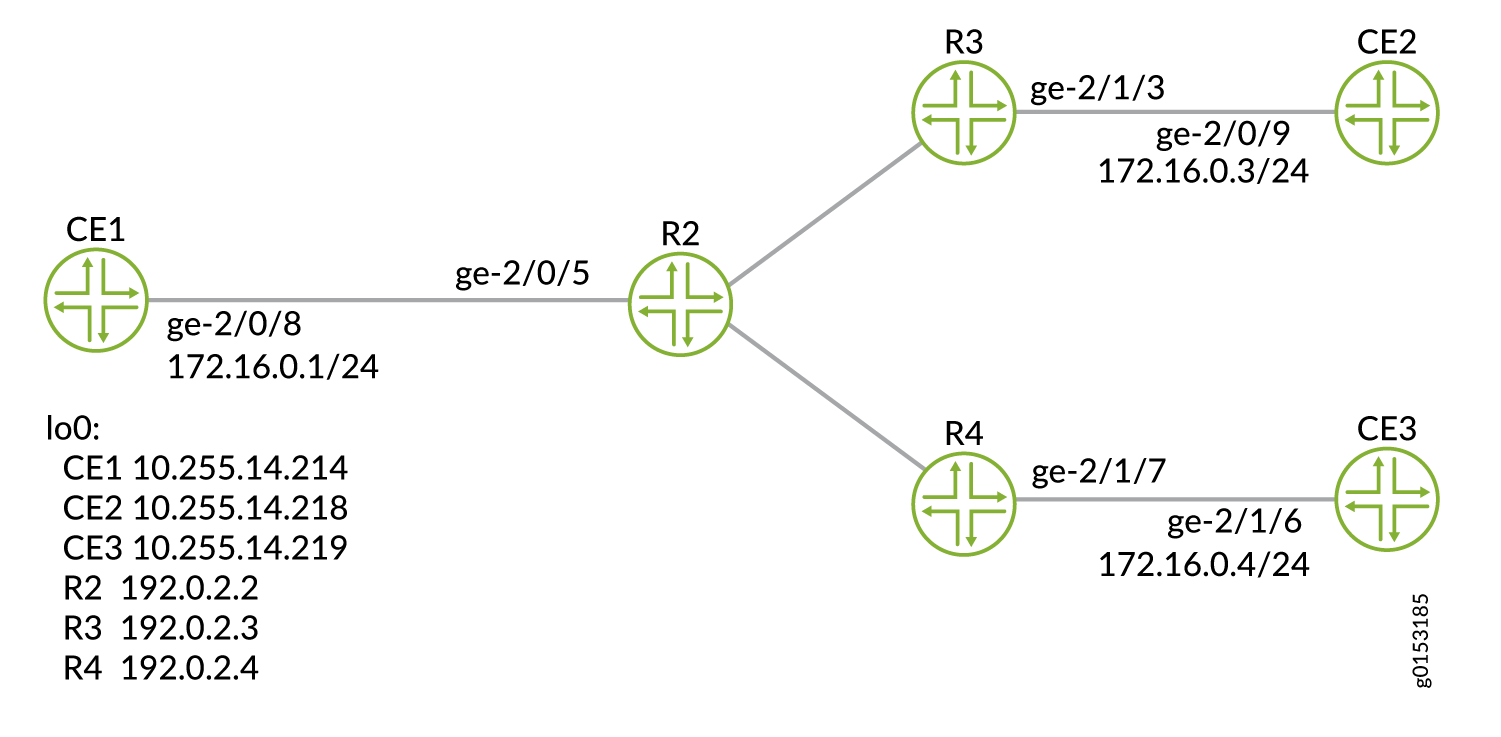
設定
CLIクイックコンフィグレーション
メッシュグループをすばやく設定するには、以下のコマンドをコピーし、改行を削除してから、各デバイスのCLIにコマンドを貼り付けます。
デバイスCE1
set interfaces ge-2/0/8 unit 0 family inet address 172.16.0.1/24
set interfaces lo0 unit 0 family inet address 10.255.14.214/32
set protocols ospf area 0.0.0.0 interface lo0.0 passive
set protocols ospf area 0.0.0.0 interface ge-2/0/8.0
デバイスCE3
set interfaces ge-2/0/9 unit 0 family inet address 172.16.0.3/24
set interfaces lo0 unit 0 family inet address 10.255.14.218/32
set protocols ospf area 0.0.0.0 interface lo0.0 passive
set protocols ospf area 0.0.0.0 interface ge-2/0/9.0
デバイスCE4
set interfaces ge-2/1/6 unit 0 family inet address 172.16.0.4/24
set interfaces lo0 unit 0 family inet address 10.255.14.219/32
set protocols ospf area 0.0.0.0 interface lo0.0 passive
set protocols ospf area 0.0.0.0 interface ge-2/1/6.0
デバイスR2
set interfaces ge-2/0/5 encapsulation ethernet-vpls
set interfaces ge-2/0/5 unit 0 description to_CE1
set interfaces ge-2/0/5 unit 0 family vpls
set interfaces ge-2/0/10 unit 0 description to_R3
set interfaces ge-2/0/10 unit 0 family inet address 10.10.4.2/30
set interfaces ge-2/0/10 unit 0 family mpls
set interfaces ge-2/0/11 unit 0 description to_R4
set interfaces ge-2/0/11 unit 0 family inet address 10.10.5.1/30
set interfaces ge-2/0/11 unit 0 family mpls
set interfaces lo0 unit 0 family inet address 192.0.2.2/24
set protocols mpls interface ge-2/0/10.0
set protocols mpls interface ge-2/0/11.0
set protocols bgp local-address 192.0.2.2
set protocols bgp group pe-pe type internal
set protocols bgp group pe-pe connect-retry-interval 1
set protocols bgp group pe-pe family l2vpn auto-discovery-only
set protocols bgp group pe-pe family l2vpn signaling
set protocols bgp group pe-pe neighbor 192.0.2.3
set protocols bgp group pe-pe neighbor 192.0.2.4
set protocols ospf traffic-engineering
set protocols ospf area 0.0.0.0 interface lo0.0 passive
set protocols ospf area 0.0.0.0 interface ge-2/0/10.0
set protocols ospf area 0.0.0.0 interface ge-2/0/11.0
set protocols ldp interface ge-2/0/10.0
set protocols ldp interface ge-2/0/11.0
set protocols ldp interface lo0.0
set routing-instances inst512 instance-type vpls
set routing-instances inst512 interface ge-2/0/5.0
set routing-instances inst512 route-distinguisher 100:100
set routing-instances inst512 l2vpn-id l2vpn-id:1:2
set routing-instances inst512 vrf-target target:1:1
set routing-instances inst512 protocols vpls mesh-group metro1 vrf-target target:2:1
set routing-instances inst512 protocols vpls mesh-group metro1 route-distinguisher 100:200
set routing-options autonomous-system 64510
デバイスR3
set interfaces ge-2/0/10 unit 0 description to_R2
set interfaces ge-2/0/10 unit 0 family inet address 10.10.4.1/30
set interfaces ge-2/0/10 unit 0 family mpls
set interfaces ge-2/1/3 encapsulation ethernet-vpls
set interfaces ge-2/1/3 unit 0 description to_CE2
set interfaces ge-2/1/3 unit 0 family vpls
set interfaces lo0 unit 0 family inet address 192.0.2.3/24
set protocols mpls interface ge-2/0/10.0
set protocols bgp local-address 192.0.2.3
set protocols bgp group pe-pe type internal
set protocols bgp group pe-pe connect-retry-interval 1
set protocols bgp group pe-pe family l2vpn auto-discovery-only
set protocols bgp group pe-pe family l2vpn signaling
set protocols bgp group pe-pe neighbor 192.0.2.2
set protocols bgp group pe-pe neighbor 192.0.2.4
set protocols ospf traffic-engineering
set protocols ospf area 0.0.0.0 interface ge-2/0/10.0
set protocols ospf area 0.0.0.0 interface lo0.0 passive
set protocols ldp interface ge-2/0/10.0
set protocols ldp interface lo0.0
set routing-instances inst512 instance-type vpls
set routing-instances inst512 interface ge-2/1/3.0
set routing-instances inst512 route-distinguisher 100:100
set routing-instances inst512 l2vpn-id l2vpn-id:1:2
set routing-instances inst512 vrf-target target:1:1
set routing-instances inst512 protocols vpls
set routing-options autonomous-system 64510
デバイスR4
set interfaces ge-2/0/10 unit 0 description to_R2
set interfaces ge-2/0/10 unit 0 family inet address 10.10.5.2/30
set interfaces ge-2/0/10 unit 0 family mpls
set interfaces ge-2/1/7 encapsulation ethernet-vpls
set interfaces ge-2/1/7 unit 0 description to_CE3
set interfaces ge-2/1/7 unit 0 family vpls
set interfaces lo0 unit 0 family inet address 192.0.2.4/24
set protocols mpls interface ge-2/0/10.0
set protocols bgp local-address 192.0.2.4
set protocols bgp group pe-pe type internal
set protocols bgp group pe-pe connect-retry-interval 1
set protocols bgp group pe-pe family l2vpn auto-discovery-only
set protocols bgp group pe-pe family l2vpn signaling
set protocols bgp group pe-pe neighbor 192.0.2.2
set protocols bgp group pe-pe neighbor 192.0.2.3
set protocols ospf traffic-engineering
set protocols ospf area 0.0.0.0 interface ge-2/0/10.0
set protocols ospf area 0.0.0.0 interface lo0.0 passive
set protocols ldp interface ge-2/0/10.0
set protocols ldp interface lo0.0
set routing-instances inst512 instance-type vpls
set routing-instances inst512 interface ge-2/1/7.0
set routing-instances inst512 route-distinguisher 100:100
set routing-instances inst512 l2vpn-id l2vpn-id:1:2
set routing-instances inst512 vrf-target target:1:1
set routing-instances inst512 protocols vpls
set routing-options autonomous-system 64510
手順
ステップバイステップの手順
メッシュグループを設定するには:
インターフェイスを設定します。
[edit interfaces]
user@R2# set ge-2/0/5 encapsulation ethernet-vpls
user@R2# set ge-2/0/5 unit 0 description to_CE1
user@R2# set ge-2/0/5 unit 0 family vpls
user@R2# set ge-2/0/10 unit 0 description to_R3
user@R2# set ge-2/0/10 unit 0 family inet address 10.10.4.2/30
user@R2# set ge-2/0/10 unit 0 family mpls
user@R2# set ge-2/0/11 unit 0 description to_R4
user@R2# set ge-2/0/11 unit 0 family inet address 10.10.5.1/30
user@R2# set ge-2/0/11 unit 0 family mpls
user@R2# set lo0 unit 0 family inet address 192.0.2.2/24
インターフェイスに MPLS を設定します。
[edit protocols mpls]
user@R2# set interface ge-2/0/10.0
user@R2# set interface ge-2/0/11.0
BGPを設定します。
[edit protocols bgp]
user@R2# set local-address 192.0.2.2
[edit protocols bgp group pe-pe]
user@R2# set type internal
user@R2# set connect-retry-interval 1
user@R2# set family l2vpn auto-discovery-only
user@R2# set family l2vpn signaling
user@R2# set neighbor 192.0.2.3
user@R2# set neighbor 192.0.2.4
デフォルトのメッシュグループのインポートとエクスポートのルートターゲットを設定します。
[edit protocols ospf]
user@R2# set traffic-engineering
user@R2# set area 0.0.0.0 interface lo0.0 passive
user@R2# set area 0.0.0.0 interface ge-2/0/10.0
user@R2# set area 0.0.0.0 interface ge-2/0/11.0
コアに面するインターフェイスとループバック インターフェイスで LDP を設定します。
[edit protocols ldp]
user@R2# set interface ge-2/0/10.0
user@R2# set interface ge-2/0/11.0
user@R2# set interface lo0.0
VPLSルーティングインスタンスを設定します。
メッシュグループ内のルート識別が一意であることを確認します。
[edit routing-instances inst512]
user@R2# set instance-type vpls
user@R2# set interface ge-2/0/5.0
user@R2# set route-distinguisher 100:100
user@R2# set l2vpn-id l2vpn-id:1:2
user@R2# set vrf-target target:1:1
user@R2# set protocols vpls mesh-group metro1 vrf-target target:2:1
user@R2# set protocols vpls mesh-group metro1 route-distinguisher 100:200
自律システム(AS)番号を設定します。
[edit routing-options]
user@R2# set autonomous-system 64510
デバイスの設定が完了したら、設定をコミットします。
[edit]
user@R2# commit
結果
設定モードから、 show routing-instances コマンドを入力して設定を確認します。出力に意図した設定が表示されない場合は、この例の手順を繰り返して設定を修正します。
user@R2# show interfaces
ge-2/0/5 {
    encapsulation ethernet-vpls;
    unit 0 {
        description PE1_to_CE1;
        family vpls;
    }
}
ge-2/0/10 {
    unit 0{
        description to_R3;
        family inet {
            address 10.10.4.2/30;
        }
        family mpls;
    }
}
ge-2/0/11 {
    unit 0 {
        description to_R4;
        family inet {
            address 10.10.5.1/30;
        }
        family mpls;
    }
}
lo0 {
    unit 0{
        family inet {
            address 192.0.2.2/24;
        }
    }
}
user@R2# show protocols
mpls {
    interface ge-2/0/10.0;
    interface ge-2/0/11.0;
}
bgp {
    local-address 192.0.2.2;
    group pe-pe {
        type internal;
        connect-retry-interval 1;
        family l2vpn {
            auto-discovery-only;
            signaling;
        }
        neighbor 192.0.2.3;
        neighbor 192.0.2.4;
    }
}
ospf {
    traffic-engineering;
    area 0.0.0.0 {
        interface lo0.0 {
            passive;
        }
        interface ge-2/0/10.0;
        interface ge-2/0/11.0;
    }
}
ldp {
    interface ge-2/0/10.0;
    interface ge-2/0/11.0;
    interface lo0.0;
}
user@R2# show routing-instances
inst512 {
    instance-type vpls;
    interface ge-2/0/5.0;
    route-distinguisher 100:100;
    l2vpn-id l2vpn-id:1:2;
    vrf-target target:1:1;
    protocols {
        vpls {
            mesh-group metro1 {
                vrf-target target:2:1;
                route-distinguisher 100:200;
            }
        }
    }
}
user@R2# show routing-options
autonomous-system 64510;
検証
設定が正常に機能していることを確認します。
ルートの検証
目的
期待ルートが学習されていることを確認します。
アクション
動作モードから、 show route コマンドを入力します。
user@R2> show route
inet.0: 9 destinations, 9 routes (9 active, 0 holddown, 0 hidden)
+ = Active Route, - = Last Active, * = Both

192.0.2.2/24         *[Direct/0] 4d 02:42:47
                    > via lo0.0
192.0.2.3/24         *[OSPF/10] 4d 02:41:56, metric 1
                    > to 10.10.4.1 via ge-2/0/10.0
192.0.2.4/24         *[OSPF/10] 4d 02:42:01, metric 1
                    > to 10.10.5.2 via ge-2/0/11.0
10.10.3.2/24       *[Local/0] 4d 02:42:47
                      Reject
10.10.4.0/30       *[Direct/0] 4d 02:42:46
                    > via ge-2/0/10.0
10.10.4.2/32       *[Local/0] 4d 02:42:47
                      Local via ge-2/0/10.0
10.10.5.0/30       *[Direct/0] 4d 02:42:46
                    > via ge-2/0/11.0
10.10.5.1/32       *[Local/0] 4d 02:42:47
                      Local via ge-2/0/11.0
203.0.113.0/24       *[OSPF/10] 4d 02:42:49, metric 1
                      MultiRecv

inet.3: 2 destinations, 2 routes (2 active, 0 holddown, 0 hidden)
+ = Active Route, - = Last Active, * = Both

192.0.2.3/24         *[LDP/9] 4d 02:01:06, metric 1
                    > to 10.10.4.1 via ge-2/0/10.0
192.0.2.4/24         *[LDP/9] 4d 02:01:06, metric 1
                    > to 10.10.5.2 via ge-2/0/11.0

mpls.0: 12 destinations, 12 routes (12 active, 0 holddown, 0 hidden)
+ = Active Route, - = Last Active, * = Both

0                  *[MPLS/0] 4d 02:42:49, metric 1
                      Receive
1                  *[MPLS/0] 4d 02:42:49, metric 1
                      Receive
2                  *[MPLS/0] 4d 02:42:49, metric 1
                      Receive
13                 *[MPLS/0] 4d 02:42:49, metric 1
                      Receive
299776             *[LDP/9] 4d 02:01:06, metric 1
                    > to 10.10.5.2 via ge-2/0/11.0, Pop
299776(S=0)        *[LDP/9] 4d 02:01:06, metric 1
                    > to 10.10.5.2 via ge-2/0/11.0, Pop
299792             *[LDP/9] 4d 02:01:06, metric 1
                    > to 10.10.4.1 via ge-2/0/10.0, Pop
299792(S=0)        *[LDP/9] 4d 02:01:06, metric 1
                    > to 10.10.4.1 via ge-2/0/10.0, Pop
800000             *[VPLS/7] 4d 02:01:05
                    > via vt-2/0/10.185597952, Pop
800001             *[VPLS/7] 4d 02:01:05
                    > via vt-2/0/10.185597953, Pop
vt-2/0/10.185597953*[VPLS/7] 4d 02:01:05, metric2 1
                    > to 10.10.5.2 via ge-2/0/11.0, Push 800001
vt-2/0/10.185597952*[VPLS/7] 4d 02:01:05, metric2 1
                    > to 10.10.4.1 via ge-2/0/10.0, Push 800001

bgp.l2vpn.0: 2 destinations, 2 routes (2 active, 0 holddown, 0 hidden)
+ = Active Route, - = Last Active, * = Both

100:100:192.0.2.3/96 AD
                   *[BGP/170] 4d 02:32:41, localpref 100, from 192.0.2.3
                      AS path: I, validation-state: unverified
                    > to 10.10.4.1 via ge-2/0/10.0
100:100:192.0.2.4/96 AD
                   *[BGP/170] 4d 02:32:41, localpref 100, from 192.0.2.4
                      AS path: I, validation-state: unverified
                    > to 10.10.5.2 via ge-2/0/11.0

inst512.l2vpn.0: 8 destinations, 8 routes (8 active, 0 holddown, 0 hidden)
+ = Active Route, - = Last Active, * = Both

100:100:192.0.2.2/96 AD
                   *[VPLS/170] 4d 02:01:05, metric2 1
                      Indirect
100:100:192.0.2.3/96 AD
                   *[BGP/170] 4d 02:32:41, localpref 100, from 192.0.2.3
                      AS path: I, validation-state: unverified
                    > to 10.10.4.1 via ge-2/0/10.0
100:100:192.0.2.4/96 AD
                   *[BGP/170] 4d 02:32:41, localpref 100, from 192.0.2.4
                      AS path: I, validation-state: unverified
                    > to 10.10.5.2 via ge-2/0/11.0
100:200:192.0.2.2/96 AD
                   *[VPLS/170] 4d 02:01:05, metric2 1
                      Indirect
192.0.2.3:NoCtrlWord:5:1:2:192.0.2.2:192.0.2.3/176
                   *[VPLS/7] 4d 02:01:05, metric2 1
                    > to 10.10.4.1 via ge-2/0/10.0
192.0.2.3:NoCtrlWord:5:1:2:192.0.2.3:192.0.2.2/176
                   *[LDP/9] 4d 02:01:05
                      Discard
192.0.2.4:NoCtrlWord:5:1:2:192.0.2.2:192.0.2.4/176
                   *[VPLS/7] 4d 02:01:05, metric2 1
                    > to 10.10.5.2 via ge-2/0/11.0
192.0.2.4:NoCtrlWord:5:1:2:192.0.2.4:192.0.2.2/176
                   *[LDP/9] 4d 02:01:05
                      Discard

ldp.l2vpn.0: 2 destinations, 2 routes (2 active, 0 holddown, 0 hidden)
+ = Active Route, - = Last Active, * = Both

192.0.2.3:NoCtrlWord:5:1:2:192.0.2.3:192.0.2.2/176
                   *[LDP/9] 4d 02:01:05
                      Discard
192.0.2.4:NoCtrlWord:5:1:2:192.0.2.4:192.0.2.2/176
                   *[LDP/9] 4d 02:01:05
                      Discard
意味
出力には、自動検出(AD)ルートを含む、学習したすべてのルートが表示されます。
接続の確認
目的
デバイスCE1がデバイスCE2とデバイスCE3にpingを実行できることを確認します。
アクション
user@CE1> ping 10.255.14.218
PING 10.255.14.218 (10.255.14.218): 56 data bytes
64 bytes from 10.255.14.218: icmp_seq=0 ttl=64 time=0.787 ms
64 bytes from 10.255.14.218: icmp_seq=1 ttl=64 time=0.651 ms
^C
--- 10.255.14.218 ping statistics ---
2 packets transmitted, 2 packets received, 0% packet loss
round-trip min/avg/max/stddev = 0.651/0.719/0.787/0.068 ms
user@CE1> ping 10.255.14.219
PING 10.255.14.219 (10.255.14.219): 56 data bytes
64 bytes from 10.255.14.219: icmp_seq=0 ttl=64 time=1.054 ms
64 bytes from 10.255.14.219: icmp_seq=1 ttl=64 time=0.669 ms
^C
--- 10.255.14.219 ping statistics ---
2 packets transmitted, 2 packets received, 0% packet loss
round-trip min/avg/max/stddev = 0.669/0.862/1.054/0.193 ms
意味
出力は、VPLSが動作していることを示しています。
VPLS接続の確認
目的
すべてのFEC 129 VPLS接続が正しく起動することを確認します。
アクション
user@R2> show vpls connections
Instance: inst512
  L2vpn-id: 1:2
  Local-id: 192.0.2.2
  Mesh-group connections: __ves__
    Remote-id                 Type  St     Time last up          # Up trans
    192.0.2.4                   rmt   Up     Oct 26 15:11:56 2012           1
      Remote PE: 192.0.2.4, Negotiated control-word: No
      Incoming label: 800001, Outgoing label: 800001
      Local interface: vt-2/0/10.185597953, Status: Up, Encapsulation: ETHERNET
        Description: Intf - vpls inst512 local-id 192.0.2.2 remote-id 192.0.2.4 neighbor 192.0.2.4
    192.0.2.3                   rmt   Up     Oct 26 15:11:56 2012           1
      Remote PE: 192.0.2.3, Negotiated control-word: No
      Incoming label: 800000, Outgoing label: 800001
      Local interface: vt-2/0/10.185597952, Status: Up, Encapsulation: ETHERNET
        Description: Intf - vpls inst512 local-id 192.0.2.2 remote-id 192.0.2.3 neighbor 192.0.2.3
意味
予想通り、接続は稼働しています。
学習したVPLS MACアドレス情報を表示する
目的
すべてのCEデバイスのMACアドレスが学習され、インストールされていることを確認します。
アクション
user@R2> show vpls mac-table

MAC flags (S -static MAC, D -dynamic MAC, L -locally learned, C -Control MAC
           SE -Statistics enabled, NM -Non configured MAC, R -Remote PE MAC)

Logical system   : R2
Routing instance : inst512
 Bridging domain : __inst512__, VLAN : NA
   MAC                 MAC      Logical          NH     RTR
   address             flags    interface        Index  ID
   00:21:59:0f:35:32   D        ge-2/0/5.0
   00:21:59:0f:35:33   D        vt-2/0/10.185597952
   00:21:59:0f:35:d5   D        vt-2/0/10.185597953