
例:モバイルバックホールシナリオでの擬似回線冗長性の設定
この例では、モバイルバックホールのシナリオでレイヤー2セグメントとレイヤー3セグメントが相互接続される疑似回線の冗長性を設定する方法を示します。
要件
この例では、以下のハードウェアおよびソフトウェアコンポーネントを使用して設定できます。
-
Junos OSリリース13.2以降
-
アクセス(A)ルーターとしてのルーターのACX5000シリーズ
-
MXシリーズ 5Gユニバーサルルーティングプラットフォーム、プロバイダエッジ(PE)ルーター用のM Seriesマルチサービスエッジルーター
-
トランジットラベルスイッチルーターとして機能するPTXシリーズパケットトランスポートルーター
-
コアルーター用のT Seriesコアルーター
PE ルーターは T Series コア ルーターである場合もありますが、それは一般的ではありません。拡張要件に応じて、コアルーターは、MXシリーズの5GユニバーサルルーティングプラットフォームまたはM Seriesマルチサービスエッジルーターにもなります。カスタマーエッジ(CE)デバイスは、ジュニパーネットワークスまたは他のベンダーの他のルーターまたはスイッチである可能性があります。
この例を設定する前に、デバイスの初期化以外の特別な設定を行う必要はありません。
概要
デバイスCE1は、IPv4インターフェイスとPEデバイスを指す静的ルートを持つシンプルなエッジルーターです。デバイスA1は、 hot-standby ステートメントを使用して、デバイスPE1とデバイスPE2に向けて2つの仮想回線(VC)を確立します。デバイスPE1とデバイスPE2は、これらのVCを終了し、論理トンネルIPv4サブネット上にポリシー条件を適用します。デバイス PE3 は、デバイス PE1 およびデバイス PE2 と共有するレイヤー 3 VPN で IPv4 インターフェイスを持つことで、レイヤー 3 VPN プロバイダ エッジ デバイスとして機能します。
CLIクイックコンフィグレーションは、図1に示すすべてのデバイスの構成を示しています。
「 ステップバイステップの手順」 では、デバイスA1とデバイスPE1の手順について説明します。
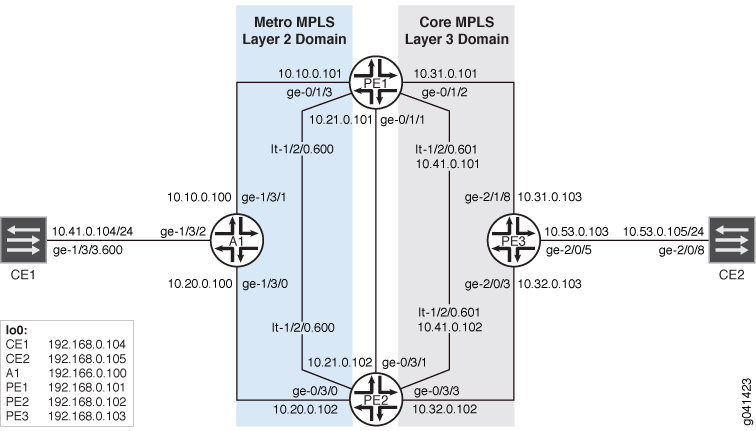
設定
手順
CLIクイックコンフィグレーション
この例をすばやく設定するには、以下のコマンドをコピーしてテキストファイルに貼り付け、改行を削除して、ネットワーク構成に合わせて必要な詳細を変更してから、コマンドを [edit] 階層レベルのCLIにコピー&ペーストします。
デバイスCE1
set interfaces ge-1/3/3 vlan-tagging
set interfaces ge-1/3/3 unit 600 vlan-id 600
set interfaces ge-1/3/3 unit 600 family inet address 10.41.0.104/24
set interfaces lo0 unit 0 family inet address 192.168.0.104/32 primary
set protocols ospf area 0.0.0.0 interface ge-1/3/3.600
set protocols ospf area 0.0.0.0 interface lo0.0
set routing-options static route 192.168.0.0/8 next-hop 10.41.0.1
set routing-options static route 10.53.0.0/16 next-hop 10.41.0.1
set routing-options router-id 192.168.0.104
デバイスA1
set interfaces ge-1/3/0 unit 0 family inet address 10.20.0.100/24
set interfaces ge-1/3/0 unit 0 family iso
set interfaces ge-1/3/0 unit 0 family mpls
set interfaces ge-1/3/1 unit 0 family inet address 10.10.0.100/24
set interfaces ge-1/3/1 unit 0 family iso
set interfaces ge-1/3/1 unit 0 family mpls
set interfaces ge-1/3/2 vlan-tagging
set interfaces ge-1/3/2 encapsulation vlan-ccc
set interfaces ge-1/3/2 unit 600 encapsulation vlan-ccc
set interfaces ge-1/3/2 unit 600 vlan-id 600
set interfaces ge-1/3/2 unit 600 family ccc
set interfaces lo0 unit 0 family inet address 192.168.0.100/32 primary
set interfaces lo0 unit 0 family iso address 49.0002.0192.0168.0100.00
set routing-options router-id 192.168.0.100
set routing-options autonomous-system 64510
set routing-options forwarding-table export pplb
set protocols rsvp interface ge-1/3/0.0
set protocols rsvp interface ge-1/3/1.0
set protocols rsvp interface lo0.0
set protocols mpls interface ge-1/3/0.0
set protocols mpls interface ge-1/3/1.0
set protocols isis interface ge-1/3/0.0
set protocols isis interface ge-1/3/1.0
set protocols isis interface lo0.0
set protocols ldp interface ge-1/3/0.0
set protocols ldp interface ge-1/3/1.0
set protocols ldp interface lo0.0
set protocols l2circuit neighbor 192.168.0.101 interface ge-1/3/2.600 virtual-circuit-id 1
set protocols l2circuit neighbor 192.168.0.101 interface ge-1/3/2.600 pseudowire-status-tlv
set protocols l2circuit neighbor 192.168.0.101 interface ge-1/3/2.600 revert-time 10 maximum 60
set protocols l2circuit neighbor 192.168.0.101 interface ge-1/3/2.600 backup-neighbor 192.168.0.102 virtual-circuit-id 2
set protocols l2circuit neighbor 192.168.0.101 interface ge-1/3/2.600 backup-neighbor 192.168.0.102 hot-standby
set policy-options policy-statement pplb then load-balance per-packet
デバイスPE1
set interfaces ge-0/1/1 unit 0 family inet address 10.21.0.101/24
set interfaces ge-0/1/1 unit 0 family iso
set interfaces ge-0/1/1 unit 0 family mpls
set interfaces ge-0/1/2 unit 0 family inet address 10.31.0.101/24
set interfaces ge-0/1/2 unit 0 family iso
set interfaces ge-0/1/2 unit 0 family mpls
set interfaces ge-0/1/3 unit 0 family inet address 10.10.0.101/24
set interfaces ge-0/1/3 unit 0 family iso
set interfaces ge-0/1/3 unit 0 family mpls
set interfaces lt-1/2/0 unit 600 encapsulation vlan-ccc
set interfaces lt-1/2/0 unit 600 vlan-id 600
set interfaces lt-1/2/0 unit 600 peer-unit 601
set interfaces lt-1/2/0 unit 601 encapsulation vlan
set interfaces lt-1/2/0 unit 601 vlan-id 600
set interfaces lt-1/2/0 unit 601 peer-unit 600
set interfaces lt-1/2/0 unit 601 family inet filter input icmp_inet
set interfaces lt-1/2/0 unit 601 family inet filter output icmp_inet
set interfaces lt-1/2/0 unit 601 family inet address 10.41.0.101/24 vrrp-group 0 virtual-address 10.41.0.1
set interfaces lt-1/2/0 unit 601 family inet address 10.41.0.101/24 vrrp-group 0 accept-data
set interfaces lo0 unit 0 family inet address 192.168.0.101/32 primary
set interfaces lo0 unit 0 family iso address 49.0002.0192.0168.0003.00
set interfaces lo0 unit 1 family inet address 192.168.1.101/32
set routing-options router-id 192.168.0.101
set routing-options autonomous-system 64511
set protocols rsvp interface ge-0/1/1.0
set protocols rsvp interface ge-0/1/2.0
set protocols rsvp interface ge-0/1/3.0
set protocols rsvp interface lo0.0
set protocols mpls label-switched-path to_PE3 to 192.168.0.103
set protocols mpls label-switched-path to_PE2 to 192.168.0.102
set protocols mpls interface ge-0/1/1.0
set protocols mpls interface ge-0/1/2.0
set protocols mpls interface ge-0/1/3.0
set protocols bgp local-address 192.168.0.101
set protocols bgp group ibgp family inet-vpn any
set protocols bgp group ibgp peer-as 64511
set protocols bgp group ibgp neighbor 192.168.0.102
set protocols bgp group ibgp neighbor 192.168.0.103
set protocols isis interface ge-0/1/1.0
set protocols isis interface ge-0/1/2.0
set protocols isis interface ge-0/1/3.0
set protocols isis interface lo0.0
set protocols ldp interface ge-0/1/1.0
set protocols ldp interface ge-0/1/2.0
set protocols ldp interface ge-0/1/3.0
set protocols ldp interface lo0.0
set protocols l2circuit neighbor 192.168.0.100 interface lt-1/2/0.600 virtual-circuit-id 1
set protocols l2circuit neighbor 192.168.0.100 interface lt-1/2/0.600 pseudowire-status-tlv hot-standby-vc-on
set policy-options policy-statement l3vpn_export term primary from condition primary
set policy-options policy-statement l3vpn_export term primary then local-preference add 300
set policy-options policy-statement l3vpn_export term primary then community set l3vpn
set policy-options policy-statement l3vpn_export term primary then accept
set policy-options policy-statement l3vpn_export term standby from condition standby
set policy-options policy-statement l3vpn_export term standby then local-preference add 30
set policy-options policy-statement l3vpn_export term standby then community set l3vpn
set policy-options policy-statement l3vpn_export term standby then accept
set policy-options policy-statement l3vpn_export term default then community set l3vpn
set policy-options policy-statement l3vpn_export term default then accept
set policy-options policy-statement l3vpn_import term 1 from community l3vpn
set policy-options policy-statement l3vpn_import term 1 then accept
set policy-options policy-statement l3vpn_import term default then reject
set policy-options policy-statement ospf_export term 0 from community l3vpn
set policy-options policy-statement ospf_export term 0 then accept
set policy-options community l3vpn members target:64511:600
set policy-options condition primary if-route-exists address-family ccc lt-1/2/0.600
set policy-options condition primary if-route-exists address-family ccc table mpls.0
set policy-options condition primary if-route-exists address-family ccc peer-unit 601
set policy-options condition standby if-route-exists address-family ccc lt-1/2/0.600
set policy-options condition standby if-route-exists address-family ccc table mpls.0
set policy-options condition standby if-route-exists address-family ccc standby
set policy-options condition standby if-route-exists address-family ccc peer-unit 601
set firewall family inet filter icmp_inet interface-specific
set firewall family inet filter icmp_inet term 0 from source-address 10.41.0.101/32 except
set firewall family inet filter icmp_inet term 0 from source-address 10.0.0.0/8
set firewall family inet filter icmp_inet term 0 from protocol icmp
set firewall family inet filter icmp_inet term 0 then count icmp_inet
set firewall family inet filter icmp_inet term 0 then log
set firewall family inet filter icmp_inet term 0 then accept
set firewall family inet filter icmp_inet term 1 then accept
set routing-instances l3vpn instance-type vrf
set routing-instances l3vpn interface lt-1/2/0.601
set routing-instances l3vpn interface lo0.1
set routing-instances l3vpn route-distinguisher 192.168.1.101:64511
set routing-instances l3vpn vrf-import l3vpn_import
set routing-instances l3vpn vrf-export l3vpn_export
set routing-instances l3vpn vrf-table-label
set routing-instances l3vpn protocols ospf export ospf_export
set routing-instances l3vpn protocols ospf area 0.0.0.0 lt-1/2/0.601
set routing-instances l3vpn protocols ospf area 0.0.0.0 lo0.1
デバイスPE2
set interfaces ge-0/3/0 unit 0 family inet address 10.20.0.102/24
set interfaces ge-0/3/0 unit 0 family iso
set interfaces ge-0/3/0 unit 0 family mpls
set interfaces ge-0/3/1 unit 0 family inet address 10.21.0.102/24
set interfaces ge-0/3/1 unit 0 family iso
set interfaces ge-0/3/1 unit 0 family mpls
set interfaces ge-0/3/3 unit 0 family inet address 10.32.0.102/24
set interfaces ge-0/3/3 unit 0 family iso
set interfaces ge-0/3/3 unit 0 family mpls
set interfaces lt-1/2/0 unit 600 encapsulation vlan-ccc
set interfaces lt-1/2/0 unit 600 vlan-id 600
set interfaces lt-1/2/0 unit 600 peer-unit 601
set interfaces lt-1/2/0 unit 601 encapsulation vlan
set interfaces lt-1/2/0 unit 601 vlan-id 600
set interfaces lt-1/2/0 unit 601 peer-unit 600
set interfaces lt-1/2/0 unit 601 family inet filter input icmp_inet
set interfaces lt-1/2/0 unit 601 family inet filter output icmp_inet
set interfaces lt-1/2/0 unit 601 family inet address 10.41.0.102/24 vrrp-group 0 virtual-address 10.41.0.1
set interfaces lt-1/2/0 unit 601 family inet address 10.41.0.102/24 vrrp-group 0 accept-data
set interfaces lo0 unit 0 family inet address 192.168.0.102/32 primary
set interfaces lo0 unit 0 family iso address 49.0002.0192.0168.0102.00
set interfaces lo0 unit 1 family inet address 192.168.1.102/32
set routing-options router-id 192.168.0.102
set routing-options autonomous-system 64511
set protocols rsvp interface ge-0/3/0.0
set protocols rsvp interface ge-0/3/1.0
set protocols rsvp interface ge-0/3/3.0
set protocols rsvp interface lo0.0
set protocols mpls label-switched-path to_PE1 to 192.168.0.101
set protocols mpls label-switched-path to_PE3 to 192.168.0.103
set protocols mpls interface ge-0/3/0.0
set protocols mpls interface ge-0/3/1.0
set protocols mpls interface ge-0/3/3.0
set protocols bgp local-address 192.168.0.102
set protocols bgp group ibgp family inet-vpn any
set protocols bgp group ibgp peer-as 64511
set protocols bgp group ibgp neighbor 192.168.0.101
set protocols bgp group ibgp neighbor 192.168.0.103
set protocols isis interface ge-0/3/0.0
set protocols isis interface ge-0/3/1.0
set protocols isis interface ge-0/3/3.0
set protocols isis interface lo0.0
set protocols ldp interface ge-0/3/0.0
set protocols ldp interface ge-0/3/1.0
set protocols ldp interface ge-0/3/3.0
set protocols ldp interface lo0.0
set protocols l2circuit neighbor 192.168.0.100 interface lt-1/2/0.600 virtual-circuit-id 2
set protocols l2circuit neighbor 192.168.0.100 interface lt-1/2/0.600 pseudowire-status-tlv hot-standby-vc-on
set policy-options policy-statement l3vpn_export term primary from condition primary
set policy-options policy-statement l3vpn_export term primary then local-preference add 300
set policy-options policy-statement l3vpn_export term primary then community set l3vpn
set policy-options policy-statement l3vpn_export term primary then accept
set policy-options policy-statement l3vpn_export term standby from condition standby
set policy-options policy-statement l3vpn_export term standby then local-preference add 30
set policy-options policy-statement l3vpn_export term standby then community set l3vpn
set policy-options policy-statement l3vpn_export term standby then accept
set policy-options policy-statement l3vpn_export term default then community set l3vpn
set policy-options policy-statement l3vpn_export term default then accept
set policy-options policy-statement l3vpn_import term 1 from community l3vpn
set policy-options policy-statement l3vpn_import term 1 then accept
set policy-options policy-statement l3vpn_import term default then reject
set policy-options policy-statement ospf_export term 0 from community l3vpn
set policy-options policy-statement ospf_export term 0 then accept
set policy-options community l3vpn members target:64511:600
set policy-options condition primary if-route-exists address-family ccc lt-1/2/0.600
set policy-options condition primary if-route-exists address-family ccc table mpls.0
set policy-options condition primary if-route-exists address-family ccc peer-unit 601
set policy-options condition standby if-route-exists address-family ccc lt-1/2/0.600
set policy-options condition standby if-route-exists address-family ccc table mpls.0
set policy-options condition standby if-route-exists address-family ccc standby
set policy-options condition standby if-route-exists address-family ccc peer-unit 601
set firewall family inet filter icmp_inet interface-specific
set firewall family inet filter icmp_inet term 0 from source-address 10.41.0.102/32 except
set firewall family inet filter icmp_inet term 0 from source-address 10.0.0.0/8
set firewall family inet filter icmp_inet term 0 from protocol icmp
set firewall family inet filter icmp_inet term 0 then count icmp_inet
set firewall family inet filter icmp_inet term 0 then log
set firewall family inet filter icmp_inet term 0 then accept
set firewall family inet filter icmp_inet term 1 then accept
set routing-instances l3vpn instance-type vrf
set routing-instances l3vpn interface lt-1/2/0.601
set routing-instances l3vpn interface lo0.1
set routing-instances l3vpn route-distinguisher 192.168.1.102:64511
set routing-instances l3vpn vrf-import l3vpn_import
set routing-instances l3vpn vrf-export l3vpn_export
set routing-instances l3vpn vrf-table-label
set routing-instances l3vpn protocols ospf export ospf_export
set routing-instances l3vpn protocols ospf area 0.0.0.0 interface lt-1/2/0.601
set routing-instances l3vpn protocols ospf area 0.0.0.0 interface lo0.1
デバイスPE3
set interfaces ge-2/0/3 unit 0 family inet address 10.32.0.103/24
set interfaces ge-2/0/3 unit 0 family iso
set interfaces ge-2/0/3 unit 0 family mpls
set interfaces ge-2/0/5 unit 0 family inet address 10.53.0.103/24
set interfaces ge-2/0/5 unit 0 family mpls
set interfaces ge-2/1/8 unit 0 family inet address 10.31.0.103/24
set interfaces ge-2/1/8 unit 0 family iso
set interfaces ge-2/1/8 unit 0 family mpls
set interfaces lo0 unit 0 family inet address 192.168.0.103/32 primary
set interfaces lo0 unit 0 family iso address 49.0002.0192.0168.0103.00
set interfaces lo0 unit 1 family inet address 192.168.1.103/32
set routing-options router-id 192.168.0.103
set routing-options autonomous-system 64511
set protocols rsvp interface ge-2/0/3.0
set protocols rsvp interface ge-2/1/8.0
set protocols rsvp interface lo0.0
set protocols mpls label-switched-path to_PE1 to 192.168.0.101
set protocols mpls label-switched-path to_PE2 to 192.168.0.102
set protocols mpls interface ge-2/0/3.0
set protocols mpls interface ge-2/1/8.0
set protocols bgp local-address 192.168.0.103
set protocols bgp group ibgp family inet-vpn any
set protocols bgp group ibgp peer-as 64511
set protocols bgp group ibgp neighbor 192.168.0.101
set protocols bgp group ibgp neighbor 192.168.0.102
set protocols isis interface ge-2/0/3.0
set protocols isis interface ge-2/1/8.0
set protocols isis interface lo0.0
set protocols ldp interface ge-2/0/3.0
set protocols ldp interface ge-2/1/8.0
set protocols ldp interface lo0.0
set policy-options policy-statement l3vpn_ospf_export term 0 from protocol direct
set policy-options policy-statement l3vpn_ospf_export term 0 then accept
set policy-options policy-statement l3vpn_ospf_import term 0 from protocol bgp
set policy-options policy-statement l3vpn_ospf_import term 0 from community l3vpn
set policy-options policy-statement l3vpn_ospf_import term 0 then accept
set policy-options policy-statement ospf_export term 0 from community l3vpn
set policy-options policy-statement ospf_export term 0 then accept
set policy-options community l3vpn members target:64511:600
set routing-instances l3vpn instance-type vrf
set routing-instances l3vpn interface ge-2/0/5.0
set routing-instances l3vpn interface lo0.1
set routing-instances l3vpn route-distinguisher 192.168.0.103:64511
set routing-instances l3vpn vrf-target target:64511:600
set routing-instances l3vpn vrf-table-label
set routing-instances l3vpn protocols ospf export ospf_export
set routing-instances l3vpn protocols ospf area 0.0.0.0 interface ge-2/0/5.0
set routing-instances l3vpn protocols ospf area 0.0.0.0 interface lo0.1
デバイスCE2
set interfaces ge-2/0/8 unit 0 family inet address 10.53.0.105/24
set interfaces lo0 unit 0 family inet address 192.168.0.105/32 primary
set protocols ospf area 0.0.0.0 interface ge-2/0/8.0
set protocols ospf area 0.0.0.0 interface lo0.0
set routing-options router-id 192.168.0.105
ステップバイステップの手順
次の例では、設定階層のさまざまなレベルに移動する必要があります。CLIのナビゲーションについては、『CLIユーザーガイド』の「設定モードでのCLIエディターの使用」を参照してください。
デバイスA1を設定するには:
-
インターフェイスを設定します。
コアに面するインターフェイスで MPLS を有効にします。プロバイダネットワークでIS-ISが内部ゲートウェイプロトコル(IGP)として使用されるため、ISOアドレスファミリーも有効になります。
顧客向けのインターフェイスでは、MPLSを有効にする必要はありません。このインターフェイスで、CCCカプセル化とアドレスファミリーCCCを有効にします。
[edit interfaces]
user@A1# set ge-1/3/0 unit 0 family inet address 10.20.0.100/24
user@A1# set ge-1/3/0 unit 0 family iso
user@A1# set ge-1/3/0 unit 0 family mpls
user@A1# set ge-1/3/1 unit 0 family inet address 10.10.0.100/24
user@A1# set ge-1/3/1 unit 0 family iso
user@A1# set ge-1/3/1 unit 0 family mpls
user@A1# set ge-1/3/2 vlan-tagging
user@A1# set ge-1/3/2 encapsulation vlan-ccc
user@A1# set ge-1/3/2 unit 600 encapsulation vlan-ccc
user@A1# set ge-1/3/2 unit 600 vlan-id 600
user@A1# set ge-1/3/2 unit 600 family ccc
user@A1# set lo0 unit 0 family inet address 192.168.0.100/32 primary
user@A1# set lo0 unit 0 family iso address 49.0002.0192.0168.0100.00
-
コアに面するインターフェイスとループバック インターフェイスで RSVP を設定します。
RSVP はレイヤー 3 ドメインで使用されます。
[edit protocols rsvp]
user@A1# set interface ge-1/3/0.0
user@A1# set interface ge-1/3/1.0
user@A1# set interface lo0.0
-
コアに面するインターフェイスとループバック インターフェイスで LDP を設定します。
LDPはレイヤー2ドメインで使用されます。
[edit protocols ldp]
user@A1# set interface ge-1/3/0.0
user@A1# set interface ge-1/3/1.0
user@A1# set interface lo0.0
-
コアに面するインターフェイスで MPLS を設定します。
[edit protocols mpls]
user@A1# set interface ge-1/3/0.0
user@A1# set interface ge-1/3/1.0
-
IS-ISやOSPFなどの内部ゲートウェイプロトコルを、コアに面するインターフェイスとループバックインターフェイスで設定します。
[edit protocols isis]
user@A1# set interface ge-1/3/0.0
user@A1# set interface ge-1/3/1.0
user@A1# set interface lo0.0
-
カスタマーエッジに面するインターフェイスで、レイヤー2回線を設定します。
アクティブとスタンバイ仮想回線(VC)(トポロジーのデバイスA1)の両方を備えたルーターに
hot-standbyステートメントを設定します。アクセスルーターにpseudowire-status-tlvステートメントを含める必要があります。ステータス TLV シグナリングがない場合、スタンバイフラグをリモート プロバイダー エッジ(PE)デバイスにアドバタイズできません。revert-timeステートメントとmaximumオプションも、アクセスルーターで設定する必要があります。revert-timeステートメントがなければ、復元の完了時にすべてのVCのトラフィックがプライマリパスに移行されることはありません。revert-time遅延が定義されていて、maximum遅延が定義されていない場合、復帰タイマーの有効期限が切れるとすぐにVCが復元されます。最大オプションでは、VC を一度にすべて復元するのではなく、分散して復元できます。[edit protocols l2circuit neighbor 192.168.0.101 interface ge-1/3/2.600] user@A1# set virtual-circuit-id 1 user@A1# set pseudowire-status-tlv user@A1# set revert-time 10 maximum 60 user@A1# set backup-neighbor 192.168.0.102 virtual-circuit-id 2 user@A1# set backup-neighbor 192.168.0.102 hot-standby
-
ユニリストネクストホップを他のアクセスルーターにプッシュするには、パケットごとのロードバランシングを設定します。
[edit policy-options policy-statement pplb]
user@A1# set then load-balance per-packet
-
パケットごとのロードバランシングポリシーを適用します。
[edit routing-options forwarding-table]
user@A1# set export pplb
-
自律システム(AS)IDとルーターIDを設定します。
[edit routing-options]
user@A1# set router-id 192.168.0.100
user@A1# set autonomous-system 64510
同様に、他のアクセスデバイスも設定します。
ステップバイステップの手順
次の例では、設定階層のさまざまなレベルに移動する必要があります。CLIのナビゲーションについては、『CLIユーザーガイド』の「設定モードでのCLIエディターの使用」を参照してください。
デバイスPE1を設定するには:
-
インターフェイスを設定します。
コアに面するインターフェイスで MPLS を有効にします。
[edit interfaces]
user@PE1# set ge-0/1/1 unit 0 family inet address 10.21.0.101/24
user@PE1# set ge-0/1/1 unit 0 family iso
user@PE1# set ge-0/1/1 unit 0 family mpls
user@PE1# set ge-0/1/2 unit 0 family inet address 10.31.0.101/24
user@PE1# set ge-0/1/2 unit 0 family iso
user@PE1# set ge-0/1/2 unit 0 family mpls
user@PE1# set ge-0/1/3 unit 0 family inet address 10.10.0.101/24
user@PE1# set ge-0/1/3 unit 0 family iso
user@PE1# set ge-0/1/3 unit 0 family mpls
user@PE1# set lo0 unit 0 family inet address 192.168.0.101/32 primary
user@PE1# set lo0 unit 0 family iso address 49.0002.0192.0168.0003.00
user@PE1# set lo0 unit 1 family inet address 192.168.1.101/32
-
アグリゲーションルーターであるデバイスPE1とデバイスPE2で、LT(x)とLT(y)を表す論理トンネルインターフェイスのペアを設定します。
このソリューションでは、レイヤー2ドメインとレイヤー3ドメインのステッチに、論理トンネル(lt-)ペアインターフェイスを使用します。
レイヤー2疑似配線は、CCC(回線クロスコネクト)アドレスファミリーで定義された論理トンネルインターフェイスの1つLT(x)で終端します。レイヤー3 VPNは、IPv4(inet)アドレスファミリーで定義された2番目の論理トンネルインターフェイスLT(y)を終端します。LT(x) と LT(y) はペアになっています。
[edit interfaces]
user@PE1# set lt-1/2/0 unit 600 encapsulation vlan-ccc
user@PE1# set lt-1/2/0 unit 600 vlan-id 600
user@PE1# set lt-1/2/0 unit 600 peer-unit 601
user@PE1# set lt-1/2/0 unit 601 encapsulation vlan
user@PE1# set lt-1/2/0 unit 601 vlan-id 600
user@PE1# set lt-1/2/0 unit 601 peer-unit 600
user@PE1# set lt-1/2/0 unit 601 family inet filter input icmp_inet
user@PE1# set lt-1/2/0 unit 601 family inet filter output icmp_inet
-
(オプション)一意のVRRPアドレスをデバイスPE1とデバイスPE2の両方に関連付けます。
この場合、デバイス PE1 とデバイス PE2 の両方が、定義された VIP IPv4 アドレスのプライマリ状態を想定するため、ルーター間で VRRP hello メッセージは交換されません。
[edit interfaces lt-1/2/0 unit 601 family inet address 10.41.0.101/24]
user@PE1# set vrrp-group 0 virtual-address 10.41.0.1
user@PE1# set vrrp-group 0 accept-data
-
IS-ISまたは別のIGPを設定します。
[edit protocols isis]
user@PE1# set interface ge-0/1/1.0
user@PE1# set interface ge-0/1/2.0
user@PE1# set interface ge-0/1/3.0
user@PE1# set interface lo0.0
-
コアに面するインターフェイスで MPLS を設定します。
[edit protocols mpls]
user@PE1# set interface ge-0/1/1.0
user@PE1# set interface ge-0/1/2.0
user@PE1# set interface ge-0/1/3.0
-
他のPEデバイスへのラベルスイッチパスを設定します。
BGPはポリシー駆動型プロトコルであるため、必要なルーティングポリシーを設定して適用することもできます。例えば、スタティックルートをBGPにエクスポートすることができます。
[edit protocols mpls]
user@PE1# set label-switched-path to_PE3 to 192.168.0.103
user@PE1# set label-switched-path to_PE2 to 192.168.0.102
-
コアに面するインターフェイスとループバック インターフェイスで LDP を設定します。
[edit protocols ldp]
user@PE1# set interface ge-0/1/1.0
user@PE1# set interface ge-0/1/2.0
user@PE1# set interface ge-0/1/3.0
user@PE1# set interface lo0.0
-
コアに面するインターフェイスとループバック インターフェイスで RSVP を設定します。
[edit protocols rsvp]
user@PE1# set interface ge-0/1/1.0
user@PE1# set interface ge-0/1/2.0
user@PE1# set interface ge-0/1/3.0
user@PE1# set interface lo0.0
-
内部BGP(IBGP)を設定します。
[edit protocols bgp]
user@PE1# set local-address 192.168.0.101
user@PE1# set group ibgp family inet-vpn any
user@PE1# set group ibgp peer-as 64511
user@PE1# set group ibgp neighbor 192.168.0.102
user@PE1# set group ibgp neighbor 192.168.0.103
-
論理トンネルインターフェイスでレイヤー2回線を設定します。
PW_FWD_STDBYステータスTLVの到着時にホットスタンバイ擬似配線を確立する場合は、
hot-standby-vc-onステートメントを設定します。[edit protocols l2circuit neighbor 192.168.0.100 interface lt-1/2/0.600] user@PE1# set virtual-circuit-id 1 user@PE1# set pseudowire-status-tlv hot-standby-vc-on
-
レイヤー3 VPNインスタンス内で定義されたエグレスポリシーに適用する条件のペアを定義します。
条件
primaryと条件standbyの両方で、一致するルートはインターフェイスlt-1/2/0.600(y)に対応します。これは、任意の疑似回線を表すためにルーティングテーブルmpls.0に表示されるエグレスルートの形式だからです。これらの条件の違いは、
standby属性にあります。デバイス PE1 またはデバイス PE2 へのPW_FWD_STDBY ステータス TLVが到着すると、Junos OSは条件standbyに一致するため、l3vpnポリシー内の条件standbyのみが実行されます。一方、PW_FWD_STDBYステータスTLVが存在しない場合、ポリシーは条件primaryのみに一致し、l3vpnポリシー内の条件primaryが実行されます。また、論理トンネルベースのCCCサービスの場合、論理トンネルCCCインターフェイスLT(x)に関連付けられた論理トンネルインターフェイスLT(y)を指定する必要があります。(疑似回線冗長性モバイルバックホールシナリオを理解するを参照してください)。最後に、CCC ベースの条件では、Junos OS はマッチング ルーティングテーブルとして mpls.0 のみを許可します。
address属性では、論理インターフェイスユニット形式(例:lt-0/0/0.0)の文字列のみJunos OS許可されます。[edit policy-options condition primary if-route-exists address-family ccc] user@PE1# set lt-1/2/0.600 user@PE1# set table mpls.0 user@PE1# set peer-unit 601 [edit policy-options condition standby if-route-exists address-family ccc] user@PE1# set lt-1/2/0.600 user@PE1# set table mpls.0 user@PE1# set standby user@PE1# set peer-unit 601
-
レイヤー3 VPNエクスポートポリシーを設定します。
レイヤー2仮想回線(VC)がプライマリの場合、対応するプロバイダーエッジ(PE)ルーティングデバイスは、より高いローカルプリファレンスで接続回線(AC)のサブネットをアドバタイズします。すべてのアグリゲーション PE デバイスは、最初に同じローカル プリファレンスで AC のサブネットをアドバタイズします。
このルーティングポリシーでは、レイヤー2 VCがアクティブな場合に、より高いローカルプリファレンス値をアドバタイズできます。
[edit policy-options policy-statement l3vpn_export]
user@PE1# set term primary from condition primary
user@PE1# set term primary then local-preference add 300
user@PE1# set term primary then community set l3vpn
user@PE1# set term primary then accept
user@PE1# set term standby from condition standby
user@PE1# set term standby then local-preference add 30
user@PE1# set term standby then community set l3vpn
user@PE1# set term standby then accept
user@PE1# set term default then community set l3vpn
user@PE1# set term default then accept
-
レイヤー3 VPNコミュニティメンバーを設定します。
[edit policy-options community l3vpn]
user@PE1# set members target:64511:600
-
レイヤー3 VPNコミュニティに基づいて、レイヤー3 VPNインポートポリシーを設定します。
[edit policy-options policy-statement l3vpn_import]
user@PE1# set term 1 from community l3vpn
user@PE1# set term 1 then accept
user@PE1# set term default then reject
-
レイヤー3 VPNコミュニティに基づいて、OSPFエクスポートポリシーを設定します。
[edit policy-options policy-statement ospf_export term 0]
user@PE1# set from community l3vpn
user@PE1# set then accept
-
(オプション)ファイアウォールフィルターを設定して、トラフィックがたどる経路を確認します。
[edit firewall family inet filter icmp_inet]
user@PE1# set interface-specific
user@PE1# set term 0 from source-address 10.41.0.101/32 except
user@PE1# set term 0 from source-address 10.0.0.0/8
user@PE1# set term 0 from protocol icmp
user@PE1# set term 0 then count icmp_inet
user@PE1# set term 0 then log
user@PE1# set term 0 then accept
user@PE1# set term 1 then accept
-
ルーティングインスタンスを設定します。
このルーティング インスタンスは、デバイス PE1 とデバイス PE2 がマルチアクセス メディア(イーサネット)を介してメトロ リングに相互接続されているレイヤー 2 ドメインにあります。レイヤー3ドメインに向けて論理トンネル(lt-)インターフェイスに対応する直接サブネットプレフィックスのアドバタイズを有効にするには、デバイスPE1とデバイスPE2に
vrf-table-label'ステートメントを含める必要があります。デバイスPE1とデバイスPE2は、デバイスCE1とのレイヤー3 VPN通信にOSPFを使用します。
[edit routing-instances l3vpn]
user@PE1# set instance-type vrf
user@PE1# set interface lt-1/2/0.601
user@PE1# set interface lo0.1
user@PE1# set route-distinguisher 192.168.1.101:64511
user@PE1# set vrf-import l3vpn_import
user@PE1# set vrf-export l3vpn_export
user@PE1# set vrf-table-label
user@PE1# set protocols ospf export ospf_export
user@PE1# set protocols ospf area 0.0.0.0 interface lt-1/2/0.601
user@PE1# set protocols ospf area 0.0.0.0 interface lo0.1
-
自律システム(AS)IDとルーターIDを設定します。
[edit routing-options]
user@PE1# set router-id 192.168.0.101
user@PE1# set autonomous-system 64511
同様に、デバイスPE2を設定します。
結果
設定モードから、 show interfaces、 show firewall、 show protocols、 show policy-options、 show routing-options、および show routing-instances コマンドを入力して設定を確認します。出力に意図した設定が表示されない場合は、この例の手順を繰り返して設定を修正します。
デバイスA1
user@A1#

                     show interfaces


ge-1/3/0 {
    unit 0 {
        family inet {
            address 10.20.0.100/24;
        }
        family iso;
        family mpls;
    }
}
ge-1/3/1 {
    unit 0 {
        family inet {
            address 10.10.0.100/24;
        }
        family iso;
        family mpls;
    }
}
ge-1/3/2 {
    vlan-tagging;
    encapsulation vlan-ccc;
    unit 600 {
        encapsulation vlan-ccc;
        vlan-id 600;
        family ccc;
    }
}
lo0 {
    unit 0 {
        family inet {
            address 192.168.0.100/32 {
                primary;
            }
        }
        family iso {
            address 49.0002.0192.0168.0100.00;
        }
    }
}
user@A1#

                     show protocols


rsvp {
    interface ge-1/3/0.0;
    interface ge-1/3/1.0;
    interface lo0.0;
}
mpls {
    interface ge-1/3/0.0;
    interface ge-1/3/1.0;
}
isis {
    interface ge-1/3/0.0;
    interface ge-1/3/1.0;
    interface lo0.0;
}
ldp {
    interface ge-1/3/0.0;
    interface ge-1/3/1.0;
    interface lo0.0;
}
l2circuit {
    neighbor 192.168.0.101 {
        interface ge-1/3/2.600 {
            virtual-circuit-id 1;
            pseudowire-status-tlv;
            backup-neighbor 192.168.0.102 {
                virtual-circuit-id 2;
                hot-standby;
            }
        }
    }
}
user@A1#

                     show policy-options


policy-statement pplb {
    then {
        load-balance per-packet;
    }
}
user@A1#

                     show routing-options


autonomous-system 64510;
router-id 192.168.0.100;
forwarding-table {
    export pplb;
}
デバイスPE1
user@PE1#

                     show interfaces


ge-0/1/1 {
    unit 0 {
        family inet {
            address 10.21.0.101/24;
        }
        family iso;
        family mpls;
    }
}
ge-0/1/2 {
    unit 0 {
        family inet {
            address 10.31.0.101/24;
        }
        family iso;
        family mpls;
    }
}
ge-0/1/3 {
    unit 0 {
        family inet {
            address 10.10.0.101/24;
        }
        family iso;
        family mpls;
    }
}
lt-1/2/0 {
    unit 600 {
        encapsulation vlan-ccc;
        vlan-id 600;
        peer-unit 601;
    }
    unit 601 {
        encapsulation vlan;
        vlan-id 600;
        peer-unit 600;
        family inet {
            filter {
                input icmp_inet;
                output icmp_inet;
            }
            address 10.41.0.101/24 {
                vrrp-group 0 {
                    virtual-address 10.41.0.1;
                    accept-data;
                }
            }
        }
    }
}
lo0 {
    unit 0 {
        family inet {
            address 192.168.0.101/32 {
                primary;
            }
        }
        family iso {
            address 49.0002.0192.0168.0003.00;
        }
    }
    unit 1 {
        family inet {
            address 192.168.1.101/32;
        }
    }
}
user@PE1#

                     show firewall


family inet {
    filter icmp_inet {
        interface-specific;
        term 0 {
            from {
                source-address {
                    10.41.0.101/32 except;
                    10.0.0.0/8;
                }
                protocol icmp;
            }
            then {
                count icmp_inet;
                log;
                accept;
            }
        }
        term 1 {
            then accept;
        }
    }
}
user@PE1#

                     show protocols


rsvp {
    interface ge-0/1/1.0;
    interface ge-0/1/2.0;
    interface ge-0/1/3.0;
    interface lo0.0;
}
mpls {
    label-switched-path to_PE3 {
        to 192.168.0.103;
    }
    label-switched-path to_PE2 {
        to 192.168.0.102;
    }
    interface ge-0/1/1.0;
    interface ge-0/1/2.0;
    interface ge-0/1/3.0;
}
bgp {
    local-address 192.168.0.101;
    group ibgp {
        family inet-vpn {
            any;
        }
        peer-as 64511;
        neighbor 192.168.0.102;
        neighbor 192.168.0.103;
    }
}
isis {
    interface ge-0/1/1.0;
    interface ge-0/1/2.0;
    interface ge-0/1/3.0;
    interface lo0.0;
}
ldp {
    interface ge-0/1/1.0;
    interface ge-0/1/2.0;
    interface ge-0/1/3.0;
    interface lo0.0;
}
l2circuit {
    neighbor 192.168.0.100 {
        interface lt-1/2/0.600 {
            virtual-circuit-id 1;
            pseudowire-status-tlv hot-standby-vc-on;
        }
    }
}
user@PE1#

                     show policy-options


policy-statement l3vpn_export {
    term primary {
        from condition primary;
        then {
            local-preference add 300;
            community set l3vpn;
            accept;
        }
    }
    term standby {
        from condition standby;
        then {
            local-preference add 30;
            community set l3vpn;
            accept;
        }
    }
    term default {
        then {
            community set l3vpn;
            accept;
        }
    }
}
policy-statement l3vpn_import {
    term 1 {
        from community l3vpn;
        then accept;
    }
    term default {
        then reject;
    }
}
policy-statement ospf_export {
    term 0 {
        from community l3vpn;
        then accept;
    }
}
community l3vpn members target:64511:600;
condition primary {
    if-route-exists {
        address-family {
            ccc {
                lt-1/2/0.600;
                table mpls.0;
                peer-unit 601;
            }
        }
    }
}
condition standby {
    if-route-exists {
        address-family {
            ccc {
                lt-1/2/0.600;
                table mpls.0;
                standby;
                peer-unit 601;
            }
        }
    }
}
user@PE1#

                     show routing-options


router-id 192.168.0.101;
autonomous-system 64511;
user@PE1#

                     show routing-instances


l3vpn {
    instance-type vrf;
    interface lt-1/2/0.601;
    interface lo0.1;
    route-distinguisher 192.168.1.101:64511;
    vrf-import l3vpn_import;
    vrf-export l3vpn_export;
    vrf-table-label;
    protocols {
        ospf {
            export ospf_export;
            area 0.0.0.0 {
                interface lt-1/2/0.601;
                interface lo0.1;
            }
        }
    }
}
デバイスの設定が完了したら、設定モードから commit を入力します。
検証
設定が正常に機能していることを確認します。
レイヤー 2 回線の確認
目的
レイヤー2仮想回線(VC)が確立されると、 show l2circuit connections コマンドの出力にアクティブVCとホットスタンバイVCが表示されます。さらに、ホットスタンバイVCのコントロールプレーンの詳細も表示されます。
アクション
動作モードから、 show l2circuit connections extensive コマンドを入力します。
user@A1> show l2circuit connections extensive

Layer-2 Circuit Connections:

Legend for connection status (St)
EI -- encapsulation invalid      NP -- interface h/w not present
MM -- mtu mismatch               Dn -- down
EM -- encapsulation mismatch     VC-Dn -- Virtual circuit Down
CM -- control-word mismatch      Up -- operational
VM -- vlan id mismatch           CF -- Call admission control failure
OL -- no outgoing label          IB -- TDM incompatible bitrate
NC -- intf encaps not CCC/TCC    TM -- TDM misconfiguration
BK -- Backup Connection          ST -- Standby Connection
CB -- rcvd cell-bundle size bad  SP -- Static Pseudowire
LD -- local site signaled down   RS -- remote site standby
RD -- remote site signaled down  HS -- Hot-standby Connection
XX -- unknown

Legend for interface status
Up -- operational
Dn -- down
Neighbor: 192.168.0.101
    Interface                 Type  St     Time last up          # Up trans
    ge-1/3/2.600(vc 1)        rmt   Up     Jan 24 11:00:26 2013           1
      Remote PE: 192.168.0.101, Negotiated control-word: Yes (Null)
      Incoming label: 299776, Outgoing label: 299776
      Negotiated PW status TLV: Yes
      local PW status code: 0x00000000, Neighbor PW status code: 0x00000000
      Local interface: ge-1/3/2.600, Status: Up, Encapsulation: VLAN
    Connection History:
        Jan 24 11:00:26 2013  status update timer
        Jan 24 11:00:26 2013  PE route changed
        Jan 24 11:00:26 2013  Out lbl Update                    299776
        Jan 24 11:00:26 2013  In lbl Update                     299776
        Jan 24 11:00:26 2013  loc intf up                 ge-1/3/2.600
Neighbor: 192.168.0.102
    Interface                 Type  St     Time last up          # Up trans
    ge-1/3/2.600(vc 2)        rmt   HS     -----                       ----
      Remote PE: 192.168.0.102, Negotiated control-word: Yes (Null)
      Incoming label: 299792, Outgoing label: 299776
      Negotiated PW status TLV: Yes
      local PW status code: 0x00000020, Neighbor PW status code: 0x00000000
      Local interface: ge-1/3/2.600, Status: Up, Encapsulation: VLAN
user@PE1> show l2circuit connections extensive

Layer-2 Circuit Connections:

Legend for connection status (St)
EI -- encapsulation invalid      NP -- interface h/w not present
MM -- mtu mismatch               Dn -- down
EM -- encapsulation mismatch     VC-Dn -- Virtual circuit Down
CM -- control-word mismatch      Up -- operational
VM -- vlan id mismatch           CF -- Call admission control failure
OL -- no outgoing label          IB -- TDM incompatible bitrate
NC -- intf encaps not CCC/TCC    TM -- TDM misconfiguration
BK -- Backup Connection          ST -- Standby Connection
CB -- rcvd cell-bundle size bad  SP -- Static Pseudowire
LD -- local site signaled down   RS -- remote site standby
RD -- remote site signaled down  HS -- Hot-standby Connection
XX -- unknown

Legend for interface status
Up -- operational
Dn -- down
Neighbor: 192.168.0.100
    Interface                 Type  St     Time last up          # Up trans
    lt-1/2/0.600(vc 1)        rmt   Up     Jan 24 11:06:36 2013           1
      Remote PE: 192.168.0.100, Negotiated control-word: Yes (Null)
      Incoming label: 299776, Outgoing label: 299776
      Negotiated PW status TLV: Yes
      local PW status code: 0x00000000, Neighbor PW status code: 0x00000000
      Local interface: lt-1/2/0.600, Status: Up, Encapsulation: VLAN
    Connection History:
        Jan 24 11:06:36 2013  status update timer
        Jan 24 11:06:36 2013  PE route changed
        Jan 24 11:06:36 2013  Out lbl Update                    299776
        Jan 24 11:06:36 2013  In lbl Update                     299776
        Jan 24 11:06:36 2013  loc intf up                 lt-1/2/0.600
user@PE2> show l2circuit connections extensive

Layer-2 Circuit Connections:

Legend for connection status (St)
EI -- encapsulation invalid      NP -- interface h/w not present
MM -- mtu mismatch               Dn -- down
EM -- encapsulation mismatch     VC-Dn -- Virtual circuit Down
CM -- control-word mismatch      Up -- operational
VM -- vlan id mismatch           CF -- Call admission control failure
OL -- no outgoing label          IB -- TDM incompatible bitrate
NC -- intf encaps not CCC/TCC    TM -- TDM misconfiguration
BK -- Backup Connection          ST -- Standby Connection
CB -- rcvd cell-bundle size bad  SP -- Static Pseudowire
LD -- local site signaled down   RS -- remote site standby
RD -- remote site signaled down  HS -- Hot-standby Connection
XX -- unknown

Legend for interface status
Up -- operational
Dn -- down
Neighbor: 192.168.0.100
    Interface                 Type  St     Time last up          # Up trans
    lt-1/2/0.600(vc 2)        rmt   Up     Jan 24 10:55:31 2013           1
      Remote PE: 192.168.0.100, Negotiated control-word: Yes (Null)
      Incoming label: 299776, Outgoing label: 299792
      Negotiated PW status TLV: Yes
      local PW status code: 0x00000000, Neighbor PW status code: 0x00000020
      Local interface: lt-1/2/0.600, Status: Up, Encapsulation: VLAN
    Connection History:
        Jan 24 10:55:31 2013  status update timer
        Jan 24 10:55:31 2013  PE route changed
        Jan 24 10:55:31 2013  Out lbl Update                    299792
        Jan 24 10:55:31 2013  In lbl Update                     299776
        Jan 24 10:55:31 2013  loc intf up                 lt-1/2/0.600
意味
デバイスPE1とデバイスPE2の観点からは、アクセスルーターに向けて単一のレイヤー2回線が確立されているため、 show l2circuit connections コマンドのCLI出力にスタンバイデバイス情報はありません。ホットスタンバイとして機能するVCのタイミングやフラッピング情報は提供されないことに注意してください。Junos OSでは、アクティブなVCに対してのみこれらのカウンターを追跡できます。
ポリシー条件の確認
目的
PE デバイスでは、レイヤー 3 VPN のエグレス ポリシーの一部として定義されたさまざまな条件の状態を確認します。ここで、10.41.0.0/24 は論理トンネル(y)サブネットに対応します。
アクション
動作モードから、 show policy conditions detail コマンドを入力します。
user@PE1> show policy conditions detail
Configured conditions:
Condition primary (static), event: Existence of a route in a specific routing table
Dependent routes:
 10.41.0.0/24, generation 8
 192.168.0.104/32, generation 8

Condition standby (static), event: Existence of a route in a specific routing table
Dependent routes:
None

Condition tables:
Table mpls.0, generation 0, dependencies 0, If-route-exists conditions: primary (static) standby (static)
Table l3vpn.inet.0, generation 12, dependencies 2
user@PE2> show policy conditions detail
Configured conditions:
Condition primary (static), event: Existence of a route in a specific routing table
Dependent routes:
 10.41.0.0/24, generation 18

Condition standby (static), event: Existence of a route in a specific routing table
Dependent routes:
 10.41.0.0/24, generation 18

Condition tables:
Table mpls.0, generation 0, dependencies 0, If-route-exists conditions: primary (static) standby (static)
Table l3vpn.inet.0, generation 367, dependencies 2