
例:レイヤー 2 回線の VCCV 用 BFD の設定
この例では、レイヤー 2 回線の VCCV に BFD を設定し、データ パス内の障害をより迅速に検出する方法を示します。
要件
この例では、以下のハードウェアおよびソフトウェアコンポーネントを使用しています。
2つのMXシリーズ5Gユニバーサルルーティングプラットフォーム
すべてのデバイスで実行されているJunos OSリリース12.1以降
概要
Junos OSリリース12.1以降、仮想回線接続検証(VCCV)の双方向フォワーディング検出(BFD)サポートにより、疑似配線の制御チャネルと、その制御チャネル上で使用する対応する操作および管理機能を設定できるようになりました。BFDは、疑似回線データパスの継続的な監視とデータプレーン障害の検出のための低リソースメカニズムを提供します。この機能は、RFC 5885、 擬似回線仮想回線接続検証(VCCV)用の双方向フォワーディング検出(BFD)に記載されているように、VCCVの非同期モードBFDをサポートします。また、pingを使用して疑似配線の障害を検出することもできます。ただし、ping に必要な処理リソースは、BFD に必要な処理リソースよりも大きくなります。さらに、BFDは、VCCV pingよりも高速にデータプレーンの障害を検出できます。疑似配線向けBFDは、レイヤ2回線(LDPベース)でサポートされています。
レイヤー2回線のVCCV用BFDを設定するには、[edit protocols l2circuit neighbor address interface interface-name]階層レベルでoam設定ステートメントを設定します。[edit routing-instances routing-instance-name protocols l2vpn oam]階層レベルのcontrol-channel設定ステートメントは、レイヤー2回線設定には適用されません。
トポロジー
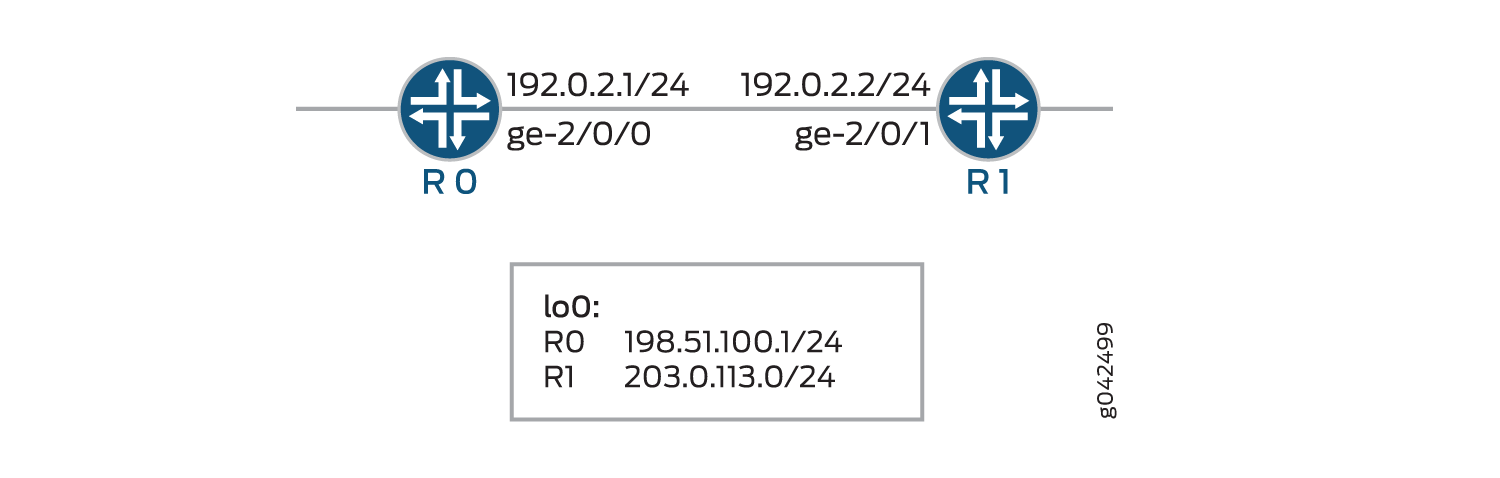
トポロジーでは、レイヤー2回線のVCCV用BFDがデバイスR0に設定されています。
設定
CLIクイックコンフィグレーション
この例をすばやく設定するには、以下のコマンドをコピーしてテキスト ファイルに貼り付け、改行を削除し、ネットワーク設定に一致させる必要がある詳細情報を変更し、コマンドを [edit] 階層レベルでCLIにコピー アンド ペーストして、設定モードから commit を入力します。
R0
set chassis redundancy graceful-switchover
set interfaces ge-1/1/9 vlan-tagging
set interfaces ge-1/1/9 encapsulation vlan-ccc
set interfaces ge-1/1/9 unit 0 encapsulation vlan-ccc
set interfaces ge-1/1/9 unit 0 vlan-id 512
set interfaces ge-2/0/0 unit 0 family inet address 192.0.2.1/24
set interfaces ge-2/0/0 unit 0 family mpls
set interfaces lo0 unit 0 family inet address 198.51.100.0/24
set routing-options nonstop-routing
set routing-options static route 203.0.113.0/24 next-hop 192.0.2.2
set routing-options router-id 198.51.100.0
set protocols rsvp interface ge-2/0/0.0
set protocols mpls label-switched-path lsp1 to 203.0.113.0
set protocols mpls interface ge-2/0/0.0
set protocols ospf traffic-engineering
set protocols ospf area 0.0.0.0 interface ge-2/0/0.0
set protocols ldp interface all
set protocols l2circuit neighbor 203.0.113.0 interface ge-1/1/9.0 virtual-circuit-id 1
set protocols l2circuit neighbor 203.0.113.0 interface ge-1/1/9.0 oam bfd-liveness-detection minimum-interval 300
set protocols l2circuit neighbor 203.0.113.0 interface ge-1/1/9.0 oam bfd-liveness-detection minimum-receive-interval 10
set protocols l2circuit neighbor 203.0.113.0 interface ge-1/1/9.0 oam bfd-liveness-detection multiplier 3
set protocols l2circuit neighbor 203.0.113.0 interface ge-1/1/9.0 oam bfd-liveness-detection transmit-interval minimum-interval 5
set protocols l2circuit neighbor 203.0.113.0 interface ge-1/1/9.0 oam bfd-liveness-detection transmit-interval threshold 30
set protocols l2circuit neighbor 203.0.113.0 interface ge-1/1/9.0 oam bfd-liveness-detection detection-time threshold 40
R1
set interfaces ge-1/1/9 vlan-tagging
set interfaces ge-1/1/9 encapsulation vlan-ccc
set interfaces ge-1/1/9 unit 0 encapsulation vlan-ccc
set interfaces ge-1/1/9 unit 0 vlan-id 512
set interfaces ge-2/0/1 unit 0 family inet address 192.0.2.2/24
set interfaces ge-2/0/1 unit 0 family mpls
set interfaces lo0 unit 0 family inet address 203.0.113.0/24
set routing-options static route 198.51.100.0/24 next-hop 192.0.2.1
set routing-options router-id 203.0.113.0
set protocols rsvp interface ge-2/0/1.0
set protocols mpls label-switched-path lsp2 to 198.51.100.0
set protocols mpls interface ge-2/0/1.0
set protocols ospf traffic-engineering
set protocols ospf area 0.0.0.0 interface ge-2/0/1.0
set protocols ldp interface all
set protocols l2circuit neighbor 198.51.100.0 interface ge-1/1/9.0 virtual-circuit-id 1
set protocols l2circuit neighbor 198.51.100.0 interface ge-1/1/9.0 oam bfd-liveness-detection minimum-interval 300
set protocols l2circuit neighbor 198.51.100.0 interface ge-1/1/9.0 oam bfd-liveness-detection minimum-receive-interval 10
set protocols l2circuit neighbor 198.51.100.0 interface ge-1/1/9.0 oam bfd-liveness-detection multiplier 3
set protocols l2circuit neighbor 198.51.100.0 interface ge-1/1/9.0 oam bfd-liveness-detection transmit-interval minimum-interval 5
set protocols l2circuit neighbor 198.51.100.0 interface ge-1/1/9.0 oam bfd-liveness-detection transmit-interval threshold 30
set protocols l2circuit neighbor 198.51.100.0 interface ge-1/1/9.0 oam bfd-liveness-detection detection-time threshold 40
デバイスR0の設定
ステップバイステップの手順
次の例では、設定階層のさまざまなレベルに移動する必要があります。CLIのナビゲーションについては、『CLIユーザーガイド』の「設定モードでのCLIエディターの使用」を参照してください。
デバイスR0を設定するには:
デバイスR1の適切なインターフェイス名、アドレス、およびその他のパラメータを変更した後、この手順を繰り返します。
グレースフルスイッチオーバーの冗長性を設定します。
[edit chassis]
user@R0# set redundancy graceful-switchover
インターフェイスを設定します。
[edit interfaces]
user@R0# set ge-1/1/9 vlan-tagging
user@R0# set ge-1/1/9 encapsulation vlan-ccc
user@R0# set ge-1/1/9 unit 0 encapsulation vlan-ccc
user@R0# set ge-1/1/9 unit 0 vlan-id 512
user@R0# set ge-2/0/0 unit 0 family inet address 192.0.2.1/24
user@R0# set ge-2/0/0 unit 0 family mpls
user@R0# set lo0 unit 0 family inet address 198.51.100.0/24
ノンストップルーティングオプション、スタティックルート、およびルーターIDルーティングオプションを設定します。
[edit routing-options]
user@R0# set nonstop-routing
user@R0# set static route 203.0.113.0/24 next-hop 192.0.2.2
user@R0# set router-id 198.51.100.0
RSVPプロトコルを設定します。
[edit protocols rsvp]
user@R0# set interface ge-2/0/0.0
MPLSプロトコルを設定します。
[edit protocols mpls]
user@R0# set label-switched-path lsp1 to 203.0.113.0
user@R0# set interface ge-2/0/0.0
OSPFプロトコルを設定します。
[edit protocols ospf]
user@R0# set traffic-engineering
user@R0# set area 0.0.0.0 interface ge-2/0/0.0
LDPプロトコルを設定します。
[edit protocols ldp]
user@R0# set interface all
レイヤー2回線プロトコルのネイバーの仮想回線IDを設定します。
[edit protocols l2circuit]
user@R0# set neighbor 203.0.113.0 interface ge-1/1/9.0 virtual-circuit-id 1
レイヤー2回線プロトコルのoam属性を設定します。
[edit protocols l2circuit]
user@R0# set neighbor 203.0.113.0 interface ge-1/1/9.0 oam bfd-liveness-detection minimum-interval 300
user@R0# set neighbor 203.0.113.0 interface ge-1/1/9.0 oam bfd-liveness-detection minimum-receive-interval 10
user@R0# set neighbor 203.0.113.0 interface ge-1/1/9.0 oam bfd-liveness-detection multiplier 3
user@R0# set neighbor 203.0.113.0 interface ge-1/1/9.0 oam bfd-liveness-detection transmit-interval minimum-interval 5
user@R0# set neighbor 203.0.113.0 interface ge-1/1/9.0 oam bfd-liveness-detection transmit-interval threshold 30
user@R0# set neighbor 203.0.113.0 interface ge-1/1/9.0 oam bfd-liveness-detection detection-time threshold 40
結果
設定モードから、 show chassis、 show interfaces、 show protocols、および show routing-options コマンドを入力して設定を確認します。出力に意図した設定が表示されない場合は、この例の手順を繰り返して設定を修正します。
user@R0# show chassis
redundancy {
    graceful-switchover;
}
user@R0# show interfaces
ge-1/1/9 {
    vlan-tagging;
    encapsulation vlan-ccc;
    unit 0 {
        encapsulation vlan-ccc;
        vlan-id 512;
    }
}
ge-2/0/0 {
    unit 0 {
        family inet {
            address 192.0.2.1/24;
        }
        family mpls;
    }
}
lo0 {
    unit 0 {
        family inet {
            address 198.51.100.0/24;
        }
    }
}
user@R0# show protocols
rsvp {
    interface ge-2/0/0.0;
}
mpls {
    label-switched-path lsp1 {
        to 203.0.113.0;
    }
    interface ge-2/0/0.0;
}
ospf {
    traffic-engineering;
    area 0.0.0.0 {
        interface ge-2/0/0.0;
    }
}
ldp {
    interface all;
}
l2circuit {
    neighbor 203.0.113.0 {
        interface ge-1/1/9.0 {
            virtual-circuit-id 1;
            oam {
                bfd-liveness-detection {
                    minimum-interval 300;
                    minimum-receive-interval 10;
                    multiplier 3;
                    transmit-interval {
                        minimum-interval 5;
                        threshold 30;
                    }
                    detection-time {
                        threshold 40;
                    }
                }
            }
        }
    }
}
user@R0# show routing-options
nonstop-routing;
static {
    route 203.0.113.0/24 next-hop 192.0.2.2;
}
router-id 198.51.100.0;
デバイスの設定が完了したら、設定モードから commit を入力します。
検証
設定が正常に機能していることを確認します。
レイヤー 2 回線接続の検証
目的
レイヤー 2 回線の接続を検証します。
アクション
動作モードから、デバイスR0に対して show l2circuit connections コマンドを実行します。
user@R0> show l2circuit connections

Layer-2 Circuit Connections:

Legend for connection status (St)
EI -- encapsulation invalid      NP -- interface h/w not present
MM -- mtu mismatch               Dn -- down
EM -- encapsulation mismatch     VC-Dn -- Virtual circuit Down
CM -- control-word mismatch      Up -- operational
VM -- vlan id mismatch           CF -- Call admission control failure
OL -- no outgoing label          IB -- TDM incompatible bitrate
NC -- intf encaps not CCC/TCC    TM -- TDM misconfiguration
BK -- Backup Connection          ST -- Standby Connection
CB -- rcvd cell-bundle size bad  SP -- Static Pseudowire
LD -- local site signaled down   RS -- remote site standby
RD -- remote site signaled down  HS -- Hot-standby Connection
XX -- unknown

Legend for interface status
Up -- operational
Dn -- down
Neighbor: 203.0.113.0
    Interface                 Type  St     Time last up          # Up trans
    ge-1/1/9.0(vc 1)          rmt   Up     Jun  2 03:19:44 2014           1
      Remote PE: 203.0.113.0, Negotiated control-word: Yes (Null)
      Incoming label: 299792, Outgoing label: 299792
      Negotiated PW status TLV: No
      Local interface: ge-1/1/9.0, Status: Up, Encapsulation: VLAN
      Flow Label Transmit: No, Flow Label Receive: No
      Flow Label Transmit: No, Flow Label Receive: No
意味
出力は、デバイスR0からネイバーまでのレイヤー2仮想回線情報を示しています。
BFD セッションの検証
目的
BFDセッションを検証します。
アクション
動作モードから、デバイスR0に対して show bfd session コマンドを実行します。
user@R0> show bfd session

                                                  Detect   Transmit
Address                  State     Interface      Time     Interval  Multiplier

203.0.113.7                Up        ge-2/0/0.0     0.030     0.010        3

1 sessions, 1 clients
Cumulative transmit rate 100.0 pps, cumulative receive rate 100.0 pps
意味
出力は、BFDセッションがアクティブなアドレスとインターフェイスを示しています。状態 Up は、BFDセッションが稼働していることを示します。BFDセッションはBFD制御パケットを検出する時間間隔を30ミリ秒、送信システムにはBFD制御パケットを送信する時間間隔を10ミリ秒、送信システムは 3 に時間間隔を乗算して検出時間を決定します。アクティブなBFDセッションの合計数とアクティブなBFDセッションをホストしているクライアントの合計数。累積送信レートは、すべてのアクティブ セッションで 1 秒間に送信された BFD 制御パケットの総数を示し、累積受信レートは、すべてのアクティブ セッションで 1 秒間に受信した BFD 制御パケットの総数を示します。
BFD セッションの詳細情報の検証
目的
BFD セッションの詳細情報を確認します。
アクション
動作モードから、デバイスR0の show bfd session extensive コマンドを実行します。
user@R0> show bfd session extensive

                                                  Detect   Transmit
Address                  State     Interface      Time     Interval  Multiplier

203.0.113.7                Up        ge-2/0/0.0     0.030     0.010        3
 Client L2CKT-OAM, TX interval 0.005, RX interval 0.010
 Session up time 03:47:14
 Local diagnostic None, remote diagnostic None
 Remote state Up, version 1
 Replicated
 Session type: VCCV BFD
 Min async interval 0.005, min slow interval 1.000
 Adaptive async TX interval 0.005, RX interval 0.010
 Local min TX interval 0.005, minimum RX interval 0.010, multiplier 3
 Remote min TX interval 0.005, min RX interval 0.010, multiplier 3
 Threshold transmission interval 0.030, Threshold for detection time 0.040
 Local discriminator 20, remote discriminator 13004
 Echo mode disabled/inactive
 Remote is control-plane independent
 Neighbor address 203.0.113.0, Virtual circuit id 1
  Session ID: 0x0

1 sessions, 1 clients
Cumulative transmit rate 100.0 pps, cumulative receive rate 100.0 pps
意味
出力には、BFD セッションの詳細情報が表示されます。