
例:AS PIC IKE DYNAMIC SA 設定
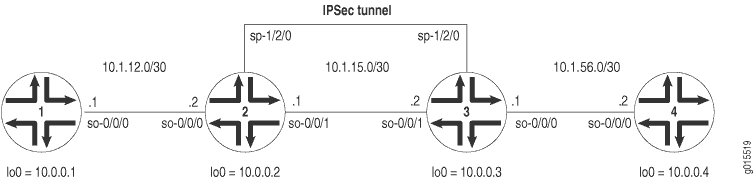
図 1 は、AS PIC 手動 SA の例と同じ IPSec トポロジーを示しています。ただし、この構成では、ルーター 2 および 3 が IKE ダイナミック SA、拡張認証、およびより強力な暗号化を使用して IPSec トンネルを確立する必要があります。ルーター 1 とルーター 4 は引き続き基本的な接続を提供し、IPSec トンネルが動作していることを確認するために使用されます。
AS PIC で IKE プロポーザル、IPSec プロポーザル、IPSec ポリシーを指定しない場合、Junos OS はデフォルトで最高レベルの暗号化と認証を使用します。その結果、デフォルトの認証プロトコルは ESP、デフォルトの認証モードは HMAC-SHA1-96、デフォルトの暗号化モードは 3DES-CBC になります。デフォルトのIKEおよびIPSecポリシーとAS PICでのプロポーザルの詳細については、 IKEダイナミックSAの設定を参照してください。
ルーター 1 で、ルーター 2 への基本的な OSPF 接続を提供します。
ルーター1
[edit]
interfaces {
    so-0/0/0 {
        description "To R2 so-0/0/0";
        unit 0 {
            family inet {
                address 10.1.12.2/30;
            }
        }
    }
    lo0 {
        unit 0 {
            family inet {
                address 10.0.0.1/32;
            }
        }
    }
}
routing-options {
    router-id 10.0.0.1;
}
protocols {
    ospf {
        area 0.0.0.0 {
            interface so-0/0/0.0;
            interface lo0.0;
        }
    }
}
ルーター2では、ルーター1および3に接続するための基盤となるルーティングプロトコルとしてOSPFを有効にします。[edit ipsec-vpn rule]階層レベルの rule-ike と呼ばれるルールで双方向 IKE ダイナミック SA を設定します。[edit services service-set]階層レベルの service-set-dynamic-BiEspsha3des というサービス セットでこのルールを参照します。
AS PICでデフォルト値を使用すると、IPsecプロポーザル、IPsecポリシー、IKEプロポーザルを指定する必要はありません。ただし、IKEポリシーで、[edit services ipsec-vpn ike policy policy-name]階層レベルでpre-shared-keyステートメントを使用して事前共有キーを設定する必要があります。(デフォルトのIKEおよびIPsecポリシーとAS PICでのプロポーザルの詳細については、 IKEダイナミックSAの設定を参照してください)。
AS PIC および IPSec トンネルにトラフィックを転送するには、ネクストホップ スタイルのサービス セットを設定し、IPSec 内部インターフェイスとして使用されるアダプティブ サービス論理インターフェイスを OSPF 設定に追加します。
ルーター2
[edit]
interfaces {
    so-0/0/0 {
        description "To R1 so-0/0/0";
        unit 0 {
            family inet {
                address 10.1.12.1/30;
            }
        }
    }
    so-0/0/1 {
        description "To R3 so-0/0/1";
        unit 0 {
            family inet {
                address 10.1.15.1/30;
            }
        }
    }
    sp-1/2/0 {
        services-options {
            syslog {
                host local {
                    services info;
                }
            }
        }
        unit 0 {
            family inet {
            }
                                 unit 1 { # sp-1/2/0.1 is the IPSec inside interface.
                family inet;
                service-domain inside;
            }
                                 unit 2 { # sp-1/2/0.2 is the IPSec outside interface.
                family inet;
                service-domain outside;
            }
        }
        lo0 {
            unit 0 {
                family inet {
                    address 10.0.0.2/32;
                }
            }
        }
    }
    routing-options {
        router-id 10.0.0.2;
    }
    protocols {
        ospf {
            area 0.0.0.0 {
                interface so-0/0/0.0;
                interface lo0.0;
                                     interface sp-1/2/0.1; # This sends OSPF traffic over the IPSec tunnel.
            }
        }
    }
    services {
                           service-set service-set-dynamic-BiEspsha3des { # Define your service set here.
                                 next-hop-service { # Required for dynamic routing protocols such as OSPF.
                inside-service-interface sp-1/2/0.1;
                outside-service-interface sp-1/2/0.2;
            }
            ipsec-vpn-options {
                                     local-gateway 10.1.15.1; # Specify the local IP address of the IPSec tunnel.
            }
                               ipsec-vpn-rules rule-ike; # Reference your IPSec VPN rule here.
        }
        ipsec-vpn {
                                 rule rule-ike { # Define your IPSec VPN rule here.
                term term-ike {
                    then {
                                                 remote-gateway 10.1.15.2; # The remote IP address of the IPSec tunnel.
                                                   dynamic { # This creates a dynamic SA.
                                                       ike-policy ike-policy-preshared; # Reference your IKE policy here.
                        }
                    }
                }
                                     match-direction input; # Specify in which direction the rule should match.
            }
            ike {
                                       policy ike-policy-preshared { # Define your IKE policy specifications here.
                                           pre-shared-key ascii-text "$ABC123";
                    ## The unencrypted preshared key for this example is juniper.
                }
            }
        }
    }
}
ルーター3では、ルーター2および4に接続するための基盤となるルーティングプロトコルとしてOSPFを有効にします。[edit ipsec-vpn rule]階層レベルの rule-ike と呼ばれるルールで双方向 IKE 動的 SA を設定します。[edit services service-set]階層レベルの service-set-dynamic-BiEspsha3des というサービス セットでこのルールを参照します。
ここでも、ルータ 2 で使用したのと同じデフォルトのポリシーとプロポーザルを使用します。ただし、[edit services ipsec-vpn IKEポリシーpolicy-name]階層レベルで 事前共有キーステートメントを使用してIKEポリシーで事前共有キーを設定することを忘れないでください。キーは、ルーター 2 で指定したキーと一致する必要があります。(デフォルトのIKEおよびIPSecポリシーとAS PICでのプロポーザルの詳細については、 IKEダイナミックSAの設定を参照してください)。
AS PIC および IPSec トンネルにトラフィックを転送するには、ネクストホップ スタイルのサービス セットを設定し、IPSec 内部インターフェイスとして使用されるアダプティブ サービス論理インターフェイスを OSPF 設定に追加します。
ルーター3
[edit]
interfaces {
    so-0/0/0 {
        description "To R4 so-0/0/0";
        unit 0 {
            family inet {
                address 10.1.56.1/30;
            }
        }
    }
    so-0/0/1 {
        description "To R2 so-0/0/1";
        unit 0 {
            family inet {
                address 10.1.15.2/30;
            }
        }
    }
    sp-1/2/0 {
        services-options {
            syslog {
                host local {
                    services info;
                }
            }
        }
        unit 0 {
            family inet {
            }
                                 unit 1 { # sp-1/2/0.1 is the IPSec inside interface.
                family inet;
                service-domain inside;
            }
                                 unit 2 { # sp-1/2/0.2 is the IPSec outside interface.
                family inet;
                service-domain outside;
            }
        }
        lo0 {
            unit 0 {
                family inet {
                    address 10.0.0.3/32;
                }
            }
        }
    }
    routing-options {
        router-id 10.0.0.3;
    }
    protocols {
        ospf {
            area 0.0.0.0 {
                interface so-0/0/0.0;
                interface lo0.0;
                                     interface sp-1/2/0.1; # This sends OSPF traffic over the IPSec tunnel.
            }
        }
    }
    services {
                           service-set service-set-dynamic-BiEspsha3des { # Define your service set here.
                                 next-hop-service { # Required for dynamic routing protocols such as OSPF.
                inside-service-interface sp-1/2/0.1;
                outside-service-interface sp-1/2/0.2;
            }
            ipsec-vpn-options {
                                     local-gateway 10.1.15.2; # Specify the local IP address of the IPSec tunnel.
            }
                               ipsec-vpn-rules rule-ike; # Reference your IPSec VPN rule here.
        }
        ipsec-vpn {
                                 rule rule-ike { # Define your IPSec VPN rule here.
                term term-ike {
                    then {
                                                 remote-gateway 10.1.15.1; # The remote IP address of the IPSec tunnel.
                                                   dynamic { # This creates a dynamic SA.
                                                       ike-policy ike-policy-preshared; # Reference your IKE policy here.
                        }
                    }
                }
                                     match-direction input; # Specify in which direction the rule should match.
            }
            ike {
                                       policy ike-policy-preshared { # Define your IKE policy specifications here.
                                           pre-shared-key ascii-text "$ABC123";
                    ## The unencrypted preshared key for this example is juniper.
                }
            }
        }
    }
}
ルーター 4 で、ルーター 3 への基本的な OSPF 接続を提供します。
ルーター4
[edit]
interfaces {
    so-0/0/0 {
        description "To R3 so-0/0/0";
        unit 0 {
            family inet {
                address 10.1.56.2/30;
            }
        }
    }
    lo0 {
        unit 0 {
            family inet {
                address 10.0.0.4/32;
            }
        }
    }
}
routing-options {
        router-id 10.0.0.4;
}
protocols {
    ospf {
        area 0.0.0.0 {
            interface so-0/0/0.0;
            interface lo0.0;
        }
    }
}
機能の検証
AS PICでIKEベースの動的SAが正しく動作していることを確認するには、次のコマンドを使用します。
-
ピン
-
show services ipsec-vpn ike security-associations (detail) -
show services ipsec-vpn ipsec security-associations (detail) -
show services ipsec-vpn ipsec statistics -
トレースルート
以下のセクションでは、設定例で使用されるこれらのコマンドの出力を示します。
ルーター1
ルーター 1 で、ルーター 4 の so-0/0/0 インターフェイスに ping コマンドを発行して、IPSec トンネルを介してトラフィックを送信します。
user@R1> ping 10.1.56.2
PING 10.1.56.2 (10.1.56.2): 56 data bytes
64 bytes from 10.1.56.2: icmp_seq=0 ttl=254 time=1.351 ms
64 bytes from 10.1.56.2: icmp_seq=1 ttl=254 time=1.187 ms
64 bytes from 10.1.56.2: icmp_seq=2 ttl=254 time=1.172 ms
64 bytes from 10.1.56.2: icmp_seq=3 ttl=254 time=1.154 ms
64 bytes from 10.1.56.2: icmp_seq=4 ttl=254 time=1.156 ms
^C
--- 10.1.56.2 ping statistics ---
5 packets transmitted, 5 packets received, 0% packet loss
round-trip min/avg/max/stddev = 1.154/1.204/1.351/0.074 ms
ルーター2
IKE SA ネゴシエーションが成功したことを確認するには、 show services ipsec-vpn ike security-associations コマンドを発行します。
user@R2> show services ipsec-vpn ike security-associations
Remote Address  State         Initiator cookie  Responder cookie  Exchange type
10.1.15.2       Matured       03075bd3a0000003  4bff26a5c7000003  Main
IPsecセキュリティアソシエーションがアクティブであることを確認するには、 show services ipsec-vpn ipsec security-associations detail コマンドを発行します。SA には、プロトコルの ESP や認証アルゴリズムの HMAC-SHA1-96 など、AS PIC に固有のデフォルト設定が含まれていることに注意してください。
user@R2> show services ipsec-vpn ipsec security-associations detail
Service set: service-set-dynamic-BiEspsha3des
  Rule: rule-ike, Term: term-ike, Tunnel index: 1
  Local gateway: 10.1.15.1, Remote gateway: 10.1.15.2
  Local identity: ipv4_subnet(any:0,[0..7]=10.1.12.0/24)
  Remote identity: ipv4_subnet(any:0,[0..7]=10.1.56.0/24)
    Direction: inbound, SPI: 2666326758, AUX-SPI: 0
    Mode: tunnel, Type: dynamic, State: Installed
    Protocol: ESP, Authentication: hmac-sha1-96, Encryption: 3des-cbc
    Soft lifetime: Expires in 26863 seconds
    Hard lifetime: Expires in 26998 seconds
    Anti-replay service: Enabled, Replay window size: 64
    Direction: outbound, SPI: 684772754, AUX-SPI: 0
    Mode: tunnel, Type: dynamic, State: Installed
    Protocol: ESP, Authentication: hmac-sha1-96, Encryption: 3des-cbc
    Soft lifetime: Expires in 26863 seconds
    Hard lifetime: Expires in 26998 seconds
    Anti-replay service: Enabled, Replay window size: 64
トラフィックが双方向IPSecトンネル上を移動していることを確認するには、 show services ipsec-vpn statistics コマンドを発行します。
user@R2> show services ipsec-vpn ipsec statistics
PIC: sp-1/2/0, Service set: service-set-dynamic-BiEspsha3des
ESP Statistics:
  Encrypted bytes:             2248
  Decrypted bytes:             2120
  Encrypted packets:             27
  Decrypted packets:             25
AH Statistics:
  Input bytes:                    0
  Output bytes:                   0
  Input packets:                  0
  Output packets:                 0
Errors:
  AH authentication failures: 0, Replay errors: 0
  ESP authentication failures: 0, ESP decryption failures: 0
不正なヘッダー: 0、不正なトレーラー: 0
ルーター3
IKE SA ネゴシエーションが成功したことを確認するには、 show services ipsec-vpn ike security-associations コマンドを発行します。正常に実行するには、ルーター 3 の SA に、ルーター 2 で指定したのと同じ設定が含まれている必要があります。
user@R3> show services ipsec-vpn ike security-associations
Remote Address  State         Initiator cookie  Responder cookie  Exchange type
10.1.15.1       Matured       03075bd3a0000003  4bff26a5c7000003  Main
IPsec SAがアクティブであることを確認するには、 show services ipsec-vpn ipsec security-associations detail コマンドを発行します。正常に実行するには、ルーター 3 の SA に、ルーター 2 で指定したのと同じ設定が含まれている必要があります。
user@R3> show services ipsec-vpn ipsec security-associations detail
Service set: service-set-dynamic-BiEspsha3des
  Rule: rule-ike, Term: term-ike, Tunnel index: 1
  Local gateway: 10.1.15.2, Remote gateway: 10.1.15.1
  Local identity: ipv4_subnet(any:0,[0..7]=10.1.56.0/24)
  Remote identity: ipv4_subnet(any:0,[0..7]=10.1.12.0/24)
    Direction: inbound, SPI: 684772754, AUX-SPI: 0
    Mode: tunnel, Type: dynamic, State: Installed
    Protocol: ESP, Authentication: hmac-sha1-96, Encryption: 3des-cbc
    Soft lifetime: Expires in 26598 seconds
    Hard lifetime: Expires in 26688 seconds
    Anti-replay service: Enabled, Replay window size: 64
    Direction: outbound, SPI: 2666326758, AUX-SPI: 0
    Mode: tunnel, Type: dynamic, State: Installed
    Protocol: ESP, Authentication: hmac-sha1-96, Encryption: 3des-cbc
    Soft lifetime: Expires in 26598 seconds
    Hard lifetime: Expires in 26688 seconds
    Anti-replay service: Enabled, Replay window size: 64
トラフィックが双方向IPsecトンネル上を移動していることを確認するには、 show services ipsec-vpn statistics コマンドを発行します。
user@R3> show services ipsec-vpn ipsec statistics
PIC: sp-1/2/0, Service set: service-set-dynamic-BiEspsha3des
ESP Statistics:
  Encrypted bytes:             2120
  Decrypted bytes:             2248
  Encrypted packets:             25
  Decrypted packets:             27
AH Statistics:
  Input bytes:                    0
  Output bytes:                   0
  Input packets:                  0
  Output packets:                 0
Errors:
  AH authentication failures: 0, Replay errors: 0
  ESP authentication failures: 0, ESP decryption failures: 0
不正なヘッダー: 0、不正なトレーラー: 0
ルーター4
ルーター4では、ルーター1のso-0/0/0インターフェイスにpingコマンドを発行して、IPsecトンネルを介してトラフィックを送信します。
user@R4> ping 10.1.12.2
PING 10.1.12.2 (10.1.12.2): 56 data bytes
64 bytes from 10.1.12.2: icmp_seq=0 ttl=254 time=1.350 ms
64 bytes from 10.1.12.2: icmp_seq=1 ttl=254 time=1.161 ms
64 bytes from 10.1.12.2: icmp_seq=2 ttl=254 time=1.124 ms
64 bytes from 10.1.12.2: icmp_seq=3 ttl=254 time=1.142 ms
64 bytes from 10.1.12.2: icmp_seq=4 ttl=254 time=1.139 ms
64 bytes from 10.1.12.2: icmp_seq=5 ttl=254 time=1.116 ms
^C
--- 10.1.12.2 ping statistics ---
6 packets transmitted, 6 packets received, 0% packet loss
round-trip min/avg/max/stddev = 1.116/1.172/1.350/0.081 ms
トラフィックがIPsecトンネル上を移動することを確認する最後の方法は、ルーター1のso-0/0/0インターフェイスにtracerouteコマンドを発行することです。ルーター 2 とルータ 3 の間の物理インターフェイスがパスで参照されていないことに注意してください。トラフィックは、ルータ 3 の適応サービス IPSec 内部インターフェイスを経由して IPSec トンネルに入り、ルータ 2 のループバック インターフェイスを通過して、ルータ 1 の so-0/0/0 インターフェイスで終了します。
user@R4> traceroute 10.1.12.2
traceroute to 10.1.12.2 (10.1.12.2), 30 hops max, 40 byte packets
 1  10.1.15.2 (10.1.15.2)  0.987 ms  0.630 ms  0.563 ms
 2  10.0.0.2 (10.0.0.2)  1.194 ms  1.058 ms  1.033 ms
 3  10.1.12.2 (10.1.12.2)  1.073 ms  0.949 ms  0.932 ms