
例:ルーティングテーブルにおけるプレフィックスの条件付きインストールを可能にする条件付きアドバタイズのルーティングポリシーの設定
この例では、エクスポートポリシーを使用して、ルーティングテーブルでのプレフィックスの条件付きインストールを設定する方法BGP説明します。
要件
この例では、以下のハードウェアおよびソフトウェアコンポーネントを使用しています。
-
M Seriesマルチサービスエッジルーター、MXシリーズ 5Gユニバーサルルーティングプラットフォーム、またはT Seriesコアルーター
-
Junos OSリリース9.0以降
概要
この例では、3つの異なる自律システム(AS)にある3つのルーターが接続され、BGPプロトコルで設定されています。アップストリームルーターであるインターネットとラベル付けされたルーターは、lo0.0 ループバックインターフェイスで設定された 5 つのアドレス(172.16.11.1/32、172.16.12.1/32、172.16.13.1/32、172.16.14.1/32、および 172.16.15.1/32)があり、追加のループバックアドレス(192.168.9.1/32)がルーター ID として設定されています。これら6つのアドレスは、インターネットに接続されたルーターのBGPルーティングテーブルの内容をエミュレートするためにBGPにエクスポートされ、Northにアドバタイズされます。
NorthルーターとSouthルーターは、それぞれ10.0.89.12/30および10.0.78.12/30ネットワークを使用し、それぞれのループバックアドレスに192.168.7.1と192.168.8.1を使用します。
図1 は、この例で使用されているトポロジーを示しています。
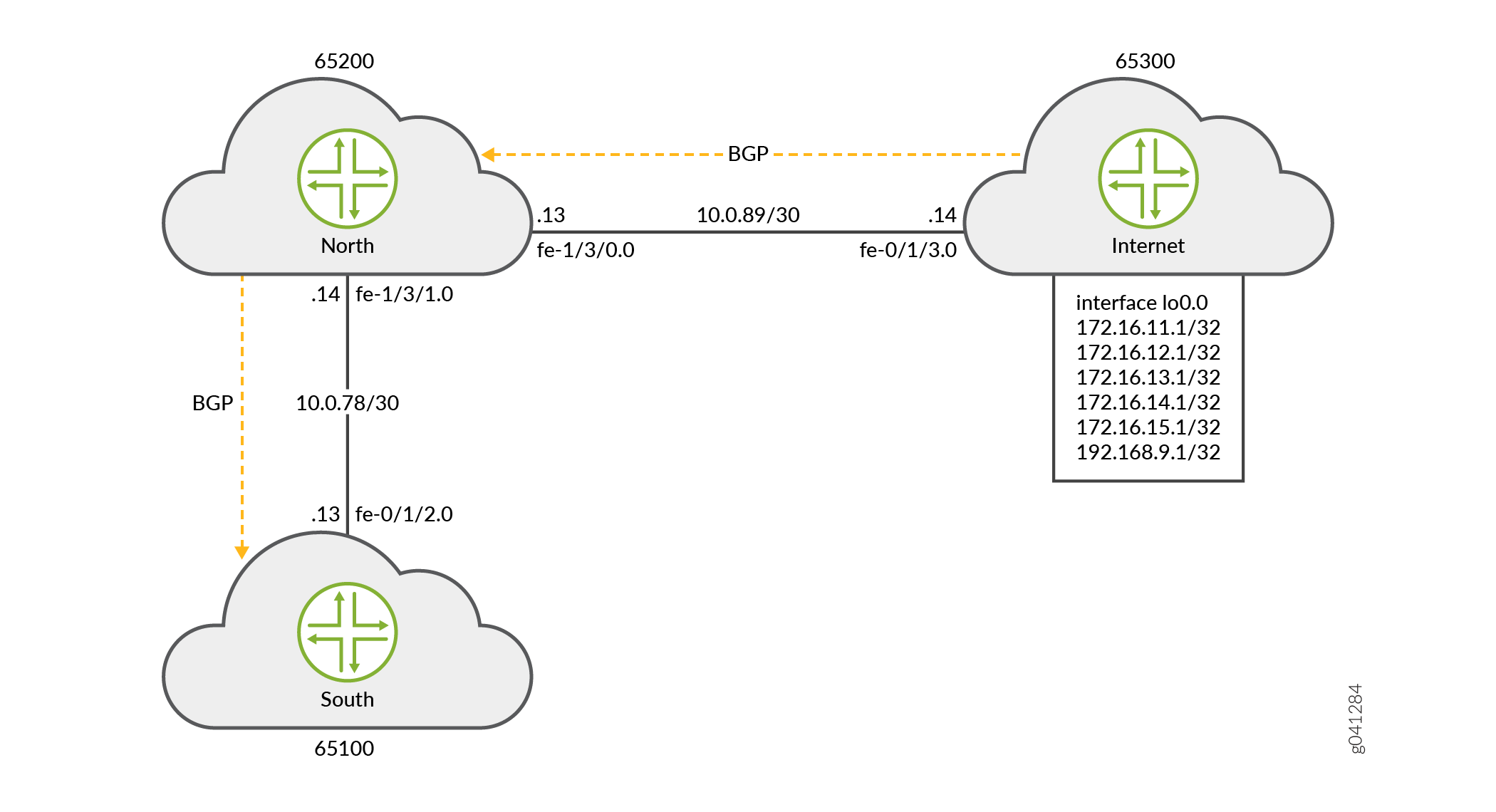
ルーターNorthは、ルーターインターネットから学習した172.16.0.0/16 BGPルートをルーターSouthにエクスポートします。これらのルートは、インターネットルーターのドメインが所有するルートを表す場合があります。さらに、特定の172.16.11.1/32ルートが存在する場合、ルーターNorthはデフォルトルートもアドバタイズします。172.16.11.1ルートは、完全なインターネット接続を提供するティア1トランジットピアリングプロバイダへのインターネットルーターのリンクを表す場合があります。
ルーターSouthは6つのルートすべてを受信しますが、ルーティングテーブルにはデフォルトルートと1つの他の特定のルート(172.16.11.1/32)のみをインストールする必要があります。
要約すると、この例は次の要件を満たしています。
-
Northでは、すべての172.16/16プレフィックスを送信します。さらに、特定のルートがinet.0ルーティングテーブルに存在する場合にのみ、0/0をSouthに送信します(この例では172.16.11.1/32)。
-
Southで、ルーティングテーブルと転送テーブルにデフォルトルートと172.16.11.1/32ルートを受け入れてインストールします。その他すべてのルートをドロップします。Southが完全なインターネットルーティングテーブルを受け入れられないローエンドデバイスかもしれないことを考慮してください。その結果、運用担当者はSouthにデフォルトルートと1つの他の特定のプレフィックスのみを割り当てたいと考えています。
最初の要件は、Northのエクスポートポリシーで満たされています。
user@North# show policy-options
policy-statement conditional-export-bgp {
    term prefix_11 {
        from {
            protocol bgp;
            route-filter 172.16.0.0/16 orlonger;
        }
        then accept;
    }
    term conditional-default {
        from {
            route-filter 0.0.0.0/0 exact;
            condition prefix_11;
        }
        then accept;
    }
    term others {
        then reject;
    }
}
condition prefix_11 {
    if-route-exists {
        172.16.11.1/32;
        table inet.0;
    }
}
条件付きエクスポートポリシーのロジックは、以下のように要約できます。 0/0が存在する場合、172.16.11.1/32が存在する場合は、0/0プレフィックスを送信します。つまり、172.16.11.1/32が存在しない場合、0/0を送信しないということです。
2つ目の要件は、Southのインポートポリシーで満たされています。
user@South# show policy-options
policy-statement import-selected-routes {
    term 1 {
        from {
            rib inet.0;
            neighbor 10.0.78.14;
            route-filter 0.0.0.0/0 exact;
            route-filter 172.16.11.1/32 exact;
        }
        then accept;
    }
    term 2 {
        then reject;
    }
}
この例では、Southのインポートポリシーの結果として、4つのルートがドロップされます。これは、Northのエクスポートポリシーがインターネットから受信したルートを全てリークし、Southのインポートポリシーがこれらのルートの一部を除外しているためです。
Junos OSでは、インポートポリシー(インバウンドルートフィルター)がルートを拒否する、トラフィック転送に使用しない、他のピアへのアドバタイズに含まれないこと、ルーターがこれらのルートを非表示ルートとして保持することを理解しておくことが重要です。これらの非表示ルートは、ポリシーまたはルーティング目的に使用できません。ただし、これらはルーターのメモリ領域を占有します。ルートをフィルタリングして、メモリに保管され、ルーターによって処理される情報量を制御するサービスプロバイダは、インポートポリシーによって拒否されたルートを完全にドロップするようにルーターを望む場合があります。
非表示のルートは、show route receive-protocol bgp neighbor-address hiddenコマンドを使用して表示できます。その後、非表示のルートは、[edit protocols bgp]または[edit protocols bgp group group-name]階層レベルでkeep all | noneステートメントを設定することで、ルーティングテーブルから保持またはドロップすることができます。
BGPルート保持のルールは、以下のとおりです。
-
デフォルトでは、ASパスがループするルートを除き、BGPから学習したすべてのルートが保持されます。(ASパスにはローカルASが含まれます。)
-
keep allステートメントを設定することで、BGPから学習したすべてのルートは、ASパスにローカルASがあるルートも含めて保持されます。 -
keep noneステートメントを設定することで、BGPはピアから受信したルート、およびインポートポリシーまたはその他のサニティーチェックによって拒否されたルートを破棄します。このステートメントが設定され、インバウンドポリシーが変更されると、Junos OSはピアによってアドバタイズされたすべてのルートを再アドバタイズします。
keep allまたはkeep noneを設定し、ピアがルート更新をサポートする場合、ローカルスピーカーはリフレッシュメッセージを送信し、インポート評価を実行します。これらのピアに対してセッションは再起動されません。ピアが更新をサポートしているかどうかを確認するには、show bgp neighborコマンドの出力でPeer supports Refresh capabilityを確認します。
keep allまたはkeep noneを設定し、ピアがセッション再起動をサポートしていない場合、関連するBGPセッションが再起動(フラップ)されます。
トポロジー
設定
CLIクイックコンフィグレーション
この例をすばやく設定するには、以下のコマンドをコピーしてテキストファイルに貼り付け、改行を削除して、ネットワーク構成に合わせて必要な詳細を変更してから、コマンドを [edit] 階層レベルのCLIにコピー&ペーストします。
ルーターインターネット
set interfaces lo0 unit 0 family inet address 172.16.11.1/32
set interfaces lo0 unit 0 family inet address 172.16.12.1/32
set interfaces lo0 unit 0 family inet address 172.16.13.1/32
set interfaces lo0 unit 0 family inet address 172.16.14.1/32
set interfaces lo0 unit 0 family inet address 172.16.15.1/32
set interfaces lo0 unit 0 family inet address 192.168.9.1/32
set interfaces fe-0/1/3 unit 0 family inet address 10.0.89.14/30
set protocols bgp group toNorth local-address 10.0.89.14
set protocols bgp group toNorth peer-as 65200
set protocols bgp group toNorth neighbor 10.0.89.13
set protocols bgp group toNorth export into-bgp
set policy-options policy-statement into-bgp term 1 from interface lo0.0
set policy-options policy-statement into-bgp term 1 then accept
set routing-options router-id 192.168.9.1
set routing-options autonomous-system 65300
ルーターNorth
set interfaces fe-1/3/1 unit 0 family inet address 10.0.78.14/30
set interfaces fe-1/3/0 unit 0 family inet address 10.0.89.13/30
set interfaces lo0 unit 0 family inet address 192.168.8.1/32
set protocols bgp group toInternet local-address 10.0.89.13
set protocols bgp group toInternet peer-as 65300
set protocols bgp group toInternet neighbor 10.0.89.14
set protocols bgp group toSouth local-address 10.0.78.14
set protocols bgp group toSouth export conditional-export-bgp
set protocols bgp group toSouth peer-as 65100
set protocols bgp group toSouth neighbor 10.0.78.13
set policy-options policy-statement conditional-export-bgp term prefix_11 from protocol bgp
set policy-options policy-statement conditional-export-bgp term prefix_11 from route-filter 172.16.0.0/16 orlonger
set policy-options policy-statement conditional-export-bgp term prefix_11 then accept
set policy-options policy-statement conditional-export-bgp term conditional-default from route-filter 0.0.0.0/0 exact
set policy-options policy-statement conditional-export-bgp term conditional-default from condition prefix_11
set policy-options policy-statement conditional-export-bgp term conditional-default then accept
set policy-options policy-statement conditional-export-bgp term others then reject
set policy-options condition prefix_11 if-route-exists 172.16.11.1/32
set policy-options condition prefix_11 if-route-exists table inet.0
set routing-options static route 0/0 reject
set routing-options router-id 192.168.8.1
set routing-options autonomous-system 65200
ルーターSouth
set interfaces fe-0/1/2 unit 0 family inet address 10.0.78.13/30
set interfaces lo0 unit 0 family inet address 192.168.7.1/32
set protocols bgp group toNorth local-address 10.0.78.13
set protocols bgp group toNorth import import-selected-routes
set protocols bgp group toNorth peer-as 65200
set protocols bgp group toNorth neighbor 10.0.78.14
set policy-options policy-statement import-selected-routes term 1 from neighbor 10.0.78.14
set policy-options policy-statement import-selected-routes term 1 from route-filter 172.16.11.1/32 exact
set policy-options policy-statement import-selected-routes term 1 from route-filter 0.0.0.0/0 exact
set policy-options policy-statement import-selected-routes term 1 then accept
set policy-options policy-statement import-selected-routes term 2 then reject
set routing-options router-id 192.168.7.1
set routing-options autonomous-system 65100
プレフィックスの条件付きインストールの設定
ステップバイステップの手順
次の例では、設定階層内のさまざまなレベルに移動する必要があります。CLIのナビゲーションについては、『Junos OS CLIユーザーガイド』の「 設定モードでのCLIエディターの使用 」を参照してください。
プレフィックスの条件付きインストールを設定するには:
-
3つのルーター間のリンクを形成するルーターインターフェイスを設定します。
Router Internet
[edit interfaces]
user@Internet# set fe-0/1/3 unit 0 family inet address 10.0.89.14/30
Router North
[edit interfaces]
user@North# set fe-1/3/1 unit 0 family inet address 10.0.78.14/30
user@North# set fe-1/3/0 unit 0 family inet address 10.0.89.13/30
Router South
[edit interfaces]
user@South# set fe-0/1/2 unit 0 family inet address 10.0.78.13/30
-
ルーターインターネットで5つのループバックインターフェイスアドレスを設定して、ルーターSouthのルーティングテーブルにインポートされるインターネットから学習したBGPルートをエミュレートし、ルーターIDとして設定する追加アドレス(192.168.9.1/32)を設定します。
Router Internet
[edit interfaces lo0 unit 0 family inet]
user@Internet# set address 172.16.11.1/32
user@Internet# set address 172.16.12.1/32
user@Internet# set address 172.16.13.1/32
user@Internet# set address 172.16.14.1/32
user@Internet# set address 172.16.15.1/32
user@Internet# set address 192.168.9.1/32
また、ルーターNorthとSouthでループバックインターフェイスアドレスを設定します。
Router North
[edit interfaces lo0 unit 0 family inet]
user@North# set address 192.168.8.1/32
Router South
[edit interfaces lo0 unit 0 family inet]
user@South# set address 192.168.7.1/32
-
ルーターNorthで、ルーターSouthにアドバタイズされる静的デフォルトルートを設定します。
[edit routing-options]
user@North# set static route 0/0 reject
-
ルーターNorthのルーティングテーブルからプレフィックスをエクスポートする条件を定義します。
[edit policy-options condition prefix_11]
user@North# set if-route-exists 172.16.11.1/32
user@North# set if-route-exists table inet.0
-
ルーターインターネットとNorthでそれぞれエクスポートポリシー(
into-bgpとconditional-export-bgp)を定義し、BGPにルートをアドバタイズします。注:エクスポートポリシーで、条件
prefix_11(ステップ 4で設定)を参照する必要があります。Router Internet [edit policy-options policy-statement into-bgp ] user@Internet# set term 1 from interface lo0.0 user@Internet# set term 1 then accept
Router North
[edit policy-options policy-statement conditional-export-bgp]
user@North# set  term prefix_11 from protocol bgp
user@North# set  term prefix_11 from route-filter 172,16.0.0/16 orlonger
user@North# set  term prefix_11 then accept
user@North# set  term conditional-default from route-filter 0.0.0.0/0 exact
user@North# set  term conditional-default from condition prefix_11
user@North# set  term conditional-default then accept
user@North# set term others then reject
-
ルーターSouthでインポートポリシー(
import-selected-routes)を定義して、ルーターNorthによってアドバタイズされたルートの一部をルーティングテーブルにインポートします。[edit policy-options policy-statement import-selected-routes ] user@South# set term 1 from neighbor 10.0.78.14 user@South# set term 1 from route-filter 172.16.11.1/32 exact user@South# set term 1 from route-filter 0.0.0.0/0 exact user@South# set term 1 then accept user@South# set term 2 then reject
-
3つのルーターすべてでBGPを設定し、自律システム間でプレフィックスのフローを有効にします。
注:プレフィックスアドバタイズメントが行われるように、定義したインポートおよびエクスポートポリシーをそれぞれBGPグループに適用してください。
Router Internet
[edit protocols bgp group toNorth]
user@Internet# set local-address 10.0.89.14
user@Internet# set peer-as 65200
user@Internet# set neighbor 10.0.89.13
user@Internet# set export into-bgp
Router North
[edit protocols bgp group toInternet]
user@North# set local-address 10.0.89.13
user@North# set peer-as 65300
user@North# set neighbor 10.0.89.14
[edit protocols bgp group toSouth]
user@North# set local-address 10.0.78.14
user@North# set peer-as 65100
user@North# set neighbor 10.0.78.13
user@North# set export conditional-export-bgp
Router South
[edit protocols bgp group toNorth]
user@South# set local-address 10.0.78.13
user@South# set peer-as 65200
user@South# set neighbor 10.0.78.14
user@South# set import import-selected-routes
-
3 つのルーターすべてのルーター ID と自律システム番号を設定します。
注:この例では、ルーターのlo0.0インターフェイスで設定されたIPアドレスに基づいてルーターIDが設定されています。
Router Internet
[edit routing options]
user@Internet# set router-id 192.168.9.1
user@Internet# set autonomous-system 65300
Router North
[edit routing options]
user@North# set router-id 192.168.8.1
user@North# set autonomous-system 65200
Router South
[edit routing options]
user@South# set router-id 192.168.7.1
user@South# set autonomous-system 65100
結果
設定モードから、 show interfaces、 show protocols bgp、 show policy-options、 show routing-options コマンドを発行して設定を確認します。出力に意図した設定が表示されない場合は、この例の手順を繰り返して設定を修正します。
デバイスインターネット
user@Internet# show interfaces
fe-0/1/3 {
    unit 0 {
        family inet {
            address 10.0.89.14/30;
        }
    }
}
lo0 {
    unit 0 {
        family inet {
            address 172.16.11.1/32;
            address 172.16.12.1/32;
            address 172.16.13.1/32;
            address 172.16.14.1/32;
            address 172.16.15.1/32;
            address 192.168.9.1/32;
        }
    }
}
user@Internet# show protocols bgp
group toNorth {
    local-address 10.0.89.14;
    export into-bgp;
    peer-as 65200;
    neighbor 10.0.89.13;
}
user@Internet# show policy-options
policy-statement into-bgp {
    term 1 {
        from interface lo0.0;
        then accept;
    }
}
user@Internet# show routing-options
router-id 192.168.9.1;
autonomous-system 65300;
デバイスNorth
user@North# show interfaces
fe-1/3/1 {
    unit 0 {
        family inet {
            address 10.0.78.14/30;
        }
    }
}
fe-1/3/0 {
    unit 0 {
        family inet {
            address 10.0.89.13/30;
        }
    }
}
lo0 {
    unit 0 {
        family inet {
            address 192.168.8.1/32;
        }
    }
}
user@North# show protocols bgp
group toInternet {
    local-address 10.0.89.13;
    peer-as 65300;
    neighbor 10.0.89.14;
}
group toSouth {
    local-address 10.0.78.14;
    export conditional-export-bgp;
    peer-as 65100;
    neighbor 10.0.78.13;
}
user@North# show policy-options
policy-statement conditional-export-bgp {
    term prefix_11 {
        from {
            protocol bgp;
            route-filter 172.16.0.0/16 orlonger;
        }
        then accept;
    }
    term conditional-default {
        from {
            route-filter 0.0.0.0/0 exact;
            condition prefix_11;
        }
        then accept;
    }
    term others {
        then reject;
    }
}
condition prefix_11 {
    if-route-exists {
        172.16.11.1/32;
        table inet.0;
    }
}
user@North# show routing-options
static {
    route 0.0.0.0/0 reject;
}
router-id 192.168.8.1;
autonomous-system 65200;
デバイスSouth
user@South# show interfaces
fe-0/1/2 {
    unit 0 {
        family inet {
            address 10.0.78.13/30;
        }
    }
}
lo0 {
    unit 0 {
        family inet {
            address 192.168.7.1/32;
        }
    }
}
user@South# show protocols bgp
bgp {
    group toNorth {
        local-address 10.0.78.13;
        import import-selected-routes;
        peer-as 65200;
        neighbor 10.0.78.14;
    }
}
user@South# show policy-options
policy-statement import-selected-routes {
    term 1 {
        from {
            neighbor 10.0.78.14;
            route-filter 172.16.11.1 exact;
            route-filter 0.0.0.0/0 exact;
        }
        then accept;
    }
    term 2 {
        then reject;
    }
}
user@South# show routing-options
router-id 192.168.7.1;
autonomous-system 65100;
ルーターの設定が完了したら、設定モードから commit を入力します。
検証
設定が正常に機能していることを確認します。
- BGPの検証
- ルーターインターネットからルーターNorthへのプレフィックスアドバタイズの検証
- ルーターNorthからルーターSouthへのプレフィックスアドバタイズの検証
- プレフィックスのインストールに関するBGPインポートポリシーの検証
- ルーターNorthからルーターSouthへの条件付きエクスポートの検証
- ポリシーによって非表示とされているルートの存在の検証(オプション)
BGPの検証
目的
3つのルーター間でBGPセッションが確立されていることを確認します。
アクション
動作モードから、 show bgp neighbor neighbor-address コマンドを実行します。
-
ルーターインターネットでBGPセッションをチェックして、ルーターNorthがネイバーであることを確認します。
user@Internet> show bgp neighbor 10.0.89.13 Peer: 10.0.89.13+179 AS 65200 Local: 10.0.89.14+56187 AS 65300 Type: External State: Established Flags: [ImportEval Sync] Last State: OpenConfirm Last Event: RecvKeepAlive Last Error: None Export: [ into-bgp ] Options: [Preference LocalAddress PeerAS Refresh] Local Address: 10.0.89.14 Holdtime: 90 Preference: 170 Number of flaps: 0 Peer ID: 192.168.8.1 Local ID: 192.168.9.1 Active Holdtime: 90 Keepalive Interval: 30 Group index: 0 Peer index: 0 BFD: disabled, down Local Interface: fe-0/1/3.0 NLRI for restart configured on peer: inet-unicast NLRI advertised by peer: inet-unicast NLRI for this session: inet-unicast Peer supports Refresh capability (2) Stale routes from peer are kept for: 300 Peer does not support Restarter functionality NLRI that restart is negotiated for: inet-unicast NLRI of received end-of-rib markers: inet-unicast NLRI of all end-of-rib markers sent: inet-unicast Peer supports 4 byte AS extension (peer-as 65200) Peer does not support Addpath Table inet.0 Bit: 10000 RIB State: BGP restart is complete Send state: in sync Active prefixes: 0 Received prefixes: 0 Accepted prefixes: 0 Suppressed due to damping: 0 Advertised prefixes: 6 Last traffic (seconds): Received 9 Sent 18 Checked 28 Input messages: Total 12 Updates 1 Refreshes 0 Octets 232 Output messages: Total 14 Updates 1 Refreshes 0 Octets 383 Output Queue[0]: 0 -
ルーターNorthのBGPセッションをチェックして、ルーターインターネットがネイバーであることを確認します。
user@North> show bgp neighbor 10.0.89.14
Peer: 10.0.89.14+56187 AS 65300  Local: 10.0.89.13+179 AS 65200
  Type: External    State: Established    Flags: [ImportEval Sync]
  Last State: OpenConfirm   Last Event: RecvKeepAlive
  Last Error: None
  Options: [Preference LocalAddress PeerAS Refresh]
  Local Address: 10.0.89.13 Holdtime: 90 Preference: 170
  Number of flaps: 0
  Peer ID: 192.168.9.1     Local ID: 192.168.8.1       Active Holdtime: 90
  Keepalive Interval: 30         Group index: 0    Peer index: 0
  BFD: disabled, down
  Local Interface: fe-1/3/0.0
  NLRI for restart configured on peer: inet-unicast
  NLRI advertised by peer: inet-unicast
  NLRI for this session: inet-unicast
  Peer supports Refresh capability (2)
  Stale routes from peer are kept for: 300
  Peer does not support Restarter functionality
  NLRI that restart is negotiated for: inet-unicast
  NLRI of received end-of-rib markers: inet-unicast
  NLRI of all end-of-rib markers sent: inet-unicast
  Peer supports 4 byte AS extension (peer-as 65300)
  Peer does not support Addpath
  Table inet.0 Bit: 10001
    RIB State: BGP restart is complete
    Send state: in sync
    Active prefixes:              6
    Received prefixes:            6
    Accepted prefixes:            6
    Suppressed due to damping:    0
    Advertised prefixes:          0
  Last traffic (seconds): Received 14   Sent 3    Checked 3
  Input messages:  Total 16     Updates 2       Refreshes 0     Octets 402
  Output messages: Total 15     Updates 0       Refreshes 0     Octets 348
  Output Queue[0]: 0
これらの出力で以下のフィールドをチェックして、BGPセッションが確立されたことを確認します。
-
Peer—ピアAS番号が表示されているかどうか確認します。
-
Local—ローカルAS番号が表示されているかどうか確認します。
-
State—値が
Establishedであることを確認します。そうでない場合は、設定を再度確認し、出力フィールドの詳細についてはshow bgp neighborを参照してください。
同様に、ルーターNorthとSouthが互いにピア関係を形成していることを確認します。
意味
BGPセッションは、3つのルーター間で確立されます。
ルーターインターネットからルーターNorthへのプレフィックスアドバタイズの検証
目的
ルーターインターネットから送信されたルートがルーターNorthによって受信されていることを確認します。
アクション
-
ルーターインターネット上のオペレーショナルモードから、
show route advertising-protocol bgp neighbor-addressコマンドを実行します。user@Internet> show route advertising-protocol bgp 10.0.89.13 inet.0: 8 destinations, 8 routes (8 active, 0 holddown, 0 hidden) Prefix Nexthop MED Lclpref AS path * 172.16.11.1/32 Self I * 172.16.12.1/32 Self I * 172.16.13.1/32 Self I * 172.16.14.1/32 Self I * 172.16.15.1/32 Self I * 192.168.9.1/32 Self I
出力では、ルーターインターネットがルート172.16.11.1/32、172.16.12.1/32、172.16.13.1/32、172.16.14.1/32、172.16.15.1/32、192.168.9.1/32(ルーターIDとして使用されるループバックアドレス)をルーターNorthにアドバタイズすることを確認します。
-
ルーターNorthの運用モードから、
show route receive-protocol bgp neighbor-addressコマンドを実行します。user@North> show route receive-protocol bgp 10.0.89.14 inet.0: 12 destinations, 12 routes (12 active, 0 holddown, 0 hidden) Prefix Nexthop MED Lclpref AS path * 172.16.11.1/32 10.0.89.14 65300 I * 172.16.12.1/32 10.0.89.14 65300 I * 172.16.13.1/32 10.0.89.14 65300 I * 172.16.14.1/32 10.0.89.14 65300 I * 172.16.15.1/32 10.0.89.14 65300 I * 192.168.9.1/32 10.0.89.14 65300 I
出力では、ルーターNorthがルーターインターネットによってアドバタイズされたすべてのルートを受信したことを確認します。
意味
ルーターインターネットによって送信されたプレフィックスは、ルーターNorthのルーティングテーブルに正常にインストールされました。
ルーターNorthからルーターSouthへのプレフィックスアドバタイズの検証
目的
ルーターインターネットから受信したルートと静的デフォルトルートが、ルーターNorthからルーターSouthでアドバタイズされていることを確認します。
アクション
-
ルーターNorthの運用モードから、
show route 0/0 exactコマンドを実行します。user@North> show route 0/0 exact inet.0: 12 destinations, 12 routes (12 active, 0 holddown, 0 hidden) + = Active Route, - = Last Active, * = Both 0.0.0.0/0 *[Static/5] 00:10:22 Reject出力では、ルーターNorthのルーティングテーブルに静的デフォルトルート(0.0.0.0/0)が存在することを検証します。
-
ルーターNorthの運用モードから、
show route advertising-protocol bgp neighbor-addressコマンドを実行します。user@North> show route advertising-protocol bgp 10.0.78.13 inet.0: 12 destinations, 12 routes (12 active, 0 holddown, 0 hidden) Prefix Nexthop MED Lclpref AS path * 0.0.0.0/0 Self I * 172.16.11.1/32 Self 65300 I * 172.16.12.1/32 Self 65300 I * 172.16.13.1/32 Self 65300 I * 172.16.14.1/32 Self 65300 I * 172.16.15.1/32 Self 65300 I
出力では、ルーターNorthがルーターインターネットから受信した静的ルートと172.16.11.1/32ルート、その他多くのルートをルーターSouthにアドバタイズしていることを確認します。
プレフィックスのインストールに関するBGPインポートポリシーの検証
目的
BGPインポートポリシーにより、必要なプレフィックスが正しくインストールされていることを確認します。
アクション
ルーターNorthからの静的デフォルトルートとルーターSouthからの172.16.11.1/32ルートのみがルーティングテーブルにインストールされているかどうか、ルーターSouthのインポートルーティングテーブルにインストールされているかどうかを確認します。
動作モードから、 show route receive-protocol bgp neighbor-address コマンドを実行します。
user@South> show route receive-protocol bgp 10.0.78.14
inet.0: 10 destinations, 11 routes (6 active, 0 holddown, 4 hidden)
  Prefix                  Nexthop              MED     Lclpref    AS path
* 0.0.0.0/0               10.0.78.14                              65200 I
* 172.16.11.1/32          10.0.78.14                              65200 65300 I
出力では、BGPインポートポリシーがルーターSouthで動作していること、およびルーターNorthからの0.0.0.0/0の静的デフォルトルートとルーターインターネットからの172.16.11.1/32ルートのみがルーターSouthのルーティングテーブルにリークされたことを確認します。
意味
設定されたBGPインポートポリシーにより、プレフィックスのインストールが成功しました。
ルーターNorthからルーターSouthへの条件付きエクスポートの検証
目的
デバイスインターネットが172.16.11.1/32ルートの送信を停止すると、デバイスNorthがデフォルト0/0ルートの送信を停止することを確認します。
アクション
-
ループバックインターフェイスで172.16.11.1/32アドレスを無効にすることにより、デバイスインターネットが172.16.11.1/3ルートの送信を停止する原因となります。
[edit interfaces lo0 unit 0 family inet]
user@Internet# deactivate address 172.16.11.1/32
user@Internet# commit
-
ルーターNorthの運用モードから、
show route advertising-protocol bgp neighbor-addressコマンドを実行します。user@North> show route advertising-protocol bgp 10.0.78.13 inet.0: 11 destinations, 11 routes (11 active, 0 holddown, 0 hidden) Prefix Nexthop MED Lclpref AS path * 172.16.12.1/32 Self 65300 I * 172.16.13.1/32 Self 65300 I * 172.16.14.1/32 Self 65300 I * 172.16.15.1/32 Self 65300 I
出力では、ルーターNorthがルーターSouthにデフォルトルートをアドバタイズしていないことを確認します。これは、172.16.11.1/32ルートが存在しない場合に予想される動作です。
-
デバイスインターネットのループバックインターフェイスで172.16.11.1/32アドレスを再有効化します。
[edit interfaces lo0 unit 0 family inet]
user@Internet# activate address 172.16.11.1/32
user@Internet# commit