
例:セグメントルーティングでOSPFv2の複数の独立したインスタンスを設定する
この例では、セグメントルーティングを使用して、OSPFv2の複数のIGPインスタンスを設定します。
この例は、当社のコンテンツテストチームが検証し、更新しました。
| 読書時間 |
30分 |
| 設定時間 |
20分 |
前提条件の例
| ハードウェア要件 |
MXシリーズルーター3台。 |
| ソフトウェア要件 |
すべてのデバイスで実行されている Junos OS リリース 24.4R1 以降。 |
始める前に
| 利点 |
セグメントルーティングを使用してOSPFv2の複数の独立したインスタンスを設定することで、特に大規模で複雑なネットワークにおいて、ネットワークの柔軟性、拡張性、トラフィックエンジニアリングの制御が強化されます。 |
| 詳細はこちら |
機能の概要
| 使用されたテクノロジー |
|
| 一次検証タスク |
|
トポロジーの概要
この設定例では、R1、R2、R3 の 3 つのデバイスを示しています。デバイスR1とデバイスR2の間、およびデバイスR2とデバイスR3の間に設定された2つのサブインターフェイスがあります。各デバイスは、セグメントルーティングを有効にした状態で複数のOSPFインスタンスを実行します。ネットワーク経由でパスを制御できるようにSR-MPLSを設定します。デバイスの2つのサブインターフェイスのそれぞれで実行されている metro-edge という名前のOSPFインスタンスがあります。
| ホスト名 |
役割 |
機能 |
|---|---|---|
| R1、R2、R3 |
デバイスのサブインターフェイスにはマルチインスタンス OSPF が設定されており、セグメント ルーティングが有効になっています。 |
デバイスは、OSPFマルチインスタンスに参加し、ルートをアドバタイズし、プレフィックスSIDを使用して他のデバイスにトラフィックを転送します。 |
トポロジー図
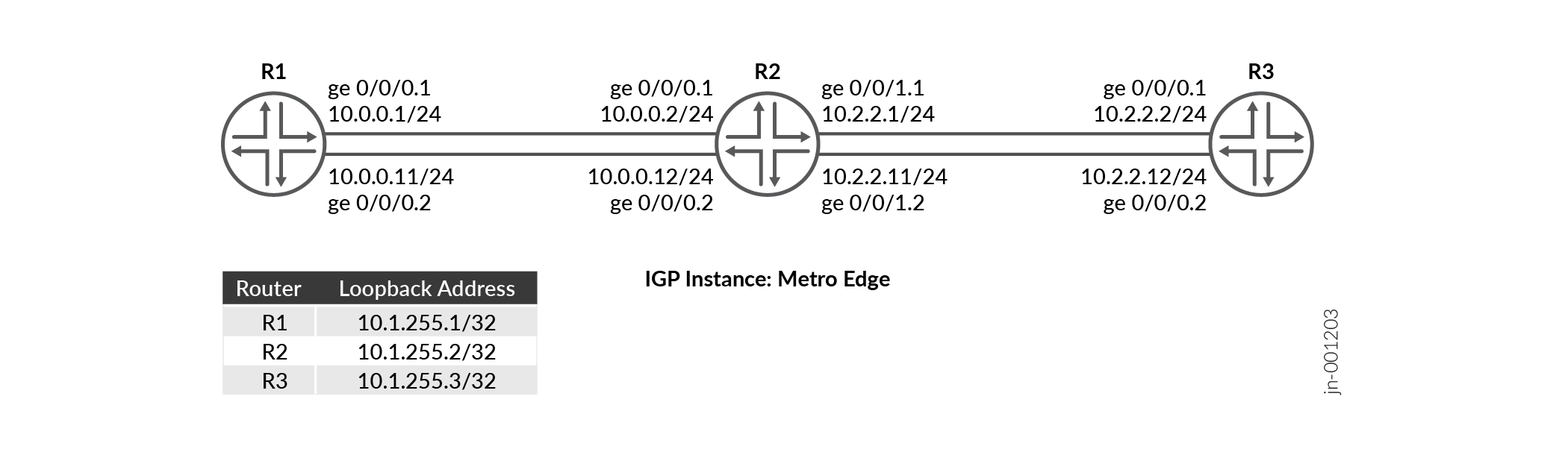
R2の設定手順
R2 の設定例の詳細については、次を参照してください。 付録 1:すべてのデバイスでコマンドを設定する
このセクションでは、この例の R0 デバイスの設定に必要な主な設定タスクに焦点を当てます。
-
デバイスインターフェイスの論理ユニットでホスト名、
enhanced-ipモード、IPv4アドレスなどの基本的なデバイス設定を構成します。IPアドレスでループバックインターフェイスを設定し、MPLSを有効にします。
ルーターIDと自律システム(AS)番号を設定して、同じASに属する一連のルーティングデバイス内でルーティング情報を伝送します。
VLANタグを有効にし、異なるVLAN IDを持つ両方のインターフェイスの論理ユニットを設定します。
各論理ユニットで MPLS を有効にします。各インターフェイスの論理ユニットの発信パケットに適用できるMPLSラベルの最大数を設定します。
パケットの負荷分散を行うポリシーを定義し、パケットごとのポリシーを適用してトラフィックのロードバランシングを有効にします。
正確なプレフィックスに基づいてルートを一致させるポリシーステートメントを設定し、一致したルートにセグメント識別子を割り当てます。
セグメントルーティングドメイン全体でラベルの予測可能性を高めるために、
edit protocol mpls階層レベルでMPLSトラフィックエンジニアリングセグメントルーティンググローバルブロック(SRGB)ラベル範囲を設定し、設定されたsrgbラベルからリンクにラベルを割り当てるためのラベル範囲MPLS設定します。[edit] set system host-name R2 set chassis network-services enhanced-ip set interfaces ge-0/0/0 unit 1 family inet address 10.0.0.2/24 set interfaces ge-0/0/0 unit 2 family inet address 10.0.0.12/24 set interfaces ge-0/0/1 unit 1 family inet address 10.2.2.1/24 set interfaces ge-0/0/1 unit 2 family inet address 10.2.2.11/24
[edit]
set interfaces lo0 unit 0 family inet address 10.1.255.2/32
set interfaces lo0 unit 0 family mpls
[edit]
set routing-options router-id 10.1.255.2
set routing-options autonomous-system 100
[edit]
set interfaces ge-0/0/0 vlan-tagging
set interfaces ge-0/0/0 unit 1 vlan-id 1
set interfaces ge-0/0/0 unit 2 vlan-id 2
set interfaces ge-0/0/1 vlan-tagging
set interfaces ge-0/0/1 unit 1 vlan-id 1
set interfaces ge-0/0/1 unit 2 vlan-id 2
[edit]
set interfaces ge-0/0/0 unit 1 family mpls maximum-labels 5
set interfaces ge-0/0/0 unit 2 family mpls maximum-labels 5
set interfaces ge-0/0/1 unit 1 family mpls maximum-labels 5
set interfaces ge-0/0/1 unit 2 family mpls maximum-labels 5
[edit]
set policy-options policy-statement pplb then load-balance per-packet
set policy-options policy-statement pplb then accept
set routing-options forwarding-table export pplb
[edit]
set policy-options policy-statement prefix-sid term 1 from route-filter 10.1.255.2/32 exact
set policy-options policy-statement prefix-sid term 1 then prefix-segment index 1001
set policy-options policy-statement prefix-sid term 1 then accept
[edit]
set protocols mpls traffic-engineering
set protocols mpls label-range srgb-label-range 800000 879999
set protocols mpls label-range static-label-range 60001 100000
set protocols mpls interface all
set protocols mpls interface fxp0.0 disable
サブインターフェイス(R2からR1、およびR2からR3への接続)で
ospf-instancemetro-edgeを設定します。[edit] set protocols ospf-instance metro-edge area 0.0.0.0 interface all
プレフィックスSIDを使用したセグメントルーティングを使用できるようにOSPF
metro-edgeインスタンスを有効にします。[edit] set protocols ospf-instance metro-edge source-packet-routing prefix-segment prefix-sid
- ノードセグメントのIPv4インデックス値を設定します。
[edit]
set protocols ospf-instance metro-edge source-packet-routing node-segment ipv4-index 1
OSPF
metro-edgeインスタンスのループバックアドレスをパッシブとして設定し、管理インターフェイス(fxp0.0)を無効にします。[edit] set protocols ospf-instance metro-edge area 0.0.0.0 interface lo0.0 passive set protocols ospf-instance metro-edge area 0.0.0.0 interface fxp0.0 disable
検証
| コマンド | 検証タスク |
|---|---|
| show route protocol ospf table inet.0 extensive |
|
| show ospf spring sid-database igp-instance igp-instance | OSPFインスタンスのOSPFセグメントルーティングデータベースを確認します。 |
| show ospf neighbor igp-instance igp-instance | 特定の OSPF インスタンスのネイバーを検証します。 |
| ospf データベース igp-instance を表示 igp-instance | IGPインスタンスに関連付けられたOSPFリンクステートデータベース(LSDB)内のOSPFアドバタイズエントリを確認します。 |
| show ospf interface igp-instance igp-instance | IGPインスタンスにマッピングされたインターフェイスを確認します。 |
| show ospf route igp-instance igp-instance | R1とR3のルートとOSPFインスタンスマッピング情報を確認します。 |
- ルーティングテーブルの検証
- OSPF アドバタイズメントの検証
- OSPFルーティングテーブル内のルートの検証
- OSPFセグメントルーティングデータベースの検証
- OSPFインターフェースの検証
- OSPFネイバーの検証
ルーティングテーブルの検証
目的
ルーティングテーブルのルートエントリーを検証します
アクション
動作モードから、 show route table inet.0 route-destination address extensive コマンドを実行します。
user@R2>show route protocol ospf table inet.0 10.1.255.1 extensive
inet.0: 19 destinations, 21 routes (19 active, 0 holddown, 0 hidden)
10.1.255.1/32 (1 entry, 1 announced)
TSI:
KRT in-kernel 10.1.255.1/32 -> {list:10.0.0.1, 10.0.0.11}
        *OSPF   Preference: 10/10
                Next hop type: Router, Next hop index: 0
                Address: 0x8b32234
                Next-hop reference count: 2, Next-hop session id: 0
                Kernel Table Id: 0
                Next hop: 10.0.0.1 via ge-0/0/0.1, selected
                Session Id: 0
                Next hop: 10.0.0.11 via ge-0/0/0.2
                Session Id: 0
                State: <Active Int>
                Local AS:   100
                Age: 1w4d 16:01:19      Metric: 1
                Validation State: unverified
                Area: 0.0.0.0
                Task: OSPF-metro-edge
                Announcement bits (1): 0-KRT
                AS path: I
                Thread: junos-main

user@R2>show route protocol ospf table inet.0 10.1.255.3 extensive
inet.0: 19 destinations, 21 routes (19 active, 0 holddown, 0 hidden)
10.1.255.3/32 (1 entry, 1 announced)
TSI:
KRT in-kernel 10.1.255.3/32 -> {list:10.2.2.2, 10.2.2.12}
        *OSPF   Preference: 10/10
                Next hop type: Router, Next hop index: 0
                Address: 0x8b316f4
                Next-hop reference count: 2, Next-hop session id: 0
                Kernel Table Id: 0
                Next hop: 10.2.2.2 via ge-0/0/1.1, selected
                Session Id: 0
                Next hop: 10.2.2.12 via ge-0/0/1.2
                Session Id: 0
                State: <Active Int>
                Local AS:   100
                Age: 1w4d 16:13:55      Metric: 1
                Validation State: unverified
                Area: 0.0.0.0
                Task: OSPF-metro-edge
                Announcement bits (1): 0-KRT
                AS path: I
                Thread: junos-main
意味
出力は、R1 のループバック アドレス(10.1.255.1)と R3 のループバック アドレス(10.1.255.2)が、R2 で設定された OSPF igp インスタンス メトロエッジ にマッピングされていることを示しています。
OSPF アドバタイズメントの検証
目的
IGPインスタンスに関連付けられたOSPFリンクステートデータベース(LSDB)内のOSPFアドバタイズエントリを確認します。
アクション
動作モードから、 show ospf database igp-instance igp-instance コマンドを実行します。
user@R2>show ospf database igp-instance metro-edge
    OSPF database, Area 0.0.0.0
Type       ID               Adv Rtr           Seq      Age  Opt  Cksum  Len
Router   10.1.255.1       10.1.255.1       0x80000013  1110  0x22 0xe6e9  72
Router  *10.1.255.2       10.1.255.2       0x80000015  1084  0x22 0x7be2  96
Router   10.1.255.3       10.1.255.3       0x80000013  1585  0x22 0x491   72
Network *10.0.0.2         10.1.255.2       0x80000010  2959  0x22 0x6791  32
Network *10.0.0.12        10.1.255.2       0x80000010  2209  0x22 0x3eb   32
Network  10.2.2.2         10.1.255.3       0x80000010  2085  0x22 0x4ba6  32
Network  10.2.2.12        10.1.255.3       0x80000010  1085  0x22 0xe601  32
OpaqArea 7.0.0.1          10.1.255.1       0x80000012   193  0x22 0x8c0   44
OpaqArea*7.0.0.1          10.1.255.2       0x80000012   511  0x22 0x2a9b  44
OpaqArea 7.0.0.1          10.1.255.3       0x80000012   585  0x22 0x4c76  44
OpaqArea 8.0.0.1          10.1.255.1       0x80000010  2610  0x22 0x4683  48
OpaqArea*8.0.0.1          10.1.255.2       0x80000010  2584  0x22 0xac01  52
OpaqArea 8.0.0.1          10.1.255.3       0x80000010  2584  0x22 0x7d06  52
OpaqArea 8.0.0.2          10.1.255.1       0x80000010  1860  0x22 0x4f55  48
OpaqArea*8.0.0.2          10.1.255.2       0x80000011   334  0x22 0xf393  52
OpaqArea 8.0.0.2          10.1.255.3       0x80000011    84  0x22 0xc498  52
OpaqArea*8.0.0.3          10.1.255.2       0x80000010  1834  0x22 0x445a  48
OpaqArea*8.0.0.4          10.1.255.2       0x80000010  1459  0x22 0x4d2c  48
意味
OSPFルーティングテーブル内のルートの検証
目的
OSPF ルーティングテーブル内のルートを検証します
アクション
動作モードから、 show ospf route コマンドを実行します。
user@R2>show ospf route igp-instance metro-edge
Topology default Route Table:

Prefix             Path  Route      NH       Metric NextHop       Nexthop
                   Type  Type       Type            Interface     Address/LSP
10.1.255.1         Intra Router     IP            1 ge-0/0/0.1    10.0.0.1
                                                    ge-0/0/0.2    10.0.0.11
10.1.255.3         Intra Router     IP            1 ge-0/0/1.1    10.2.2.2
                                                    ge-0/0/1.2    10.2.2.12
10.0.0.0/24        Intra Network    IP            1 ge-0/0/0.1
                                                    ge-0/0/0.2
10.1.255.1/32      Intra Network    IP            1 ge-0/0/0.1    10.0.0.1
                                                    ge-0/0/0.2    10.0.0.11
10.1.255.2/32      Intra Network    IP            0 lo0.0
10.1.255.3/32      Intra Network    IP            1 ge-0/0/1.1    10.2.2.2
                                                    ge-0/0/1.2    10.2.2.12
10.2.2.0/24        Intra Network    IP            1 ge-0/0/1.1
                                                    ge-0/0/1.2
299840             Intra Network    Mpls          0 ge-0/0/0.2    10.0.0.11
299840 (S=0)       Intra Network    Mpls          0 ge-0/0/0.2    10.0.0.11
299856             Intra Network    Mpls          0 ge-0/0/0.1    10.0.0.1
299856 (S=0)       Intra Network    Mpls          0 ge-0/0/0.1    10.0.0.1
299904             Intra Network    Mpls          0 ge-0/0/1.2    10.2.2.12
299904 (S=0)       Intra Network    Mpls          0 ge-0/0/1.2    10.2.2.12
299920             Intra Network    Mpls          0 ge-0/0/1.1    10.2.2.2
299920 (S=0)       Intra Network    Mpls          0 ge-0/0/1.1    10.2.2.2
意味
R2の出力は、R1とR3のループバックアドレスとOSPFインスタンスマッピング情報を示しています。
OSPFセグメントルーティングデータベースの検証
目的
OSPFインスタンスメトロエッジのOSPFセグメントルーティングデータベースを確認します。
アクション
動作モードから、 show ospf spring sid-database igp-instance igp-instance コマンドを実行します。
user@R2>show ospf spring sid-database igp-instance metro-edge
    OSPF database, Area 0.0.0.0
SID     Prefix             Advertised-by    Route-type
1000    10.1.255.1/32      10.1.255.1       Intra-Area
1001    10.1.255.2/32      10.1.255.2       Intra-Area
1002    10.1.255.3/32      10.1.255.3       Intra-Area
意味
出力は、異なるプレフィックスSIDをアドバタイズするOSPF(メトロエッジ)の複数のインスタンスを示しています。
OSPFインターフェースの検証
目的
OSPFインスタンスが有効なインターフェイスのステータス情報を確認します。
アクション
動作モードから、 show ospf interface igp-instance igp-instance コマンドを実行します。
user@R2>show ospf interface igp-instance metro-edge
Interface           State   Area            DR ID           BDR ID          Nbrs
ge-0/0/0.1          DR      0.0.0.0         10.1.255.2      10.1.255.1         1
ge-0/0/0.2          DR      0.0.0.0         10.1.255.2      10.1.255.1         1
ge-0/0/1.1          DR      0.0.0.0         10.1.255.2      10.1.255.3         1
ge-0/0/1.2          DR      0.0.0.0         10.1.255.2      10.1.255.3         1
lo0.0               DRother 0.0.0.0         0.0.0.0         0.0.0.0            0
lo0.0               DRother 0.0.0.0         0.0.0.0         0.0.0.0            0
意味
出力は、OSPFインスタンス(メトロエッジ)にマッピングされたR2のサブインターフェイスを示しています。
OSPFネイバーの検証
目的
設定されたリンク間の隣接関係を確認します。
アクション
動作モードから、 show ospf neighbor igp-instance igp-instance コマンドを実行します。
user@R2>show ospf neighbor igp-instance metro-edge
Address          Interface              State           ID               Pri  Dead
10.0.0.1         ge-0/0/0.1             Full            10.1.255.1       128    35
10.0.0.11        ge-0/0/0.2             Full            10.1.255.1       128    39
10.2.2.2         ge-0/0/1.1             Full            10.1.255.3       128    33
10.2.2.12        ge-0/0/1.2             Full            10.1.255.3       128    36
意味
デバイスR2は、デバイスR1およびデバイスR3との隣接関係を確立しており、状態出力フィールド( Full)で示されています。
付録1:すべてのデバイスでコマンドを設定する
この例をすばやく設定するには、以下のコマンドをコピーしてテキストファイルに貼り付け、改行を削除して、ネットワーク構成に合わせて必要な詳細を変更し、[edit]階層レベルのCLIにコマンドをコピー&ペーストします。
R1
set system host-name R1
set interfaces ge-0/0/0 unit 1 family inet address 10.0.0.1/24
set interfaces ge-0/0/0 unit 2 family inet address 10.0.0.11/24
set interfaces ge-0/0/0 unit 2 enable
set interfaces ge-0/0/0 vlan-tagging
set interfaces ge-0/0/0 unit 1 vlan-id 1
set interfaces ge-0/0/0 unit 2 vlan-id 2
set interfaces ge-0/0/0 unit 1 family mpls maximum-labels 5
set interfaces ge-0/0/0 unit 2 family mpls maximum-labels 5
set interfaces lo0 unit 0 family inet address 10.1.255.1/32
set interfaces lo0 unit 0 family mpls
set policy-options policy-statement pplb then load-balance per-packet
set policy-options policy-statement pplb then accept
set policy-options policy-statement prefix-sid term 1 from route-filter 10.1.255.1/32 exact
set policy-options policy-statement prefix-sid term 1 then prefix-segment index 1000
set policy-options policy-statement prefix-sid term 1 then accept
set routing-options router-id 10.1.255.1
set routing-options autonomous-system 100
set routing-options forwarding-table export pplb
set protocols mpls traffic-engineering
set protocols mpls label-range srgb-label-range 800000 879999
set protocols mpls label-range static-label-range 60001 100000
set protocols mpls interface all
set protocols mpls interface fxp0.0 disable
set protocols ospf-instance metro-edge source-packet-routing prefix-segment prefix-sid
set protocols ospf-instance metro-edge source-packet-routing node-segment ipv4-index 0
set protocols ospf-instance metro-edge area 0.0.0.0 interface all
set protocols ospf-instance metro-edge area 0.0.0.0 interface lo0.0 passive
set protocols ospf-instance metro-edge area 0.0.0.0 interface fxp0.0 disable
R2
set system host-name R2
set interfaces ge-0/0/0 unit 1 family inet address 10.0.0.2/24
set interfaces ge-0/0/0 unit 2 family inet address 10.0.0.12/24
set interfaces ge-0/0/1 unit 1 family inet address 10.2.2.1/24
set interfaces ge-0/0/1 unit 2 family inet address 10.2.2.11/24
set interfaces ge-0/0/0 vlan-tagging
set interfaces ge-0/0/0 unit 1 vlan-id 1
set interfaces ge-0/0/0 unit 2 vlan-id 2
set interfaces ge-0/0/1 vlan-tagging
set interfaces ge-0/0/1 unit 1 vlan-id 1
set interfaces ge-0/0/1 unit 2 vlan-id 2
set interfaces ge-0/0/0 unit 1 family mpls maximum-labels 5
set interfaces ge-0/0/0 unit 2 family mpls maximum-labels 5
set interfaces ge-0/0/1 unit 1 family mpls maximum-labels 5
set interfaces ge-0/0/1 unit 2 family mpls maximum-labels 5
set interfaces lo0 unit 0 family inet address 10.1.255.2/32
set interfaces lo0 unit 0 family mpls
set policy-options policy-statement pplb then load-balance per-packet
set policy-options policy-statement pplb then accept
set policy-options policy-statement prefix-sid term 1 from route-filter 10.1.255.2/32 exact
set policy-options policy-statement prefix-sid term 1 then prefix-segment index 1001
set policy-options policy-statement prefix-sid term 1 then accept
set routing-options router-id 10.1.255.2
set routing-options autonomous-system 100
set routing-options forwarding-table export pplb
set protocols mpls traffic-engineering
set protocols mpls label-range srgb-label-range 800000 879999
set protocols mpls label-range static-label-range 60001 100000
set protocols mpls interface all
set protocols mpls interface fxp0.0 disable
set protocols ospf-instance metro-edge source-packet-routing prefix-segment prefix-sid
set protocols ospf-instance metro-edge source-packet-routing node-segment ipv4-index 1
set protocols ospf-instance metro-edge area 0.0.0.0 interface all
set protocols ospf-instance metro-edge area 0.0.0.0 interface lo0.0 passive
set protocols ospf-instance metro-edge area 0.0.0.0 interface fxp0.0 disable
R3
set system host-name R3
set interfaces ge-0/0/0 unit 1 family inet address 10.2.2.2/24
set interfaces ge-0/0/0 unit 2 family inet address 10.2.2.12/24
set interfaces ge-0/0/0 vlan-tagging
set interfaces ge-0/0/0 unit 1 vlan-id 1
set interfaces ge-0/0/0 unit 2 vlan-id 2
set interfaces ge-0/0/0 unit 1 family mpls maximum-labels 5
set interfaces ge-0/0/0 unit 2 family mpls maximum-labels 5
set interfaces lo0 unit 0 family inet address 10.1.255.3/32
set interfaces lo0 unit 0 family mpls
set policy-options policy-statement pplb then load-balance per-packet
set policy-options policy-statement pplb then accept
set policy-options policy-statement prefix-sid term 1 from route-filter 10.1.255.3/32 exact
set policy-options policy-statement prefix-sid term 1 then prefix-segment index 1002
set policy-options policy-statement prefix-sid term 1 then accept
set routing-options router-id 10.1.255.3
set routing-options autonomous-system 100
set routing-options forwarding-table export pplb
set protocols mpls traffic-engineering
set protocols mpls label-range srgb-label-range 800000 879999
set protocols mpls label-range static-label-range 60001 100000
set protocols mpls interface all
set protocols mpls interface fxp0.0 disable
set protocols ospf-instance metro-edge source-packet-routing prefix-segment prefix-sid
set protocols ospf-instance metro-edge source-packet-routing node-segment ipv4-index 2
set protocols ospf-instance metro-edge area 0.0.0.0 interface lo0.0 passive
set protocols ospf-instance metro-edge area 0.0.0.0 interface all
set protocols ospf-instance metro-edge area 0.0.0.0 interface fxp0.0 disable