
例:NFX250 NextGenデバイスにおけるLANからWANへのルーティングのためのサービスチェイニングの設定
この例では、LAN から WAN へのルーティング用にサービス チェイニングを構成する方法を示します。
要件
この例では、Junos OS リリース 19.1R1 を実行する NFX250 NextGen デバイスを使用します。
概要
この例では、LAN ネットワークからのトラフィックがデバイスに着信し、OVSを通過し、デバイスから出て、WAN ネットワークに入るように、デバイスのさまざまなレイヤーを構成する方法を説明します。
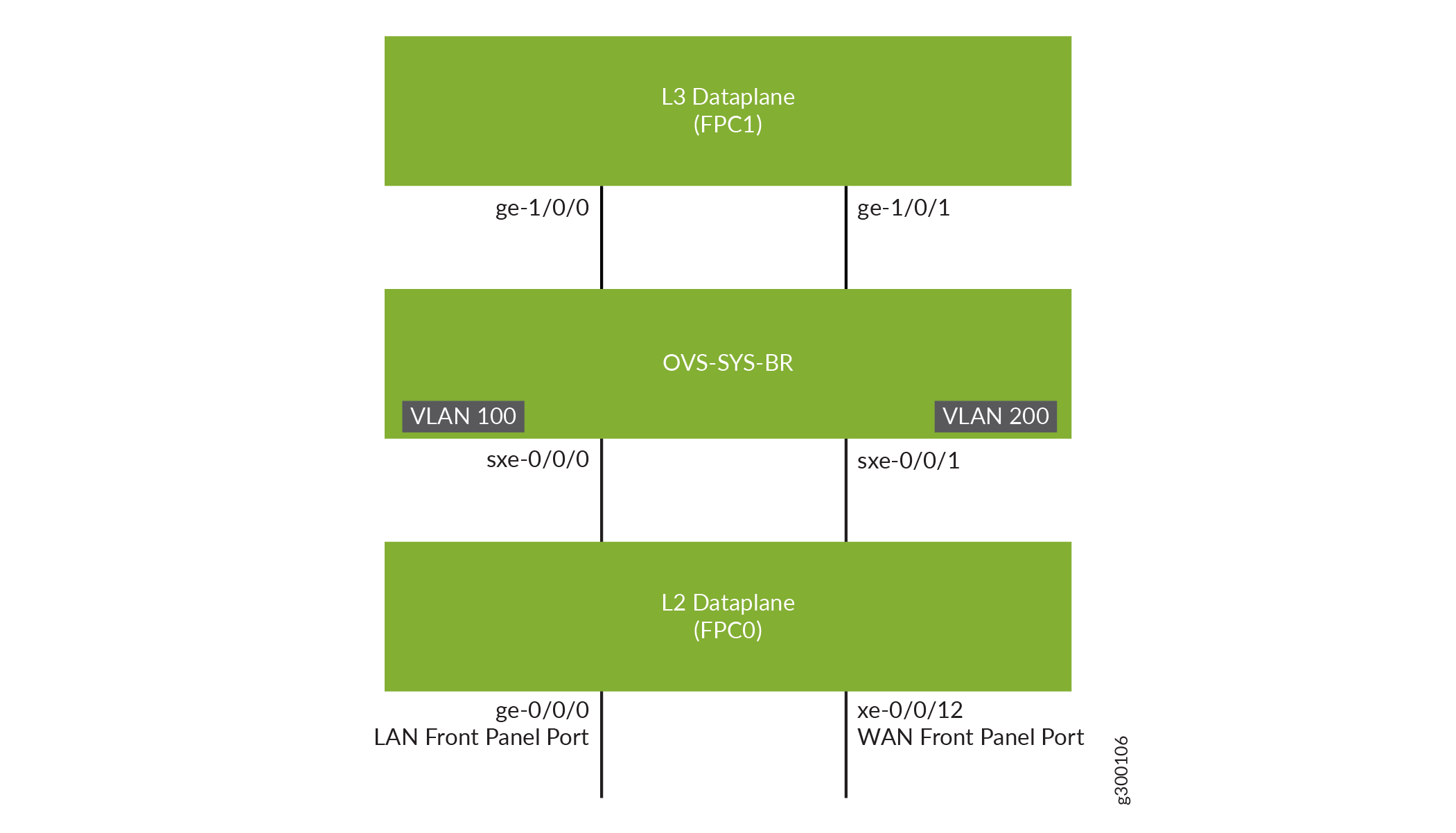
構成
レイヤー2データパスの設定
手順
LAN 側インターフェイスの VLAN を設定します。
user@host# set vlans vlan100 vlan-id 100
user@host# set vlans vlan200 vlan-id 200
LAN 側のフロント パネル ポートを設定し、LAN 側と WAN 側の VLAN に追加します。
user@host# set interfaces ge-0/0/0 unit 0 family ethernet-switching interface-mode trunk
user@host# set interfaces ge-0/0/0 unit 0 family ethernet-switching vlan members vlan100
user@host# set interfaces xe-0/0/12 unit 0 family ethernet-switching interface-mode trunk
user@host# set interfaces xe-0/0/12 unit 0 family ethernet-switching vlan members vlan200
内部に面したインターフェイス sxe-0/0/0 をトランク ポートとして設定し、LAN 側 VLAN に追加します。内部に面するインターフェイスは、複数のフロントパネルポートおよびVLANからのトラフィックをサポートする必要があるため、通常はトランクポートとなります。
user@host# set interfaces sxe-0/0/0 unit 0 family ethernet-switching interface-mode trunk
user@host# set interfaces sxe-0/0/0 unit 0 family ethernet-switching vlan members vlan100
内部に面したインターフェイスsxe-0/0/1をトランクポートとして設定し、WAN側VLANに追加します。
user@host# set interfaces sxe-0/0/1 unit 0 family ethernet-switching interface-mode trunk
user@host# set interfaces sxe-0/0/1 unit 0 family ethernet-switching vlan members vlan200
レイヤー3データパスの設定
手順
ge-1/0/0 で VLAN タギングを設定します。
user@host# set interfaces ge-1/0/0 vlan-tagging
user@host# set interfaces ge-1/0/0 unit 0 vlan-id 100
user@host# set interfaces ge-1/0/0 unit 0 family inet address 192.0.2.1/24
ge-1/0/1でVLANタギングを設定します。
user@host# set interfaces ge-1/0/1 vlan-tagging
user@host# set interfaces ge-1/0/1 unit 0 vlan-id 200
user@host# set interfaces ge-1/0/1 unit 0 family inet address 203.0.113.2/24
検証
インターフェイスのステータスの確認
目的
レイヤー 2 およびレイヤー 3 インターフェイスのステータスを確認します。
アクション
レイヤー 2(ge-0/0/x)およびレイヤー 3(ge-1/0/x)インターフェイスのステータスを検証します。
user@host> show interfaces interface-name statistics
例えば:
user@host> show interfaces ge-0/0/0 statistics
Physical interface: ge-0/0/0, Enabled, Physical link is Up
  Interface index: 144, SNMP ifIndex: 518
  Link-level type: Ethernet, MTU: 9192, LAN-PHY mode, Speed: 1000mbps,
  BPDU Error: None, Loop Detect PDU Error: None, Ethernet-Switching Error: None,
  MAC-REWRITE Error: None, Loopback: Disabled, Source filtering: Disabled,
  Flow control: Enabled
  Device flags   : Present Running
  Interface flags: SNMP-Traps Internal: 0x4000
  Link flags     : None
  CoS queues     : 8 supported, 8 maximum usable queues
  Current address: 00:00:5e:00:53:43, Hardware address: 00:00:5e:00:53:43
  Last flapped   : 2018-04-18 05:38:22 UTC (2d 10:07 ago)
  Statistics last cleared: Never
  Input rate     : 0 bps (0 pps)
  Output rate    : 0 bps (0 pps)
  Input errors: 0, Output errors: 0
  Active alarms  : None
  Active defects : None
  PCS statistics                      Seconds
    Bit errors                             0
    Errored blocks                         0
  Ethernet FEC statistics              Errors
    FEC Corrected Errors                    0
    FEC Uncorrected Errors                  0
    FEC Corrected Errors Rate               0
    FEC Uncorrected Errors Rate             0
  PRBS Statistics : Disabled
  Interface transmit statistics: Disabled

  Logical interface ge-0/0/0.0 (Index 333) (SNMP ifIndex 524)
    Flags: Up SNMP-Traps 0x24024000 Encapsulation: Ethernet-Bridge
    Input packets : 147888
    Output packets: 22
    Protocol eth-switch, MTU: 9192
      Flags: Is-Primary