
例:レイヤー3 VPN(仮想プライベートネットワーク)で、ネットワークのソースパケットルーティング(SPRING)でIS-ISリンク遅延を有効にする
この例では、レイヤー3 VPNシナリオでSPRINGでIS-ISリンク遅延を設定する方法を示しています。この例では、PE1 と PE2 の間に 2 つの VPN を作成できます。VPN1はリンク遅延を最適化し、VPN2はIGPメトリックを最適化します。テストトポロジーで双方向トラフィックを有効にする機能を設定することはできますが、この例では一方向トラフィックシナリオに焦点を当てています。具体的には、PE1 がアドバタイズした宛先に PE1 が送信するレイヤー 3 VPN トラフィックの転送パスを制御することです。
要件
この例では、以下のハードウェアとソフトウェアのコンポーネントを使用しています。
-
4 台の MX シリーズ ルーター
-
すべてのデバイスで Junos OS リリース 21.1R1 以降が実行されている
トポロジ
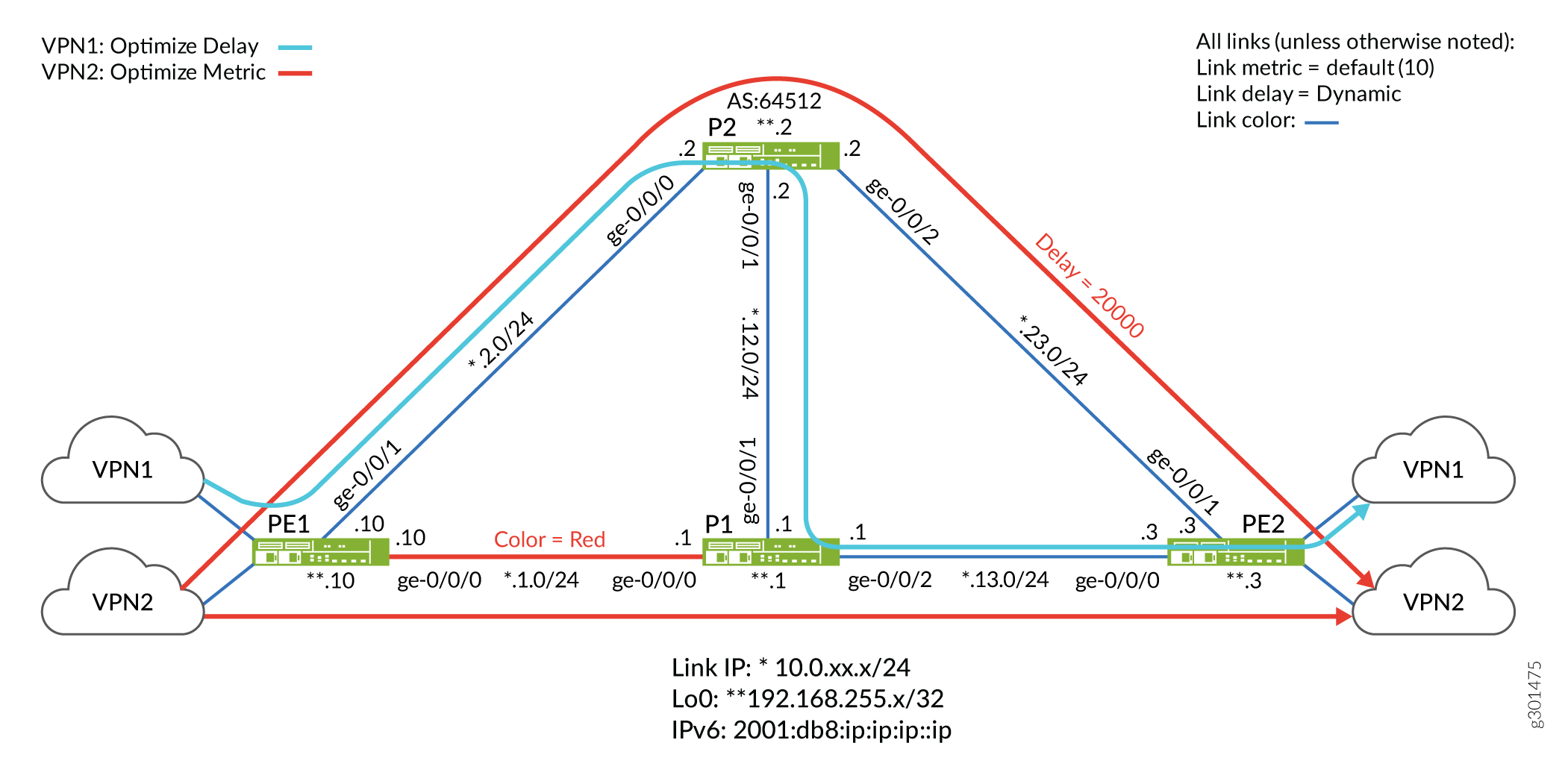
トポロジーでは、ほとんどのリンクには(デフォルト)IGPメトリックが10、動的遅延測定値、青の色が付いています。例外は、PE1 と P1 の間の赤色で示されたパスと、P2 から PE2 へのリンク上の静的遅延設定です。
IPv4 と IPv6 の両方で IS-IS リンク遅延をサポートするようにテスト トポロジーを構成しました。P2ルーターは、PEデバイスをクライアントとしてルートリフレクタとして設定しました。トポロジーをシンプルにするため、PE2 ルーターの VRF には静的ルートを使用しています。これにより、CEデバイスやEBGPなどのPE-CEルーティングプロトコルが不要になります。
目標は、PE2 が VPN1 用にアドバタイズしたルートが、遅延を最適化しながら、青色のリンクのみを使用するように制限されるパスを取得するようにネットワークを設定することです。対照的に、VPN2に関連するルートに送信されたトラフィックは、そのIGPメトリックに基づいてパスを最適化する青または赤色のリンクを取得できます。
- VPN1 のフレックス アルゴリズム定義(FAD)では、アルゴリズム 128 を使用します。遅延を減らすために最適化されたパス上で青い色のリンク(PE1>P2>P1>PE2)のみを使用するように設定しました。適切なパス選択を示すために、P2 と PE2 の間で 20000 マイクロ秒の静的遅延を設定します。この遅延は、残りのリンクで測定された動的遅延よりも大幅に高くなります。その結果、フレックス アルゴリズム 128 トラフィックは、P2 から PE2 へのリンクを回避し、blue カラー パス(PE1>P2>P1>PE2)に沿った追加ホップを優先することを期待しています。
- VPN2 のフレックス アルゴリズム定義(FAD)では、アルゴリズム 129 を使用します。IGPメトリックに最適化されたパスで、青または赤のリンク(PE1>P1>PE2またはPE1>P2>PE2)を取得するように設定しました。その結果、フレックス アルゴリズム 129 を使用するトラフィックには、PE1 と PE2 の間に 2 つの等コスト パスがあり、両方とも 2 つのホップが発生し、結果としてメトリックが 20 になります。
概要
IP ネットワークでは、トラフィックの大部分がコア ネットワークを通過することが多いため、コストは削減されますが、遅延が増加する可能性があります。しかし、ビジネストラフィックは、IGPメトリックに基づいて従来のパス最適化を中継するのではなく、パス遅延などの他のパフォーマンスメトリックに基づいてパス選択を決定する機能を利用するメリットがあります。遅延を短縮するためにパスを最適化することは、リアルタイムの音声やビデオなどのアプリケーションに大きなメリットをもたらします。また、ミリ秒が大幅な増加または損失につながる金融市場のデータへのハイパフォーマンスアクセスを可能にすることができます。
Junos OS リリース 21.1R1 以降、IP ネットワークで IS-IS リンク遅延を有効にできるようになりました。デフォルトのIS-ISアルゴリズム(0)を使用して、適切なリンクコストでIS-ISを設定することで、最小IGPメトリックパスを達成できます。そうすることで、リンク メトリックの合計に厳密に基づくエンドポイントへのパスが最適化されます。IS-IS遅延フレックスアルゴリズムを使用することで、エンドツーエンドの遅延に基づいてパスを最適化できます。
リンク遅延は、TWAMP(Two-Way Active Measurement Probes)を使用して動的に測定できます。次に、ルーターはリンク遅延パラメーターをフラッディングします。エリア内のルーターは、これらのパラメーターを共有リンク状態データベース(LSDB)に格納します。イングレスノードはLSDBに対してSPFアルゴリズムを実行し、リンクカラー、IGPメトリック、トラフィック制御(TE)メトリックなど、またはこの例に示すようにリンク遅延など、さまざまな属性で最適化されたパスを計算します。
エグレスルーターは、BGPを介してアドバタイズされたルートに関連するカラーコミュニティをアタッチすることで、どのフレックスアルゴリズムが必要かを知らせます。送信側(リモートPEがアドバタイズするタグ付きルートを受信したローカルPE)では、これらのカラーコミュニティを使用して、リモートプロトコルのネクストホップ(PEのループバックアドレス)を解決するカラーテーブルにインデックスを付けて、フレックスアルゴリズム識別子に変換します。レイヤー3 VPNのコンテキストでは、イングレスノードでカラーマッピングポリシーを使用して、カラーテーブルを介してネクストホップを解決するプレフィックスを選択します。
ローカル PE は次に、ローカルの FAD(フレックス アルゴリズム定義)を使用して、フレックス アルゴリズム識別子を一連のパス選択基準にマッピングします。たとえば、「blue リンクを使用して遅延を最適化する」などです。イングレスPEは、LSDBの値に基づいて最適なパスを計算し、関連するMPLSラベルスタックをパケットにプッシュし、関連付けられたネクストホップに送信します。その結果、IS-IS をシグナリング プロトコルとして使用するトラフィック制御 MPLS パスが作成されます。
構成
CLI クイックコンフィギュレーション
この例を迅速に設定するには、以下のコマンドをコピーしてテキスト ファイルに貼り付け、改行を削除し、ネットワーク設定に合わせて必要な詳細を変更し、[edit]階層レベルの CLI にコマンドをコピー アンド ペーストします。
MX シリーズ ルーターの MPC のタイプによっては、IS-IS 遅延機能をサポートするために拡張 IP サービスを明示的に有効にする必要がある場合があります。設定ステートメントを set chassis network-services enhanced-ip コミットすると、システムを再起動するよう求められます。
PE1
set system host-name PE1
set chassis network-services enhanced-ip
set services rpm twamp server authentication-mode none
set services rpm twamp server light
set interfaces ge-0/0/0 description To_R1
set interfaces ge-0/0/0 unit 0 family inet address 10.0.1.10/24
set interfaces ge-0/0/0 unit 0 family iso
set interfaces ge-0/0/0 unit 0 family inet6 address 2001:db8:10:0:1::10/80
set interfaces ge-0/0/0 unit 0 family mpls maximum-labels 16
set interfaces ge-0/0/1 description To_R2
set interfaces ge-0/0/1 unit 0 family inet address 10.0.2.10/24
set interfaces ge-0/0/1 unit 0 family iso
set interfaces ge-0/0/1 unit 0 family inet6 address 2001:db8:10:0:2::10/80
set interfaces ge-0/0/1 unit 0 family mpls maximum-labels 16
set interfaces lo0 unit 0 family inet address 192.168.255.10/32
set interfaces lo0 unit 0 family inet address 127.0.0.1/32
set interfaces lo0 unit 0 family iso address 49.0001.000a.0a0a.0a00
set interfaces lo0 unit 0 family inet6 address 2001:db8:192:168:255::10/128
set interfaces lo0 unit 1 family inet address 172.16.10.1/32
set interfaces lo0 unit 1 family inet6 address 2001:db8:172:16:10::1/128
set interfaces lo0 unit 2 family inet address 172.16.10.2/32
set interfaces lo0 unit 2 family inet6 address 2001:db8:172:16:10::2/128
set policy-options policy-statement pplb then load-balance per-packet
set policy-options policy-statement prefix-sid term 1 from route-filter 192.168.255.10/32 exact
set policy-options policy-statement prefix-sid term 1 then prefix-segment algorithm 128 index 1280
set policy-options policy-statement prefix-sid term 1 then prefix-segment algorithm 128 node-segment
set policy-options policy-statement prefix-sid term 1 then prefix-segment algorithm 129 index 1290
set policy-options policy-statement prefix-sid term 1 then prefix-segment algorithm 129 node-segment
set policy-options policy-statement prefix-sid term 1 then prefix-segment index 1000
set policy-options policy-statement prefix-sid term 1 then prefix-segment node-segment
set policy-options policy-statement prefix-sid term 1 then accept
set policy-options policy-statement prefix-sid term 2 from route-filter 2001:db8:192:168:255::10/128 exact
set policy-options policy-statement prefix-sid term 2 then prefix-segment algorithm 128 index 4280
set policy-options policy-statement prefix-sid term 2 then prefix-segment algorithm 128 node-segment
set policy-options policy-statement prefix-sid term 2 then prefix-segment algorithm 129 index 4290
set policy-options policy-statement prefix-sid term 2 then prefix-segment algorithm 129 node-segment
set policy-options policy-statement prefix-sid term 2 then prefix-segment index 4000
set policy-options policy-statement prefix-sid term 2 then prefix-segment node-segment
set policy-options policy-statement prefix-sid term 2 then accept
set policy-options policy-statement v6vpn1_res_map1 from route-filter 2001:db8:172:16:1::/80 orlonger
set policy-options policy-statement v6vpn1_res_map1 then accept
set policy-options policy-statement v6vpn1_res_map1 then resolution-map map1
set policy-options policy-statement v6vpn2_res_map1 from route-filter 2001:db8:172:16:2::/80 orlonger
set policy-options policy-statement v6vpn2_res_map1 then accept
set policy-options policy-statement v6vpn2_res_map1 then resolution-map map1
set policy-options policy-statement vpn1_res_map1 term 1 from route-filter 172.16.1.0/24 orlonger
set policy-options policy-statement vpn1_res_map1 term 1 then accept
set policy-options policy-statement vpn1_res_map1 term 1 then resolution-map map1
set policy-options policy-statement vpn2_res_map1 term 1 from route-filter 172.16.2.0/24 orlonger
set policy-options policy-statement vpn2_res_map1 term 1 then accept
set policy-options policy-statement vpn2_res_map1 term 1 then resolution-map map1
set policy-options resolution-map map1 mode ip-color
set routing-instances vpn1 instance-type vrf
set routing-instances vpn1 interface lo0.1
set routing-instances vpn1 route-distinguisher 64512:1
set routing-instances vpn1 vrf-target target:64512:1
set routing-instances vpn1 vrf-table-label
set routing-instances vpn2 instance-type vrf
set routing-instances vpn2 interface lo0.2
set routing-instances vpn2 route-distinguisher 64512:2
set routing-instances vpn2 vrf-target target:64512:2
set routing-instances vpn2 vrf-table-label
set protocols bgp group to-RRv6 type internal
set protocols bgp group to-RRv6 local-address 2001:db8:192:168:255::10
set protocols bgp group to-RRv6 import v6vpn1_res_map1
set protocols bgp group to-RRv6 import v6vpn2_res_map1
set protocols bgp group to-RRv6 family inet6 unicast extended-nexthop-color
set protocols bgp group to-RRv6 family inet6-vpn unicast
set protocols bgp group to-RRv6 neighbor 2001:db8:192:168:255::2
set protocols bgp group to-RR type internal
set protocols bgp group to-RR local-address 192.168.255.10
set protocols bgp group to-RR import vpn1_res_map1
set protocols bgp group to-RR import vpn2_res_map1
set protocols bgp group to-RR family inet unicast extended-nexthop-color
set protocols bgp group to-RR family inet-vpn unicast
set protocols bgp group to-RR family traffic-engineering unicast
set protocols bgp group to-RR neighbor 192.168.255.2
set protocols bgp group to-RR vpn-apply-export
set protocols isis interface ge-0/0/0.0 level 2 post-convergence-lfa node-protection
set protocols isis interface ge-0/0/0.0 delay-measurement advertisement periodic threshold 100
set protocols isis interface ge-0/0/0.0 point-to-point
set protocols isis interface ge-0/0/1.0 level 2 post-convergence-lfa node-protection
set protocols isis interface ge-0/0/1.0 delay-measurement advertisement periodic threshold 100
set protocols isis interface ge-0/0/1.0 point-to-point
set protocols isis interface lo0.0 passive
set protocols isis source-packet-routing srgb start-label 80000
set protocols isis source-packet-routing srgb index-range 5000
set protocols isis source-packet-routing flex-algorithm 128
set protocols isis source-packet-routing flex-algorithm 129
set protocols isis level 1 disable
set protocols isis backup-spf-options use-post-convergence-lfa maximum-backup-paths 8
set protocols isis backup-spf-options use-source-packet-routing
set protocols isis traffic-engineering l3-unicast-topology
set protocols isis traffic-engineering advertisement always
set protocols isis export prefix-sid
set protocols mpls traffic-engineering
set protocols mpls admin-groups RED 0
set protocols mpls admin-groups BLUE 1
set protocols mpls icmp-tunneling
set protocols mpls interface all
set protocols mpls interface fxp0.0 disable
set protocols mpls interface ge-0/0/0.0 admin-group RED
set protocols mpls interface ge-0/0/1.0 admin-group BLUE
set routing-options flex-algorithm 128 definition metric-type delay-metric
set routing-options flex-algorithm 128 definition spf
set routing-options flex-algorithm 128 definition admin-group include-any BLUE
set routing-options flex-algorithm 129 definition metric-type igp-metric
set routing-options flex-algorithm 129 definition spf
set routing-options flex-algorithm 129 definition admin-group include-any RED
set routing-options flex-algorithm 129 definition admin-group include-any BLUE
set routing-options router-id 192.168.255.10
set routing-options autonomous-system 64512
set routing-options forwarding-table export pplb
set routing-options forwarding-table ecmp-fast-reroute
set routing-options forwarding-table chained-composite-next-hop ingress l3vpn
P1
set system host-name P1
set chassis network-services enhanced-ip
set services rpm twamp server authentication-mode none
set services rpm twamp server light
set interfaces ge-0/0/0 description To_R0
set interfaces ge-0/0/0 unit 0 family inet address 10.0.1.1/24
set interfaces ge-0/0/0 unit 0 family iso
set interfaces ge-0/0/0 unit 0 family inet6 address 2001:db8:10:0:1::1/80
set interfaces ge-0/0/0 unit 0 family mpls maximum-labels 16
set interfaces ge-0/0/1 description To_R2
set interfaces ge-0/0/1 unit 0 family inet address 10.0.12.1/24
set interfaces ge-0/0/1 unit 0 family iso
set interfaces ge-0/0/1 unit 0 family inet6 address 2001:db8:10:0:12::1/80
set interfaces ge-0/0/1 unit 0 family mpls maximum-labels 16
set interfaces ge-0/0/2 description To_R3
set interfaces ge-0/0/2 unit 0 family inet address 10.0.13.1/24
set interfaces ge-0/0/2 unit 0 family iso
set interfaces ge-0/0/2 unit 0 family inet6 address 2001:db8:10:0:13::1/80
set interfaces ge-0/0/2 unit 0 family mpls maximum-labels 16
set interfaces lo0 unit 0 family inet address 192.168.255.1/32
set interfaces lo0 unit 0 family iso address 49.0001.0005.0505.0500
set interfaces lo0 unit 0 family inet6 address 2001:db8:192:168:255::1/128
set policy-options policy-statement pplb then load-balance per-packet
set policy-options policy-statement prefix-sid term 1 from route-filter 192.168.255.1/32 exact
set policy-options policy-statement prefix-sid term 1 then prefix-segment algorithm 128 index 1281
set policy-options policy-statement prefix-sid term 1 then prefix-segment algorithm 128 node-segment
set policy-options policy-statement prefix-sid term 1 then prefix-segment algorithm 129 index 1291
set policy-options policy-statement prefix-sid term 1 then prefix-segment algorithm 129 node-segment
set policy-options policy-statement prefix-sid term 1 then prefix-segment index 1001
set policy-options policy-statement prefix-sid term 1 then prefix-segment node-segment
set policy-options policy-statement prefix-sid term 1 then accept
set policy-options policy-statement prefix-sid term 2 from route-filter 2001:db8:192:168:255::1/128 exact
set policy-options policy-statement prefix-sid term 2 then prefix-segment algorithm 128 index 4281
set policy-options policy-statement prefix-sid term 2 then prefix-segment algorithm 128 node-segment
set policy-options policy-statement prefix-sid term 2 then prefix-segment algorithm 129 index 4291
set policy-options policy-statement prefix-sid term 2 then prefix-segment algorithm 129 node-segment
set policy-options policy-statement prefix-sid term 2 then prefix-segment index 4001
set policy-options policy-statement prefix-sid term 2 then prefix-segment node-segment
set policy-options policy-statement prefix-sid term 2 then accept
set protocols isis interface ge-0/0/0.0 level 2 post-convergence-lfa node-protection
set protocols isis interface ge-0/0/0.0 delay-measurement advertisement periodic threshold 100
set protocols isis interface ge-0/0/0.0 point-to-point
set protocols isis interface ge-0/0/1.0 level 2 post-convergence-lfa node-protection
set protocols isis interface ge-0/0/1.0 delay-measurement advertisement periodic threshold 100
set protocols isis interface ge-0/0/1.0 point-to-point
set protocols isis interface ge-0/0/2.0 level 2 post-convergence-lfa node-protection
set protocols isis interface ge-0/0/2.0 delay-measurement advertisement periodic threshold 100
set protocols isis interface ge-0/0/2.0 point-to-point
set protocols isis interface lo0.0 passive
set protocols isis source-packet-routing srgb start-label 80000
set protocols isis source-packet-routing srgb index-range 5000
set protocols isis source-packet-routing flex-algorithm 128
set protocols isis source-packet-routing flex-algorithm 129
set protocols isis level 1 disable
set protocols isis backup-spf-options use-post-convergence-lfa maximum-backup-paths 8
set protocols isis backup-spf-options use-source-packet-routing
set protocols isis traffic-engineering l3-unicast-topology
set protocols isis traffic-engineering advertisement always
set protocols isis export prefix-sid
set protocols mpls admin-groups RED 0
set protocols mpls admin-groups BLUE 1
set protocols mpls icmp-tunneling       set protocols mpls interface all
set protocols mpls interface fxp0.0 disable
set protocols mpls interface ge-0/0/0.0 admin-group RED
set protocols mpls interface ge-0/0/1.0 admin-group BLUE
set protocols mpls interface ge-0/0/2.0 admin-group BLUE
set routing-options router-id 192.168.255.1
set routing-options autonomous-system 65412
set routing-options forwarding-table export pplb
P2
set system host-name P2
set chassis network-services enhanced-ip
set services rpm twamp server authentication-mode none
set services rpm twamp server light
set interfaces ge-0/0/0 unit 0 family inet address 10.0.2.2/24
set interfaces ge-0/0/0 unit 0 family iso
set interfaces ge-0/0/0 unit 0 family inet6 address 2001:db8:10:0:2::2/80
set interfaces ge-0/0/0 unit 0 family mpls maximum-labels 16
set interfaces ge-0/0/1 description To_R1
set interfaces ge-0/0/1 unit 0 family inet address 10.0.12.2/24
set interfaces ge-0/0/1 unit 0 family iso
set interfaces ge-0/0/1 unit 0 family inet6 address 2001:db8:10:0:12::2/80
set interfaces ge-0/0/1 unit 0 family mpls maximum-labels 16
set interfaces ge-0/0/2 description To_R3
set interfaces ge-0/0/2 unit 0 family inet address 10.0.23.2/24
set interfaces ge-0/0/2 unit 0 family iso
set interfaces ge-0/0/2 unit 0 family inet6 address 2001:db8:10:0:23::2/80
set interfaces ge-0/0/2 unit 0 family mpls maximum-labels 16
set interfaces lo0 unit 0 family inet address 192.168.255.2/32
set interfaces lo0 unit 0 family iso address 49.0001.0002.0202.0200
set interfaces lo0 unit 0 family inet6 address 2001:db8:192:168:255::2/128
set policy-options policy-statement pplb then load-balance per-packet
set policy-options policy-statement prefix-sid term 1 from route-filter 192.168.255.2/32 exact
set policy-options policy-statement prefix-sid term 1 then prefix-segment algorithm 128 index 1282
set policy-options policy-statement prefix-sid term 1 then prefix-segment algorithm 128 node-segment
set policy-options policy-statement prefix-sid term 1 then prefix-segment algorithm 129 index 1292
set policy-options policy-statement prefix-sid term 1 then prefix-segment algorithm 129 node-segment
set policy-options policy-statement prefix-sid term 1 then prefix-segment index 1002
set policy-options policy-statement prefix-sid term 1 then prefix-segment node-segment
set policy-options policy-statement prefix-sid term 1 then accept
set policy-options policy-statement prefix-sid term 2 from route-filter 2001:db8:192:168:255::2/128 exact
set policy-options policy-statement prefix-sid term 2 then prefix-segment algorithm 128 index 4282
set policy-options policy-statement prefix-sid term 2 then prefix-segment algorithm 128 node-segment
set policy-options policy-statement prefix-sid term 2 then prefix-segment algorithm 129 index 4292
set policy-options policy-statement prefix-sid term 2 then prefix-segment algorithm 129 node-segment
set policy-options policy-statement prefix-sid term 2 then prefix-segment index 4002
set policy-options policy-statement prefix-sid term 2 then prefix-segment node-segment
set policy-options policy-statement prefix-sid term 2 then accept
set policy-options policy-statement ted2nlri_igp term 1 from family traffic-engineering
set policy-options policy-statement ted2nlri_igp term 1 from protocol isis
set policy-options policy-statement ted2nlri_igp term 1 then accept
set protocols bgp group to-RRv6 type internal
set protocols bgp group to-RRv6 local-address 2001:db8:192:168:255::2
set protocols bgp group to-RRv6 family inet6 unicast
set protocols bgp group to-RRv6 family inet6-vpn unicast
set protocols bgp group to-RRv6 neighbor 2001:db8:192:168:255::10
set protocols bgp group to-RRv6 neighbor 2001:db8:192:168:255::3
set protocols bgp group to-RR type internal
set protocols bgp group to-RR local-address 192.168.255.2
set protocols bgp group to-RR family inet unicast
set protocols bgp group to-RR family inet-vpn unicast
set protocols bgp group to-RR neighbor 192.168.255.10
set protocols bgp group to-RR neighbor 192.168.255.3
set protocols bgp cluster 192.168.255.2
set protocols isis interface ge-0/0/0.0 level 2 post-convergence-lfa node-protection
set protocols isis interface ge-0/0/0.0 delay-measurement advertisement periodic threshold 100
set protocols isis interface ge-0/0/0.0 point-to-point
set protocols isis interface ge-0/0/1.0 level 2 post-convergence-lfa node-protection
set protocols isis interface ge-0/0/1.0 delay-measurement advertisement periodic threshold 100
set protocols isis interface ge-0/0/1.0 point-to-point
set protocols isis interface ge-0/0/2.0 level 2 post-convergence-lfa node-protection
set protocols isis interface ge-0/0/2.0 delay-metric 20000
set protocols isis interface ge-0/0/2.0 delay-measurement advertisement periodic threshold 100
set protocols isis interface ge-0/0/2.0 point-to-point
set protocols isis interface lo0.0 passive
set protocols isis source-packet-routing srgb start-label 80000
set protocols isis source-packet-routing srgb index-range 5000
set protocols isis source-packet-routing flex-algorithm 128
set protocols isis source-packet-routing flex-algorithm 129
set protocols isis level 1 disable
set protocols isis backup-spf-options use-post-convergence-lfa maximum-backup-paths 8
set protocols isis backup-spf-options use-source-packet-routing
set protocols isis traffic-engineering l3-unicast-topology
set protocols isis traffic-engineering advertisement always
set protocols isis export prefix-sid
set protocols mpls traffic-engineering
set protocols mpls admin-groups RED 0
set protocols mpls admin-groups BLUE 1
set protocols mpls icmp-tunneling       set protocols mpls interface all
set protocols mpls interface fxp0.0 disable
set protocols mpls interface ge-0/0/0.0 admin-group BLUE
set protocols mpls interface ge-0/0/1.0 admin-group BLUE
set protocols mpls interface ge-0/0/2.0 admin-group BLUE
set routing-options router-id 192.168.255.2
set routing-options autonomous-system 64512
set routing-options forwarding-table export pplb
PE2
set system host-name PE2
set chassis network-services enhanced-ip
set services rpm twamp server authentication-mode none
set services rpm twamp server light
set interfaces ge-0/0/0 description To_R1
set interfaces ge-0/0/0 unit 0 family inet address 10.0.13.3/24
set interfaces ge-0/0/0 unit 0 family iso
set interfaces ge-0/0/0 unit 0 family inet6 address 2001:db8:10:0:13::3/80
set interfaces ge-0/0/0 unit 0 family mpls maximum-labels 16
set interfaces ge-0/0/1 description To_R2
set interfaces ge-0/0/1 unit 0 family inet address 10.0.23.3/24
set interfaces ge-0/0/1 unit 0 family iso
set interfaces ge-0/0/1 unit 0 family inet6 address 2001:db8:10:0:23::364/128
set interfaces ge-0/0/1 unit 0 family mpls maximum-labels 16
set interfaces lo0 unit 0 family inet address 192.168.255.3/32
set interfaces lo0 unit 0 family inet address 127.0.0.1/32
set interfaces lo0 unit 0 family iso address 49.0001.0007.0707.0700
set interfaces lo0 unit 0 family inet6 address 2001:db8:192:168:255::3/128
set interfaces lo0 unit 1 family inet address 172.16.3.1/32
set interfaces lo0 unit 1 family inet6 address 2001:db8:172:16:3::1/128
set interfaces lo0 unit 2 family inet address 172.16.3.2/32
set interfaces lo0 unit 2 family inet6 address 2001:db8:172:16:3::2/128
set policy-options policy-statement pplb then load-balance per-packet
set policy-options policy-statement prefix-sid term 1 from route-filter 192.168.255.3/32 exact
set policy-options policy-statement prefix-sid term 1 then prefix-segment algorithm 128 index 1283
set policy-options policy-statement prefix-sid term 1 then prefix-segment algorithm 128 node-segment
set policy-options policy-statement prefix-sid term 1 then prefix-segment algorithm 129 index 1293
set policy-options policy-statement prefix-sid term 1 then prefix-segment algorithm 129 node-segment
set policy-options policy-statement prefix-sid term 1 then prefix-segment index 1003
set policy-options policy-statement prefix-sid term 1 then prefix-segment node-segment
set policy-options policy-statement prefix-sid term 1 then accept
set policy-options policy-statement prefix-sid term 2 from route-filter 2001:db8:192:168:255::3/128 exact
set policy-options policy-statement prefix-sid term 2 then prefix-segment algorithm 128 index 4283
set policy-options policy-statement prefix-sid term 2 then prefix-segment algorithm 128 node-segment
set policy-options policy-statement prefix-sid term 2 then prefix-segment algorithm 129 index 4293
set policy-options policy-statement prefix-sid term 2 then prefix-segment algorithm 129 node-segment
set policy-options policy-statement prefix-sid term 2 then prefix-segment index 4003
set policy-options policy-statement prefix-sid term 2 then prefix-segment node-segment
set policy-options policy-statement prefix-sid term 2 then accept
set policy-options policy-statement vpn_1_export term 1 from route-filter 172.16.1.0/24 orlonger
set policy-options policy-statement vpn_1_export term 1 then community add color128
set policy-options policy-statement vpn_1_export term 1 then next-hop 192.168.255.3
set policy-options policy-statement vpn_1_export term 1 then accept
set policy-options policy-statement vpn_1_export_v6 term 1 from route-filter 2001:db8:172:16:1::/80 orlonger
set policy-options policy-statement vpn_1_export_v6 term 1 then community add color128
set policy-options policy-statement vpn_1_export_v6 term 1 then next-hop 2001:db8:192:168:255::3
set policy-options policy-statement vpn_1_export_v6 term 1 then accept
set policy-options policy-statement vpn_1_export_v6 term 2 from route-filter 2001:db8:172:16:3::1/128 exact
set policy-options policy-statement vpn_1_export_v6 term 2 then community add color128
set policy-options policy-statement vpn_1_export_v6 term 2 then next-hop 2001:db8:192:168:255::3
set policy-options policy-statement vpn_1_export_v6 term 2 then accept
set policy-options policy-statement vpn_2_export term 1 from route-filter 172.16.2.0/24 orlonger
set policy-options policy-statement vpn_2_export term 1 then community add color129
set policy-options policy-statement vpn_2_export term 1 then next-hop 192.168.255.3
set policy-options policy-statement vpn_2_export term 1 then accept
set policy-options policy-statement vpn_2_export_v6 term 1 from route-filter 2001:db8:172:16:2::/80 orlonger
set policy-options policy-statement vpn_2_export_v6 term 1 then community add color129
set policy-options policy-statement vpn_2_export_v6 term 1 then next-hop 2001:db8:192:168:255::3
set policy-options policy-statement vpn_2_export_v6 term 1 then accept
set policy-options community color128 members color:0:128
set policy-options community color129 members color:0:129
set policy-options resolution-map map1 mode ip-color
set routing-instances vpn1 instance-type vrf
set routing-instances vpn1 routing-options rib vpn1.inet6.0 static route 2001:db8:172:16:1::/80 receive
set routing-instances vpn1 routing-options static route 172.16.1.0/24 receive
set routing-instances vpn1 interface lo0.1
set routing-instances vpn1 route-distinguisher 64512:1
set routing-instances vpn1 vrf-target target:64512:1
set routing-instances vpn1 vrf-table-label
set routing-instances vpn2 instance-type vrf
set routing-instances vpn2 routing-options rib vpn2.inet6.0 static route 2001:db8:172:16:2::/80 receive
set routing-instances vpn2 routing-options static route 172.16.2.0/24 receive
set routing-instances vpn2 interface lo0.2
set routing-instances vpn2 route-distinguisher 64512:2
set routing-instances vpn2 vrf-target target:64512:2
set routing-instances vpn2 vrf-table-label
set protocols bgp group to-RRv6 type internal
set protocols bgp group to-RRv6 local-address 2001:db8:192:168:255::3
set protocols bgp group to-RRv6 family inet6 unicast extended-nexthop-color
set protocols bgp group to-RRv6 family inet6-vpn unicast
set protocols bgp group to-RRv6 export vpn_1_export_v6
set protocols bgp group to-RRv6 export vpn_2_export_v6
set protocols bgp group to-RRv6 neighbor 2001:db8:192:168:255::2
set protocols bgp group to-RRv6 vpn-apply-export
set protocols bgp group to-RR type internal
set protocols bgp group to-RR local-address 192.168.255.3
set protocols bgp group to-RR family inet unicast extended-nexthop-color
set protocols bgp group to-RR family inet-vpn unicast
set protocols bgp group to-RR export vpn_1_export
set protocols bgp group to-RR export vpn_2_export
set protocols bgp group to-RR neighbor 192.168.255.2
set protocols bgp group to-RR vpn-apply-export
set protocols isis interface ge-0/0/0.0 level 2 post-convergence-lfa node-protection
set protocols isis interface ge-0/0/0.0 delay-measurement advertisement periodic threshold 100
set protocols isis interface ge-0/0/0.0 point-to-point
set protocols isis interface ge-0/0/1.0 level 2 post-convergence-lfa node-protection
set protocols isis interface ge-0/0/1.0 delay-measurement advertisement periodic threshold 100
set protocols isis interface ge-0/0/1.0 point-to-point
set protocols isis interface ge-0/0/2.0 delay-metric 20000
set protocols isis interface lo0.0 passive
set protocols isis source-packet-routing srgb start-label 80000
set protocols isis source-packet-routing srgb index-range 5000
set protocols isis source-packet-routing flex-algorithm 128
set protocols isis source-packet-routing flex-algorithm 129
set protocols isis level 1 disable
set protocols isis backup-spf-options use-post-convergence-lfa maximum-backup-paths 8
set protocols isis backup-spf-options use-source-packet-routing
set protocols isis traffic-engineering l3-unicast-topology
set protocols isis traffic-engineering advertisement always
set protocols isis export prefix-sid
set protocols mpls admin-groups RED 0
set protocols mpls admin-groups BLUE 1
set protocols mpls icmp-tunneling       set protocols mpls interface all
set protocols mpls interface fxp0.0 disable
set protocols mpls interface ge-0/0/0.0 admin-group BLUE
set protocols mpls interface ge-0/0/1.0 admin-group BLUEset routing-options router-id 192.168.255.3
set routing-options autonomous-system 64512
set routing-options forwarding-table export pplb
set routing-options forwarding-table ecmp-fast-reroute
set routing-options forwarding-table chained-composite-next-hop ingress l3vpn
手順
-
ホスト名、IPv4、IPv6アドレス、ループバックインターフェイスアドレス
enhanced-ip、モードなどの基本的なデバイス設定を設定し、4台すべてのルーターのすべてのインターフェイスでISOおよびMPLSプロトコルファミリーを有効にします。user@PE1# set system host-name PE1 set chassis network-services enhanced-ip set interfaces ge-0/0/0 description To_R1 set interfaces ge-0/0/0 unit 0 family inet address 10.0.1.10/24 set interfaces ge-0/0/0 unit 0 family iso set interfaces ge-0/0/0 unit 0 family inet6 address 2001:db8:10:0:1::10/80 set interfaces ge-0/0/0 unit 0 family mpls maximum-labels 16 set interfaces ge-0/0/1 description To_R2 set interfaces ge-0/0/1 unit 0 family inet address 10.0.2.10/24 set interfaces ge-0/0/1 unit 0 family iso set interfaces ge-0/0/1 unit 0 family inet6 address 2001:db8:10:0:2::10/80 set interfaces ge-0/0/1 unit 0 family mpls maximum-labels 16 set interfaces lo0 unit 0 family inet address 192.168.255.10/32 set interfaces lo0 unit 0 family inet address 127.0.0.1/32 set interfaces lo0 unit 0 family iso address 49.0001.000a.0a0a.0a00 set interfaces lo0 unit 0 family inet6 address 2001:db8:192:168:255::10/128 set interfaces lo0 unit 1 family inet address 172.16.10.1/32 set interfaces lo0 unit 1 family inet6 address 2001:db8:172:16:10::1/128 set interfaces lo0 unit 2 family inet address 172.16.10.2/32 set interfaces lo0 unit 2 family inet6 address 2001:db8:172:16:10::2/128
-
ルーターID、自律システム(AS)番号を設定し、すべてのルーターの転送テーブルにロードバランシングエクスポートポリシーを適用して、トラフィックのロードバランシングを有効にします。
user@PE1#
set routing-options router-id 192.168.255.10
set routing-options autonomous-system 64512
set routing-options forwarding-table export pplb
-
PE1 および PE2 では、ECMP(等価コスト マルチパス)を設定して、高速再ルート保護を有効にします。また、チェーン化された合成ネクストホップを設定して、同じ宛先を共有するルートを共通の転送ネクストホップに向けることができます。このオプションにより、FIB(転送情報ベース)のスケーリングが向上します。
user@PE1#
set routing-options forwarding-table ecmp-fast-reroute
set routing-options forwarding-table chained-composite-next-hop ingress l3vpn
-
すべてのルーターのすべてのインターフェイスで MPLS プロトコル処理を有効にします。トラフィック制御も有効にします。
user@PE1#
set protocols mpls interface fxp0.0 disable
set protocols mpls interface all
set protocols mpls traffic-engineering
-
すべてのルーターで TWAMP プローブを有効にします。これらのプローブは、各ルーターペア間のリンク遅延の動的測定をサポートします。
user@PE1#
set services rpm twamp server authentication-mode none
set services rpm twamp server light
-
ポイントツーポイント操作の IS-IS プロトコルを設定し(TWAMP ベースの遅延測定はマルチポイント リンクではサポートされません)、すべてのインターフェイスで TOPOLOGy-Independent Loop-Free Alternate(TILFA)操作のノード保護モードを有効にします。また、ループバックインターフェイスでパッシブモードIS-ISを有効にし、IS-ISレベル1を無効にして、IS-ISレベル2のみを使用します。レイヤー 3 ユニキャスト トポロジーを使用したトラフィックエンジニアリングを有効にして、IGP トポロジーを TED にダウンロードします。SPRING ルーテッド パスをサポートするように IS-IS を設定します。 prefix-sid エクスポート・ポリシーは、後続のステップで定義されます。このポリシーは、ローカルノードが1つ以上のフレックスアルゴリズムにマッピングしてループバックアドレスをアドバタイズするために使用されます。
user@PE1#
set protocols isis level 1 disable
set protocols isis interface ge-0/0/0.0 point-to-point
set protocols isis interface ge-0/0/0.0 level 2 post-convergence-lfa node-protection
set protocols isis interface ge-0/0/1.0 point-to-point
set protocols isis interface ge-0/0/1.0 level 2 post-convergence-lfa node-protection
set protocols isis interface lo0.0 passive
set protocols isis backup-spf-options use-post-convergence-lfa maximum-backup-paths 8
set protocols isis backup-spf-options use-source-packet-routing
set protocols isis traffic-engineering l3-unicast-topology
set protocols isis traffic-engineering advertisement always
set protocols isis export prefix-sid
-
すべてのルーターのすべての IS-IS インターフェイスで TWAMP プローブを使用して動的 IS-IS リンク遅延測定を設定します(この例では静的遅延値を使用する P2 と PE2 間のリンクを除く)。
user@PE1#
set protocols isis interface ge-0/0/0.0 delay-measurement advertisement periodic threshold 100
set protocols isis interface ge-0/0/1.0 delay-measurement advertisement periodic threshold 100
user@P1#
set protocols isis interface ge-0/0/0.0 delay-measurement advertisement periodic threshold 100
set protocols isis interface ge-0/0/1.0 delay-measurement advertisement periodic threshold 100
set protocols isis interface ge-0/0/2.0 delay-measurement advertisement periodic threshold 100
user@P2#
set protocols isis interface ge-0/0/0.0 delay-measurement advertisement periodic threshold 100
set protocols isis interface ge-0/0/1.0 delay-measurement advertisement periodic threshold 100
set protocols isis interface ge-0/0/2.0 delay-measurement advertisement periodic threshold 100
user@PE2#
set protocols isis interface ge-0/0/0.0 delay-measurement advertisement periodic threshold 100
set protocols isis interface ge-0/0/1.0 delay-measurement advertisement periodic threshold 100
-
P2とPE2間のリンクに静的な遅延メトリックを設定します。
user@P2#
set protocols isis interface ge-0/0/2.0 delay-metric 20000
user@PE2#
set protocols isis interface ge-0/0/1.0 delay-metric 20000
-
2つのレイヤー3 VPN(VPN1およびVPN2)をサポートするようにPE1とPE2を設定します。
user@PE1#
set routing-instances vpn1 instance-type vrf
set routing-instances vpn1 interface lo0.1
set routing-instances vpn1 route-distinguisher 64512:1
set routing-instances vpn1 vrf-target target:64512:1
set routing-instances vpn1 vrf-table-label

set routing-instances vpn2 instance-type vrf
set routing-instances vpn2 interface lo0.2
set routing-instances vpn2 route-distinguisher 64512:2
set routing-instances vpn2 vrf-target target:64512:2
set routing-instances vpn2 vrf-table-label
メモ:PE2 のルーティング インスタンスは、IPv4 および IPv6 スタティック ルートで設定されていることに注意してください。これらのルートは、 オプションで
receive構成されており、pingを使用して接続をテストできます。レイヤー 3 VPN が PE と接続された CE デバイス間の動的ルーティング プロトコルを使用する場合、IS-IS 遅延機能は同じように動作します。この例では静的ルートを使用して、トポロジをシンプルにして、IS-IS 遅延最適化機能に集中できるようにします。user@PE2# set routing-instances vpn1 instance-type vrf set routing-instances vpn1 routing-options rib vpn1.inet6.0 static route 2001:db8:172:16:1::/80 receive set routing-instances vpn1 routing-options static route 172.16.1.0/24 receive set routing-instances vpn1 interface lo0.1 set routing-instances vpn1 route-distinguisher 64512:1 set routing-instances vpn1 vrf-target target:64512:1 set routing-instances vpn1 vrf-table-label set routing-instances vpn2 instance-type vrf set routing-instances vpn2 routing-options rib vpn2.inet6.0 static route 2001:db8:172:16:2::/80 receive set routing-instances vpn2 routing-options static route 172.16.2.0/24 receive set routing-instances vpn2 interface lo0.2 set routing-instances vpn2 route-distinguisher 64512:2 set routing-instances vpn2 vrf-target target:64512:2 set routing-instances vpn2 vrf-table-label
-
BGP カラー テーブルに対してプレフィックスを照合する VPN ルート解決を有効にするには、PE1 でマップ ポリシーを設定します。これにより、フレックスパス転送アルゴリズムをプレフィックスごとに呼び出します。解決ポリシーは map1 解決モードに設定されます
ip-color。メモ:レイヤー 3 VPN のコンテキストでは、カラー テーブルでネクスト ホップを解決できるプレフィックスを選択するマッピング ポリシーが必要です。拡張ネクストホップとカラーコミュニティをアタッチしたルートを持つだけでは、マッピングポリシーを使用しない限り、カラーテーブルは使用されません。
user@PE1#
set policy-options policy-statement vpn1_res_map1 term 1 from route-filter 172.16.1.0/24 orlonger
set policy-options policy-statement vpn1_res_map1 term 1 then accept
set policy-options policy-statement vpn1_res_map1 term 1 then resolution-map map1
set policy-options policy-statement vpn2_res_map1 term 1 from route-filter 172.16.2.0/24 orlonger
set policy-options policy-statement vpn2_res_map1 term 1 then accept
set policy-options policy-statement vpn2_res_map1 term 1 then resolution-map map1
set policy-options policy-statement v6vpn1_res_map1 from route-filter 2001:db8:172:16:1::/80 orlonger
set policy-options policy-statement v6vpn1_res_map1 then accept
set policy-options policy-statement v6vpn1_res_map1 then resolution-map map1
set policy-options policy-statement v6vpn2_res_map1 from route-filter 2001:db8:172:16:2::/80 orlonger
set policy-options policy-statement v6vpn2_res_map1 then accept
set policy-options policy-statement v6vpn2_res_map1 then resolution-map map1
set policy-options resolution-map map1 mode ip-color
-
PE2でVPNルートエクスポートポリシーを設定し、PE1にアドバタイズするVPNルートに(ルートリフレクタを介して)目的のカラーコミュニティをアタッチします。ここで重要なのは、VPN1からのルートにフレックスパス128のカラーコミュニティ(最適化遅延)がアタッチされているのに対し、VPN2からアドバタイズされたルートには129カラーコミュニティが接続されている(IGPメトリックの最適化)方法です。
user@PE2#
set policy-options policy-statement vpn_1_export term 1 from route-filter 172.16.1.0/24 orlonger
set policy-options policy-statement vpn_1_export term 1 then community add color128
set policy-options policy-statement vpn_1_export term 1 then next-hop 192.168.255.3
set policy-options policy-statement vpn_1_export term 1 then accept

set policy-options policy-statement vpn_2_export term 1 from route-filter 172.16.2.0/24 orlonger
set policy-options policy-statement vpn_2_export term 1 then community add color129
set policy-options policy-statement vpn_2_export term 1 then next-hop 192.168.255.3
set policy-options policy-statement vpn_2_export term 1 then accept

set policy-options policy-statement vpn_1_export_v6 term 1 from route-filter 2001:db8:172:16:1::/80 orlonger
set policy-options policy-statement vpn_1_export_v6 term 1 then community add color128
set policy-options policy-statement vpn_1_export_v6 term 1 then next-hop 2001:db8:192:168:255::3
set policy-options policy-statement vpn_1_export_v6 term 1 then accept
set policy-options policy-statement vpn_2_export_v6 term 1 from route-filter 2001:db8:172:16:2::/80 orlonger
set policy-options policy-statement vpn_2_export_v6 term 1 then community add color129
set policy-options policy-statement vpn_2_export_v6 term 1 then next-hop 2001:db8:192:168:255::3
set policy-options policy-statement vpn_2_export_v6 term 1 then accept

set policy-options community color128 members color:0:128
set policy-options community color129 members color:0:129
-
PEデバイスとルートリフレクタ間のBGPピアリングを設定します。PE デバイスで拡張カラー ネクスト ホップをサポートするように、ユニキャストネットワーク層到達可能性情報(NLRI)を設定します。このオプションを有効にすると、カラーコミュニティを持つルートは、カラーテーブルを通じてネクストホップを解決することができます。カラーコミュニティーが正常なネクストホップ解決を受けている拡張ネクストホップ設定ルートがなければ、フレックスアルゴリズムパスを使用しません。
-
また、IPv4 および IPv6 レイヤー 3 VPN ユニキャスト ルートのサポートも有効にします。PE1 では、カラー マッピング ポリシーをインポートとして適用して、リモート PE デバイスから受信したルートに対して動作できるようにします。
user@PE1#
set protocols bgp group to-RR type internal
set protocols bgp group to-RR local-address 192.168.255.10
set protocols bgp group to-RR neighbor 192.168.255.2
set protocols bgp group to-RR family inet unicast extended-nexthop-color
set protocols bgp group to-RR family inet-vpn unicast
set protocols bgp group to-RR family traffic-engineering unicast
set protocols bgp group to-RR import vpn1_res_map1
set protocols bgp group to-RR import vpn2_res_map1
set protocols bgp group to-RRv6 type internal
set protocols bgp group to-RRv6 local-address 2001:db8:192:168:255::10
set protocols bgp group to-RRv6 neighbor 2001:db8:192:168:255::2
set protocols bgp group to-RRv6 family inet6 unicast extended-nexthop-color
set protocols bgp group to-RRv6 family inet6-vpn unicast
set protocols bgp group to-RRv6 import v6vpn1_res_map1
set protocols bgp group to-RRv6 import v6vpn2_res_map1
user@P2#
set protocols bgp group to-RR type internal
set protocols bgp group to-RR local-address 192.168.255.2
set protocols bgp group to-RR neighbor 192.168.255.10
set protocols bgp group to-RR neighbor 192.168.255.3
set protocols bgp cluster 192.168.255.2
set protocols bgp group to-RR family inet unicast
set protocols bgp group to-RR family inet-vpn unicast
PE 2 では、エクスポート ポリシーを適用して、PE1 に送信された VPN ルート アドバタイズメントに目的のカラー コミュニティをアタッチします。
vpn-apply-exportエクスポートポリシーがリモートPEにアドバタイズされたVPNルートに対して動作できるようにするには、PE2で オプションが必要です。user@PE2# set protocols bgp group to-RR type internal set protocols bgp group to-RR local-address 192.168.255.3 set protocols bgp group to-RR neighbor 192.168.255.2 set protocols bgp group to-RR family inet unicast extended-nexthop-color set protocols bgp group to-RR family inet-vpn unicast set protocols bgp group to-RR export vpn_1_export set protocols bgp group to-RR export vpn_2_export set protocols bgp group to-RR vpn-apply-export set protocols bgp group to-RRv6 type internal set protocols bgp group to-RRv6 local-address 2001:db8:192:168:255::3 set protocols bgp group to-RRv6 neighbor 2001:db8:192:168:255::2 set protocols bgp group to-RRv6 family inet6 unicast extended-nexthop-color set protocols bgp group to-RRv6 family inet6-vpn unicast set protocols bgp group to-RRv6 export vpn_1_export_v6 set protocols bgp group to-RRv6 export vpn_2_export_v6 set protocols bgp group to-RRv6 vpn-apply-export
-
すべてのルーターでパケット単位のロードバランシングポリシーを定義します。
user@PE1#
set policy-options policy-statement pplb then load-balance per-packet
-
すべてのルーターで2つのフレックスアルゴリズム(128および129)によるセグメントルーティングのサポートを設定します。
user@PE1#
set protocols isis source-packet-routing srgb start-label 80000
set protocols isis source-packet-routing srgb index-range 5000
set protocols isis source-packet-routing flex-algorithm 128
set protocols isis source-packet-routing flex-algorithm 129
-
すべてのルーターが、128および129のフレックスアルゴリズムの両方をサポートしてループバックアドレスをアドバタイズするように設定します。オプションは、
prefix-segment index各ルーターのループバックアドレスのベースラベルを設定します。この例では、IPv4ベースインデックスとIPv6ベースインデックスは、ルーター番号を反映するように設定されています。その結果、R0(PE1)は IPv4 に 1000 を使用し、R1(P1)は 1001 を使用します。user@PE1# set policy-options policy-statement prefix-sid term 1 from route-filter 192.168.255.10/32 exact set policy-options policy-statement prefix-sid term 1 then prefix-segment algorithm 128 index 1280 set policy-options policy-statement prefix-sid term 1 then prefix-segment algorithm 128 node-segment set policy-options policy-statement prefix-sid term 1 then prefix-segment algorithm 129 index 1290 set policy-options policy-statement prefix-sid term 1 then prefix-segment algorithm 129 node-segment set policy-options policy-statement prefix-sid term 1 then prefix-segment index 1000 set policy-options policy-statement prefix-sid term 1 then prefix-segment node-segment set policy-options policy-statement prefix-sid term 1 then accept set policy-options policy-statement prefix-sid term 2 from route-filter 2001:db8:192:168:255::10/128 exact set policy-options policy-statement prefix-sid term 2 then prefix-segment algorithm 128 index 4280 set policy-options policy-statement prefix-sid term 2 then prefix-segment algorithm 128 node-segment set policy-options policy-statement prefix-sid term 2 then prefix-segment algorithm 129 index 4290 set policy-options policy-statement prefix-sid term 2 then prefix-segment algorithm 129 node-segment set policy-options policy-statement prefix-sid term 2 then prefix-segment index 4000 set policy-options policy-statement prefix-sid term 2 then prefix-segment node-segment set policy-options policy-statement prefix-sid term 2 then accept
user@P1#
set policy-options policy-statement prefix-sid term 1 from route-filter 192.168.255.1/32 exact
set policy-options policy-statement prefix-sid term 1 then prefix-segment algorithm 128 index 1281
set policy-options policy-statement prefix-sid term 1 then prefix-segment algorithm 128 node-segment
set policy-options policy-statement prefix-sid term 1 then prefix-segment algorithm 129 index 1291
set policy-options policy-statement prefix-sid term 1 then prefix-segment algorithm 129 node-segment
set policy-options policy-statement prefix-sid term 1 then prefix-segment index 1001
set policy-options policy-statement prefix-sid term 1 then prefix-segment node-segment
set policy-options policy-statement prefix-sid term 1 then accept

set policy-options policy-statement prefix-sid term 2 from route-filter 2001:db8:192:168:255::1/128 exact
set policy-options policy-statement prefix-sid term 2 then prefix-segment algorithm 128 index 4281
set policy-options policy-statement prefix-sid term 2 then prefix-segment algorithm 128 node-segment
set policy-options policy-statement prefix-sid term 2 then prefix-segment algorithm 129 index 4291
set policy-options policy-statement prefix-sid term 2 then prefix-segment algorithm 129 node-segment
set policy-options policy-statement prefix-sid term 2 then prefix-segment index 4001
set policy-options policy-statement prefix-sid term 2 then prefix-segment node-segment
set policy-options policy-statement prefix-sid term 2 then accept
user@P2#
set policy-options policy-statement prefix-sid term 1 from route-filter 192.168.255.2/32 exact
set policy-options policy-statement prefix-sid term 1 then prefix-segment algorithm 128 index 1282
set policy-options policy-statement prefix-sid term 1 then prefix-segment algorithm 128 node-segment
set policy-options policy-statement prefix-sid term 1 then prefix-segment algorithm 129 index 1292
set policy-options policy-statement prefix-sid term 1 then prefix-segment algorithm 129 node-segment
set policy-options policy-statement prefix-sid term 1 then prefix-segment index 1002
set policy-options policy-statement prefix-sid term 1 then prefix-segment node-segment
set policy-options policy-statement prefix-sid term 1 then accept

set policy-options policy-statement prefix-sid term 2 from route-filter 2001:db8:192:168:255::2/128 exact
set policy-options policy-statement prefix-sid term 2 then prefix-segment algorithm 128 index 4282
set policy-options policy-statement prefix-sid term 2 then prefix-segment algorithm 128 node-segment
set policy-options policy-statement prefix-sid term 2 then prefix-segment algorithm 129 index 4292
set policy-options policy-statement prefix-sid term 2 then prefix-segment algorithm 129 node-segment
set policy-options policy-statement prefix-sid term 2 then prefix-segment index 4002
set policy-options policy-statement prefix-sid term 2 then prefix-segment node-segment
set policy-options policy-statement prefix-sid term 2 then accept
user@PE2#
set policy-options policy-statement prefix-sid term 1 from route-filter 192.168.255.3/32 exact
set policy-options policy-statement prefix-sid term 1 then prefix-segment algorithm 128 index 1283
set policy-options policy-statement prefix-sid term 1 then prefix-segment algorithm 128 node-segment
set policy-options policy-statement prefix-sid term 1 then prefix-segment algorithm 129 index 1293
set policy-options policy-statement prefix-sid term 1 then prefix-segment algorithm 129 node-segment
set policy-options policy-statement prefix-sid term 1 then prefix-segment index 1003
set policy-options policy-statement prefix-sid term 1 then prefix-segment node-segment
set policy-options policy-statement prefix-sid term 1 then accept

set policy-options policy-statement prefix-sid term 2 from route-filter 2001:db8:192:168:255::3/128 exact
set policy-options policy-statement prefix-sid term 2 then prefix-segment algorithm 128 index 4283
set policy-options policy-statement prefix-sid term 2 then prefix-segment algorithm 128 node-segment
set policy-options policy-statement prefix-sid term 2 then prefix-segment algorithm 129 index 4293
set policy-options policy-statement prefix-sid term 2 then prefix-segment algorithm 129 node-segment
set policy-options policy-statement prefix-sid term 2 then prefix-segment index 4003
set policy-options policy-statement prefix-sid term 2 then prefix-segment node-segment
set policy-options policy-statement prefix-sid term 2 then accept
-
すべてのルーターで および BLUE MPLS 管理グループをRED定義し、各インターフェイスに希望のカラーを割り当てます。また、MPLS ベースのレイヤー 3 VPN のコンテキストでトレース ルート サポートを許可するために、ICMP トンネリングを有効にします。
user@PE1#
set protocols mpls admin-groups RED 0
set protocols mpls admin-groups BLUE 1
set protocols mpls icmp-tunneling set protocols mpls interface ge-0/0/0.0 admin-group RED
set protocols mpls interface ge-0/0/1.0 admin-group BLUE
user@P1#
set protocols mpls admin-groups RED 0
set protocols mpls admin-groups BLUE 1
set protocols mpls icmp-tunneling       set protocols mpls interface ge-0/0/0.0 admin-group RED
set protocols mpls interface ge-0/0/1.0 admin-group BLUE
set protocols mpls interface ge-0/0/2.0 admin-group BLUE
user@P2#
set protocols mpls admin-groups RED 0
set protocols mpls admin-groups BLUE 1
set protocols mpls icmp-tunneling       set protocols mpls interface ge-0/0/0.0 admin-group BLUE
set protocols mpls interface ge-0/0/1.0 admin-group BLUE
set protocols mpls interface ge-0/0/2.0 admin-group BLUE
user@PE2#
set protocols mpls admin-groups RED 0
set protocols mpls admin-groups BLUE 1
set protocols mpls icmp-tunneling       set protocols mpls interface ge-0/0/0.0 admin-group BLUE
set protocols mpls interface ge-0/0/1.0 admin-group BLUE
-
階層下のイングレスPEデバイス(PE1)でFADを設定します
routing-options。この場合、フレックスアルゴリズム128を割り当てて、 および 129にdelay-metric基づいてパスを最適化し、 を最適化しますigp-metric。この例では、フレックス アルゴリズム 128 は青色のカラー パスのみを取得し、フレックス アルゴリズム 129 は青色または赤色のパスのいずれかを取得できます。この例では、PE1 から PE2 への転送パスのみに焦点を当てているので、PE1 での FAD のみを定義します。双方向フレックスパス転送をサポートするには、PE2デバイスで必要なFADを定義する必要があります。エグレスノードへのパスを計算する際にFADがイングレスノードでのみ使用されるため、PルーターはFAD定義を必要としません。
user@PE1#
set routing-options flex-algorithm 128 definition metric-type delay-metric
set routing-options flex-algorithm 128 definition spf
set routing-options flex-algorithm 128 definition admin-group include-any BLUE

set routing-options flex-algorithm 129 definition metric-type igp-metric
set routing-options flex-algorithm 129 definition spf
set routing-options flex-algorithm 129 definition admin-group include-any RED
set routing-options flex-algorithm 129 definition admin-group include-any BLUE
-
設定モードから を に入力
commitします。
結果
設定の結果を確認します。
user@PE1# show interfaces
ge-0/0/0 {
    description To_R1;
    unit 0 {
        family inet {
            address 10.0.1.10/24;
        }
        family iso;
        family inet6 {
            address 2001:db8:10:0:1::10/80;
        }
        family mpls {
            maximum-labels 16;
        }
    }
}
ge-0/0/1 {
    description To_R2;
    unit 0 {
        family inet {
            address 10.0.2.10/24;
        }
        family iso;
        family inet6 {
            address 2001:db8:10:0:2::10/80;
        }
        family mpls {
            maximum-labels 16;
        }
    }
}
lo0 {
    unit 0 {
        family inet {
            address 192.168.255.10/32;
            address 127.0.0.1/32;
        }
        family iso {
            address 49.0001.000a.0a0a.0a00;
        }
        family inet6 {
            address 2001:db8:192:168:255::10/128;
        }
    }
    unit 1 {
        family inet {
            address 172.16.10.1/32;
        }
        family inet6 {
            address 2001:db8:172:16:10::1/128;
        }
    }
    unit 2 {
        family inet {
            address 172.16.10.2/32;
        }
        family inet6 {
            address 2001:db8:172:16:10::2/128;
        }
    }
}
user@PE1# show policy-options
policy-statement pplb {
    then {
        load-balance per-packet;
    }
}
policy-statement prefix-sid {
    term 1 {
        from {
            route-filter 192.168.255.10/32 exact;
        }
        then {
            prefix-segment {
                algorithm 128 index 1280 node-segment;
                algorithm 129 index 1290 node-segment;
                index 1000;
                node-segment;
            }
            accept;
        }
    }
    term 2 {
        from {
            route-filter 2001:db8:192:168:255::10/128 exact;
        }
        then {
            prefix-segment {
                algorithm 128 index 4280 node-segment;
                algorithm 129 index 4290 node-segment;
                index 4000;
                node-segment;
            }
            accept;
        }
    }
}
policy-statement v6vpn1_res_map1 {
    from {
        route-filter 2001:db8:172:16:1::/80 orlonger;
    }
    then {
        accept;
        resolution-map map1;
    }
}
policy-statement v6vpn2_res_map1 {
    from {
        route-filter 2001:db8:172:16:2::/80 orlonger;
    }
    then {
        accept;
        resolution-map map1;
    }
}
policy-statement vpn1_res_map1 {
    term 1 {
        from {
            route-filter 172.16.1.0/24 orlonger;
        }
        then {
            accept;
            resolution-map map1;
        }
    }
}
policy-statement vpn2_res_map1 {
    term 1 {
        from {
            route-filter 172.16.2.0/24 orlonger;
        }
        then {
            accept;
            resolution-map map1;
        }
    }
}
resolution-map map1 {
    mode ip-color;
}
user@PE1# show protocols
bgp {
    group to-RRv6 {
        type internal;
        local-address 2001:db8:192:168:255::10;
        import [ v6vpn1_res_map1 v6vpn2_res_map1 ];
        family inet6 {
            unicast {
                extended-nexthop-color;
            }
        }
        family inet6-vpn {
            unicast;
        }
        neighbor 2001:db8:192:168:255::2;
    }
    group to-RR {
        type internal;
        local-address 192.168.255.10;
        import [ vpn1_res_map1 vpn2_res_map1 ];
        family inet {
            unicast {
                extended-nexthop-color;
            }
        }
        family inet-vpn {
            unicast;
        }
        family traffic-engineering {
            unicast;
        }
        neighbor 192.168.255.2;
    }
}
isis {
    interface ge-0/0/0.0 {
        level 2 {
            post-convergence-lfa {
                node-protection;
            }
        }
        delay-measurement {
            advertisement {
                periodic {
                    threshold 100;
                }
            }
        }
        point-to-point;
    }
    interface ge-0/0/1.0 {
        level 2 {
            post-convergence-lfa {
                node-protection;
            }
        }
        delay-measurement {
            advertisement {
                periodic {
                    threshold 100;
                }
            }
        }
        point-to-point;
    }
    interface lo0.0 {
        passive;
    }
    source-packet-routing {
        srgb start-label 80000 index-range 5000;
        flex-algorithm [ 128 129 ];
    }
    level 1 disable;
    backup-spf-options {
        use-post-convergence-lfa maximum-backup-paths 8;
        use-source-packet-routing;
    }
    traffic-engineering {
        l3-unicast-topology;
        advertisement always;
    }
    export prefix-sid;
}
mpls {
    traffic-engineering;
    admin-groups {
        RED 0;
        BLUE 1;
    }
    icmp-tunneling;
    interface all;
    interface fxp0.0 {
        disable;
    }
    interface ge-0/0/0.0 {
        admin-group RED;
    }
    interface ge-0/0/1.0 {
        admin-group BLUE;
    }
}
user@PE1# show routing-options
flex-algorithm 128 {
    definition {
        metric-type delay-metric;
        spf;
        admin-group include-any BLUE;
    }
}
flex-algorithm 129 {
    definition {
        metric-type igp-metric;
        spf;
        admin-group include-any [ RED BLUE ];
    }
}
router-id 192.168.255.10;
autonomous-system 64512;
forwarding-table {
    export pplb;
    ecmp-fast-reroute;
    chained-composite-next-hop {
        ingress {
            l3vpn;
        }
    }
}
user@PE1# show routing-instances
vpn1 {
    instance-type vrf;
    interface lo0.1;
    route-distinguisher 64512:1;
    vrf-target target:64512:1;
    vrf-table-label;
}
vpn2 {
    instance-type vrf;
    interface lo0.2;
    route-distinguisher 64512:2;
    vrf-target target:64512:2;
    vrf-table-label;
}
user@PE1# show services rpm
twamp {
    server {
        authentication-mode none;
        light;
    }
}
検証
- IS-IS隣接関係の確認
- IS-ISデータベースの検証
- BGP ピアリングの検証
- VPNルートでカラーコミュニティを確認する
- inetcolor.0ルーティングテーブルの確認
- TWAMP 動作の確認
- ルート解決の確認
- 転送パスの検証
IS-IS隣接関係の確認
目的
ルーティングデバイス上で予想されるIS-IS隣接関係を確認します。
アクション
動作モードから、 コマンドを show isis adjacency 入力します。
user@PE1> show isis adjacency
Interface             System         L State        Hold (secs) SNPA
ge-0/0/0.0            P1          2  Up                   26
ge-0/0/1.0            P2          2  Up                   25
意味
Th の出力は、PE1 が、それぞれ P1 ルーターと P2 ルーターに接続する、そのおよびge-0/0/0.0ge-0/0/1.0インターフェイスで IS-IS 隣接関係を正常に形成したことを示しています。
IS-ISデータベースの検証
目的
リンク遅延パラメータがIS-ISデータベースに存在することを確認します。
アクション
操作コマンドを show isis database extensive | match delay 使用します。
user@PE1> show isis database extensive | match delay
Unidirectional link delay: 1041
        Min unidirectional link delay: 841
        Max unidirectional link delay: 1885
        Unidirectional delay variation: 71
        Unidirectional link delay: 2469
        Min unidirectional link delay: 766
        Max unidirectional link delay: 15458
        Unidirectional delay variation: 129
        Unidirectional link delay: 20000
        Min unidirectional link delay: 20000
        Max unidirectional link delay: 20000
        Unidirectional delay variation: 20000
        Unidirectional link delay: 1272
        Min unidirectional link delay: 628
        Max unidirectional link delay: 3591
        Unidirectional delay variation: 1559
        Unidirectional link delay: 8470
        Min unidirectional link delay: 855
        Max unidirectional link delay: 52934
        Unidirectional delay variation: 7900
        Unidirectional link delay: 5736
        Min unidirectional link delay: 3650
        Max unidirectional link delay: 7946
        Unidirectional delay variation: 4416
        Unidirectional link delay: 2312
        Min unidirectional link delay: 740
        Max unidirectional link delay: 14227
        Unidirectional delay variation: 3144
        Unidirectional link delay: 1233
        Min unidirectional link delay: 711
        Max unidirectional link delay: 2833
        Unidirectional delay variation: 366
        Unidirectional link delay: 928
        Min unidirectional link delay: 844
        Max unidirectional link delay: 1042
        Unidirectional delay variation: 143
        Unidirectional link delay: 7570
        Min unidirectional link delay: 761
        Max unidirectional link delay: 61926
        Unidirectional delay variation: 27290
意味
出力には、トポロジー内のさまざまなインターフェイスに関連付けられた動的遅延が表示されます。出力のハイライトされた部分は、P2からPE2リンクに設定された20000マイクロ秒の静的遅延を指定します。静的に設定された遅延値は、どの動的遅延測定値よりも有意に高くなります。この大きな遅延は、ネットワークを通過する遅延最適化 blue パスを簡単に予測できるように構成されています。
BGP ピアリングの検証
目的
両方のPEが、ルートリフレクタへのIPv4およびIPv6ピアリングセッションを正常に確立したことを確認します。
アクション
操作コマンドを show bgp summary 使用します。この場合、ルートリフレクタであるP2で コマンドを実行し、1つのコマンドを使用して両方のPEからの両方のピアリングセッションを確認する便利な場所を提供します。
user@P2 show bgp summary
Threading mode: BGP I/O
Default eBGP mode: advertise - accept, receive - accept
Groups: 2 Peers: 4 Down peers: 0
Table          Tot Paths  Act Paths Suppressed    History Damp State    Pending
inet6.0
                       0          0          0          0          0          0
bgp.l3vpn-inet6.0
                       6          6          0          0          0          0
inet.0
                       0          0          0          0          0          0
bgp.l3vpn.0
                       6          6          0          0          0          0
Peer                     AS      InPkt     OutPkt    OutQ   Flaps Last Up/Dwn State|#Active/Received/Accepted/Damped...
192.168.255.3         64512       2511       2489       0       0    18:49:42 Establ
  inet.0: 0/0/0/0
  bgp.l3vpn.0: 4/4/4/0
192.168.255.10        64512       2511       2491       0       0    18:49:46 Establ
  inet.0: 0/0/0/0
  bgp.l3vpn.0: 2/2/2/0
2001:db8:192:168:255::3       64512       2512       2490       0       0    18:49:46 Establ
  inet6.0: 0/0/0/0
  bgp.l3vpn-inet6.0: 4/4/4/0
2001:db8:192:168:255::10       64512       2510       2490       0       0    18:49:42 Establ
  inet6.0: 0/0/0/0
  bgp.l3vpn-inet6.0: 2/2/2/0
意味
出力は、すべてのBGPピアリングセッションが正しく確立されていることを確認します。また、このディスプレイは、これらのピアリングセッションを介してレイヤー3 VPNルートがアドバタイズ/学習されていることを確認します。
VPNルートでカラーコミュニティを確認する
目的
PE2 によってアドバタイズされた VPN ルートが、カラー コミュニティで正しくタグ付けされていることを確認します。
アクション
show route detail <prefix> table <table-name> PE2 から学習したレイヤー 3 VPN ルートの詳細を表示するには、PE1 の 操作コマンドを使用します。
user@PE1 show route detail 172.16.1.0 table vpn1
vpn1.inet.0: 3 destinations, 3 routes (3 active, 0 holddown, 0 hidden)
172.16.1.0/24 (1 entry, 1 announced)
        *BGP    Preference: 170/-101
                Route Distinguisher: 64512:1
                Next hop type: Indirect, Next hop index: 0
                Address: 0xc5b9d5c
                Next-hop reference count: 3
                Source: 192.168.255.2
                Next hop type: Router, Next hop index: 0
                Next hop: 10.0.2.2 via ge-0/0/1.0 weight 0x1, selected
                Label operation: Push 81282
                Label TTL action: prop-ttl
                Load balance label: Label 81282: None;
                Label element ptr: 0xcbf1440
                Label parent element ptr: 0x0
                Label element references: 2
                Label element child references: 0
                Label element lsp id: 0
                Session Id: 0x0
                Protocol next hop: 192.168.255.3-128<c>
                Label operation: Push 16
                Label TTL action: prop-ttl
                Load balance label: Label 16: None;
                Composite next hop: 0xbd50440 665 INH Session ID: 0x0
                Indirect next hop: 0xc74e684 1048588 INH Session ID: 0x0
                State: <Secondary Active Int Ext ProtectionCand>
                Local AS: 64512 Peer AS: 64512
                Age: 19:10:35   Metric2: 2204
                Validation State: unverified
                ORR Generation-ID: 0
                Task: BGP_64512.192.168.255.2
                Announcement bits (1): 0-KRT
                AS path: I  (Originator)
                Cluster list:  192.168.255.2
                Originator ID: 192.168.255.3
                Communities: target:64512:1 color:0:128
                Import Accepted
                VPN Label: 16
                Localpref: 100
                Router ID: 192.168.255.2
                Primary Routing Table: bgp.l3vpn.0
                Thread: junos-main
意味
この出力は、VPN1ルーティングインスタンスのVPNプレフィックスに、カラーコミュニティ color:0:128 がアタッチされていることを確認します。さらに、このルートのプロトコルのネクストホップが、カラーテーブルに一致するエントリーにインデックスを付ける拡張ネクストホップを持つPE2ルーターのループバックアドレスであることを確認できます。
表示はしませんが、VPN2テーブルのプレフィックスに対してこのコマンドを繰り返すことができます。これらのルートが接続されているのが color:0:129 分かります。
inetcolor.0ルーティングテーブルの確認
目的
ルーティングテーブルに inetcolor.0 、128および129のフレックスアルゴリズムの両方のサポートを示すすべてのルーター ID(ループバックアドレス)が正しく表示されていることを確認します。
IPv6 ルートは、 テーブルを inet6color.0 介してサポートされています。このテーブルは、IPv4カラーテーブルのこのセクションに示されているのと同じアプローチを使用して検証できます。
アクション
操作コマンドを show route table inetcolor.0 使用します。
user@PE1> show route table inetcolor.0
inetcolor.0: 6 destinations, 6 routes (6 active, 0 holddown, 0 hidden)
+ = Active Route, - = Last Active, * = Both

192.168.255.1-128<c>/64
                   *[L-ISIS/14] 6d 14:40:37, metric 1527
                    >  to 10.0.2.2 via ge-0/0/1.0, Push 81281
192.168.255.1-129<c>/64
                   *[L-ISIS/14] 6d 14:40:35, metric 10
                    >  to 10.0.1.1 via ge-0/0/0.0
                       to 10.0.2.2 via ge-0/0/1.0, Push 81291
192.168.255.2-128<c>/64
                   *[L-ISIS/14] 6d 14:40:40, metric 761
                    >  to 10.0.2.2 via ge-0/0/1.0
192.168.255.2-129<c>/64
                   *[L-ISIS/14] 6d 14:40:35, metric 10
                    >  to 10.0.2.2 via ge-0/0/1.0
                       to 10.0.1.1 via ge-0/0/0.0, Push 81292
192.168.255.3-128<c>/64
                   *[L-ISIS/14] 6d 14:40:37, metric 2382
                    >  to 10.0.2.2 via ge-0/0/1.0, Push 81283
192.168.255.3-129<c>/64
                   *[L-ISIS/14] 6d 14:40:35, metric 20
                    >  to 10.0.1.1 via ge-0/0/0.0, Push 81293
                       to 10.0.2.2 via ge-0/0/1.0, Push 81293
意味
出力には、ルートテーブル内のルートが inetcolor.0 表示されます。ハイライトされた部分は、PE2 から発信された 2 つのルートを示しています。ルートは 192.168.255.3-128<c> 、可能なパスを1つだけ持ち、ネクストホップとしてP2へのインターフェイスを取得 ge-0/0/1.0 します。128 フレックス アルゴリズムでは、blue リンクを使用する必要があり、PE1 の観点からは青色の色の ge-0/0/1 インターフェイスのみが有効なパスとして残っていることを思い出してください。
対照的に、 の192.168.255.3-129<c>ルートは、インターフェイスからP1とge-0/0/1.0P2の両方ge-0/0/0.0でロードバランシングが可能です。フレックス アルゴリズムのこのパスは、blue または red のいずれかのパスを使用できるため、関連する宛先に転送する際にいずれかのインターフェイスを使用できることを思い出してください。
TWAMP 動作の確認
目的
動的リンク遅延が設定されたルーター間で TWAMP プローブが動作していることを確認します。
アクション
動作モード コマンドを show services rpm twamp client 使用します。
user@PE1> show services rpm twamp client
Connection      Session         Sender           Sender Reflector        Reflector
Name            Name            address          port   address          port
__r__8          __r__9          10.0.1.10         56570 10.0.1.1            862
__r__10         __r__11         10.0.2.10         64074 10.0.2.2            862
意味
出力のハイライトされた部分は、PE1 に P2(10.0.1.2)と P1(10.0.1.1)の 2 つの TWAMP ネイバーがあることを示しています。
必要に応じて、動作モード コマンドを show services rpm twamp client probe-results 使用して、現在および履歴の遅延測定値を確認します。
user@PE1> show services rpm twamp client probe-results
root@PE1# run show services rpm twamp client probe-results
    Owner: __r__12, Test: __r__13
    TWAMP-Server-Status: Light, Number-Of-Retries-With-TWAMP-Server: 0
    Reflector address: 10.0.2.2, Reflector port: 862, Sender address: 10.0.2.10, sender-port: 57270
    Test size: 10 probes
    Probe results:
      Response received
      Probe sent time: Thu May  6 14:43:26 2021
      Probe rcvd/timeout time: Thu May  6 14:43:26 2021
      Rtt: 1931 usec, Egress jitter: 259 usec, Ingress jitter: 96 usec, Round trip jitter: 353 usec
      Egress interarrival jitter: 5489 usec, Ingress interarrival jitter: 855 usec, Round trip interarrival jitter: 6076 usec
    Results over current test:
      Probes sent: 8, Probes received: 8, Loss percentage: 0.000000
      Measurement: Round trip time
        Samples: 8, Minimum: 1576 usec, Maximum: 13289 usec, Average: 6100 usec, Peak to peak: 11713 usec, Stddev: 4328 usec,
        Sum: 48797 usec
      Measurement: Ingress delay
        Samples: 2, Minimum: 8466 usec, Maximum: 8488 usec, Average: 8477 usec, Peak to peak: 22 usec, Stddev: 11 usec,
        Sum: 16954 usec
      Measurement: Egress delay
        Samples: 2, Minimum: 118 usec, Maximum: 4801 usec, Average: 2460 usec, Peak to peak: 4683 usec, Stddev: 2342 usec,
        Sum: 4919 usec
      Measurement: Positive egress jitter
        Samples: 4, Minimum: 259 usec, Maximum: 11250 usec, Average: 4465 usec, Peak to peak: 10991 usec, Stddev: 4225 usec,
        Sum: 17859 usec
      Measurement: Negative egress jitter
        Samples: 4, Minimum: 201 usec, Maximum: 6564 usec, Average: 4467 usec, Peak to peak: 6363 usec, Stddev: 2566 usec,
        Sum: 17869 usec
      Measurement: Positive ingress jitter
        Samples: 5, Minimum: 96 usec, Maximum: 4954 usec, Average: 1431 usec, Peak to peak: 4858 usec, Stddev: 1843 usec,
        Sum: 7155 usec
      Measurement: Negative ingress jitter
        Samples: 3, Minimum: 202 usec, Maximum: 4990 usec, Average: 2340 usec, Peak to peak: 4788 usec, Stddev: 1988 usec,
        Sum: 7021 usec
      Measurement: Positive round trip jitter
        Samples: 4, Minimum: 353 usec, Maximum: 11585 usec, Average: 5827 usec, Peak to peak: 11232 usec, Stddev: 4797 usec,
        Sum: 23309 usec
      Measurement: Negative round trip jitter
        Samples: 4, Minimum: 2056 usec, Maximum: 9734 usec, Average: 5831 usec, Peak to peak: 7678 usec, Stddev: 2776 usec,
        Sum: 23325 usec
    Results over last test:
. . .
ルート解決の確認
目的
VPN1とVPN2のルートを、予想されるフレックスアルゴリズムパス上で解決します。
アクション
動作モード コマンドを show route 使用します。
user@PE1> show route 172.16.1.0
inet.0: 18 destinations, 18 routes (17 active, 0 holddown, 1 hidden)
+ = Active Route, - = Last Active, * = Both
. . .
vpn1.inet.0: 3 destinations, 3 routes (3 active, 0 holddown, 0 hidden)
+ = Active Route, - = Last Active, * = Both

172.16.1.0/24      *[BGP/170] 6d 16:32:32, localpref 100, from 192.168.255.2
                      AS path: I, validation-state: unverified
                    >  to 10.0.2.2 via ge-0/0/1.0, Push 16, Push 81287(top)
user@PE1> show route 172.16.2.0
inet.0: 18 destinations, 18 routes (17 active, 0 holddown, 1 hidden)
+ = Active Route, - = Last Active, * = Both. . .

vpn2.inet.0: 3 destinations, 3 routes (3 active, 0 holddown, 0 hidden)
+ = Active Route, - = Last Active, * = Both

172.16.2.0/24      *[BGP/170] 6d 16:36:02, localpref 100, from 192.168.255.2
                      AS path: I, validation-state: unverified
                       to 10.0.1.1 via ge-0/0/0.0, Push 17, Push 81297(top)
                    >  to 10.0.2.2 via ge-0/0/1.0, Push 17, Push 81297(top)
意味
ハイライトされた出力は、PE1デバイス上のVPN1の172.16.1.0ルートがFAD 128をブルーカラーパスのみを取得し、P1(10.0.2.2)がVPN2のルート中にネクストホップになることを示しています。 172.16.2.0 は FAD 129 を使用します。つまり、ge-0/0/0.0 インターフェイスから P1>PE2 へ、または ge-0/0/1.0 インターフェイスから P2> PE2 に赤いカラー パスを通ることができます。これは、VPN1の場合に示すように、IPv6ルートにも当てはまります。
user@PE1> show route 2001:db8:172:16:1::/80
vpn1.inet6.0: 5 destinations, 5 routes (5 active, 0 holddown, 0 hidden)
+ = Active Route, - = Last Active, * = Both

2001:db8:172:16:1::/80
                   *[BGP/170] 01:26:27, localpref 100, from 2001:db8:192:168:255::2
                      AS path: I, validation-state: unverified
                    >  to fe80::5668:a5ff:fed1:21d9 via ge-0/0/1.0, Push 16, Push 84287(top)
VPN1からのIPv6ルートは、IPv4対応ルートと同じ転送パスに解決されます。これは、どちらもフレックスアルゴリズム128を使用して、遅延の最適化でブルーリンクの使用を強制しているため理にかなっています。これらのルートのソースである PE2 は、IPv4 ルートに 1287、IPv6 ルートに 4287、および to 8000 を使用するように設定したことを思い source-packet-routing srgb start-label 出してください。その結果、VPN1 からの IPv4 ルートは 81287 のラベルを持ち、VPN1 からの IPv6 ルートは 84287 を使用します。
転送パスの検証
目的
VPN1とVPN2のルートが、予想されるフレックスアルゴリズムパスを介して転送されていることを確認します。
アクション
および trace route 運用モードコマンドをping使用して、到達可能性を確認し、PE1 が VPN 宛先にトラフィックを PE2 として送信する際に使用される IPv4 転送パスを確認します。
PE2 で受信ネクスト ホップを持つスタティック ルートを使用することで、リモート ルートに ping を実行できます。ただし、IPv4 スタティック受信ルートをターゲットとする場合、トレース ルート処理はサポートされないため、トレース ルートの最終ホップがタイムアウトすることを期待できます。
user@PE1> ping 172.16.1.0 routing-instance vpn1 count 2
PING 172.16.1.0 (172.16.1.0): 56 data bytes
64 bytes from 172.16.1.0: icmp_seq=0 ttl=63 time=6.617 ms
64 bytes from 172.16.1.0: icmp_seq=1 ttl=63 time=33.849 ms

--- 172.16.1.0 ping statistics ---
2 packets transmitted, 2 packets received, 0% packet loss
round-trip min/avg/max/stddev = 6.617/20.233/33.849/13.616 ms
user@PE1> traceroute 172.16.1.0 routing-instance vpn1 no-resolve
traceroute to 172.16.1.0 (172.16.1.0), 30 hops max, 52 byte packets
 1  10.0.2.2 (10.0.2.2)  4.729 ms  4.698 ms  4.559 ms
     MPLS Label=81282 CoS=0 TTL=1 S=0
     MPLS Label=16 CoS=0 TTL=1 S=1
 2  10.0.12.1 (10.0.12.1)  8.524 ms  7.780 ms  4.338 ms
     MPLS Label=81282 CoS=0 TTL=1 S=0
     MPLS Label=16 CoS=0 TTL=2 S=1
 3  * * *
*^C
user@PE1>
user@PE1> ping 172.16.2.0 routing-instance vpn1 count 2
PING 172.16.2.0 (172.16.2.0): 56 data bytes
64 bytes from 172.16.2.0: icmp_seq=0 ttl=63 time=31.723 ms
64 bytes from 172.16.2.0: icmp_seq=1 ttl=63 time=3.873 ms

--- 172.16.2.0 ping statistics ---
2 packets transmitted, 2 packets received, 0% packet loss
round-trip min/avg/max/stddev = 3.873/17.798/31.723/13.925 ms
user@PE1> traceroute 172.16.2.0 routing-instance vpn2 no-resolve
traceroute to 172.16.2.0 (172.16.2.0), 30 hops max, 52 byte packets
 1  10.0.1.1  7.102 ms  8.746 ms  7.820 ms
     MPLS Label=81292 CoS=0 TTL=1 S=0
     MPLS Label=17 CoS=0 TTL=1 S=1
 2  * * *
*^C
user@PE1>
意味
出力は、予想される転送パスが使用されていることを示しています。例えば、VPN1 の 172.16.1.0/24 ルートのトレース ルートは、blue パスが使用され、P2 と PE2 間の高遅延リンクが回避されていることを示しています。これにより、エンドツーエンドのパス遅延が減少した場合、フレックスアルゴリズムが余分なホップを持つパスを優先することを確認します。この場合、P2 と P1 間の 10.0.12.0 リンクが使用され、P2 と PE2 間の直接リンクは回避されます。
対照的に、VPN2 とフレックス アルゴリズム 129 に関連付けられた 172.16.2.0/24 ルートで取得したパスは、PE1 と PE2 の間の直接パスのいずれかを取得できます。この場合、転送パスは PE1 から P1 へ、そして宛先(PE2)へで、最後のホップがタイムアウトします。最終ホップでのこのタイムアウトは、CE デバイスを指すルートでは発生しません(この例で使用する静的受信ルートとは異なります)。
ここでは簡潔にするために表示しませんが、フレックス アルゴリズム 128 または 129 にマッピングされているかどうかに基づいて、IPv6 VPN ルートへのトレース ルートに同じ転送パスが存在することを想定しています。この例では、それぞれ VPN1 と VPN2 に関連付けられていることを意味します。