
項目一覧
例:イーサネット擬似配線のUNI方向のMX104ルーター上でRFC 2544ベースのベンチマークテストを設定する
この例では、2 つのルーター間で有効化されているイーサネット擬似配線サービスの UNI(ユーザーからネットワーク インターフェイス)方向に対するRFC2544ベースのベンチマーク テストを設定する方法を示します。このテストでは、相互接続されたルーターのパフォーマンスを検出して分析します。
必要条件
MXシリーズルーターは、RFC2544ベースのベンチマークテストでリフレクタ機能のみをサポートします。この例では、MX104 3Dユニバーサルエッジルーターをリフレクターとして使用しています。また、Junos OS リリース 16.1 以降の MPC1、MPC2、16 ポート 10 ギガビット イーサネット MPC を搭載した MX80 シリーズ ルーターおよび MX240、MX480、MX960 シリーズ ルーターでもベンチマーク テストを設定できます。MX240、MX480、MX960シリーズルーターでRFC2544ベースのベンチマークテストを設定するには、 MXシリーズルーターでのRFC 2544ベースのベンチマークテストのサポートの有効化を参照してください。
この例では、以下のハードウェアとソフトウェアのコンポーネントを使用しています。
-
MX104(リフレクタ)
-
ACXシリーズルーター(イニシエーター)
-
Junos OS リリース 13.3 以降
概要
ルータールーターA(MX104)が、RFC 2544ベースのベンチマークテスト用のテストフレームのリフレクターとして機能するサンプルトポロジーを考えてみましょう。ルーターAでは、CE(ロジカルカスタマーエッジ)に面したインターフェイスと inet ファミリーが設定されています。ルーターAは疑似回線の一部ではないため、レイヤー3ファミリーの設定が必要です。カスタマーエッジデバイスCE1であるルーターAは、EtherTypeまたはレイヤー2イーサネットペイロードを持つUNI方向のイーサネット擬似回線を介してプロバイダーエッジデバイスPE1として機能するルーターB(ACX)に接続されています。論理インターフェイス、ファミリー、およびUNI方向は、ルーターBに設定されています。ルーターBまたはPE1は、NNI方向のイーサネット疑似回線を介して、リモートサイトであるPE2にあるプロバイダーエッジデバイスに接続されています。CE1とPE1の間のリンクは、イーサネットレイヤー2ネットワークであり、任意のEtherType値で設定できます。PE1とPE2の間のリンクは、レイヤー2ペイロードとレイヤー3トランスポートが送信されたイーサネット回線(E-Line)またはイーサネット専用線(EPL)です。ルーターBまたはPE1は、ルーターAに送信され、ルーターAからリフレクションされるテストフレームのイニシエーターおよびターミネーターとして機能します。
このベンチマークテストは、ルーターAとルーターB間のイーサネット疑似配線サービスのUNI(ユーザーからネットワークインターフェイス)方向のパフォーマンス属性を計算するために使用されます。テストの進行中は、ネットワーク間インターフェイス(NNI)からカスタマーエッジに到着するデータトラフィックは無視されます。すべてのパケットがテスト プローブであるとみなされるため、CE からのパケットは NNI には送信されません。
図 1 は、イーサネット疑似回線サービスの UNI 方向の RFC 2544 テストを実行するためのサンプル トポロジーを示しています。
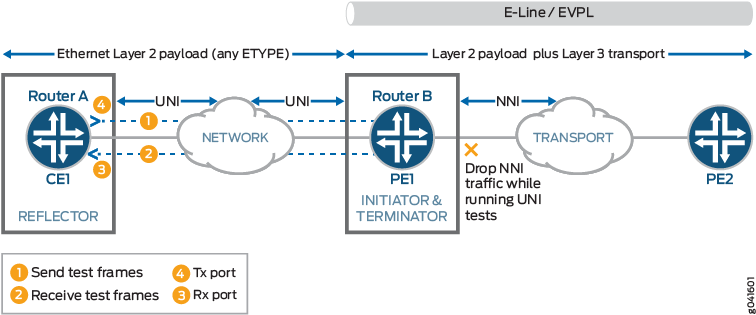 のUNI方向に関するRFC 2544ベースのベンチマークテスト
構成
この例では、相互接続されたルーターのパフォーマンスを検出および分析するために、2つのルーター間で有効化されているイーサネット疑似配線サービスのUNI方向のベンチマークテストを設定します。
CLIクイック構成
この例をすばやく設定するには、次のコマンドをコピーしてテキスト ファイルに貼り付け、改行を削除して、ネットワーク構成に合わせて必要な詳細を変更し、コマンドを [edit] 階層レベルの CLI にコピー アンド ペーストしてください。
ルーターB(イニシエーターとターミネーター)でのベンチマークテストパラメータの設定
set interfaces ge-0/0/0 vlan-tagging
set interfaces ge-0/0/0 unit 0 vlan-id 101
set interfaces ge-0/0/0 unit 0 family inet address 192.0.2.1/24
set services rpm rfc2544-benchmarking profiles test-profile throughput test-type throughput
set services rpm rfc2544-benchmarking profiles test-profile throughput packet-size 64
set services rpm rfc2544-benchmarking profiles test-profile throughput test-duration 20m
set services rpm rfc2544-benchmarking profiles test-profile throughput bandwidth-kbps 500
set services rpm rfc2544-benchmarking tests test-name test1 interface ge-0/0/0.0
set services rpm rfc2544-benchmarking tests test-name test1 test-profile throughput
set services rpm rfc2544-benchmarking tests test-name test1 mode initiate-and-terminate
set services rpm rfc2544-benchmarking tests test-name test1 family inet
set services rpm rfc2544-benchmarking tests test-name test1 dest-address 192.0.2.2
set services rpm rfc2544-benchmarking tests test-name test1 udp-port 4001
ルーターA(リフレクタ)のベンチマークテストパラメータの設定
set interfaces ge-0/0/4 vlan-tagging
set interfaces ge-0/0/4 unit 0 encapsulation vlan-ccc
set interfaces ge-0/0/4 unit 0 vlan-id 101
set services rpm rfc2544-benchmarking tests test-name test1 interface ge-0/0/4.0
set services rpm rfc2544-benchmarking tests test-name test1 mode reflect
set services rpm rfc2544-benchmarking tests test-name test1 mode family ccc
set services rpm rfc2544-benchmarking tests test-name test1 direction uni
ルーターB(イニシエーターとターミネーター)でのベンチマークテストパラメータの設定
手順
以下では、設定階層のいくつかのレベルに移動する必要があります。CLIのナビゲーションについては、「 1 コンフィグレーション・モードでのCLIエディタの使用」を参照してください。
ルーターBでテストパラメータを設定するには:
設定モードで、
[edit interfaces]階層レベルに移動します。[edit] user@host# edit interfaces
テストを実行するインターフェイスを設定します。
[edit interfaces]
user@host# edit ge-0/0/0
802.1Q VLAN タグ付きフレームの送受信のための VLAN タグ付けを設定します。
[edit interfaces ge-0/0/0]
 user@host# set vlan-tagging
論理ユニットを設定し、プロトコルファミリーを
inetに指定します。[edit interfaces ge-0/0/0] user@host# edit unit 0 family inet
論理インターフェイスのアドレスを指定します。
[edit interfaces ge-0/0/0 unit 0 family inet]
user@host# set address 192.0.2.1/24
論理インターフェイスの VLAN ID を 101 として設定します。
[edit interfaces ge-0/0/0 unit 0]
user@host# set vlan-id 101
設定コマンド モードの最上位レベルに移動します。
[edit interfaces ge-0/0/0 unit 0]
user@host# top
設定モードで、
[edit services]階層レベルに移動します。[edit] user@host# edit services
リアルタイム パフォーマンス監視サービス (RPM) インスタンスを構成します。
[edit services]
user@host# edit rpm
RPM インスタンスの RFC 2544 ベースのベンチマークテストを設定します。
[edit services rpm]
user@host# edit rfc2544-benchmarking
テストプロファイルの名前を定義します(例:スループット)。
[edit services rpm rfc2544-benchmarking]
user@host# edit profiles test-profile throughput
実行するテストのタイプをスループットとして構成します。
[edit services rpm rfc2544-benchmarking profiles test-profile throughput]
user@host# set test-type throughput
テストパケットのサイズを64バイトに指定します。
[edit services rpm rfc2544-benchmarking profiles test-profile throughput]
user@host# set test-type packet-size 64
テストを実行する期間を時間、分、または秒単位で指定するには、数字の後に文字 h(時間)、m(分)、または s(秒)を指定します。この例では、期間を 20 分に設定します。
[edit services rpm rfc2544-benchmarking profiles test-profile throughput]
user@host# set test-type test-duration 20m
テストの理論上の最大帯域幅を 1 Kbps から 1,000,000 Kbps までの値で、1 秒あたりのキロビット単位で定義します。
[edit services rpm rfc2544-benchmarking profiles test-profile throughput]
user@host# set test-type bandwidth-kbps 500
upコマンドを入力して、設定階層の前のレベルに移動します。[edit services rpm rfc2544-benchmarking profiles test-profile throughput] user@host# up
upコマンドを入力して、設定階層の前のレベルに移動します。[edit services rpm rfc2544-benchmarking profiles] user@host# up
テストの名前を定義します (例: test1)。テスト名識別子の長さは最大 32 文字です。
[edit services rpm rfc2544-benchmarking]
user@host# edit tests test-name test1
特定のテスト名に関連付けるテストプロファイルの名前(スループットなど)を指定します。
[edit services rpm rfc2544-benchmarking tests test-name test1]
user@host# set test-profile throughput
RFC 2544ベースのベンチマークテストを実行する論理インターフェイスge-0/0/0.0を指定します。
[edit services rpm rfc2544-benchmarking tests test-name test1]
user@host# set test-interface ge-0/0/0.0
ベンチマークテスト中に送信されるパケットのテストモードを
initiate-and-terminateに指定します。[edit services rpm rfc2544-benchmarking tests test-name test1] user@host# set mode initiate-and-terminate
ベンチマークテスト用のアドレスタイプファミリー
inetを設定します。[edit services rpm rfc2544-benchmarking tests test-name test1] user@host# set family inet
テスト パケットの宛先 IPv4 アドレスを 192.0.2.2 として設定します。
[edit services rpm rfc2544-benchmarking tests test-name test1]
user@host# set dest-address 192.0.2.2
生成されたフレームの UDP ヘッダーで使用される宛先の UDP ポートを 4001 に指定します。
[edit services rpm rfc2544-benchmarking tests test-name test1]
user@host# set udp-port 4001
設定の確認とコミット
設定モードで、 show コマンドを入力して、ルーター B の設定を確認します。出力結果に意図した設定内容が表示されない場合は、この例の設定手順を繰り返して設定を修正します。
ルーターBのベンチマークテストパラメータ:
[edit]
user@host# show
[edit interfaces]
  ge-0/0/0 {
      vlan-tagging;
      unit 0 {
          vlan-id 101;
          family inet {
              address 192.0.2.1/24;
          }
      }
  }

  [edit services rpm]
  rfc2544-benchmarking {
      profiles {
          test-profile throughput {
              test-type throughput
              packet-size 64;
              test-duration 20m;
              bandwidth-kbps 500;
          }
      }

      tests {
          test-name test1 {
              interface ge-0/0/0.0;
              test-profile throughput;
              mode initiate-and-terminate;
              family inet;
              dest-address 192.0.2.2
              udp-port 4001;
          }
      }
  }
設定が正しい場合は、設定をコミットします。
[edit]
user@host# commit
ルーターA(リフレクタ)のベンチマークテストパラメータの設定
手順
以下では、設定階層のいくつかのレベルに移動する必要があります。CLIのナビゲーションについては、「 1 コンフィグレーション・モードでのCLIエディタの使用」を参照してください。
ルーターAでテストパラメータを設定するには、次のようにします。
設定モードで、
[edit interfaces]階層レベルに移動します。[edit] user@host# edit interfaces
テストを実行するインターフェイスを設定します。
[edit interfaces]
user@host# edit ge-0/0/4
802.1Q VLAN タグ付きフレームの送受信のための VLAN タグ付けを設定します。
[edit interfaces ge-0/0/4]
 user@host# set vlan-tagging
インターフェイスの論理ユニットを設定します。
[edit interfaces ge-0/0/4]
 user@host# edit unit 0
イーサネットVLAN回線のカプセル化を指定します。
[edit interfaces ge-0/0/4 unit 0]
 user@host# set encapsulation vlan-ccc
論理インターフェイスで VLAN ID を 101 として設定します。
[edit interfaces ge-0/0/4 unit 0]
user@host# set vlan-id 101
設定コマンド モードの最上位レベルに移動します。
[edit interfaces ge-0/0/4 unit 0]
user@host# top
設定モードで、
[edit services]階層レベルに移動します。[edit] user@host# edit services
リアルタイム パフォーマンス監視サービス (RPM) インスタンスを構成します。
[edit services]
user@host# edit rpm
RPM インスタンスの RFC 2544 ベースのベンチマークテストを設定します。
[edit services rpm]
user@host# edit rfc2544-benchmarking
テストの名前を定義します (例: test1)。テスト名識別子の長さは最大 32 文字です。
[edit services rpm rfc2544-benchmarking]
user@host# edit tests test-name test1
RFC 2544ベースのベンチマーキングテストを実行する論理インターフェイスを指定します。
[edit services rpm rfc2544-benchmarking tests test-name test1]
user@host# set test-interface ge-0/0/4.0
ベンチマークテスト中に送信されるパケットのテストモードとして
reflectを指定します。[edit services rpm rfc2544-benchmarking tests test-name test1] user@host# set mode reflect
ベンチマークテスト用のアドレスタイプファミリー
cccを設定します。[edit services rpm rfc2544-benchmarking tests test-name test1] user@host# set family ccc
テストを実行するインターフェイスの方向(この例では UNI)を指定します。
[edit services rpm rfc2544-benchmarking tests test-name test1]
user@host# set direction uni
設定の確認とコミット
設定モードで、 show コマンドを入力してルーター A の設定を確認します。出力結果に意図した設定内容が表示されない場合は、この例の設定手順を繰り返して設定を修正します。
ルーターAのベンチマークテストパラメータ:
[edit]
user@host# show
[edit interfaces]
  ge-0/0/4 {
      vlan-tagging;
      unit 0 {
          encapsulation vlan-ccc;
          vlan-id 101;
      }
  }

  [edit services rpm]
  rfc2544-benchmarking {
      # Note, When in reflector mode, test profile is not needed
      tests {
          test-name test1 {
              interface ge-0/0/4.0;
              mode reflect;
              family ccc;
              direction uni;
          }
      }
  }
設定が正しい場合は、設定をコミットします。
[edit]
user@host# commit
ベンチマーキングテストの実行
-
リフレクタ(ルーター A)でベンチマーク テストを開始します。
user@host> test services rpm rfc2544-benchmarking test test1 start
テストが正常に完了すると、テストはイニシエーター(ルーター B)で自動的に停止します。イニシエータでテストが正常に完了したら、リフレクタ(ルータ A)でテストを停止します。
user@host> test services rpm rfc2544-benchmarking test test1 stop
ベンチマーキングテスト結果の検証
ルーターAとルーターBの間で設定されたサービスに対して実行されるベンチマークテストの結果を調べます。
目的
ルーターAとルーターBの間に設定されたサービスで実行されるベンチマークテストに必要な統計値が表示されていることを確認します。
アクション
動作モードで show services rpm rfc2544-benchmarking (aborted-tests | active-tests | completed-tests | summary) コマンドを入力すると、RPM(リアルタイム パフォーマンス監視)インスタンスごとに、終了したテスト、アクティブ テスト、完了したテストなど、RFC 2544 ベースのベンチマーク テストの各カテゴリまたは状態に関する情報が表示されます。
意味
出力には、実行したベンチマーキングテストの詳細が表示されます。show services rpm rfc2544-benchmarking操作コマンドの詳細については、CLIエクスプローラーのshow services rpm rfc2544-benchmarkingを参照してください。