
例:ブリッジドメインのレイヤー2 E-LANサービス用のMX104ルーター上のRFC2544ベースのベンチマークテストの設定
この例では、ブリッジ ドメイン内のレイヤー 2 E-LAN サービスのベンチマーキング テストを設定する方法を示します。この例では、スループット、フレーム損失、バックツーバック、遅延の4つの基本的なテストについて説明します。
要件
MXシリーズルーターは、RFC2544ベースのベンチマークテストではリフレクター機能のみをサポートします。この例では、MX104 3Dユニバーサルエッジルーターをリフレクタとして使用します。MX80シリーズルーターと、Junos OSリリース16.1以降のMPC1、MPC2、および16ポート10ギガビットイーサネットMPCを搭載したMX240、MX480、およびMX960シリーズルーターでベンチマークテストを設定することもできます。MX240、MX480、MX960シリーズルーターでRFC2544ベースのベンチマークテストを設定するには、 MXシリーズルーターでのRFC 2544ベースのベンチマークテストのサポートの有効化を参照してください。
この例では、以下のハードウェアおよびソフトウェアコンポーネントを使用しています。
-
MX104(リフレクタ)
-
ACXシリーズルーター(イニシエーター)
-
MXシリーズルーターのJunos OSリリース14.2以降
概要
ACXシリーズルーターがRFC2544ベースのベンチマークテストのテストフレームのイニシエーターおよびターミネーターとして機能するサンプルトポロジーを考えてみましょう。ACXシリーズルーターは、片側でカスタマーエッジデバイスCE1に接続され、レイヤー2ネットワークを介してMX104シリーズルーターに接続されています。MX104シリーズルーターは、ACXシリーズイニシエーターから受信したテストフレームをイニシエーターに反映するリフレクターとして機能します。MX04シリーズルーターは、カスタマーエッジデバイスCE2にも接続されています。
インターフェイスでレイヤー2リフレクションが有効になっている場合、テストインターフェイスを介したテストトラフィックを除くイングレストラフィックとエグレストラフィックをブロックするようにフィルターが内部設定されます。
図1は、レイヤー2ブリッジネットワーク上のUNI方向の4つのRFC2544ベースのベンチマークテスト(スループット、バックツーバックフレーム、遅延、フレーム損失)すべてを実行するためのサンプルトポロジーを示しています。
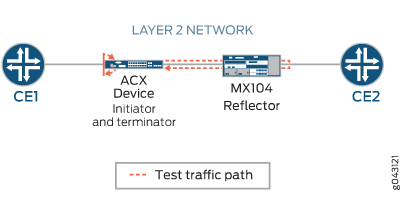
ACXシリーズルーターでは、ge-1/2/1.0はレイヤー2 NNIインターフェイスで、ge-1/1/3.0はレイヤー2 UNIインターフェイスです。MX104シリーズルーターでは、ge-1/1/6.0はレイヤー2 NNIインターフェイスで、ge-1/1/5.0はレイヤー2 UNIインターフェイスです。ベンチマークテストは、ブリッジドメイン上のE-LANサービスのパフォーマンス属性を計算するために使用されます。
テストパケットは、宛先MACアドレス、送信元MACアドレス、およびテストインターフェイスを使用して識別できます。タグ付きインターフェイスとタグなしインターフェイスの両方がサポートされています。タグ付きインターフェイスの場合、テスト インターフェイスは VLAN サブインターフェイスです。タグなしインターフェイスの場合、物理ポートはテスト インターフェイスを表します。同じ物理ポート内に存在する他のVLANサブインターフェイスを介したトラフィックは、サブインターフェイスの1つでベンチマークテストを設定しても影響を受けません。
設定
この例では、相互接続されたルーターのパフォーマンスを検出して分析するために、2 つのルーター間で有効になっているレイヤー 2 ブリッジ ドメイン上の E-LAN サービスの UNI 方向のベンチマーキング テストを設定します。この例では、まず ACXシリーズ ルーターを設定します。ACXシリーズルーターでは、まずテストプロファイル、テスト属性を指定して各テストを設定し、次に関連する属性を持つテストプロファイルにテストを関連付けてテストを定義します。その後、インターフェイスを設定できます。MX104シリーズルーターでも、同じ手順を実行します。ただし、外部VLAN ID、送信元UDPポート、宛先UDPポート、各反復の期間、およびそれらの値などのいくつかの属性は、イニシエーターまたはACXシリーズルーターにのみ適用されます。
レイヤー 2 リフレクションを構成するときに、ブリッジ カプセル化を使用して ELINE サービスをシミュレートする場合は、テスト対象のサービス タイプを ELINE として指定できます。
- CLIクイックコンフィグレーション
- ACXシリーズルーターでのスループットベンチマークテストパラメーターの設定
- バックツーバックフレームの設定 ACXシリーズルーターでのベンチマークテストパラメーター
- ACXシリーズルーターでレイテンシベンチマークテストパラメーターを設定する
- ACXシリーズルーターでのフレーム損失ベンチマーキングテストパラメーターの設定
- ACXシリーズルーターでその他のベンチマークテストパラメーターを設定する
- MX104ルーターでのベンチマーキングテストパラメーターの設定
- MX104ルーターでその他のベンチマークテストパラメーターを設定する
- 結果
CLIクイックコンフィグレーション
この例をすばやく設定するには、以下のコマンドをコピーしてテキスト ファイルに貼り付け、改行を削除し、ネットワーク構成に合わせて必要な詳細を変更し、[edit] 階層レベルのCLIにコマンドをコピー&ペーストします。
ACXシリーズルーターでのベンチマークテストパラメーターの設定
set services rpm rfc2544-benchmarking profiles test-profile tput test-type throughput
set services rpm rfc2544-benchmarking profiles test-profile tput packet-size 128
set services rpm rfc2544-benchmarking profiles test-profile tput bandwidth-kbps 900000
set services rpm rfc2544-benchmarking profiles test-profile b2bt test-type back-back-frames
set services rpm rfc2544-benchmarking profiles test-profile b2bt packet-size 512
set services rpm rfc2544-benchmarking profiles test-profile b2bt bandwidth-kbps 950000
set services rpm rfc2544-benchmarking profiles test-profile lty test-type latency
set services rpm rfc2544-benchmarking profiles test-profile lty packet-size 512
set services rpm rfc2544-benchmarking profiles test-profile lty bandwidth-kbps 1000000
set services rpm rfc2544-benchmarking profiles test-profile frloss test-type frame-loss
set services rpm rfc2544-benchmarking profiles test-profile frloss packet-size 1600
set services rpm rfc2544-benchmarking profiles test-profile frloss bandwidth-kbps 1000000
set services rpm rfc2544-benchmarking tests test-name tput-test test-profile tput
set services rpm rfc2544-benchmarking tests test-name tput-test source-mac-address 00:00:5e:00:53:11
set services rpm rfc2544-benchmarking tests test-name tput-test destination-mac-address 00:00:5e:00:53:22
set services rpm rfc2544-benchmarking tests test-name tput-test ovlan-id 400
set services rpm rfc2544-benchmarking tests test-name tput-test service-type elan
set services rpm rfc2544-benchmarking tests test-name tput-test mode initiate-and-terminate
set services rpm rfc2544-benchmarking tests test-name tput-test family bridge
set services rpm rfc2544-benchmarking tests test-name tput-test direction egress
set services rpm rfc2544-benchmarking tests test-name tput-test source-udp-port 200
set services rpm rfc2544-benchmarking tests test-name tput-test destination-udp-port 200
set services rpm rfc2544-benchmarking tests test-name tput-test test-iterator-duration 20
set services rpm rfc2544-benchmarking tests test-name tput-test test-interface ge-1/1/3.0
set services rpm rfc2544-benchmarking tests test-name b2b-test test-profile b2bt
set services rpm rfc2544-benchmarking tests test-name b2b-test source-mac-address 00:00:5e:00:53:11
set services rpm rfc2544-benchmarking tests test-name b2b-test destination-mac-address 00:00:5e:00:53:22
set services rpm rfc2544-benchmarking tests test-name b2b-test ovlan-id 400
set services rpm rfc2544-benchmarking tests test-name b2b-test service-type elan
set services rpm rfc2544-benchmarking tests test-name b2b-test mode initiate-and-terminate
set services rpm rfc2544-benchmarking tests test-name b2b-test family bridge
set services rpm rfc2544-benchmarking tests test-name b2b-test direction egress
set services rpm rfc2544-benchmarking tests test-name b2b-test test-iterator-duration 20
set services rpm rfc2544-benchmarking tests test-name b2b-test test-interface ge-1/1/3.0
set services rpm rfc2544-benchmarking tests test-name lty-test test-profile lty
set services rpm rfc2544-benchmarking tests test-name lty-test source-mac-address 00:00:5e:00:53:11
set services rpm rfc2544-benchmarking tests test-name lty-test destination-mac-address 00:00:5e:00:53:22
set services rpm rfc2544-benchmarking tests test-name lty-test ovlan-id 400
set services rpm rfc2544-benchmarking tests test-name lty-test service-type elan
set services rpm rfc2544-benchmarking tests test-name lty-test mode initiate-and-terminate
set services rpm rfc2544-benchmarking tests test-name lty-test family bridge
set services rpm rfc2544-benchmarking tests test-name lty-test direction egress
set services rpm rfc2544-benchmarking tests test-name lty-test source-udp-port 200
set services rpm rfc2544-benchmarking tests test-name lty-test destination-udp-port 200
set services rpm rfc2544-benchmarking tests test-name lty-test test-iterator-duration 20
set services rpm rfc2544-benchmarking tests test-name lty-test test-interface ge-1/1/3.0
set services rpm rfc2544-benchmarking tests test-name frloss-test test-profile frloss
set services rpm rfc2544-benchmarking tests test-name frloss-test source-mac-address 00:00:5e:00:53:11
set services rpm rfc2544-benchmarking tests test-name frloss-test destination-mac-address 00:00:5e:00:53:22
set services rpm rfc2544-benchmarking tests test-name frloss-test ovlan-id 400
set services rpm rfc2544-benchmarking tests test-name frloss-test service-type elan
set services rpm rfc2544-benchmarking tests test-name frloss-test mode initiate-and-terminate
set services rpm rfc2544-benchmarking tests test-name frloss-test family bridge
set services rpm rfc2544-benchmarking tests test-name frloss-test direction egress
set services rpm rfc2544-benchmarking tests test-name frloss-test source-udp-port 200
set services rpm rfc2544-benchmarking tests test-name frloss-test destination-udp-port 200
set services rpm rfc2544-benchmarking tests test-name frloss-test test-iterator-duration 20
set services rpm rfc2544-benchmarking tests test-name frloss-test test-interface ge-1/1/3.0
set interfaces ge-1/2/1 flexible-vlan-tagging
set interfaces ge-1/2/1 mtu 9192
set interfaces ge-1/2/1 encapsulation flexible-ethernet-services
set interfaces ge-1/2/1 unit 0 encapsulation vlan-bridge
set interfaces ge-1/2/1 unit 0 vlan-id 400
set interfaces ge-1/1/3 flexible-vlan-tagging
set interfaces ge-1/1/3 mtu 9192
set interfaces ge-1/1/3 encapsulation flexible-ethernet-services
set interfaces ge-1/1/3 unit 0 encapsulation vlan-bridge
set interfaces ge-1/1/3 unit 0 vlan-id 400
set bridge-domains bd1 vlan-id 600
set bridge-domains bd1 interface ge-1/2/1.0
set bridge-domains bd1 interface ge-1/1/3.0
MX104ルーターでのベンチマーキングテストパラメーターの設定
set services rpm rfc2544-benchmarking tests test-name l2b-reflector source-mac-address 00:00:5e:00:53:11
set services rpm rfc2544-benchmarking tests test-name l2b-reflector destination-mac-address 00:00:5e:00:53:22
set services rpm rfc2544-benchmarking tests test-name l2b-reflector service-type elan
set services rpm rfc2544-benchmarking tests test-name l2b-reflector mode reflect
set services rpm rfc2544-benchmarking tests test-name l2b-reflector family bridge
set services rpm rfc2544-benchmarking tests test-name l2b-reflector direction egress
set services rpm rfc2544-benchmarking tests test-name l2b-reflector test-interface ge-1/1/5.0
set interfaces ge-1/1/6 flexible-vlan-tagging
set interfaces ge-1/1/6 mtu 9192
set interfaces ge-1/1/6 encapsulation flexible-ethernet-services
set interfaces ge-1/1/6 unit 0 encapsulation vlan-bridge
set interfaces ge-1/1/6 unit 0 vlan-id 400
set interfaces ge-1/1/5 flexible-vlan-tagging
set interfaces ge-1/1/5 mtu 9192
set interfaces ge-1/1/5 encapsulation flexible-ethernet-services
set interfaces ge-1/1/5 unit 0 encapsulation vlan-bridge
set interfaces ge-1/1/5 unit 0 vlan-id 400
set bridge-domains bd1 domain-type bridge
set bridge-domains bd1 vlan-id 500
set bridge-domains bd1 interface ge-1/1/6.0
set bridge-domains bd1 interface ge-1/1/5.0
ACXシリーズルーターでのスループットベンチマークテストパラメーターの設定
ステップバイステップの手順
以下の設定では、スループットテスト用のテストプロファイルを設定し、一意のテスト名でテストプロファイルを参照する必要があります。test-nameは、ACXシリーズルーターで実行するスループットテストのパラメーターを定義します。
ACXシリーズルーターでスループットテストパラメーターを設定するには:
-
設定モードで、[
edit]階層レベルで、リアルタイムパフォーマンス監視サービス(RPM)インスタンスとRPMインスタンスのRFC2544ベースのベンチマークテストを設定します。[edit] user@host# edit services rpm rfc2544-benchmarking
-
最初のテストプロファイルの名前を定義します(例:スループットテストプロファイルの
tput)。[edit services rpm rfc2544-benchmarking] user@host# set profiles test-profile tput
-
実行するテストのタイプをスループットとして設定し、パケットサイズを128バイトに指定し、テストの理論上の最大帯域幅をキロビット/秒(Kbps)で定義し、1Kbpsから1,000,000Kbpsの値で定義します。
[edit services rpm rfc2544-benchmarking profiles test-profile tput]
user@host# set test-type throughput packet-size 128 bandwidth-kbps 900000
-
upコマンドを2回入力して、設定階層の[edit services rpm rfc2544-benchmarking]レベルに移動します。[edit services rpm rfc2544-benchmarking profiles test-profile tput ] user@host# up user@host# up
-
スループットテストの名前を定義します(例:
tput-test)。テスト名の長さは最大32文字です。[edit services rpm rfc2544-benchmarking ] user@host# set tests test-name tput-test
-
テスト名に関連付けられるテストプロファイルの名前(
tput)を指定します。[edit services rpm rfc2544-benchmarking tests test-name tput-test] user@host# set test-profile tput
-
テストパケットの送信元と宛先のMACアドレスを設定します。
[edit services rpm rfc2544-benchmarking tests test-name tput-test]
user@host# set source-mac-address 00:00:5e:00:53:11 destination-mac-address 00:00:5e:00:53:22
-
テストフレームの外部VLAN IDを設定し、テスト対象のサービスタイプをE-LANに指定します。
[edit services rpm rfc2544-benchmarking tests test-name tput-test]
user@host# set ovlan-id 400 service-type elan
-
ベンチマーキングテスト中に送信されるパケットのテストモードを開始と終了として指定します。
[edit services rpm rfc2544-benchmarking tests test-name tput-test]
user@host# set mode initiate-and-terminate
-
ベンチマーキングテスト用にファミリータイプ(
bridge)を設定し、方向(egress)を指定します。また、テストパケットのUDPヘッダーで使用する送信元と宛先のUDPポートを指定します。[edit services rpm rfc2544-benchmarking tests test-name tput-test] user@host# set family bridge direction egress source-udp-port 200 destination-udp-port 200
-
各反復の時間を10秒から1,728,000秒の値で秒単位で指定し、RFC2544ベンチマークテストが実行される論理インターフェイスge-0/2/1.0を指定します。
[edit services rpm rfc2544-benchmarking tests test-name tput-test]
user@host# set test-iterator-duration 20 test-interface ge-1/1/3.0
バックツーバックフレームの設定 ACXシリーズルーターでのベンチマークテストパラメーター
ステップバイステップの手順
以下の設定では、バックツーバックフレームテスト用のテストプロファイルを設定し、一意のテスト名でテストプロファイルを参照する必要があります。test-nameは、ACXシリーズルーターで実行するバックツーバックフレームテストのパラメーターを定義します。
ACXシリーズルーターでバックツーバックフレームテストパラメーターを設定するには:
-
設定モードで、[
edit]階層レベルで、リアルタイムパフォーマンス監視サービス(RPM)インスタンスとRPMインスタンスのRFC2544ベースのベンチマークテストを設定します。[edit] user@host# edit services rpm rfc2544-benchmarking
-
バックツーバックテストプロファイルの名前を定義します(例:
b2bt)。[edit services rpm rfc2544-benchmarking] user@host# set profiles test-profile b2bt
-
バックツーバックフレームとして実行するテストのタイプを設定し、パケットサイズを128バイトに指定し、テストの理論上の最大帯域幅を1Kbpsから1,000,000Kbpsの値でキロビット/秒で定義します。
[edit services rpm rfc2544-benchmarking profiles test-profile b2bt]
user@host# set test-type back-toback-frames packet-size 4444 bandwidth-kbps 950000
-
upコマンドを2回入力して、設定階層の[edit services rpm rfc2544-benchmarking]レベルに移動します。[edit services rpm rfc2544-benchmarking profiles test-profile b2bt ] user@host# up user@host# up
-
バックツーバックフレームテストの名前を定義します(例:
b2bt-test)。テスト名の長さは最大32文字です。[edit services rpm rfc2544-benchmarking ] user@host# set tests test-name b2bt-test
-
テスト名に関連付けられるテストプロファイルの名前(
b2bt)を指定します。[edit services rpm rfc2544-benchmarking tests test-name b2bt-test] user@host# set test-profile b2bt
-
テストパケットの送信元と宛先のMACアドレスを設定します。
[edit services rpm rfc2544-benchmarking tests test-name b2bt-test]
user@host# set source-mac-address 00:00:5e:00:53:11 destination-mac-address 00:00:5e:00:53:22
-
テストフレームの外部VLAN IDを設定し、テスト対象のサービスタイプを指定します。
[edit services rpm rfc2544-benchmarking tests test-name b2bt-test]
user@host# set ovlan-id 400 service-type elan
-
ベンチマーキングテスト中に送信されるパケットのテストモードを開始と終了として指定します。
[edit services rpm rfc2544-benchmarking tests test-name b2bt-test]
user@host# set mode initiate-and-terminate
-
ベンチマーキングテスト用にファミリータイプ(
bridge)を設定し、方向(egress)を指定します。[edit services rpm rfc2544-benchmarking tests test-name b2bt-test] user@host# set family bridge direction egress
-
各反復の期間を秒単位で指定し、10秒から1,728,000秒までの値で指定します。また、RFC2544ベースのベンチマーキングテストが実行される論理インターフェイスge-0/2/1.0を指定します。
[edit services rpm rfc2544-benchmarking tests test-name b2bt-test]
user@host# set test-iterator-duration 20 test-interface ge-1/1/3.0
ACXシリーズルーターでレイテンシベンチマークテストパラメーターを設定する
ステップバイステップの手順
以下の設定では、遅延テスト用のテストプロファイルを設定し、一意のテスト名でテストプロファイルを参照する必要があります。test-nameは、ACXシリーズルーターで実行する遅延テストのパラメーターを定義します。
ACXシリーズルーターで遅延テストパラメーターを設定するには:
-
設定モードで、[
edit]階層レベルで、リアルタイムパフォーマンス監視サービス(RPM)インスタンスとRPMインスタンスのRFC2544ベースのベンチマークテストを設定します。[edit] user@host# edit services rpm rfc2544-benchmarking
-
遅延テストプロファイルの名前を定義します(例:
lty)。[edit services rpm rfc2544-benchmarking] user@host# set profiles test-profile lty
-
遅延として実行するテストのタイプを設定し、テストパケットのパケットサイズを指定し、テストの最大帯域幅を1Kbpsから1,000,000Kbpsの値でキロビット/秒で定義します。
[edit services rpm rfc2544-benchmarking profiles]
user@host# set test-profile lty test-type latency packet-size 512 bandwidth-kbps 1000000
-
upコマンドを2回入力して、設定階層の前のレベルに移動します。[edit services rpm rfc2544-benchmarking profiles test-profile lty] user@host# up user@host# up
-
遅延テストの名前を定義します(例:
lty-test)。テスト名の長さは最大32文字です。[edit services rpm rfc2544-benchmarking ] user@host# set tests test-name lty-test
-
テスト名に関連付けられるテストプロファイルの名前(
lty)を指定します。[edit services rpm rfc2544-benchmarking tests test-name lty-test] user@host# set test-profile lty
-
テストパケットの送信元と宛先のMACアドレスを設定します。
[edit services rpm rfc2544-benchmarking tests test-name lty-test]
user@host# set source-mac-address 00:00:5e:00:53:11 destination-mac-address 00:00:5e:00:53:22
-
テストフレームの外部VLAN IDを設定し、テスト対象のサービスタイプを指定します。
[edit services rpm rfc2544-benchmarking tests test-name lty-test]
user@host# set ovlan-id 400 service-type elan
-
ベンチマーキングテスト中に送信されるパケットのテストモードを開始と終了として指定します。
[edit services rpm rfc2544-benchmarking tests test-name lty-test]
user@host# set mode initiate-and-terminate
-
ベンチマーキングテスト用にファミリータイプ(
bridge)を設定し、方向(egress)を指定します。また、テストパケットのUDPヘッダーで使用する送信元と宛先のUDPポートを指定します。[edit services rpm rfc2544-benchmarking tests test-name lty-test] user@host# set family bridge direction egress source-udp-port 200 destination-udp-port 200
-
各反復の期間を秒単位で指定し、10秒から1,728,000秒までの値で指定します。また、RFC2544ベースのベンチマーキングテストが実行される論理インターフェイスge-0/2/1.0を指定します。
[edit services rpm rfc2544-benchmarking tests test-name lty-test]
user@host# set test-iterator-duration 20 test-interface ge-1/1/3.0
ACXシリーズルーターでのフレーム損失ベンチマーキングテストパラメーターの設定
ステップバイステップの手順
以下の設定では、フレーム損失テスト用のテストプロファイルを設定し、固有のテスト名でテストプロファイルを参照する必要があります。test-nameは、ACXシリーズルーターで実行するフレーム損失テストのパラメーターを定義します。
ACXシリーズルーターでフレーム損失テストパラメーターを設定するには:
-
設定モードで、[
edit]階層レベルで、リアルタイムパフォーマンス監視サービス(RPM)インスタンスとRPMインスタンスのRFC2544ベースのベンチマークテストを設定します。[edit] user@host# edit services rpm rfc2544-benchmarking
-
フレーム損失テストプロファイルの名前を定義します(例:
frloss)。[edit services rpm rfc2544-benchmarking] user@host# set profiles test-profile frloss
-
フレーム損失として実行するテストのタイプを設定し、テストパケットのパケットサイズを指定し、テストの最大帯域幅を1Kbpsから1,000,000Kbpsの値でキロビット/秒で定義します。
[edit services rpm rfc2544-benchmarking profiles]
user@host# set test-profile frloss test-type frame-loss packet-size 1600 bandwidth-kbps 1000000
-
upコマンドを入力して、設定階層の前のレベルに移動します。[edit services rpm rfc2544-benchmarking profiles ] user@host# up
-
フレーム損失テストの名前を定義します(例:
frloss-test)。テスト名の長さは最大32文字です。[edit services rpm rfc2544-benchmarking ] user@host# set tests test-name frloss-test
-
テスト名に関連付けられるテストプロファイルの名前(
frloss)を指定します。[edit services rpm rfc2544-benchmarking tests test-name frloss-test] user@host# set test-profile frloss
-
テストパケットの送信元と宛先のMACアドレスを設定します。
[edit services rpm rfc2544-benchmarking tests test-name frloss-test]
user@host# set source-mac-address 00:00:5e:00:53:11 destination-mac-address 00:00:5e:00:53:22
-
テストフレームの外部VLAN IDを設定し、テスト対象のサービスタイプを指定します。
[edit services rpm rfc2544-benchmarking tests test-name frloss-test]
user@host# set ovlan-id 400 service-type elan
-
ベンチマーキングテスト中に送信されるパケットのテストモードを開始と終了として指定します。
[edit services rpm rfc2544-benchmarking tests test-name frloss-test]
user@host# set mode initiate-and-terminate
-
ベンチマーキングテスト用にファミリータイプ(
bridge)を設定し、方向(egress)を指定します。また、テストパケットのUDPヘッダーで使用する送信元と宛先のUDPポートを指定します。[edit services rpm rfc2544-benchmarking tests test-name frloss-test] user@host# set family bridge direction egress source-udp-port 200 destination-udp-port 200
-
各反復の期間を秒単位で指定し、10秒から1,728,000秒までの値で指定します。また、RFC2544ベースのベンチマーキングテストが実行される論理インターフェイスge-0/2/1.0を指定します。
[edit services rpm rfc2544-benchmarking tests test-name frloss-test]
user@host# set test-iterator-duration 20 test-interface ge-1/1/3.0
-
exitコマンドを入力して、[edit]階層レベルに移動します。[edit services rpm rfc2544-benchmarking tests test-name test4 ] user@host# exit
ACXシリーズルーターでその他のベンチマークテストパラメーターを設定する
ステップバイステップの手順
次の例では、設定階層のさまざまなレベルに移動する必要があります。CLIのナビゲーションについては、 設定モードでのCLIエディターの使用を参照してください。
ACXシリーズルーターでインターフェイスとブリッジドメインを設定するには:
-
テストを実行する必要があるレイヤー2 NNIインターフェイスを[
edit]階層レベルから構成します。[edit] user@host# edit interfaces ge-1/2/1
-
論理インターフェイス上のタグなしフレームまたは802.1Qシングルタグおよびデュアルタグ付きフレームの送信用に、柔軟なVLANタグを設定します。また、インターフェイスとカプセル化の最大送信単位(MTU)サイズを指定することもできます。
[edit interfaces ge-1/2/1]
user@host# set flexible-vlan-tagging mtu 9192 encapsulation flexible-ethernet-services
-
インターフェイスの論理ユニットを設定し、カプセル化を指定し、論理インターフェイスのVLAN IDを設定します。
[edit interfaces ge-1/2/1]
user@host# set unit 0 encapsulation vlan-bridge vlan-id 400
-
レイヤー 2 UNI インターフェイスを設定します。
[edit]
user@host# edit interfaces ge-1/1/3
-
論理インターフェイス上のタグなしフレームまたは802.1Qシングルタグおよびデュアルタグフレームの送信用に、柔軟なVLANタグを設定します。また、インターフェイスとカプセル化の最大送信単位(MTU)サイズを指定することもできます。
[edit interfaces ge-1/1/3]
user@host# set flexible-vlan-tagging mtu 9192 encapsulation flexible-ethernet-services
-
インターフェイスの論理ユニットを設定し、カプセル化を指定し、論理インターフェイス上のVLAN IDを設定します。
[edit interfaces ge-1/1/3]
user@host# set unit 0 encapsulation vlan-bridge vlan-id 400
-
ブリッジドメインbd1を設定し、ブリッジドメインと関連するインターフェイスに関連付けられたVLAN IDを[
edit]階層レベルから指定します。[edit] user@host# set bridge-domains bd1 vlan-id 600 interface ge-1/2/1.0 user@host# set bridge-domains bd1 vlan-id 600 intreface ge-1/1/3.0
MX104ルーターでのベンチマーキングテストパラメーターの設定
ステップバイステップの手順
以下の設定では、MX104シリーズルーターでベンチマーキングテスト用に一意のテスト名を設定する必要があります。test-name は、実行するベンチマーキングテストのパラメーターを定義します。テストインターフェイスとテストMACアドレスが同じであるため、リフレクタ(MX104)で単一のテスト設定を作成できます。
MX104シリーズルーターでベンチマーキングテストパラメーターを設定するには:
-
設定モードで、[
edit]階層レベルで、リアルタイムパフォーマンス監視サービス(RPM)インスタンスとRPMインスタンスのRFC2544ベースのベンチマークテストを設定します。[edit] user@host# edit services rpm rfc2544-benchmarking
-
テストの名前を定義します(例:
l2b-reflector)。テスト名の長さは最大32文字です。[edit services rpm rfc2544-benchmarking ] user@host# set tests test-name l2b-reflector
-
テストパケットの送信元と宛先のMACアドレスを指定します。
[edit services rpm rfc2544-benchmarking test-name l2b-reflector]
user@host# set source-mac-address 00:00:5e:00:53:11 destination-mac-address 00:00:5e:00:53:22
-
リフレクタで、テスト対象のサービスタイプとモード(
reflect)を指定します。[edit services rpm rfc2544-benchmarking test-name l2b-reflector] user@host# set service-type elan
-
リフレクタに反映されるモードを指定します。
[edit services rpm rfc2544-benchmarking test-name l2b-reflector]
user@host# set mode reflect
-
ベンチマークテストのファミリタイプ
bridgeを設定し、方向egressを指定します。また、RFC2544ベースのベンチマーキングテストが実行されている論理インターフェイスge-1/1/5.0を指定します。[edit services rpm rfc2544-benchmarking tests test-name l2b-reflector] user@host# set family bridge direction egress test-interface ge-1/1/5.0
MX104ルーターでその他のベンチマークテストパラメーターを設定する
ステップバイステップの手順
次の例では、設定階層のさまざまなレベルに移動する必要があります。CLIのナビゲーションについては、 設定モードでのCLIエディターの使用を参照してください。
MX104シリーズルーターでインターフェイスとブリッジドメインを設定するには:
-
テストを実行するレイヤー2 NNIインターフェイスを設定します。
[edit]
user@host# edit interfaces ge-1/1/6
-
論理インターフェイス上のタグなしフレームまたは802.1Qシングルタグ付きおよびデュアルタグ付きフレームの送信用に、柔軟なVLANタグを設定します。また、インターフェイスとカプセル化の最大送信単位(MTU)サイズを指定することもできます。
[edit interfaces ge-1/1/6]
user@host# set flexible-vlan-tagging mtu 9192 encapsulation flexible-ethernet-services
-
インターフェイスの論理ユニットを設定し、カプセル化を指定し、論理インターフェイスのVLAN IDを設定します。
[edit interfaces ge-1/1/6]
user@host# set unit 0 encapsulation vlan-bridge vlan-id 400
-
レイヤー 2 NNI インターフェイスを設定します。
[edit]
user@host# edit interfaces ge-1/1/5
-
論理インターフェイス上のタグなしフレームまたは802.1Qシングルタグ付きおよびデュアルタグ付きフレームの送信用に、柔軟なVLANタグを設定します。また、インターフェイスとカプセル化の最大送信単位(MTU)サイズを指定することもできます。
[edit interfaces ge-1/1/5]
user@host# set flexible-vlan-tagging mtu 9192 encapsulation flexible-ethernet-services
-
インターフェイスの論理ユニットを設定し、カプセル化を指定し、論理インターフェイスのVLAN IDを設定します。
[edit interfaces ge-1/1/5]
user@host# set unit 0 encapsulation vlan-bridge vlan-id 400
-
ブリッジドメインbd1を設定し、ブリッジドメインに関連するVLAN IDと、[
edit]階層レベルから関連するインターフェイスを指定します。[edit] user@host# set bridge-domains bd1 vlan-id 500 interface ge-1/1/6.0 user@host# set bridge-domains bd1 vlan-id 500 interface ge-1/1/5.0
-
リフレクタでベンチマークテストを開始します。
user@host> test services rpm rfc2544-benchamrking test l2b-reflector start
イニシエーターでテストが正常に完了したら、
test services rpm rfc2544-benchmarking test l2b-reflector stopコマンドを入力してリフレクタでテストを停止できます。
結果
設定モードで、 show コマンドを入力して、ACXシリーズルーターとMX104シリーズルーターの設定を確認します。出力に意図した設定が表示されない場合は、この例の設定手順を繰り返して修正します。
ACXシリーズルーターのベンチマークテストパラメーター:
[edit interfaces]
  ge-1/2/1 {
      flexible-vlan-tagging;
      mtu 9192;
      encapsulation flexible-ethernet-services;
      unit 0 {
          encapsulation vlan-bridge;
          vlan-id 400;
      }
  }
  ge-1/1/3 {
      flexible-vlan-tagging;
      mtu 9192;
      encapsulation flexible-ethernet-services;
      unit 0 {
          encapsulation vlan-bridge;
          vlan-id 400;
      }
  }

[edit bridge-domains]
 bd1 {
    vlan-id 600;
    interface ge-1/2/1.0;
    interface ge-1/1/3.0;
 }

[edit services rpm]
  rfc2544-benchmarking {
      profiles {
          test-profile tput {
              test-type throughput
              packet-size 128;
              bandwidth-kbps 900000;
          }
          test-profile b2bt {
              test-type back-back-frames
              packet-size 512;
              bandwidth-kbps 950000;
          }
          test-profile lty {
              test-type latency
              packet-size 512;
              bandwidth-kbps 100000;
          }
          test-profile frloss {
              test-type frameloss
              packet-size 1600;
              bandwidth-kbps 1000000;
          }
      }
      tests {
          test-name tput-test {
              interface ge-1/1/3.0;
              test-profile tput;
              mode initiate-and-terminate;
              source-mac-address 00:00:5e:00:53:11;
              destination-mac-address 00:00:5e:00:53:22;
              ovlan-id 400;
              service-type elan;
              family bridge;
              direction egress;
              source-udp-port 200;
              destination-udp-port 200;
              test-iterator-duration 20;
          }
          test-name b2b-test {
              interface ge-1/1/3.0;
              test-profile b2bt;
              mode initiate-and-terminate;
              source-mac-address 00:00:5e:00:53:11;
              destination-mac-address 00:00:5e:00:53:22;
              ovlan-id 400;
              service-type elan;
              family bridge;
              direction egress;
              test-iterator-duration 20;
          }
          test-name lty-test {
              interface ge-1/1/3.0;
              test-profile lty;
              mode initiate-and-terminate;
              source-mac-address 00:00:5e:00:53:11;
              destination-mac-address 00:00:5e:00:53:22;
              ovlan-id 400;
              service-type elan;
              family bridge;
              direction egress;
              source-udp-port 200;
              destination-udp-port 200;
              test-iterator-duration 20;
          }
          test-name frloss-test {
              interface ge-1/1/3.0;
              test-profile frloss;
              mode initiate-and-terminate;
              source-mac-address 00:00:5e:00:53:11;
              destination-mac-address 00:00:5e:00:53:22;
              ovlan-id 400;
              service-type elan;
              family bridge;
              direction egress;
              source-udp-port 200;
              destination-udp-port 200;
              test-iterator-duration 20;
          }
      }
  }
MX104シリーズルーターのベンチマークテストパラメーター:
[edit interfaces]
  ge-1/1/6 {
      flexible-vlan-tagging;
      mtu 9192;
      encapsulation flexible-ethernet-services;
      unit 0 {
          encapsulation vlan-bridge;
          vlan-id 400;
      }
  }

 ge-1/1/5 {
      flexible-vlan-tagging;
      mtu 9192;
      encapsulation flexible-ethernet-services;
      unit 0 {
          encapsulation vlan-bridge;
          vlan-id 400;
      }
 }
}
[edit bridge-domains]
 bd1 {
    vlan-id 500;
    interface ge-1/1/6.0;
    interface ge-1/1/5.0;
 }
[edit services rpm]
  rfc2544-benchmarking {
      # Note, When in reflector mode, test profile is not needed
      tests {
          test-name l2b-reflector {
              interface ge-1/1/5.0;
              source-mac-address 00:00:5e:00:53:11;
              destination-mac-address 00:00:5e:00:53:22;
              family bridge;
              mode reflect;
              service-type elan;
              family bridge;
              direction egress;
           }
      }
  }
ブリッジドメインにおけるレイヤー2サービス(E-LAN)のベンチマークテスト結果の検証
ACXシリーズルーターとMX104シリーズルーター間の設定されたサービスで実行されたベンチマークテストの結果を調べます。まずリフレクタでテストを開始し、次にイニシエーターでテストを開始します。
スループットベンチマークテスト結果の検証
目的
ACXシリーズルーターとMX104シリーズルーター間の設定されたサービスで実行されるベンチマークテストに必要な統計値が表示されていることを確認します。
アクション
動作モードで、ACXシリーズルーターに show services rpm rfc2544-benchmarking test-id test-id-number detail コマンドを入力します。
user@host> show services rpm rfc2544-benchmarking test-id 1 detail
Test information :
      Test id: 1, Test name: tput_test, Test type: Throughput
      Test mode: Initiate-and-Terminate
      Test packet size: 128
      Test state: TEST_STATE_COMPLETED
      Status: Test-Completed
      Test start time: 2014-09-24 22:21:09 PDT
      Test finish time: 2014-09-24 22:21:33 PDT
      Counters last cleared: Never

      Test-profile Configuration:
          Test-profile name: tput
          Test packet size: 128
          Theoretical max bandwidth : 900000 kbps

      Test Configuration:
          Test mode: Initiate-and-Terminate
          Duration in seconds: 20
          Test finish wait duration in seconds: 1
          Test family: Bridge
          Test iterator pass threshold: 0.50 %
          Test receive failure threshold: 0.00 %
          Test transmit failure threshold: 0.50 %

      Bridge family Configuration:
          Interface : ge-1/1/3.0
          Test direction: Egress
          Source mac address: 00:00:5e:00:53:11
          Destination mac address: 00:00:5e:00:53:22
          Outer vlan-id: 400
          Outer vlan priority: 0
          Outer vlan cfi: 0
          Outer tag protocol id: 0x8100
          Source ipv4 address: 192.168.1.10
          Destination ipv4 address: 192.168.1.20
          Source udp port: 200
          Destination udp port: 200

  Rfc2544 throughput test information :
      Initial test load percentage : 100.00 %
      Test iteration mode : Binary
      Test iteration step : 50.00 %
      Theoretical max bandwidth : 900000 kbps

Test packet size: 128
Iteration  Internal Duration  Elapsed  --------  Throughput ---------
           Overhead  (sec)     time    Theoretical  Transmit Measured
   1         0       20        20       100.00 %    100.00 % 100.00 %

Result of the iteration runs : Throughput Test complete for packet size 128
Best iteration : 1, Best iteration (pps) : 760135
Best iteration throughput : 100.00 %

RFC2544 Throughput test results summary:
----------------------------------------

  Packet  Internal    Theoretical Transmit    Tx           Rx       Measured        Measured
   Size   overhead    rate (pps)    pps     Packets      Packets   throughput %   bandwidth (kbps)
   128     0           760135     760135    15202700     15202700    100.00 %       900000
動作モードで、MX104シリーズルーターで show services rpm rfc2544-benchmarking test-id test-id-number detail コマンドを入力します。
user@host> show services rpm rfc2544-benchmarking test-id 1 detail
Test information :
      Test id: 1, Test name: l2b-reflector, Test type: Reflect
      Test mode: Reflect
      Test packet size: 0
      Test state: TEST_STATE_RUNNING
      Status: Running
      Test start time: 2014-09-24 22:20:54 PDT
      Test finish time: TEST_RUNNING
      Counters last cleared: Never

      Test Configuration:
          Test mode: Reflect
          Duration in seconds: 864000
          Test finish wait duration in seconds: 1
          Test family: Bridge
          Test iterator pass threshold: 0.50 %
          Test receive failure threshold: 0.00 %
          Test transmit failure threshold: 0.50 %

      Bridge family Configuration:
          Interface : ge-1/1/5.0
          Test direction: Egress
          Source mac address: 00:00:5e:00:53:11
          Destination mac address: 00:00:5e:00:53:22
          Service type: Elan

Elapsed        Reflected            Reflected
 time           Packets               Bytes
     61        15202700            1945945600
show services rpm rfc2544-benchmarking (aborted-test | active-tests | completed-tests | summary) コマンドを使用して、各リアルタイムパフォーマンス監視(RPM)インスタンスのRFC2544ベースのベンチマークテストの各カテゴリまたは状態の結果に関する情報を表示することもできます。
意味
出力には、実行したベンチマーキングテストの詳細が表示されます。 run show services rpm rfc2544-benchmarking 操作コマンドの詳細については、CLIエクスプローラーの show services rpm rfc2544-benchmarking を参照してください。
連続ベンチマークテスト結果の検証
目的
ACXシリーズルーターとMX104シリーズルーター間の設定されたサービスで実行されるベンチマークテストに必要な統計値が表示されていることを確認します。
アクション
動作モードで、ACXシリーズルーターに show services rpm rfc2544-benchmarking test-id test-id-number detail コマンドを入力します。
user@host> show services rpm rfc2544-benchmarking test-id 4 detail
Test information :
      Test id: 4, Test name: b2b-test, Test type: Back-Back-Frames
      Test mode: Initiate-and-Terminate
      Test packet size: 128 512
      Test state: TEST_STATE_COMPLETED
      Status: Test-Completed
      Test start time: 2014-09-24 22:30:16 PDT
      Test finish time: 2014-09-24 22:31:03 PDT
      Counters last cleared: Never

      Test-profile Configuration:
          Test-profile name: b2bt
          Test packet size: 128 512
          Theoretical max bandwidth : 950000 kbps

      Test Configuration:
          Test mode: Initiate-and-Terminate
          Duration in seconds: 20
          Test finish wait duration in seconds: 1
          Test family: Bridge
          Test iterator pass threshold: 0.50 %
          Test receive failure threshold: 0.00 %
          Test transmit failure threshold: 0.50 %

      Bridge family Configuration:
          Interface : ge-1/1/3.0
          Test direction: Egress
          Source mac address: 00:00:5e:00:53:11
          Destination mac address: 00:00:5e:00:53:22
          Outer vlan-id: 400
          Outer vlan priority: 0
          Outer vlan cfi: 0
          Outer tag protocol id: 0x8100
          Source ipv4 address: 192.168.1.10
          Destination ipv4 address: 192.168.1.20
          Source udp port: 4040
          Destination udp port: 4041

  Rfc2544 Back-Back test information :
      Initial burst length: 20 seconds at 950000 kbps
      Test iteration mode : Binary
      Test iteration step : 50.00 %

Test packet size: 128
Iteration   Theoretical    Transmit     Internal Duration  Elapsed
            burst length  burst length  overhead   time
             (packets)     (packets)
    1    16047280         16047280        0       20        20

Result of the iteration runs : Back-Back Test complete for packet size 128
Best iteration : 1
Measured burst (num sec)  : 20 sec
Measured burst (num pkts)  : 16047280 packets

Test packet size: 512
Iteration   Theoretical    Transmit     Internal Duration  Elapsed
            burst length  burst length  overhead   time
             (packets)     (packets)
    1    4464280          4464280         0       20        20

Result of the iteration runs : Back-Back Test complete for packet size 512
Best iteration : 1
Measured burst (num sec)  : 20 sec
Measured burst (num pkts)  : 4464280 packets

RFC2544 Back-Back test results summary:
----------------------------------------

  Packet      Measured Burst      Time
   Size      length (Packets)   (seconds)
    128           16047280        20
    512            4464280        20
動作モードで、MX104シリーズルーターで show services rpm rfc2544-benchmarking test-id test-id-number detail コマンドを入力します。
user@host> show services rpm rfc2544-benchmarking test-id 4 detail
Test information :
      Test id: 4, Test name: l2b-reflector, Test type: Reflect
      Test mode: Reflect
      Test packet size: 0
      Test state: TEST_STATE_RUNNING
      Status: Running
      Test start time: 2014-09-24 22:30:07 PDT
      Test finish time: TEST_RUNNING
      Counters last cleared: Never

      Test Configuration:
          Test mode: Reflect
          Duration in seconds: 864000
          Test finish wait duration in seconds: 1
          Test family: Bridge
          Test iterator pass threshold: 0.50 %
          Test receive failure threshold: 0.00 %
          Test transmit failure threshold: 0.50 %

      Bridge family Configuration:
          Interface : ge-1/1/5.0
          Test direction: Egress
          Source mac address: 00:00:5e:00:53:11
          Destination mac address: 00:00:5e:00:53:22
          Service type: Elan

Elapsed        Reflected            Reflected
 time           Packets               Bytes
     58        20511560            4339763200
show services rpm rfc2544-benchmarking (aborted-test | active-tests | completed-tests | summary) コマンドを使用して、各リアルタイムパフォーマンス監視(RPM)インスタンスのRFC2544ベースのベンチマークテストの各カテゴリまたは状態の結果に関する情報を表示することもできます。
意味
出力には、実行したベンチマーキングテストの詳細が表示されます。 run show services rpm rfc2544-benchmarking 操作コマンドの詳細については、CLIエクスプローラーの show services rpm rfc2544-benchmarking を参照してください。
フレーム損失ベンチマーキングテスト結果の検証
目的
ACXシリーズルーターとMX104シリーズルーター間の設定されたサービスで実行されるベンチマークテストに必要な統計値が表示されていることを確認します。
アクション
動作モードで、ACXシリーズルーターに show services rpm rfc2544-benchmarking test-id test-id-number detail コマンドを入力します。
user@host> show services rpm rfc2544-benchmarking test-id 3 detail
Test information :
      Test id: 3, Test name: frloss-test, Test type: Frame-Loss
      Test mode: Initiate-and-Terminate
      Test packet size: 1600
      Test state: TEST_STATE_COMPLETED
      Status: Test-Completed
      Test start time: 2014-09-24 22:26:45 PDT
      Test finish time: 2014-09-24 22:27:55 PDT
      Counters last cleared: Never

      Test-profile Configuration:
          Test-profile name: frloss
          Test packet size: 1600
          Theoretical max bandwidth : 1000000 kbps

      Test Configuration:
          Test mode: Initiate-and-Terminate
          Duration in seconds: 20
          Test finish wait duration in seconds: 1
          Test family: Bridge
          Test iterator pass threshold: 0.50 %
          Test receive failure threshold: 0.00 %
          Test transmit failure threshold: 0.50 %

      Bridge family Configuration:
          Interface : ge-1/1/3.0
          Test direction: Egress
          Source mac address: 00:00:5e:00:53:11
          Destination mac address: 00:00:5e:00:53:22
          Outer vlan-id: 400
          Outer vlan priority: 0
          Outer vlan cfi: 0
          Outer tag protocol id: 0x8100
          Source ipv4 address: 192.168.1.10
          Destination ipv4 address: 192.168.1.20
          Source udp port: 200
          Destination udp port: 200

  Rfc2544 frame-loss test information :
      Initial test load percentage : 100.00 %
      Test iteration mode : step-down
      Test iteration step : 10 %
      Theoretical max bandwidth : 1000000 kbps

Test packet size: 1600
Iteration Internal Duration  Elapsed  --------  Throughput ---------  Frame-loss
          Overhead  (sec)     time    Theoretical  Transmit Measured    rate %
   1        0        20       20       100.00 %     100.00 % 100.00 %  0.00 %
   2        0        20       20       100.00 %     100.00 % 100.00 %  0.00 %
   3        0        20       20       100.00 %     100.00 % 100.00 %  0.00 %

Result of the iteration runs : Frame-loss test complete for packet size 1600
Percentage throughput transmitted: 100.00 %
Frame-loss rate (percent) : 0.00 %

RFC2544 Frame-loss test results summary:
----------------------------------------

  Packet  Internal  Theoretical  Transmit    Transmit       Tx             Rx           Frame Loss
   Size   overhead  rate (pps)      pps     throughput    Packets        Packets       rate percent
    1600   0         77160       77160      100.00 %      1543200        1543200        0.00 %
動作モードで、MX104シリーズルーターで show services rpm rfc2544-benchmarking test-id test-id-number detail コマンドを入力します。
user@host> show services rpm rfc2544-benchmarking test-id 3 detail
Test information :
      Test id: 3, Test name: l2b-reflector, Test type: Reflect
      Test mode: Reflect
      Test packet size: 0
      Test state: TEST_STATE_RUNNING
      Status: Running
      Test start time: 2014-09-24 22:25:36 PDT
      Test finish time: TEST_RUNNING
      Counters last cleared: Never

      Test Configuration:
          Test mode: Reflect
          Duration in seconds: 864000
          Test finish wait duration in seconds: 1
          Test family: Bridge
          Test iterator pass threshold: 0.50 %
          Test receive failure threshold: 0.00 %
          Test transmit failure threshold: 0.50 %

      Bridge family Configuration:
          Interface : ge-1/1/5.0
          Test direction: Egress
          Source mac address: 00:00:5e:00:53:11
          Destination mac address: 00:00:5e:00:53:22
          Service type: Elan

Elapsed        Reflected            Reflected
 time           Packets               Bytes
     95         1624361            2598977600
show services rpm rfc2544-benchmarking (aborted-test | active-tests | completed-tests | summary) コマンドを使用して、各リアルタイムパフォーマンス監視(RPM)インスタンスのRFC2544ベースのベンチマークテストの各カテゴリまたは状態の結果に関する情報を表示することもできます。
意味
出力には、実行したベンチマーキングテストの詳細が表示されます。 run show services rpm rfc2544-benchmarking 操作コマンドの詳細については、CLIエクスプローラーの show services rpm rfc2544-benchmarking を参照してください。
遅延ベンチマークテスト結果の検証
目的
ACXシリーズルーターとMX104シリーズルーター間の設定されたサービスで実行されるベンチマークテストに必要な統計値が表示されていることを確認します。
アクション
動作モードで、ACXシリーズルーターに show services rpm rfc2544-benchmarking test-id test-id-number detail コマンドを入力します。
user@host> show services rpm rfc2544-benchmarking test-id 5 detail
Test information :
      Test id: 5, Test name: lty-test, Test type: Latency
      Test mode: Initiate-and-Terminate
      Test packet size: 512
      Test state: TEST_STATE_COMPLETED
      Status: Test-Completed
      Test start time: 2014-09-24 22:33:05 PDT
      Test finish time: 2014-09-24 22:40:46 PDT
      Counters last cleared: Never

      Test-profile Configuration:
          Test-profile name: lty
          Test packet size: 512
          Theoretical max bandwidth : 1000000 kbps

      Test Configuration:
          Test mode: Initiate-and-Terminate
          Duration in seconds: 20
          Test finish wait duration in seconds: 1
          Test family: Bridge
          Test iterator pass threshold: 0.50 %
          Test receive failure threshold: 0.00 %
          Test transmit failure threshold: 0.50 %

      Bridge family Configuration:
          Interface : ge-1/1/3.0
          Test direction: Egress
          Source mac address: 00:00:5e:00:53:11
          Destination mac address: 00:00:5e:00:53:22
          Outer vlan-id: 400
          Outer vlan priority: 0
          Outer vlan cfi: 0
          Outer tag protocol id: 0x8100
          Source ipv4 address: 192.168.1.10
          Destination ipv4 address: 192.168.1.20
          Source udp port: 200
          Destination udp port: 200

  Rfc2544 latency test information :
      Theoretical max bandwidth : 1000000 kbps
      Initial test load percentage : 100.00 %
      Duration in seconds: 20
      Measurement unit for timestamp: Nanoseconds

Test packet size: 512
Iteration  Duration   Elapsed  Theoretical   Transmit      Throughput    ------------------ Latency --------------------
            (sec)      time    rate (pps)       pps      percent          Minimum     Average      Maximum     Probe
   1        20        20      234962         234962        100.00 %        44008       45253        47424       45096
   2        20        20      234962         234962        100.00 %        44008       45237        47456       45256
   3        20        20      234962         234962        100.00 %        43864       45198        46976       45144
   4        20        20      234962         234962        100.00 %        43832       45243        47088       45096
   5        20        20      234962         234962        100.00 %        44072       45261        46976       45176
   6        20        20      234962         234962        100.00 %        43784       45214        46864       45032
   7        20        20      234962         234962        100.00 %        44024       45259        47216       45240
   8        20        20      234962         234962        100.00 %        44072       45290        46864       45192
   9        20        20      234962         234962        100.00 %        43976       45272        46792       45208
   10       20        20      234962         234962        100.00 %        44024       45206        46976       45112
   11       20        20      234962         234962        100.00 %        44040       45198        47088       45176
   12       20        20      234962         234962        100.00 %        44008       45223        46976       45160
   13       20        20      234962         234962        100.00 %        44088       45257        47408       45176
   14       20        20      234962         234962        100.00 %        43976       45183        46832       45080
   15       20        20      234962         234962        100.00 %        44024       45198        47088       45112
   16       20        20      234962         234962        100.00 %        43864       45206        46912       45208
   17       20        20      234962         234962        100.00 %        44056       45209        46960       45176
   18       20        20      234962         234962        100.00 %        44008       45198        46912       45112
   19       20        20      234962         234962        100.00 %        43816       45175        47248       45000
   20       20        20      234962         234962        100.00 %        43912       45202        46992       45192

Result of the iteration runs : Latency Test complete for packet size 512
Internal overhead per packet: 0
Avg (min) Latency                  : 43972
Avg (avg) latency                  : 45224
Avg (Max) latency                  : 47052
Avg (probe) latency                : 45147

RFC2544 Latency test results summary:
----------------------------------------

  Packet Internal  Theoretical  Transmit      Tx           Rx         ------------------ Latency --------------------
   Size  overhead  rate (pps)      pps     Packets       Packets      Minimum     Average      Maximum     Probe
   512     0        234962      234962      93984800      93984800     43972       45224        47052       45147
動作モードで、MX104シリーズルーターで show services rpm rfc2544-benchmarking test-id test-id-number detail コマンドを入力します。
user@host> show services rpm rfc2544-benchmarking test-id 5 detail
Test information :
      Test id: 5, Test name: l2b-reflector, Test type: Reflect
      Test mode: Reflect
      Test packet size: 0
      Test state: TEST_STATE_RUNNING
      Status: Running
      Test start time: 2014-09-24 22:32:55 PDT
      Test finish time: TEST_RUNNING
      Counters last cleared: Never

      Test Configuration:
          Test mode: Reflect
          Duration in seconds: 864000
          Test finish wait duration in seconds: 1
          Test family: Bridge
          Test iterator pass threshold: 0.50 %
          Test receive failure threshold: 0.00 %
          Test transmit failure threshold: 0.50 %

      Bridge family Configuration:
          Interface : ge-1/1/5.0
          Test direction: Egress
          Source mac address: 00:00:5e:00:53:11
          Destination mac address: 00:00:5e:00:53:22
          Service type: Elan

Elapsed        Reflected            Reflected
 time           Packets               Bytes
    426        84586320           43308195840
show services rpm rfc2544-benchmarking (aborted-test | active-tests | completed-tests | summary) コマンドを使用して、各リアルタイムパフォーマンス監視(RPM)インスタンスのRFC2544ベースのベンチマークテストの各カテゴリまたは状態の結果に関する情報を表示することもできます。
意味
出力には、実行したベンチマーキングテストの詳細が表示されます。 show services rpm rfc2544-benchmarking 動作モードコマンドの詳細については、CLIエクスプローラーの show services rpm rfc2544-benchmarking トピックを参照してください。