
例:MXシリーズルーターでのフローコレクターインターフェイスの設定
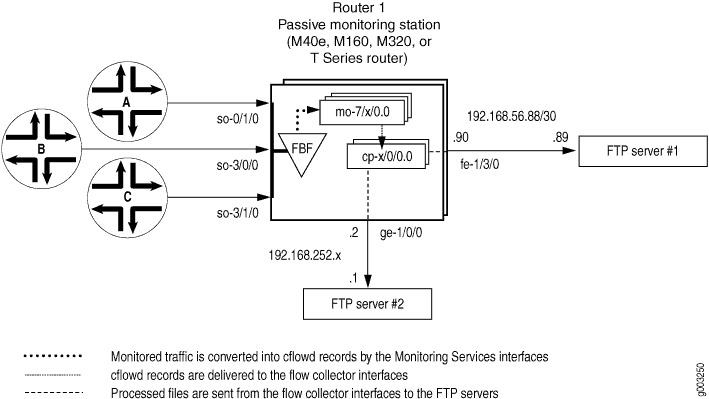
図1 は、監視対象のトラフィックがルーターを通過する際に移動する経路を示しています。パケットは、入力インターフェイス so-0/1/0、 so-3/0/0、 so-3/1/0に到着します。生のパケットは、フィルターベースの転送ルーティングインスタンスに送信され、監視サービスインターフェイス mo-7/1/0、 mo-7/2/0、 およびmo-7/3/0によってフローレコードに処理されます。フロー記録はフローコレクターインターフェイス cp-6/0/0 および cp-7/0/0 でファイルに圧縮され、分析のためにFTPサーバーに送信されます。最後に、フローコレクターインターフェイスのエクスポートチャネル0と1に必須のサービスクラス(CoS)設定が適用され、送信処理済みファイルを管理します。
ルーター1
[edit]
chassis {
    fpc 6 {
        pic 0 {
            monitoring-services {
                application flow-collector; # This converts a Monitoring Services II PIC
            }          # into a flow collector interface.
        }
    }
    fpc 7 {
        pic 0 {
            monitoring-services {
                application flow-collector; # This converts a Monitoring Services II PIC
            }             # into a flow collector interface.
        }
    }
}
interfaces {
    cp-6/0/0 {
                           unit 0 {# Logical interface .0 on a flow collector interface is export
            family inet { # channel 0 and sends records to the FTP server.
                filter {
                                           output cp-ftp; # Apply the CoS filter here.
                }
                address 10.0.0.1/32 {
                    destination 10.0.0.2;
                }
            }
        }
                           unit 1 { # Logical interface .1 on a flow collector interface is export
            family inet { # channel 1 and sends records to the FTP server.
                filter {
                                           output cp-ftp; # Apply the CoS filter here.
                }
                address 10.1.1.1/32 {
                    destination 10.1.1.2;
                }
            }
        }
                           unit 2 { # Logical interface .2 on a flow collector interface is the flow
            family inet { # receive channel that communicates with the Routing Engine.
                address 10.2.2.1/32 { # Do not apply a CoS filter on logical interface .2.
                    destination 10.2.2.2;
                }
            }
        }
    }
    cp-7/0/0 {
                           unit 0 { # Logical interface .0 on a flow collector interface is export
            family inet { # channel 0 and sends records to the FTP server.
                filter {
                                           output cp-ftp; # Apply the CoS filter here.
                }
                address 10.3.3.1/32 {
                    destination 10.3.3.2;
                }
            }
        }
                           unit 1 { # Logical interface .1 on a flow collector interface is export
            family inet { # channel 1 and sends records to the FTP server.
                filter {
                                           output cp-ftp; # Apply the CoS filter here.
                }
                address 10.4.4.1/32 {
                    destination 10.4.4.2;
                }
            }
        }
                           unit 2 { # Logical interface .2 on a flow collector interface is the flow
            family inet { # receive channel that communicates with the Routing Engine.
                address 10.5.5.1/32 { # Do not apply a CoS filter on logical interface .2.
                    destination 10.5.5.2;
                }
            }
        }
    }
                     fe-1/3/0 { # This is the exit interface leading to the first FTP server.
        unit 0 {
            family inet {
                address 192.168.56.90/30;
            }
        }
    }
                     ge-1/0/0 { # This is the exit interface leading to the second FTP server.
        unit 0 {
            family inet {
                address 192.168.252.2/24;
            }
        }
    }
                     mo-7/1/0 {  # This is the first interface that creates flow records.
        unit 0 {
            family inet;
        }
    }
                     mo-7/2/0 { # This is the second interface that creates flow records.
        unit 0 {
            family inet;
        }
    }
                     mo-7/3/0 { # This is the third interface that creates flow records.
        unit 0 {
            family inet;
        }
    }
                     so-0/1/0 { # This is the first input interface that receives traffic to be monitored.
        encapsulation ppp;
        unit 0 {
                               passive-monitor-mode; # This allows the interface to be passively monitored.
            family inet {
                filter {
                                           input catch; # The filter-based forwarding filter is applied here.
                }
            }
        }
    }
                     so-3/0/0 { # This is the second interface that receives traffic to be monitored.
        encapsulation ppp;
        unit 0 {
                               passive-monitor-mode; # This allows the interface to be passively monitored.
            family inet {
                filter {
                                           input catch; # The filter-based forwarding filter is applied here.
                }
            }
        }
    }
                     so-3/1/0 { # This is the third interface that receives traffic to be monitored.
        encapsulation ppp;
        unit 0 {
                               passive-monitor-mode; # This allows the interface to be passively monitored.
            family inet {
                filter {
                                           input catch; # The filter-based forwarding filter is applied here.
                }
            }
        }
    }
}
forwarding-options {
                     monitoring group1 { # Always define your monitoring group here.
        family inet {
            output {
                export-format cflowd-version-5;
                flow-active-timeout 60;
                flow-inactive-timeout 15;
                                     flow-export-destination collector-pic; # Sends records to the flow collector.
                interface mo-7/1/0.0 {
                    source-address 192.168.252.2;
                }
                interface mo-7/2/0.0 {
                    source-address 192.168.252.2;
                }
                interface mo-7/3/0.0 {
                    source-address 192.168.252.2;
                }
            }
        }
    }
}
routing-options {
    interface-routes {
        rib-group inet common;
    }
    rib-groups {
        common {
            import-rib [ inet.0 fbf_instance.inet.0 ];
        }
    }
    forwarding-table {
        export pplb;
    }
}
policy-options {
    policy-statement pplb {
        then {
            load-balance per-packet;
        }
    }
}
class-of-service { # A class-of-service configuration for the flow collector interface
    interfaces { # is mandatory when implementing flow collector services.
                           cp-6/0/0 {
            scheduler-map cp-map;
        }
                           cp-7/0/0 {
            scheduler-map cp-map;
        }
    }
    scheduler-maps {
        cp-map {
            forwarding-class best-effort scheduler Q0;
            forwarding-class expedited-forwarding scheduler Q1;
            forwarding-class network-control scheduler Q3;
        }
    }
    schedulers {
        Q0 {
            transmit-rate remainder;
            buffer-size percent 90;
        }
        Q1 {
            transmit-rate percent 5;
            buffer-size percent 5;
            priority strict-high;
        }
        Q3 {
            transmit-rate percent 5;
            buffer-size percent 5;
        }
    }
}
firewall {
    family inet {
        filter cp-ftp { # This filter provides CoS for flow collector interface traffic.
            term t1 {
                then forwarding-class expedited-forwarding;
            }
        }
    }
    filter catch { # This firewall filter sends incoming traffic into the
        interface-specific; # filter-based forwarding routing instance.
        term def {
            then {
                count counter;
                routing-instance fbf_instance;
            }
        }
    }
}
routing-instances {
                     fbf_instance { # This instance sends traffic to the monitoring services interface.
        instance-type forwarding;
        routing-options {
            static {
                route 0.0.0.0/0 next-hop mo-7/1/0.0;
            }
        }
    }
}
services {
                     flow-collector { # Define properties for flow collector interfaces here.
                         analyzer-address 10.10.10.1; # This is the IP address of the analyzer.
                         analyzer-id server1; # This helps to identify the analyzer.
                         retry 3; # Maximum number of attempts by the PIC to send a file transfer log.
                         retry-delay 30; # The time interval between attempts to send a file transfer log.
                           destinations { # This defines the FTP servers that receive flow collector output.
                                 "ftp://user@192.168.56.89//tmp/collect1/" {  # The primary FTP server.
                password "$ABC123"; # SECRET-DATA
            }
                                 "ftp://user@192.168.252.1//tmp/collect2/" { # The second FTP server.
                password "$ABC123"; # SECRET-DATA
            }
        }
                           file-specification {  # Define sets of flow collector characteristics here.
                                 def-spec {
            }
                               data-format flow-compressed; # The default compressed output format.
        }
                           f1 {
            name-format "cFlowd-py69Ni69-0-%D_%T-%I_%N.bcp.bi.gz";
                               data-format flow-compressed; # The default compressed output format.
                               transfer timeout 1800 record-level 1000000; # Here are configured values.
        }
    }
                     interface-map { # Allows you to map interfaces to flow collector interfaces.
                         file-specification def-spec; # Flows generated for default traffic are sent to the
                         collector cp-7/0/0; # default flow collector interface cp-7/0/0.
                           so-0/1/0.0 {# Flows generated for the so-0/1/0 interface are sent
                               collector cp-6/0/0; # to cp-6/0/0, and the file-specification used is “default”.
        }
                           so-3/0/0.0 { # Flows generated for the so-3/0/0 interface are sent
                               file-specification f1; # to cp-6/0/0, and the file-specification used is "f1."
                               collector cp-6/0/0;
        }
                         so-3/1/0.0; # Because no settings are defined, flows generated for this
    }
                     transfer-log-archive { # Sends flow collector interface log files to an FTP server.
        filename-prefix so_3_0_0_log;
        maximum-age 15;
        archive-sites {
            "ftp://user@192.168.56.89//tmp/transfers/" {
                password "$ABC123";
            }
        }
    }
}
作業の検証
フローコレクターの設定が機能していることを確認するには、フロー収集用に設定された監視ステーションで以下のコマンドを使用します。
clear services flow-collector statisticsrequest services flow-collector change-destination (primary | secondary)request services flow-collector test-file-transfershow services flow-collector file interface (detail | extensive | terse)show services flow-collector (detail | extensive)show services flow-collector input interface (detail | extensive | terse)
次のセクションは、設定例で使用した show コマンドの出力を示しています。
user@router1> show services flow-collector input interface cp-6/0/0 detail
Interface                      Packets        Bytes
mo-7/1/0.0                        6170      8941592

user@router1>  show services flow-collector interface all detail
Flow collector interface: cp-6/0/0
Interface state: Collecting flows
  Packets     Bytes     Flows Uncompressed  Compressed     FTP bytes FTP files
                                     Bytes       Bytes
     6736   9757936    195993     21855798     3194148             0         0
Flow collector interface: cp-7/0/0
Interface state: Collecting flows
  Packets     Bytes     Flows Uncompressed  Compressed     FTP bytes FTP files
                                     Bytes       Bytes
        0         0         0            0           0             0         0

user@router1>  show services flow-collector input interface cp-6/0/0 extensive
Interface                      Packets        Bytes
mo-7/1/0.0                        6260      9074096

user@router1>  show services flow-collector interface cp-6/0/0 extensive
Flow collector interface: cp-6/0/0
Interface state: Collecting flows
Memory:
    Used: 19593212, Free: 479528656
Input:
    Packets: 6658, per second: 0, peak per second: 0
    Bytes: 9647752, per second: 12655, peak per second: 14311
    Flow records processed: 193782, per second: 252, peak per second: 287
Allocation:
    Blocks allocated: 174, per second: 0, peak per second: 0
    Blocks freed: 0, per second: 0, peak per second: 0
    Blocks unavailable: 0, per second: 0, peak per second: 0
Files:
    Files created: 1, per second: 0, peak per second: 0
    Files exported: 0, per second: 0, peak per second: 0
    Files destroyed: 0, per second: 0, peak per second: 0
Throughput:
    Uncompressed bytes: 21075152, per second: 52032, peak per second: 156172
    Compressed bytes: 3079713, per second: 7618, peak per second: 22999
Packet drops:
    No memory: 0, Not IP: 0
    Not IPv4: 0, Too small: 0
    Fragments: 0, ICMP: 0
    TCP: 0, Unknown: 0
    Not JUNOS flow: 0
File Transfer:
    FTP bytes: 0, per second: 0, peak per second: 0
    FTP files: 0, per second: 0, peak per second: 0
    FTP failure: 0
Export channel: 0
    Current server: Secondary
    Primary server state: OK, Secondary server state: OK
Export channel: 1
    Current server: Secondary
    Primary server state: OK, Secondary server state: OK

user@router1>  show services flow-collector file interface cp-6/0/0 terse
File name                                                        Flows State
cFlowd-py69Ni69-0-20031112_014301-so_3_0_0_0.bcp.bi.gz          185643 Active

user@router1>  show services flow-collector file interface cp-6/0/0 detail
Filename: cFlowd-py69Ni69-0-20031112_014301-so_3_0_0_0.bcp.bi.gz
  Throughput:
    Flow records: 187067, Uncompressed bytes: 21121960, Compressed bytes: 2965643
  Status:
    State: Active, Transfer attempts: 0

user@router1>  show services flow-collector file interface cp-6/0/0 extensive
Filename: cFlowd-py69Ni69-0-20031112_014301-so_3_0_0_0.bcp.bi.gz
  Throughput:
    Flow records: 188365, per second: 238, peak per second: 287
    Uncompressed bytes: 21267756, per second: 27007, peak per second: 32526
    Compressed bytes: 2965643, per second: 0, peak per second: 22999
  Status:
    Compressed blocks: 156, Block count: 156
    State: Active, Transfer attempts: 0
フローコレクターインターフェイスの統計情報をクリアするには、 clear services flow-collector statistics interface (all | interface-name) コマンドを発行します。
もう1つの便利なフローコレクターオプションでは、FTPサーバーをプライマリからセカンダリに変更し、FTP転送をテストできます。フローコレクターインターフェイスにプライマリまたはセカンダリのFTPサーバーの使用を強制するには、request services flow-collector change-destination interface cp-fpc/pic/port コマンドを発行するときにプライマリまたはセカンダリオプションを含めます。
プライマリサーバーを1つだけ設定し、 プライマリ オプションを付けてこのコマンドを実行すると、「宛先の変更は不要です」というエラーメッセージが表示されます。セカンダリサーバーが設定されていない場合、このコマンドを セカンダリ オプション付きで発行すると、「宛先が設定されていません」というエラーメッセージが表示されます。それ以外の場合、両方のサーバーが正しく設定されている場合、成功した出力は次のように表示されます。
user@router1> request services flow-collector change-destination interface            cp-6/0/0 primary
Flow collector interface: cp-6/0/0
Interface state: Collecting flows
Destination change successful

user@router1>  request services flow-collector change-destination interface  cp-6/0/0 secondary
Flow collector interface: cp-6/0/0
Interface state: Collecting flows
Destination change successful
request services flow-collector change-destination interface cp-fpc/pic/port コマンドのその他のオプションには、即時(即時スイッチオーバーを強制)、グレースフル(段階的なスイッチオーバーを可能にするデフォルトの動作)、クリアファイル(既存のデータファイルをパージする)、およびクリアログ(既存のログファイルをパージする)があります。
転送ログファイルがFTPサーバーへの配信がスケジュールされていることを確認するには、 request services flow-collector test-file-transfer filename interface cp-fpc/pic/port コマンドを発行します。このコマンドには、目的のエクスポートチャネル(ゼロまたは1)とターゲットFTPサーバー(プライマリまたはセカンダリ)を含めます。
user@router1> request services flow-collector test-file-transfer test_file            interface cp-6/0/0 channel-one primary
Flow collector interface: cp-6/0/0
Interface state: Collecting flows
Response: Test file transfer successfully scheduled
ファイル転送の成功を確認する別の方法は、転送ログを分析することです。転送ログは、フローコレクターインターフェイスによって収集および処理されるファイルに関する詳細情報を送信します。 表1 は、転送ログで使用可能なさまざまなフィールドについて説明しています。
フィールド |
説明 |
|---|---|
fn |
ファイル名 |
sz |
ファイルサイズ |
NR |
レコード数 |
TS |
年(4桁)、月(2桁)、日(2桁)、時間(2桁)、分(2桁)、秒(2桁)の形式のタイムスタンプ。 |
SF |
成功フラグ—値は、成功の場合は 1 、失敗の場合は 0 です。 |
ul |
サーバーURL |
RC |
FTP結果コード |
ER |
FTPエラーテキスト |
TT |
転送時間 |
以下は、成功した転送ログの例です。
fn="cFlowd-py69Ni69-0-20040227_230438-at_4_0_0_4_3.bcp.bi.gz":sz=552569
:nr=20000:ts="20040227230855":sf=1:ul="ftp://10.63.152.1/tmp/server1/:"rc=250:
er="":tt=3280
以下は、FTPセッションに障害が発生した場合の転送ログの例です。
fn="cFlowd-py69Ni69-0-20040227_230515-at_4_0_0_2_8.bcp.bi.gz":sz=560436
:nr=20000:ts="20040227230855":sf=1:ul="ftp://10.63.152.1/tmp/server1/:"rc=250
:er="":tt=3290
フローコレクターインターフェイスがフローレコードを受信して処理すると、PICサービスログプロセス(fsad)は以下のタスクを処理します。
フローコレクターインターフェイスがファイルをFTPサーバーに転送すると、 /var/log/flowc ディレクトリに一時ログファイルが作成されます。一時ログファイルには、次のファイル名規則があります。
<hostname>_<filename_prefix>_ YYYYMMDD_hhmmss.tmp
hostname は転送サーバーのホスト名で、filename_prefixは[edit services flow-collector transfer-log-archive]階層レベルの
filename-prefixステートメントで定義された同じ値で、YYYYMMDDは年、月、日付、hhmmssは時間、分、秒を示すタイムスタンプです。ログファイルが[edit services flow-collector transfer-log-archive]階層レベルの
maximum-ageステートメントで指定された期間(デフォルトは120分)ルーターに保存された後、一時ログファイルが実際のログファイルに変換され、一時ファイルが削除されます。新しいログファイルは、拡張子が*.logであることを除いて、同じ命名規則を保持します。最終ログファイルが作成されて圧縮されると、PICサービスログプロセス(fsad)は、ログファイルを/var/log/flowcディレクトリからFTPサーバーに送信しようとします。[edit services flow-collector transfer-log-archive]階層レベルで
archive-sitesステートメントを含めることで、ログファイルを受信する最大5つのFTPサーバーを指定できます。ログ プロセスは、ログ ファイルを構成に表示される順に、一度に 1 つのサーバーに送信しようとします。最初の転送が成功すると、ログファイルが削除され、ログプロセスはリスト内の残りのFTPサーバーへのログファイルの送信を停止します。ログファイルの転送が成功しない場合、ログファイルは /var/log/flowc/failed ディレクトリに移動されます。ログ プロセスは 30 分ごとにログ ファイルの再送信を試みます。ログファイルが正常に転送されると、 /var/log/flowc/failed ディレクトリから削除されます。
注:フローコレクターインターフェイスのメモリがいっぱいの場合、インターフェイスは受信パケットをドロップする可能性があります。
フローコレクターインターフェイスが、処理された情報ファイルをFTPサーバーに正常に配信した後、ファイルを分析できます。このファイルには、フローコレクターインターフェイスによって収集および処理されたフローに関する詳細情報が含まれています。 表 2 は、フロー コレクター インターフェイス ファイルで使用できるさまざまなフィールドを示しています。
フィールド |
説明 |
|---|---|
linkDir |
リンクディレクトリ—レコードを識別するために使用されるランダムに生成された番号 |
アナライザアドレス |
アナライザアドレス |
アナライザID |
アナライザ識別子 |
ifエイリアス |
インターフェイス識別子 |
送信元アドレス |
送信元アドレス |
宛先アドレス |
宛先アドレス |
パケット |
パケット数 |
バイト |
バイト数 |
開始時間 |
開始時間 |
終了時間 |
終了時間 |
ソースポート |
送信元ポート |
宛先ポート |
宛先ポート |
tcp_flag |
TCPフラグ |
プロトコル |
IPプロトコル番号 |
src_AS_番号 |
送信元AS番号 |
dst_AS_番号 |
宛先AS番号 |
以下は、フロー コレクター インターフェイス ファイルからの出力例です。
11799241612374557782|10.10.10.1|server1|at_4_0_0_4|192.168.10.100|10.0.0.1|8|
3136|1077926402|1077926402|8224|12336|27|6|0|0