
例:MXシリーズルーターでのパッシブフロー監視設定
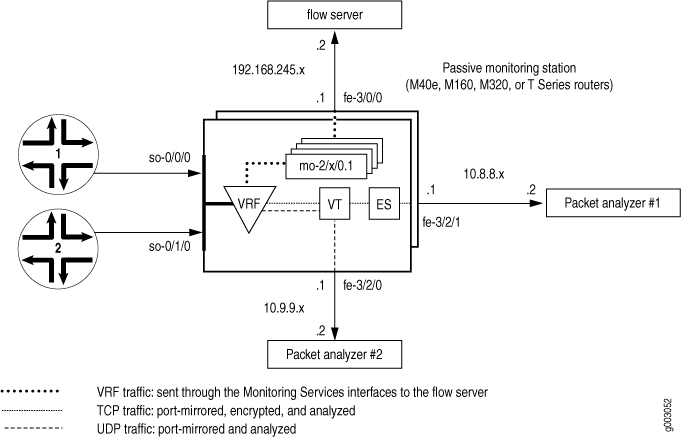
図1では、トラフィックはインターフェイスso-0/0/0およびso-0/1/0を介して監視ステーションに入ります。ファイアウォールフィルターが監視対象のトラフィックを受け入れた後、パケットはVRFインスタンスに入ります。
元のパケットは、フロー処理のためにVRFインスタンス内を監視サービスPICに移動します。最終的なフローパケットは、監視サービスインターフェイスから fe-3/0/0 インターフェイスからフローサーバーに送信されます。
受け入れられたトラフィックのコピーは、トンネルPICにポートミラーリングされます。コピーされたパケットがトンネルインターフェイスに入ると、2つ目のファイアウォールフィルターがTCPパケットとUDPパケットを分離し、2つのフィルターベースの転送インスタンスに配置します。UDPインスタンスは、 fe-3/2/0に接続されたパケットアナライザにUDPパケットを送信します。TCPインスタンスは暗号化のためにTCPパケットをES PICに送信し、ES PICは fe-3/2/1に接続された2番目のパケットアナライザにパケットを送信します。
最初のステップは、ファイアウォールフィルターを定義して、監視するパケットを選択することです。フィルタリングされたすべてのトラフィックを受け入れる必要があり、[edit firewall family inet filter filter-name term term-name then]階層レベルのport-mirrorステートメントがポートミラーリングを容易にします。
次に、入力SONET/SDHインターフェイスを設定し、先ほど定義したファイアウォールフィルターを適用します。 passive-monitor-mode ステートメントは、SONET/SDHインターフェイスでSONETキープアライブを無効にし、受動的なフロー監視を有効にします。
監視サービスインターフェイス、エクスポートインターフェイス、トンネルインターフェイス、ESインターフェイスなど、監視アプリケーションで使用する他のすべてのインターフェイスを設定します。インターフェイスが配置されたら、VRFインスタンスと監視グループを設定して、元のパケットを入力インターフェイスから監視サービスインターフェイスに送信して処理します。結果として得られるフロー記述パケットは fe-3/0/0 を出てフローサーバーに到達します。
次に、監視対象のトラフィックをトンネルインターフェイスにポートミラーリングするステートメントを設定します。このコピーされたトラフィックの一部を選択して詳細な分析を行い、一部のトラフィックを選択して破棄するファイアウォールフィルターを設計します。この場合、TCPとUDPのトラフィックを分離し、これら2つのフローを別々のフィルターベースの転送ルーティングインスタンスに誘導します。TCPトラフィックとUDPトラフィックを分離できるように、必ずトンネルインターフェイスにフィルターを適用してください。また、ルーティングテーブルグループを使用して、インターフェイスルートを転送インスタンスにインポートします。
フィルターベースの転送インスタンスで、静的ルートのネクストホップを定義します。TCPインスタンスのネクストホップはESインターフェイスで、UDPインスタンスのネクストホップは fe-3/2/0に接続されたパケットアナライザです。最後に、TCPトラフィックのネクストホップが fe-3/2/1に接続された2番目のパケットアナライザになるようにIPSecを設定します。
[edit]
interfaces {
                   so-0/0/0 { # Traffic enters the router on this interface.
        description “ input interface”;
        encapsulation ppp;
        unit 0 {
                             passive-monitor-mode; # Disables SONET keepalives.
            family inet {
                filter {
                                         input input-monitoring-filter; # The firewall filter is applied here.
                }
            }
        }
    }
                   so-0/1/0 { # Traffic enters the router on this interface.
        description “ input interface”;
        encapsulation ppp;
        unit 0 {
                             passive-monitor-mode;  # Disables SONET keepalives.
            family inet {
                filter {
                                         input input-monitoring-filter;  # The firewall filter is applied here.
                }
            }
        }
    }
                   es-3/1/0 {  # This is where the TCP traffic enters the ES PIC.
        unit 0 {
            tunnel {
                source 10.8.8.1;
                destination 10.8.8.2;
            }
            family inet {
                ipsec-sa sa-esp;
                address 192.0.2.1/32 {
                    destination 192.0.2.2;
                }
            }
        }
    }
                   fe-3/0/0 { # Flow records exit here and travel to the flow server.
        description “ export interface to the flow server”;
        unit 0 {
            family inet;
            address 192.168.245.1/30;
        }
    }
                   fe-3/2/0 { # This export interface for UDP traffic leads to a packet analyzer.
        description “ export interface to the packet analyzer”;
        unit 0 {
            family inet {
                address 10.9.9.1/30;
            }
        }
    }
                   fe-3/2/1 {  # This IPSec tunnel source exports TCP traffic to a packet analyzer.
        unit 0 {
            family inet {
                address 10.8.8.1/30;
            }
        }
    }
                   mo-4/0/0 { # This marks the beginning of the monitoring services interfaces.
        unit 0 { # Unit 0 is part of the inet.0 routing table and generates flow records.
            family inet;
        }
                         unit 1 { # Unit 1 receives monitored traffic and is part of the VRF instance.
            family inet;
        }
    }
                   mo-4/1/0 {
        unit 0 { # Unit 0 is part of the inet.0 routing table and generates flow records.
            family inet;
        }
                         unit 1 { # Unit 1 receives monitored traffic and is part of the VRF instance.
            family inet;
        }
    }
                   mo-4/2/0 {
        unit 0 { # Unit 0 is part of the inet.0 routing table and generates flow records.
            family inet;
        }
                         unit 1 { # Unit 1 receives monitored traffic and is part of the VRF instance.
            family inet;
        }
    }
                   mo-4/3/0 {
        unit 0 { # Unit 0 is part of the inet.0 routing table and generates flow records.
            family inet;
        }
                         unit 1 { # Unit 1 receives monitored traffic and is part of the VRF instance.
            family inet;
        }
    }
                   vt-0/2/0 {  # The tunnel services interface receives the port-mirrored traffic.
        unit 0 {
            family inet {
                filter {
                                         input tunnel-interface-filter;  # The filter splits traffic into TCP and UDP
                }
            }
        }
    }
}
forwarding-options {
                   monitoring group1 {  # Monitored traffic is processed by the monitoring services
        family inet { # interfaces and flow records are sent to the flow server.
                               output {
                export-format cflowd-version-5;
                flow-active-timeout 60;
                flow-inactive-timeout 30;
                                   flow-server 192.168.245.2 port 2055; # IP address and port for server.
                                     interface mo-4/0/0.1 {  # Use monitoring services interfaces for output.
                    engine-id 1; # engine and interface-index statements are optional.
                    engine-type 1;
                    input-interface-index 44;
                    output-interface-index 54;
                                         source-address 192.168.245.1; # This is the IP address of fe-3/0/0.
                }
                interface mo-4/1/0.1 {
                    engine-id 2; # engine and interface-index statements are optional.
                    engine-type 1;
                    input-interface-index 45;
                    output-interface-index 55;
                    source-address 192.168.245.1; # This is the IP address of fe-3/0/0.
                }
                interface mo-4/2/0.1 {
                    engine-id 3; # engine and interface-index statements are optional.
                    engine-type 1;
                    input-interface-index 46;
                    output-interface-index 56;
                    source-address 192.168.245.1; # This is the IP address of fe-3/0/0.
                }
                interface mo-4/3/0.1 {
                    engine-id 4; # engine and interface-index statements are optional.
                    engine-type 1;
                    input-interface-index 47;
                    output-interface-index 57;
                                         source-address 192.168.245.1; # This is the IP address of fe-3/0/0.
                }
            }
        }
    }
                   port-mirroring {  # Copies the traffic and sends it to the Tunnel Services PIC.
        family inet {
            input {
                rate 1;
                run-length 1;
            }
            output {
                                   interface vt-0/2/0.0;
                no-filter-check;
            }
        }
    }
}
             routing-options { # This installs the interface routes into the forwarding instances.
                   interface-routes {


         rib-group inet bc-vrf;
    }
    rib-groups {


         bc-vrf {


         import-rib [inet.0 tcp-routing-table.inet.0 udp-routing-table.inet.0];
        }
    }
    forwarding-table {
        export pplb; # Applies per-packet load balancing to the forwarding table.
    }
}
policy-options {
    policy-statement monitoring-vrf-import {
        then reject;
    }
    policy-statement monitoring-vrf-export {
        then reject;
    }
    policy-statement pplb {
        then {
            load-balance per-packet;
        }
    }
}
             security { # This sets IPSec options for the ES PIC.
    ipsec {
        proposal esp-sha1-3des {
            protocol esp;
            authentication-algorithm hmac-sha1-96;
            encryption-algorithm 3des-cbc;
            lifetime-seconds 180;
        }
        policy esp-group2 {
            perfect-forward-secrecy {
                keys group2;
            }
            proposals esp-sha1-3des;
        }
        security-association sa-esp {
            mode tunnel;
            dynamic {
                ipsec-policy esp-group2;
            }
        }
    }
    ike {
        proposal ike-esp {
            authentication-method pre-shared-keys;
            dh-group group2;
            authentication-algorithm sha1;
            encryption-algorithm 3des-cbc;
            lifetime-seconds 180;
        }
        policy 10.8.8.2 {
            mode aggressive;
            proposals ike-esp;
            pre-shared-key ascii-text "$ABC123";
        }
    }
}
firewall {
    family inet {
        filter input-monitoring-filter { # This filter selects traffic to send into the VRF
            term 1 { # instance and prepares the traffic for port mirroring.
                from {
                    destination-address {
                        10.7.0.0/16;
                    }
                }
                then {
                    port-mirror;
                    accept;
                }
            }
            term 2 {
                from {
                    destination-address {
                        10.6.0.0/16;
                    }
                }
                then accept;
            }
        }
                         filter tunnel-interface-filter {  # This filter breaks the port-mirrored traffic into two
            term tcp { # filter-based forwarding instances: TCP packets and UDP packets.
                from {
                    protocol tcp;
                }
                then { # This counts TCP packets and sends them into a TCP instance.
                    count tcp;
                    routing-instance tcp-routing-table;
                }
            }
            term udp {
                from {
                    protocol udp;
                }
                then { # This counts UDP packets and sends them into a UDP instance.
                    count udp;
                    routing-instance udp-routing-table;
                }
            }
            term rest {
                then {
                    count rest;
                    discard;
                }
            }
        }
    }
}
routing-instances {
                   monitoring-vrf { # This is the VRF instance where you send the traffic. It contains
        instance-type vrf; # the input interface and the monitoring services interfaces.
                       interface so-0/0/0.0; # Traffic enters the router on these input interfaces.
        interface so-0/1/0.0;


         interface mo-4/0/0.1;


         interface mo-4/1/0.1; # These are output interfaces (use them as
        interface mo-4/2/0.1; # output interfaces in your monitoring group).
        interface mo-4/3/0.1;
        route-distinguisher 69:1;
        vrf-import monitoring-vrf-import;
        vrf-export monitoring-vrf-export;
        routing-options { # Sends traffic to a group of monitoring services interfaces.
            static {


         route 0.0.0.0/0 next-hop [mo-4/0/0.1 mo-4/1/0.1
mo-4/2/0.1 mo-4/3/0.1];
            }
        }
    }
                   tcp-routing-table {  # This is the filter-based forwarding instance for TCP traffic.
        instance-type forwarding;
                         routing-options {  # The next hop is the ES PIC.
            static {


         route 0.0.0.0/0 next-hop es-3/1/0.0;
            }
        }
    }
    udp-routing-table { # This is the filter-based forwarding instance for UDP traffic.
        instance-type forwarding;
        routing-options { # The next hop is the second packet analyzer.
            static {


         route 0.0.0.0/0 next-hop 10.9.1.2;
            }
        }
    }
}
作業の検証
設定が正しいことを確認するには、パッシブフロー監視用に設定された監視ステーションで以下のコマンドを使用します。
-
show route 0/0 -
show passive-monitoring error -
show passive-monitoring flow -
show passive-monitoring memory -
show passive-monitoring status -
show passive-monitoring usage
show passive-monitoring errorおよびshow passive-monitoring flowコマンドの統計情報をクリアするには、clear passive-monitoring (all | interface-name)コマンドを発行します。
簡易ネットワーク管理プロトコル(SNMP)を使用して、パッシブフロー監視ステータスを表示することもできます。以下の管理情報ベース(MIB)テーブルがサポートされています。
-
jnxPMonErrorTable—
show passive-monitoring errorコマンドに対応します。 -
jnxPMonFlowTable—
show passive-monitoring flowコマンドに対応します。 -
jnxPMonMemoryTable -
show passive-monitoring memoryコマンドに対応します。
次のセクションは、設定例で使用した show コマンドの出力を示しています。
user@host> show route 0/0
 <skip inet.0>
# ルーティングインスタンスルートのみに関係します。
bc-vrf.inet.0:  1 destinations, 1 routes (1 active, 0 holddown, 0 hidden)
bc-vrf.inet.0:+ = Active Route, - = Last Active, * = Both
0.0.0.0/0          *[Static/5] 5d 17:34:57
                      via mo-4/0/0.1
                    > via mo-4/1/0.1
                      via mo-4/2/0.1
                      via mo-4/3/0.1
tcp-rt.inet.0: 13 destinations, 13 routes (12 active, 0 holddown, 1
hidden)
+ = Active Route, - = Last Active, * = Both
0.0.0.0/0          *[Static/5] 19:24:39
                    > via es-3/1/0.0
  : <other interface routes>
udp-rt.inet.0: 13 destinations, 13 routes (12 active, 0 holddown, 1
hidden)
+ = Active Route, - = Last Active, * = Both
0.0.0.0/0          *[Static/5] 19:24:39
                    > to 10.9.1.2 via fe-3/2/0.0
  : <other interface routes>
すべての show passive-monitoring コマンドについて、ワイルドカード(*など)または all オプションを使用した場合に得られる出力は、 [edit forwarding-options monitoring group-name] 階層レベルでリストされた設定済みインターフェイスに基づきます。設定例の出力には、設定されたインターフェイス mo-4/0/0、 mo-4/1/0、 mo-4/2/0、および mo-4/3/0の情報のみが表示されます。
engine-idやengine-typeなど、監視グループで設定できるステートメントの多くは、show passive-monitoringコマンドの出力に表示されます。
| フィールド |
説明 |
|---|---|
| パケットがドロップされました(メモリなし) |
メモリが原因でドロップしたパケット数。 |
| パケット がドロップされました(IPではありません) |
ドロップされた非IPパケットの数。 |
| パケットがドロップされました(IPv4以外) |
IPv4 チェックに失敗したためにドロップされたパケット数。 |
| パケットがドロップされました(ヘッダーが小さすぎます) |
パケット長またはIPヘッダー長が小さすぎたためにドロップされたパケット数。 |
| メモリ割り当ての失敗 |
フローレコードメモリ割り当て失敗の数。少数は、フリーリストの補充に失敗したことを反映しています。数字が大きい場合は、監視ステーションのメモリ領域がほぼ不足していることを示します。 |
| メモリ空き障害 |
解放されたフロー レコード メモリの数。 |
| メモリ空きリストの障害 |
フリーリストから受信した失敗したフローレコードの数。メモリがほぼ消耗しているか、1秒間に128Kを超える新規フローが多すぎる場合。 |
| メモリに関する警告 |
フローが、監視サービスPICで100万パケット/秒(Mpps)を超えており、監視サービスII PICで2Mppsを超えています。回答は 「はい」 または 「いいえ」です。 |
| メモリ過負荷 |
メモリが過負荷になっています。答えは 「はい」 または 「いいえ」です。 |
| PPSオーバーロード |
パケット数/秒で、PICが設定されたしきい値よりも多くのトラフィックを受信しているかどうか。回答は 「はい」 または 「いいえ」です。 |
| BPS オーバーロード |
バイト/秒で、PICが設定されたしきい値よりも多くのトラフィックを受信しているかどうか。回答は 「はい」 または 「いいえ」です。 |
user@host> show passive-monitoring error all
Passive monitoring interface: mo-4/0/0, Local interface index: 44
  Error information
    Packets dropped (no memory): 0, Packets dropped (not IP): 0
    Packets dropped (not IPv4): 0, Packets dropped (header too small): 0
    Memory allocation failures: 0, Memory free failures: 0
    Memory free list failures: 0
    Memory warning: No, Memory overload: No, PPS overload: No, BPS overload: No

Passive monitoring interface: mo-4/1/0, Local interface index: 45
  Error information
    Packets dropped (no memory): 0, Packets dropped (not IP): 0
    Packets dropped (not IPv4): 0, Packets dropped (header too small): 0
    Memory allocation failures: 0, Memory free failures: 0
    Memory free list failures: 0
    Memory warning: No, Memory overload: No, PPS overload: No, BPS overload: No

Passive monitoring interface: mo-4/2/0, Local interface index: 46
  Error information
    Packets dropped (no memory): 0, Packets dropped (not IP): 0
    Packets dropped (not IPv4): 0, Packets dropped (header too small): 0
    Memory allocation failures: 0, Memory free failures: 0
    Memory free list failures: 0
    Memory warning: No, Memory overload: No, PPS overload: No, BPS overload: No

Passive monitoring interface: mo-4/3/0, Local interface index: 47
  Error information
    Packets dropped (no memory): 0, Packets dropped (not IP): 0
    Packets dropped (not IPv4): 0, Packets dropped (header too small): 0
    Memory allocation failures: 0, Memory free failures: 0
    Memory free list failures: 0
    Memory warning: No, Memory overload: No, PPS overload: No, BPS overload: No
| フィールド |
説明 |
|---|---|
| フローパケット |
動作中のPICが受信したパケット数。 |
| フロー バイト |
動作PICが受信したバイト数。 |
| フローパケット10秒レート |
PICが処理し、10秒平均として表示される1秒あたりのパケット数。 |
| フローバイト10秒レート |
PICが処理し、10秒平均として表示される1秒あたりのバイト数。 |
| アクティブなフロー |
PICが追跡する現在アクティブなフローの数 |
| 総フロー数 |
運用PICが受信したフローの総数。 |
| エクスポートされたフロー |
運用PICによってエクスポートされたフローの合計数。 |
| エクスポートされたフローパケット |
運用PICによってエクスポートされたフローパケットの合計数。 |
| 非アクティブなフローがタイムアウトしました |
非アクティブのためにエクスポートされたフローの合計数。 |
| フローアクティブがタイムアウトしました |
アクティブなタイムアウトのためにエクスポートされた長寿命フローの合計数。 |
user@host> show passive-monitoring flow all
Passive monitoring interface: mo-4/0/0, Local interface index: 44
  Flow information
    Flow packets: 6533434, Flow bytes: 653343400
    Flow packets 10-second rate: 0, Flow bytes 10-second rate: 0
    Active flows: 0, Total flows: 1599
    Flows exported: 1599, Flows packets exported: 55
    Flows inactive timed out: 1599, Flows active timed out: 0

Passive monitoring interface: mo-4/1/0, Local interface index: 45
  Flow information
    Flow packets: 6537780, Flow bytes: 653778000
    Flow packets 10-second rate: 0, Flow bytes 10-second rate: 0
    Active flows: 0, Total flows: 1601
    Flows exported: 1601, Flows packets exported: 55
    Flows inactive timed out: 1601, Flows active timed out: 0

Passive monitoring interface: mo-4/2/0, Local interface index: 46
  Flow information
    Flow packets: 6529259, Flow bytes: 652925900
    Flow packets 10-second rate: 0, Flow bytes 10-second rate: 0
    Active flows: 0, Total flows: 1599
    Flows exported: 1599, Flows packets exported: 55
    Flows inactive timed out: 1599, Flows active timed out: 0

Passive monitoring interface: mo-4/3/0, Local interface index: 47
  Flow information
    Flow packets: 6560741, Flow bytes: 656074100
    Flow packets 10-second rate: 0, Flow bytes 10-second rate: 0
    Active flows: 0, Total flows: 1598
    Flows exported: 1598, Flows packets exported: 55
    Flows inactive timed out: 1598, Flows active timed out: 0
| フィールド |
説明 |
|---|---|
| 割り当てカウント |
割り当てられたフロー レコードの数。 |
| フリーカウント |
解放されたフロー レコードの数。 |
| 割り当て られた最大数 |
監視ステーションの起動以降に割り当てられたフロー レコードの最大数。この数は、一度に割り当てられるフローレコードのピーク数を表します。 |
| 割り当て数/秒 |
PICの最後の統計間隔中に1秒ごとに割り当てられたフローレコード。 |
| フリー数/秒 |
PICの最後の統計間隔中に1秒ごとに解放されたフローレコード。 |
| 使用済みメモリの合計 |
現在使用されているメモリの合計量(バイト単位)。 |
| 合計メモリ空き容量 |
現在空きメモリの合計量(バイト単位)。 |
user@host> show passive-monitoring memory all
Passive monitoring interface: mo-4/0/0, Local interface index: 44
  Memory utilization
    Allocation count: 1600, Free count: 1599, Maximum allocated: 1600
    Allocations per second: 3200, Frees per second: 1438
    Total memory used (in bytes): 103579176, Total memory free (in bytes): 163914184

Passive monitoring interface: mo-4/1/0, Local interface index: 45
  Memory utilization
    Allocation count: 1602, Free count: 1601, Maximum allocated: 1602
    Allocations per second: 3204, Frees per second: 1472
    Total memory used (in bytes): 103579176, Total memory free (in bytes): 163914184

Passive monitoring interface: mo-4/2/0, Local interface index: 46
  Memory utilization
    Allocation count: 1600, Free count: 1599, Maximum allocated: 1600
    Allocations per second: 3200, Frees per second: 1440
    Total memory used (in bytes): 103579176, Total memory free (in bytes): 163914184

Passive monitoring interface: mo-4/3/0, Local interface index: 47
  Memory utilization
    Allocation count: 1599, Free count: 1598, Maximum allocated: 1599
    Allocations per second: 3198, Frees per second: 1468
    Total memory used (in bytes): 103579176, Total memory free (in bytes): 163914184
| フィールド |
説明 |
|---|---|
| インターフェイスの状態 |
インターフェイスが監視中(正常に動作)、無効(管理上無効)、または監視されていない(未設定)かどうかを示します。 |
| グループインデックス |
PICがメンバーである監視グループを表す整数。(監視グループの数を示すものではありません。 |
| エクスポート間隔 |
フローレコードのエクスポート間隔を設定します(秒単位)。 |
| エクスポート形式 |
設定されたエクスポート形式(現在v5のみサポートされています)。 |
| プロトコル |
PICが監視するように設定されているプロトコル(現在サポートされているのはIPv4のみ)。 |
| エンジン型式 |
出力フローパケットに挿入される設定されたエンジンタイプ。 |
| エンジンID |
出力フローパケットに挿入される設定されたエンジンID。 |
| ルートレコード数 |
記録されたルートの数。 |
| IFL から SNMP へのインデックス数 |
SNMPインデックスにマッピングされた論理インターフェイスの数。 |
| ASカウント |
フローが越えた AS 境界の数。 |
| 時間設定 |
タイムスタンプが設定されているかどうかを示します。 |
| 設定セット |
監視構成が設定されているかどうかを示します。 |
| ルートレコードセット |
ルートが記録されているかどうかを示します。 |
| IFL SNMP マップ セット |
論理インターフェイスがSNMPインデックスにマッピングされているかどうかを示します。 |
user@host> show passive-monitoring status all
Passive monitoring interface: mo-4/0/0, Local interface index: 44
  Interface state: Monitoring
  Group index: 0
  Export interval: 15 secs, Export format: cflowd v5
  Protocol: IPv4, Engine type: 1, Engine ID: 1
  Route record count: 13, IFL to SNMP index count: 30, AS count: 1
  Time set: Yes, Configuration set: Yes
  Route record set: Yes, IFL SNMP map set: Yes

Passive monitoring interface: mo-4/1/0, Local interface index: 45
  Interface state: Monitoring
  Group index: 0
  Export interval: 15 secs, Export format: cflowd v5
  Protocol: IPv4, Engine type: 1, Engine ID: 2
  Route record count: 13, IFL to SNMP index count: 30, AS count: 1
  Time set: Yes, Configuration set: Yes
  Route record set: Yes, IFL SNMP map set: Yes

Passive monitoring interface: mo-4/2/0, Local interface index: 46
  Interface state: Monitoring
  Group index: 0
  Export interval: 15 secs, Export format: cflowd v5
  Protocol: IPv4, Engine type: 1, Engine ID: 3
  Route record count: 13, IFL to SNMP index count: 30, AS count: 1
  Time set: Yes, Configuration set: Yes
  Route record set: Yes, IFL SNMP map set: Yes

Passive monitoring interface: mo-4/3/0, Local interface index: 47
  Interface state: Monitoring
  Group index: 0
  Export interval: 15 secs, Export format: cflowd v5
  Protocol: IPv4, Engine type: 1, Engine ID: 4
  Route record count: 13, IFL to SNMP index count: 30, AS count: 1
  Time set: Yes, Configuration set: Yes
  Route record set: Yes, IFL SNMP map set: Yes
| フィールド |
説明 |
|---|---|
| 稼働時間 |
PICが動作した時間(ミリ秒)。 |
| 割り込み時間 |
最後のPICリセット以降、PICがパケットの処理に費やした累積時間。 |
| 負荷(5秒) |
PIC の CPU 負荷は平均 5 秒以上でした。この数値は、アクティブなタスクに費やされた時間を合計経過時間で割った割合です。 |
| ロード(1分) |
PICのCPU負荷は平均1分以上でした。この数値は、アクティブなタスクに費やされた時間を合計経過時間で割った割合です。 |
user@host> show passive-monitoring usage *
Passive monitoring interface: mo-4/0/0, Local interface index: 44
  CPU utilization
    Uptime: 653155 milliseconds, Interrupt time: 40213754 microseconds
    Load (5 second): 20%, Load (1 minute): 17%

Passive monitoring interface: mo-4/1/0, Local interface index: 45
  CPU utilization
    Uptime: 652292 milliseconds, Interrupt time: 40223178 microseconds
    Load (5 second): 22%, Load (1 minute): 15%

Passive monitoring interface: mo-4/2/0, Local interface index: 46
  CPU utilization
    Uptime: 649491 milliseconds, Interrupt time: 40173645 microseconds
    Load (5 second): 22%, Load (1 minute): 10098862%

Passive monitoring interface: mo-4/3/0, Local interface index: 47
  CPU utilization
    Uptime: 657328 milliseconds, Interrupt time: 40368704 microseconds
    Load (5 second): 1%, Load (1 minute): 15%